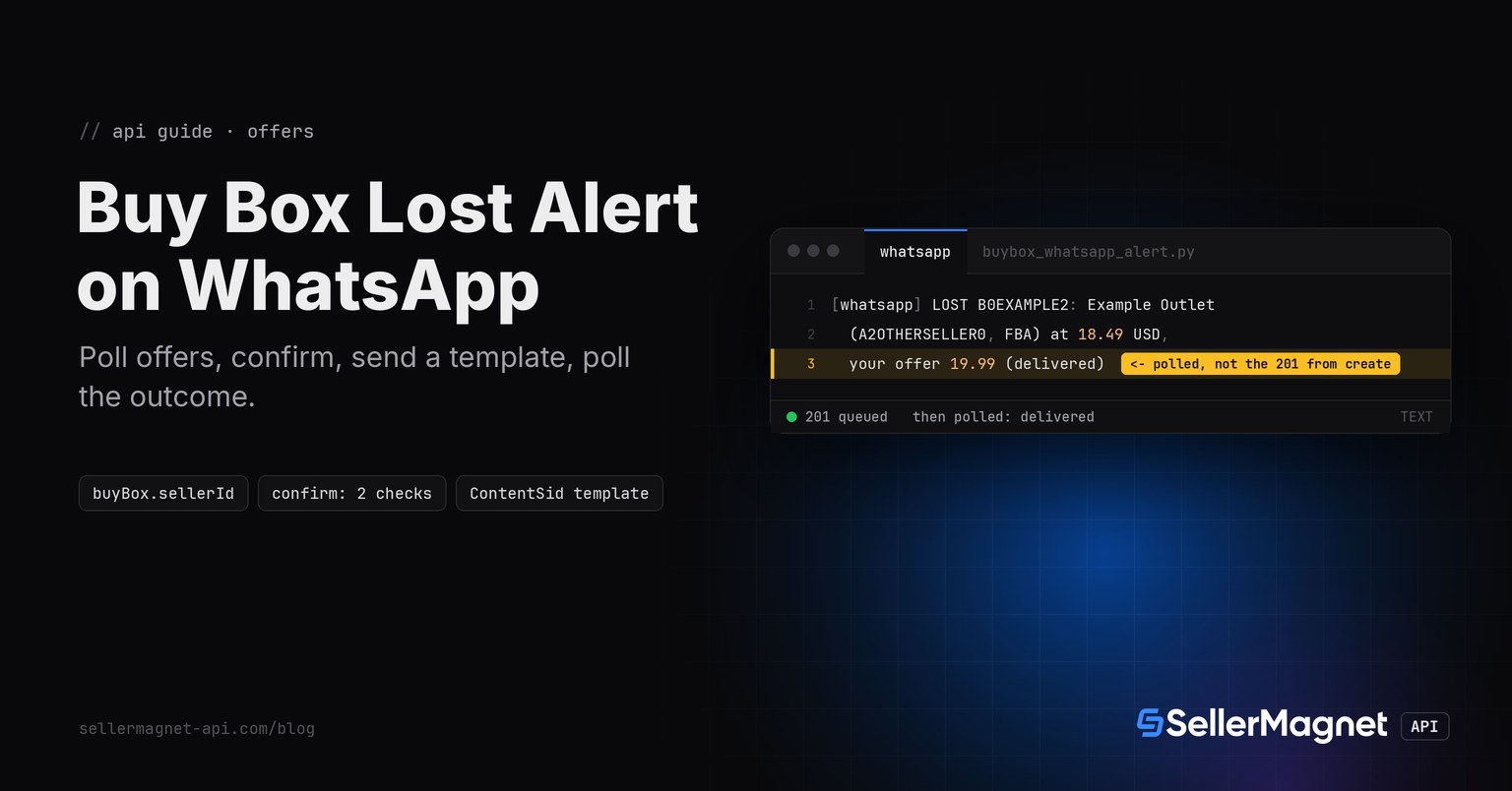
To get an Amazon Buy Box lost alert on WhatsApp, poll /amazon-product-offers for each ASIN, compare buyBox.sellerId with your own seller ID, and once the same reading shows up on two checks in a row, send a Twilio WhatsApp Content Template and poll the Message resource until its real status is known. WhatsApp never confirms delivery on the create call itself, so the script below marks an alert as sent only after a follow-up read says delivered, sent or read.
Key Takeaways
- A WhatsApp Message create call answers 201 with status queued or accepted; the delivery outcome (delivered, or a failure like error 63016) only appears later on the Message resource.
- Outside the 24-hour customer service window, which is always true for a script that alerts first, only an approved Content Template sent with ContentSid + ContentVariables is allowed.
- Error 63016 means the window/template rule was violated; error 63018 means the channel's rate limit was hit. Neither is fixed by resending the exact same request immediately.
- Alert only when two checks in a row agree, the same confirmation pattern as the Slack, Teams and email alert versions of this script.
- Each check costs 1 credit per ASIN; 502/503 retries are billed per attempt, a 500 is refunded, and a free 401/403 stops the run.
What does the offers endpoint tell you about who holds the Buy Box?
/amazon-product-offers reads one page of the live offer listing. buyBox is the featured offer with sellerId, sellerName and totalPrice; Amazon itself appears as the literal "Amazon". When buyBox is an empty object, buyBoxSuppressed says why: true means offers exist but Amazon features none, false with an empty offers list means there is nothing to feature. Field details are in the Offer Listing API guide.
| Response | Reading | WhatsApp message |
|---|---|---|
| buyBox.sellerId is your sellerId | mine | BACK, after a confirmed loss (only if a loss was confirmed first) |
| buyBox.sellerId is any other seller or "Amazon" | lost | LOST, with holder, price and your offer |
| buyBox is {} and buyBoxSuppressed is true | suppressed | NONE |
| buyBox is {} and offers is [] | no-offers | NONE |
How do I send the WhatsApp alert through Twilio?
read_buy_box() is unchanged from the Slack version and turns one offers response into a reading. send_whatsapp_template() creates the Message with ContentSid and ContentVariables (never Body, because a business-initiated alert is always outside the 24-hour window), then polls GET .../Messages/{Sid}.json up to three times with a short backoff, reading status and error_code. check() only sets alerted_for once that poll reports delivered, sent or read; any other outcome (a non-201 create, a pending status after every poll, or an error) leaves the streak as it was so the alert is attempted again next run. get_with_retry, ApiError and new_session are the unchanged helpers from the Python quickstart.
buybox_whatsapp_alert.py - offers check, 2-check confirmation, Twilio WhatsApp template + poll
import json
import os
import re
import time

import requests

from retry import get_with_retry
from sellermagnet import ApiError, new_session

MARKETPLACE_ID = "ATVPDKIKX0DER"                 # amazon.com
MY_SELLER_ID = os.environ["MY_SELLER_ID"]        # your sellerId as it appears in offers[]; no default on purpose
ASINS = ["B0CL61F39H", "B0EXAMPLE2", "B0EXAMPLE3"]
CONFIRM = 2                                      # same reading on 2 checks in a row before WhatsApp hears about it
STATE_FILE = "buybox_state.json"
ASIN_RE = re.compile(r"^[A-Z0-9]{10}$")          # offers calls are billed even for a typo, so filter first

TWILIO_ACCOUNT_SID = os.environ["TWILIO_ACCOUNT_SID"]
TWILIO_AUTH_TOKEN = os.environ["TWILIO_AUTH_TOKEN"]
TWILIO_API = f"https://api.twilio.com/2010-04-01/Accounts/{TWILIO_ACCOUNT_SID}"
WHATSAPP_FROM = os.environ["WHATSAPP_FROM"]      # e.g. "whatsapp:+14155238886" (your Twilio WhatsApp sender)
WHATSAPP_TO = os.environ["WHATSAPP_TO"]           # e.g. "whatsapp:+491701234567" (your own phone)
CONTENT_SID_LOST = os.environ["TWILIO_CONTENT_SID_LOST"]       # approved template SID, e.g. "HXxxxxxxxx..."
CONTENT_SID_BACK = os.environ["TWILIO_CONTENT_SID_BACK"]
POLL_DELAYS = (1, 2, 4)                           # seconds between status polls (3 polls, ~7s worst case)


def read_buy_box(session, asin: str) -> tuple[str, str]:
    """('mine' | 'lost' | 'suppressed' | 'no-offers', detail for the message)."""
    data = get_with_retry(session, "amazon-product-offers", asin=asin, marketplaceId=MARKETPLACE_ID)
    box = data.get("buyBox") or {}
    if not box:
        return ("suppressed", "") if data.get("buyBoxSuppressed") else ("no-offers", "")
    holder = box.get("sellerId") or "unknown"
    if holder == MY_SELLER_ID:
        return "mine", ""
    currency = (data.get("currency") or {}).get("code", "")
    detail = f"{box.get('sellerName', '?')} ({holder}, {box.get('fulfillmentType', '?')})"
    if isinstance(box.get("totalPrice"), (int, float)):
        detail += f" at {box['totalPrice']:.2f} {currency}"
    mine = [o["totalPrice"] for o in data.get("offers") or []
            if o.get("sellerId") == MY_SELLER_ID and isinstance(o.get("totalPrice"), (int, float))]
    detail += f", your offer {min(mine):.2f}" if mine else ", your offer: not on the first offer page"
    return "lost", detail


def load_state() -> dict:
    try:
        with open(STATE_FILE) as f:
            return json.load(f)
    except FileNotFoundError:
        return {}


def save_state(state: dict) -> None:
    with open(STATE_FILE, "w") as f:
        json.dump(state, f)


def send_whatsapp_template(session: requests.Session, content_sid: str, variables: dict) -> tuple[bool, str]:
    """Create a WhatsApp Message via Content Template, then poll the Message resource for the final status.

    Business-initiated alerts (we send first, the user never messaged us) can NEVER use a free-form Body:
    outside the 24-hour customer service window Twilio answers error 63016 if you try. A Content Template
    sent with ContentSid + ContentVariables is the only way to start that conversation, and since this alert
    always runs business-initiated, every message uses the template path, confirmed or not.
    Returns (delivered, reason). delivered=False does NOT reset the streak: the next run tries again.
    """
    resp = session.post(
        f"{TWILIO_API}/Messages.json",
        data={
            "To": WHATSAPP_TO,
            "From": WHATSAPP_FROM,
            "ContentSid": content_sid,
            "ContentVariables": json.dumps(variables),
        },
        auth=(TWILIO_ACCOUNT_SID, TWILIO_AUTH_TOKEN),
        timeout=30,
    )
    if resp.status_code != 201:
        return False, f"create failed: HTTP {resp.status_code} {resp.json().get('message', '')}"
    sid = resp.json()["sid"]
    for delay in POLL_DELAYS:
        time.sleep(delay)
        poll = session.get(f"{TWILIO_API}/Messages/{sid}.json",
                            auth=(TWILIO_ACCOUNT_SID, TWILIO_AUTH_TOKEN), timeout=30)
        body = poll.json()
        status = body.get("status")
        if status in ("delivered", "sent", "read"):
            return True, status
        if status in ("failed", "undelivered"):
            code = body.get("error_code")
            if code == 63016:
                return False, "error 63016: template rejected, check ContentSid is approved"
            if code == 63018:
                return False, "error 63018: rate limit exceeded for channel, retry next run"
            return False, f"error {code}: {body.get('error_message')}"
        # still queued/sending/accepted: poll again
    return False, "status still pending after all polls, treat as not delivered this run"


def check(session, twilio_session, state: dict) -> list[str]:
    sent = []
    for asin in ASINS:
        if not ASIN_RE.match(asin):
            continue
        try:
            reading, detail = read_buy_box(session, asin)
        except ApiError as err:
            if err.status in (401, 403):
                sent.append(f"STOP: {err.status} {err}")
                return sent
            continue                       # a 404/502/503 after retries: streak unchanged
        entry = state.setdefault(asin, {"reading": None, "streak": 0, "alerted_for": None})
        if entry["reading"] == reading:
            entry["streak"] += 1
        else:
            entry["reading"], entry["streak"] = reading, 1
        confirmed = entry["streak"] >= CONFIRM
        already_alerted = entry["alerted_for"] == reading
        if confirmed and not already_alerted and reading in ("lost", "mine"):
            if reading == "lost":
                delivered, info = send_whatsapp_template(
                    twilio_session, CONTENT_SID_LOST, {"1": asin, "2": detail})
                label = f"LOST {asin}: {detail}"
            else:
                if entry.get("was_lost"):
                    delivered, info = send_whatsapp_template(
                        twilio_session, CONTENT_SID_BACK, {"1": asin})
                    label = f"BACK {asin}: you hold the Buy Box again"
                else:
                    delivered, info = True, "no prior loss to recover from"
                    label = None
            if label:
                sent.append(f"[{'whatsapp' if delivered else 'NOT SENT'}] {label} ({info})")
            if delivered:
                entry["alerted_for"] = reading   # only mark sent once Twilio confirmed delivered/sent/read
        if reading == "lost":
            entry["was_lost"] = True
        elif reading == "mine" and entry["alerted_for"] == "mine":
            entry["was_lost"] = False
    return sent


def main():
    state = load_state()
    session, twilio_session = new_session(), requests.Session()
    sent = check(session, twilio_session, state)
    save_state(state)
    for line in sent:
        print(line)
    print(f"{len(ASINS)} checked, {sum(1 for s in sent if s.startswith('[whatsapp'))} alert(s) sent")


if __name__ == "__main__":
    main()
Five runs of the script (illustrative ASINs and sellers)
--- run 1 (illustrative ASINs and sellers)
3 checked, 0 alert(s) sent
--- run 2, one check later (Buy Box lost)
3 checked, 0 alert(s) sent
--- run 3 (confirms the loss, sends the WhatsApp template)
[whatsapp] LOST B0CL61F39H: Example Outlet (A2OTHERSELLER0, FBA) at 18.49 USD, your offer 19.99 (delivered)
[whatsapp] LOST B0EXAMPLE2: Example Outlet (A2OTHERSELLER0, FBA) at 18.49 USD, your offer 19.99 (delivered)
[whatsapp] LOST B0EXAMPLE3: Example Outlet (A2OTHERSELLER0, FBA) at 18.49 USD, your offer 19.99 (delivered)
3 checked, 3 alert(s) sent
--- run 4 (Buy Box recovered)
3 checked, 0 alert(s) sent
--- run 5 (confirms recovery, sends BACK template)
[whatsapp] BACK B0CL61F39H: you hold the Buy Box again (delivered)
[whatsapp] BACK B0EXAMPLE2: you hold the Buy Box again (delivered)
[whatsapp] BACK B0EXAMPLE3: you hold the Buy Box again (delivered)
3 checked, 3 alert(s) sent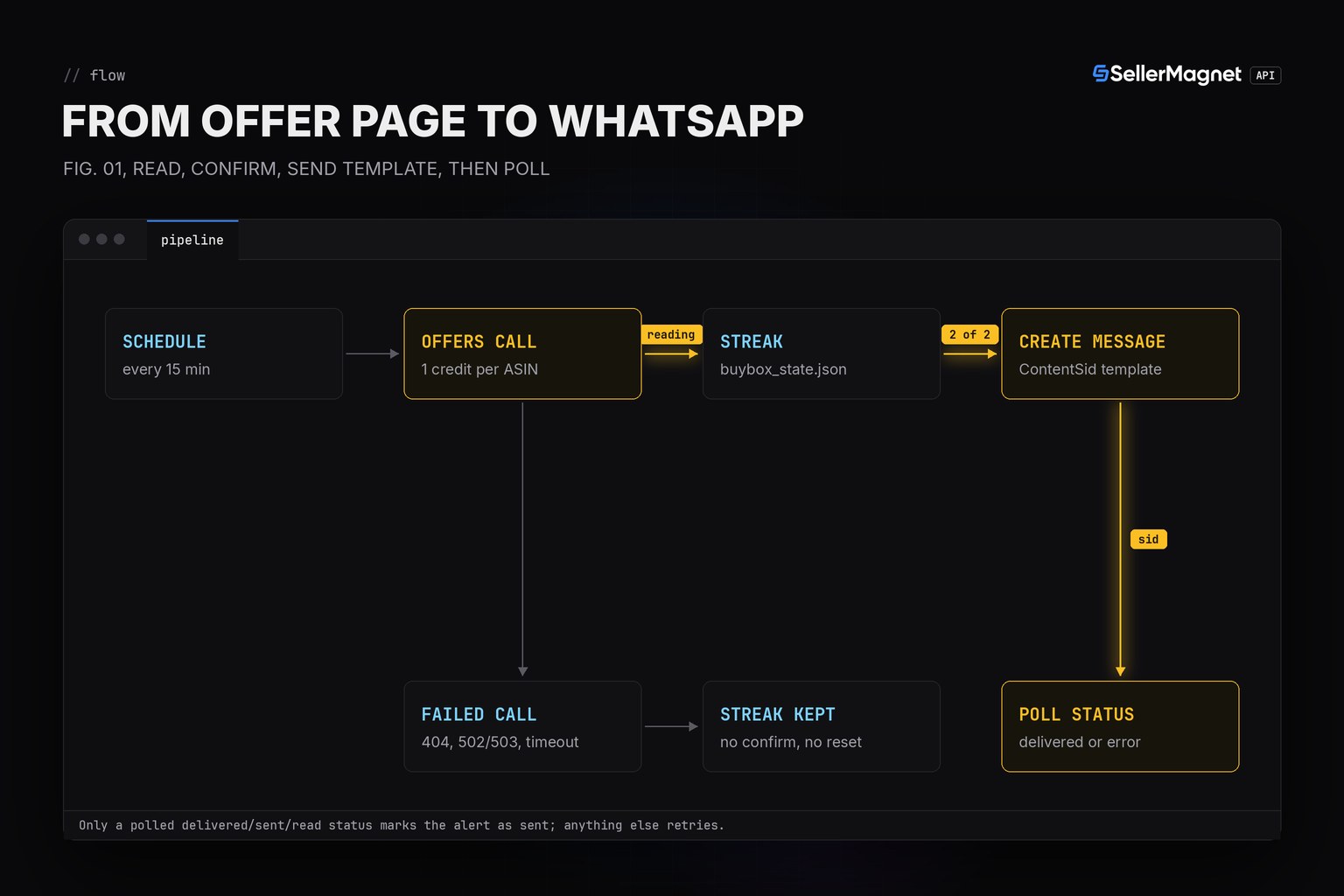
What is the 24-hour customer service window, and why does it matter here?
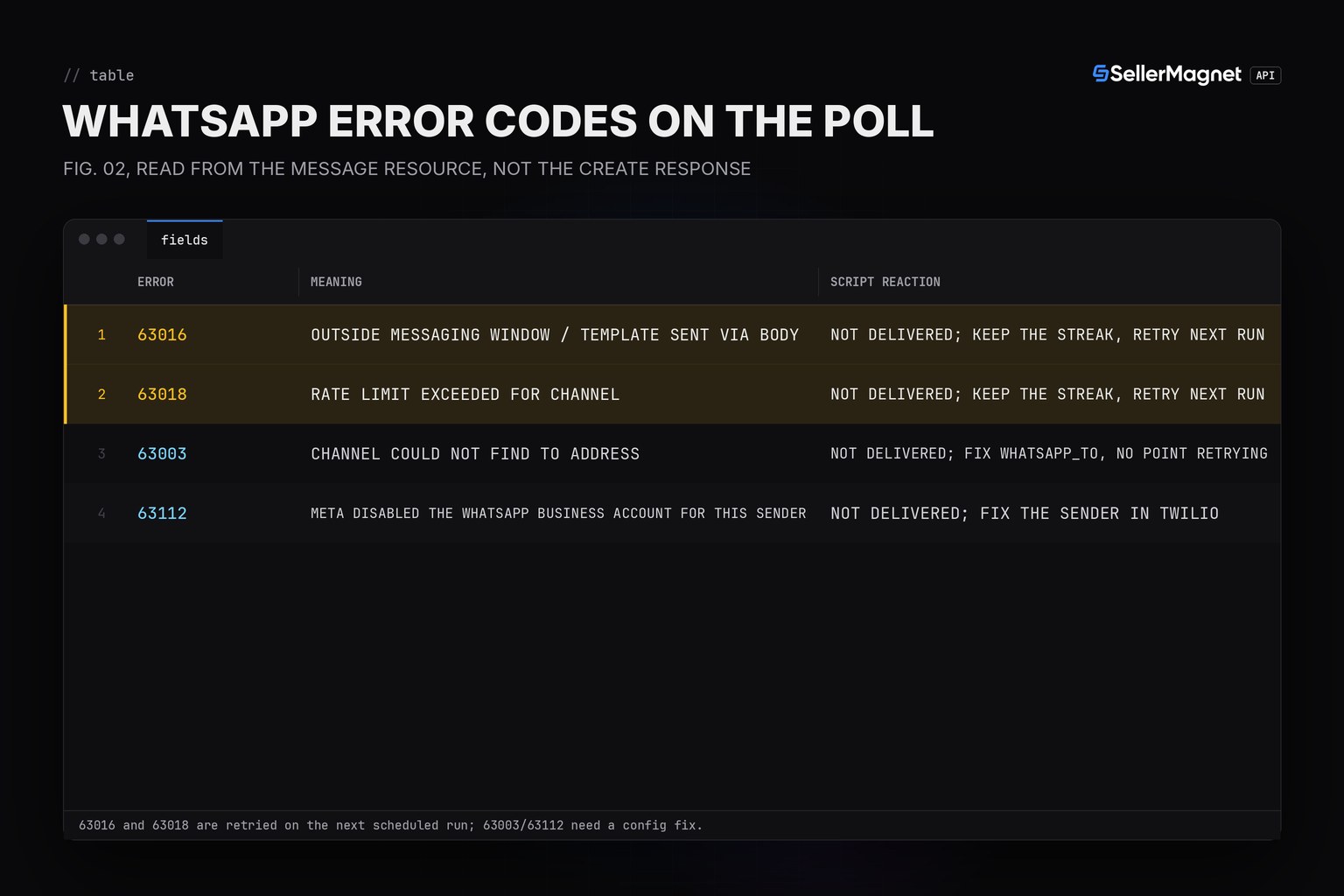
Twilio's WhatsApp docs describe a customer service window that opens for 24 hours after the last inbound message Twilio received from that WhatsApp user; inside it, free-form Body messages are allowed. A Buy Box alert script always sends first, so it is always outside that window, and only an approved Content Template, sent with ContentSid and ContentVariables, is allowed. Sending a template through Body instead, or any free-form content at all, is rejected with error 63016, the same error used for a genuinely out-of-window free-form send since April 1, 2025.
| Error | Meaning | Script reaction |
|---|---|---|
| 63016 | Outside messaging window / template sent via Body | Not delivered; keep the streak, retry next run |
| 63018 | Rate limit exceeded for Channel | Not delivered; keep the streak, retry next run |
| 63003 | Channel could not find To address | Not delivered; fix WHATSAPP_TO, no point retrying |
| 63112 | Meta disabled the WhatsApp Business Account for this Sender | Not delivered; fix the sender in Twilio |
Why poll the Message resource instead of trusting the create response?
Twilio's Messages resource documentation states that error_code and the final status (delivered, sent, read, failed, undelivered) are properties of the Message resource, read separately from the create call; the create call only confirms the request was queued. The script polls up to three times with a short backoff and treats anything other than delivered, sent or read as not yet confirmed: a failed/undelivered status with error_code 63016 or 63018, or a status that is still queued/sending/accepted after every poll. None of those outcomes mark the alert as sent, so the next scheduled run tries again as long as the Buy Box reading still holds.
How do I set up the Twilio WhatsApp sender and template?
- Enable WhatsApp on a Twilio numberFollow Twilio's Self-Signup Guide for WhatsApp (or use the shared sandbox number for testing) to get a WHATSAPP_FROM sender.
- Create a Content TemplateIn Messaging > Content Template Builder, create a template per alert type (lost, recovered) and submit it for WhatsApp review.
- Wait for approvalTwilio states review usually finishes within one business day; only an Approved template's ContentSid can open a business-initiated conversation.
- Get opt-in firstWhatsApp requires an explicit opt-in before you message a number; collect it once (sign-up flow, SMS, app settings) before adding that number to the alert list.
- Store the credentials as secretsAccount SID, Auth Token and the two ContentSids go into environment variables that never enter version control.
Environment file and a cron entry for a 15-minute check (flock -n prevents overlapping runs)
# .env (keep it out of git: the Auth Token is a secret)
export SELLERMAGNET_API_KEY="your-key-here"
export MY_SELLER_ID="A1MYSELLER0001"              # your sellerId as it appears in offers[]
export TWILIO_ACCOUNT_SID="ACxxxxxxxxxxxxxxxxxxxxxxxxxxxxxxxx"
export TWILIO_AUTH_TOKEN="your-twilio-auth-token"
export WHATSAPP_FROM="whatsapp:+14155238886"       # your approved Twilio WhatsApp sender
export WHATSAPP_TO="whatsapp:+491701234567"        # your own opted-in phone number
export TWILIO_CONTENT_SID_LOST="HXxxxxxxxxxxxxxxxxxxxxxxxxxxxxxxxx"   # approved "lost" template
export TWILIO_CONTENT_SID_BACK="HXxxxxxxxxxxxxxxxxxxxxxxxxxxxxxxxx"  # approved "recovered" template

# crontab -e: every 15 minutes, 3 ASINs = 288 credits a day; flock -n skips a run while the last one still runs
*/15 * * * * cd /opt/buybox && . ./.env && flock -n .lock .venv/bin/python buybox_whatsapp_alert.py >> alert.log 2>&1
What should you check when a LOST alert arrives?
The alert names the holder and its total price, not why Amazon featured that offer. Amazon's Seller Central page on becoming the Featured Offer lists the price including shipping, the delivery promise, free shipping and returns, and seller performance as the named factors; an out-of-stock offer cannot be featured. Start with the price gap between the holder and your offer, then your own delivery date and stock. The Buy Box price gap guide shows why the lowest price alone does not decide it.
How many credits does the WhatsApp Buy Box alert cost?
The SellerMagnet side costs exactly what the Slack version costs: one offers call per ASIN per check, billed the usual way (404 billed once, 502/503 billed per retry, 500 refunded, 400/401/403/429 free). Twilio bills WhatsApp conversations and template sends separately on its own pricing page, outside SellerMagnet credits entirely; check Twilio's current WhatsApp pricing before enabling this for many ASINs. Pricing lists the SellerMagnet plans, and the Buy Box monitoring interval guide compares check intervals in more detail.
Frequently Asked Questions
Why does the script poll the Message resource instead of trusting the 201 from the create call?
Because Twilio only queues the send at create time. WhatsApp evaluates the 24-hour window and the template approval afterwards, so the real outcome, delivered or a 63016/63018 failure, only shows up later on GET .../Messages/{Sid}.json (or a status callback). A 201 alone does not mean the contact received anything.
Why does every alert use a Content Template, even for the recovery (BACK) message?
Because the script sends first; the contact never messaged it, so there is no open 24-hour customer service window to send a free-form Body into. Business-initiated WhatsApp messages always need an approved template, loss and recovery alike.
What happens on error 63016?
The template was rejected (often because it is not yet WhatsApp-approved, or because a template was sent via Body instead of ContentSid/ContentVariables). The script does not mark the alert as sent, so the next run tries again once the template problem is fixed.
What happens on error 63018?
The account hit the WhatsApp channel's messaging rate limit. The script does not mark the alert as sent and does not retry in a tight loop; the next scheduled run tries again.
Why wait for a second check before alerting?
An offer page can come back without parsable offers, which looks like a stock-out. Waiting for the same reading on two checks in a row filters a one-off reading at the cost of one interval, the same CONFIRM pattern as the Slack and email alert versions.
How do I get a WHATSAPP_FROM sender and an approved ContentSid?
Enable WhatsApp on a Twilio number (or the sandbox for testing), then create and submit a Content Template for WhatsApp review in Messaging > Content Template Builder; Twilio states review usually finishes within one business day.
Bottom line: compare buyBox.sellerId with your own seller ID, confirm on a second check, send a Twilio Content Template because the script always alerts first, and only trust a polled delivered/sent/read status, never the 201 from the create call. To see who held the Buy Box and for how long after the fact, use the Buy Box history API; a free account includes 150 credits to try the alert.