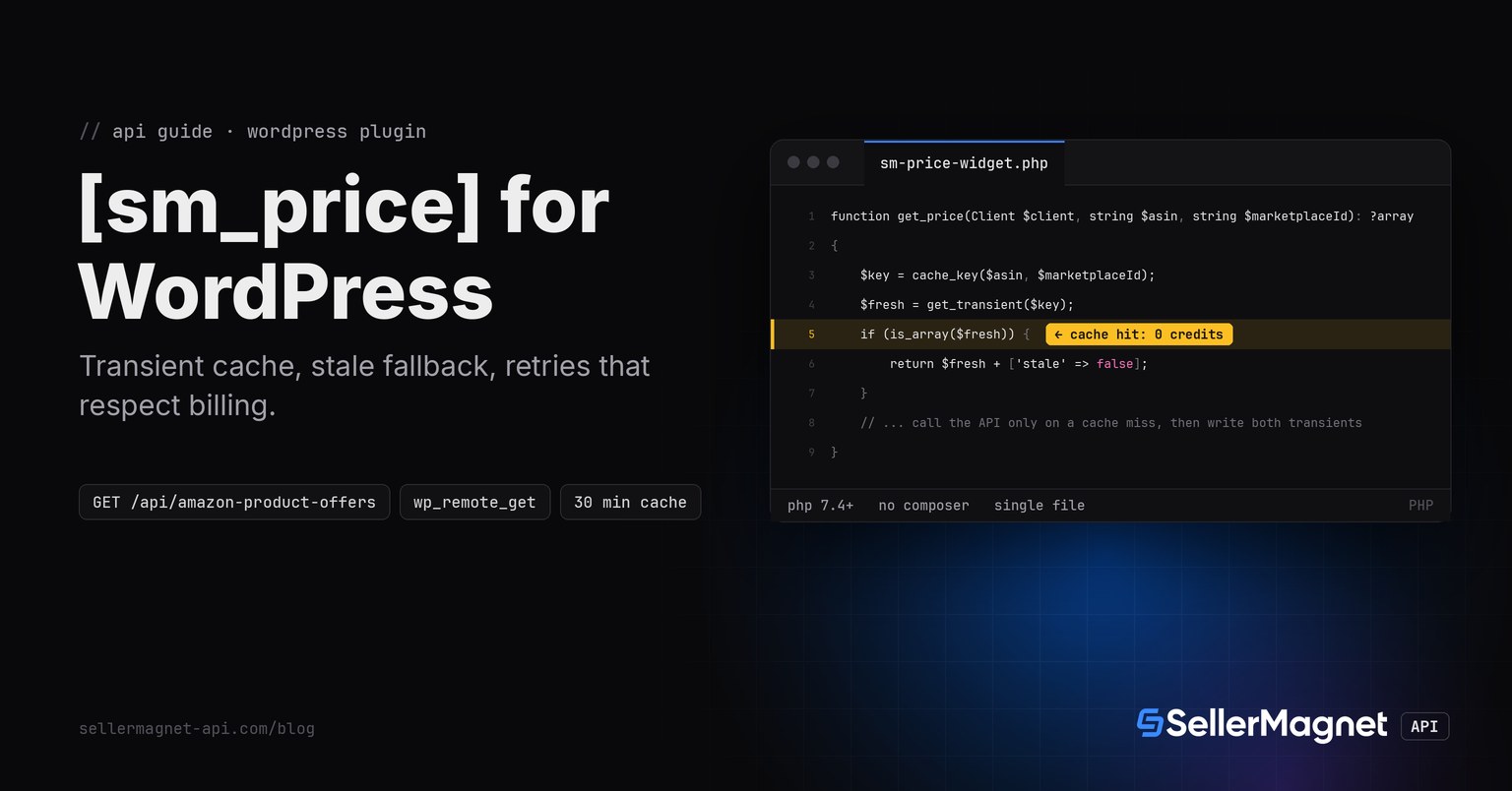
To show a live Amazon price on a WordPress page, add a shortcode that calls /api/amazon-product-offers through wp_remote_get(), caches the result in a transient for 30 minutes, and keeps a second, 24-hour transient to fall back to if a later call fails. One plugin file, no Composer and no cron: the cache check inside the shortcode callback is what keeps a page with 2,000 daily visitors from spending more than 48 credits a day on one product.
Key Takeaways
- A shortcode that calls the API on every page load bills once per visitor. A transient cache with even a 30-minute TTL turns that into once per 30 minutes, no matter how many visitors load the page in between.
wp_remote_get()defaults to a 5-second timeout, far short of what a slower endpoint can take. Settimeoutto 120 in the request args, the same ceiling the API's other clients use.wp_remote_get()reports a connection failure as aWP_Error, not an exception and not a distinct cURL errno like Guzzle or raw cURL expose. There is no way to tell "never reached the server" apart from "reached it and it hung"; treat everyWP_Erroras not billed and not retried, and let the stale cache carry the page instead.- Keep two transients per product: a short one that is the real cache, and a long one that only the error path reads. A product page that loses its fresh price for one failed call still shows the last known price instead of nothing.
- Validate the ASIN with
\A...\z, not^...$: in a PHP regex$also matches before a trailing newline, and a shortcode attribute copy-pasted from a spreadsheet column can carry one.
Why a transient cache, not wp_cron or a fetch on every request?
wp_cron only fires on a page load, so a low-traffic site can go hours without a scheduled job running, and a high-traffic one fires it needlessly often. Caching inside the shortcode callback itself ties the cache's lifetime to actual requests: no page view, no API call, and a page that suddenly gets traffic refreshes its price on the very next view instead of waiting for a cron tick. get_transient() and set_transient() already handle expiry, and on a host that gives WordPress a persistent object cache, a cache hit costs no database query either.
- WordPress 5.0+ and PHP 7.4+ (the plugin uses typed properties and
str_contains-free string checks on purpose, to stay installable on older hosts than a Composer-based client would need). - No Composer and no Guzzle:
wp_remote_get()is WordPress's own HTTP client and is always available, unlike avendor/folder a shared host may strip on deploy. - An API key from a free account (150 credits after e-mail verification), stored as a WordPress option, never hardcoded in the plugin file.
- The Product Offers endpoint, the same one the PHP quickstart uses for its
OffersDTO; this plugin reads onlybuyBoxfrom the same response shape.
The shortcode: cache, call, cache again, fall back on error
[sm_price asin="B0CL61F39H" mp="ATVPDKIKX0DER"] renders a <span> with the Buy Box total price, or nothing at all if there is truly nothing to show yet. get_price() is the whole decision: read the fresh transient first; on a miss, call the API and, on success, write both the 30-minute and the 24-hour transient; on failure, read the 24-hour transient instead of the one that just expired. A visitor never sees an error message in place of a price.
sm-price-widget.php - the whole plugin (one file)
<?php
/**
 * Plugin Name: SellerMagnet Price Widget
 * Description: [sm_price asin="B0CL61F39H" mp="ATVPDKIKX0DER"] shortcode showing a live Amazon buy box price.
 * Requires PHP: 7.4
 */

declare(strict_types=1);

namespace SellerMagnetWidget;

// --- Client: wp_remote_get only, no Guzzle/Composer (most WordPress hosts have neither) ---

final class ApiError extends \RuntimeException
{
    public function __construct(public readonly int $status, string $message, public readonly int $retryAfter = 0)
    {
        parent::__construct("$status: $message");
    }
}

final class Client
{
    private const ATTEMPTS = 4;
    /** 429 is free, a 500 without Retry-After is refunded (retried once), 502/503 are billed per attempt. */
    private const RETRYABLE = [429, 500, 502, 503];
    private const FREE_400 = ['Missing required parameter', 'Invalid marketplaceId',
        'This endpoint is not available'];

    public int $billed = 0;
    /** @var callable(float): void swapped out in tests so retries do not really sleep */
    public $sleeper;

    public function __construct(private readonly string $key, private readonly string $base)
    {
        $this->sleeper = static function (float $seconds): void {
            // phpcs:ignore -- real WordPress sites run PHP-FPM workers; sleeping here blocks one of them.
            usleep((int) ($seconds * 1_000_000));
        };
    }

    public static function fromOption(): self
    {
        $key = get_option('sm_price_widget_api_key', '');
        if (!is_string($key) || $key === '') {
            throw new \RuntimeException('set the SellerMagnet API key under Settings > SM Price Widget');
        }
        return new self($key, 'https://sellermagnet-api.com/api');
    }

    /** offers: buyBox (nullable) + full offer list, decimal prices already rounded to the cent. */
    public function offers(string $asin, string $marketplaceId): array
    {
        return $this->get('amazon-product-offers', ['asin' => $asin, 'marketplaceId' => $marketplaceId]);
    }

    public function get(string $endpoint, array $params): array
    {
        $wait = 0.0;
        $internalErrors = 0;
        for ($attempt = 1; ; $attempt++) {
            try {
                return $this->getOnce($endpoint, $params);
            } catch (ApiError $e) {
                if (!in_array($e->status, self::RETRYABLE, true)) {
                    throw $e; // 404 is an answer: billed once, a retry pays for the same answer again
                }
                if ($e->status === 500 && ++$internalErrors > 1) {
                    throw $e; // a second 500 for the same call: report it, do not loop
                }
                $wait = max(self::backoff($attempt), $e->retryAfter);
            }
            if ($attempt === self::ATTEMPTS) {
                throw $e;
            }
            ($this->sleeper)($wait);
        }
    }

    private function getOnce(string $endpoint, array $params): array
    {
        $url = rtrim($this->base, '/') . '/' . $endpoint . '?' . http_build_query($params);
        $response = wp_remote_get($url, [
            'headers' => ['X-Api-Key' => $this->key], // a header, never ?api_key=... in a logged URL
            'timeout' => 120,                          // wp_remote_get defaults to 5 s: far too short
        ]);
        if (is_wp_error($response)) {
            // A WP_Error here means the request never reached the API (DNS, TLS, connection refused):
            // nothing was billed. A genuine timeout also surfaces this way in WordPress's HTTP API, so
            // it is retried too -- unlike the raw-cURL clients in the other quickstarts, which separate
            // "never sent" from "sent but no answer" by cURL errno. wp_remote_get does not expose that.
            throw new ApiError(0, $response->get_error_message());
        }
        $status = (int) wp_remote_retrieve_response_code($response);
        $retryAfter = (int) wp_remote_retrieve_header($response, 'retry-after');
        $body = json_decode((string) wp_remote_retrieve_body($response), true);
        $message = is_array($body) && is_string($body['message'] ?? null) ? $body['message'] : 'request failed';
        $free400 = $status === 400 && array_filter(self::FREE_400, fn ($p) => str_starts_with($message, $p));
        if (in_array($status, [200, 404, 502, 503], true) || ($status === 500 && $retryAfter > 0)
            || ($status === 400 && !$free400)) {
            $this->billed++;
        }
        if ($status === 200 && is_array($body) && ($body['success'] ?? false) === true) {
            return is_array($body['data'] ?? null) ? $body['data'] : throw new \UnexpectedValueException('no data');
        }
        throw new ApiError($status, $message, $retryAfter);
    }

    private static function backoff(int $attempt): float
    {
        return min(2 ** $attempt, 30) + random_int(0, 999) / 1000;
    }
}

// --- Cache: a short "fresh" transient plus a long "stale" fallback the widget serves if the API errors ---

const FRESH_TTL = 30 * 60;   // 30 minutes: price pages change, but not every page load needs a credit
const STALE_TTL = 24 * 3600; // served only when a fresh fetch fails, so a visitor still sees a price

function cache_key(string $asin, string $marketplaceId): string
{
    return 'sm_price_' . md5($asin . '|' . $marketplaceId);
}

/**
 * Returns ['price' => float|null, 'currency' => string, 'fulfillment' => string|null, 'stale' => bool]
 * or null when there is no price to show at all (first load, API down, no cached value yet).
 */
function get_price(Client $client, string $asin, string $marketplaceId): ?array
{
    $key = cache_key($asin, $marketplaceId);
    $fresh = get_transient($key);
    if (is_array($fresh)) {
        return $fresh + ['stale' => false];
    }
    try {
        $data = $client->offers($asin, $marketplaceId);
        $buyBox = $data['buyBox'] ?? [];
        $result = [
            'price' => (is_array($buyBox) && ($buyBox['sellerId'] ?? '') !== '')
                ? round((float) ($buyBox['totalPrice'] ?? 0), 2) : null, // {} = nobody holds the buy box
            'currency' => (string) ($data['currency']['code'] ?? ''),
            'fulfillment' => is_array($buyBox) ? ($buyBox['fulfillmentType'] ?? null) : null,
        ];
        set_transient($key, $result, FRESH_TTL);
        set_transient($key . '_stale', $result, STALE_TTL);
        return $result + ['stale' => false];
    } catch (ApiError $e) {
        if (in_array($e->status, [401, 403], true)) {
            // A bad key or an empty balance never recovers on its own; stop spending the remaining budget
            // on every page view and let the stale cache (if any) keep showing a price.
        }
        $stale = get_transient($key . '_stale');
        return is_array($stale) ? $stale + ['stale' => true] : null;
    }
}

add_action('init', static function (): void {
    add_shortcode('sm_price', __NAMESPACE__ . '\\render_shortcode');
});

function render_shortcode(array $atts): string
{
    $atts = shortcode_atts(['asin' => '', 'mp' => 'ATVPDKIKX0DER'], $atts);
    $asin = sanitize_text_field($atts['asin']);
    // \z, not $: a PHP regex $ also matches before a trailing newline, which a copy-pasted shortcode attribute
    // from a CSV export can carry.
    if (preg_match('/\A[A-Z0-9]{10}\z/', $asin) !== 1) {
        return ''; // a malformed ASIN costs a credit on a real call; it is rejected before the cache is even read
    }
    try {
        $client = Client::fromOption();
    } catch (\RuntimeException $e) {
        return current_user_can('manage_options') ? '<em>' . esc_html($e->getMessage()) . '</em>' : '';
    }
    $price = get_price($client, $asin, sanitize_text_field($atts['mp']));
    if ($price === null) {
        return '';
    }
    if ($price['price'] === null) {
        return '<span class="sm-price sm-price--no-offer">no offer right now</span>';
    }
    $label = sprintf('%.2f %s', $price['price'], esc_html($price['currency']));
    $staleTag = $price['stale'] ? ' <small class="sm-price__stale">(last known price)</small>' : '';
    return '<span class="sm-price">' . esc_html($label) . '</span>' . $staleTag;
}
Using it outside a post body, e.g. in a theme template
<?php
// Any PHP template can call the shortcode directly; it still reads the 30-minute transient
// cache, so a template placement costs no extra credits over the shortcode in post content.
echo do_shortcode('[sm_price asin="B0CL61F39H" mp="ATVPDKIKX0DER"]');
Which responses the widget retries, and which it just records
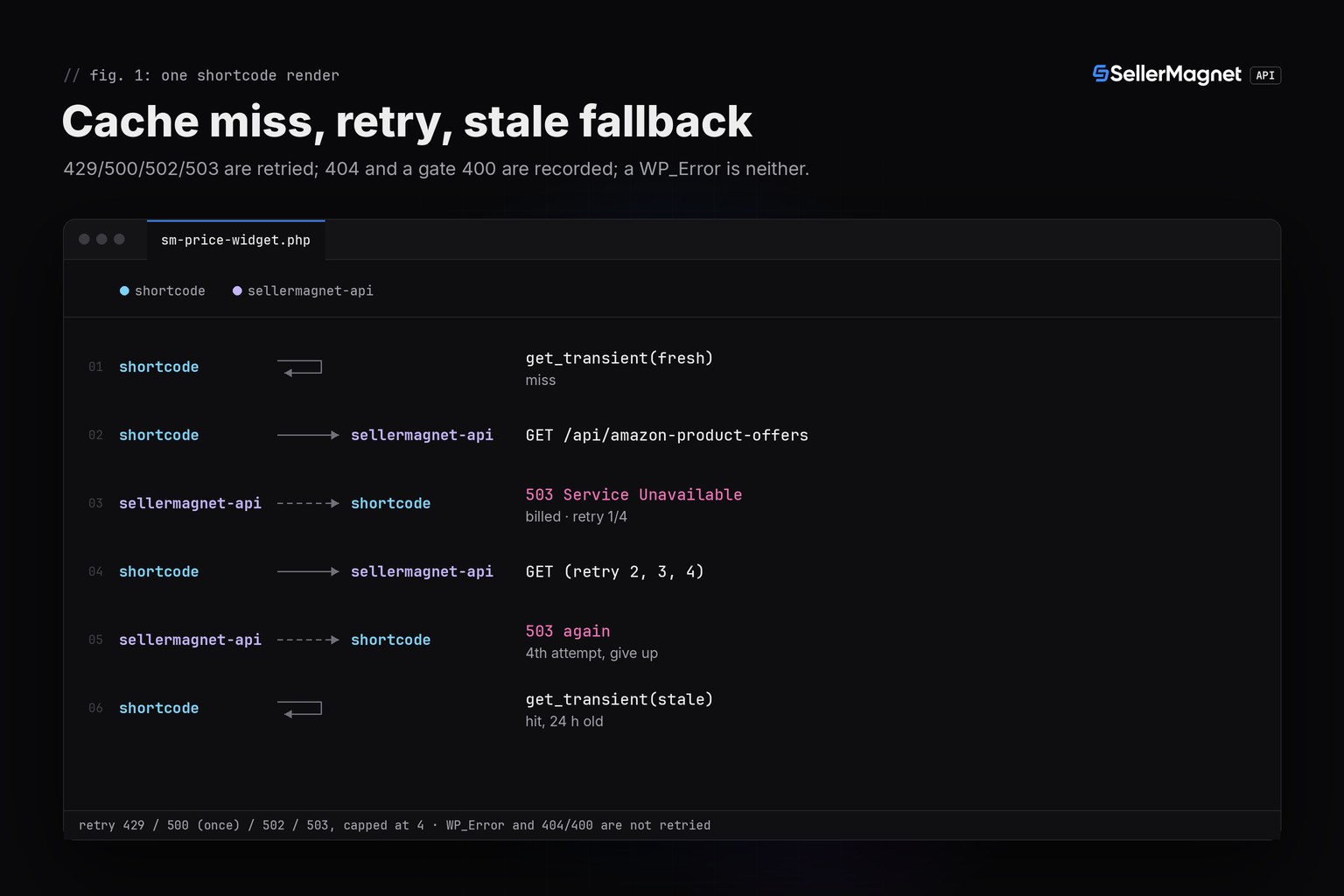
429 is free and carries Retry-After, so it is always worth waiting for. A 500 without Retry-After is refunded, so one retry costs nothing; 502 and 503 are billed on every attempt and capped at 4 tries total. A 404 (ASIN not on this marketplace) and a gate 400 (marketplace not covered by offers) are answers, not failures: retrying them pays again for the same answer, so the widget records them and, if a stale price exists, shows that instead.
| Response | Billed | Retried | What the visitor sees |
|---|---|---|---|
| 200, buy box present | yes (1 credit) | no | price span, fresh |
200, buy box empty {} | yes (1 credit) | no | "no offer right now" |
| 404 not on this marketplace | yes (1 credit) | no | empty, or stale if cached before |
| 400 gate (marketplace not covered) | no | no | empty, or stale if cached before |
| 429 concurrency limit | no | yes, waits Retry-After | price span once it succeeds |
| 500 no Retry-After | no (refunded) | once | price span if the retry succeeds |
| 502 / 503 | yes, every attempt | yes, capped at 4 | stale span if cached before, else empty |
| WP_Error (DNS/TLS/refused) | no | no | stale span if cached before, else empty |
How many credits does a busy product page actually spend?
With a 30-minute fresh TTL, one product shortcode spends at most 48 credits a day regardless of traffic: 24 hours times 2 refreshes an hour. Ten different ASINs on a comparison page cost at most 480 credits a day the same way. The only exception is a sustained outage: each failed render that lands on an expired cache retries up to 4 times before falling back, so an API incident that lasts an hour can cost a few extra billed attempts per product, not per visitor, since the next successful call re-arms the 30-minute window for everyone after it.
Demo run output (illustrative data; logged from the test harness, not a live page)
[B0CL61F39H first view]  <span class="sm-price">444.99 USD</span>
[B0CLTBHXWQ no buy box]  <span class="sm-price sm-price--no-offer">no offer right now</span>
[B0NOTFOUND  unknown]
[B0CL61F39 malformed]
[B0CL61F39H cached view] <span class="sm-price">444.99 USD</span>
requests sent: 3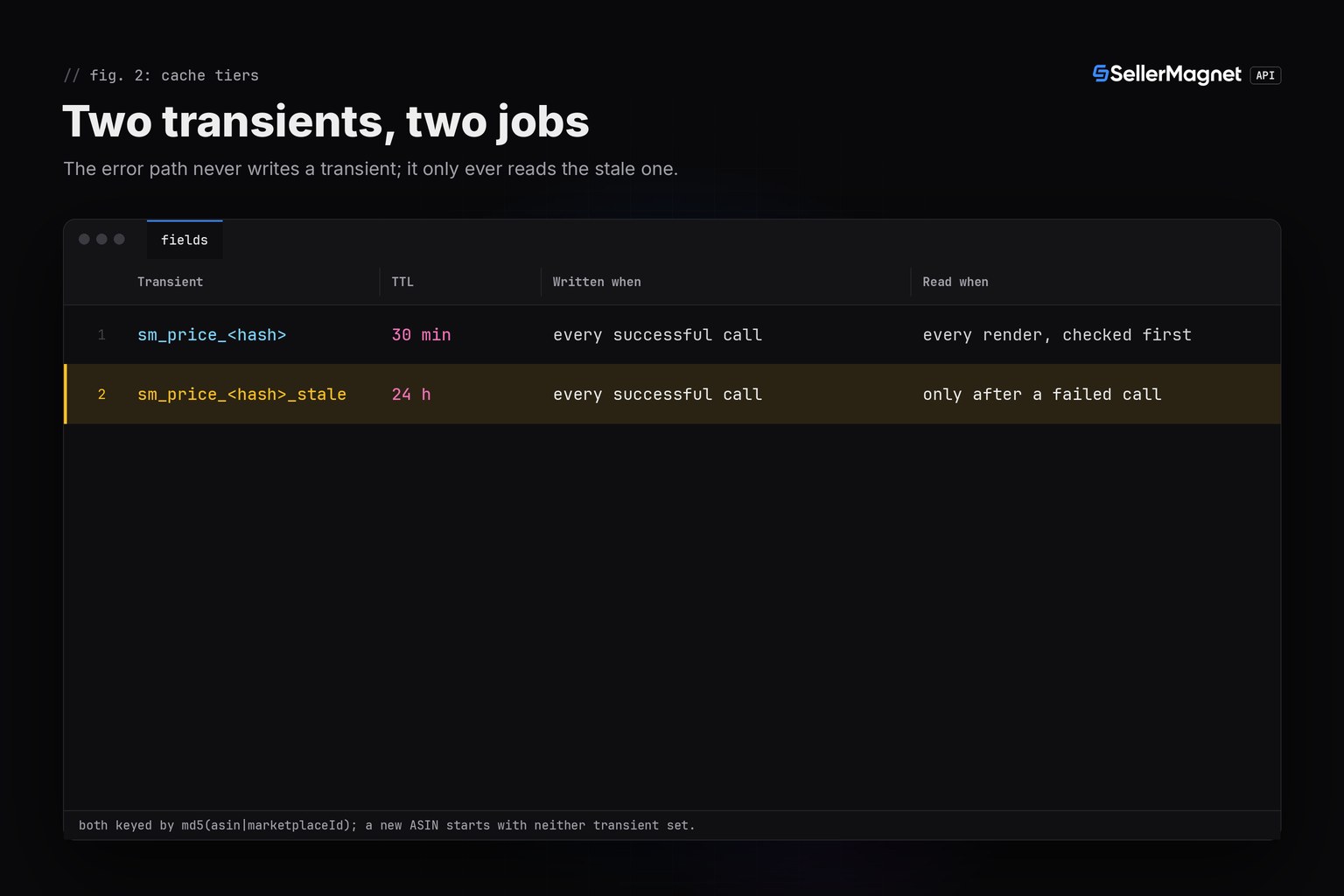
Frequently Asked Questions
Does this plugin need Composer or Guzzle?
No. It uses wp_remote_get(), WordPress's own HTTP client, which every WordPress install already has. There is no vendor/ folder for a host to strip on deploy.
Why does the price sometimes say "last known price"?
Because the live API call failed (a 503, a timeout, a dropped connection) and the 24-hour stale transient still had a value from an earlier successful call. The widget shows that instead of an error or a blank space.
Why not just use wp_cron to refresh the price?
wp_cron only runs on a page load, so a low-traffic site can miss ticks for hours. Caching inside the shortcode itself refreshes the price on the very next real visit after the transient expires, with no separate schedule to maintain.
What happens if two visitors load the page at the exact same moment the cache expires?
Both can call the API before either write lands (a classic cache stampede), at most doubling that one refresh's cost. At 30 minutes per refresh this is rare enough to ignore; a high-traffic site can add a short "fetching" transient lock if it matters.
Can I show more than the Buy Box price, like the seller or fulfillment type?
Yes. get_price() already keeps fulfillment from the same offers call; add it to the cached array and read it in render_shortcode() alongside the price.
Bottom line: one plugin file, a transient cache that ties API spend to real page views instead of a schedule, and a second, longer-lived transient that keeps a price on the page through a failed call. The same /amazon-product-offers response also drives the PHP quickstart and the rate limits and error handling guide; every field used here is documented in the API reference.