
To get Amazon product data in Python, send one GET request with requests to /api/amazon-product-lookup with an ASIN, a marketplace ID and your API key in the X-Api-Key header. The response is JSON with the title, images, Buy Box price and bestseller ranks. This quickstart builds a 40-line client for lookups and keyword search, adds a retry policy that never pays twice for the same miss, and runs lookups in parallel with a thread pool.
Key Takeaways
- One dependency: requests. Every endpoint is a GET with query parameters and the key in the X-Api-Key header.
- Set the client timeout to 120 seconds; the server allows a scrape up to that long, and a request you abandon is still billed.
- Retry 429, 500, 502 and 503 only. A 404 means the ASIN is not on that marketplace; retrying it buys the same answer again.
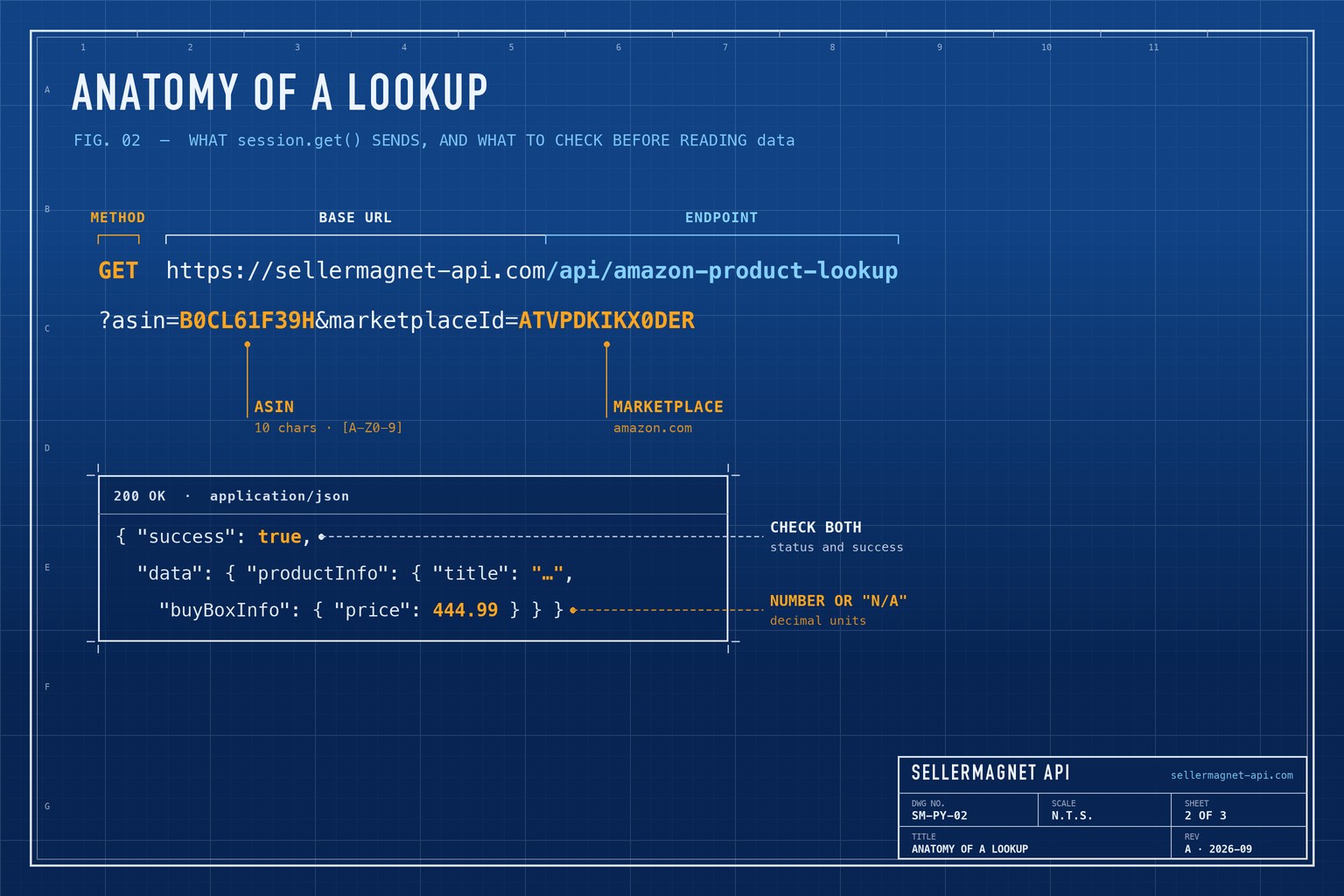
- Lookup returns the price as a decimal number, or the string "N/A" when no offer is featured.
- A thread pool of 5 to 10 workers with one Session per thread stays well under the per-key concurrency cap.
What do I need before I start?
- Python 3.10 or later (the examples use
X | Nonetype hints) andrequests. - An API key - a free account includes 150 credits, one per request.
- The key in an environment variable, so it never lands in your repository.
Install requests and put the key in the environment
python3 -m venv .venv
.venv/bin/pip install requests
export SELLERMAGNET_API_KEY="your-key-here"
How do I get Amazon product data in Python?
Put the base URL, the key header and the timeout in one requests.Session, and raise one exception type for every failure. The helper checks both the HTTP status and the success flag, so callers only ever see data or an ApiError carrying the status code and the API's own message. Marketplace IDs for all 23 storefronts are in the marketplace IDs list.
sellermagnet.py - a small client with one exception type
import os

import requests

API = "https://sellermagnet-api.com/api"


class ApiError(Exception):
    def __init__(self, status: int, message: str, retry_after: float = 0.0):
        super().__init__(f"{status}: {message}")
        self.status, self.retry_after = status, retry_after


def new_session() -> requests.Session:
    session = requests.Session()
    session.headers["X-Api-Key"] = os.environ["SELLERMAGNET_API_KEY"]
    return session


def get(session: requests.Session, endpoint: str, **params) -> dict:
    resp = session.get(f"{API}/{endpoint}", params=params, timeout=120)
    try:
        body = resp.json()
    except ValueError:                      # e.g. an HTML page from a proxy
        body = {}
    if resp.status_code == 200 and body.get("success"):
        return body["data"]
    try:
        wait = float(resp.headers.get("Retry-After", 0))
    except ValueError:
        wait = 0.0
    raise ApiError(resp.status_code, body.get("message", "request failed"), wait)


def lookup(session: requests.Session, asin: str, marketplace_id: str) -> dict:
    p = get(session, "amazon-product-lookup", asin=asin, marketplaceId=marketplace_id)["productInfo"]
    price = p["buyBoxInfo"].get("price")
    return {
        "asin": p["asin"],
        "title": p["title"],
        "price": price if isinstance(price, (int, float)) else None,   # "N/A" = no featured offer
        "currency": p["buyBoxInfo"].get("currencyCode"),
        "rank": ((p.get("bestsellerRanks") or {}).get("main_category") or {}).get("rank") or None,
        "url": p["link"],
    }


if __name__ == "__main__":
    print(lookup(new_session(), "B0CL61F39H", "ATVPDKIKX0DER"))
Trimmed lookup response (example values)
{
  "success": true,
  "data": {
    "productInfo": {
      "asin": "B0CL61F39H",
      "marketplaceId": "ATVPDKIKX0DER",
      "title": "PlayStation®5 console (slim)",
      "buyBoxInfo": {"price": 444.99, "currencyCode": "USD", "currencySymbol": "$",
                     "sellerId": "Amazon", "amazonSellerId": "ATVPDKIKX0DER"},
      "bestsellerRanks": {"main_category": {"name": "Video Games", "rank": 31},
                          "subcategory": {"name": "PlayStation", "rank": 1}},
      "link": "https://www.amazon.com/dp/B0CL61F39H"
    }
  }
}
The key can also go in an api_key query parameter, but a header keeps it out of proxy and server logs that record URLs. The product lookup page lists every field, including images, bullet points, variations and videos.
How do I search Amazon products by keyword in Python?
/api/amazon-search takes a query q, a marketplace ID and an optional count of up to 50. Results come from the first results page in page order, sponsored ones included and flagged. The price is a decimal string here, so parse it with Decimal rather than float if you store or compare it. Products without a displayed price are skipped.
search.py - organic results with prices as Decimal
from decimal import Decimal, InvalidOperation

from sellermagnet import get, new_session


def to_decimal(value) -> Decimal | None:
    try:
        return Decimal(str(value))
    except (InvalidOperation, TypeError):
        return None


session = new_session()
count = 20
assert 1 <= count <= 50, "count above 50 is a billed 400"
data = get(session, "amazon-search", q="usb c charger", marketplaceId="A1PA6795UKMFR9", count=count)

organic = [
    {"position": r["position"], "asin": r["asin"], "title": r["productTitle"],
     "price": to_decimal(((r.get("listingPrice") or {}).get("price") or {}).get("total"))}
    for r in data["searchResults"] if not r.get("sponsored")
]
for row in organic[:5]:
    print(row["position"], row["asin"], row["price"], row["title"][:60])
Which errors should a Python client retry?
Retry only what can succeed on a second try. A 429 means the key's concurrency cap was full for 20 seconds; it is free and carries Retry-After: 2. A 500 is our internal error and its credit is refunded, so one retry costs nothing. 502 and 503 are billed on every attempt, so honour Retry-After and cap the attempts. A 404 is a real answer - the ASIN is not on that marketplace - and a second call only buys it again.
| Status | Meaning | Charged | Client action |
|---|---|---|---|
200 | success | Yes | Use data |
| 400 gate | missing parameter | No | Fix the call |
| 400 endpoint | count > 50 or not whole | Yes | Fix the call |
| 401 / 403 | key or credits | No | Stop |
404 | not on this marketplace | Yes | Store as missing |
429 | concurrency cap | No | Wait retry-after |
500 | internal error | No - refunded | Retry once |
| 502 / 503 | upstream / breaker | Yes | Wait, then retry |
retry.py - retries only where a second attempt can help
import random
import time

import requests

from sellermagnet import ApiError, get

RETRYABLE = {429, 500, 502, 503}


def get_with_retry(session, endpoint: str, attempts: int = 4, **params) -> dict:
    internal_errors = 0
    for attempt in range(1, attempts + 1):
        try:
            return get(session, endpoint, **params)
        except ApiError as err:
            internal_errors += err.status == 500
            if err.status not in RETRYABLE or attempt == attempts or internal_errors > 1:
                raise                      # a second 500 in a row: report it, don't loop
            backoff = min(2 ** attempt, 30) + random.uniform(0, 1)
            time.sleep(max(backoff, err.retry_after))
        except (requests.ConnectionError, requests.Timeout):
            if attempt == attempts:
                raise
            time.sleep(min(2 ** attempt, 30))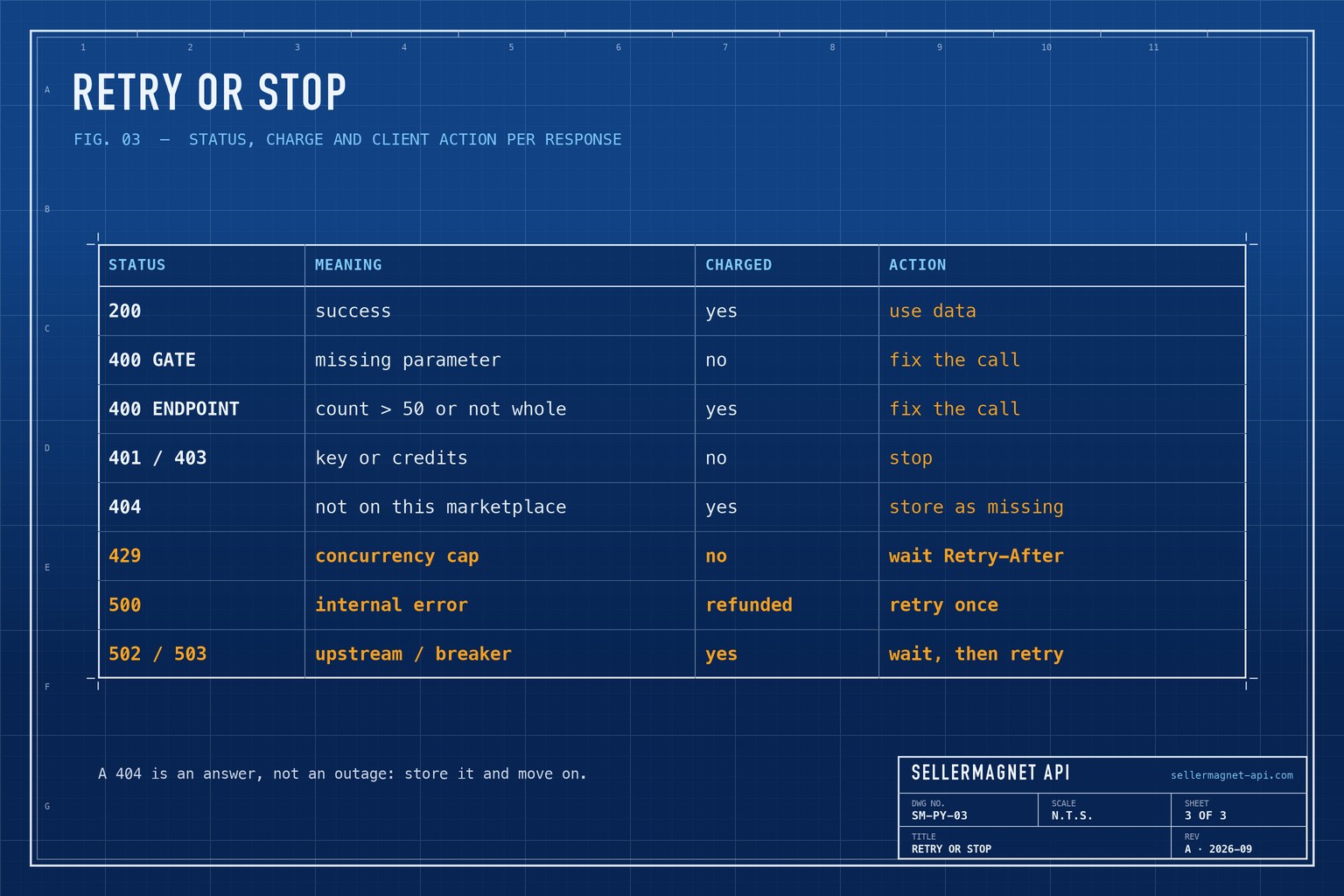
Do not shorten the timeout
The API gives a scrape up to 120 seconds. A client that gives up after 30 has still spent the credit, and its retry spends another. Keep timeout=120 and let slow requests finish.
How do I run many lookups in parallel?
Use a ThreadPoolExecutor: the work is waiting on the network, so threads are enough and asyncio adds nothing here. requests does not promise that one Session is safe across threads, so give each worker its own through threading.local. Keep the pool at 5 to 10 workers; a burst above the per-key cap is queued for up to 20 seconds before it becomes a 429. There is no batch endpoint - the bulk ASIN lookup guide scales this to thousands of products.
bulk.py - eight workers, one Session each, results to CSV
import csv
import threading
from concurrent.futures import ThreadPoolExecutor

import requests

from retry import get_with_retry
from sellermagnet import ApiError, new_session

_local = threading.local()


def session():
    if not hasattr(_local, "session"):
        _local.session = new_session()
    return _local.session


def fetch(asin: str, marketplace_id: str = "ATVPDKIKX0DER") -> dict:
    try:
        p = get_with_retry(session(), "amazon-product-lookup", asin=asin, marketplaceId=marketplace_id)["productInfo"]
    except ApiError as err:
        return {"asin": asin, "error": err.status}
    except requests.RequestException as err:     # network gave up after retries: keep the batch
        return {"asin": asin, "error": type(err).__name__}
    price = p["buyBoxInfo"].get("price")
    return {"asin": asin, "title": p["title"], "price": price if isinstance(price, (int, float)) else "",
            "currency": p["buyBoxInfo"].get("currencyCode"), "error": ""}


asins = ["B0CL61F39H", "B0CLTBHXWQ"]
with ThreadPoolExecutor(max_workers=8) as pool:
    rows = list(pool.map(fetch, asins))

with open("products.csv", "w", newline="", encoding="utf-8") as fh:
    writer = csv.DictWriter(fh, fieldnames=["asin", "title", "price", "currency", "error"])
    writer.writeheader()
    writer.writerows(rows)
Every row costs one credit, including the 404 rows. Check ASINs locally first (10 characters, letters and digits) - lookup does not validate the format and a typo is billed like any other request. The error-handling guide covers the per-IP limit and circuit breaker in more depth.
Frequently Asked Questions
Is there an official Python SDK for the SellerMagnet API?
No, and none is needed. Every endpoint is a plain GET with query parameters, so requests or httpx and a 40-line helper cover it.
Should I send the API key as a header or a query parameter?
Both work. The X-Api-Key header keeps the key out of URLs, which proxies and servers often write to their logs.
What timeout should a Python client use?
120 seconds. The server allows a scrape that long, and a request the client abandons early is still charged.
Which status codes should I retry?
429, 500, 502 and 503. A 429 is free, a 500 is refunded, and 502 and 503 are charged per attempt, so cap retries and honour Retry-After.
Why is the lookup price sometimes "N/A"?
No offer is featured in the Buy Box right now. Treat it as missing, not zero, and use the offers endpoint to see the individual offers.
Bottom line: one Session with the key header and a 120-second timeout, one exception type, retries for 429, 500, 502 and 503 only, and a small thread pool. The same pattern in JavaScript is in the Node.js quickstart, and every endpoint is in the API documentation.


