Amazon Product Charts as PNG Images
Add graphs=true to an Amazon Product Statistics request and the response includes up to 9 chart image URLs: price, Buy Box, sales rank, rating, review count and monthly sold history. Same request, same 1 credit.
1 credit per request · Up to 9 PNG charts · 11 Amazon marketplaces
One Request, Up to 9 Charts
Charts are an option of the Amazon Product Statistics endpoint, not a separate API.
Send a GET request to /api/amazon-product-statistics with graphs=true. The JSON response contains the usual product statistics plus a data.graphs object with one URL per chart, up to 9 in total. Each URL points to a PNG image that our servers rendered from the same history series that the response contains.
The request costs 1 credit, exactly as it does without charts. The charts cover:
- Price history: marketplace new price, Amazon as seller, Buy Box, lowest FBM and lowest FBA price.
- Sales rank history.
- Rating history and rating count history.
- Monthly sold history.
A chart is only included when its series has data for the product, so a response can hold fewer than 9 keys.
Request Charts
Send your API key in the X-Api-Key header. The response arrives only after every chart is rendered, so give the client more than 120 seconds (the samples use 130).
curl --fail-with-body --max-time 130 \
  -H "X-Api-Key: YOUR_API_KEY" \
  "https://sellermagnet-api.com/api/amazon-product-statistics?asin=B0CLTBHXWQ&marketplaceId=APJ6JRA9NG5V4&graphs=true"
import requests

resp = requests.get(
    "https://sellermagnet-api.com/api/amazon-product-statistics",
    params={"asin": "B0CLTBHXWQ", "marketplaceId": "APJ6JRA9NG5V4", "graphs": "true"},
    headers={"X-Api-Key": "YOUR_API_KEY"},
    timeout=130,  # charts are rendered before the response is sent
)
if resp.status_code != 200:
    raise SystemExit(f"HTTP {resp.status_code}: {resp.text[:200]}")

graphs = resp.json()["data"].get("graphs", {})

for key in ("buyBoxPriceHistory", "salesRankHistory", "monthlySoldHistory"):
    url = graphs.get(key)
    if url is None:  # no data for this series, or this chart failed
        print(f"{key}: no chart for this product")
        continue
    try:
        image = requests.get(url, timeout=60)
        image.raise_for_status()
    except requests.RequestException as exc:  # e.g. the file is no longer available
        print(f"{key}: download failed ({exc})")
        continue
    with open(f"B0CLTBHXWQ_{key}.png", "wb") as fh:  # keep your own copy
        fh.write(image.content)
    print(f"{key}: saved")
// charts.mjs (ES module, so top-level await works)
const params = new URLSearchParams({
  asin: "B0CLTBHXWQ",
  marketplaceId: "APJ6JRA9NG5V4",
  graphs: "true",
});

const res = await fetch(
  `https://sellermagnet-api.com/api/amazon-product-statistics?${params}`,
  {
    headers: { "X-Api-Key": "YOUR_API_KEY" },
    signal: AbortSignal.timeout(130000), // charts are rendered before the response is sent
  }
);
if (!res.ok) {
  throw new Error(`HTTP ${res.status}: ${(await res.text()).slice(0, 200)}`);
}

const { data } = await res.json();
const graphs = data.graphs ?? {};

for (const key of ["buyBoxPriceHistory", "salesRankHistory", "monthlySoldHistory"]) {
  if (!graphs[key]) {
    // no data for this series, or this chart failed
    console.log(`${key}: no chart for this product`);
    continue;
  }
  console.log(`${key}: ${graphs[key]}`);
}
Request Parameters
Send a GET request. Charts need nothing beyond the graphs parameter.
GET https://sellermagnet-api.com/api/amazon-product-statistics
| Parameter | Type | Required | Description |
|---|---|---|---|
asin |
String | Required | ASIN of the product, for example B0CLTBHXWQ. Leading and trailing spaces are removed. A value made only of digits is looked up as an EAN or UPC code. |
marketplaceId |
String | Required | One of the 11 supported marketplace IDs, exactly as listed (case-sensitive), for example APJ6JRA9NG5V4 for amazon.it. |
graphs |
String | Optional | true adds data.graphs with up to 9 chart URLs. Case does not matter (true, True and TRUE all work). Any other value, including 1 or yes, means no charts and no data.graphs key. The cost is 1 credit either way. |
X-Api-Key (header) |
String | Required | Your API key. The header is recommended because it keeps the key out of URLs and logs. Alternatively send it as the api_key query parameter; if both are sent, the query parameter is used. |
The 9 Charts
Each chart plots one series from the same response. The graphs key names the chart; the last column shows where the plotted data sits in the JSON.
| graphs key | Chart title | What is plotted | Y axis | Source series |
|---|---|---|---|---|
marketplaceNewPriceHistory |
Marketplace New Price History | Lowest new offer price (item price) | Price (currency) | data.marketplaceNewPriceHistory |
amazonAsSellerPriceHistory |
Amazon as Seller Price History | Price of Amazon's own offer | Price (currency) | data.stats.amazonAsSellerPriceHistory |
buyBoxPriceHistory |
Buy Box Price History | Buy Box price, including shipping | Price (currency) | data.stats.buyBoxPriceHistory |
lowestFBMPriceHistory |
Lowest FBM Price History | Lowest FBM price, including shipping | Price (currency) | data.stats.lowestFBMPriceHistory |
lowestFBAPriceHistory |
Lowest FBA Price History | Lowest FBA price | Price (currency) | data.stats.lowestFBAPriceHistory |
salesRankHistory |
Sales Rank History | Sales rank, without no-data points | Sales Rank, inverted (rank 1 at the top) | data.stats.salesRankHistory |
productRatingHistory |
Product Rating History | Product rating, without no-data points | Rating (out of 5) | data.stats.productRatingHistory |
productRatingCountHistory |
Product Rating Count History | Rating count, without no-data points | Number of Reviews, starting at 0 | data.stats.productRatingCountHistory |
monthlySoldHistory |
Monthly Sold History | One point per month (YYYY-MM) that has a value above 0: the last such value recorded in that month. Months without one are left out, not drawn as 0. |
Units Sold, starting at 0 | data.stats.monthlySoldHistory |
Price charts label the y axis with the marketplace currency, for example Price (EUR), and use major units (see image details). The x axis is labelled Date on every chart except Monthly Sold History, where it is labelled Month. Price series only contain points that have a price, and their dates are cut to the day (YYYY-MM-DD). Price, sales rank and rating axes are scaled to the data (see image details).
What the Charts Look Like
Five of the nine chart types. Select an image to open it at full size.
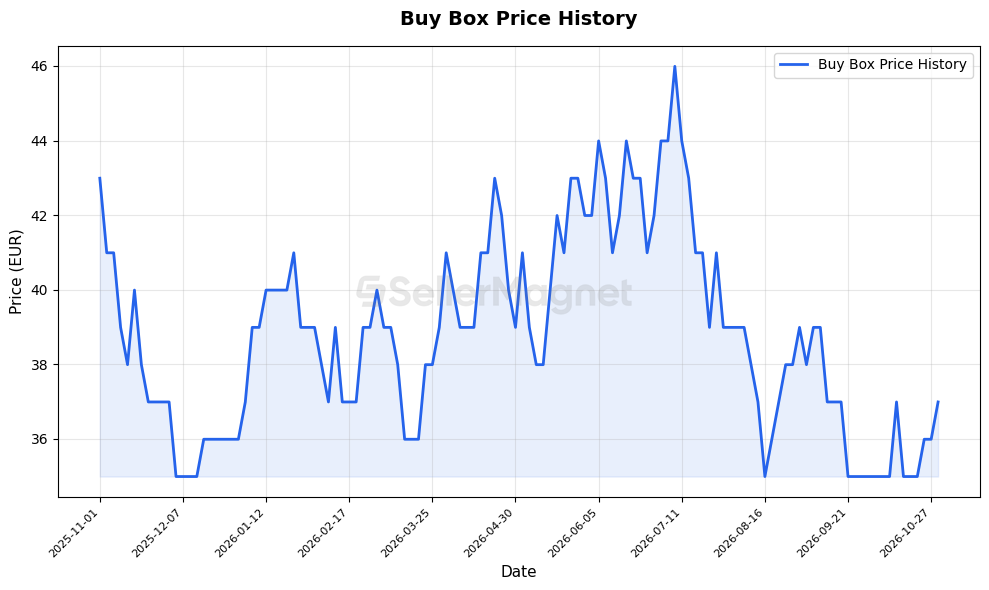
buyBoxPriceHistory). Price axis in EUR, major units.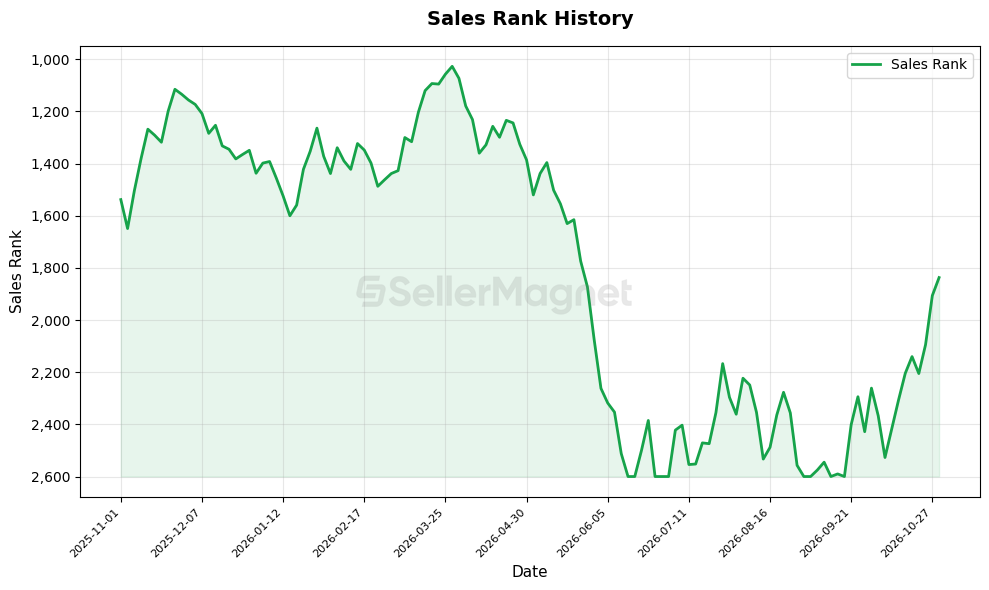
salesRankHistory). Inverted axis: rank 1 is at the top.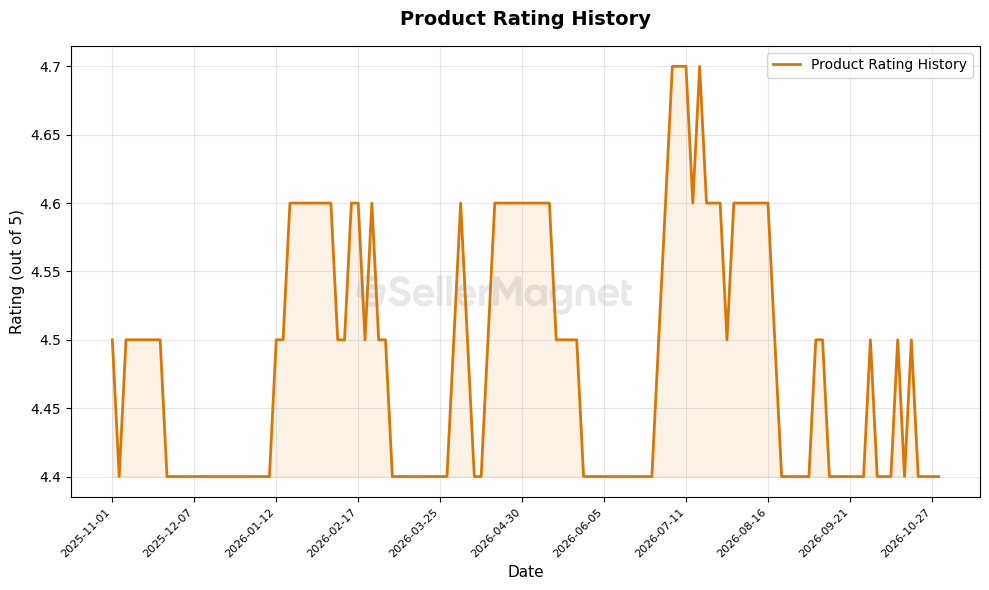
productRatingHistory).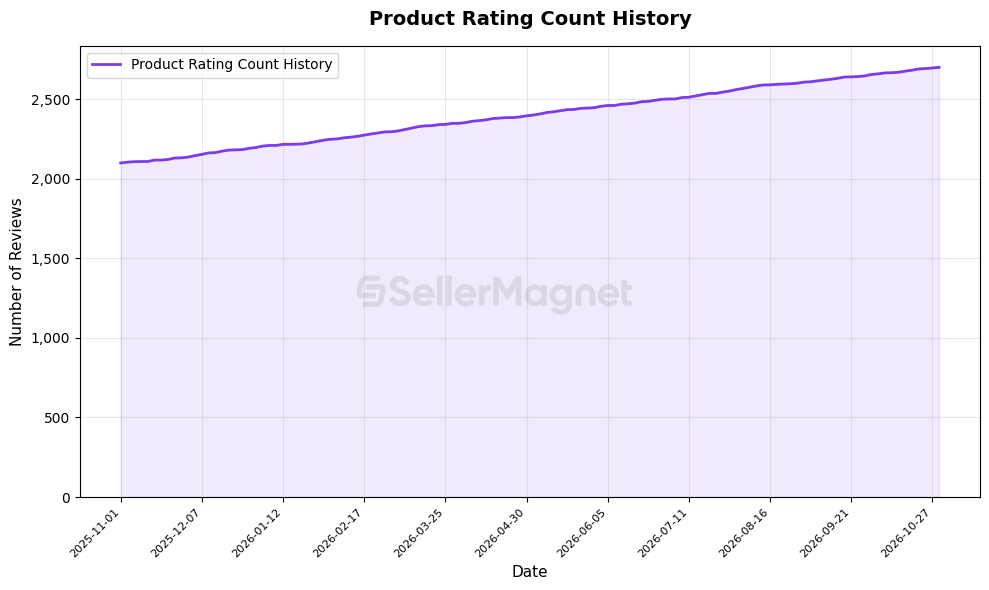
productRatingCountHistory). Y axis starts at 0.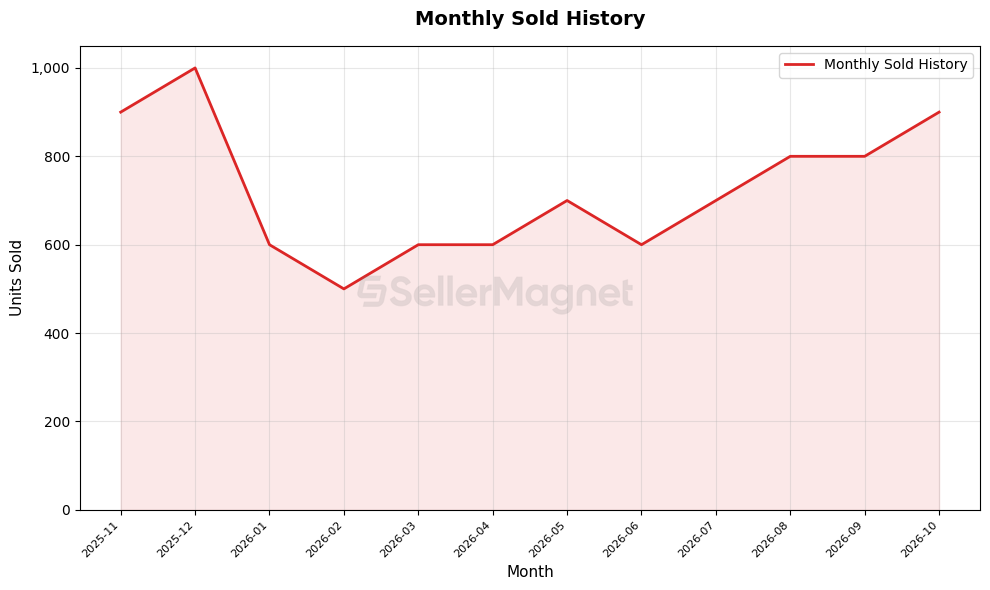
monthlySoldHistory). One point per month.Where the Chart URLs Are
Chart URLs sit in data.graphs, keyed by chart. The history series they were drawn from stay in the same response.
{
  "data": {
    "asin": "B0CLTBHXWQ",
    "bestSellerRank": 15,
    "buyBoxPrice": 41800,
    "graphs": {
      "buyBoxPriceHistory": "https://sellermagnet-api-webspace.s3.eu-central-1.amazonaws.com/amazon/api/charts/B0CLTBHXWQ/1762035001/B0CLTBHXWQ_buy_box_1762034996_8_3f9a1c2e.png",
      "salesRankHistory": "https://sellermagnet-api-webspace.s3.eu-central-1.amazonaws.com/amazon/api/charts/B0CLTBHXWQ/1762035002/B0CLTBHXWQ_sales_rank_1762034996_8_3f9a1c2e.png"
    },
    "marketplaceId": "APJ6JRA9NG5V4",
    "marketplaceNewPriceHistory": [["2025-06-14", 41700]],
    "productTitle": "Playstation 5 Console Edizione Digital Slim",
    "stats": {
      "buyBoxPriceHistory": [["2025-06-14", 41800]],
      "salesRankHistory": [["2025-06-14 01:58:00", 15]]
    },
    "trackingSince": "2023-12-18"
  },
  "success": true
}
Shortened: other fields, series points and chart keys are left out. The rules for data.graphs:
- With
graphs=true,data.graphsis always present on a successful response, possibly as an empty object{}. - Without
graphs=truethere is nodata.graphskey at all. - A chart key is absent (never
null) when its series is empty, when the sales rank, rating or rating count series has only no-data points, or when rendering or uploading that chart failed. The response is still HTTP 200 with the other charts. Always check that a key exists before using it. - Error responses never contain charts.
salesRankHistoryis insidedata.stats, like every other charted series exceptmarketplaceNewPriceHistory, which is at the top level ofdata.- Prices in the JSON are integers in the smallest currency unit (cents; whole yen on amazon.co.jp).
buyBoxPricecan be the string"N/A"when nobody holds the Buy Box or the holder is not among the live new offers returned, andamazonPrice,lowestFBAPriceandlowestFBMPricecan benull. Check the type before doing arithmetic. - The JSON series keep the no-data points that the charts leave out:
-1insalesRankHistoryandproductRatingCountHistory, and-0.1inproductRatingHistory. Drop values below 0 before you plot or average them yourself.
How the Charts Are Drawn
- Format: PNG, served as
image/png. - Size: about 990 × 590 pixels (the samples above are 989 × 590). The image is drawn at 10 × 6 inches and 100 dpi, then trimmed to its content, so the exact size can vary slightly. Do not hard-code it.
- Resolution: 100 dpi, made for screens rather than print.
- Watermark: every chart carries a SellerMagnet logo watermark in the centre.
- Style: one line per chart with the area between the line and the bottom of the chart lightly filled, a title, a legend, axis labels and a light grid on a white background.
- Y axis: price, sales rank and rating axes are scaled to the range of the data, so they do not start at 0 and small changes stay visible; read exact values from the JSON series. The rating count and monthly sold axes start at 0. Large numbers are written out with thousands separators, for example 1,500,000.
- X axis: points are evenly spaced in the order they were recorded. This is not a time scale: a gap of weeks between two points takes the same width as a gap of hours. Periods without data (no offer, no rank) leave no visible gap: the line joins the points on either side. With 20 or fewer points every point is labelled; with more, every n-th point is labelled (n = number of points divided by 10, rounded down), which gives 10 to 15 labels, and the newest point is often unlabelled. Labels are rotated 45 degrees. On the price, sales rank, rating and rating count charts the labels show only the day (
YYYY-MM-DD), so several points can share a label. - Price axes: labelled with the marketplace currency, for example
Price (USD)orPrice (EUR), and plotted in major units: a JSON value of41800is plotted as 418. On amazon.co.jp the values are whole yen and are plotted as they are. The JSON keeps the smallest-unit integers. - Sales rank: the y axis is inverted, so rank 1 is at the top and a rising line means a better rank. The axis shows dates (
YYYY-MM-DD), while the JSON keeps the full timestamp. Points without a rank are left out. - Rating and rating count: points without data are left out. If nothing is left, that chart is not created. The axis shows dates (
YYYY-MM-DD), while the JSON keeps the full timestamp. The rating count axis starts at 0. - Monthly sold: one point per month that has a value above 0, labelled
YYYY-MM, with the axis starting at 0. A month without such a value is left out rather than drawn as 0, and because the x axis is not a time scale the gap is not visible. Each value is Amazon's "bought in past month" figure as last recorded in that month, not a count of units sold in that calendar month. - Time range: each chart covers all the history available for the product. There is no fixed number of days;
data.trackingSinceshows when tracking of the product started. - Freshness: SellerMagnet caches neither responses nor images. Every request fetches the product history again and renders new image files.
Chart URLs Are Public S3 Links
- Each URL is a direct, unsigned link to a PNG file in a public Amazon S3 bucket in the eu-central-1 region, for example
https://sellermagnet-api-webspace.s3.eu-central-1.amazonaws.com/amazon/api/charts/.... - Opening a chart URL needs no API key, so an
<img>tag or any HTTP client can load it. Anyone who has the URL can open the image. - Every request creates new files with new URLs. Requesting the same ASIN twice gives two different sets of URLs.
- Use the URLs exactly as returned; do not build or parse them yourself.
Supported Marketplaces
Charts work on the same 11 Amazon marketplaces as the statistics endpoint. Other marketplace IDs get an HTTP 400 that costs no credit.
| Marketplace | marketplaceId | Price axis currency |
|---|---|---|
| amazon.com (United States) | ATVPDKIKX0DER | USD |
| amazon.co.uk (United Kingdom) | A1F83G8C2ARO7P | GBP |
| amazon.de (Germany) | A1PA6795UKMFR9 | EUR |
| amazon.fr (France) | A13V1IB3VIYZZH | EUR |
| amazon.it (Italy) | APJ6JRA9NG5V4 | EUR |
| amazon.es (Spain) | A1RKKUPIHCS9HS | EUR |
| amazon.co.jp (Japan) | A1VC38T7YXB528 | JPY (whole yen) |
| amazon.ca (Canada) | A2EUQ1WTGCTBG2 | CAD |
| amazon.in (India) | A21TJRUUN4KGV | INR |
| amazon.com.mx (Mexico) | A1AM78C64UM0Y8 | MXN |
| amazon.com.br (Brazil) | A2Q3Y263D00KWC | BRL |
1 Credit, Rendered Before the Response
- Cost: 1 credit per request, with or without
graphs=true. The credit is charged once the request passes the free checks listed under errors, and it is refunded only for an HTTP 500. - Synchronous: the response is sent only after every chart has been rendered and uploaded, one after another (up to 9). A request with
graphs=truetherefore does more work than one without. We do not publish a response time. - Timeout: the server waits at most 120 seconds for the response. If it is not ready in time you get HTTP 504, which is not JSON. The request is still billed and its charts are not returned, so a retry costs another credit. Set your client timeout to more than 120 seconds for
graphs=true(the samples use 130). - Concurrency: the request holds one of your API key's concurrent request slots until its response is ready, charts included.
- No charts needed? Leave out
graphs=true. The price is the same and the response does not wait for any rendering.
Errors and Billing
JSON errors have the shape {"success": false, "error": "...", "message": "..."}. Whether a credit is charged depends on where the request stopped.
Free: no credit charged
| HTTP | Message | When |
|---|---|---|
| 429 | Rate limit exceeded for this IP address. Slow down and retry. | Too many requests from one IP address. |
| 401 | API key is required | No key in the X-Api-Key header or the api_key parameter. |
| 401 | Invalid or inactive API key. | The key is unknown or deactivated. |
| 401 | Insufficient user credits. | You have no credits left. If the balance runs out between the key check and the charge, the same message comes with HTTP 403. |
| 401 | Temporary error validating API key. Please try again. | The key could not be checked. Retry. |
| 400 | Missing required parameter(s): asin, marketplaceId | Lists the parameters that are missing or blank. |
| 400 | Invalid marketplaceId | The ID is not a known Amazon marketplace ID. |
| 400 | This endpoint is not available for the requested marketplace. Supported: amazon.com, .ca, .com.mx, .com.br, .co.uk, .de, .fr, .it, .es, .in and .co.jp. | A known marketplace outside the 11 supported ones. |
| 429 | Max N concurrent requests per API key. Retry shortly. | Too many requests with your key are in progress at once and no slot became free within 20 seconds. Comes with Retry-After: 2. |
Billed: 1 credit charged
| HTTP | Message | When |
|---|---|---|
| 200 | (success) | Statistics returned; with graphs=true, charts in data.graphs. |
| 400 | Invalid product ASIN | The identifier was rejected as invalid. |
| 404 | Product not found | No product for this identifier on this marketplace. |
| 404 | No offers available - Parent Asin: parent ASIN | No live new-condition offer was found and the product has a parent ASIN. data.asin_not_found is true and data.parentAsin holds the parent ASIN. |
| 503 | Service is busy. Please retry in N seconds. | Temporary upstream limit. The Retry-After header says when to retry. |
| 502 | Upstream data service error. Please try again shortly. | The upstream data service failed. |
| 504 | (not JSON) | The response was not ready within the server's time limit (at most 120 seconds). The credit is kept. |
Refunded: credit given back
| HTTP | Message | When |
|---|---|---|
| 500 | An internal error occurred. Please try again shortly. | An error on our side. The credit is refunded. |
Frequently Asked Questions
Common questions about chart generation with graphs=true.
No. A request to /api/amazon-product-statistics costs 1 credit with or without graphs=true. The charts are rendered as part of that same request.
A key is left out, never set to null, when the series behind it has no data for the product, when the sales rank, rating or rating count series holds only no-data points, or when rendering or uploading that one chart failed. The other charts are still returned with HTTP 200. With graphs=true the data.graphs object is always present, even when it is empty.
We do not promise a lifetime or an expiry date for chart URLs. Every request creates new image files with new URLs. If you need an image later, for example in a report or an email, download it and store it yourself.
No. Price charts label the y axis with the marketplace currency, for example Price (EUR), and plot major units: a JSON value of 41800 is plotted as 418. On amazon.co.jp prices are whole yen on the axis and in the JSON. The JSON response itself keeps every price as an integer in the smallest currency unit.
No. graphs=true is the only chart option. It renders every chart that has data at about 990 by 590 pixels (the exact size can differ by a pixel or two), over all the history available for the product. There is no parameter to pick charts, change size or colours, set a date range or remove the watermark.
The x axis is not a time scale. Points are placed one after another in the order they were recorded, with equal spacing, so a gap of several weeks between two data points takes the same width as a gap of a few hours. Read the date labels, not the distance between points.
Charts are available on the same 11 Amazon marketplaces as the statistics endpoint: amazon.com, amazon.co.uk, amazon.de, amazon.fr, amazon.it, amazon.es, amazon.co.jp, amazon.ca, amazon.in, amazon.com.mx and amazon.com.br. Any other marketplace ID is rejected with HTTP 400 before a credit is charged.
Try Charts with Your Own ASIN
Create an account, copy your API key and add graphs=true to a Product Statistics request.
1 credit per request, with or without charts