
To get every offer on an Amazon listing, call the SellerMagnet /api/amazon-product-offers endpoint with the ASIN and marketplace. The response lists each offer with its seller, condition, FBA or FBM fulfilment, item price, shipping, landed price, delivery date and seller rating, and names the featured offer separately as buyBox. One request costs one credit and reads the offer listing live, so the prices are the ones a shopper sees right now.
Key Takeaways
- offers[] holds every offer on the first page of Amazon's offer listing; buyBox is the featured one.
- Compare offers on totalPrice (item plus shipping) - an FBM offer's item price alone hides its shipping.
- condition separates New from the Used grades; most price comparisons should look at New only.
- inventory is the add-to-cart limit for the offer, not the seller's stock.
- sellerId is "Amazon" for Amazon's own offer; amazonSellerId carries its real seller ID.
What does the offer listing API return?
The endpoint reads one page of Amazon's offer listing - the panel behind Other sellers on Amazon: the featured offer plus the offers Amazon loads first. There is no paging parameter. Each offer appears once: rows from the same seller with the same condition, fulfilment and delivery date are kept once - the first row wins. Prices are decimal numbers in the marketplace currency; offers[].totalPrice is rounded to two places, so round the buyBox copy yourself before comparing.
Response from /api/amazon-product-offers on amazon.com (trimmed, sellers anonymised)
{
  "success": true,
  "data": {
    "asin": "B0CL61F39H",
    "marketplaceId": "ATVPDKIKX0DER",
    "currency": {"symbol": "$", "code": "USD", "name": "United States Dollar"},
    "buyBoxSuppressed": false,
    "buyBox": {
      "sellerId": "Amazon", "amazonSellerId": "ATVPDKIKX0DER", "sellerName": "Amazon",
      "condition": "New", "fulfillmentType": "FBA",
      "priceWithoutShipping": 499.0, "shippingPrice": 0.0, "totalPrice": 499.0,
      "deliveryDate": "2025-06-28", "inventory": 30, "totalReviews": 0, "positivePercentage": 0
    },
    "offers": [
      {"sellerId": "Amazon", "amazonSellerId": "ATVPDKIKX0DER", "sellerName": "Amazon", "condition": "New",
       "fulfillmentType": "FBA", "priceWithoutShipping": 499.0, "shippingPrice": 0.0, "totalPrice": 499.0,
       "deliveryDate": "2025-06-28", "inventory": 30, "totalReviews": 0, "positivePercentage": 0},
      {"sellerId": "A17J18A7XABQI9", "amazonSellerId": null, "sellerName": "Example Seller",
       "condition": "Used - Very Good", "fulfillmentType": "FBM", "priceWithoutShipping": 409.99,
       "shippingPrice": 0.0, "totalPrice": 409.99, "deliveryDate": "2025-07-07", "inventory": 10,
       "totalReviews": 6892, "positivePercentage": 78}
    ]
  }
}| Field | Type | Meaning |
|---|---|---|
sellerId | string | Seller ID, or "Amazon" for Amazon's own offer |
amazonSellerId | string or null | Amazon's real seller ID when the seller is Amazon; null on amazon.in and amazon.sg |
condition | string | New, or Used - Like New / Very Good / Good / Acceptable |
fulfillmentType | FBA or FBM | Fulfilled by Amazon or by the merchant |
priceWithoutShipping / shippingPrice | number | Item price and shipping, decimal units |
totalPrice | number | Landed price: item plus shipping - the one to compare |
deliveryDate | string | YYYY-MM-DD, or N/A when the page shows none |
totalReviews / positivePercentage | integer | Seller rating count and share; 0 for Amazon |
inventory | integer | Add-to-cart limit for the offer (default 1) - not stock |
How do I compare Amazon offers fairly?
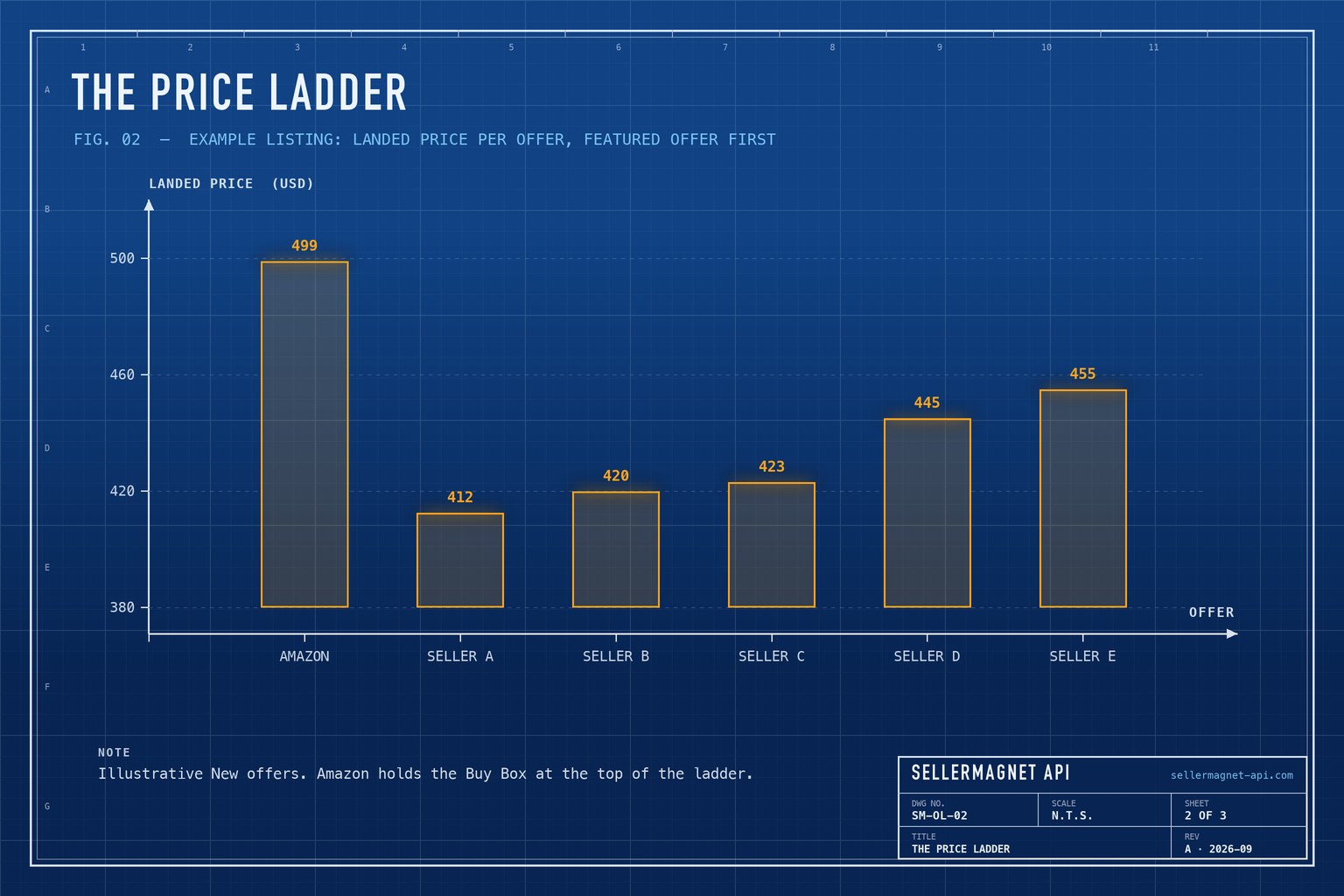
Compare landed prices of offers in the same condition. An FBM offer at 409.99 plus 12.00 shipping costs the shopper more than an FBA offer at 419.83 with free shipping, and a used console is not a competitor for a new one. The Buy Box is not simply the lowest price either: Amazon weighs fulfilment, delivery speed and seller rating, so a cheaper offer can sit behind the featured one.
offer_summary.py - the competition on one listing, one credit
import os
from collections import Counter

import requests


def offers(asin: str, marketplace_id: str) -> dict:
    resp = requests.get("https://sellermagnet-api.com/api/amazon-product-offers",
                        params={"asin": asin, "marketplaceId": marketplace_id},
                        headers={"X-Api-Key": os.environ["SELLERMAGNET_API_KEY"]}, timeout=120)
    try:
        body = resp.json()
    except ValueError:  # e.g. an HTML error page from a proxy
        body = {}
    if resp.status_code != 200 or not body.get("success"):
        raise RuntimeError(f"{asin}: {resp.status_code} {body.get('message')}")
    return body["data"]


def summarise(data: dict, my_seller_id: str | None = None) -> dict:
    new = [o for o in data["offers"] if o["condition"] == "New" and o["totalPrice"] > 0]
    by_channel = Counter(o["fulfillmentType"] for o in new)
    floor = {ch: min((o["totalPrice"] for o in new if o["fulfillmentType"] == ch), default=None)
             for ch in ("FBA", "FBM")}
    box = data.get("buyBox") or {}
    mine = next((o for o in new if o["sellerId"] == my_seller_id), None)
    return {
        "new_offers": len(new),
        "fba_sellers": by_channel["FBA"], "fbm_sellers": by_channel["FBM"],
        "lowest_new_fba": floor["FBA"], "lowest_new_fbm": floor["FBM"],
        "buy_box": None if not box else (box["sellerName"], box["totalPrice"]),
        "amazon_on_listing": any(o["sellerName"] == "Amazon" for o in new),
        "my_gap_to_buy_box": round(mine["totalPrice"] - box["totalPrice"], 2) if mine and box else None,
    }


print(summarise(offers("B0CL61F39H", "ATVPDKIKX0DER")))
What does the inventory field mean?
inventory is the maximum quantity Amazon lets a shopper add to the cart for that offer, read from the offer's add-to-cart button. For large sellers it is usually a per-order limit such as 10 or 30; for a seller with two units left it can be 2. Treat it as a lower bound on stock at best, never as a stock count - a value of 30 says nothing about whether the seller has 30 or 3,000 units.
No featured offer
When offers exist but Amazon shows none as featured, buyBoxSuppressed is true and buyBox is an empty object. A listing with no offers at all returns only buyBox: {}, currency: {} and offers: [] - no asin or buyBoxSuppressed, so read fields with .get(). It is a normal answer, billed like any other.
How do I list the sellers on an ASIN from the command line?
New offers sorted by landed price, with curl and jq
curl -sG "https://sellermagnet-api.com/api/amazon-product-offers" \
  -H "X-Api-Key: $SELLERMAGNET_API_KEY" \
  --data-urlencode "asin=B0CL61F39H" \
  --data-urlencode "marketplaceId=ATVPDKIKX0DER" \
  | jq -r '(.data.offers // []) | map(select(.condition == "New")) | sort_by(.totalPrice)[]
           | [.totalPrice, .fulfillmentType, .sellerName, .deliveryDate] | @tsv'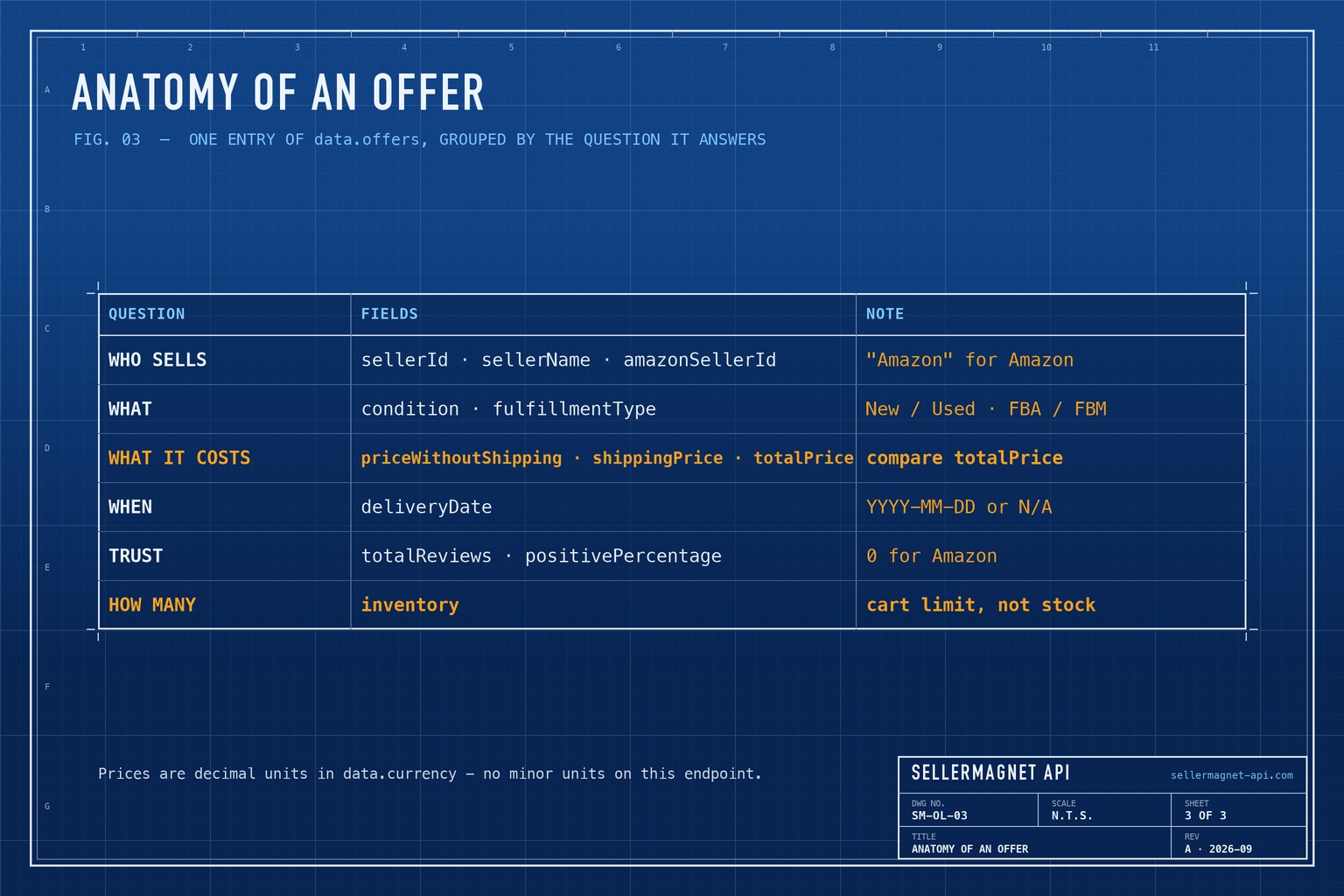
The offer listing is a snapshot. To watch who takes the featured offer over the day, the Buy Box polling guide sets the interval and cost; for how prices moved over months, the price history endpoint returns the recorded series. The endpoint does not validate the ASIN format, so a typo is sent and billed - check it locally first, as the error-handling guide explains.
Frequently Asked Questions
Is there an API for all sellers on an Amazon listing?
Yes. /api/amazon-product-offers returns the offers on an ASIN's offer listing with seller, condition, FBA or FBM, landed price, delivery date and seller rating, plus the featured Buy Box offer.
Does the offers API return every offer?
It returns the first page of Amazon's offer listing: the featured offer and the offers Amazon loads first. There is no paging parameter.
Which price should I compare?
totalPrice, the landed price including shipping, and only between offers in the same condition.
Is inventory the seller's stock?
No. It is the maximum quantity the offer can be added to the cart with - a per-order limit or a lower bound on stock.
How is Amazon's own offer shown?
sellerId and sellerName are "Amazon"; amazonSellerId carries Amazon's seller ID for that marketplace, such as ATVPDKIKX0DER on amazon.com (null on amazon.in and amazon.sg).
Bottom line: one call returns the listing's competition, compare landed prices within one condition, and read inventory as a cart limit. The product offers page shows the endpoint, and a free account includes 150 credits.


