
To see who held an Amazon Buy Box over time, call /api/amazon-product-statistics with the ASIN and marketplace ID and read buyBoxSellerIdHistory: a list of [timestamp, sellerId] pairs, one per change of holder. One credit returns the whole recorded history. Weighting each holder by how long they kept the Buy Box gives every seller's share of time, and Amazon's own seller ID shows when Amazon itself took over. The Python below does both.
Key Takeaways
- buyBoxSellerIdHistory lists ["YYYY-MM-DD HH:MM:SS", sellerId] pairs in UTC, one entry per change of holder.
- A holder keeps the Buy Box until the next entry, so a share must be time-weighted, not a count of entries.
- "-1" means no seller qualified for the Buy Box; "-2" means a seller held it whose ID is not known yet, typically a brand-new one.
- Amazon appears under its real seller ID, such as A3JWKAKR8XB7XF on amazon.de - not as the word Amazon.
- shareBuyBox is true when Amazon did not hold the Buy Box in the last 30 days; privateLabel when at most one known seller ever held it.
What does the Buy Box history contain?
The history sits at the top level of data, next to two flags derived from it and the live offers keyed by seller ID. The series records changes only: an entry means a new holder took the Buy Box at that moment and kept it until the next entry.
Buy Box fields from /api/amazon-product-statistics (trimmed, example values)
{
  "success": true,
  "data": {
    "asin": "B0CL61F39H",
    "marketplaceId": "ATVPDKIKX0DER",
    "buyBoxSellerIdHistory": [
      ["2026-06-02 08:14:00", "ATVPDKIKX0DER"],
      ["2026-07-19 21:40:00", "A2I59UVTUWUFH0"],
      ["2026-08-03 05:02:00", "-1"],
      ["2026-08-05 11:26:00", "ATVPDKIKX0DER"]
    ],
    "privateLabel": false,
    "shareBuyBox": false,
    "buyBoxFulfillment": "FBA",
    "offers": {
      "ATVPDKIKX0DER": {"isFBA": true, "lastUpdated": "2026-09-23 06:10:00"},
      "A2I59UVTUWUFH0": {"isFBA": true, "lastUpdated": "2026-09-23 06:10:00"}
    }
  }
}| Field | Meaning |
|---|---|
buyBoxSellerIdHistory | [time, sellerId] per change of holder, UTC; null when no history is recorded |
"-1" / "-2" | No seller qualified for the Buy Box / a seller held it, but its ID is unknown (typically a brand-new seller) |
privateLabel | true when at most one identified seller ID has ever held the Buy Box ("-2" holders are not counted) |
shareBuyBox | true when Amazon itself did not hold the Buy Box in the last 30 days |
buyBoxFulfillment | FBA or FBM for the current holder; null when nobody holds it or the holder is not among the returned offers |
offers | Live new-condition offers keyed by seller ID, with isFBA - former holders may be missing |
How do I compute each seller's Buy Box share?
Walk the changes in order and give each holder the time until the next change, or until now for the current one. For a 90-day window, start with whoever held the Buy Box when the window opened - the last change before it - otherwise a seller who held it all along gets no time at all. get() and new_session() are the helpers from the Python quickstart.
buybox_share.py - time-weighted share per holder over a window
from collections import defaultdict
from datetime import datetime, timedelta, timezone

from sellermagnet import get, new_session

NO_HOLDER = "no holder"            # "-1": no seller qualified
UNKNOWN = "unknown seller"         # "-2": held by a seller whose ID is not known yet


def parse(history) -> list[tuple[datetime, str]]:
    points = []
    for ts, seller in history or []:
        when = datetime.strptime(ts, "%Y-%m-%d %H:%M:%S").replace(tzinfo=timezone.utc)
        points.append((when, {"-1": NO_HOLDER, "-2": UNKNOWN}.get(str(seller), str(seller))))
    return sorted(points, key=lambda p: p[0])      # stable: same-minute entries keep their order


def buy_box_share(history, days: int = 90, now: datetime | None = None) -> dict[str, float]:
    """Percent of the recorded time in the window each holder kept the Buy Box."""
    now = now or datetime.now(timezone.utc)
    start = now - timedelta(days=days)
    points = parse(history)
    before = [p for p in points if p[0] <= start]
    timeline = ([(start, before[-1][1])] if before else []) + [p for p in points if start < p[0] <= now]
    seconds = defaultdict(float)
    for (when, holder), (until, _) in zip(timeline, timeline[1:] + [(now, None)]):
        seconds[holder] += (until - when).total_seconds()
    total = sum(seconds.values()) or 1.0
    return {h: round(100 * s / total, 1) for h, s in sorted(seconds.items(), key=lambda kv: -kv[1])}


if __name__ == "__main__":
    data = get(new_session(), "amazon-product-statistics", asin="B0CL61F39H", marketplaceId="ATVPDKIKX0DER")
    for holder, pct in buy_box_share(data["buyBoxSellerIdHistory"]).items():
        print(f"{holder:<16} {pct:5.1f} %")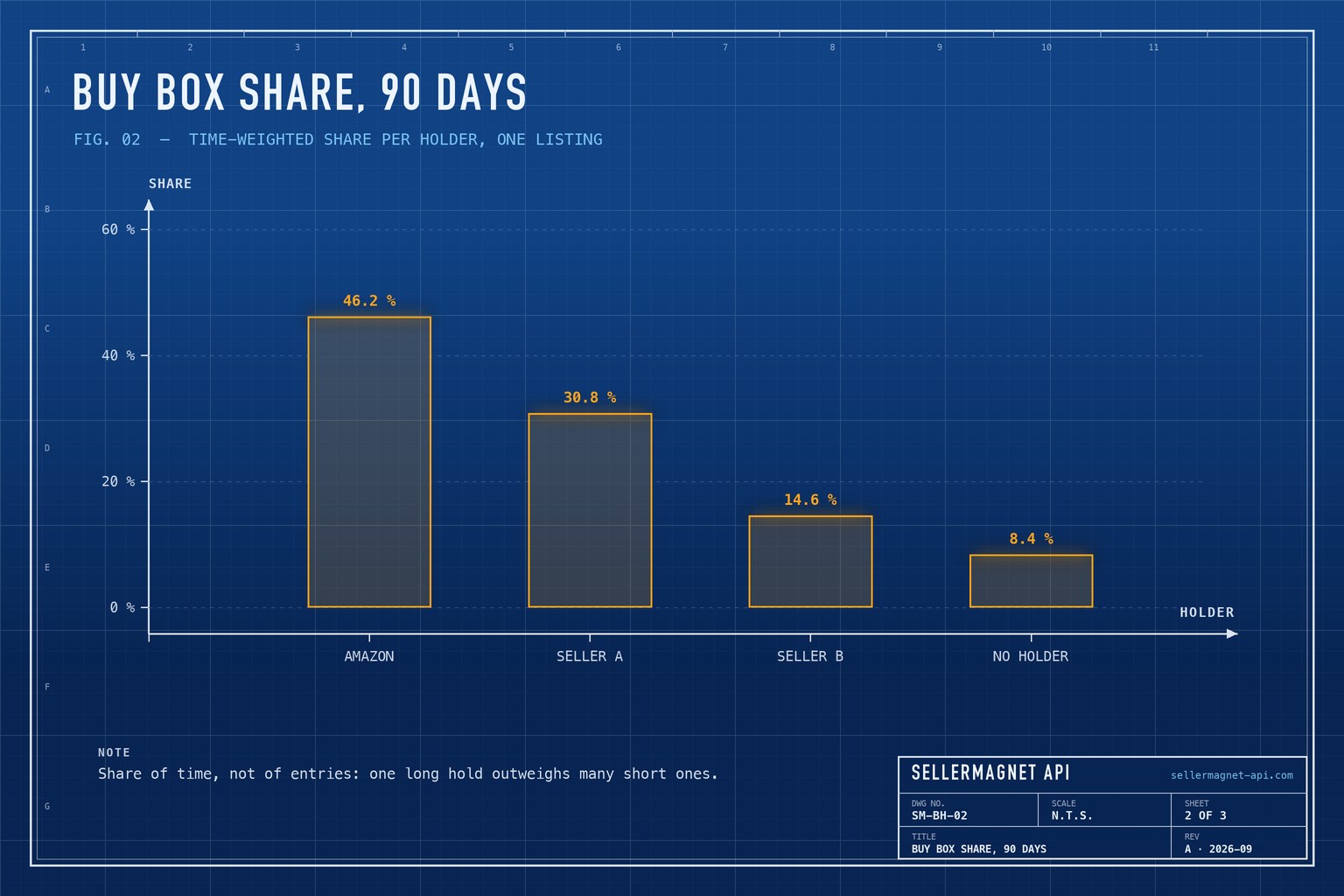
This is not the "Featured Offer (Buy Box) percentage" in Seller Central: that metric covers only your own offers and is weighted by page views. The time share here covers every seller on the listing, competitors included, and comes from one call instead of weeks of snapshots - the older Buy Box monitoring article shows the snapshot approach.
Count time, not entries
A seller who wins the Buy Box twenty times for ten minutes each appears twenty times in the list, but holds it for just over three hours. Counting entries overstates rotating sellers and understates a holder who kept the Buy Box for weeks.
How do I see when Amazon takes the Buy Box?
Match the history against Amazon's first-party seller ID for that marketplace. The live offers endpoint shows Amazon as sellerId: "Amazon" with the real ID in amazonSellerId; the history uses the real ID directly. amazon.in has no first-party seller, so there shareBuyBox is always true (or null without history).
amazon_switches.py - when Amazon took or lost the Buy Box
from buybox_share import parse

AMAZON_ID = {  # marketplaceId -> Amazon's own seller ID (amazon.in has none)
    "ATVPDKIKX0DER": "ATVPDKIKX0DER", "A2EUQ1WTGCTBG2": "A3DWYIK6Y9EEQB", "A1AM78C64UM0Y8": "AVDBXBAVVSXLQ",
    "A2Q3Y263D00KWC": "A1ZZFT5FULY4LN", "A1F83G8C2ARO7P": "A3P5ROKL5A1OLE", "A1PA6795UKMFR9": "A3JWKAKR8XB7XF",
    "A13V1IB3VIYZZH": "A1X6FK5RDHNB96", "APJ6JRA9NG5V4": "A11IL2PNWYJU7H", "A1RKKUPIHCS9HS": "A1AT7YVPFBWXBL",
    "A1VC38T7YXB528": "AN1VRQENFRJN5",
}


def amazon_switches(history, marketplace_id: str) -> list[str]:
    amazon, events, had = AMAZON_ID.get(marketplace_id), [], None
    for when, holder in parse(history):
        has = holder == amazon
        if had is not None and has != had:
            events.append(f"{when:%Y-%m-%d %H:%M} Amazon {'took' if has else 'lost'} the Buy Box")
        had = has
    return events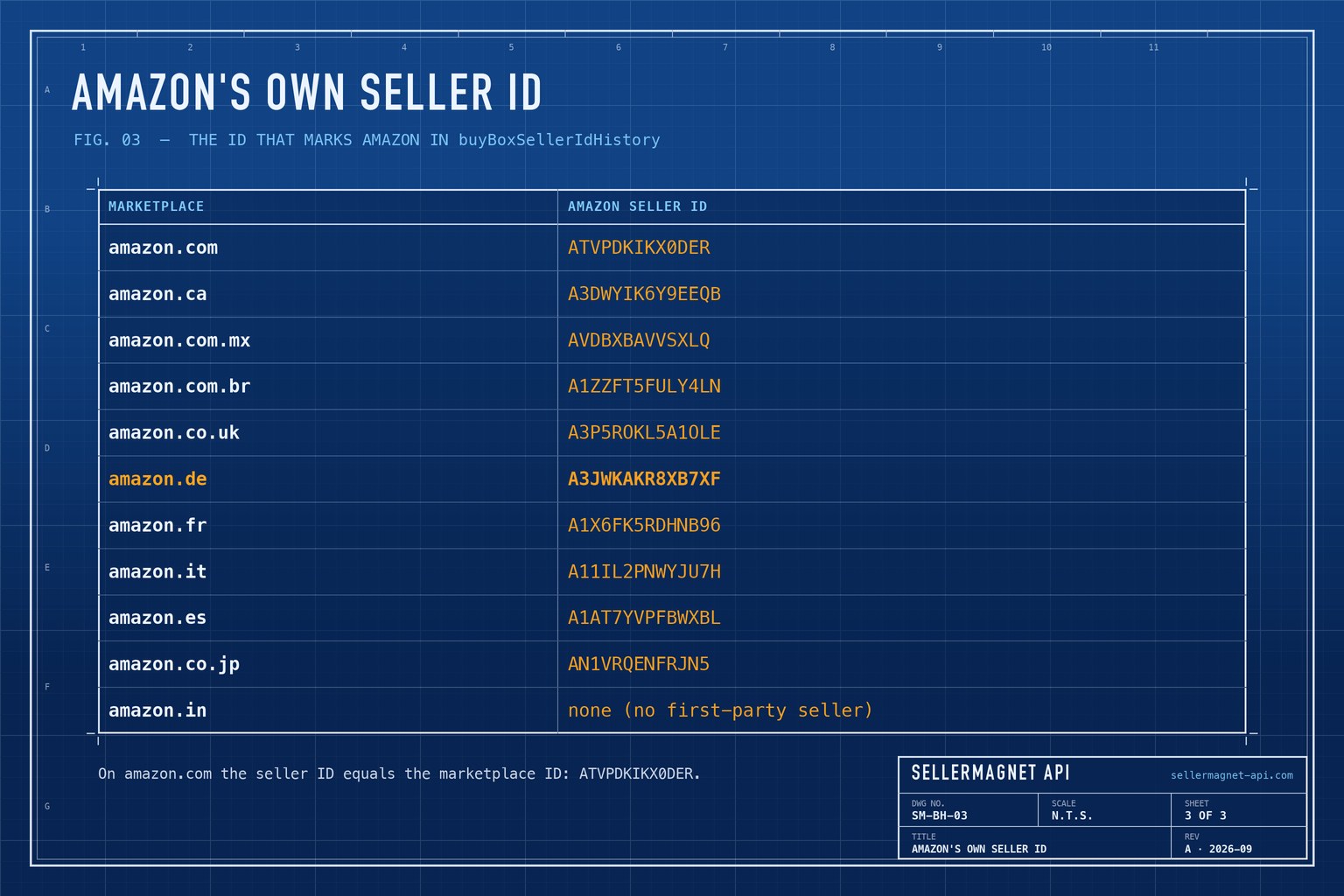
What do privateLabel and shareBuyBox mean?
Both flags are computed from the same history. privateLabel is true when at most one identified seller has ever held the Buy Box - typical of a brand selling its own product alone. shareBuyBox is true when Amazon itself did not hold the Buy Box at any time in the last 30 days, so third-party sellers have a chance at it. Both are null when the history cannot be read.
Can I count Buy Box changes from the command line?
Yes. jq can list the latest changes of holder and count the entries, which is a quick check before writing any code. Remember that entries are changes, not time.
Last five holders and the number of history entries
curl -sG "https://sellermagnet-api.com/api/amazon-product-statistics" \
  -H "X-Api-Key: $SELLERMAGNET_API_KEY" --max-time 120 \
  --data-urlencode "asin=B0CL61F39H" \
  --data-urlencode "marketplaceId=ATVPDKIKX0DER" \
  | jq -r 'if .success then ((.data.buyBoxSellerIdHistory // []) as $h
           | ($h[-5:][] | @tsv), "entries: \($h | length)") else error(.message) end'
History shows how the Buy Box moved; it does not tell you who holds it this minute. For the live holder and the seller names behind the IDs, call the offers endpoint, and to react to changes as they happen see the Buy Box polling guide. The same statistics call also carries the price history.
Frequently Asked Questions
How far back does the Buy Box history go?
One statistics call returns all of it. The first entry of buyBoxSellerIdHistory is the earliest recorded holder; data.trackingSince shows when tracking of the product began.
Why is Amazon not shown as "Amazon" in the history?
The history stores seller IDs. Amazon appears under its first-party seller ID for the marketplace, such as ATVPDKIKX0DER on amazon.com.
What does -1 mean in buyBoxSellerIdHistory?
No seller qualified for the Buy Box from that moment, for example when it was suppressed. -2 means a seller did hold it, but one whose ID is not known yet.
Does the history include seller names?
No, only seller IDs. The offers endpoint returns names for current sellers; the seller feedback endpoint returns a seller's name by ID.
Which marketplaces have Buy Box history?
The 11 marketplaces with recorded history, such as amazon.com, .co.uk, .de, .fr and .co.jp. Other marketplaces return a free 400.
Bottom line: one statistics call gives the holder history, time-weighting turns it into a fair share per seller, and Amazon's own seller ID marks when Amazon competed. The product statistics page has the parameters, and a free account includes 150 credits.


