
For Amazon Buy Box monitoring, check each ASIN as often as a lost Buy Box actually costs you money, and no more often. Every check is one API request, so the interval sets both your worst-case detection lag and your spend: polling one ASIN every 15 minutes costs 96 credits a day, every 6 hours costs 4. Most catalogues are best served by a tiered schedule - fast for the few ASINs that matter, slow for the rest.
Key Takeaways
- The worst-case delay before you notice a Buy Box change equals your polling interval.
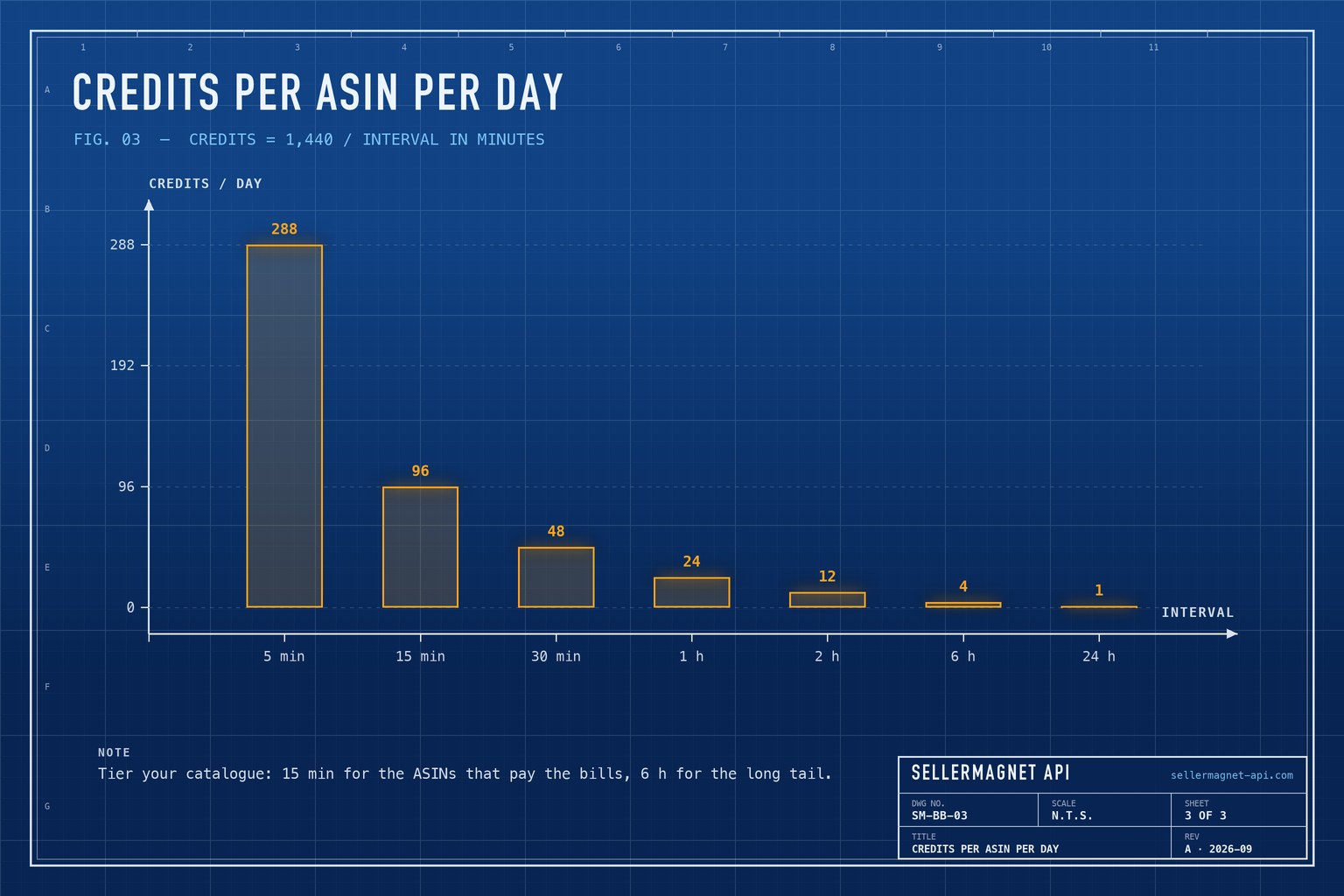
- Credits per ASIN per day equal 1,440 divided by the interval in minutes.
- Polling one ASIN every 15 minutes costs 96 credits a day; every 6 hours costs 4.
- A tiered schedule keeps fast checks for a handful of key ASINs and cuts total spend sharply.
- The offers endpoint reads the live listing, so it is the right source for detecting a change now.
What does the polling interval actually decide?
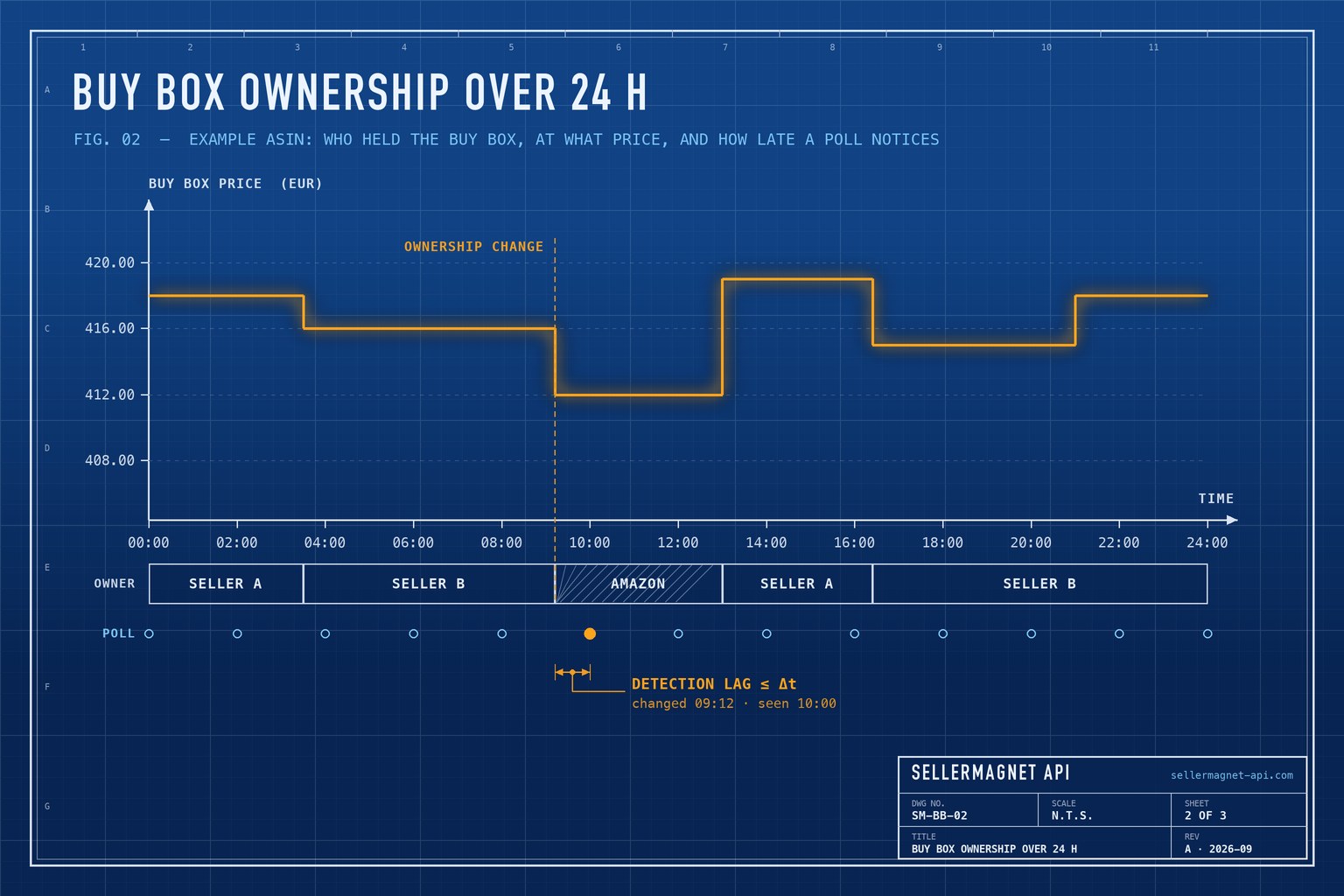
The polling interval (Δt) is the time between two checks of the same ASIN. If a competitor takes the Buy Box one second after a check, you learn about it one full interval later, so Δt is your worst-case detection lag. On average the lag is about half the interval, but you plan for the worst case.
The interval also sets the cost, because each check is one request and one credit. Halving Δt halves the lag and doubles the spend. The chart below shows the trade on a single ASIN: the owner changes at 09:12, and a 2-hourly schedule does not notice until the 10:00 check.
How many credits does each interval cost?
Credits per ASIN per day are 1,440 minutes divided by the interval. The table assumes one request per ASIN per check; see pricing for what a credit costs on your plan.
| Interval | Worst-case lag | Credits / ASIN / day | Credits / day for 100 ASINs |
|---|---|---|---|
| 5 min | 5 min | 288 | 28,800 |
| 15 min | 15 min | 96 | 9,600 |
| 30 min | 30 min | 48 | 4,800 |
| 1 h | 1 h | 24 | 2,400 |
| 2 h | 2 h | 12 | 1,200 |
| 6 h | 6 h | 4 | 400 |
| 24 h | 24 h | 1 | 100 |
What is a tiered polling schedule?
A tiered schedule checks each ASIN at an interval matched to its value. Take 200 ASINs: polling all of them every 15 minutes costs 19,200 credits a day. Checking the top 20 every 15 minutes (1,920) and the other 180 every 6 hours (720) costs 2,640 - an 86 percent saving - while the ASINs that drive revenue keep a 15-minute lag.
- Hot tier - best sellers and ASINs under active repricing: every 15 to 30 minutes.
- Warm tier - steady sellers: every 1 to 2 hours.
- Cold tier - long tail and watch lists: every 6 to 24 hours.
How do I track Buy Box owner changes in Python?
Read the live offer listing from /api/amazon-product-offers, compare the Buy Box sellerId with the one stored last time, and act only when it changes. The script stores state in a small JSON file, so it can run from cron without a database. For the price and ownership history, /api/amazon-product-statistics returns a timestamped buyBoxSellerIdHistory; the offers endpoint page documents the live fields.
buybox_check.py - alert only when the Buy Box owner changes
import json
import os
import sys
from pathlib import Path

import requests

STATE = Path(os.environ.get("BUYBOX_STATE", "buybox_state.json"))  # one file per tier
MARKETPLACE = "APJ6JRA9NG5V4"  # amazon.it


def buy_box(asin: str) -> dict:
    resp = requests.get(
        "https://sellermagnet-api.com/api/amazon-product-offers",
        params={"asin": asin, "marketplaceId": MARKETPLACE,
                "api_key": os.environ["SELLERMAGNET_API_KEY"]},
        timeout=120,
    )
    if resp.status_code != 200:
        raise RuntimeError(f"{asin}: HTTP {resp.status_code}")
    body = resp.json()
    if not body.get("success"):
        raise RuntimeError(f"{asin}: {body.get('message')}")
    box = body["data"].get("buyBox") or {}
    return {"seller": box.get("sellerId") or None,  # None: nobody holds it
            "price": box.get("totalPrice")}


def main(asins: list[str]) -> None:
    state = json.loads(STATE.read_text()) if STATE.exists() else {}
    for asin in asins:
        try:
            now = buy_box(asin)
        except (RuntimeError, ValueError, requests.RequestException) as exc:
            print(exc, file=sys.stderr)  # one bad ASIN must not stop the whole tier
            continue
        before = state.get(asin)
        if before and before["seller"] != now["seller"]:
            print(f"BUY BOX CHANGE {asin}: {before['seller']} -> {now['seller']} at {now['price']}")
        state[asin] = now
    STATE.write_text(json.dumps(state, indent=2))


if __name__ == "__main__":
    main(sys.argv[1:])
The part of the offers response the checker reads
{
  "success": true,
  "data": {
    "asin": "B0CL61F39H",
    "marketplaceId": "ATVPDKIKX0DER",
    "buyBox": {
      "sellerId": "Amazon",
      "sellerName": "Amazon",
      "fulfillmentType": "FBA",
      "totalPrice": 444.99,
      "condition": "New"
    }
  }
}
Scheduling the tiers with cron
crontab -e: one line per tier
SELLERMAGNET_API_KEY=your-key-here   # cron does not read your shell profile
# one state file per tier: tiers that start in the same minute must not overwrite each other
# hot tier: every 15 minutes
*/15 * * * *  cd /opt/buybox && BUYBOX_STATE=hot.json  .venv/bin/python buybox_check.py $(cat hot.txt)  >> hot.log  2>&1
# warm tier: every 2 hours
0 */2 * * *   cd /opt/buybox && BUYBOX_STATE=warm.json .venv/bin/python buybox_check.py $(cat warm.txt) >> warm.log 2>&1
# cold tier: every 6 hours
0 */6 * * *   cd /opt/buybox && BUYBOX_STATE=cold.json .venv/bin/python buybox_check.py $(cat cold.txt) >> cold.log 2>&1
How do I measure my Buy Box win rate?
Buy Box win rate is the share of time your seller ID held the Buy Box. The statistics endpoint's buyBoxSellerIdHistory lists every ownership change as a [timestamp, sellerId] pair, so weighting each owner by how long they held it gives a time-based share for the whole history window. A seller ID of -1 marks periods when nobody held the Buy Box.
Time-weighted Buy Box share from the ownership history
from datetime import datetime


def buy_box_share(history: list[list[str]], seller_id: str, until: datetime) -> float:
    """Share of the history window in which seller_id held the Buy Box."""
    points = sorted((datetime.strptime(ts, "%Y-%m-%d %H:%M:%S"), sid) for ts, sid in history)
    ends = [start for start, _sid in points[1:]] + [until]
    held = total = 0.0
    for (start, sid), end in zip(points, ends):
        span = (end - start).total_seconds()
        total += span
        if sid == seller_id:
            held += span
    return held / total if total else 0.0


# history = stats["buyBoxSellerIdHistory"]  from /api/amazon-product-statistics
# print(f"{buy_box_share(history, 'A2I59UVTUWUFH0', datetime.utcnow()):.0%}")
Which changes deserve an alert?
- You lose the Buy Box - the seller ID changes away from yours.
- You are undercut while holding it - a competing offer's
totalPricedrops below yours. - The Buy Box disappears - nobody holds it, often a sign of a pricing or stock problem.
- A new seller appears - a seller ID in the offer list you have not seen on that ASIN before.
No server? Schedule it without code
The DataPipeline scheduler runs batches of up to 10,000 URLs on a cron schedule and delivers the results to your own S3 bucket, a webhook or email.
Retries, Retry-After and which errors cost a credit are covered in rate limits and error handling. For a broader look at what drives Buy Box changes, see monitoring Buy Box dynamics in real time. For polling many ASINs at once, the bulk lookup guide covers concurrency and caching.
Frequently Asked Questions
How often does the Amazon Buy Box change?
It depends on the listing. Competitive ASINs with several sellers can change owner many times a day; single-seller ASINs rarely change.
How many credits does polling cost per day?
1,440 divided by the interval in minutes, per ASIN. Every 15 minutes is 96 credits; every hour is 24.
Which endpoint shows the current Buy Box owner?
/api/amazon-product-offers reads the live offer listing and returns the Buy Box seller ID, name, price, fulfilment type and condition, for one credit per request.
Can I get the Buy Box history instead of polling?
Yes. The product statistics endpoint returns a timestamped list of Buy Box sellers, useful for trends rather than instant alerts.
What happens if nobody holds the Buy Box?
The live Buy Box seller comes back empty, which the example script records as None and reports as a change. In the statistics history it appears as seller ID -1.
Bottom line: set each ASIN's interval by what a lost hour of Buy Box costs, tier the catalogue, and alert only on change. Fifteen minutes for the few ASINs that matter and six hours for the rest is a strong default. Start with 150 free credits to size your schedule.


