
To find new products on an Amazon bestseller list, read the category's top 50 with /api/amazon-bestsellers, then look up each ASIN with /api/amazon-product-lookup and keep the ones whose listedSinceDate - the page's Date First Available - is recent. The first run costs 51 credits per category. Launch dates do not change, so a small cache means later runs only look up the ASINs that newly entered the list.
Key Takeaways
- A bestseller page holds 50 products; one request with count=50 returns all of them for one credit.
- listedSinceDate is the Date First Available shown on the product page, as YYYY-MM-DD, or null when the page shows none.
- Cache every answer you paid for, including null and 404: dates do not change, so each ASIN is bought once.
- Retry only lookups that failed; a product without a date stays unknown and is not bought again every week.
- New products with few reviews high on a list are the strongest signal: Amazon ranks the list by sales, updated hourly.
How do I find new products on a bestseller list?
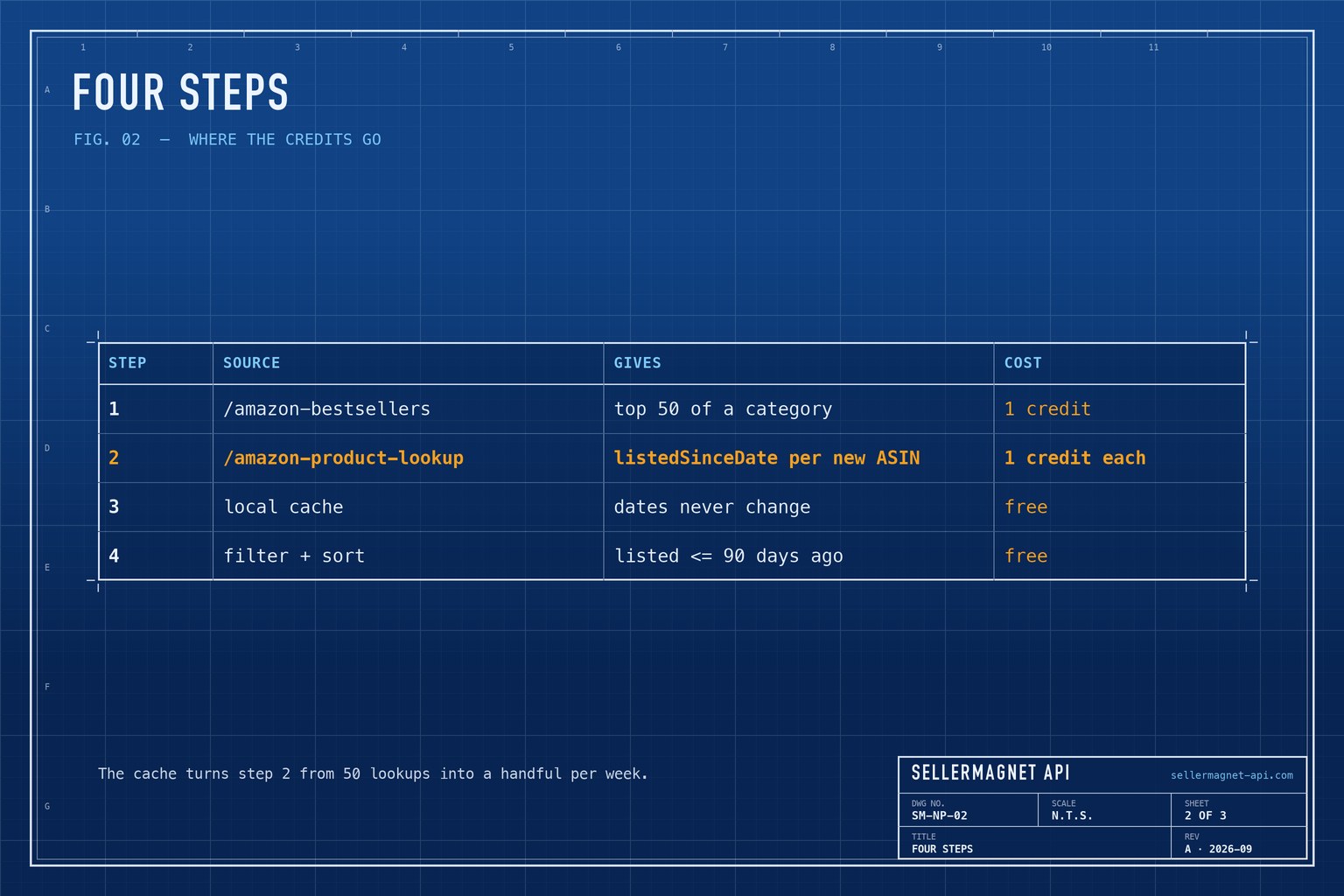
Four steps: the list, the launch dates, a cache, and a filter. Bestsellers returns rank, asin, productTitle, the price and reviewAmount for up to 50 products; product lookup adds listedSinceDate. Date First Available is when the ASIN was created, which can be weeks before the product actually shipped, so treat it as an upper bound on age. Category IDs per marketplace are explained in the category ID guide and can be browsed on the category explorer.
| Step | Source | What it gives | Cost |
|---|---|---|---|
| 1 | /amazon-bestsellers | Top 50 of a category | 1 credit |
| 2 | /amazon-product-lookup | ListedSinceDate per new ASIN | 1 credit each |
| 3 | Local cache | Dates never change | free |
| 4 | Filter + sort | Listed <= 90 days ago | free |
new_products.py - new arrivals on one bestseller list
"""Products on an Amazon bestseller list that were first listed recently."""
import json
import threading
from concurrent.futures import ThreadPoolExecutor
from datetime import date
from pathlib import Path

import requests

from sellermagnet import ApiError, get, new_session

CACHE = Path("listed_since.json")   # "Date First Available" does not change, so each ASIN is looked up once
_local = threading.local()


def session():
    if not hasattr(_local, "session"):
        _local.session = new_session()
    return _local.session


MISSING = object()                   # the call failed (network, 5xx): try again next run


def listed_since(asin: str, marketplace_id: str):
    """The listing date ("YYYY-MM-DD"), None when there is none, MISSING when the call failed."""
    try:
        return get(session(), "amazon-product-lookup", asin=asin, marketplaceId=marketplace_id)["productInfo"].get("listedSinceDate")
    except ApiError as err:
        return None if err.status == 404 else MISSING   # a 404 is billed: do not buy it again
    except requests.RequestException:
        return MISSING


def new_on_list(category_id: str, marketplace_id: str, max_age_days: int = 90) -> list[dict]:
    cache = json.loads(CACHE.read_text()) if CACHE.exists() else {}
    top = get(session(), "amazon-bestsellers", category_id=category_id, marketplaceId=marketplace_id, count=50)["bestsellers"]
    todo = [p["asin"] for p in top if f"{marketplace_id}:{p['asin']}" not in cache]
    with ThreadPoolExecutor(max_workers=5) as pool:
        for asin, since in zip(todo, pool.map(lambda a: listed_since(a, marketplace_id), todo)):
            if since is not MISSING:                    # a page without a date is cached as null too
                cache[f"{marketplace_id}:{asin}"] = since
    CACHE.write_text(json.dumps(cache, indent=1))

    rows = []
    for p in top:
        since = cache.get(f"{marketplace_id}:{p['asin']}")
        age = (date.today() - date.fromisoformat(since)).days if since else None
        if age is not None and age <= max_age_days:
            rows.append({"rank": p["rank"], "asin": p["asin"], "days_listed": age, "listed": since,
                         "reviews": p.get("reviewAmount"), "title": (p.get("productTitle") or "")[:60]})
    print(f"credits: 1 list + {len(todo)} lookups")
    return rows


if __name__ == "__main__":
    for row in new_on_list("electronics", "ATVPDKIKX0DER"):
        print(row["rank"], row["asin"], row["days_listed"], row["reviews"], row["title"])
Lookups run on five threads, each with its own session. get(), new_session() and ApiError come from the Python quickstart. A category ID that does not exist in the marketplace's tree is a billed 400, so take IDs from the tree rather than guessing.
listed_since.json - the cache after the first run (excerpt, example values)
{
 "ATVPDKIKX0DER:B0CL61F39H": "2023-12-10",
 "ATVPDKIKX0DER:B0D1XD1ZV3": "2026-08-02",
 "ATVPDKIKX0DER:B07PXGQC1Q": null
}
How much does a weekly scan cost?
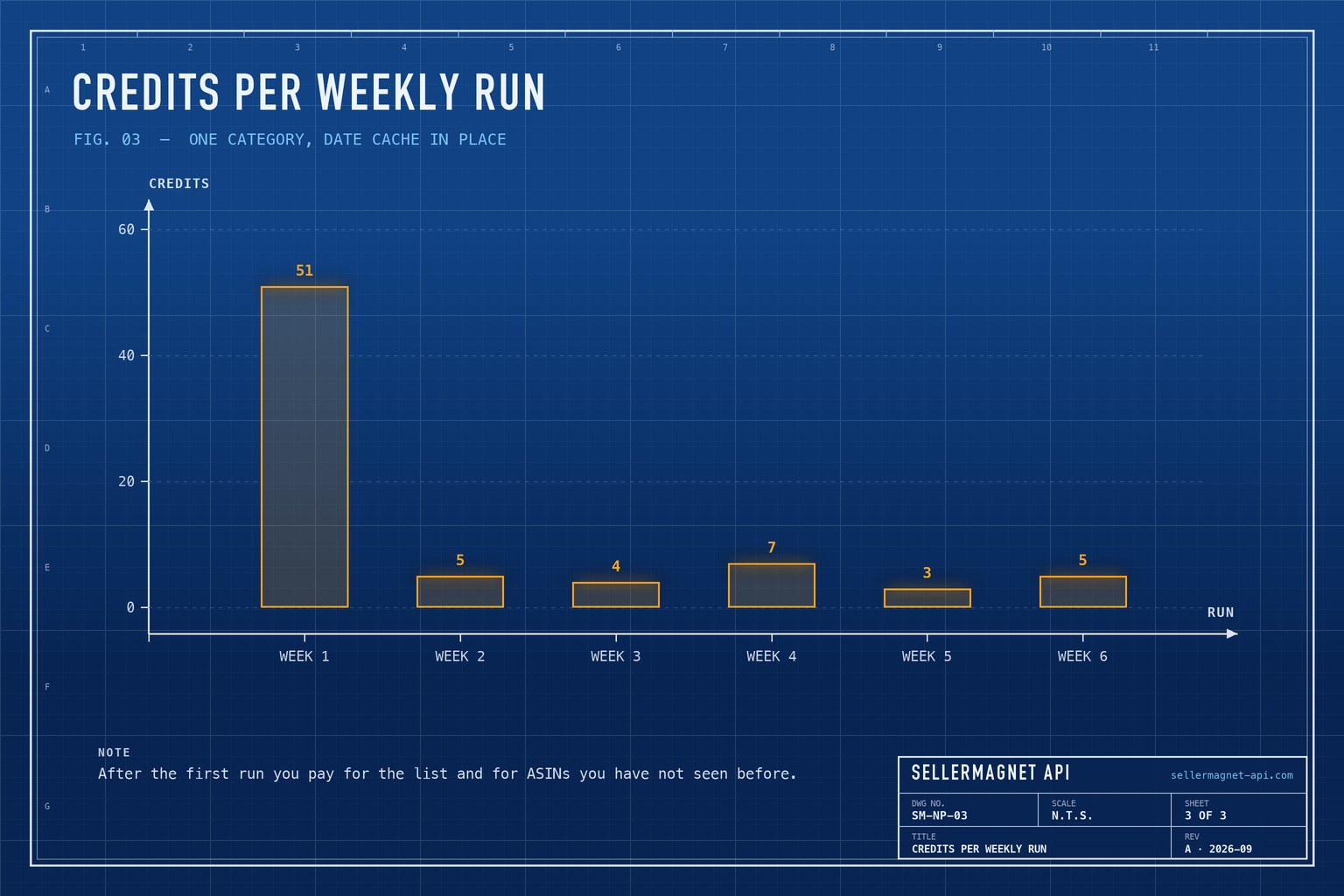
The first run pays for the list and 50 lookups. After that, most of the top 50 are products you have already seen: a busy category brings a few new entrants a week, so a weekly run costs one credit for the list plus one per new ASIN. Ten categories scanned weekly settle at a few hundred credits a month after the first 510.
Which new products are worth a closer look?
Age alone is not enough. Sort the new arrivals by rank and look at reviewAmount: a product listed six weeks ago with 40 reviews at rank 12 is selling fast, while one with 3,000 reviews and a recent date is often an older product under a new ASIN, or one that shares ratings with its variation family. Then check its trend with the sales rank history and its competition with the offers endpoint.
Newest arrivals first from the cache, with jq
jq -r 'to_entries | map(select(.value != null)) | sort_by(.value) | reverse
       | .[:10][] | "\(.value)  \(.key)"' listed_since.json
Frequently Asked Questions
Is there an Amazon new releases API?
Amazon's Hot New Releases list is not an endpoint here. Filtering a Best Sellers list by Date First Available gives a different signal: new products that already sell well.
What is listedSinceDate?
The Date First Available shown on the product page, returned as YYYY-MM-DD, or null when the page shows no date.
How many products does a bestseller list return?
Up to 50 per category and marketplace, the size of one bestseller page. offset plus count may not exceed 50.
Why cache products without a date?
Looking it up again every week would usually buy the same null. Only failed calls are retried; delete null entries from the cache now and then to re-check them.
Does it work outside amazon.com?
The list works on all 23 marketplaces. listedSinceDate is read from English, German, French, Italian, Spanish, Dutch, Polish and Portuguese labels; on amazon.co.jp, .se, .com.tr and the Arabic stores it is null or a different date.
Bottom line: one list request, one lookup per ASIN you have not seen, a cache that never pays twice, and a filter by launch date turn any bestseller list into a new-product radar. The bestsellers page lists every field, and a free account includes 150 credits.


