
To call an Amazon product API from PowerShell, send a GET request with Invoke-RestMethod to /api/amazon-product-lookup with an ASIN, a marketplace ID and your API key in the X-Api-Key header; the cmdlet parses the JSON body for you and returns it as an object. This quickstart builds a small module for three endpoints (lookup, offers and statistics), shows where Invoke-RestMethod hides the HTTP status code on a failed call, and adds a retry policy that only resends the requests a second attempt can fix.
Key Takeaways
- Invoke-RestMethod throws on any non-2xx response instead of returning a status code - the status lives on $_.Exception.Response.StatusCode inside a catch block, as a HttpStatusCode enum value, not a plain integer.
- Set -TimeoutSec 120: the API can take that long to answer, and an abandoned request is still billed.
- Send the key in an -Headers hashtable (X-Api-Key), never in the URL as a query parameter.
- Lookup sends the price as a number or the literal string "N/A"; statistics sends it as integer cents. Compare the lookup value to the string "N/A" before doing arithmetic with it.
- Retry 429, a Retry-After-less 500, 502 and 503 only. A 404 is a billed answer; retrying it pays for the same answer again.
What do I need before I start?
- PowerShell 7 or later (
pwsh);Invoke-RestMethodships with it, no module install needed. Windows PowerShell 5.1 also has the cmdlet, but its exception shape differs from the one used here (PowerShell 7'sHttpResponseException). - An API key - a free account includes 150 credits, one per request.
- The key in an environment variable, never hard-coded in a script you might commit.
Save the module, set the key (Linux/macOS; Windows uses setx)
export SELLERMAGNET_API_KEY="your-key-here"
pwsh -File main.ps1
How do I call the Amazon product API from PowerShell?
Keep the base URL, the key and the timeout together and build one function per endpoint on top of a single request helper. The key goes into the -Headers hashtable, never the URL: a key left in a URL ends up in shell history and request logs, and the header vs query string guide shows where that leaks. Test-SMAsin filters a malformed ASIN before it can cost a credit on lookup or offers, or trigger a billed 400 on statistics.
SellerMagnet.psm1 - config, the ASIN check and one request helper
# SellerMagnet API client for PowerShell: Invoke-RestMethod + a billing-aware
# retry wrapper. One dependency: PowerShell 7+ itself (Invoke-RestMethod ships
# with it, no module install needed).

function Get-SMConfig {
    <#
    .SYNOPSIS
    Reads SELLERMAGNET_API_KEY (required) and SELLERMAGNET_API_BASE (optional,
    defaults to the public API, overridden here to point at a fake server in
    tests). Fails fast with a clear message instead of sending an empty key.
    #>
    $key = $env:SELLERMAGNET_API_KEY
    if ([string]::IsNullOrWhiteSpace($key)) {
        throw "Set SELLERMAGNET_API_KEY before calling the API."
    }
    $base = $env:SELLERMAGNET_API_BASE
    if ([string]::IsNullOrWhiteSpace($base)) { $base = "https://sellermagnet-api.com/api" }
    return [PSCustomObject]@{ Key = $key; Base = $base }
}

function Test-SMAsin {
    <#
    .SYNOPSIS
    True for a plausible Amazon ASIN: 10 upper-case alphanumeric characters.
    .DESCRIPTION
    Uses \A...\z, not ^...$: a bare ^...$ in PowerShell/.NET regex still
    matches a string with one trailing newline (verified directly with
    'B0CL61F39H' + "`n" on this host, the same trap documented for the Perl
    and Elixir quickstarts), because $ matches end-of-string OR right before
    a single trailing \n even without the multiline option. \A and \z anchor
    to the true start/end with no such exception.
    #>
    param([Parameter(Mandatory)][string]$Asin)
    return $Asin -cmatch '\A[A-Z0-9]{10}\z'
}
Why does a successful call look different from a failed one?
Because Invoke-RestMethod does not return a status code at all on a non-2xx response: it throws a Microsoft.PowerShell.Commands.HttpResponseException instead, unlike requests in Python or a status field on a returned struct in Go. The real HTTP status lives on $_.Exception.Response.StatusCode inside the catch block, as a System.Net.HttpStatusCode enum value (NotFound, not 404) - cast it with [int] to get the number back. This was verified directly against a real HTTP 404 on this host, not assumed from another language's quickstart: PowerShell's own error shape is genuinely different from every prior post in this series. A connection failure (DNS, refused, timeout) throws a different exception with no .Response at all, so the catch block checks for that case separately instead of assuming every exception carries a status code.
Invoke-SMRequest - reading the status out of the caught exception
function Invoke-SMRequest {
    <#
    .SYNOPSIS
    One GET against the SellerMagnet API, no retry: callers that need retries
    use Invoke-SMRequestWithRetry below. Returns the decoded `data` object on
    success; on failure returns $null and sets $Result (ref) with Status,
    Message and RetryAfterSeconds, the same split every other quickstart in
    this series uses so a caller never has to parse an exception to find the
    status code.
    .DESCRIPTION
    Invoke-RestMethod throws on any non-2xx status (HttpResponseException in
    PowerShell 7+), unlike requests.Session.get() in Python or a return-coded
    response struct in C/Go, so the status must be read out of the caught
    exception, not off a return value - verified directly on this host, not
    assumed from the other quickstarts' explicit-return-value shape.
    #>
    param(
        [Parameter(Mandatory)][string]$Endpoint,
        [Parameter(Mandatory)][hashtable]$Params,
        [Parameter(Mandatory)][ref]$Result
    )
    $cfg = Get-SMConfig
    $query = ($Params.GetEnumerator() | ForEach-Object {
        "$([uri]::EscapeDataString($_.Key))=$([uri]::EscapeDataString([string]$_.Value))"
    }) -join "&"
    $uri = "$($cfg.Base)$Endpoint`?$query"

    $Result.Value = [PSCustomObject]@{ Status = -1; Message = ""; RetryAfterSeconds = $null; IsTransport = $false }
    try {
        $resp = Invoke-RestMethod -Uri $uri -Headers @{ "X-Api-Key" = $cfg.Key } -TimeoutSec 120 -Method Get
        $Result.Value.Status = 200
        if (-not $resp.success) {
            # defensive: a 200 with success:false is not documented, but never silently treated as data
            $Result.Value.Message = "unexpected success:false on HTTP 200"
            return $null
        }
        return $resp.data
    } catch [Microsoft.PowerShell.Commands.HttpResponseException] {
        $status = [int]$_.Exception.Response.StatusCode
        $Result.Value.Status = $status
        $retryAfterHeader = $_.Exception.Response.Headers.RetryAfter
        if ($retryAfterHeader -and $retryAfterHeader.Delta) {
            $Result.Value.RetryAfterSeconds = [int]$retryAfterHeader.Delta.Value.TotalSeconds
        }
        $msg = $null
        if ($_.ErrorDetails -and $_.ErrorDetails.Message) {
            try { $msg = ($_.ErrorDetails.Message | ConvertFrom-Json).message } catch { $msg = $_.ErrorDetails.Message }
        }
        $Result.Value.Message = if ($msg) { $msg } else { $_.Exception.Message }
        return $null
    } catch {
        # DNS failure, connection refused, timeout: no HTTP answer at all, never billed, never retried
        # the same way as a billed 5xx (the request may not have reached the server).
        $Result.Value.IsTransport = $true
        $Result.Value.Message = $_.Exception.Message
        return $null
    }
Trimmed lookup response (example values from the API docs)
{
  "success": true,
  "data": {
    "productInfo": {
      "asin": "B0CL61F39H",
      "buyBoxInfo": {"price": 444.99, "currencyCode": "USD", "currencySymbol": "$"}
    }
  }
}
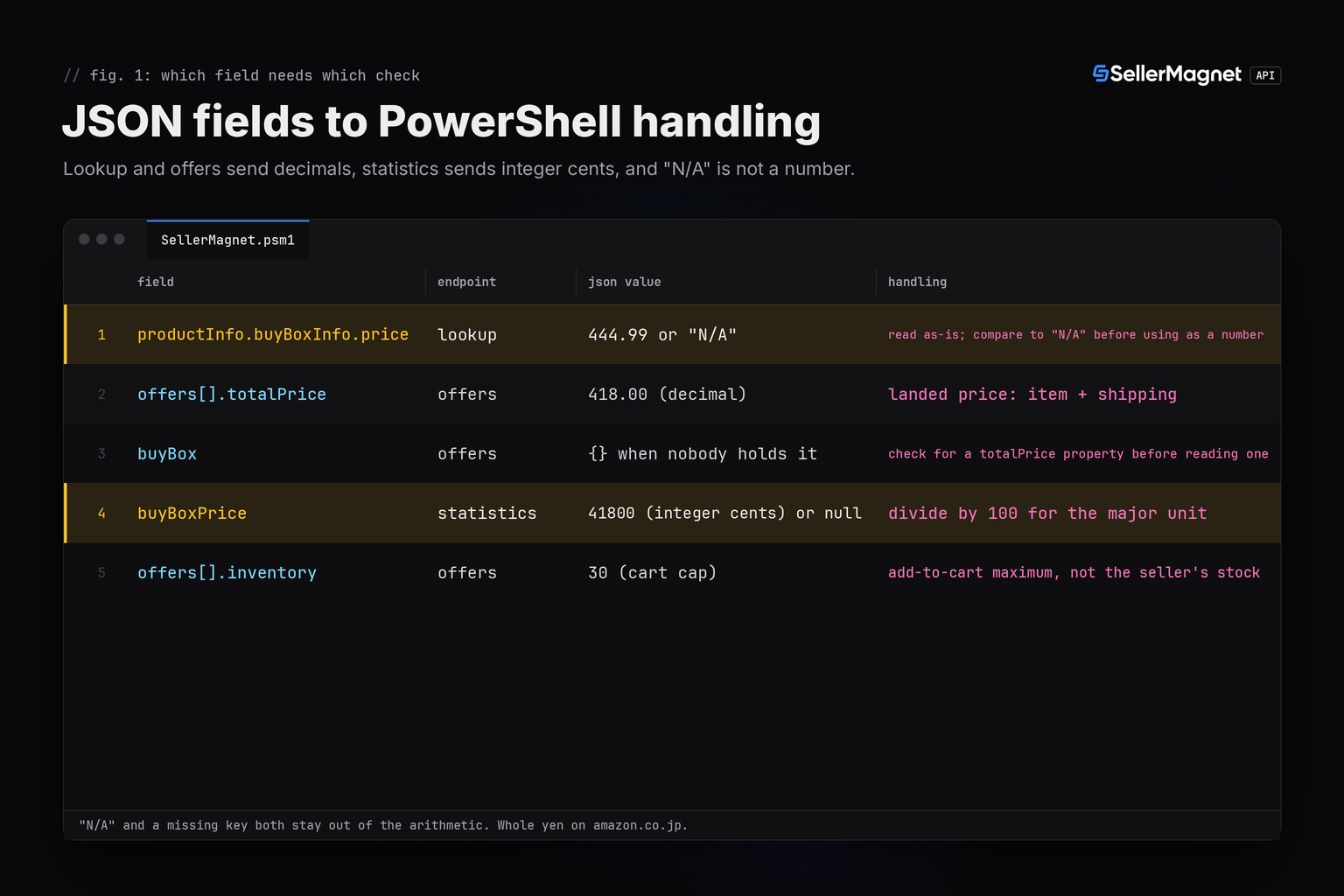
productInfo.buyBoxInfo.price from product lookup is a number or the literal string "N/A" when no offer is featured. Invoke-RestMethod already parsed the JSON, so the PowerShell value really is a [string] in that case and a [double] otherwise - comparing it to "N/A" before any arithmetic keeps a missing price from silently becoming 0 through a failed numeric coercion.
Why is the statistics price a different number?
Because /amazon-product-statistics reports buyBoxPrice in integer minor units: 41800 means 418.00. Lookup and offers report decimal units, and the lookup price excludes shipping while the statistics and offers prices are landed (item plus shipping), so 409.99 from lookup and 41800 from statistics can describe the same offer. Divide by 100 for the major unit, except on amazon.co.jp, where the values are whole yen. More detail is in the cents vs decimal guide. Statistics also answers a free 400 (not billed, not retried) outside the 11 marketplaces with full price/BSR history.
| Field | Endpoint | JSON value | PowerShell handling |
|---|---|---|---|
productInfo.buyBoxInfo.price | lookup | 444.99 or "N/A" | read as-is; compare to "N/A" before using as a number |
offers[].totalPrice | offers | 418.00 (decimal) | landed price: item + shipping |
buyBox | offers | {} when nobody holds it | check for a totalPrice property before reading one |
buyBoxPrice | statistics | 41800 (integer cents) or null | divide by 100 for the major unit |
offers[].inventory | offers | 30 (cart cap) | add-to-cart maximum, not the seller's stock |
What should a PowerShell client retry?
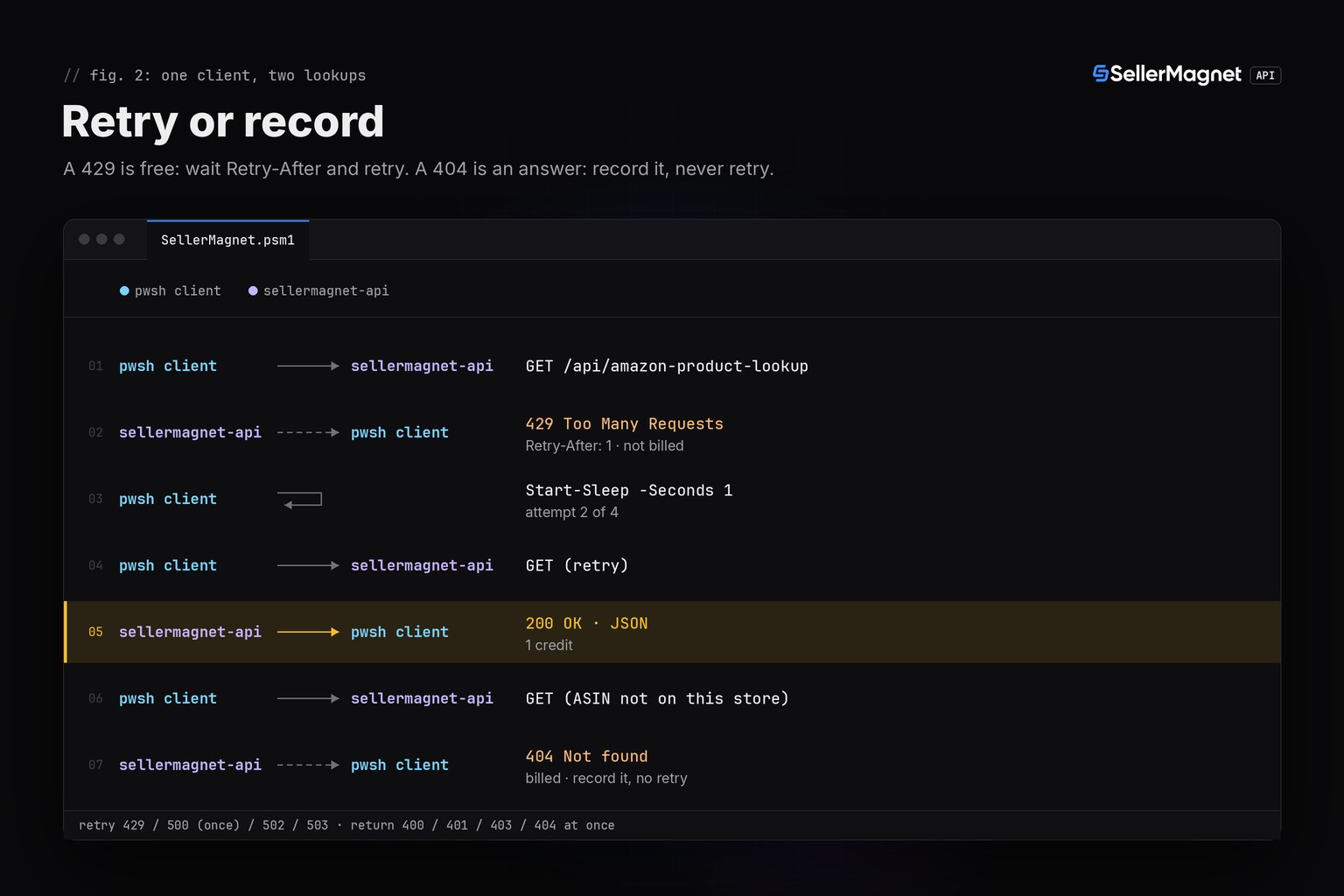
Retry only what a second attempt can fix. A 429 from the per-key concurrency cap is free and carries Retry-After; $_.Exception.Response.Headers.RetryAfter.Delta gives that wait as a TimeSpan. A 500 without Retry-After is refunded, so one retry costs nothing beyond the retry itself; a 500 that carries Retry-After stays charged. 502 and 503 are billed on every attempt, so wait at least the Retry-After and cap the attempts. Invoke-RestMethod has no retry logic of its own - a thrown exception is never resent automatically, so this loop decides what gets sent twice and nothing else does.
| Status | Meaning | Charged | Client action |
|---|---|---|---|
200 | Success | Yes | Read data |
400 gate | Missing parameter | No | Fix the call |
400 endpoint | Uncovered marketplace on statistics | Yes | Fix the call |
401 / 403 | Key or credits | No | Stop the run |
404 | Not on this marketplace | Yes | Record, never retry |
429 | Concurrency cap | No | Wait Retry-After |
500 | Internal error, no Retry-After | No, refunded | Retry once |
502 / 503 | Upstream error / breaker | Yes | Wait, retry, cap |
Invoke-SMRequestWithRetry - retries that respect billing
function Invoke-SMRequestWithRetry {
    <#
    .SYNOPSIS
    Retries only what a second attempt can fix: 429 (free, honours
    Retry-After), a 500 without Retry-After (refunded, retried once), and
    502/503 (billed on every attempt, capped at 4 total). Never retries 400,
    401, 403 or 404 - those are either free-and-unfixable or billed-and-final.
    #>
    param(
        [Parameter(Mandatory)][string]$Endpoint,
        [Parameter(Mandatory)][hashtable]$Params,
        [int]$MaxAttempts = 4
    )
    $attempt = 0
    while ($true) {
        $attempt++
        $result = $null
        $data = Invoke-SMRequest -Endpoint $Endpoint -Params $Params -Result ([ref]$result)
        if ($null -ne $data) { return [PSCustomObject]@{ Data = $data; Result = $result; Attempts = $attempt } }
        if ($result.IsTransport) { return [PSCustomObject]@{ Data = $null; Result = $result; Attempts = $attempt } }

        $retryable = ($result.Status -eq 429) -or
                     ($result.Status -eq 500 -and -not $result.RetryAfterSeconds) -or
                     ($result.Status -eq 502) -or ($result.Status -eq 503)
        if (-not $retryable -or $attempt -ge $MaxAttempts) {
            return [PSCustomObject]@{ Data = $null; Result = $result; Attempts = $attempt }
        }
        $wait = if ($result.RetryAfterSeconds) { $result.RetryAfterSeconds } else { $attempt }
        Start-Sleep -Seconds $wait
    }
}
Run lookup and statistics for five products
main.ps1 checks each ASIN's format first with Test-SMAsin, because a malformed ASIN still costs a credit on lookup and a billed 400 on statistics. It stops a row after a failed lookup instead of calling statistics for an ASIN that was never confirmed to exist on that marketplace, and prints one row per product.
main.ps1 - lookup then statistics, one row per product
# Demo run: lookup, offers and statistics for five products, same shape as
# the C/Perl/Elixir quickstarts' main program (illustrative data from the
# fake server, captured verbatim into the post's example-output block).
Import-Module "$PSScriptRoot/SellerMagnet.psm1" -Force

$products = @(
    @{ Asin = "B0CL61F39H"; MarketplaceId = "ATVPDKIKX0DER" },
    @{ Asin = "B0CLTBHXWQ"; MarketplaceId = "APJ6JRA9NG5V4" },
    @{ Asin = "B0CL61F39H"; MarketplaceId = "A2VIGQ35RCS4UG" },
    @{ Asin = "B0NOTFOUND"; MarketplaceId = "ATVPDKIKX0DER" },
    @{ Asin = "B0CL61F39"; MarketplaceId = "ATVPDKIKX0DER" }
)

$billed = 0
Write-Host ("{0,-11} {1,-16} {2,-11} {3,-11} {4}" -f "asin", "marketplace", "lookup", "stats(cents)", "note")
foreach ($p in $products) {
    if (-not (Test-SMAsin $p.Asin)) {
        Write-Host ("{0,-11} {1,-16} not an ASIN, skipped (0 credits)" -f $p.Asin, $p.MarketplaceId)
        continue
    }
    $lookup = Get-SMProduct -Asin $p.Asin -MarketplaceId $p.MarketplaceId
    $billed++
    if ($null -eq $lookup.Data) {
        Write-Host ("{0,-11} {1,-16} {2}: {3}" -f $p.Asin, $p.MarketplaceId, $lookup.Result.Status, $lookup.Result.Message)
        continue
    }
    $price = $lookup.Data.productInfo.buyBoxInfo.price
    $stats = Get-SMStatistics -Asin $p.Asin -MarketplaceId $p.MarketplaceId
    $billed++
    $statsText = if ($null -eq $stats.Data) { "not covered (free 400)" } else { "$($stats.Data.buyBoxPrice)" }
    Write-Host ("{0,-11} {1,-16} {2,-11} {3,-11} {4}" -f $p.Asin, $p.MarketplaceId, $price, $statsText, "")
}
Write-Host "credits charged: $billed"
Program output (illustrative data, from the local fake server this code was tested against)
asin        marketplace      lookup      stats(cents) note
B0CL61F39H  ATVPDKIKX0DER    444.99      44499
B0CLTBHXWQ  APJ6JRA9NG5V4    N/A         41800
B0CL61F39H  A2VIGQ35RCS4UG   444.99      not covered (free 400)
B0NOTFOUND  ATVPDKIKX0DER    404: Product not found
B0CL61F39   ATVPDKIKX0DER    not an ASIN, skipped (0 credits)
credits charged: 7
The credit math for that run: 7 requests, 7 credits (none of the five scenarios hit a free 429/500/gate-400 in this particular run; the retry policy that avoids paying for those is exercised separately in the test suite below). The fourth row's 404 ended its row after one credit, without calling statistics, and the fifth row's 9-character ASIN never left the script. The second row shows the point of the table above: lookup reports "N/A" (no featured offer at that instant) while statistics still has a recorded price of 41800 cents (418.00) from its own history. To test changes without spending credits, point SELLERMAGNET_API_BASE at a local fake HTTP server; that is how this code was tested, with no network call ever reaching the real API.
How was this tested without a .NET test framework?
Against a real local HTTP/1.1 server built on System.Net.HttpListener (fake_server.ps1), the same "real local server, no hand-written mock of the client" convention as the C, Swift, Rust, Perl and Elixir quickstarts in this series - never a hand-written stand-in for SellerMagnet.psm1 itself. scenarios.ps1 runs 36 plain assertions against the unmodified module: the happy path, "N/A" safety, a billed 404 that is never retried, a 500 that recovers on retry, a 429 that waits for its Retry-After before retrying, a 502 capped at 4 attempts, 401/403 stopping at once, a free gate 400, empty offers/buyBox {}, the cents-vs-decimal equivalence, the ASIN trailing-newline trap (proven directly, not assumed from the Perl/Elixir posts), a transport-level connection failure, and a missing API key failing closed. All 36 pass.
pwsh -File scenarios.ps1 (36/36 assertions pass)
36 passed, 0 failedFrequently Asked Questions
Is there an official PowerShell SDK for the SellerMagnet API?
No, and none is needed. Every endpoint is a plain GET with query parameters and a JSON body that Invoke-RestMethod already parses, so a client fits in well under 150 lines.
Why does my script's catch block never see a status code?
Because Invoke-RestMethod throws on a non-2xx response instead of returning one. Catch Microsoft.PowerShell.Commands.HttpResponseException and read [int]$_.Exception.Response.StatusCode, not a return value.
Does Invoke-RestMethod retry anything on its own?
No. A failed call throws once and stops; nothing in PowerShell resends it. The retry loop in this post is the only thing deciding what gets sent twice.
Why compare the lookup price to the string "N/A" instead of just using it as a number?
Because productInfo.buyBoxInfo.price really is the string "N/A" when no offer is featured. PowerShell's loose typing will not raise an error if you skip the check, it will just produce a wrong number from the comparison or arithmetic later.
What PowerShell version does this need?
PowerShell 7 or later. The exception type and the way the status code is read (this post's main point) are specific to PowerShell 7's Invoke-RestMethod; Windows PowerShell 5.1 throws a different exception shape.
Bottom line: one Invoke-RestMethod call per request with a 120-second timeout and the key in an X-Api-Key header, a caught HttpResponseException to read the status code PowerShell hides on a failed call, explicit "N/A" checks before any price arithmetic, and retries for 429, 500, 502 and 503 only. The same client shape exists for Python and Go, and every endpoint is in the API documentation.


