
An Amazon category ID, also called a browse node ID, is the identifier at the end of a Best Sellers URL: in amazon.com/.../zgbs/electronics/281407 it is 281407. The SellerMagnet bestsellers endpoint takes it as category_id, together with a marketplace ID. Top-level categories use short slugs such as electronics; everything below them uses numeric IDs, and those numbers are different in every marketplace.
Key Takeaways
- A category ID is the last path segment of an Amazon Best Sellers URL.
- Top-level categories use slugs such as electronics; deeper levels use numeric browse node IDs.
- Numeric category IDs are marketplace-specific: the amazon.de and amazon.co.uk trees share none.
- An unknown category_id returns HTTP 400 after the credit is charged, so check it against the tree first.
- One bestsellers request returns up to 50 ranked products; the default is 30.
What is an Amazon category ID?
A browse node is one category in Amazon's catalogue tree, and its ID is how Amazon addresses it. The tree is deep and different in every storefront: as of September 2026 the amazon.de tree has 32,456 categories across 51 top-level departments and up to 9 levels, while amazon.com has 28,610 categories under 27 departments and goes 12 levels deep.
Two kinds of ID appear in the tree. The top level uses readable slugs - electronics, beauty, computers - which repeat across marketplaces. Every level below uses a numeric browse node ID, which does not: comparing the amazon.de tree with the amazon.co.uk and amazon.com trees finds zero numeric IDs in common. An ID copied from one marketplace is meaningless in another.
How do I find an Amazon category ID?
- Open Best SellersOn the Amazon storefront you need, open the Best Sellers page.
- Go to the categoryClick down through the departments until you reach the list you want.
- Copy the last URL segmentThe part after the final slash is the category ID, for example 281407.
- Confirm it in the treeCheck the ID exists in the category tree of the same marketplace before calling the API.
Read it from the Best Sellers URL
Open the category on Amazon's Best Sellers page and take the last path segment of the address. For Electronics > Accessories & Supplies on amazon.com the URL ends in /zgbs/electronics/281407, so the category ID is 281407. For a top-level department it is the slug itself, such as electronics. Ordinary category pages carry the same browse node ID in a node= parameter, such as /b?node=281407. Seller Central's Product Classifier and Browse Tree Guides list the same IDs for listing products; for API work the public tree below is quicker.
Search the category tree
To search by name instead, use the Amazon category explorer, or load the JSON tree behind it: one file per marketplace, where every node carries CategoryId, CategoryName, CategoryLink and its Subcategories. Names are in the marketplace's language, so the amazon.de tree says Elektronik & Foto. Amazon can rename, move or retire deep categories, so re-load the tree rather than hard-coding deep IDs for months. The script below finds every category whose name matches and prints its full path.
find_category.py - search a marketplace's category tree by name
import sys

import requests

TREE_URL = "https://sellermagnet-api.com/static/data/{code}.json"  # US, DE, UK, JP ...


def walk(nodes, path=()):
    for node in nodes:
        here = path + (node["CategoryName"],)
        yield here, node
        yield from walk(node.get("Subcategories") or [], here)


def find(code: str, text: str) -> None:
    tree = requests.get(TREE_URL.format(code=code), timeout=60).json()
    for path, node in walk(tree):
        if text.lower() in path[-1].lower():
            print(f"{node['CategoryId']:>14}  {' > '.join(path)}")


if __name__ == "__main__":
    find(sys.argv[1], sys.argv[2])  # python find_category.py US "accessories & supplies"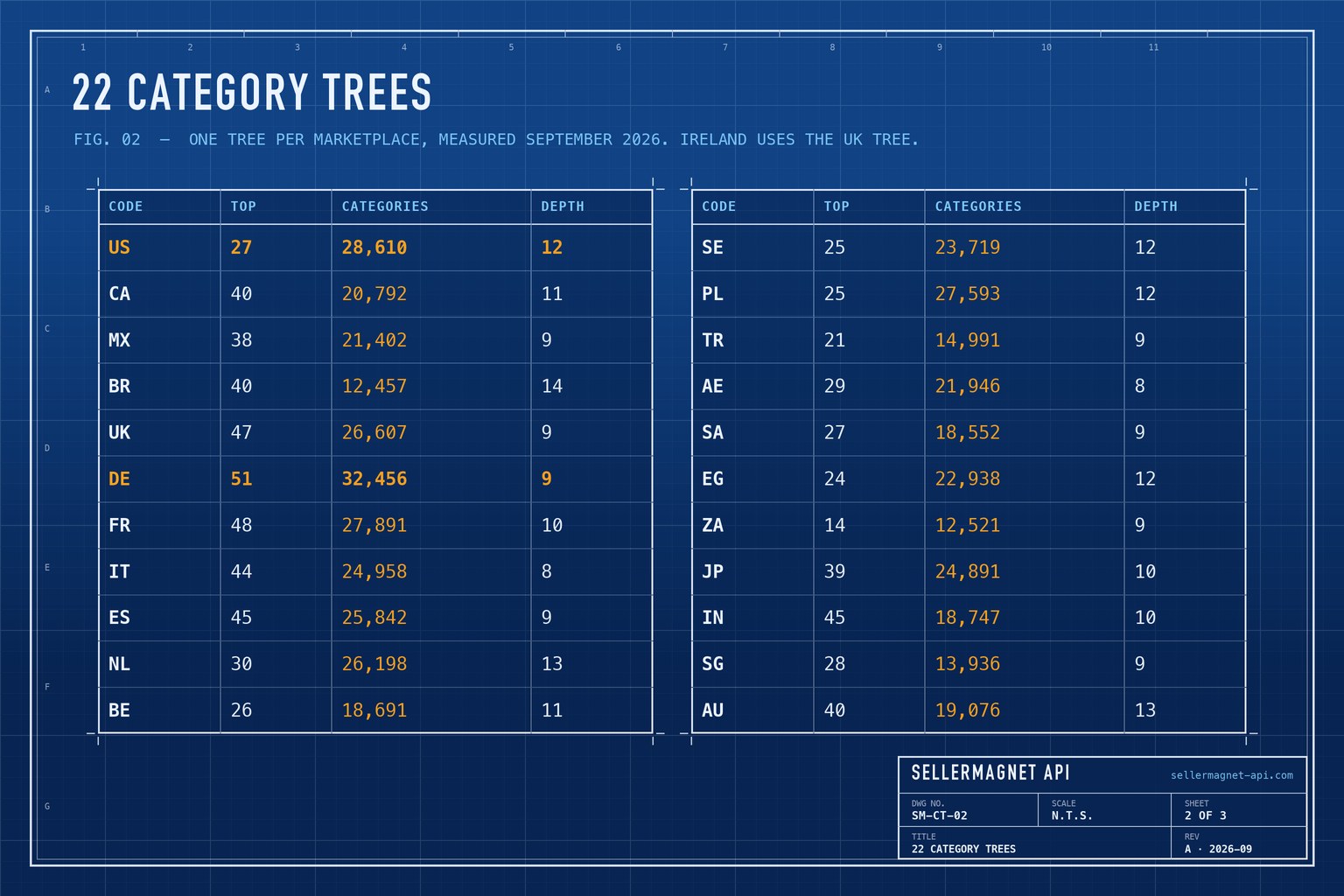
How do I call the bestsellers endpoint?
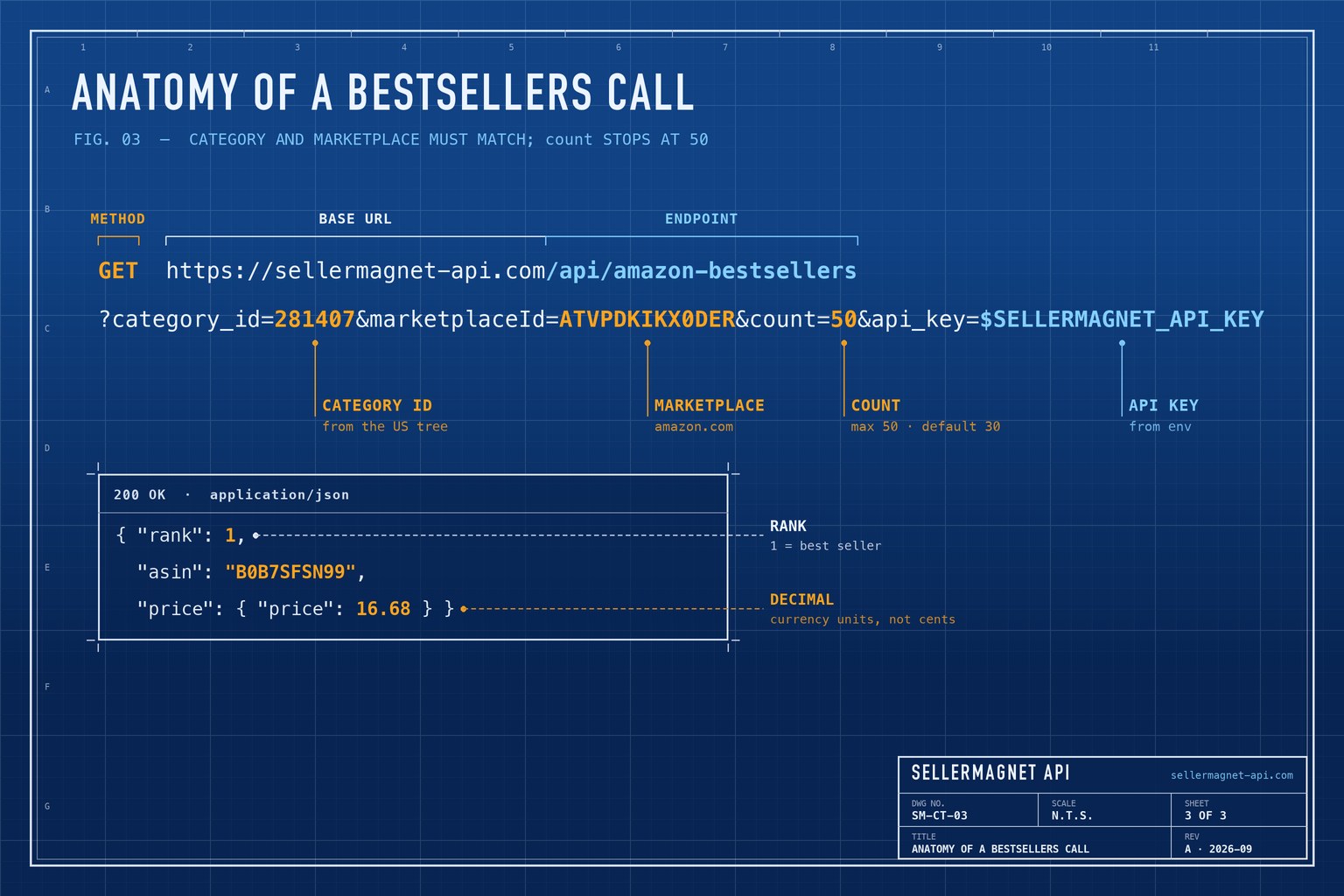
Send category_id, marketplaceId and optionally count (default 30, maximum 50) to /api/amazon-bestsellers. Each result carries its rank, asin, productTitle, price, reviewRating and reviewAmount. The script checks the ID against the marketplace's tree first, because the endpoint rejects an unknown ID only after the credit is charged. Marketplace IDs for all 23 storefronts are in the marketplace ID list.
bestsellers.py - validate the ID locally, then fetch the top 50
import os
from functools import lru_cache

import requests

API = "https://sellermagnet-api.com/api/amazon-bestsellers"
TREE_URL = "https://sellermagnet-api.com/static/data/{code}.json"


def all_ids(nodes):
    for node in nodes:
        yield str(node["CategoryId"]).lower()
        yield from all_ids(node.get("Subcategories") or [])


@lru_cache(maxsize=None)  # one download per marketplace, not per call
def known_ids(tree_code: str) -> frozenset:
    tree = requests.get(TREE_URL.format(code=tree_code), timeout=60).json()
    return frozenset(all_ids(tree))


def bestsellers(category_id: str, marketplace_id: str, tree_code: str, count: int = 50) -> list:
    if category_id.lower() not in known_ids(tree_code):
        raise ValueError(f"{category_id} is not a category in the {tree_code} tree")  # no credit spent
    resp = requests.get(API, params={
        "category_id": category_id, "marketplaceId": marketplace_id,
        "count": min(count, 50),  # above 50 is a billed 400
        "api_key": os.environ["SELLERMAGNET_API_KEY"],
    }, timeout=120)
    try:
        body = resp.json()
    except ValueError:
        body = {}  # some error pages are HTML
    if resp.status_code != 200 or not body.get("success"):
        raise RuntimeError(f"{resp.status_code}: {body.get('message')}")
    return body["data"]["bestsellers"]


for item in bestsellers("281407", "ATVPDKIKX0DER", "US")[:5]:
    print(item["rank"], item["asin"], item["price"]["price"], item["productTitle"][:60])
One entry of data.bestsellers (trimmed; example from an amazon.de list)
{
  "rank": 1,
  "asin": "B0B7SFSN99",
  "productTitle": "Sterntaler Schirmmütze Nacken - Unisex Baby- und Kinder Mütze ...",
  "price": {
    "price": 16.68,
    "currency_code": "EUR",
    "currency_symbol": "€"
  },
  "reviewRating": 4.6,
  "reviewAmount": 5152
}
Why is my category ID rejected?
The endpoint looks the ID up in the tree of the marketplace you asked for, at any depth, ignoring case. If it is not there, the answer is HTTP 400 with the message Invalid CategoryId - and because that check runs after billing, the request still costs a credit. The error-handling guide lists which errors are charged. The usual causes:
- The ID belongs to another marketplace. Numeric browse node IDs never carry over; look it up again in the target tree.
- A category name instead of an ID. Send
281407, not Accessories & Supplies. - A URL fragment instead of the last segment. From
/zgbs/electronics/281407, only281407is the ID. - Ireland. amazon.ie runs on the amazon.co.uk catalogue, so its categories come from the UK tree.
Check before you send
A category that is not in the tree is still a billed request. Checking the ID locally, as the script above does, turns that mistake into a free error.
How big is each marketplace's category tree?
Tree sizes vary widely, which matters if you cache or crawl them: the smallest trees have around 12,500 categories and the largest, amazon.de, more than 32,000. Measured on the public trees as of September 2026:
| Code | Storefront | Top-level departments | Categories | Maximum depth |
|---|---|---|---|---|
| US | amazon.com | 27 | 28,610 | 12 |
| CA | amazon.ca | 40 | 20,792 | 11 |
| MX | amazon.com.mx | 38 | 21,402 | 9 |
| BR | amazon.com.br | 40 | 12,457 | 14 |
| UK | amazon.co.uk | 47 | 26,607 | 9 |
| DE | amazon.de | 51 | 32,456 | 9 |
| FR | amazon.fr | 48 | 27,891 | 10 |
| IT | amazon.it | 44 | 24,958 | 8 |
| ES | amazon.es | 45 | 25,842 | 9 |
| NL | amazon.nl | 30 | 26,198 | 13 |
| BE | amazon.com.be | 26 | 18,691 | 11 |
| SE | amazon.se | 25 | 23,719 | 12 |
| PL | amazon.pl | 25 | 27,593 | 12 |
| TR | amazon.com.tr | 21 | 14,991 | 9 |
| AE | amazon.ae | 29 | 21,946 | 8 |
| SA | amazon.sa | 27 | 18,552 | 9 |
| EG | amazon.eg | 24 | 22,938 | 12 |
| ZA | amazon.co.za | 14 | 12,521 | 9 |
| JP | amazon.co.jp | 39 | 24,891 | 10 |
| IN | amazon.in | 45 | 18,747 | 10 |
| SG | amazon.sg | 28 | 13,936 | 9 |
| AU | amazon.com.au | 40 | 19,076 | 13 |
Frequently Asked Questions
What is an Amazon browse node ID?
An Amazon browse node ID identifies one category in Amazon's catalogue tree. It is the category ID at the end of a Best Sellers URL, and its numeric form differs per marketplace.
How do I find the category ID for an Amazon Best Sellers list?
Open the list on Amazon and take the last segment of the URL: /zgbs/electronics/281407 means the category ID is 281407.
Are Amazon category IDs the same in every country?
Only the top-level slugs such as electronics repeat. Numeric browse node IDs are different in every marketplace.
How many products does the bestsellers endpoint return?
Up to 50 per request with the count parameter; the default is 30. A count above 50 is rejected with a billed HTTP 400.
Does an invalid category ID cost a credit?
Yes. The category check runs after billing, so validate the ID against the marketplace's category tree before sending it.
Bottom line: take the category ID from the Best Sellers URL or the category tree of the same marketplace, check it locally, and ask for up to 50 ranked products per call. The bestsellers endpoint page shows the full response, and a free account includes 150 credits.


