
To monitor an Amazon listing for changes, look it up once a day with /api/amazon-product-lookup, keep a normalised snapshot of the title, bullet points, description, images, variations and A+ flag, and compare it with the previous run. Normalising is what makes it usable: image URLs change size suffixes and whitespace shifts without anything real happening. The script below stores snapshots in a JSON file and reports content changes apart from price and Buy Box moves.
Key Takeaways
- One lookup per ASIN and run returns the fields a shopper sees first: title, bullets, description, images, variations, A+ flag.
- Compare image IDs, not URLs: the same photo appears under different size suffixes such as _SL500_ and _SL1000_.
- Keep content changes (title, images, variations) apart from offer changes (price, Buy Box seller), which move all day.
- Never overwrite a good snapshot with a failed or title-only lookup, and alert on content only when two runs agree.
- Daily checks cost 30 credits per ASIN a month; a hundred listings need 3,000.
What can change on an Amazon listing?
Several sellers can contribute to one detail page, Amazon decides which contribution is shown and makes catalog edits of its own, so the page you wrote is not guaranteed to stay that way. The fields worth watching are the ones a shopper reads first - title, bullets, main image - plus the structure around them: the variation family and whether A+ content is still shown.
| Field | Normalised as | Alert class |
|---|---|---|
title | Whitespace collapsed | Content |
bullets | Each bullet trimmed, order kept | Content |
description | Hash of the trimmed text | Content |
images | Image IDs, size modifiers dropped | Content |
variations | Sorted set of child ASINs | Content |
aplus | True / false | Content |
price · buybox_seller | As returned | Offer |
How do I detect listing changes in Python?
snapshot() reduces a lookup to comparable values, check() compares each ASIN with its stored snapshot and saves the new one. The first run only records a baseline. A failed lookup - a 404, a 502, a timeout, or a page that returned a title but no body - is skipped, and a content change is reported only when two runs in a row agree, because a page can occasionally render its bullets from a different block. get(), new_session() and ApiError are the helpers from the Python quickstart.
listing_watch.py - snapshot, compare, report
"""Detect changes to Amazon listings between two runs of this script."""
import hashlib
import json
import re
import sys
from pathlib import Path

import requests

from sellermagnet import ApiError, get, new_session

STATE = Path("listing_state.json")
IMAGE_ID = re.compile(r"/images/I/([^./]+)")        # 71abcDEF+L in .../images/I/71abcDEF+L._SL1000_.jpg
CONTENT = ("title", "bullets", "description", "images", "variations", "aplus")   # the seller's content
OFFER = ("price", "buybox_seller")                  # changes many times a day - report separately


def _norm(text) -> str:
    return " ".join(str(text or "").split())


def snapshot(asin: str, marketplace_id: str) -> dict | None:
    """The comparable parts of a listing, or None when the lookup gave nothing usable."""
    try:
        p = get(new_session(), "amazon-product-lookup", asin=asin, marketplaceId=marketplace_id)["productInfo"]
    except (ApiError, requests.RequestException) as err:
        print(f"{asin}: skipped ({getattr(err, 'status', type(err).__name__)})", file=sys.stderr)
        return None                                   # keep the last good snapshot
    title = _norm(p.get("title"))
    if title in ("", "N/A"):
        return None
    if not any(p.get(f) for f in ("categories", "details", "bulletPoints")):
        return None                                   # title only: the page body did not load
    price = (p.get("buyBoxInfo") or {}).get("price")
    return {
        "title": title,
        "bullets": [_norm(b) for b in p.get("bulletPoints") or []],
        "description": hashlib.sha256(_norm(" ".join(p.get("description") or [])).encode()).hexdigest()[:16],
        "images": [m.group(1) for m in map(IMAGE_ID.search, p.get("images") or []) if m],
        "variations": sorted({v.get("asin") for v in p.get("variations") or [] if v.get("asin")}),
        "aplus": bool(p.get("hasAPlusContent")),
        "price": price if isinstance(price, (int, float)) else None,
        "buybox_seller": (p.get("buyBoxInfo") or {}).get("sellerId"),
    }


def describe(field: str, old, new) -> str:
    if field == "description":
        return "description: text changed"          # stored as a hash, the text itself is long
    if isinstance(old, list) and isinstance(new, list):
        added, removed = [x for x in new if x not in old], [x for x in old if x not in new]
        if not added and not removed:
            return f"{field}: same items, new order"
        return f"{field}: +{len(added)} / -{len(removed)} ({', '.join(map(str, (added + removed)[:3]))})"
    return f"{field}: {old!r} -> {new!r}"


def check(listings: list[tuple[str, str]]) -> list[str]:
    state = json.loads(STATE.read_text()) if STATE.exists() else {}
    alerts = []
    for asin, marketplace_id in listings:
        key, snap = f"{marketplace_id}:{asin}", snapshot(asin, marketplace_id)
        if snap is None:
            continue
        old, pending = state.get(key), state.pop(key + "?", None)
        content = {f: snap[f] for f in CONTENT}
        if old and any(old.get(f) != content[f] for f in CONTENT) and pending != content:
            state[key + "?"] = content                # seen once: alert only if the next run agrees
            continue
        for field in (CONTENT + OFFER) if old else ():
            if old.get(field) != snap[field]:
                kind = "CONTENT" if field in CONTENT else "offer"
                alerts.append(f"[{kind}] {asin} {describe(field, old.get(field), snap[field])}")
        state[key] = snap
    STATE.write_text(json.dumps(state, indent=1))
    return alerts


if __name__ == "__main__":
    for line in check([("B0CL61F39H", "ATVPDKIKX0DER"), ("B0CLTBHXWQ", "APJ6JRA9NG5V4")]):
        print(line)
Example output once an edit has been seen on two runs
[CONTENT] B0CL61F39H title: 'PS5 Console slim' -> 'PS5 Console slim - Digital'
[CONTENT] B0CL61F39H bullets: +1 / -0 (New bullet)
[CONTENT] B0CL61F39H description: text changed
[CONTENT] B0CL61F39H images: same items, new order
[CONTENT] B0CL61F39H variations: +0 / -1 (B0CL5KNB9M)
[CONTENT] B0CL61F39H aplus: True -> False
[offer] B0CL61F39H price: 444.99 -> 419.0
[offer] B0CL61F39H buybox_seller: 'Amazon' -> 'A2I59UVTUWUFH0'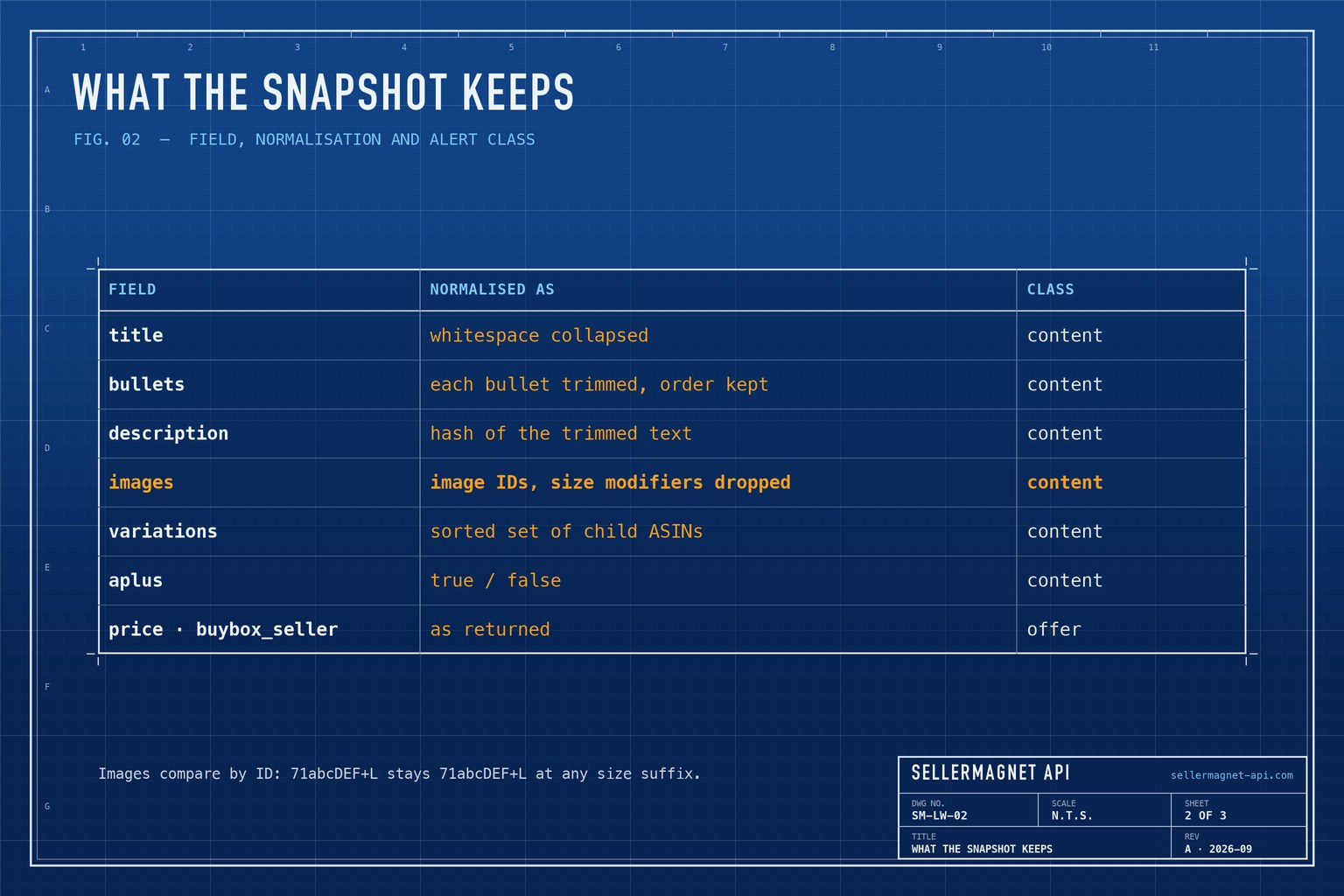
Why image IDs, not URLs
Amazon serves the same photo under many URLs: the ._SL1000_ part is only a size instruction. The ID before the first dot identifies the image, so comparing IDs catches a new photo and ignores a new size. The image download guide explains the suffixes.
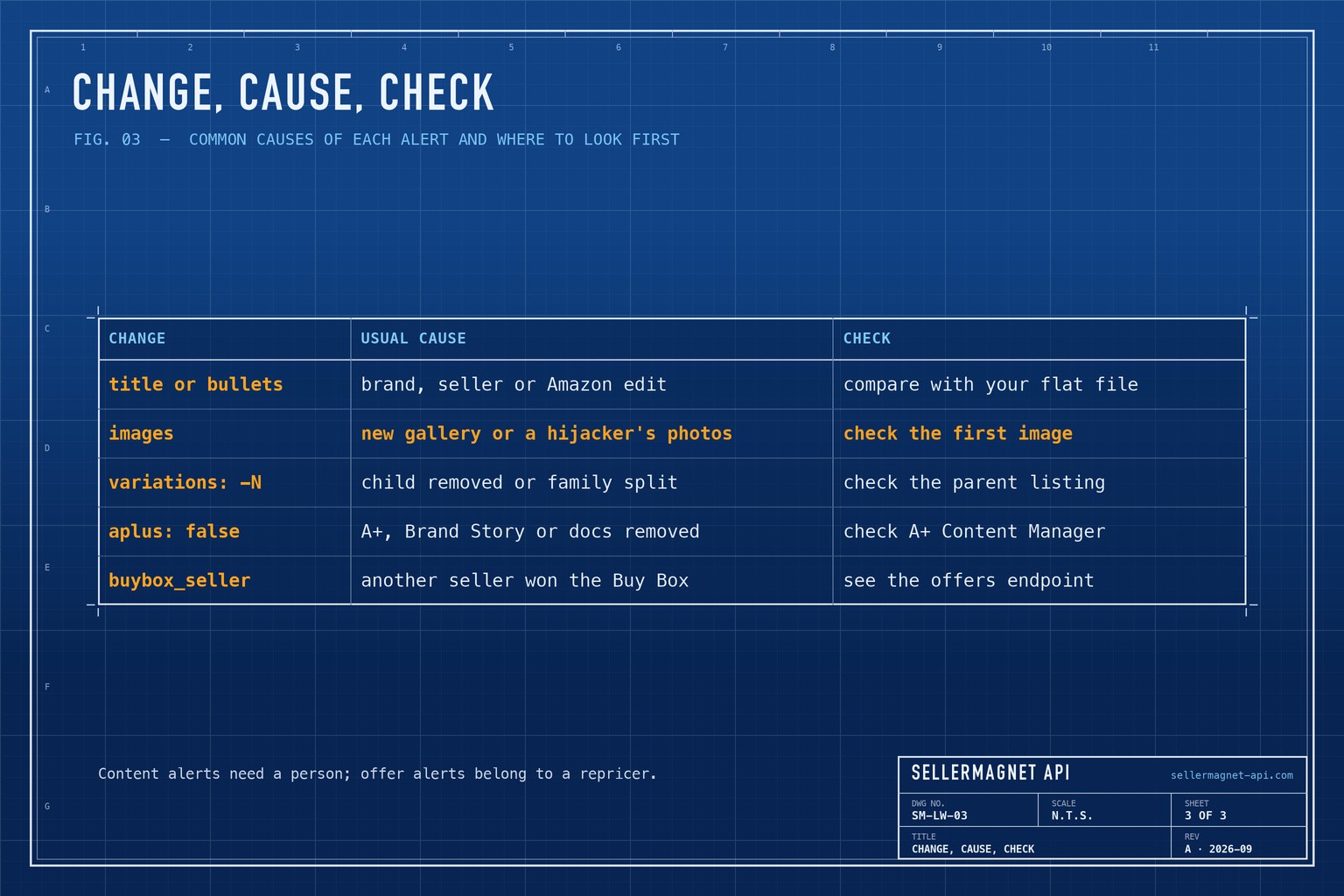
What does each kind of change usually mean?
A report is only useful with a next step. The causes below are the common ones, not the only ones - check the live page before acting. Variation changes are covered in depth in the variations guide, and Buy Box moves belong to the polling guide.
How often should the monitor run?
Once a day is enough for content: it changes far less often than prices. Each run costs one credit per ASIN - 30 a month per listing - so watch your own listings and the handful of competitors that matter rather than a whole category. Price and Buy Box lines change almost daily, so the wrapper below keeps them in a file and posts only content changes to a chat webhook; most chat webhooks accept a JSON body with a text field.
run.sh - daily run from cron, alerts to a chat webhook
#!/usr/bin/env bash
# run.sh - started by cron once a day:  30 7 * * * /opt/listing-watch/run.sh
set -euo pipefail
cd /opt/listing-watch
export SELLERMAGNET_API_KEY="your-key-here"            # cron has no login environment
CHAT_WEBHOOK_URL="https://hooks.example.com/your-webhook"

.venv/bin/python listing_watch.py > changes.txt
grep '^\[CONTENT\]' changes.txt > alerts.txt || true    # price and Buy Box moves stay in changes.txt
if [ -s alerts.txt ]; then                              # only post when content changed
  curl -fsS -X POST -H "Content-Type: application/json" \
    --data "$(jq -Rs '{text: .}' alerts.txt)" "$CHAT_WEBHOOK_URL"
fi
Frequently Asked Questions
Can I get an alert when someone changes my Amazon listing?
Yes. Look the ASIN up once a day, compare a normalised snapshot with the previous one, and alert on differences in title, bullets, images, variations or A+ content.
Why do image URLs change when the image did not?
The URL carries a size instruction such as ._SL1000_. Compare the image ID before the first dot instead of the full URL.
How much does monitoring cost?
One credit per ASIN per run. A daily check is about 30 credits per listing a month.
What happens when a lookup fails?
The script skips that ASIN and keeps its last good snapshot, so the next successful run still compares against real data.
Does this detect hijackers?
It shows changed content and a new Buy Box seller, which are the usual signs. The offers endpoint lists the featured offer and the first page of other offers.
Bottom line: one lookup a day, a normalised snapshot and a plain comparison catch the listing changes that matter without drowning you in URL noise. Every lookup field is on the product lookup page, and a free account includes 150 credits.


