To get an Amazon Buy Box lost alert in Microsoft Teams today, poll /amazon-product-offers for each of your ASINs, compare buyBox.sellerId with your own seller ID, and post an Adaptive Card to a Workflows incoming webhook - not the classic Office 365 connector, which Microsoft retired in May 2026. The script below sends one card per run, tells a lost Buy Box apart from a suppressed one, and costs one credit per ASIN per check.
Key Takeaways
- Teams retired Office 365 Connectors, including connector-based Incoming Webhooks, on a rollout that completed May 22, 2026; new webhooks come from the Workflows app instead.
- buyBox is the featured offer: its sellerId is the seller who holds the Buy Box, the literal "Amazon" when Amazon does.
- An empty buyBox means two different things: buyBoxSuppressed true (offers exist, Amazon features none) or no offers at all.
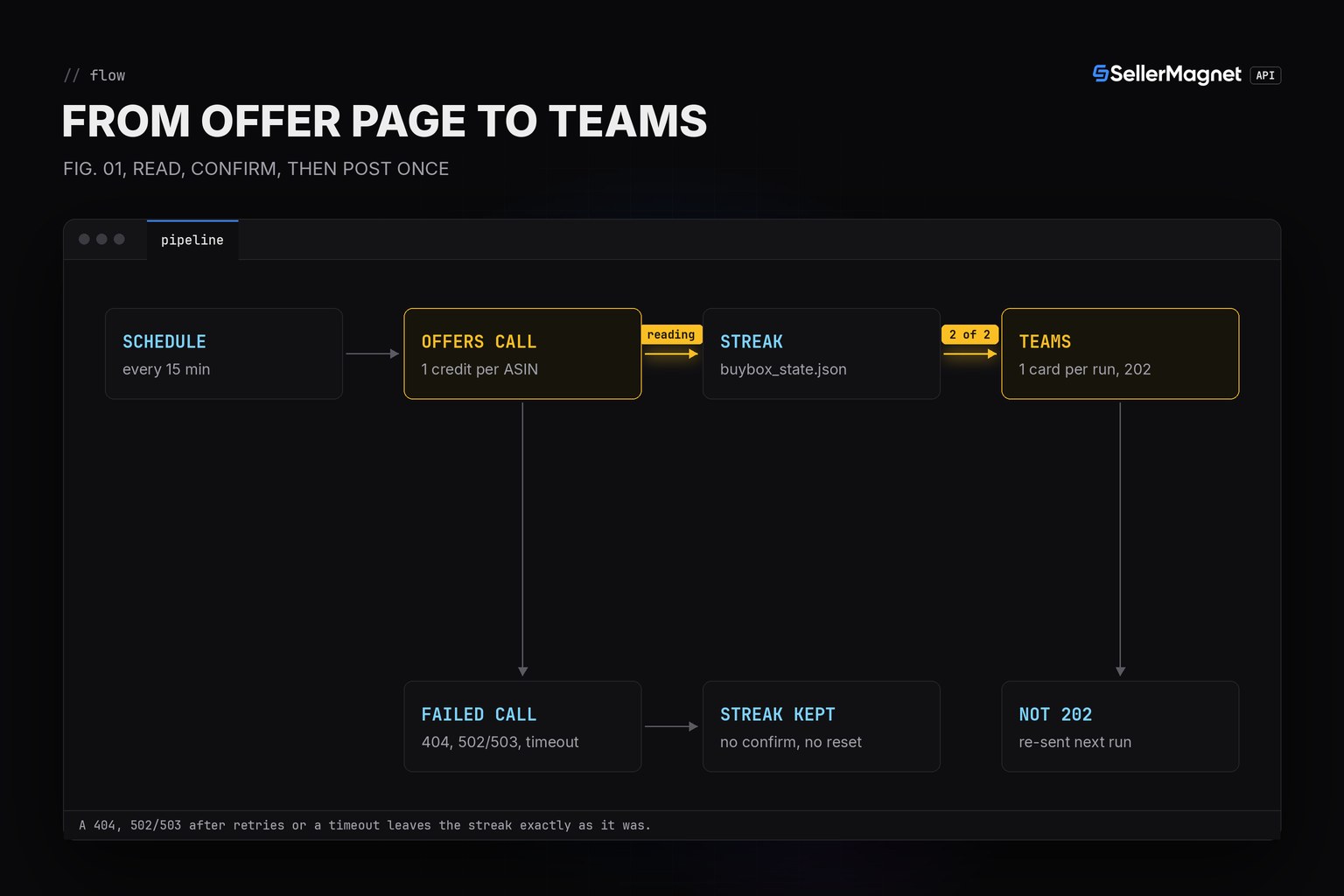
- Alert only when two checks in a row agree: an offer page can come back without parsable offers, and one reading should not page your team.
- A Workflows webhook answers 202 Accepted on success, with a 28 KB message size limit and about 4 requests per second per webhook.
- Each check costs 1 credit per ASIN; 502/503 retries are billed per attempt, a 500 is refunded, and a free 401/403 stops the run with one STOP card.
Why doesn't my old Teams webhook URL work anymore?
Because it was an Office 365 Connector, and Microsoft retired those inside Teams. The final rollout ran from May 18 to May 22, 2026; after that, "Office 365 Connectors will no longer function" (Microsoft's own wording). A webhook.office.com/webhookb2/... URL from before then is dead, and creating a new connector of that kind has been blocked for longer still. The supported replacement is the Workflows app, built on Power Automate: a flow created from the "Post to a channel when a webhook request is received" template hands you a new URL on logic.azure.com, shown once, with a sig query parameter that is the only credential. Lose it and you recreate the flow from the template; Teams does not store or redisplay it.
| Response | Reading | Teams card |
|---|---|---|
| buyBox.sellerId is your sellerId | mine | BACK, after a confirmed loss |
| buyBox.sellerId is any other seller or "Amazon" | lost | LOST, with holder, price and your offer |
| buyBox is {} and buyBoxSuppressed is true | suppressed | NONE |
| buyBox is {} and offers is [] | no-offers | EMPTY |
How do I build the Amazon Buy Box lost alert for Teams?
read_buy_box() turns one offers response into a reading, check() keeps a streak per ASIN in buybox_state.json and queues a fact once a new reading has been seen CONFIRM times in a row, and post_to_teams() sends every queued fact as one Adaptive Card. get_with_retry comes from retry.py and ApiError and new_session from sellermagnet.py, both from the Python quickstart. Malformed ASINs are skipped before any call, because the offers endpoint bills a typo like any other request. MY_SELLER_ID has no default on purpose: without it every ASIN would read as lost, so the script refuses to start. A new ASIN seeds its state to whatever it first reads, so a listing that starts out suppressed never fires a false alert just for staying that way.
buybox_teams_alert.py - offers check, 2-check confirmation, one Adaptive Card per run
import json
import os
import re

import requests

from retry import get_with_retry
from sellermagnet import ApiError, new_session

MARKETPLACE_ID = "ATVPDKIKX0DER"                 # amazon.com
MY_SELLER_ID = os.environ["MY_SELLER_ID"]       # your sellerId as it appears in offers[]; no default on purpose
ASINS = ["B0CL61F39H", "B0EXAMPLE2", "B0EXAMPLE3"]
CONFIRM = 2                                      # same reading on 2 checks in a row before Teams hears about it
STATE_FILE = "buybox_state.json"
ASIN_RE = re.compile(r"^[A-Z0-9]{10}$")          # offers calls are billed even for a typo, so filter first
MAX_FACTS = 10                                   # keep well under Teams' 28 KB message size limit


def read_buy_box(session, asin: str) -> tuple[str, str]:
    """('mine' | 'lost' | 'suppressed' | 'no-offers', detail for the message)."""
    data = get_with_retry(session, "amazon-product-offers", asin=asin, marketplaceId=MARKETPLACE_ID)
    box = data.get("buyBox") or {}
    if not box:
        # {} has two causes: offers exist but Amazon features none, or no offer at all (or none parsable)
        return ("suppressed", "") if data.get("buyBoxSuppressed") else ("no-offers", "")
    holder = box.get("sellerId") or "unknown"
    if holder == MY_SELLER_ID:
        return "mine", ""
    currency = (data.get("currency") or {}).get("code", "")
    detail = f"{box.get('sellerName', '?')} ({holder}, {box.get('fulfillmentType', '?')})"
    if isinstance(box.get("totalPrice"), (int, float)):     # price + shipping as floats, not rounded by the API
        detail += f" at {box['totalPrice']:.2f} {currency}"
    mine = [o["totalPrice"] for o in data.get("offers") or []
            if o.get("sellerId") == MY_SELLER_ID and isinstance(o.get("totalPrice"), (int, float))]
    detail += f", your offer {min(mine):.2f}" if mine else ", your offer: not on the first offer page"
    return "lost", detail                     # any other holder is the same reading: a rotation still confirms


def fact(asin: str, key: str, detail: str) -> dict:
    value = {"mine": "BACK, you hold the Buy Box again",
             "suppressed": "NONE, offers exist but Amazon features none",
             "no-offers": "EMPTY, no offers on the listing"}.get(key, f"LOST, held by {detail}")
    return {"title": asin, "value": value}


def adaptive_card(facts: list[dict]) -> dict:
    # Workflows webhooks need the card wrapped in a "message" envelope (docs.microsoft.com "Create an
    # Incoming Webhook", checked 2026-11-21), never the bare AdaptiveCard dict a raw bot payload would use.
    card = {"type": "AdaptiveCard", "$schema": "http://adaptivecards.io/schemas/adaptive-card.json",
            "version": "1.5",
            "body": [{"type": "TextBlock", "text": "Amazon Buy Box change, confirmed on 2 checks",
                      "weight": "bolder", "size": "medium", "wrap": True},
                     {"type": "FactSet", "facts": facts}]}
    return {"type": "message",
            "attachments": [{"contentType": "application/vnd.microsoft.card.adaptive", "content": card}]}


def post_to_teams(webhook_url: str, facts: list[dict]) -> bool:
    """One message per run. A Workflows webhook answers 202 Accepted with an empty body on success -
    not the 200 'ok' the retired Office 365 connector returned."""
    if not facts:
        return True
    if len(facts) > MAX_FACTS:                              # stay well under the 28 KB message size limit
        facts = facts[:MAX_FACTS] + [{"title": "...", "value": f"+{len(facts) - MAX_FACTS} more, see the dashboard"}]
    try:
        resp = requests.post(webhook_url, json=adaptive_card(facts), timeout=10)
    except requests.RequestException as err:
        print(f"teams unreachable: {type(err).__name__}")    # never print the URL: the sig= query param is the secret
        return False
    if resp.status_code == 202:
        return True
    print(f"teams refused the message: {resp.status_code} {resp.text[:60]}")
    return False


def load_state() -> dict:
    try:
        with open(STATE_FILE, encoding="utf-8") as fh:
            return json.load(fh)
    except FileNotFoundError:
        return {}


def save_state(state: dict) -> None:
    tmp = STATE_FILE + ".tmp"
    with open(tmp, "w", encoding="utf-8") as fh:
        json.dump(state, fh, indent=1, sort_keys=True)
    os.replace(tmp, STATE_FILE)                    # a crash mid-write keeps the last good state


def check(asins: list[str], webhook_url: str) -> None:
    session, state = new_session(), load_state()
    alerts, problems, checked, stopped = [], [], 0, ""
    for asin in dict.fromkeys(a.strip().upper() for a in asins):           # dedupe, keep order
        if not ASIN_RE.match(asin):
            problems.append(f"{asin}: not an ASIN, skipped")
            continue
        try:
            key, detail = read_buy_box(session, asin)
        except ApiError as err:
            if err.status in (401, 403):
                stopped = str(err)                     # bad key or no credits: every further call fails too
                problems.append(f"stopped: {stopped}")
                break
            problems.append(f"{asin}: {err}")          # 404 = listing gone (billed); state stays as it was
            continue
        except requests.RequestException as err:
            problems.append(f"{asin}: {type(err).__name__} after retries, state kept")
            continue
        checked += 1
        s = state.get(asin)
        if s is None:
            # first-ever sighting of this ASIN: seed state to it so a steady reading never alerts as a change
            s = state[asin] = {"last": key, "streak": 1, "reported": key}
            continue
        s["streak"] = s["streak"] + 1 if key == s["last"] else 1
        s["last"] = key
        if s["streak"] >= CONFIRM and key != s["reported"]:
            alerts.append((asin, key, fact(asin, key, detail)))
    facts = [f for _, _, f in alerts]
    if stopped and state.get("_stopped") != stopped:
        facts.append({"title": "STOP", "value": f"checks stopped: {stopped}"})   # said once, not every run
    sent = post_to_teams(webhook_url, facts)
    if sent:
        for asin, key, _ in alerts:
            state[asin]["reported"] = key              # only after Teams answered 202, else it is sent again
        if stopped:
            state["_stopped"] = stopped
    if not stopped:
        state.pop("_stopped", None)
    save_state(state)
    for line in problems:
        print(line)
    print(f"{checked} checked, {len(alerts)} alert(s) {'sent' if sent else 'NOT sent, retried next run'}")


if __name__ == "__main__":
    check(ASINS, os.environ["TEAMS_WEBHOOK_URL"])
Five runs of the script (illustrative ASINs and sellers; [teams] = the card body Teams received)
--- run 1 (illustrative ASINs and sellers)
3 checked, 0 alert(s) sent
--- run 2, B0EXAMPLE2 lost (1st sighting, not yet confirmed)
3 checked, 0 alert(s) sent
--- run 3, same reading confirmed
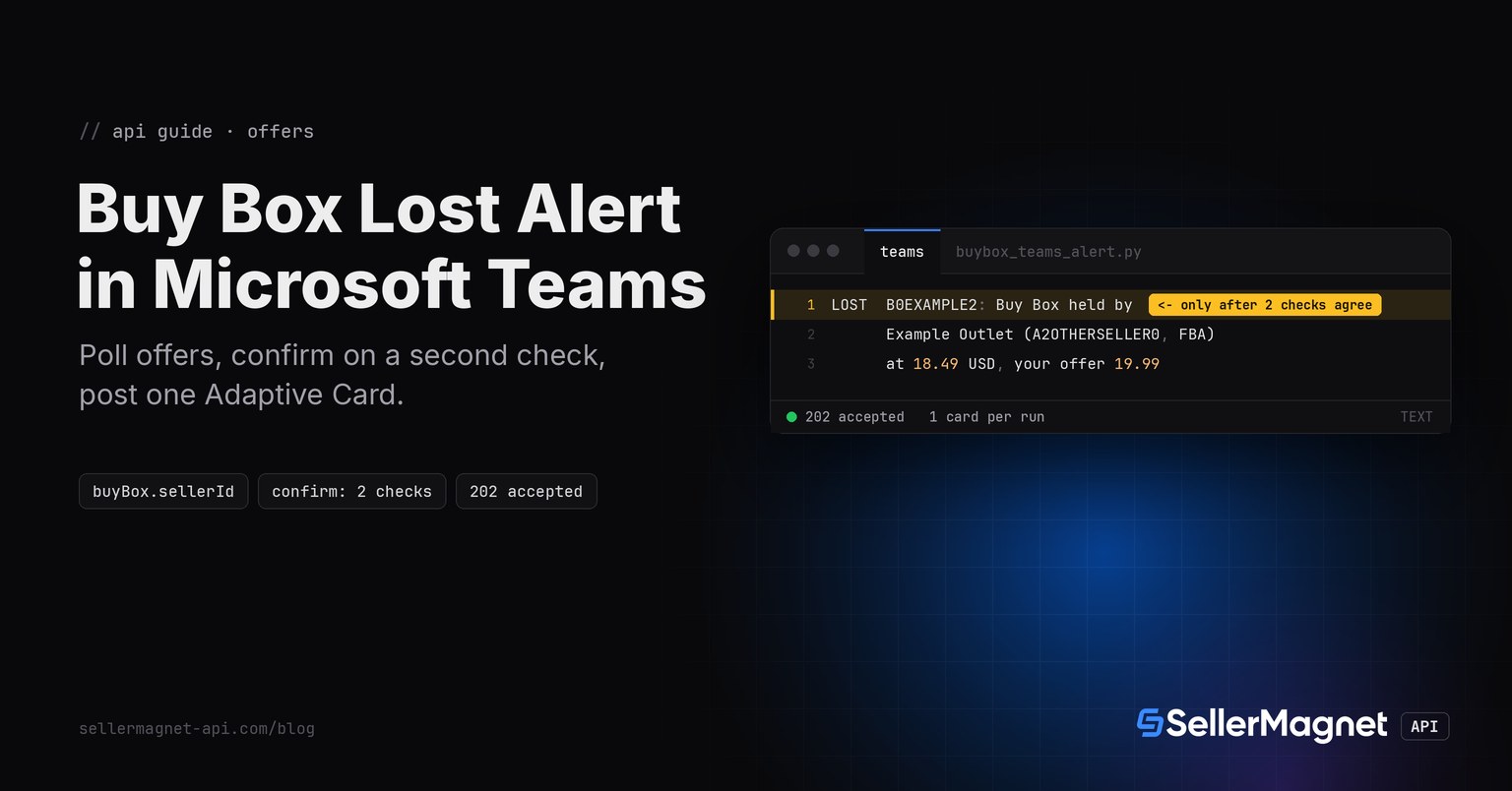
[teams] LOST  B0EXAMPLE2: Buy Box held by Example Outlet (A2OTHERSELLER0, FBA) at 18.49 USD, your offer 19.99
3 checked, 1 alert(s) sent
--- run 4, back to mine (1st sighting, not yet confirmed)
3 checked, 0 alert(s) sent
--- run 5, back to mine, confirmed
[teams] BACK  B0EXAMPLE2: you hold the Buy Box again
3 checked, 1 alert(s) sent
The Adaptive Card envelope a Workflows webhook expects (trimmed example)
{
  "type": "message",
  "attachments": [
    {
      "contentType": "application/vnd.microsoft.card.adaptive",
      "content": {
        "type": "AdaptiveCard",
        "$schema": "http://adaptivecards.io/schemas/adaptive-card.json",
        "version": "1.5",
        "body": [
          {"type": "TextBlock", "text": "Amazon Buy Box change, confirmed on 2 checks", "weight": "bolder"},
          {"type": "FactSet", "facts": [
            {"title": "B0EXAMPLE2", "value": "LOST, held by Example Outlet (A2OTHERSELLER0, FBA) at 18.49 USD"}
          ]}
        ]
      }
    }
  ]
}
How do I create the Workflows webhook in Teams?
- Open Workflows on the channelIn the target channel, open More options, then Workflows.
- Pick the incoming webhook templateSearch for webhook and select "Post to a channel when a webhook request is received".
- Choose the team and channelConfirm the Teams connection, then pick the team and channel this webhook should post to, and save.
- Copy the webhook URLTeams shows a logic.azure.com URL with a sig query parameter once. Store it as a secret; it will not be shown again.
Environment file and a cron entry for a 15-minute check (flock -n prevents overlapping runs)
# .env (keep it out of git: the webhook URL's sig= query parameter is a secret)
export SELLERMAGNET_API_KEY="your-key-here"
export TEAMS_WEBHOOK_URL="https://prod-12.westus.logic.azure.com/workflows/XXXX/triggers/manual/paths/invoke?api-version=2016-06-01&sp=%2Ftriggers%2Fmanual%2Frun&sv=1.0&sig=XXXXXXXXXXXXXXXXXXXXXXXXXXXXXXXXXXXXXXXXXXX"
export MY_SELLER_ID="A1MYSELLER0001"     # your sellerId as it appears in offers[]

# crontab -e: every 15 minutes, 3 ASINs = 288 credits a day; flock -n skips a run while the last one still runs
*/15 * * * * cd /opt/buybox && . ./.env && flock -n .lock .venv/bin/python buybox_teams_alert.py >> alert.log 2>&1
Microsoft's documentation (learn.microsoft.com "Create an Incoming Webhook", checked 2026-11-21) describes the contract the script relies on: you POST a JSON body wrapping an Adaptive Card or a MessageCard to the webhook URL, and a successful post answers HTTP 202 Accepted, with the card showing up in the channel a second or two later - there is no body to parse on success, unlike the retired connector's plain-text 1. The message size limit is 28 KB, and the documented rate limit is about 4 requests per second per webhook before the connection is throttled. Workflows webhooks also still render MessageCard payloads, but those do not support interactive HTTP POST action buttons, so an alert that only needs to display text works equally well as either; this script uses an Adaptive Card. The channel's bot identity always shows as the default Flow bot for a webhook post - custom icons and display names are not supported here, which is a step back from the old connector's per-webhook name and icon.
What should you check when a LOST alert fires?
The alert tells you who holds the Buy Box and at what total price, not why Amazon featured that offer. Amazon's US help page Becoming the Featured Offer (Seller Central, checked 2026-10-23) lists what it weighs: the total price including shipping, a fast and specific delivery promise, free shipping, free returns and seller performance, and an out-of-stock offer cannot be featured. Its Featured Offer guide on sell.amazon.com adds that fulfilling orders yourself can be just as effective as FBA. Start with the gap between the holder's price and your offer in the card, then your delivery date and stock. The Buy Box price gap guide shows why the lowest price alone does not decide it.
How many credits does a Buy Box alert cost?
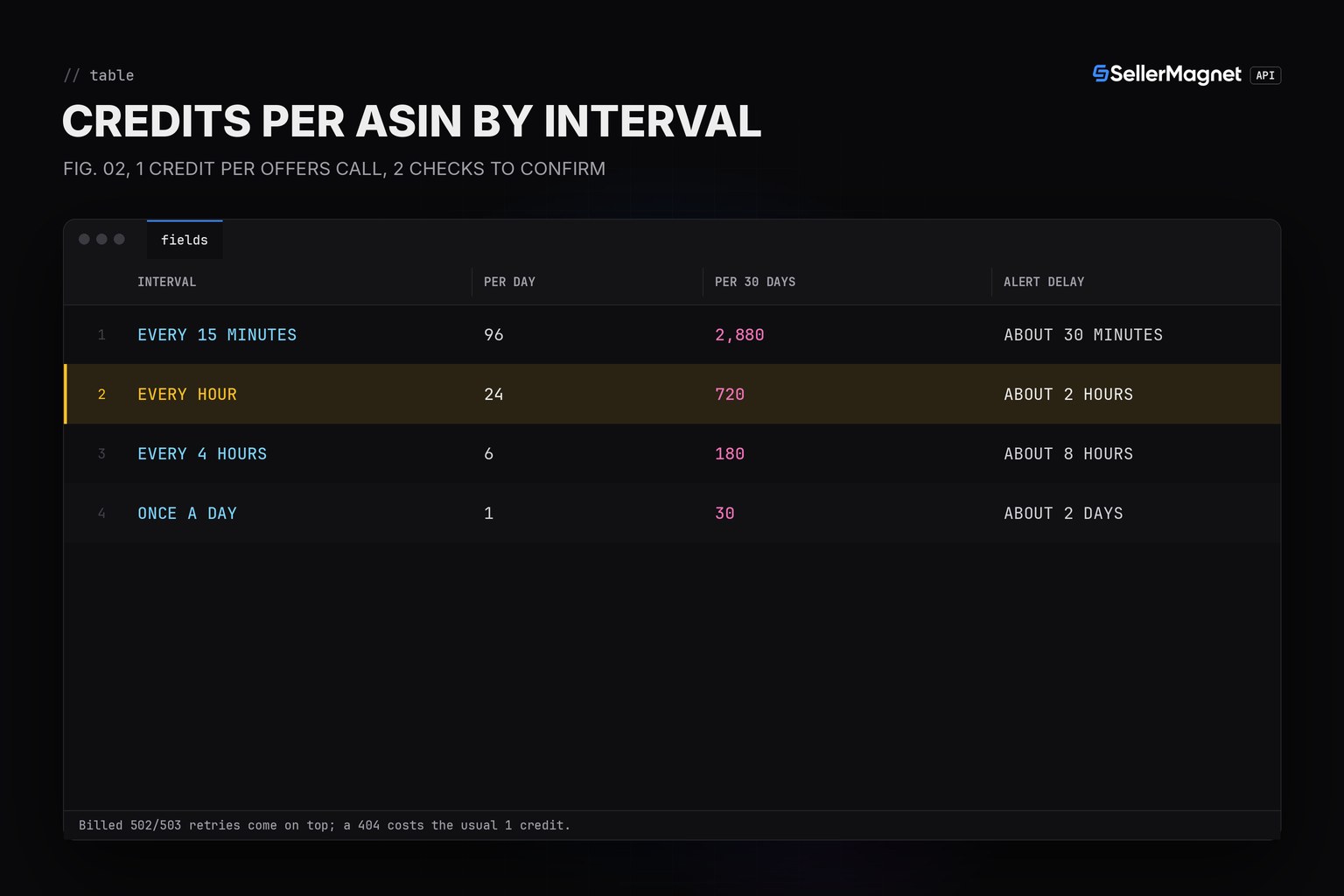
One offers call per ASIN per check, so the cost is the number of ASINs times the number of checks. With a 2-check confirmation the worst-case delay before Teams hears about a loss is about two intervals. Errors add to the bill in different ways: a 404 is billed once and not retried, a 502 or 503 is billed on every attempt, a 500 is refunded, and the free gate errors (400 for a missing parameter, 401, 403, 429) cost nothing. The Buy Box monitoring interval guide compares intervals in more detail, and Pricing lists the plans.
| Check interval | Credits per day | Credits per 30 days | Worst-case alert delay |
|---|---|---|---|
| Every 15 minutes | 96 | 2,880 | about 30 minutes |
| Every hour | 24 | 720 | about 2 hours |
| Every 4 hours | 6 | 180 | about 8 hours |
| Once a day | 1 | 30 | about 2 days |
Frequently Asked Questions
Does the old Incoming Webhook connector still work for this?
No. Microsoft retired Office 365 Connectors in Teams, including connector-based Incoming Webhooks, on a rollout that completed May 22, 2026. A webhook.office.com URL from before that no longer delivers; the replacement is a Workflows webhook URL on logic.azure.com.
Why does the script wait for a second check before posting?
An offer page can come back without parsable offers, which looks like a stock-out. Waiting for the same reading on two checks in a row filters one-off readings at the cost of one interval.
What does a successful Teams webhook call look like?
202 Accepted, with the card appearing in the channel a second or two later. That is different from the retired connector, which answered 200 with the body 1; there is no success body to parse here, only the status code.
What happens if Teams is unreachable or refuses the post?
The alert is not marked as reported, so the next run tries to send the same card again as long as the reading still holds. State is only updated after Teams answers 202.
Can I post to a private channel?
Yes. Workflows webhooks support private channels, configured through the Power Automate portal or the Workflows app in Teams, unlike some other webhook-style integrations.
What happens when my credits run out?
The API answers 401 (or 403 during a burst), which is not billed. The script stops instead of calling the remaining ASINs, posts one STOP card and does not repeat it until a run gets through without a 401 or 403.
Bottom line: compare buyBox.sellerId with your own seller ID, keep a streak per ASIN, and post one Adaptive Card per run to a Workflows webhook, not a retired Office 365 connector. To see who held the Buy Box and for how long after the fact, use the Buy Box history API; a free account includes 150 credits to try the alert.