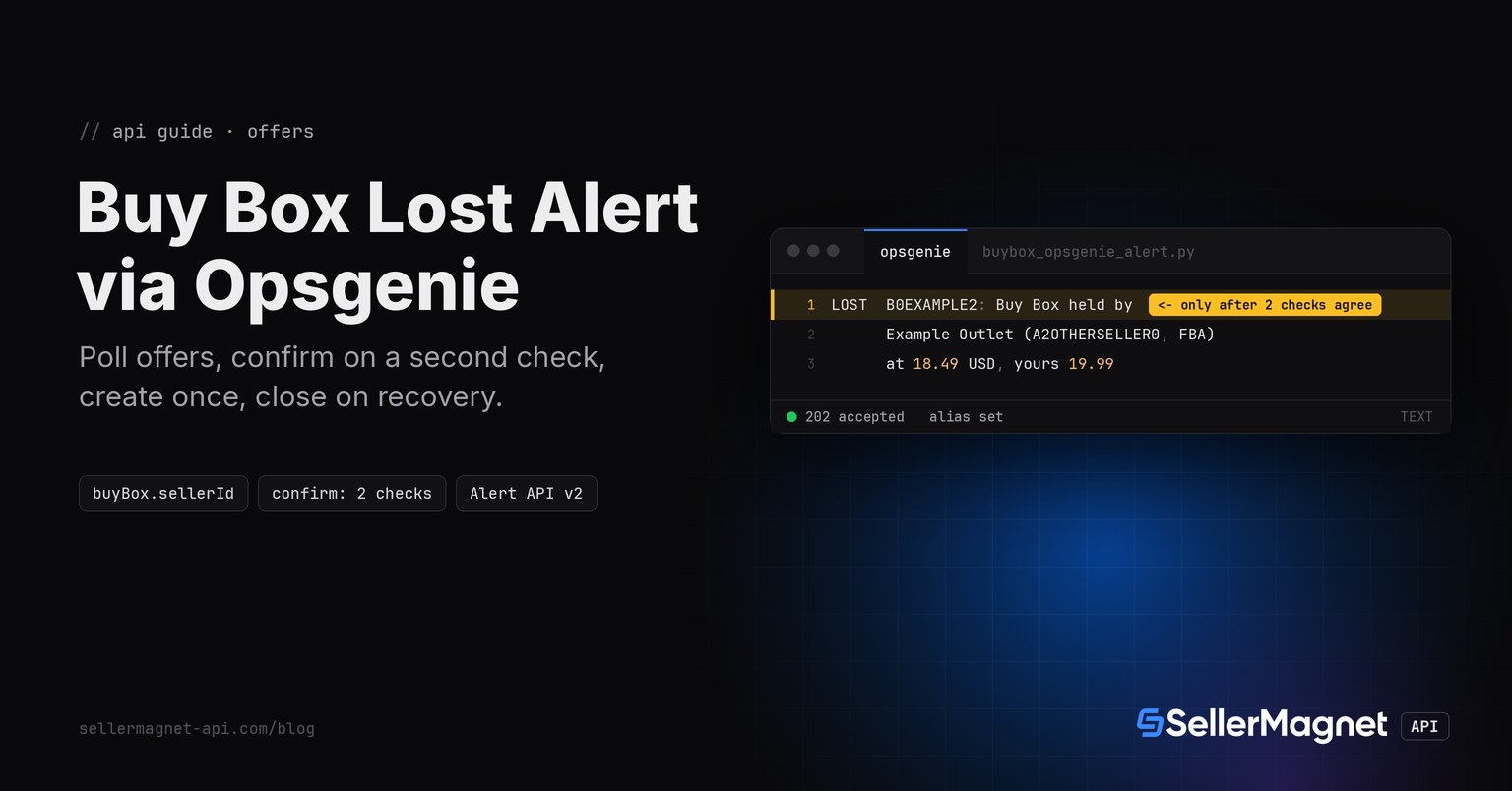
To get an Amazon Buy Box lost alert as an Opsgenie alert, poll /amazon-product-offers for each of your ASINs, compare buyBox.sellerId with your own seller ID, and call the Opsgenie Alert API v2 only when the same reading shows up on two checks in a row. The script below creates one alert per ASIN with an alias that stays stable across its whole lost-and-recovered cycle, and closes that same alert automatically once you hold the Buy Box again - no second script, no manual close.
Key Takeaways
- buyBox is the featured offer: its sellerId is the seller who holds the Buy Box, the literal "Amazon" when Amazon does.
- Alert only when two checks in a row agree: an offer page can come back without parsable offers, and one reading should not create an alert.
- alias correlates everything: the same buybox-<ASIN> alias on create and close keeps one alert per ASIN instead of a new one each run.
- Opsgenie's 202 means queued for async processing, not that the alert already exists - checking that needs a separate Get Request Status call this script skips.
- A 429 is safe to retry; a 400 means the body itself was rejected (often the 130-char message limit) and will not succeed on a retry.
What does the offers endpoint tell you about who holds the Buy Box?
/amazon-product-offers reads one page of the live offer listing. buyBox is the featured offer with sellerId, sellerName and totalPrice; Amazon itself appears as the literal "Amazon" with its own ID in amazonSellerId. When buyBox is an empty object, buyBoxSuppressed says why: true means offers exist but Amazon shows no featured offer, false with an empty offers list means there is nothing to feature. The script maps every response to one of four readings; any holder other than you is the same lost reading, so a Buy Box that rotates between two other sellers still confirms a loss and keeps the same alert open. Field details are in the Offer Listing API guide.
| Response | Reading | Opsgenie call |
|---|---|---|
| buyBox.sellerId is your sellerId | mine | close, after a confirmed recovery |
| buyBox.sellerId is any other seller or "Amazon" | lost | create, with holder, price and your offer |
| buyBox is {} and buyBoxSuppressed is true | suppressed | no Opsgenie call |
| buyBox is {} and offers is [] | no-offers | no Opsgenie call |
How do I build the Amazon Buy Box lost Opsgenie alert?
read_buy_box() turns one offers response into a reading, check() keeps a per-ASIN streak and an open flag in buybox_opsgenie_state.json and returns ("create", detail) or ("close", "") only once a new reading has repeated CONFIRM times in a row, and create_alert()/close_alert() POST to the Alert API v2. get_with_retry comes from retry.py and ApiError/new_session from sellermagnet.py, both from the Python quickstart. Malformed ASINs are skipped before any call, because the offers endpoint bills a typo like any other request. MY_SELLER_ID has no default on purpose: without it every ASIN would read as lost. The alias is always f"buybox-{asin}" - stable across the whole lost-and-recovered cycle, never random, so the close later lands on the exact alert the create opened.
buybox_opsgenie_alert.py - offers check, 2-check confirmation, create/close via Alert API v2
import os
import re
import time

import requests

from retry import get_with_retry
from sellermagnet import ApiError, new_session

MARKETPLACE_ID = "ATVPDKIKX0DER"                 # amazon.com
MY_SELLER_ID = os.environ["MY_SELLER_ID"]        # your sellerId as it appears in offers[]; no default on purpose
ASINS = ["B0CL61F39H", "B0EXAMPLE2", "B0EXAMPLE3"]
CONFIRM = 2                                      # same reading on 2 checks in a row before an alert fires
STATE_FILE = "buybox_opsgenie_state.json"
ASIN_RE = re.compile(r"\A[A-Z0-9]{10}\Z")         # offers calls are billed even for a typo, so filter first

OPSGENIE_API = "https://api.opsgenie.com/v2/alerts"       # EU accounts use api.eu.opsgenie.com instead
OPSGENIE_API_KEY = os.environ["OPSGENIE_API_KEY"]
OPSGENIE_RETRYABLE = {429, 500, 502, 503}


def read_buy_box(session, asin: str) -> tuple[str, str]:
    """('mine' | 'lost' | 'suppressed' | 'no-offers', detail for the alert message)."""
    data = get_with_retry(session, "amazon-product-offers", asin=asin, marketplaceId=MARKETPLACE_ID)
    box = data.get("buyBox") or {}
    if not box:
        # {} has two causes: offers exist but Amazon features none, or no offer at all (or none parsable)
        return ("suppressed", "") if data.get("buyBoxSuppressed") else ("no-offers", "")
    holder = box.get("sellerId") or "unknown"
    if holder == MY_SELLER_ID:
        return "mine", ""
    currency = (data.get("currency") or {}).get("code", "")
    detail = f"{box.get('sellerName', '?')} ({holder}, {box.get('fulfillmentType', '?')})"
    if isinstance(box.get("totalPrice"), (int, float)):      # price + shipping as floats, not rounded by the API
        detail += f" at {box['totalPrice']:.2f} {currency}"
    mine = [o["totalPrice"] for o in data.get("offers") or []
            if o.get("sellerId") == MY_SELLER_ID and isinstance(o.get("totalPrice"), (int, float))]
    detail += f", yours {min(mine):.2f}" if mine else ""
    return "lost", detail                      # any other holder is the same reading: a rotation still confirms


def load_state() -> dict:
    import json
    try:
        with open(STATE_FILE) as f:
            return json.load(f)
    except FileNotFoundError:
        return {}


def save_state(state: dict) -> None:
    import json
    with open(STATE_FILE, "w") as f:
        json.dump(state, f)


def check(state: dict, asin: str, key: str, detail: str) -> tuple[str, str] | None:
    """Advance the per-ASIN streak; return ('create'|'close', detail) only once a reading repeats CONFIRM times."""
    entry = state.get(asin, {"streak_key": None, "streak": 0, "open": False})
    if key == entry["streak_key"]:
        entry["streak"] += 1
    else:
        entry = {"streak_key": key, "streak": 1, "open": entry["open"]}
    state[asin] = entry
    if entry["streak"] < CONFIRM:
        return None
    if key == "mine":
        if entry["open"]:
            entry["open"] = False
            return "close", ""
        return None
    if key == "lost" and not entry["open"]:
        entry["open"] = True
        return "create", detail
    return None                                 # already open, or suppressed/no-offers: no Opsgenie call


def _headers() -> dict:
    return {"Authorization": f"GenieKey {OPSGENIE_API_KEY}", "Content-Type": "application/json"}


def create_alert(asin: str, detail: str, attempts: int = 4) -> dict:
    """POST one alert. Opsgenie answers 202 before the alert even exists - this call never confirms creation."""
    alias = f"buybox-{asin}"
    message = f"Buy Box lost on {asin}: {detail}" if detail else f"Buy Box lost on {asin}"
    body = {"message": message[:130], "alias": alias, "description": detail or "no further detail",
            "priority": "P2", "source": "sellermagnet-buybox-monitor", "tags": ["buy-box", "amazon"]}
    return _post(body, attempts)


def close_alert(asin: str, attempts: int = 4) -> dict:
    """POST to the close endpoint by alias. Same async 202 caveat as create."""
    alias = f"buybox-{asin}"
    url = f"{OPSGENIE_API}/{alias}/close?identifierType=alias"
    last = {"accepted": False, "status": None, "request_id": None, "result": "no attempt made"}
    for attempt in range(1, attempts + 1):
        resp = requests.post(url, headers=_headers(), json={"source": "sellermagnet-buybox-monitor"}, timeout=15)
        try:
            resp_json = resp.json()
        except ValueError:
            resp_json = {}
        if resp.status_code == 202:
            return {"accepted": True, "status": 202, "request_id": resp_json.get("requestId"),
                     "result": resp_json.get("result")}
        last = {"accepted": False, "status": resp.status_code, "request_id": None,
                 "result": resp_json.get("message", "request failed")}
        if resp.status_code not in OPSGENIE_RETRYABLE or attempt == attempts:
            return last
        time.sleep(min(2 ** attempt, 30))
    return last


def _post(body: dict, attempts: int) -> dict:
    last = {"accepted": False, "status": None, "request_id": None, "result": "no attempt made"}
    for attempt in range(1, attempts + 1):
        resp = requests.post(OPSGENIE_API, headers=_headers(), json=body, timeout=15)
        try:
            resp_json = resp.json()
        except ValueError:
            resp_json = {}
        if resp.status_code == 202:
            # 202 only means the create request was accepted into Opsgenie's async queue - the alert
            # may still fail processing (e.g. a bad responder) and only the Get Request Status
            # endpoint (GET /v2/alerts/requests/{requestId}) would show that, which this script skips.
            return {"accepted": True, "status": 202, "request_id": resp_json.get("requestId"),
                     "result": resp_json.get("result")}
        last = {"accepted": False, "status": resp.status_code, "request_id": None,
                 "result": resp_json.get("message", "request failed")}
        if resp.status_code not in OPSGENIE_RETRYABLE or attempt == attempts:
            return last
        time.sleep(min(2 ** attempt, 30))
    return last


def main() -> None:
    session = new_session()
    state = load_state()
    fired = 0
    for asin in ASINS:
        if not ASIN_RE.match(asin):
            print(f"SKIP {asin}: not a well-formed ASIN, not billed")
            continue
        try:
            key, detail = read_buy_box(session, asin)
        except ApiError as err:
            if err.status in (401, 403):
                print(f"STOP: {err.status} on {asin}, run ended early (free, not billed)")
                break
            print(f"SKIP {asin}: {err.status} {err}")
            continue
        action = check(state, asin, key, detail)
        if action is None:
            continue
        kind, detail = action
        result = create_alert(asin, detail) if kind == "create" else close_alert(asin)
        fired += 1
        if result["accepted"]:
            print(f"[opsgenie] {kind} accepted requestId={result['request_id']} result={result['result']}")
        else:
            print(f"[opsgenie] {kind} NOT accepted: HTTP {result['status']} {result.get('result')}")
    save_state(state)
    print(f"{len(ASINS)} checked, {fired} Opsgenie call(s) sent")


if __name__ == "__main__":
    main()
Five runs of the script (illustrative ASIN and seller; [opsgenie] = the API's own answer)
--- run 1 (illustrative ASIN and seller)
1 checked, 0 Opsgenie call(s) sent
--- run 2, one check later: B0EXAMPLE2's Buy Box flips (1st sighting, not confirmed yet)
1 checked, 0 Opsgenie call(s) sent
--- run 3: same reading confirmed, one alert created
[opsgenie] create accepted requestId=43a29c5c-3dbf-4fa4-9c26-f4f71023e120 result=Request will be processed
1 checked, 1 Opsgenie call(s) sent
--- run 4: B0EXAMPLE2 is back (1st sighting, not confirmed yet)
1 checked, 0 Opsgenie call(s) sent
--- run 5: recovery confirmed, the same alert is closed
[opsgenie] close accepted requestId=7c1e9a44-2b0d-4e3a-9f5b-11a2c3d4e5f6 result=Request will be processed
1 checked, 1 Opsgenie call(s) sent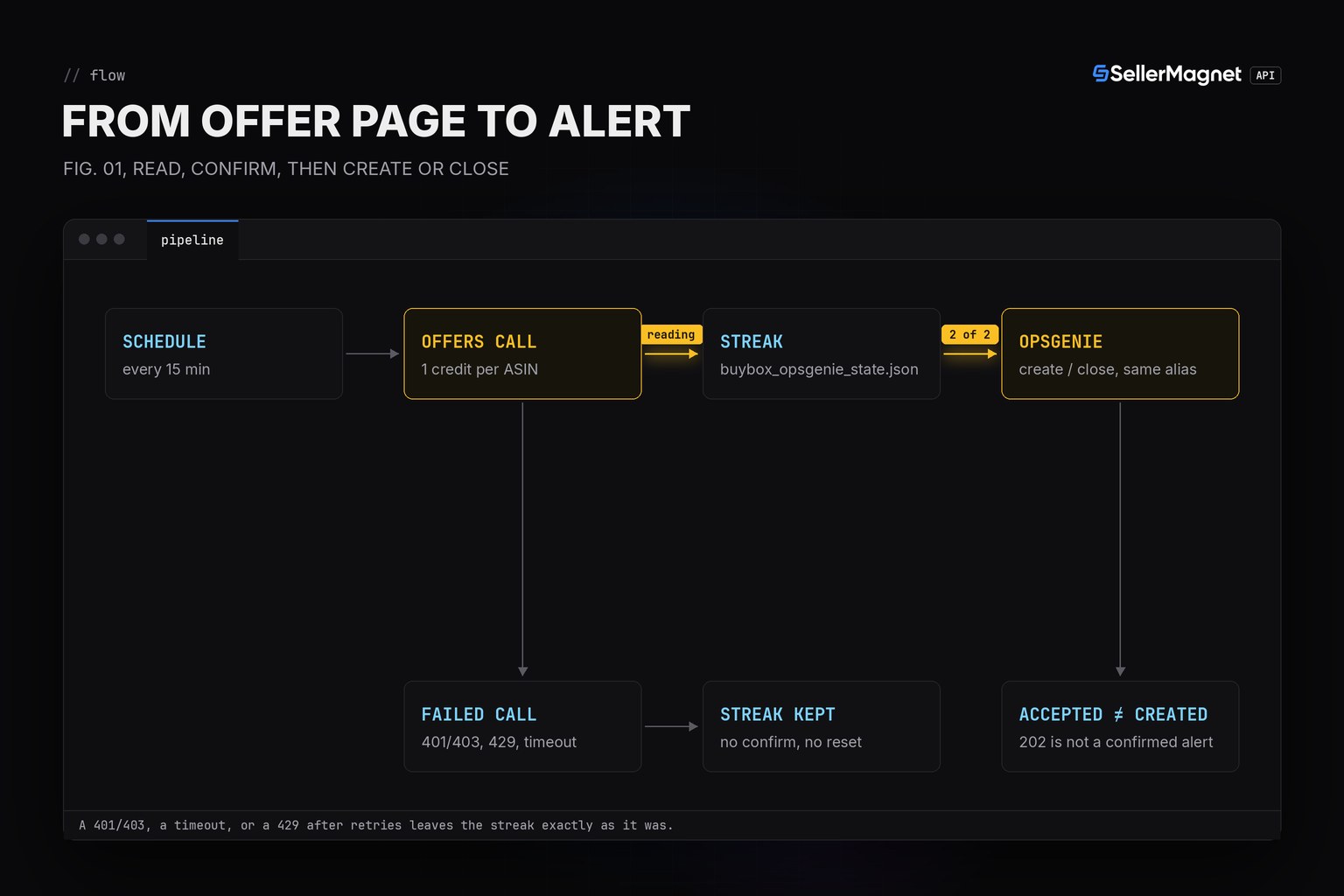
Why isn't a 202 response a confirmed alert?
Because Opsgenie documents create, close, delete and tag requests as explicitly asynchronous: "valid requests for those endpoints are responded to with HTTP status 202 - Accepted" (its own wording). The response body is {"result": "Request will be processed", "took": ..., "requestId": "..."} - no alertId, no success flag, nothing that says the alert now exists or which de-duplication branch it took. Confirming that needs a separate GET /v2/alerts/requests/{requestId} call, whose response nests data.success, data.isSuccess and data.status. This script skips that extra round trip and logs the requestId instead, the same caveat class as the SMS version of this alert: Twilio's 2xx means queued but not yet delivered, while Opsgenie's 202 means queued but not yet confirmed to have created or updated any alert at all.
Why does the same alias matter for create and close?
Because alias is, in the Alert API docs' own phrase, "the key element of Alert De-Duplication". A create sent with a still-open alias updates that existing alert instead of opening a second one, and a close sent with ?identifierType=alias only succeeds against the exact alias string an alert was created with. The script builds it as f"buybox-{asin}" - fixed per ASIN, never random, never time-stamped - specifically so the close it sends later lands on the exact alert the create opened, through every lost-then-recovered-then-lost-again cycle a real Buy Box actually goes through.
How do I set up an Opsgenie Alert API integration?
- Create an API IntegrationIn the Opsgenie web app, go to Teams (or Settings) > Integrations > Add Integration > API, and add it to the team that should see the Buy Box alert.
- Copy the API keyThe integration detail page shows its API key. Store it as OPSGENIE_API_KEY, never in the script.
- Check your regionMost accounts use api.opsgenie.com; an EU-instance account must send every request to api.eu.opsgenie.com instead.
- Send a test alertPOST a minimal create by hand first (curl is enough) and confirm it shows up on the team's alert list before wiring the cron job.
Environment file and a cron entry for a 15-minute check (flock -n prevents overlapping runs)
# .env (keep it out of git: the API key can open and close alerts on your behalf)
export SELLERMAGNET_API_KEY="your-key-here"
export OPSGENIE_API_KEY="eb243592-faa2-4ba2-a551q-1afdf565c889"   # the Alert API integration key
export MY_SELLER_ID="A1MYSELLER0001"             # your sellerId as it appears in offers[]

# crontab -e: every 15 minutes, 3 ASINs = 288 SellerMagnet credits a day; flock -n skips an overlapping run
*/15 * * * * cd /opt/buybox && . ./.env && flock -n .lock .venv/bin/python buybox_opsgenie_alert.py >> alert.log 2>&1
Which Opsgenie responses are safe to retry?
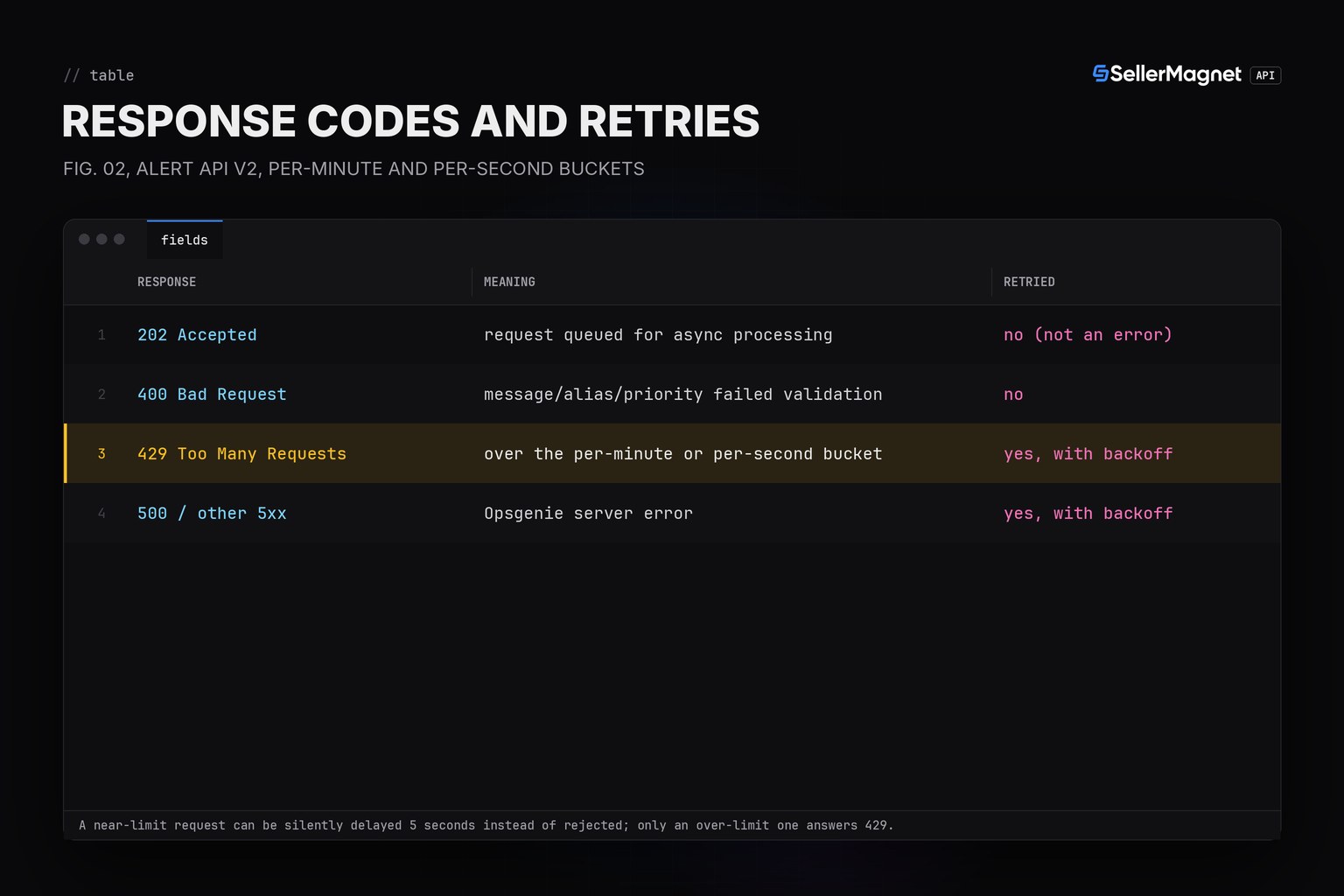
Only 429 and the 5xx range. A 429 ("Throttled") means the request exceeded either the per-minute or the per-second bucket Opsgenie tracks for that domain with a Token Bucket Algorithm - two separate rolling windows checked on every request. A request close to, but not over, either limit can instead be "Delayed" and simply run 5 seconds later without ever answering an error, which this script never has to handle specially since it still succeeds. A 400 is different: the body itself failed validation - commonly the 130-character message limit - and retrying it just repeats the same rejection, the same non-retryable class as a bad Twilio To number or a malformed PagerDuty payload.
| Response | Meaning | Retried? |
|---|---|---|
| 202 Accepted | request queued for async processing | no (not an error) |
| 400 Bad Request | message/alias/priority failed validation | no |
| 429 Too Many Requests | over the per-minute or per-second bucket | yes, with backoff |
| 500 / other 5xx | Opsgenie server error | yes, with backoff |
What should you check when a lost-Buy-Box alert fires?
The alert tells you who holds the Buy Box and at what total price, not why Amazon featured that offer. Amazon's US help page Becoming the Featured Offer (Seller Central, checked 2026-10-23) lists what it weighs: the total price including shipping, a fast and specific delivery promise, free shipping, free returns and seller performance, and an out-of-stock offer cannot be featured. Start with the gap between the holder's price and your offer in the alert, then your delivery date and stock. The Buy Box price gap guide shows why the lowest price alone does not decide it.
Frequently Asked Questions
Does a 202 from the Alert API mean the alert exists?
No. Opsgenie documents create, close, delete and tag requests as asynchronous: a 202 only means the request was accepted into the queue, with a body of {"result": "Request will be processed", "took": ..., "requestId": "..."} - no alertId, no success flag. Finding out whether it actually created a new alert, matched an existing alias, or failed validation needs a separate GET /v2/alerts/requests/{requestId} call, which this script does not make; it logs the requestId and moves on.
Why reuse the same alias for every create and close on one ASIN?
Because alias is, in Opsgenie's own words, "the key element of Alert De-Duplication". A create with a still-open alias updates that alert instead of opening a duplicate, and a close by ?identifierType=alias only works if it names the exact alias the alert was created with. The script builds it as f"buybox-{asin}" - fixed per ASIN, never random - so the close it sends later closes the exact alert its create opened.
Why wait for a second check before creating or closing?
An offer page can come back without parsable offers, which reads the same as a lost Buy Box. Waiting for the same reading on two checks in a row filters a one-off reading at the cost of one interval, the same convention this family of alerts already uses for its PagerDuty and SMS versions.
What is the difference between Throttled and Delayed on a 429?
Opsgenie checks a per-minute AND a per-second bucket on every request; a request that is allowed but close to either limit can be held and run 5 seconds later ("Delayed") instead of being rejected, for REST API endpoints only. Only a request that actually exceeds a bucket is "Throttled" and answers 429. The script only ever sees the 429 case - a delayed request still succeeds on the same call, just slightly later than usual.
What happens when my SellerMagnet credits run out?
The API answers 401 (or 403 during a burst), which is not billed. The script stops instead of calling the remaining ASINs and sends no Opsgenie call for that run.
Why does the message field get cut to 130 characters?
Because Opsgenie's own limit for the message field is 130 characters - noticeably shorter than PagerDuty's 1024-character summary. The full holder, fulfillment type and price still go into description (limit 15000 characters), which the script always sets alongside the shorter message.
Bottom line: compare buyBox.sellerId with your own seller ID, keep a streak per ASIN, and create one Opsgenie alert per ASIN with a stable alias so the same alert closes itself once you hold the Buy Box again - and remember that a 202 means queued, not yet a confirmed alert. To see who held the Buy Box and for how long after the fact, use the Buy Box history API; a free account includes 150 credits to try the alert.