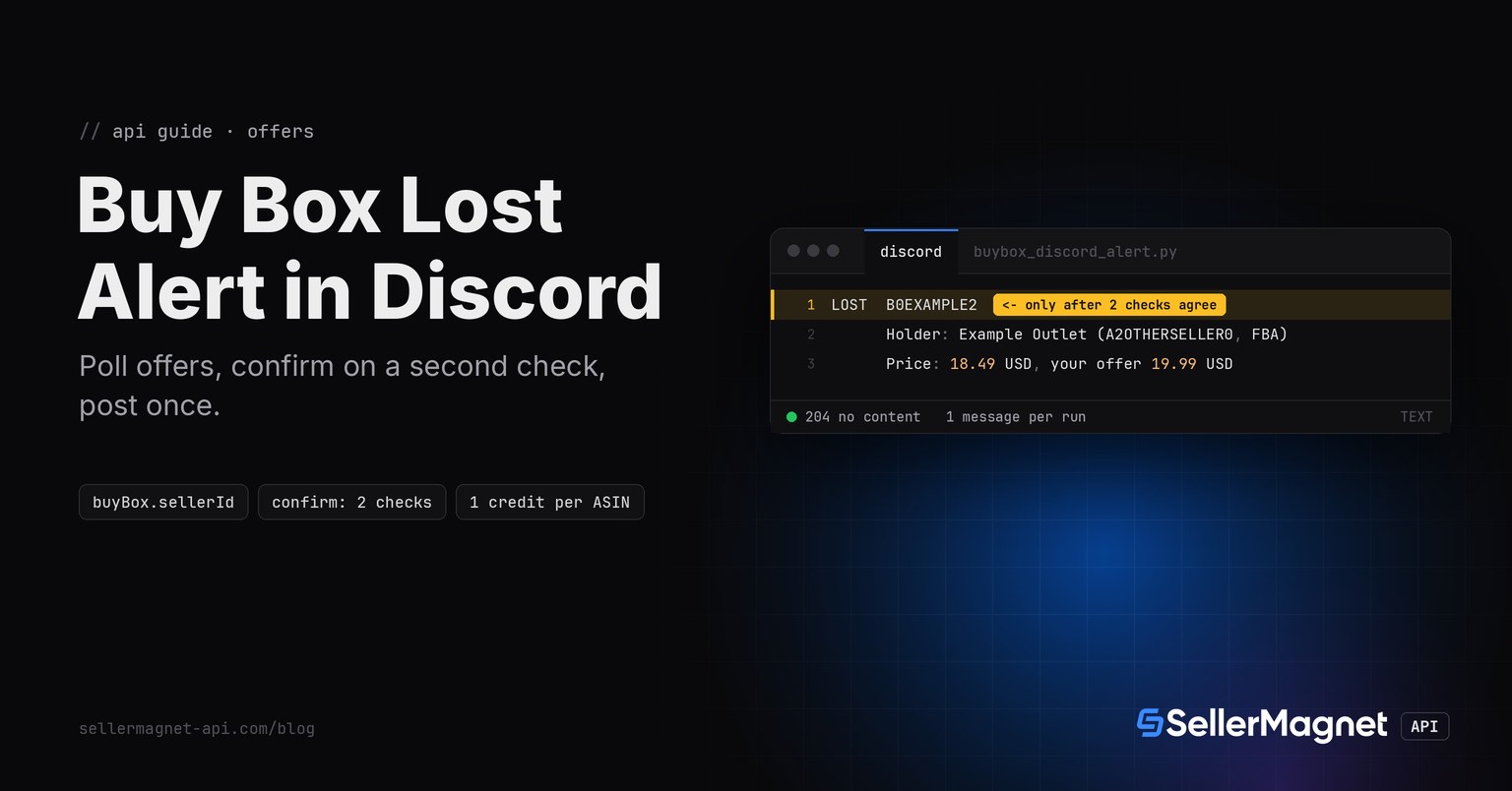
To get an Amazon Buy Box lost alert in Discord, poll /amazon-product-offers for each of your ASINs, compare buyBox.sellerId with your own seller ID, and post to a Discord incoming webhook only when the same reading shows up on two checks in a row. The script below sends one message per run with one embed per confirmed change, tells a lost Buy Box apart from a suppressed one, and costs one credit per ASIN per check.
Key Takeaways
- buyBox is the featured offer: its sellerId is the seller who holds the Buy Box, the literal "Amazon" when Amazon does.
- An empty buyBox means two different things: buyBoxSuppressed true (offers exist, Amazon features none) or no offers at all.
- Alert only when two checks in a row agree: an offer page can come back without parsable offers, and one reading should not page your team.
- Discord's webhook endpoint answers 204 No Content on success, allows up to 10 embeds per message, and returns 429 with a retry_after value when rate-limited.
- Each check costs 1 credit per ASIN; 502/503 retries are billed per attempt, a 500 is refunded, and a free 401/403 stops the run with one STOP message.
What does the offers endpoint tell you about who holds the Buy Box?
/amazon-product-offers reads one page of the live offer listing. buyBox is the featured offer with sellerId, sellerName and totalPrice; Amazon itself appears as the literal "Amazon" with its own ID in amazonSellerId. When buyBox is an empty object, buyBoxSuppressed says why: true means offers exist but Amazon shows no featured offer, false with an empty offers list means there is nothing to feature. The script maps every response to one of four readings; any holder other than you is the same lost reading, so a Buy Box that rotates between two other sellers still confirms a loss. Field details are in the Offer Listing API guide.
| Response | Reading | Discord embed |
|---|---|---|
| buyBox.sellerId is your sellerId | mine | BACK, after a confirmed loss |
| buyBox.sellerId is any other seller or "Amazon" | lost | LOST, with holder, price and your offer |
| buyBox is {} and buyBoxSuppressed is true | suppressed | NONE |
| buyBox is {} and offers is [] | no-offers | EMPTY |
How do I build the Amazon Buy Box lost alert?
read_buy_box() turns one offers response into a reading, check() keeps a streak per ASIN in buybox_state.json and queues an embed once a new reading has been seen CONFIRM times in a row, and post_to_discord() sends every queued embed as one webhook call, chunked at 10 embeds. get_with_retry comes from retry.py and ApiError and new_session from sellermagnet.py, both from the Python quickstart. Malformed ASINs are skipped before any call, because the offers endpoint bills a typo like any other request. MY_SELLER_ID has no default on purpose: without it every ASIN would read as lost, so the script refuses to start. A LOST embed names the holder, its fulfillment type and total price, and your own offer when it is on the first offer page, which is all the endpoint returns.
buybox_discord_alert.py - offers check, 2-check confirmation, one Discord message per run
import json
import os
import re

import requests

from retry import get_with_retry
from sellermagnet import ApiError, new_session

MARKETPLACE_ID = "ATVPDKIKX0DER"                 # amazon.com
MY_SELLER_ID = os.environ["MY_SELLER_ID"]        # your sellerId as it appears in offers[]; no default on purpose
ASINS = ["B0CL61F39H", "B0EXAMPLE2", "B0EXAMPLE3"]
CONFIRM = 2                                      # same reading on 2 checks in a row before Discord hears about it
STATE_FILE = "buybox_state.json"
ASIN_RE = re.compile(r"^[A-Z0-9]{10}$")          # offers calls are billed even for a typo, so filter first
WEBHOOK_URL = os.environ["DISCORD_WEBHOOK_URL"]
MAX_EMBEDS = 10                                  # Discord: at most 10 embeds per webhook message


def read_buy_box(session, asin: str) -> tuple[str, dict]:
    """('mine' | 'lost' | 'suppressed' | 'no-offers', fields for the embed)."""
    data = get_with_retry(session, "amazon-product-offers", asin=asin, marketplaceId=MARKETPLACE_ID)
    box = data.get("buyBox") or {}
    if not box:
        # {} has two causes: offers exist but Amazon features none, or no offer at all (or none parsable)
        return ("suppressed", {}) if data.get("buyBoxSuppressed") else ("no-offers", {})
    holder = box.get("sellerId") or "unknown"
    if holder == MY_SELLER_ID:
        return "mine", {}
    currency = (data.get("currency") or {}).get("code", "")
    fields = {"holder": f"{box.get('sellerName', '?')} ({holder}, {box.get('fulfillmentType', '?')})"}
    if isinstance(box.get("totalPrice"), (int, float)):     # price + shipping as floats, not rounded by the API
        fields["price"] = f"{box['totalPrice']:.2f} {currency}"
    mine = [o["totalPrice"] for o in data.get("offers") or []
            if o.get("sellerId") == MY_SELLER_ID and isinstance(o.get("totalPrice"), (int, float))]
    fields["your_offer"] = f"{min(mine):.2f} {currency}" if mine else "not on the first offer page"
    return "lost", fields                     # any other holder is the same reading: a rotation still confirms


def embed_for(asin: str, key: str, fields: dict) -> dict:
    url = f"https://www.amazon.com/dp/{asin}"
    if key == "mine":
        return {"title": f"BACK  {asin}", "url": url, "description": "You hold the Buy Box again."}
    if key == "suppressed":
        return {"title": f"NONE  {asin}", "url": url,
                 "description": "Offers exist but Amazon features none (Buy Box suppressed)."}
    if key == "no-offers":
        return {"title": f"EMPTY {asin}", "url": url, "description": "No offers on the listing."}
    return {
        "title": f"LOST  {asin}", "url": url,
        "fields": [
            {"name": "Holder", "value": fields["holder"], "inline": False},
            {"name": "Price", "value": fields.get("price", "n/a"), "inline": True},
            {"name": "Your offer", "value": fields["your_offer"], "inline": True},
        ],
    }


def post_to_discord(embeds: list[dict], content: str | None = None) -> bool:
    """One message per run; Discord allows up to 10 embeds per message, so chunk if a run ever finds more.
    Discord's webhook endpoint answers 204 No Content on a plain POST, not 200."""
    if not embeds:
        if content is None:
            return True
        try:
            resp = requests.post(WEBHOOK_URL, json={"content": content}, timeout=10)
        except requests.RequestException as err:
            print(f"discord unreachable: {type(err).__name__}")      # never print the URL: it is the secret
            return False
        return resp.status_code == 204
    ok = True
    for i in range(0, len(embeds), MAX_EMBEDS):
        chunk = embeds[i:i + MAX_EMBEDS]
        body = {"embeds": chunk}
        if content is not None and i == 0:
            body["content"] = content
        try:
            resp = requests.post(WEBHOOK_URL, json=body, timeout=10)
        except requests.RequestException as err:
            print(f"discord unreachable: {type(err).__name__}")
            ok = False
            continue
        if resp.status_code != 204:
            print(f"discord refused the message: {resp.status_code} {resp.text[:60]}")
            ok = False
    return ok


def load_state() -> dict:
    try:
        with open(STATE_FILE, encoding="utf-8") as fh:
            return json.load(fh)
    except FileNotFoundError:
        return {}


def save_state(state: dict) -> None:
    tmp = STATE_FILE + ".tmp"
    with open(tmp, "w", encoding="utf-8") as fh:
        json.dump(state, fh, indent=1, sort_keys=True)
    os.replace(tmp, STATE_FILE)                    # a crash mid-write keeps the last good state


def check(asins: list[str]) -> None:
    session, state = new_session(), load_state()
    embeds, problems, checked, stopped = [], [], 0, ""
    for asin in dict.fromkeys(a.strip().upper() for a in asins):          # dedupe, keep order
        if not ASIN_RE.match(asin):
            problems.append(f"{asin}: not an ASIN, skipped")
            continue
        try:
            key, fields = read_buy_box(session, asin)
        except ApiError as err:
            if err.status in (401, 403):
                stopped = str(err)                      # bad key or no credits: every further call fails too
                problems.append(f"stopped: {stopped}")
                break
            problems.append(f"{asin}: {err}")           # 404 = listing gone (billed); state stays as it was
            continue
        except requests.RequestException as err:
            problems.append(f"{asin}: {type(err).__name__} after retries, state kept")
            continue
        checked += 1
        s = state.setdefault(asin, {"last": "mine", "streak": 0, "reported": "mine"})
        s["streak"] = s["streak"] + 1 if key == s["last"] else 1
        s["last"] = key
        if s["streak"] >= CONFIRM and key != s["reported"]:
            embeds.append((asin, key, embed_for(asin, key, fields)))
    content = None
    if stopped and state.get("_stopped") != stopped:
        content = f"STOP: checks stopped: {stopped}"       # said once, not on every run
    sent = post_to_discord([e for _, _, e in embeds], content)
    if sent:
        for asin, key, _ in embeds:
            state[asin]["reported"] = key               # only after Discord said 204, else sent again next run
        if stopped:
            state["_stopped"] = stopped
    if not stopped:
        state.pop("_stopped", None)
    save_state(state)
    for line in problems:
        print(line)
    print(f"{checked} checked, {len(embeds)} alert(s) {'sent' if sent else 'NOT sent, retried next run'}")


if __name__ == "__main__":
    check(ASINS)
Five runs of the script (illustrative ASINs and sellers; [discord] = the message Discord received)
--- run 1 (illustrative ASINs and sellers) ---
3 checked, 0 alert(s) sent
--- run 2, B0EXAMPLE2 loses the Buy Box ---
3 checked, 0 alert(s) sent
--- run 3, one check later ---
[discord] LOST  B0EXAMPLE2: Buy Box held by Example Outlet (A2OTHERSELLER0, FBA) at 18.49 USD, your offer 19.99 USD
3 checked, 1 alert(s) sent
--- run 4 ---
3 checked, 0 alert(s) sent
--- run 5 ---
[discord] BACK  B0EXAMPLE2: You hold the Buy Box again.
3 checked, 1 alert(s) sent
Trimmed offers response for a suppressed Buy Box (example values)
{
  "success": true,
  "data": {
    "asin": "B0EXAMPLE3",
    "buyBox": {},
    "buyBoxSuppressed": true,
    "currency": {"code": "USD", "symbol": "$", "name": "US Dollar"},
    "offers": [{"sellerId": "A2OTHERSELLER0", "condition": "New", "totalPrice": 21.99}]
  }
}
Why wait for a second check before posting to Discord?
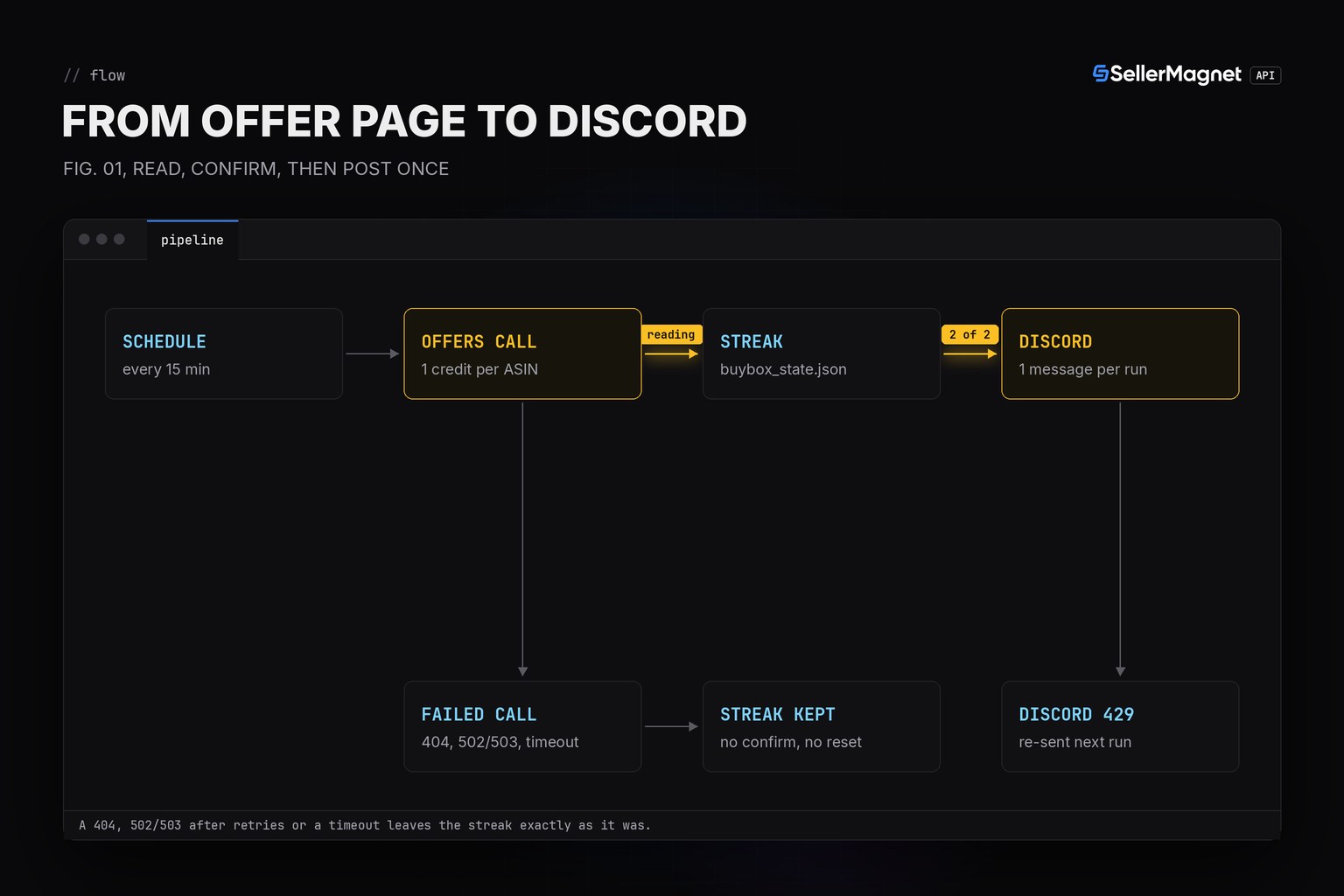
Because a single reading can be wrong in a way that looks real. When an offer page comes back with offer blocks that cannot be parsed, the response is a 200 with an empty offers list, the same shape as a listing with no offers. With CONFIRM = 2 the script alerts on the second check that sees the same reading, so a loss reaches Discord one interval later than the first sighting and a one-off reading never does. A failed call (a billed 404, a 502 or 503 after four attempts, a timeout) neither confirms nor resets the streak, and an embed that Discord did not accept is sent again on the next run while the reading still holds. A recovery needs two mine readings too, so a Buy Box that flips back for one check does not produce a BACK embed.
How do I set up the Discord incoming webhook?
- Open channel settingsIn the Discord channel that should get the alerts, open Edit Channel > Integrations > Webhooks.
- Create a webhookClick New Webhook, give it a name, and save.
- Copy the URLCopy Webhook URL. It looks like https://discord.com/api/webhooks/<id>/<token>.
- Store the URL as a secretPut the URL into DISCORD_WEBHOOK_URL in an environment file that never goes into version control: the URL itself is the only credential needed to post.
Environment file and a cron entry for a 15-minute check (flock -n prevents overlapping runs)
# .env (keep it out of git: the webhook URL is the only credential needed to post)
export SELLERMAGNET_API_KEY="your-key-here"
export DISCORD_WEBHOOK_URL="https://discord.com/api/webhooks/123456789012345678/XXXXXXXXXXXXXXXXXXXXXXXXXXXX"
export MY_SELLER_ID="A1MYSELLER0001"     # your sellerId as it appears in offers[]

# crontab -e: every 15 minutes, 3 ASINs = 288 credits a day; flock -n skips a run while the last one still runs
*/15 * * * * cd /opt/buybox && . ./.env && flock -n .lock .venv/bin/python buybox_discord_alert.py >> alert.log 2>&1
Discord's own documentation (docs.discord.com/developers/resources/webhook, checked 2026-11-10) describes the contract the script relies on: executing a webhook with a plain POST answers 204 No Content on success, not 200 - only the ?wait=true variant returns 200 with the created message. A message needs at least one of content, embeds, components, file or poll; content is capped at 2000 characters, and a message can carry up to 10 embeds, each limited to 256 characters in its title, 1024 per field value and 6000 characters total. Discord's general rate-limit documentation (docs.discord.com/developers/topics/rate-limits) says an exceeded limit answers 429 with a retry_after value in the body, and its safety page (discord.com/safety/using-webhooks-and-embeds) separately states incoming webhooks are limited to about 30 messages per minute, comfortably above what a 15-minute poll of a handful of ASINs would ever send. The script treats any webhook response other than 204 as not delivered and leaves the streak exactly where it was, so an embed that failed to post is included again on the next run while the reading still holds.
What should you check when a LOST alert fires?
The alert tells you who holds the Buy Box and at what total price, not why Amazon featured that offer. Amazon's US help page Becoming the Featured Offer (Seller Central, checked 2026-10-23) lists what it weighs: the total price including shipping, a fast and specific delivery promise, free shipping, free returns and seller performance, and an out-of-stock offer cannot be featured. Its Featured Offer guide on sell.amazon.com adds that fulfilling orders yourself can be just as effective as FBA. Start with the gap between the holder's price and your offer in the embed, then your delivery date and stock. The Buy Box price gap guide shows why the lowest price alone does not decide it.
How many credits does a Buy Box alert cost?
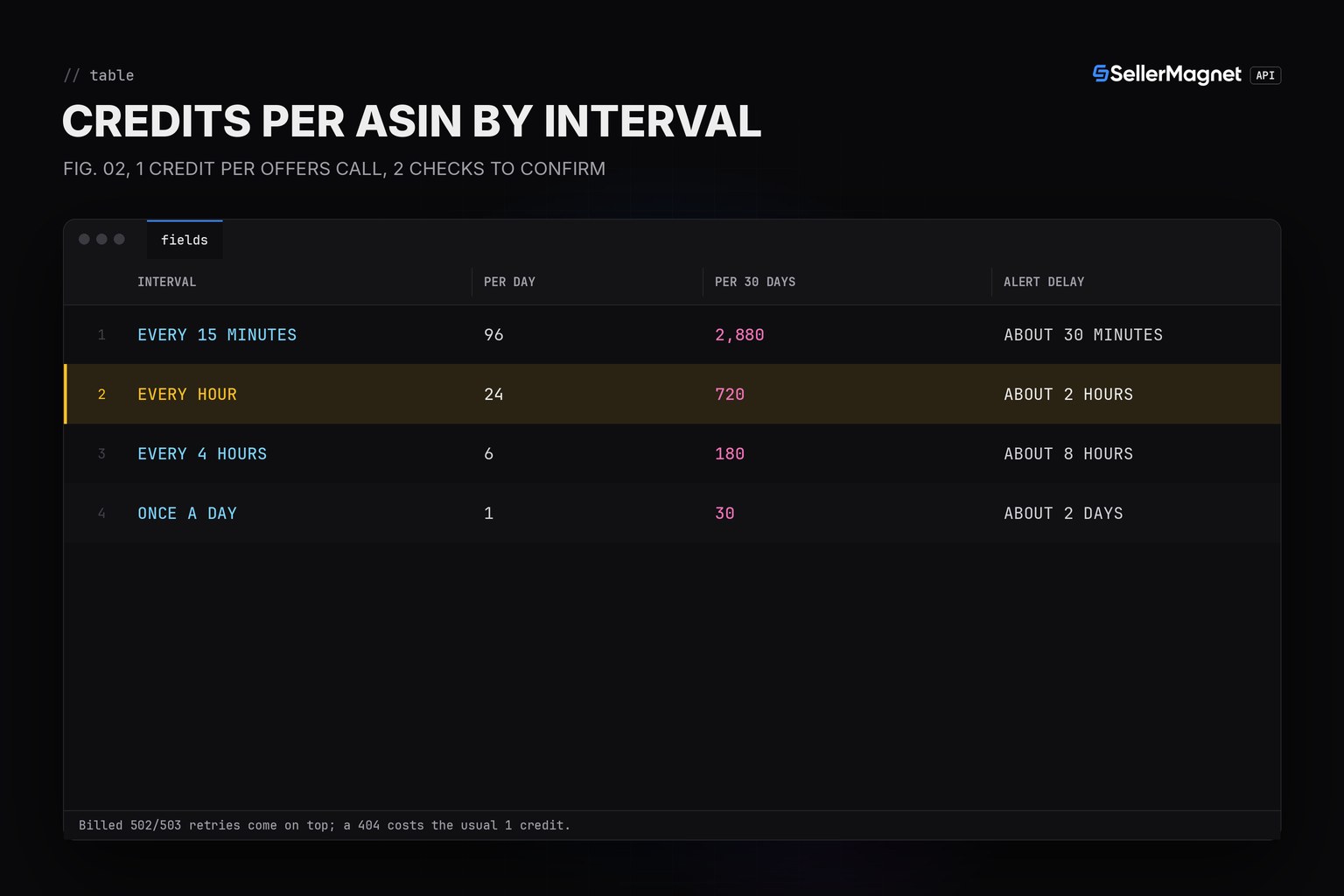
One offers call per ASIN per check, so the cost is the number of ASINs times the number of checks. With a 2-check confirmation the worst-case delay before Discord hears about a loss is about two intervals. Errors add to the bill in different ways: a 404 is billed once and not retried, a 502 or 503 is billed on every attempt, a 500 is refunded, and the free gate errors (400 for a missing parameter, 401, 403, 429) cost nothing. The Buy Box monitoring interval guide compares intervals in more detail, and Pricing lists the plans.
| Check interval | Credits per day | Credits per 30 days | Worst-case alert delay |
|---|---|---|---|
| Every 15 minutes | 96 | 2,880 | about 30 minutes |
| Every hour | 24 | 720 | about 2 hours |
| Every 4 hours | 6 | 180 | about 8 hours |
| Once a day | 1 | 30 | about 2 days |
Frequently Asked Questions
How soon after a loss does the Discord alert arrive?
After the second check that sees it. The script polls the live offer listing on your own schedule, so with checks every 15 minutes a loss reaches Discord 15 to 30 minutes after it happens.
Why not alert on the first reading?
An offer page can come back without parsable offers, which looks like a stock-out. Waiting for the same reading on two checks in a row filters one-off readings at the cost of one interval.
What is the difference between NONE and LOST?
LOST means another seller, or Amazon, holds the featured offer. NONE means offers exist but Amazon features none of them (buyBoxSuppressed is true), so nobody holds the Buy Box.
What happens if Discord is down when a loss is confirmed?
The embed is not marked as sent, so the next run posts it again as long as the reading still holds. The state file records an alert only after Discord answered 204 No Content.
Why does a 204 response mean the alert was posted?
Discord's webhook endpoint answers 204 No Content on a plain POST; only the ?wait=true variant returns 200 with the message body. Checking for 200 would treat every real success as a failure.
How do I find my own seller ID for MY_SELLER_ID?
Use the sellerId of your own offer in the offers[] list of one of your ASINs. That is the exact value buyBox.sellerId carries when you hold the Buy Box.
What happens when my credits run out?
The API answers 401 (or 403 during a burst), which is not billed. The script stops instead of calling the remaining ASINs, posts one STOP message to Discord and does not repeat it until a run gets through without a 401 or 403.
Bottom line: compare buyBox.sellerId with your own seller ID, keep a streak per ASIN, and post to Discord only when two checks agree, in one message per run with up to 10 embeds. To watch who held the Buy Box and for how long after the fact, use the Buy Box history API; a free account includes 150 credits to try the alert.