
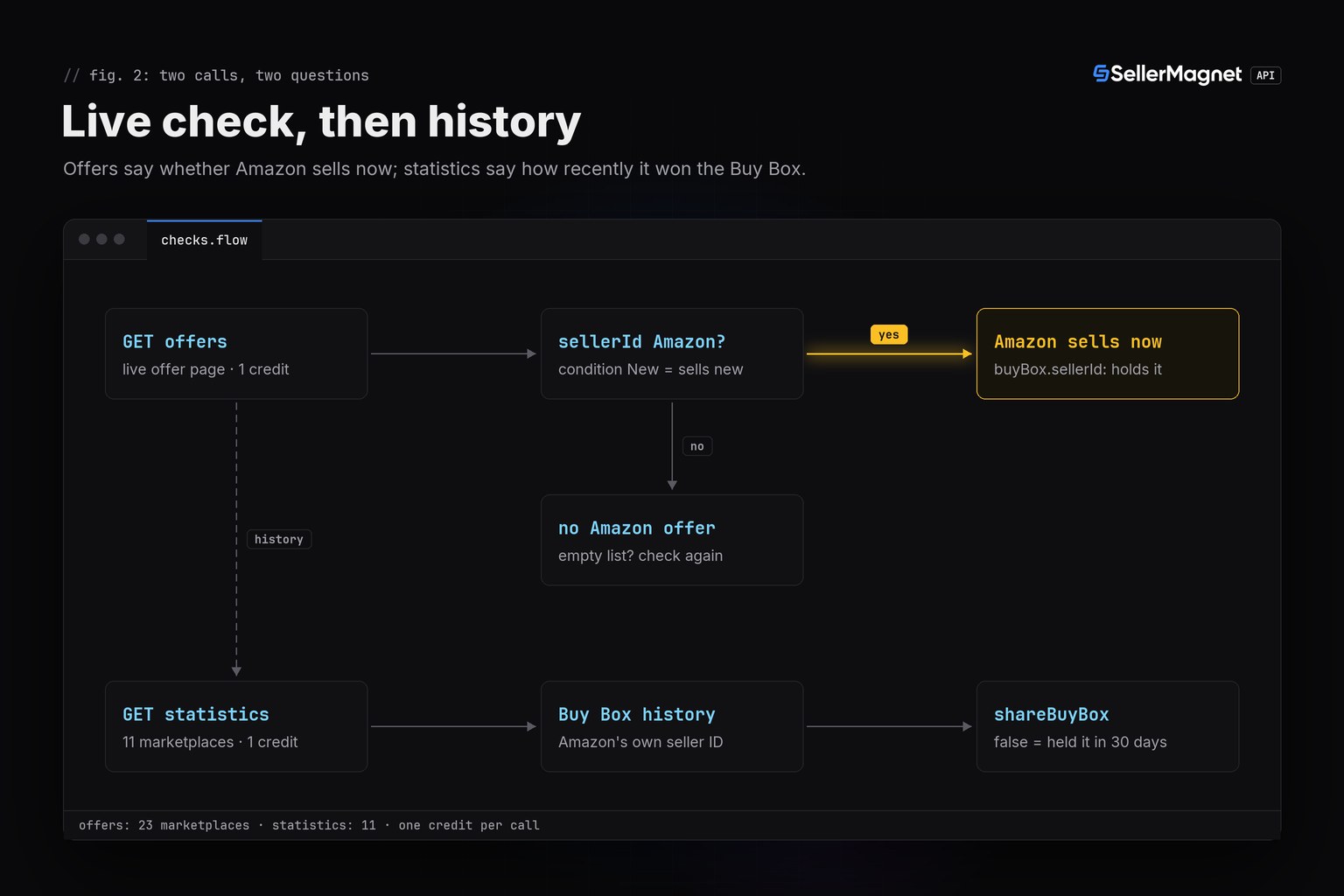
To check if Amazon is a seller on a listing, call /api/amazon-product-offers for the ASIN and look for an offer whose sellerId is the literal "Amazon". If buyBox.sellerId is "Amazon" as well, Amazon holds the Buy Box right now. For the past, /api/amazon-product-statistics records every Buy Box holder, Amazon under its own seller ID. Each call costs one credit; below are both checks in curl and Python.
Key Takeaways
- Amazon's own offers come back with sellerId "Amazon", because Amazon's offer has no seller link; amazonSellerId adds its real seller ID.
- A buyBox.sellerId of "Amazon" means Amazon holds the Buy Box, the featured offer, at the time of the call.
- Used offers sold by Amazon also say "Amazon", so filter on condition "New" when you ask whether Amazon sells the product new.
- History comes from the statistics endpoint, where Amazon appears under its first-party seller ID, such as ATVPDKIKX0DER on amazon.com.
- shareBuyBox true means Amazon did not hold the Buy Box in the last 30 days - the name reads the other way round.
How do you check if Amazon is a seller on a listing?
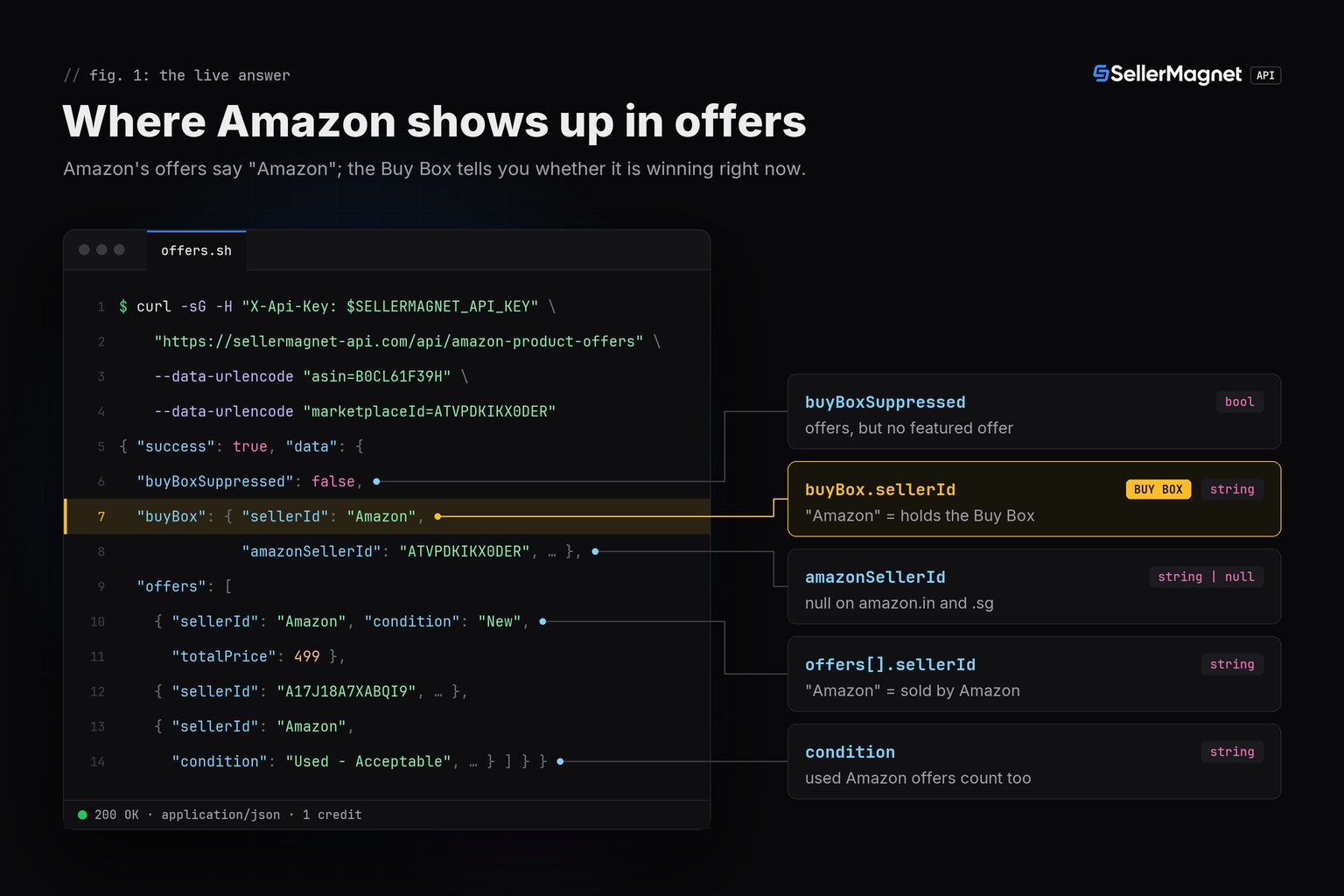
Request the live offer listing and look for sellerId equal to "Amazon": that is how the API marks Amazon's own offers. The offers endpoint takes asin and marketplaceId and returns the featured offer as buyBox plus the offers on the listing as offers[], on all 23 supported marketplaces. This call lists Amazon's offers and says whether Amazon holds the Buy Box:
Amazon's offers and the Buy Box holder with curl and jq
curl -sG "https://sellermagnet-api.com/api/amazon-product-offers" \
  -H "X-Api-Key: $SELLERMAGNET_API_KEY" --max-time 120 \
  --data-urlencode "asin=B0CL61F39H" \
  --data-urlencode "marketplaceId=ATVPDKIKX0DER" \
  | jq 'if .success then {
          amazon_offers: [.data.offers[] | select(.sellerId == "Amazon") | {condition, totalPrice}],
          amazon_holds_buy_box: (.data.buyBox.sellerId == "Amazon"),
          buy_box_suppressed: .data.buyBoxSuppressed
        } else error(.message) end'
With the example values from the API docs, Amazon has two offers on this PlayStation 5 listing on amazon.com - one new at 499.00 and one used - and holds the Buy Box. The trimmed response:
Trimmed /amazon-product-offers response (example values from the API docs)
{
  "success": true,
  "data": {
    "asin": "B0CL61F39H",
    "marketplaceId": "ATVPDKIKX0DER",
    "buyBoxSuppressed": false,
    "buyBox": {
      "sellerId": "Amazon",
      "amazonSellerId": "ATVPDKIKX0DER",
      "condition": "New",
      "fulfillmentType": "FBA",
      "totalPrice": 499
    },
    "offers": [
      {"sellerId": "Amazon", "amazonSellerId": "ATVPDKIKX0DER", "condition": "New", "totalPrice": 499},
      {"sellerId": "A17J18A7XABQI9", "amazonSellerId": null, "condition": "Used - Very Good", "totalPrice": 409.99},
      {"sellerId": "Amazon", "amazonSellerId": "ATVPDKIKX0DER", "condition": "Used - Acceptable", "totalPrice": 433.85}
    ]
  }
}
Why is the seller ID "Amazon" and not a real ID?
Amazon's own offer has no seller link on the offer page, so the API reports the literal "Amazon" and puts the real ID into amazonSellerId. That ID is Amazon's first-party seller account for the marketplace: ATVPDKIKX0DER on amazon.com, A3JWKAKR8XB7XF on amazon.de, A3P5ROKL5A1OLE on amazon.co.uk. Test sellerId, not amazonSellerId: four details decide whether your answer is right.
amazonSellerIdis null for every third-party seller, and also on amazon.in and amazon.sg, which have no first-party Amazon seller.- Amazon's used offers carry
sellerId"Amazon"too - the docs example lists one graded "Used - Acceptable". Filter oncondition"New"if the question is whether Amazon sells the product new. offers[]holds one page of the offer listing: the pinned offer plus the offers Amazon loads first. An Amazon offer further down that list would not be in it.- An empty
buyBox({}) means no featured offer;buyBoxSuppressedis true when offers exist but Amazon features none. A 200 with an emptyofferslist can be a parsing miss, so confirm it with a second check before you act on it.
| Field | Endpoint | Value when Amazon is the seller | Coverage |
|---|---|---|---|
offers[].sellerId | offers | "Amazon" on every offer Amazon sells itself | All 23 |
offers[].amazonSellerId | offers | Amazon's seller ID, e.g. ATVPDKIKX0DER | null on amazon.in and amazon.sg |
offers[].condition | offers | "New" or a used grade such as "Used - Acceptable" | All 23 |
buyBox.sellerId | offers | "Amazon" = Amazon holds the Buy Box now | All 23 |
buyBoxSellerIdHistory | statistics | Amazon's own seller ID at each change | 11 history marketplaces |
shareBuyBox | statistics | false = Amazon held the Buy Box in the last 30 days | 11 (always true on amazon.in) |
amazonPrice | statistics | Amazon's live new price + shipping, in cents | null when Amazon has no live new offer |
stats.amazonAsSellerPriceHistory | statistics | Amazon's item price over time, gaps when absent | 11 history marketplaces |
Check Amazon's offers and Buy Box in Python
This function answers both questions for one ASIN: whether Amazon sells it now (new or used) and, where history exists, when Amazon last took the Buy Box. get(), new_session() and ApiError come from the Python quickstart; the key is read from SELLERMAGNET_API_KEY. On a marketplace without history, the statistics call is a free 400 and the function returns the live part only.
amazon_on_listing.py - live offers plus Buy Box history (2 credits per ASIN)
"""Is Amazon selling on this listing? Live offers + Buy Box history, 2 credits per ASIN."""
import sys

from sellermagnet import ApiError, get, new_session

# Amazon's own seller IDs in the Buy Box history (amazon.in has none).
AMAZON_IDS = {"ATVPDKIKX0DER", "A3DWYIK6Y9EEQB", "AVDBXBAVVSXLQ", "A1ZZFT5FULY4LN", "A3P5ROKL5A1OLE",
              "A3JWKAKR8XB7XF", "A1X6FK5RDHNB96", "A11IL2PNWYJU7H", "A1AT7YVPFBWXBL", "AN1VRQENFRJN5"}


def amazon_on_listing(asin: str, marketplace_id: str) -> dict:
    session = new_session()
    live = get(session, "amazon-product-offers", asin=asin, marketplaceId=marketplace_id)
    amazon = [o for o in live["offers"] if o["sellerId"] == "Amazon"]
    new = [o for o in amazon if o["condition"] == "New"]
    report = {
        "amazon_sells_new": bool(new),
        "amazon_sells_used": len(new) < len(amazon),
        "amazon_new_price": new[0]["totalPrice"] if new else None,
        "amazon_holds_buy_box": live["buyBox"].get("sellerId") == "Amazon",  # {} = no Buy Box
    }
    try:
        stats = get(session, "amazon-product-statistics", asin=asin, marketplaceId=marketplace_id)
    except ApiError as err:
        if "not available for the requested marketplace" not in str(err):
            raise
        return report  # free 400: no history for this marketplace
    took = [ts for ts, seller in stats.get("buyBoxSellerIdHistory") or [] if seller in AMAZON_IDS]
    report["amazon_last_took_buy_box"] = took[-1] if took else None  # UTC
    share = stats.get("shareBuyBox")
    report["amazon_buy_box_last_30d"] = None if share is None else not share
    return report


if __name__ == "__main__":
    try:
        print(amazon_on_listing("B0CL61F39H", "ATVPDKIKX0DER"))
    except ApiError as err:
        sys.exit(f"check failed: {err}")  # 404 = ASIN not on this marketplace (billed)
buyBoxSellerIdHistory records changes, so its last Amazon entry is the last time Amazon took the Buy Box, not the last time it held it. To turn the history into hours held per seller, follow the Buy Box history guide.
Has Amazon sold this product before?
The statistics endpoint answers it from recorded history: Amazon appears in buyBoxSellerIdHistory under its first-party seller ID, never as "Amazon". It covers 11 marketplaces (amazon.com, .ca, .com.mx, .com.br, .co.uk, .de, .fr, .it, .es, .in and .co.jp). In the docs example below, Amazon.it (A11IL2PNWYJU7H) has a live new offer at 449.99, but a third-party seller holds the Buy Box:
Trimmed /amazon-product-statistics response (example values from the API docs, amazon.it)
{
  "success": true,
  "data": {
    "asin": "B0CLTBHXWQ",
    "marketplaceId": "APJ6JRA9NG5V4",
    "amazonPrice": 44999,
    "shareBuyBox": true,
    "privateLabel": false,
    "buyBoxSellerIdHistory": [["2025-06-14 17:08:00", "A2I59UVTUWUFH0"]],
    "offers": {"A11IL2PNWYJU7H": {"isFBA": true, "priceHistory": [["2025-06-14 06:22:00", 44999, 0]]}},
    "stats": {"amazonAsSellerPriceHistory": [["2025-06-14", 44999]]}
  }
}
shareBuyBox: truemeans Amazon did not hold the Buy Box at any time in the last 30 days;falsemeans it did. It is null when the history cannot be read and always true on amazon.in.amazonPriceis Amazon's current new price plus shipping in cents (44999 = 449.99), taken from the live new offers; it is null when Amazon is not among them.stats.amazonAsSellerPriceHistoryis Amazon's item price over time in cents. Periods without an Amazon offer are dropped, so the series has gaps, and its last entry is not the date Amazon stopped selling - ask the offers endpoint for "now".
What does each check cost?
Each call costs one credit, so the full check is two credits per ASIN; if you only need "now", the offers call alone is enough. Checks before billing are free, and anything the endpoint answers is charged:
- Statistics on a marketplace outside the 11 with history (for example amazon.nl or amazon.com.au) is a free 400.
- An ASIN that does not exist on the marketplace is a 404 and is billed: record it instead of retrying.
- A 429 from the per-key concurrency cap is free; wait the
Retry-After(2 seconds) and retry. - A 500 without
Retry-Afteris refunded; 502 and 503 are billed, so retry them with a cap.
Frequently Asked Questions
What is Amazon's seller ID on amazon.com?
ATVPDKIKX0DER, the same string as the amazon.com marketplace ID. Other stores differ, for example A3JWKAKR8XB7XF on amazon.de and A3P5ROKL5A1OLE on amazon.co.uk. The offers endpoint returns it in amazonSellerId.
Do Amazon's used offers count as Amazon?
Yes. Every offer Amazon sells itself has sellerId "Amazon", including used ones such as "Used - Acceptable". Filter on condition "New" to ask whether Amazon sells the product new.
Can I see whether Amazon sold a product in the past?
Yes, on the 11 marketplaces with history. The statistics endpoint returns Amazon's price history and the Buy Box holder history, where Amazon appears under its first-party seller ID.
What does shareBuyBox mean?
shareBuyBox is true when Amazon did not hold the Buy Box at any time in the last 30 days and false when it did. It is null when the history cannot be read.
Does the check work on every Amazon marketplace?
The live check works on all 23 supported marketplaces; amazonSellerId is null on amazon.in and amazon.sg. The history check works on 11 marketplaces; the others answer a free 400.
Bottom line: an offer with sellerId "Amazon" and condition "New" means Amazon sells the product new, and buyBox.sellerId says whether it is winning the Buy Box right now - one credit. The statistics call adds when Amazon last won it. Field details are in the offer listing API reference, and a free account includes 150 credits after e-mail verification.


