
To get Amazon Spain product data, call the SellerMagnet API with marketplaceId=A1RKKUPIHCS9HS: requests go to amazon.es and prices come back in EUR. Every endpoint answers on this store, including price history, Buy Box holder history, estimated sales and the EAN to ASIN converter. Three details matter for Spanish integrations: history prices arrive as integer euro cents, page text comes back in Spanish, and bestseller lists take Spanish category names, with gaps you should know about.
Key Takeaways
- amazon.es is marketplace A1RKKUPIHCS9HS, priced in EUR, default postcode 28001.
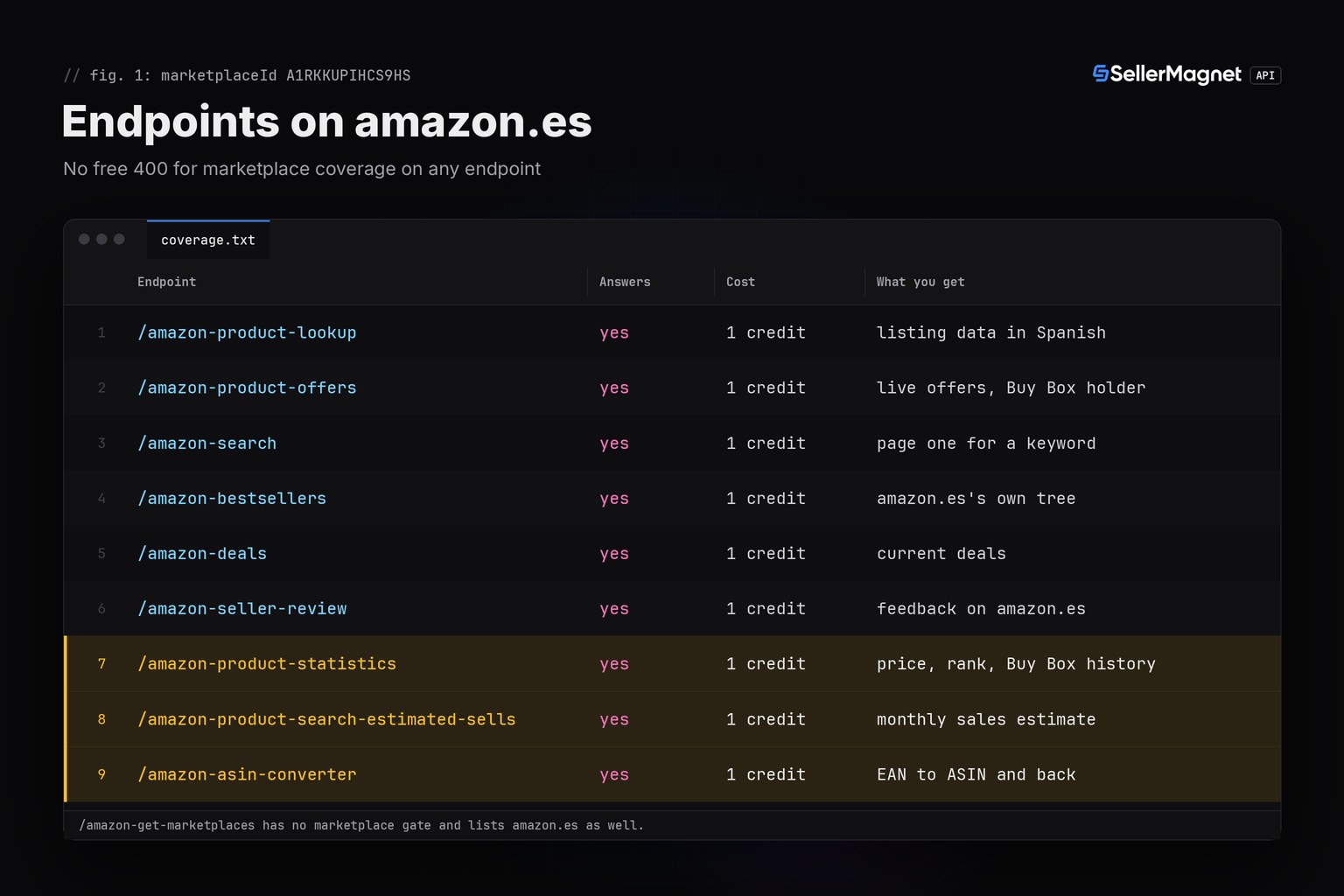
- All ten endpoints answer on amazon.es: it is one of 11 marketplaces with price history, estimated sales and the ASIN converter.
- Amazon sells first-party on amazon.es as seller A1AT7YVPFBWXBL; statistics uses that ID for amazonPrice and shareBuyBox.
- Bestsellers take Spanish names such as Cafeteras; an ambiguous or unknown name is a free 400.
- In the API's amazon.es tree, 23 of 45 departments (pets, DIY, sports, garden, books) have no subcategories: request those by slug.
Amazon Spain product API at a glance
A1RKKUPIHCS9HS is the same marketplace ID Amazon's Selling Partner API uses for Spain. Requests look the same as on any other store: GET, query parameters, the key in the X-Api-Key header. What changes are the values below. Offers and search use the default postcode 28001 unless you send geo_location (lookup always does), and on an EU store the price a buyer pays includes VAT. amazon.es prints prices with Spanish separators (1.299,99 €), but the API returns plain numbers such as 1299.99. Amazon's own APIs for amazon.es depend on your account type: the Selling Partner API's catalog calls are for sellers, and the Creators API is for Associates with at least 10 qualifying sales in the past 30 days. This API needs only an API key.
| Item | amazon.es |
|---|---|
| Marketplace ID | A1RKKUPIHCS9HS |
| Store | amazon.es |
| Currency | EUR, currencySymbol "€" (Euro) |
| Default postcode | 28001 (Madrid), used when geo_location is not sent |
| Amazon's own seller ID | A1AT7YVPFBWXBL |
| History endpoints | answer: statistics, estimated sales, ASIN converter |
| listedSinceDate (lookup) | filled from "Producto en Amazon.es desde" |
| Page language | Spanish: titles, bullets and category names |
| Bestseller category tree | amazon.es's own: 45 top-level, 25,842 nodes |
The amazon.es entry of /amazon-get-marketplaces (data is keyed by marketplace ID)
{
  "A1RKKUPIHCS9HS": {
    "currency_code": "EUR",
    "currency_name": "Euro",
    "currency_symbol": "€",
    "geo_location": "28001",
    "marketplace_domain": "amazon.es",
    "marketplace_name": "Amazon ES"
  }
}
Does amazon.es have price history in the API?
Yes. Lookup, offers, search, bestsellers, deals and seller feedback only check that the marketplace ID is valid and answer on all 23 stores. The three history endpoints cover 11 marketplaces, and amazon.es is one of them, next to amazon.de, amazon.fr, amazon.it and amazon.co.uk. Stores such as amazon.nl, amazon.com.be or amazon.pl get a free 400 "This endpoint is not available for the requested marketplace" for the same calls. On amazon.es each costs 1 credit and returns data. Prices come in three shapes: lookup reports the featured item price in decimal euros without shipping, offers adds shipping and does not round the Buy Box total, and statistics counts in euro cents, so a 24,99 € product with free delivery reads 24.99, 24.99 and 2499.
Which amazon.es bestsellers does Amazon itself win?
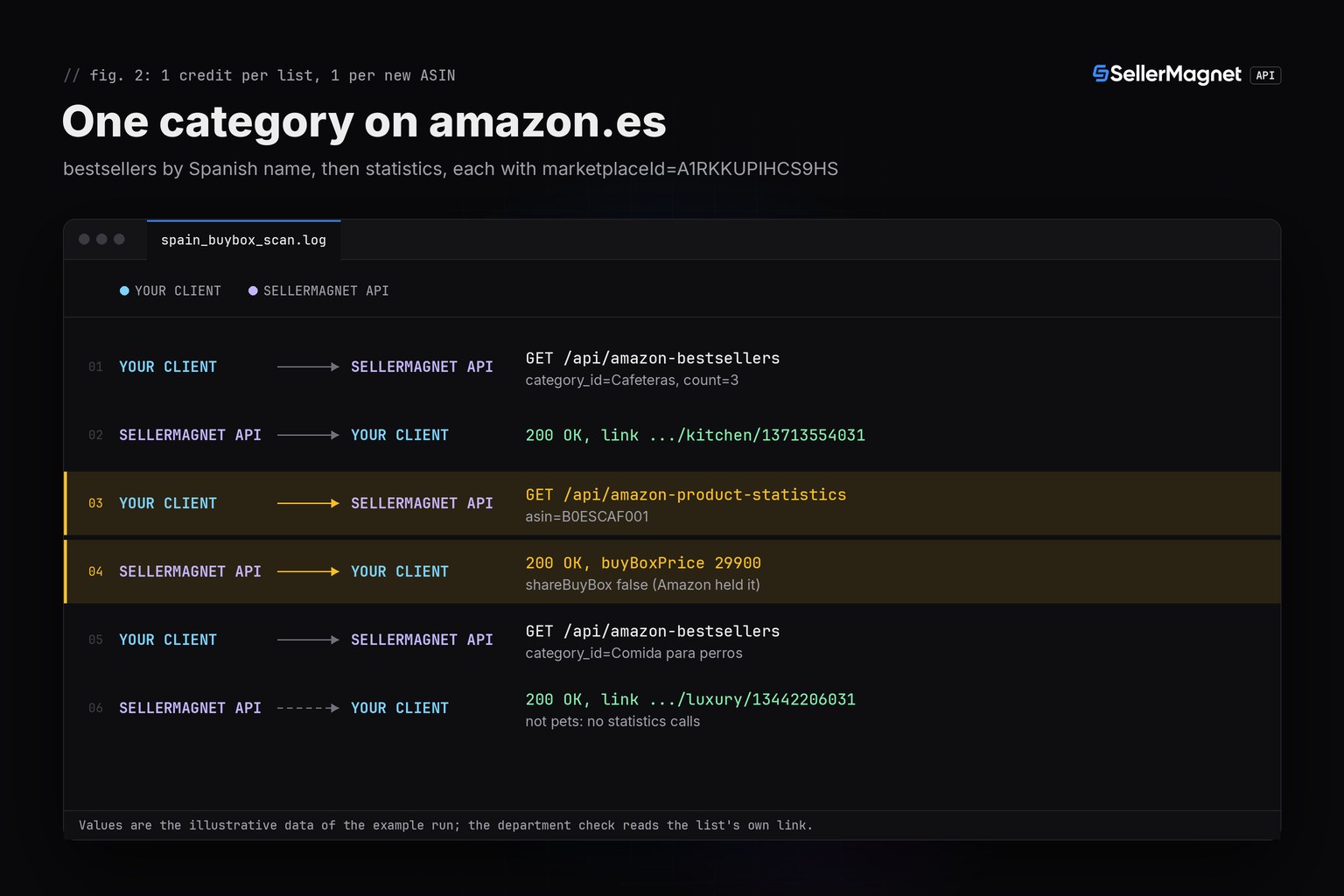
Before you source a product for amazon.es, check whether Amazon sells it first-party and keeps the Buy Box. The script below reads the top bestsellers of Spanish categories by name, checks from data.link that each name landed in the department you meant, and then asks statistics for every new ASIN: the Buy Box price, Amazon's own offer and shareBuyBox. A list read in the wrong department is ignored before any statistics credit is spent, a product that ranks in two categories is checked once, and a 401 or 403 stops the run. It uses sellermagnet.py (ApiError, new_session) and retry.py (get_with_retry) from the Python quickstart.
spain_buybox_scan.py: Buy Box and Amazon's presence for the top bestsellers of Spanish categories
"""Amazon Spain (amazon.es): which bestsellers in a Spanish category does Amazon itself keep the Buy Box on?

marketplaceId A1RKKUPIHCS9HS = amazon.es, priced in EUR. Two endpoints, 1 credit per billed call:
  /amazon-bestsellers         category_id takes a category NAME as amazon.es shows it ("Cafeteras"). data.link shows
                              the department the name was read as (.../gp/bestsellers/<department>/<id>), so the
                              script checks it before spending more credits. An ambiguous or unknown name is a
                              free 400.
  /amazon-product-statistics  amazon.es is one of the 11 marketplaces with history, so this answers with data.
                              buyBoxPrice and amazonPrice are euro cents incl. shipping ("N/A" or null = none);
                              shareBuyBox False = Amazon (seller A1AT7YVPFBWXBL) held the Buy Box in the last 30 days.

Helpers: sellermagnet.py and retry.py from https://sellermagnet-api.com/blog/amazon-product-api-python
"""
import requests

from retry import get_with_retry
from sellermagnet import ApiError, new_session

MARKET = "A1RKKUPIHCS9HS"              # amazon.es
CATEGORIES = [                         # (name or slug as amazon.es shows it, department it must land in)
    ("Cafeteras", "kitchen"),
    ("Cafeteras individuales", "kitchen"),
    ("Comida para perros", "pets"),
    ("Auriculares", "electronics"),
    ("pets", "pets"),
]
TOP = 3                                # ranks per category; each new ASIN costs one statistics call
MAX_FAILED = 3                         # 502/503 are billed on every attempt: stop after 3 calls that keep failing


class Stop(Exception):
    """401/403 (key or credits gone) or a marketplace without history: every further call fails the same way."""


def eur(value):
    """24.99 -> '24,99 €' (Spanish separators for the report; the API sends plain numbers)."""
    if value is None:
        return "-"
    return f"{value:,.2f}".replace(",", "_").replace(".", ",").replace("_", ".") + " €"


def cents(value):
    """Statistics prices are euro cents; "N/A", null, 0 or a bool mean no price, never 0,00 €."""
    if isinstance(value, int) and not isinstance(value, bool) and value > 0:
        return value / 100
    return None


def fetch(session, endpoint, **params):
    """(data, None) on success, (None, note) on a per-row error. get_with_retry retries 429/502/503, 500 once."""
    try:
        return get_with_retry(session, endpoint, marketplaceId=MARKET, **params), None
    except ApiError as err:
        if err.status in (401, 403):
            raise Stop(str(err))
        if err.status == 400 and "not available for the requested marketplace" in str(err):
            raise Stop("no history endpoints on this marketplace (free 400)")
        if err.status == 404:
            return None, "billed 404"   # charged, and a retry would only buy another 404
        if err.status == 400:
            return None, str(err)       # the API's own message says what to fix
        return None, f"error {err.status}"
    except (requests.ConnectionError, requests.Timeout) as err:
        return None, f"error {type(err).__name__}"


def department(link):
    """'https://www.amazon.es/gp/bestsellers/kitchen/13713554031?pg=1' -> 'kitchen'; a top-level list -> its slug."""
    if "/gp/bestsellers/" not in link:
        return None
    return link.split("?")[0].split("/gp/bestsellers/")[1].split("/")[0]


def main():
    if not 1 <= TOP <= 50:   # count above 50 is a billed 400: a bestseller page holds 50 products
        print(f"TOP={TOP}: use 1 to 50, nothing was sent")
        return
    session = new_session()
    print(f"amazon.es ({MARKET}): top {TOP} bestsellers per category, then statistics per new ASIN\n")
    seen, failed, known, amazon_held = {}, 0, 0, 0
    try:
        for name, want in CATEGORIES:
            if failed >= MAX_FAILED:
                raise Stop(f"{failed} calls kept failing")
            data, note = fetch(session, "amazon-bestsellers", category_id=name, count=TOP)
            if data is None:
                failed += note.startswith("error")
                print(f"{name}: {note}\n")
                continue
            got = department(data.get("link") or "")
            if got != want:   # a name can match a node in another department: don't pay statistics for it
                print(f"{name}: read as {got or '?'}/{data.get('categoryId')}, not {want}; list ignored (1 credit)\n")
                continue
            print(f"{name} -> {data.get('categoryId')} ({got})")
            print(f"  {'#':>2} {'asin':<10} {'list':>10} {'Buy Box':>10} {'Amazon':>10} {'amz30d':<6} note")
            for card in data.get("bestsellers") or []:
                asin, rank = card.get("asin"), card.get("rank") or "-"
                price = (card.get("price") or {}).get("price")   # bestseller page price, not the Buy Box
                if not asin:
                    print(f"  {rank:>2} {'-':<10} {eur(price):>10}  card without ASIN, skipped")
                    continue
                if asin in seen:
                    print(f"  {rank:>2} {asin:<10} {eur(price):>10}  also #{seen[asin]}, not checked twice")
                    continue
                seen[asin] = f"{card.get('rank')} in {name}"
                if failed >= MAX_FAILED:
                    raise Stop(f"{failed} calls kept failing")
                stats, note = fetch(session, "amazon-product-statistics", asin=asin)
                if stats is None:
                    failed += note.startswith("error")
                    print(f"  {rank:>2} {asin:<10} {eur(price):>10}  statistics {note}")
                    continue
                share = stats.get("shareBuyBox")   # True = Amazon did NOT hold the Buy Box in the last 30 days
                flag = "?" if share is None else ("no" if share else "yes")
                known += share is not None
                amazon_held += share is False
                box, own = cents(stats.get("buyBoxPrice")), cents(stats.get("amazonPrice"))
                note = "nobody holds the Buy Box" if box is None else ""
                print(f"  {rank:>2} {asin:<10} {eur(price):>10} {eur(box):>10} {eur(own):>10} {flag:<6} {note}"
                      .rstrip())
            print()
    except Stop as err:
        print(f"stopped: {err}")
    print(f"Amazon held the Buy Box in the last 30 days on {amazon_held} of {known} products with a readable "
          "holder history")


if __name__ == "__main__":
    main()
Output (illustrative data: a retried 502, a billed 404, a product in two lists, a name read in the wrong department and an ambiguous name)
amazon.es (A1RKKUPIHCS9HS): top 3 bestsellers per category, then statistics per new ASIN

Cafeteras -> 13713554031 (kitchen)
   # asin             list    Buy Box     Amazon amz30d note
   1 B0ESCAF001   299,00 €   299,00 €   299,00 € yes
   2 B0ESCAF002    59,99 €    62,99 €    64,99 € no
   3 B0ESCAF003    24,95 €    24,95 €          - no

Cafeteras individuales -> 2165185031 (kitchen)
   # asin             list    Buy Box     Amazon amz30d note
   1 B0ESCAF002    59,99 €  also #2 in Cafeteras, not checked twice
   2 B0ESCAF004    64,90 €  statistics billed 404
   3 -             19,99 €  card without ASIN, skipped

Comida para perros: read as luxury/13442206031, not pets; list ignored (1 credit)

Auriculares: 400: 'Auriculares' matches 4 categories on amazon.es. Pass the category_id of the one you want.

pets -> pets (pets)
   # asin             list    Buy Box     Amazon amz30d note
   1 B0ESPET001    12,49 €          -          - no     nobody holds the Buy Box
   2 B0ESPET002    18,99 €    18,99 €    18,99 € yes
   3 B0ESPET003          -    21,99 €          - ?

Amazon held the Buy Box in the last 30 days on 2 of 5 products with a readable holder history- amz30d yes comes from
shareBuyBoxfalse: Amazon (A1AT7YVPFBWXBL) held the Buy Box at some point in the last 30 days. no means it did not, which is not a promise that you would win it. ? means the holder history could not be read. - B0ESCAF002 (illustrative) shows Amazon selling at 64,99 € while a cheaper seller holds the Buy Box at 62,99 €: an Amazon offer on the listing and Amazon holding the Buy Box are different things.
- list is the price on the bestseller page (a range resolves to its low end), not the Buy Box. Buy Box and Amazon prices come from statistics in cents and include shipping.
- Comida para perros cost 1 credit and was ignored: the name matched a node under Luxury Stores, not the pets department, so the script did not pay for statistics on that list.
- B0ESPET001 has no Buy Box holder, so it shows dashes, never 0,00 €.
Credits for a category scan on amazon.es
1 credit per request, the same as on every store. The script spends 1 credit per bestseller list and 1 per new ASIN; a list in the wrong department costs its 1 credit and nothing more, and a repeated ASIN costs nothing. Retries add up: a 502 or 503 is charged on every attempt (get_with_retry makes up to 4), while a 500 without Retry-After is refunded. A billed 404 stays billed. The example run made 13 calls: 5 bestseller requests, of which the ambiguous name was a free 400, and 8 statistics calls for 7 products (one 502 retried once, one 404). That is 12 credits. Sending a count above 50 would be a billed 400, so the script refuses it before the first call. Plans and credit packs are on the pricing page; for the Buy Box check on a single listing, see is Amazon selling on this listing.
Can I use Spanish category names for amazon.es bestsellers?
Yes. category_id on /amazon-bestsellers takes a numeric browse node, a top-level slug such as kitchen or pets, or a category name as amazon.es shows it, in Spanish and in any letter case. A name match adds resolved_category (ID, name, path) to the response, beside data rather than inside it, so the quickstart's get() does not return it; data.categoryId and data.link still show the ID and department that were used. A name that fits several categories or none, and an unknown numeric ID, get a free 400 with a candidates list where there are matches; ApiError keeps only the message, so look the candidates up in the category explorer. English names such as "dog food" find nothing on amazon.es, and a numeric ID from another store (amazon.de's 3424591) is "Invalid CategoryId". For more on IDs, see Amazon category IDs for bestsellers.
The resolved_category field of /amazon-bestsellers with category_id=Cafeteras on amazon.es
{
  "resolved_category": {
    "category_id": "13713554031",
    "name": "Cafeteras",
    "path": "Hogar y cocina > Café y té > Cafeteras"
  }
}
The free 400 for category_id=Auriculares on amazon.es (no credit is taken)
{
  "candidates": [
    {
      "category_id": "52470778031",
      "name": "Auriculares",
      "path": "Coche y Moto - Piezas y accesorios > Electrónica para vehículos > Electrónica para coche > Auriculares"
    },
    {
      "category_id": "934312031",
      "name": "Auriculares",
      "path": "Electrónica > Radiocomunicación > Accesorios > Auriculares"
    },
    {
      "category_id": "4965385031",
      "name": "Auriculares",
      "path": "Luxury Stores > Instrumentos musicales > Equipo de DJ y VJ > Auriculares"
    },
    {
      "category_id": "22649664031",
      "name": "Auriculares",
      "path": "Videojuegos > Realidad virtual > Hardware independiente > Auriculares"
    }
  ],
  "error": "Bad request",
  "message": "'Auriculares' matches 4 categories on amazon.es. Pass the category_id of the one you want.",
  "success": false
}
The amazon.es tree has gaps
In the category tree the API checks against, 23 of amazon.es's 45 top-level departments have no subcategories, among them pets (Productos para mascotas), DIY, sports, garden, books and office products. For those, only the whole department list is available, by slug such as pets; a deeper amazon.es browse node from them is not in the tree and gets the free 400. Luxury Stores, on the other hand, holds 8,063 of the 25,842 nodes, including its own pets, sports, garden, DIY and books branches, which is why "Comida para perros" resolves to "Coberturas para comida" under Luxury Stores. Other names land in unexpected branches too: "Batidoras" resolves under Bebé. Check the department in data.link before you trust a list.
Spanish page text: what the API normalises and what stays Spanish
amazon.es answers in Spanish, so productInfo.title, bulletPoints, lookup's category names and the bestseller tree come back in Spanish. Some fields are normalised for you: offer conditions such as "Nuevo" or "Usado - Como nuevo" arrive as "New" and "Used - Like New", and delivery words like "mañana" become a deliveryDate. Lookup's listedSinceDate works on amazon.es: it reads the "Producto en Amazon.es desde" row (for example "4 noviembre 2024") and returns 2024-11-04. That date is when the listing was created, not necessarily when it first shipped.
Frequently Asked Questions
What is the Amazon Spain marketplace ID?
A1RKKUPIHCS9HS. Pass it as marketplaceId and the request goes to amazon.es with prices in EUR. A country code like "ES" or a domain like "amazon.es" is rejected with a free 400 Invalid marketplaceId.
Does the Amazon Spain API include price history?
Yes. amazon.es is one of the 11 marketplaces where /amazon-product-statistics, estimated sales and the ASIN converter answer with data, 1 credit each. History prices come back as integer euro cents, so divide by 100.
What seller ID does Amazon itself use on amazon.es?
A1AT7YVPFBWXBL. An offers Buy Box held by Amazon shows sellerId "Amazon" with this ID in amazonSellerId, and statistics uses it for amazonPrice and shareBuyBox on amazon.es.
Can I pass Spanish category names to the bestsellers endpoint?
Yes. "Cafeteras" resolves to 13713554031 and costs 1 credit. A name that fits several categories ("Auriculares" fits four) or none, including English names, gets a free 400. The response's data.link shows the department the name landed in.
Why can't I get a pet food bestseller list on amazon.es?
The category tree the API checks has no subcategories for 23 of amazon.es's 45 departments, pets included. Use the slug pets for the whole department; "Comida para perros" is read as a Luxury Stores node instead.
Bottom line: use A1RKKUPIHCS9HS for amazon.es, divide statistics prices by 100, send Spanish category names and check the department each one lands in. Because amazon.es has history coverage, a bestseller list becomes Buy Box, Amazon presence and price per product at one credit each. For the other stores, see the marketplace IDs list and endpoint coverage by marketplace; a free account includes 150 credits.


