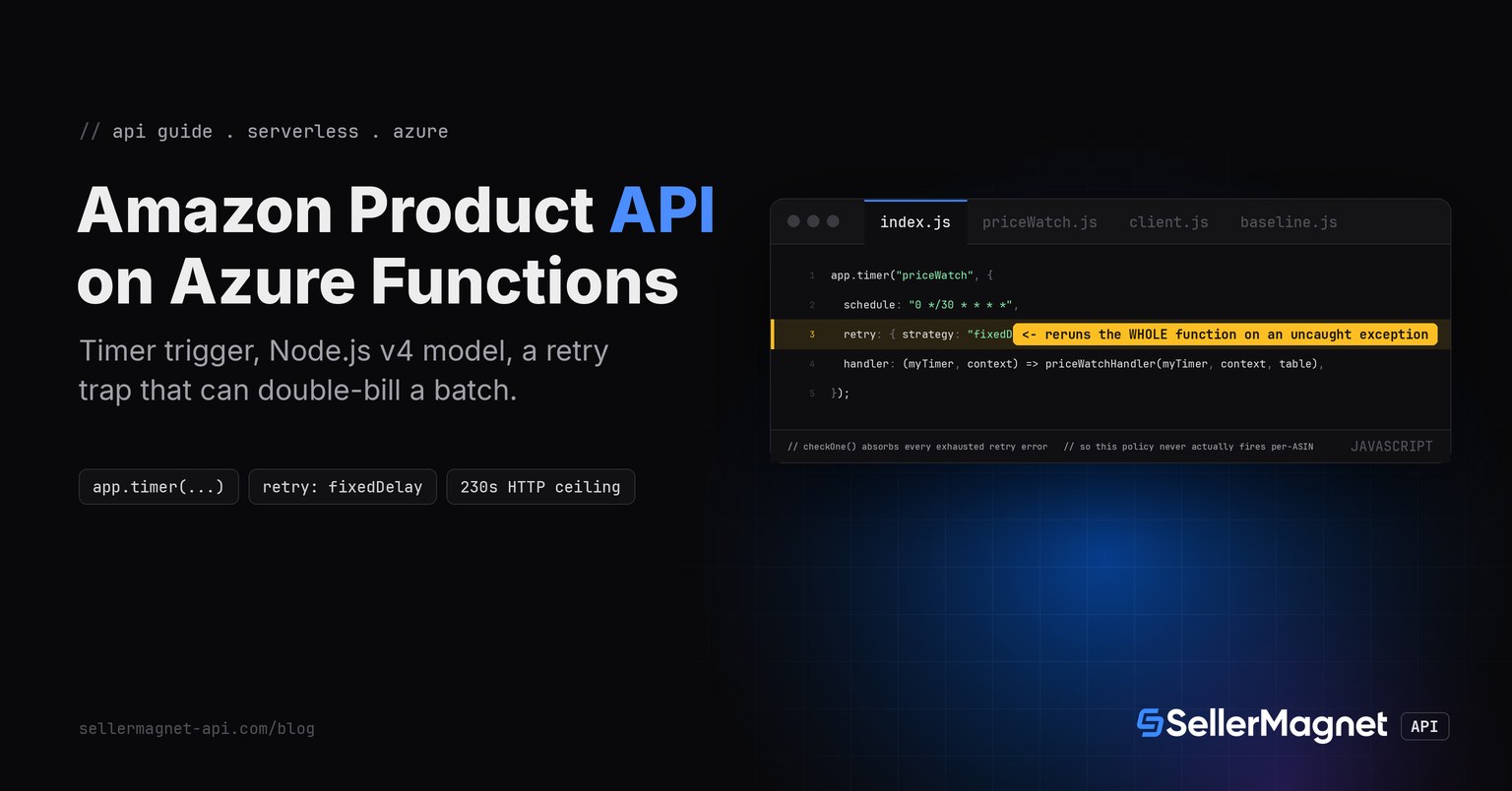
To call an Amazon product API from Azure Functions, register a Timer-triggered Node.js function with the v4 programming model (app.timer(...)) that reuses the TypeScript quickstart's own client.js and retry.js unchanged. Two platform specifics decide whether a first deploy actually works: an HTTP trigger's hard 230-second response ceiling (irrelevant here, since nothing is waiting on an HTTP response, but a trap on the sibling platform posts' framing), and a Timer trigger's own opt-in retry policy, which can double-bill an entire run if a single ASIN's exhausted error is allowed to escape the handler.
Key Takeaways
- An HTTP-triggered Azure Function hits a fixed 230-second Load Balancer ceiling that no functionTimeout setting (5 min/10 min legacy Consumption, 30 min/unbounded Flex Consumption) can override; only the Durable Functions async pattern gets past it. A Timer trigger, used here, has no such ceiling.
- Timer is one of a short list of trigger types (with Event Hubs, Cosmos DB, Kafka) that supports an opt-in, now-GA runtime retry policy; when set, an uncaught exception reruns the ENTIRE function from the top, not just the failing call.
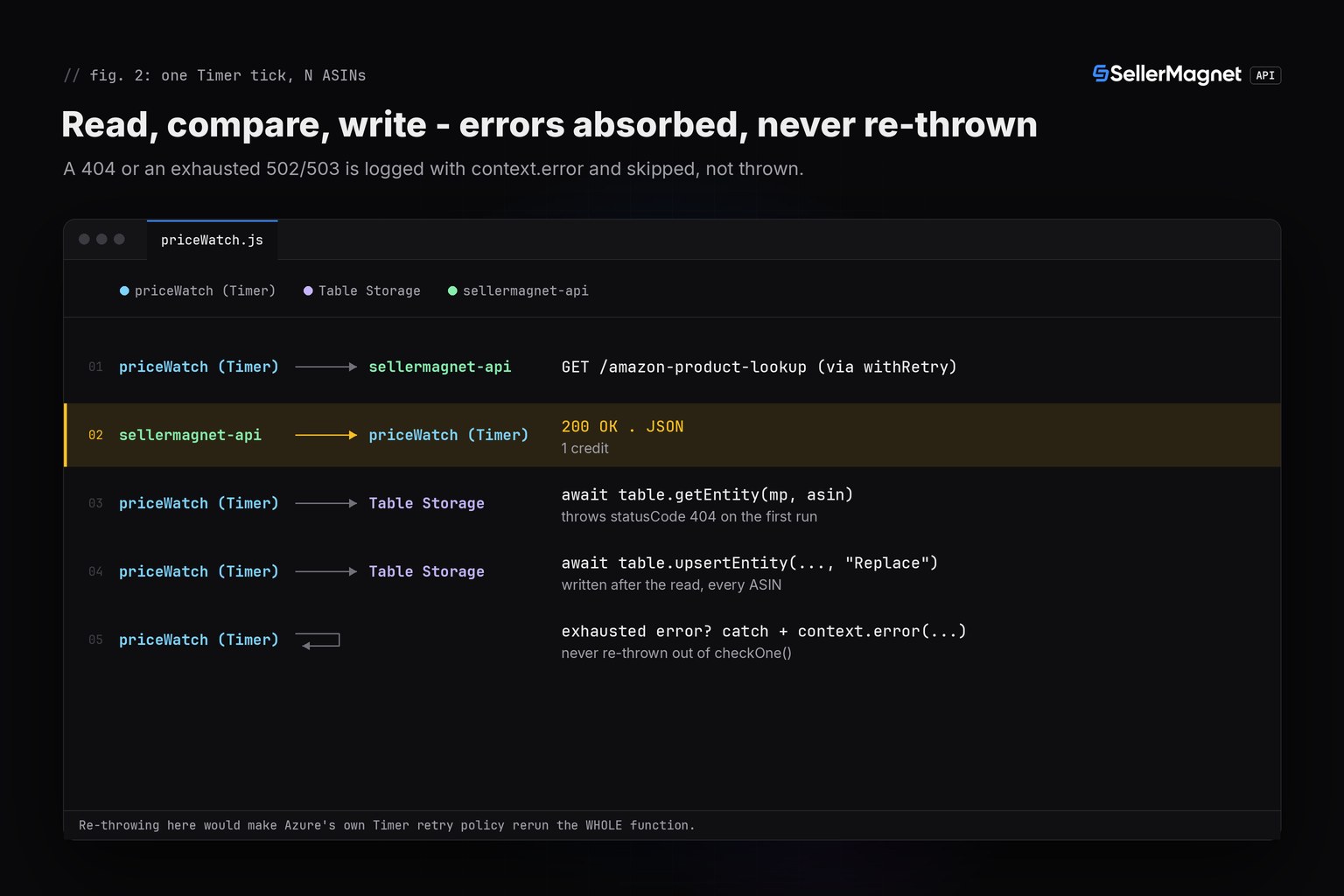
- Because of that, every per-ASIN error that has already exhausted withRetry's own attempts is caught and logged INSIDE the loop, never re-thrown - letting it escape would make Azure's own policy redo the whole batch and re-bill every ASIN that already succeeded.
- The price baseline is stored in Azure Table Storage, reusing the AzureWebJobsStorage connection string the runtime already needs; a missing row throws with statusCode 404, read here as "no baseline yet", never a 100% drop.
- local.settings.json is local-only and gitignored; the deployed function reads process.env from Application Settings, a separate store populated explicitly, so a key left only in local.settings.json sends an empty API key header in production, not a thrown error.
Why doesn't raising the timeout fix a slow HTTP-triggered function on Azure?
Microsoft's own scaling reference states it plainly: "Regardless of the function app timeout setting, 230 seconds is the maximum amount of time that an HTTP triggered function can take to respond to a request. This limit exists because of the default idle timeout of Azure Load Balancer." That applies on top of functionTimeout in host.json, whether the function app runs on the legacy Consumption plan (5-minute default, 10-minute max) or the new default Flex Consumption plan (30-minute default, unbounded max). This post's function is Timer-triggered, so the 230-second figure never applies to it - included here because the sibling AWS Lambda, Cloudflare Worker and Cloud Functions posts in this series are all HTTP-triggered, and Azure's shape of hard ceiling is different from all three of theirs.
| Trigger / plan | functionTimeout | What actually limits it |
|---|---|---|
| HTTP trigger, legacy Consumption plan | 5 min default / 10 min max (functionTimeout) | 230 s Azure Load Balancer ceiling applies ANYWAY |
| HTTP trigger, Flex Consumption plan (new default) | 30 min default / unbounded max (functionTimeout) | Same 230 s ceiling still applies; raising functionTimeout past it changes nothing |
| Timer trigger, either plan | Same functionTimeout values as above | No 230 s figure: nothing is waiting on an HTTP response |
Reusing client.js, retry.js and lookup.js unmodified
Azure Functions' Node.js worker exposes process.env the ordinary Node.js way once a variable exists in Application Settings, so the TypeScript quickstart's client.js (which reads process.env.SELLERMAGNET_API_KEY directly) and retry.js are copied in exactly as published. lookup.js inlines its one decodePrice helper instead of importing a separate types.js, the same convention as the Google Cloud Functions post in this series.
client.js - unmodified from the TypeScript quickstart
// client.js - one fetch-based client, X-Api-Key header, 120 s timeout.

// Overridable only for pointing the client at a local test server; a real
// program never needs to set SELLERMAGNET_API_BASE.
const API_BASE = process.env.SELLERMAGNET_API_BASE ?? "https://sellermagnet-api.com/api/";

/**
 * @typedef {Object} ApiErrorShape
 * @property {number} status
 * @property {string} message
 * @property {number} retryAfter - seconds, 0 when the header was absent.
 */

/** Thrown for any non-2xx response or a failed JSON decode. */
export class ApiError extends Error {
  /** @param {ApiErrorShape} shape */
  constructor({ status, message, retryAfter }) {
    super(`${status}: ${message}`);
    this.name = "ApiError";
    this.status = status;
    this.retryAfter = retryAfter;
  }
}

/**
 * Send one GET to the API and return the decoded `data` field.
 * @template T
 * @param {string} endpoint - e.g. "amazon-product-lookup"
 * @param {Record<string, string>} params
 * @returns {Promise<T>}
 */
export async function get(endpoint, params) {
  const url = new URL(API_BASE + endpoint);
  for (const [key, value] of Object.entries(params)) url.searchParams.set(key, value);

  const controller = new AbortController();
  const timeout = setTimeout(() => controller.abort(), 120_000); // server allows up to ~120 s
  let response;
  try {
    response = await fetch(url, {
      headers: { "X-Api-Key": process.env.SELLERMAGNET_API_KEY ?? "" },
      signal: controller.signal,
    });
  } finally {
    clearTimeout(timeout);
  }

  const retryAfter = Number.parseInt(response.headers.get("retry-after") ?? "0", 10) || 0;
  let body;
  try {
    body = await response.json(); // a proxy's error page is HTML, not JSON
  } catch {
    throw new ApiError({ status: response.status, message: response.statusText, retryAfter });
  }
  if (response.ok && body.success) return body.data;
  throw new ApiError({ status: response.status, message: body.message ?? response.statusText, retryAfter });
}
retry.js - unmodified from the TypeScript quickstart
// retry.js - retries that respect billing: 429/500(once)/502/503 only.

import { ApiError } from "./client.js";

const RETRYABLE = new Set([429, 500, 502, 503]);

/**
 * @template T
 * @param {() => Promise<T>} call
 * @param {number} [attempts]
 * @returns {Promise<T>}
 */
export async function withRetry(call, attempts = 4) {
  let seen500 = false;
  for (let attempt = 1; ; attempt++) {
    try {
      return await call();
    } catch (err) {
      if (!(err instanceof ApiError)) throw err;
      const give500Twice = err.status === 500 && seen500;
      if (!RETRYABLE.has(err.status) || give500Twice || attempt === attempts) throw err;
      seen500 = seen500 || err.status === 500;
      const backoff = 2 ** attempt * 100; // ms, small for the test harness
      const wait = Math.max(backoff, err.retryAfter * 1000);
      await new Promise((resolve) => setTimeout(resolve, wait));
    }
  }
}
baseline.js - the price baseline, in Azure Table Storage
// baseline.js - the last-seen Buy Box price per ASIN/marketplace, in Azure Table Storage.
// A Timer-triggered function has no caller and no request-scoped state, so the baseline must
// live somewhere outside the function instance; Table Storage reuses the SAME storage account
// the runtime already needs for AzureWebJobsStorage, so no extra resource is required
//.

import { TableClient } from "@azure/data-tables";

const TABLE_NAME = "priceWatchBaseline";

/** @param {string} connectionString */
export function openTable(connectionString) {
  return TableClient.fromConnectionString(connectionString, TABLE_NAME, { allowInsecureConnection: true });
}

/**
 * @param {import("@azure/data-tables").TableClient} table
 * @param {string} asin
 * @param {string} marketplaceId
 * @returns {Promise<number|null>} null when there is no stored baseline yet, or it is not a
 *   finite positive number (a corrupt/legacy row is treated the same as "no baseline").
 */
export async function readBaseline(table, asin, marketplaceId) {
  try {
    const entity = await table.getEntity(marketplaceId, asin);
    const price = entity.price;
    return typeof price === "number" && Number.isFinite(price) && price > 0 ? price : null;
  } catch (err) {
    if (err?.statusCode === 404) return null; // first run for this key: no baseline yet
    throw err;
  }
}

/**
 * @param {import("@azure/data-tables").TableClient} table
 * @param {string} asin
 * @param {string} marketplaceId
 * @param {number} price
 */
export async function writeBaseline(table, asin, marketplaceId, price) {
  await table.upsertEntity({ partitionKey: marketplaceId, rowKey: asin, price }, "Replace");
}
Why does a Timer trigger's own retry policy need this much caution?
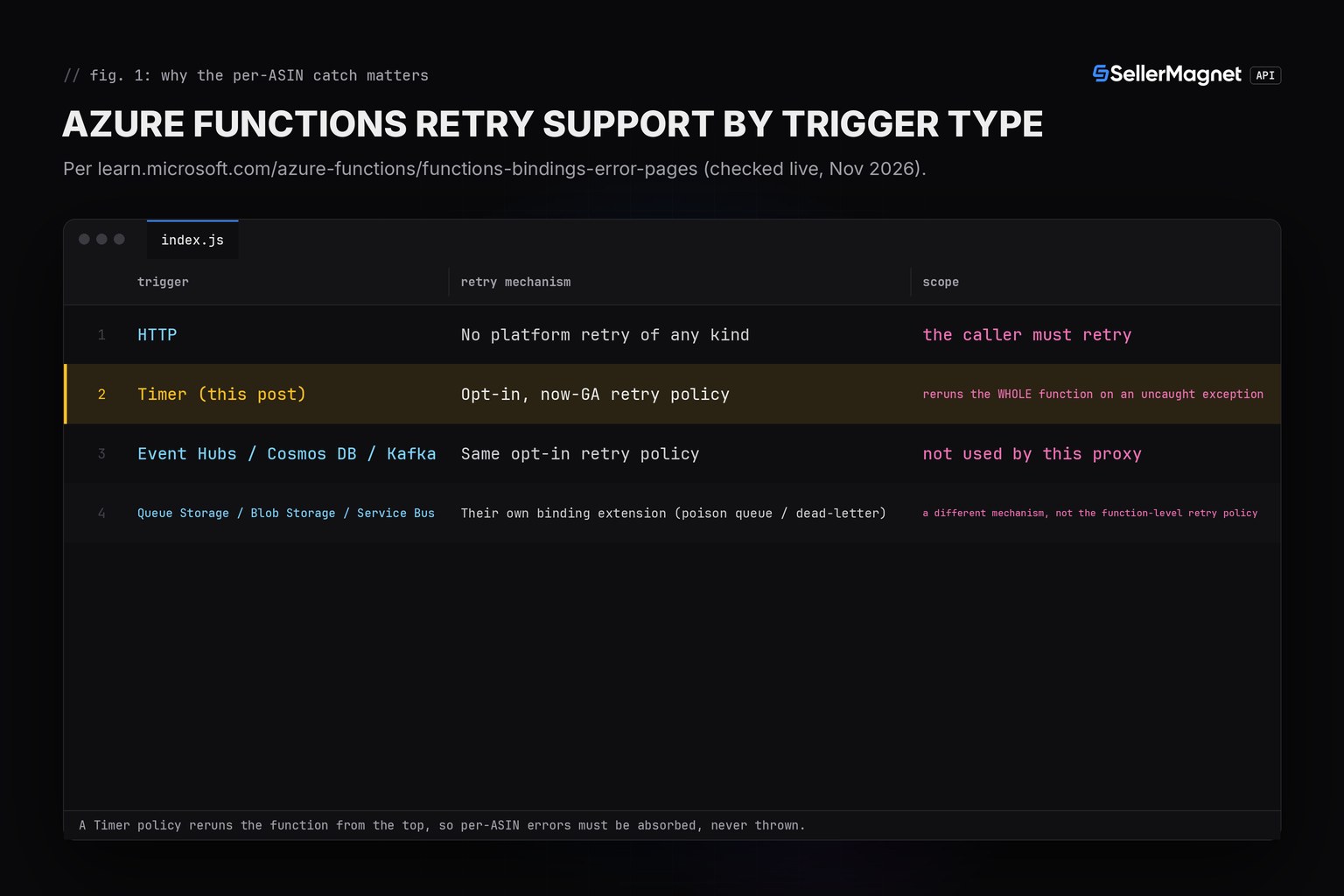
HTTP triggers have no platform-level retry at all; per Microsoft's own guidance, "the caller must retry." Timer triggers are different: Azure now offers an opt-in, GA runtime-enforced retry policy for a short list of trigger types (Timer, Event Hubs, Cosmos DB, Kafka), set directly on the trigger registration with a strategy, a delayInterval and a maxRetryCount. The catch is scope: that policy reruns the WHOLE function execution on an uncaught exception, not the one call that failed. A naive version of this proxy that lets a 503-after-4-attempts error bubble out of the loop would have Azure rerun the entire ASIN batch on the next retry, and every ASIN that had already succeeded earlier in that run gets looked up, and billed, a second time.
| Trigger | Retry mechanism | Scope |
|---|---|---|
| HTTP | No platform retry of any kind | the caller must retry |
| Timer (this post) | Opt-in, now-GA retry policy | reruns the WHOLE function on an uncaught exception |
| Event Hubs / Cosmos DB / Kafka | Same opt-in retry policy | not used by this proxy |
| Queue Storage / Blob Storage / Service Bus | Their own binding extension (poison queue / dead-letter) | a different mechanism, not the function-level retry policy |
priceWatch.js - checkOne() absorbs every exhausted error itself
// priceWatch.js - Azure Functions (Node.js v4 model) Timer-triggered price-watch function.
// Registered with app.timer(...) in index.js. Imports client.js/retry.js UNCHANGED from the
// TypeScript quickstart (amazon-product-api-typescript.py); lookup.js inlines decodePrice,
// same convention as the GCP Cloud Functions post in this series (3 files, not 4).
//
// RETRY TRAP: this function's own `retry` policy (set in index.js)
// reruns the WHOLE function from the top on an uncaught exception - Timer is one of the few
// trigger types that supports a runtime-enforced retry policy at all. If a per-ASIN error that
// has already exhausted withRetry's own attempts were allowed to propagate, Azure's policy
// would redo the ENTIRE batch and re-bill every ASIN that already succeeded earlier in this
// run. So every per-ASIN failure is caught HERE and only logged, never re-thrown.
//
// TIMEOUT NOTE: the 230-second Azure Load Balancer ceiling applies only
// to HTTP-triggered functions. A Timer trigger has no caller waiting on an HTTP response, so it
// is governed only by functionTimeout in host.json (Flex Consumption default 30 min), not the
// 230 s figure - stated explicitly so a reader does not assume the HTTP figure applies here too.

import { lookupProduct } from "./lookup.js";
import { withRetry } from "./retry.js";
import { ApiError } from "./client.js";
import { readBaseline, writeBaseline } from "./baseline.js";

const MARKETPLACE_ID = "ATVPDKIKX0DER";
const DROP_THRESHOLD = 0.03; // report a Buy Box drop of 3% or more

/**
 * @param {import("@azure/data-tables").TableClient} table
 * @param {string} asin
 * @param {{log:(s:string)=>void, error:(s:string)=>void}} log
 * @returns {Promise<{asin:string, from:number, to:number, dropPct:number}|null>} the alert, or
 *   null when there is nothing to report (no baseline yet, unchanged, rose, N/A, or an error that
 *   was already fully retried and is now absorbed instead of re-thrown).
 */
export async function checkOne(table, asin, log) {
  let current;
  try {
    current = await withRetry(() => lookupProduct(asin, MARKETPLACE_ID));
  } catch (err) {
    // Exhausted retries (or a non-retryable status): absorb it HERE. Re-throwing would make
    // Azure's own Timer retry policy rerun the whole function and re-bill every ASIN that
    // already succeeded earlier in this run.
    log.error(`${asin}: ${err instanceof ApiError ? err.message : String(err)}`);
    return null;
  }

  const price = current.buyBoxInfo.price; // null when there is no featured offer (N/A)
  const baseline = await readBaseline(table, asin, MARKETPLACE_ID);

  let alert = null;
  if (price != null && baseline != null) {
    const dropPct = Math.round(((baseline - price) / baseline) * 1000) / 10;
    if (dropPct >= DROP_THRESHOLD * 100) {
      alert = { asin, title: current.title, from: baseline, to: price, dropPct };
    }
  }

  // Write the new baseline AFTER reading it and AFTER deciding on the alert, so a run that
  // throws before this point (should not happen now that errors are absorbed above, but keeps
  // the read-before-write order explicit) never loses the last good baseline.
  if (price != null) await writeBaseline(table, asin, MARKETPLACE_ID, price);

  return alert;
}

/**
 * The Timer trigger handler. ASINS comes from an app setting (comma-separated), read as
 * process.env so the list can change without a redeploy.
 * @param {unknown} myTimer
 * @param {{log:(s:string)=>void, error:(s:string)=>void, retryContext?: {retryCount:number, maxRetryCount:number}}} context
 * @param {import("@azure/data-tables").TableClient} table - injected for testing; production
 *   code builds it once at module scope from AzureWebJobsStorage (see index.js).
 */
export async function priceWatchHandler(myTimer, context, table) {
  const asins = (process.env.WATCH_ASINS ?? "").split(",").map((s) => s.trim()).filter(Boolean);
  const alerts = [];
  for (const asin of asins) {
    const alert = await checkOne(table, asin, context);
    if (alert) alerts.push(alert);
  }
  for (const alert of alerts) {
    context.log(`ALERT ${alert.asin} ${alert.from} -> ${alert.to} (-${alert.dropPct}%)`);
  }
  return alerts;
}
index.js - the Timer trigger registration, with its own (rarely-needed) retry policy
// index.js - Azure Functions (Node.js v4 programming model) entry point. Registers one
// Timer-triggered function that runs every 30 minutes.
//
// retry: a runtime-enforced retry policy, available (GA) for a short list of trigger types
// including Timer. If checkOne() ever let an error escape (it doesn't -
// see priceWatch.js), this policy would rerun the WHOLE function from the top on the next
// retry, re-billing every ASIN lookup that already succeeded earlier in the run. Kept here
// anyway, set conservatively (2 retries, 30 s apart), as a safety net for a crash BEFORE any
// API call (a Table Storage outage, a bad deploy) - never as a substitute for withRetry.

import { app } from "@azure/functions";
import { TableClient } from "@azure/data-tables";
import { priceWatchHandler } from "./priceWatch.js";

const TABLE_NAME = "priceWatchBaseline";
// AzureWebJobsStorage is the SAME connection string the Functions runtime itself requires;
// reusing it avoids provisioning a second storage account just for this baseline table.
const table = TableClient.fromConnectionString(process.env.AzureWebJobsStorage, TABLE_NAME);

app.timer("priceWatch", {
  schedule: "0 */30 * * * *", // every 30 minutes
  retry: {
    strategy: "fixedDelay",
    delayInterval: { seconds: 30 },
    maxRetryCount: 2,
  },
  handler: (myTimer, context) => priceWatchHandler(myTimer, context, table),
});
| Status | Meaning | Billed | Reaction |
|---|---|---|---|
200 | Success | Yes | Use data |
401 / 403 | Key or credits | No | Absorbed, logged, never re-thrown |
404 | Not on this marketplace | Yes | Absorbed, logged, never re-thrown |
429 | Concurrency cap | No | Wait Retry-After, retried |
500 | Internal error | No, refunded | Retry once |
502 / 503 | Upstream / breaker | Yes | Wait, then retry, capped at 4, then absorbed |
Real output from the tested harness (fakefetch.mjs faking globalThis.fetch only, illustrative data)
first-run-no-baseline: calls=1 alert=null threw=null storedPrice=444.99
unchanged-no-alert: calls=1 alert=null threw=null storedPrice=444.99
real-drop-fires-alert: calls=1 alert={"asin":"B0CL61F39H","title":"PS5 console","from":444.99,"to":399,"dropPct":10.3} threw=null storedPrice=399
small-drop-under-threshold: calls=1 alert=null threw=null storedPrice=98
price-rose-no-alert: calls=1 alert=null threw=null storedPrice=120
no-buybox-offer-na: calls=1 alert=null threw=null storedPrice=50
corrupt-stored-value: calls=1 alert=null threw=null storedPrice=399
err: B0UNKNOWN1: 404: Product not found
not-found-404-absorbed: calls=1 alert=null threw=null storedPrice=undefined
rate-limited-429-then-ok: calls=2 alert=null threw=null storedPrice=19.99
internal-error-500-retried-once: calls=2 alert=null threw=null storedPrice=29.99
err: B0RETRY502: 503: breaker open
gateway-errors-capped-absorbed: calls=4 alert=null threw=null storedPrice=undefined
err: B0NOKEY001: 401: Invalid or inactive API key.
unauthorized-401-absorbed: calls=1 alert=null threw=null storedPrice=undefined
---
ALL 12 SCENARIOS PASS (12/12 assertions; see calls=/threw= per scenario above)
Frequently Asked Questions
Does raising functionTimeout fix a slow Azure Functions proxy for this API?
Only for a Timer-triggered function. An HTTP-triggered function hits a fixed 230-second Azure Load Balancer ceiling that functionTimeout cannot override, on either the Consumption or Flex Consumption plan. Past 230 s, only the Durable Functions async pattern gets around it.
If this function throws, does Azure retry just the failed call?
No. A Timer trigger's own retry policy, when configured, reruns the ENTIRE function from the top, not the one call that failed. That is why every per-ASIN error here is caught and logged inside the loop, never re-thrown.
Will this code work if I only set SELLERMAGNET_API_KEY in local.settings.json?
Not once deployed. local.settings.json is local-only, never published to Azure; the deployed function reads process.env from Application Settings instead, set explicitly via the portal or az functionapp config appsettings set. A key left only in local.settings.json sends an empty API key header in production, not a thrown error.
Why Table Storage for the price baseline instead of a database?
Table Storage reuses the AzureWebJobsStorage connection string the Functions runtime already requires, so no second resource needs provisioning just to remember one number per ASIN. A getEntity() on a missing row throws with statusCode 404, which this code reads as "no baseline yet", not an error.
How is this different from the AWS Lambda / Cloudflare Worker / Cloud Functions versions?
Lambda is capped at a fixed, non-raisable 29 s by API Gateway; Cloudflare Workers meter CPU time only; Cloud Functions has one configurable knob up to 3600 s. Azure alone adds a SEPARATE, fixed 230 s limit in front of the function's own timeout for HTTP triggers.
Bottom line: Azure Functions can run this price-watch with zero changes to the TypeScript quickstart's client.js and retry.js, provided every per-ASIN error is absorbed inside the Timer handler instead of escaping to trigger Azure's own whole-function retry policy, and provided the API key is set in Application Settings, not only in local.settings.json. That combination of traps is different in shape from the AWS Lambda, Cloudflare Worker and Google Cloud Functions versions of this same proxy. Every endpoint is documented on the API documentation page, more runnable snippets are on the code examples page, and a free account includes 150 credits to try it.