
To call an Amazon product API in TypeScript or plain JavaScript, send a GET request with the built in fetch to /api/amazon-product-lookup with an ASIN, a marketplace ID and your key in the X-Api-Key header, then decode the JSON with JSDoc type declarations, no SDK, request signing or associate tag needed. The JS libraries that come up first wrap Amazon's Product Advertising API, which now refuses calls: see the PA-API alternative guide. The same client shape exists for Java too, built on its HttpClient instead of fetch. This quickstart ships runnable JS (Node 18 or later) with @typedef/@param/@returns JSDoc blocks doing the job a .d.ts file would in a TypeScript project, so every snippet here is both the type declaration and the code that runs it.
Key Takeaways
- Node 18 or later is enough: global fetch, AbortController and JSDoc types. No axios, no node-fetch, no build step.
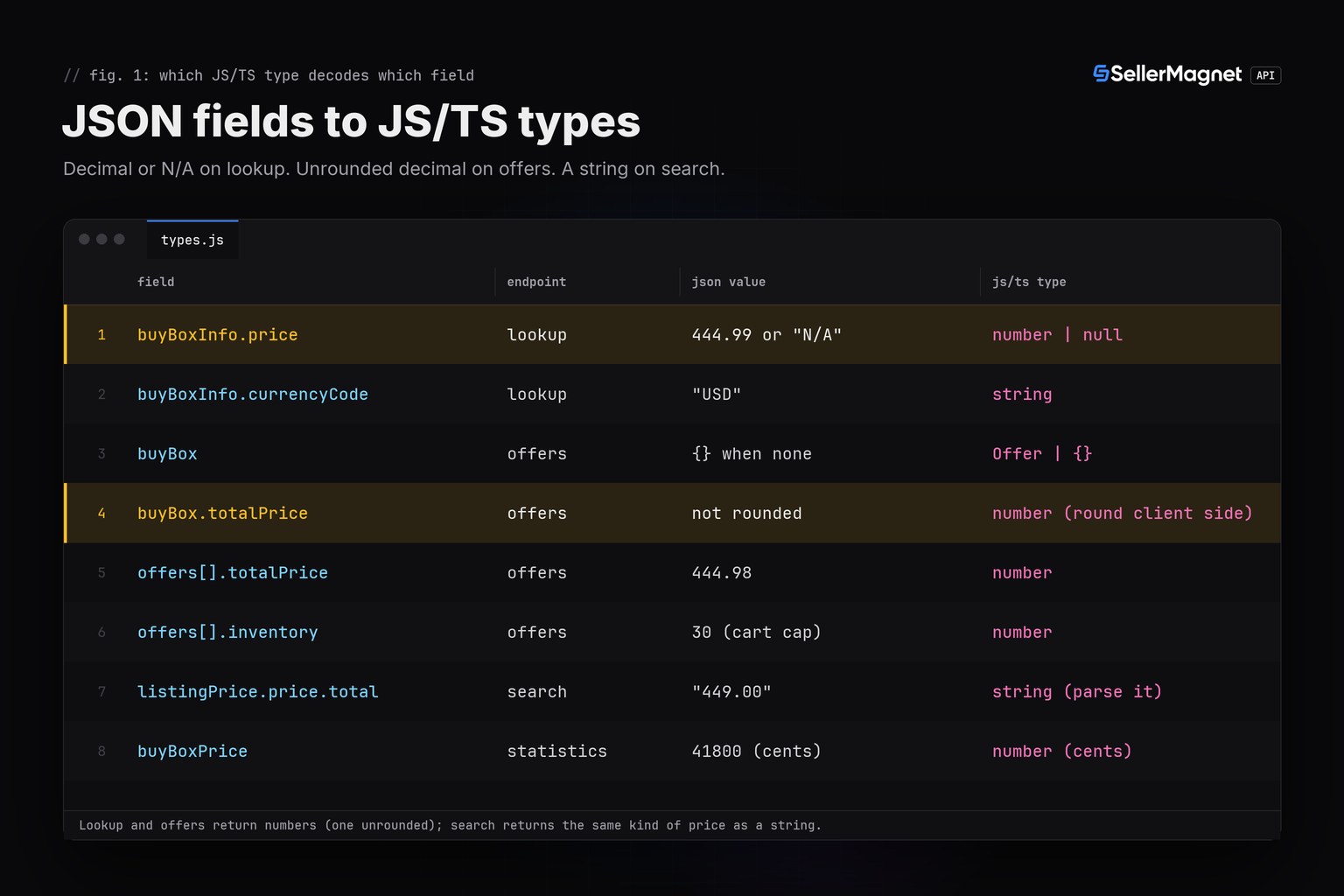
- buyBoxInfo.price (lookup) is a number or the string "N/A"; buyBox.totalPrice (offers) is a number that is not pre-rounded; listingPrice.price.total (search) is a number formatted as a STRING. Three endpoints, three shapes.
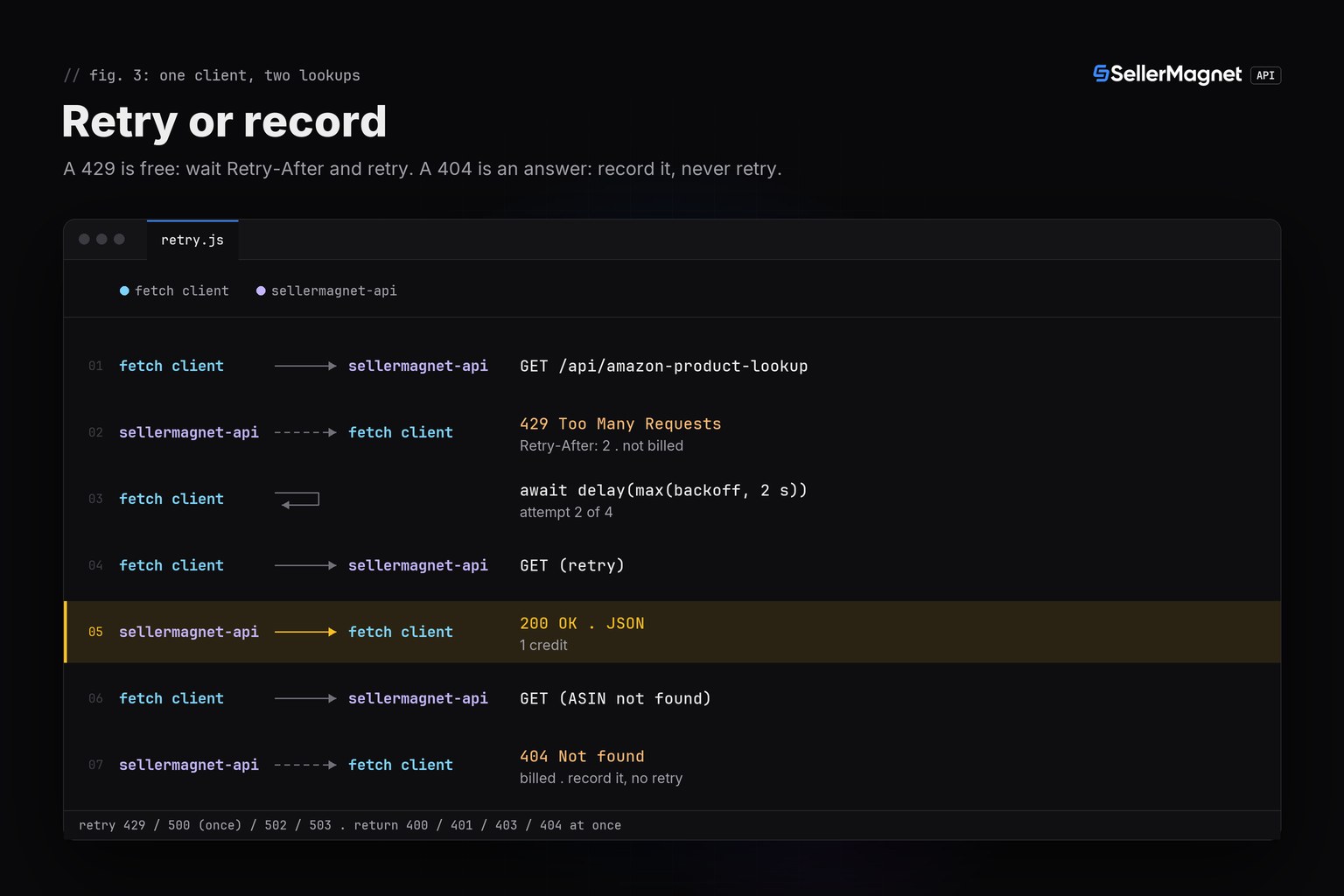
- Retry 429, 500, 502 and 503 only. A 404 means the ASIN was not found on that marketplace; retrying it pays again for the same answer.
- There is no batch endpoint, one ASIN per request, so bulk work is a small Promise based pool, not a bigger payload.
- Send the key in the X-Api-Key header, never as an api_key query parameter, so it never lands in a proxy's access log.
Prerequisites: Node 18 and an API key
- Node 18 or later, so global
fetchandAbortControllerexist without a package. - An API key, a free account includes 150 credits after e-mail verification, one credit per request.
- The key in the
SELLERMAGNET_API_KEYenvironment variable, so it never lands in your repository.
No install needed: save the files and run with node
node -v                          # v18 or later (global fetch, AbortController)
mkdir amazon-js && cd amazon-js
export SELLERMAGNET_API_KEY="your-key-here"
# save types.js, client.js, retry.js, lookup.js, offers.js, search.js, pool.js and main.js here
node --check main.js && node main.js      # runs the tested scenarios below
How do I type an Amazon API response in JavaScript without TypeScript?
JSDoc @typedef blocks describe the same shapes a .d.ts file would, and editors (VS Code, WebStorm) read them for autocomplete and type checking with zero build step. checks.py, the validator behind this post, only parse checks JavaScript, so every block below is runnable .js, not TypeScript that needs tsc to prove it compiles. decodePrice turns a number or the literal string "N/A" into number | null, so a missing featured offer never becomes a silent zero.
types.js - shared JSDoc typedefs and the three price decoders
// types.js - JSDoc type declarations shared by every client file. Plain
// runnable JS: the JSDoc blocks are type declarations a TypeScript project
// would put in a .d.ts file, kept inline so checks.py's JS parser can run
// this file directly (no transpile step, no separate .ts source).

/**
 * @typedef {Object} BuyBoxInfo
 * @property {number|null} price - decimal currency units, or null when the
 *   API sent the string "N/A" (no featured offer).
 * @property {string} currencyCode
 * @property {string} sellerId
 */

/**
 * @typedef {Object} ProductInfo
 * @property {string} asin
 * @property {string} title
 * @property {string} link
 * @property {BuyBoxInfo} buyBoxInfo
 */

/**
 * @typedef {Object} Offer
 * @property {string} sellerId - "Amazon" when Amazon itself sells it.
 * @property {string} sellerName
 * @property {string} condition
 * @property {"FBA"|"FBM"} fulfillmentType
 * @property {number} totalPrice - decimal currency units, item + shipping.
 * @property {number} inventory - add-to-cart cap, not the seller's stock.
 */

/**
 * @typedef {Object} OffersResponse
 * @property {string} asin
 * @property {Offer|{}} buyBox - {} when no offer is featured.
 * @property {boolean} buyBoxSuppressed
 * @property {Offer[]} offers
 */

/**
 * @typedef {Object} SearchPrice
 * @property {string} total - decimal currency units FORMATTED AS A STRING,
 *   e.g. "449.00" (always two decimals).
 * @property {string} currency_code
 */

/**
 * @typedef {Object} SearchResult
 * @property {number} position - 1-based, consecutive across returned items.
 * @property {string} asin
 * @property {string} productTitle
 * @property {{price: SearchPrice}} listingPrice
 * @property {boolean} sponsored
 */

/**
 * @typedef {Object} SearchResponse
 * @property {SearchResult[]} searchResults
 */

/**
 * Decode a lookup/offers price field into a number or null.
 * buyBoxInfo.price is a decimal number or the literal string "N/A";
 * offers[].totalPrice and buyBox.totalPrice are always numbers (buyBox's is
 * unrounded: price + shipping added as floats).
 * @param {number|string|null|undefined} raw
 * @returns {number|null}
 */
export function decodePrice(raw) {
  return typeof raw === "number" ? raw : null;
}

/**
 * Round a price to 2 decimals (buyBox.totalPrice is not pre-rounded).
 * @param {number} value
 * @returns {number}
 */
export function round2(value) {
  return Math.round(value * 100) / 100;
}

/**
 * search's listingPrice.price.total is a STRING like "449.00": parse it
 * explicitly instead of assuming the field is numeric.
 * @param {string} total
 * @returns {number}
 */
export function parseSearchTotal(total) {
  return Number.parseFloat(total);
}
How do I call the Amazon product API in TypeScript or JS?
Build one small get helper around fetch and reuse it from every endpoint wrapper. Set a 120 second timeout with AbortController, since the server allows a request that long and an abandoned request is still billed. A proxy's own error page is HTML, not JSON, so a failed response.json() is treated the same as a non 2xx status instead of crashing the caller.
client.js - one fetch wrapper, X-Api-Key header, 120 s timeout
// client.js - one fetch-based client, X-Api-Key header, 120 s timeout.

// Overridable only for pointing the client at a local test server; a real
// program never needs to set SELLERMAGNET_API_BASE.
const API_BASE = process.env.SELLERMAGNET_API_BASE ?? "https://sellermagnet-api.com/api/";

/**
 * @typedef {Object} ApiErrorShape
 * @property {number} status
 * @property {string} message
 * @property {number} retryAfter - seconds, 0 when the header was absent.
 */

/** Thrown for any non-2xx response or a failed JSON decode. */
export class ApiError extends Error {
  /** @param {ApiErrorShape} shape */
  constructor({ status, message, retryAfter }) {
    super(`${status}: ${message}`);
    this.name = "ApiError";
    this.status = status;
    this.retryAfter = retryAfter;
  }
}

/**
 * Send one GET to the API and return the decoded `data` field.
 * @template T
 * @param {string} endpoint - e.g. "amazon-product-lookup"
 * @param {Record<string, string>} params
 * @returns {Promise<T>}
 */
export async function get(endpoint, params) {
  const url = new URL(API_BASE + endpoint);
  for (const [key, value] of Object.entries(params)) url.searchParams.set(key, value);

  const controller = new AbortController();
  const timeout = setTimeout(() => controller.abort(), 120_000); // server allows up to ~120 s
  let response;
  try {
    response = await fetch(url, {
      headers: { "X-Api-Key": process.env.SELLERMAGNET_API_KEY ?? "" },
      signal: controller.signal,
    });
  } finally {
    clearTimeout(timeout);
  }

  const retryAfter = Number.parseInt(response.headers.get("retry-after") ?? "0", 10) || 0;
  let body;
  try {
    body = await response.json(); // a proxy's error page is HTML, not JSON
  } catch {
    throw new ApiError({ status: response.status, message: response.statusText, retryAfter });
  }
  if (response.ok && body.success) return body.data;
  throw new ApiError({ status: response.status, message: body.message ?? response.statusText, retryAfter });
}
Trimmed lookup response (documented example: B0CL61F39H on amazon.com)
{
  "success": true,
  "data": {
    "productInfo": {
      "asin": "B0CL61F39H",
      "title": "PlayStation(R)5 console (slim)",
      "buyBoxInfo": {"price": 444.99, "currencyCode": "USD", "sellerId": "Amazon"},
      "link": "https://www.amazon.com/dp/B0CL61F39H"
    }
  }
}
lookupProduct decodes buyBoxInfo.price through decodePrice, so a product with no featured offer comes back with price: null instead of failing the call or silently showing 0.
lookup.js - typed product lookup with an N/A safe price
// lookup.js - typed product lookup; buyBoxInfo.price decoded to number|null.

import { get } from "./client.js";
import { decodePrice } from "./types.js";

/**
 * @param {string} asin
 * @param {string} marketplaceId
 * @returns {Promise<import("./types.js").ProductInfo>}
 */
export async function lookupProduct(asin, marketplaceId) {
  /** @type {{productInfo: any}} */
  const data = await get("amazon-product-lookup", { asin, marketplaceId });
  const info = data.productInfo;
  return {
    asin: info.asin,
    title: info.title,
    link: info.link,
    buyBoxInfo: {
      price: decodePrice(info.buyBoxInfo.price), // number, or null for "N/A"
      currencyCode: info.buyBoxInfo.currencyCode,
      sellerId: info.buyBoxInfo.sellerId,
    },
  };
}
Why are there three different price formats on three endpoints?
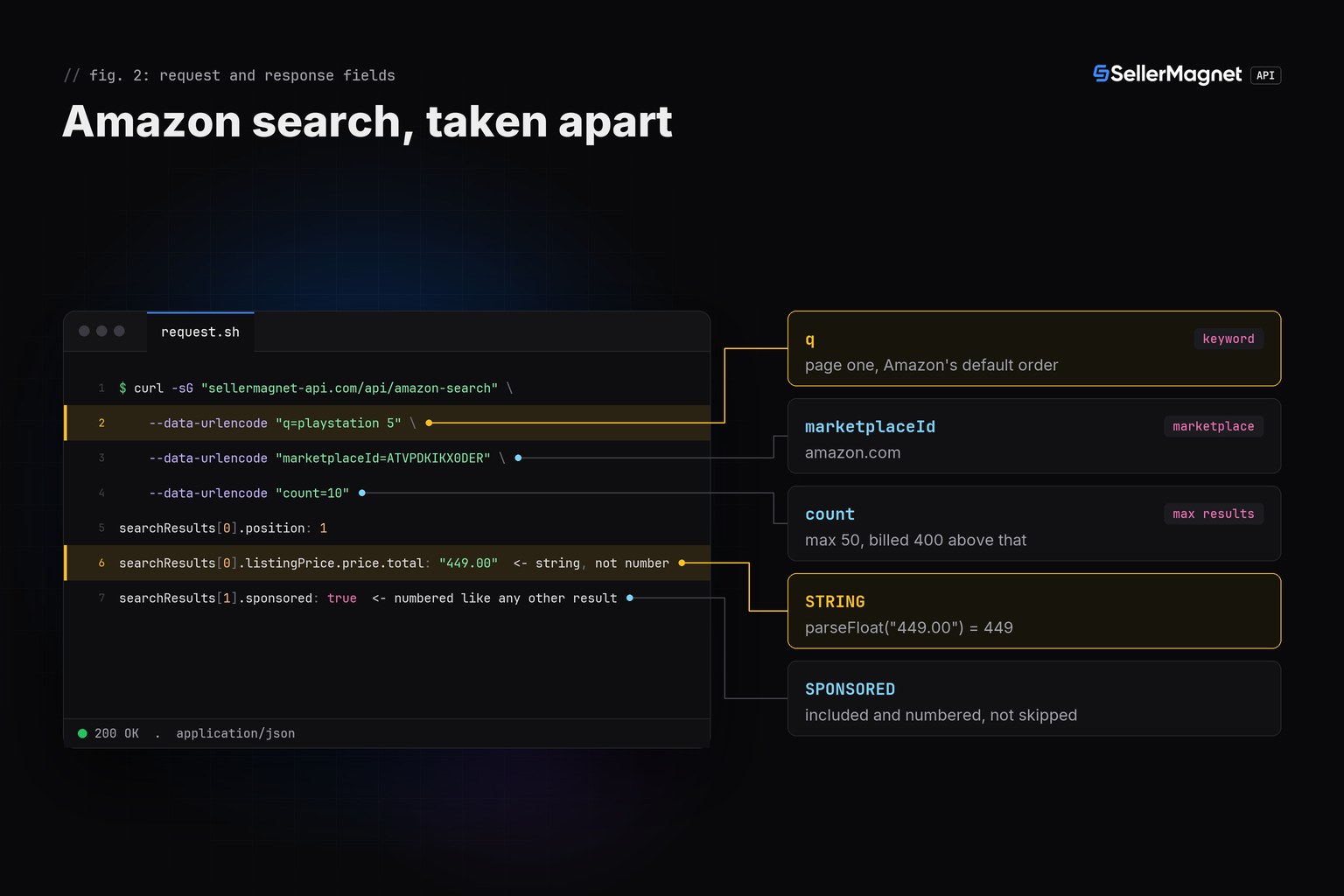
Product offers returns the live Buy Box and the first page of offers. offers[].totalPrice is rounded to two decimals already, but buyBox.totalPrice is price plus shipping added as floats and is not, so round it once after decoding (round2 in types.js). Amazon search is a third shape again: listingPrice.price.total is a decimal value formatted as a STRING like "449.00", so parsing it with Number.parseFloat is part of the type, not an afterthought. inventory on an offer is the add to cart maximum, not the seller's stock.
offers.js - the live Buy Box and offer list, totalPrice rounded
// offers.js - live Buy Box and first page of offers; totalPrice rounded.

import { get } from "./client.js";
import { round2 } from "./types.js";

/**
 * @param {string} asin
 * @param {string} marketplaceId
 * @returns {Promise<import("./types.js").OffersResponse>}
 */
export async function getOffers(asin, marketplaceId) {
  /** @type {import("./types.js").OffersResponse} */
  const data = await get("amazon-product-offers", { asin, marketplaceId });
  if (data.buyBox && typeof data.buyBox.totalPrice === "number") {
    data.buyBox.totalPrice = round2(data.buyBox.totalPrice); // not pre-rounded upstream
  }
  return data;
}
search.js - keyword search; listingPrice.price.total parsed from a string
// search.js - keyword search; listingPrice.price.total is a STRING.

import { get } from "./client.js";
import { parseSearchTotal } from "./types.js";

/**
 * @param {string} q
 * @param {string} marketplaceId
 * @param {number} [count]
 * @returns {Promise<(import("./types.js").SearchResult & {totalPriceNumber: number})[]>}
 */
export async function searchProducts(q, marketplaceId, count = 10) {
  /** @type {import("./types.js").SearchResponse} */
  const data = await get("amazon-search", { q, marketplaceId, count: String(count) });
  return data.searchResults.map((row) => ({
    ...row,
    totalPriceNumber: parseSearchTotal(row.listingPrice.price.total), // "449.00" -> 449
  }));
}| Field | Endpoint | JSON value | JS/TS type |
|---|---|---|---|
buyBoxInfo.price | lookup | 444.99 or "N/A" | number | null |
buyBoxInfo.currencyCode | lookup | "USD" | string |
buyBox | offers | {} when none | Offer | {} |
buyBox.totalPrice | offers | not rounded | number (round client side) |
offers[].totalPrice | offers | 444.98 | number |
offers[].inventory | offers | 30 (cart cap) | number |
listingPrice.price.total | search | "449.00" | string (parse it) |
buyBoxPrice | statistics | 41800 (cents) | number (cents) |
Which errors should a JS client retry?
Retry only what can succeed on a second try. A 429 from the per-key concurrency cap is free and carries Retry-After: 2. A 500 without a Retry-After header is our internal error and its credit is refunded, so one retry usually costs nothing; a 500 that does carry Retry-After stays charged. 502 and 503 are billed per attempt, so wait at least the Retry-After and cap the attempts. A missing parameter is a free 400, but an endpoint's own 400 is billed, and lookup and offers do not validate a malformed ASIN at all: it is sent upstream and billed like any other request, so check the shape before sending.
| Status | Meaning | Charged | Client action |
|---|---|---|---|
200 | Success | Yes | Decode data |
400 | Bad or missing parameter | Only an endpoint's own 400 | Fix the call |
401 / 403 | Key or credits | No | Stop |
404 | Not found on this marketplace | Yes | Record, never retry |
429 | Concurrency or per-IP limit | No | Wait Retry-After |
500 | Internal error, no Retry-After | No, refunded | Retry once |
502 / 503 | Upstream / breaker | Yes | Wait, then retry |
retry.js - retries that respect billing
// retry.js - retries that respect billing: 429/500(once)/502/503 only.

import { ApiError } from "./client.js";

const RETRYABLE = new Set([429, 500, 502, 503]);

/**
 * @template T
 * @param {() => Promise<T>} call
 * @param {number} [attempts]
 * @returns {Promise<T>}
 */
export async function withRetry(call, attempts = 4) {
  let seen500 = false;
  for (let attempt = 1; ; attempt++) {
    try {
      return await call();
    } catch (err) {
      if (!(err instanceof ApiError)) throw err;
      const give500Twice = err.status === 500 && seen500;
      if (!RETRYABLE.has(err.status) || give500Twice || attempt === attempts) throw err;
      seen500 = seen500 || err.status === 500;
      const backoff = 2 ** attempt * 100; // ms, small for the test harness
      const wait = Math.max(backoff, err.retryAfter * 1000);
      await new Promise((resolve) => setTimeout(resolve, wait));
    }
  }
}
Run many lookups with a Promise based worker pool
There is no batch endpoint: product lookup takes one ASIN per request, so bulk work means many small calls kept under the per-key concurrency cap, not a bigger request body. pool below runs a fixed number of async workers over an array with plain Promises, no library. Three to five workers stay well under the cap; for pacing thousands of ASINs end to end see the bulk ASIN lookup guide. Each item skips a malformed ASIN before it spends a credit, and a failed lookup is recorded on its own row instead of failing the whole batch.
pool.js - a small Promise based concurrency pool
// pool.js - a small Promise-based concurrency pool; there is no batch
// endpoint, so bulk work is just many single-item calls kept under the cap.

/**
 * @template In, Out
 * @param {In[]} items
 * @param {number} limit
 * @param {(item: In) => Promise<Out>} worker
 * @returns {Promise<Out[]>}
 */
export async function pool(items, limit, worker) {
  const results = new Array(items.length);
  let next = 0;
  async function run() {
    while (next < items.length) {
      const i = next++;
      results[i] = await worker(items[i]);
    }
  }
  await Promise.all(Array.from({ length: Math.min(limit, items.length) }, run));
  return results;
}
main.js - the tested scenarios: lookup, offers, search, retries and a pool
// main.js - the tested scenarios: lookup (price and "N/A"), a 404, three
// retried error classes, a search call, and a small concurrency pool.

import { lookupProduct } from "./lookup.js";
import { getOffers } from "./offers.js";
import { searchProducts } from "./search.js";
import { withRetry } from "./retry.js";
import { pool } from "./pool.js";
import { ApiError } from "./client.js";

async function main() {
  const p1 = await lookupProduct("B0CL61F39H", "ATVPDKIKX0DER");
  console.log(`lookup ${p1.asin} price=${p1.buyBoxInfo.price} ${p1.buyBoxInfo.currencyCode}`);

  const p2 = await lookupProduct("B0NOOFFER01", "ATVPDKIKX0DER");
  console.log(`lookup ${p2.asin} price=${p2.buyBoxInfo.price} (N/A -> null)`);

  try {
    await lookupProduct("B0UNKNOWN1", "ATVPDKIKX0DER");
  } catch (err) {
    console.log(`404 caught: ${err.message} (not retried, billed)`);
  }

  const offers = await getOffers("B0CL61F39H", "ATVPDKIKX0DER");
  console.log(`offers buyBox.totalPrice=${offers.buyBox.totalPrice} (rounded) offers=${offers.offers.length}`);

  const results = await searchProducts("playstation 5", "ATVPDKIKX0DER", 10);
  for (const row of results) {
    console.log(`search position=${row.position} asin=${row.asin} total=${row.totalPriceNumber} sponsored=${row.sponsored}`);
  }

  let calls429 = 0;
  const r429 = await withRetry(async () => {
    calls429++;
    return lookupProduct("B0RETRY429", "ATVPDKIKX0DER");
  });
  console.log(`429-then-200: price=${r429.buyBoxInfo.price} calls=${calls429}`);

  let calls500 = 0;
  const r500 = await withRetry(async () => {
    calls500++;
    return lookupProduct("B0RETRY500", "ATVPDKIKX0DER");
  });
  console.log(`500-then-200: price=${r500.buyBoxInfo.price} calls=${calls500}`);

  let calls502 = 0;
  const r502 = await withRetry(async () => {
    calls502++;
    return lookupProduct("B0RETRY502", "ATVPDKIKX0DER");
  });
  console.log(`502-502-then-200: price=${r502.buyBoxInfo.price} calls=${calls502}`);

  const asins = ["B0CL61F39H", "4006380000000", "B0UNKNOWN1"];
  const rows = await pool(asins, 3, async (asin) => {
    if (!/^[A-Z0-9]{10}$/.test(asin)) return { asin, price: null, error: "not a 10-character ASIN - skipped, no credit spent" };
    try {
      const p = await lookupProduct(asin, "ATVPDKIKX0DER");
      return { asin, price: p.buyBoxInfo.price, error: null };
    } catch (err) {
      return { asin, price: null, error: err instanceof ApiError ? err.message : String(err) };
    }
  });
  for (const row of rows) {
    console.log(`batch ${row.asin} price=${row.price} error=${row.error}`);
  }
}

main().catch((err) => {
  console.error(err);
  process.exitCode = 1;
});
Real output from the tested harness (illustrative ASINs, local test server)
lookup B0CL61F39H price=444.99 USD
lookup B0NOOFFER01 price=null (N/A -> null)
404 caught: 404: Product not found (not retried, billed)
offers buyBox.totalPrice=444.98 (rounded) offers=2
search position=1 asin=B0CL61F39H total=449 sponsored=false
search position=2 asin=B0SPONSORED total=59.99 sponsored=true
429-then-200: price=19.99 calls=2
500-then-200: price=29.99 calls=2
502-502-then-200: price=39.99 calls=3
batch B0CL61F39H price=444.99 error=null
batch 4006380000000 price=null error=not a 10-character ASIN - skipped, no credit spent
batch B0UNKNOWN1 price=null error=404: Product not found
Frequently Asked Questions
Do I need TypeScript, or does plain JavaScript work?
Plain JavaScript works. JSDoc @typedef, @param and @returns blocks give editors and tsc (if you run it with checkJs) the same type information a .d.ts file would, with no build step.
Which Node version do I need?
Node 18 or later, because global fetch and AbortController ship without a package starting there. Older versions need a fetch polyfill.
Is there a JavaScript SDK for the SellerMagnet API?
No, and none is needed. Every endpoint is a plain GET with query parameters and a JSON body, so fetch and a handful of JSDoc types cover it.
Why is listingPrice.price.total a string instead of a number?
Search formats the price server side as a two decimal string like "449.00"; lookup and offers return numbers instead. Parse the string explicitly rather than relying on JavaScript's loose comparisons.
What timeout should a JS client use?
120 seconds, via AbortController. The server allows a request that long, and a request the client abandons early is still charged.
Do the old JavaScript PA-API libraries still work?
No. PA-API 5 answers every call with an AccessDenied error that points to Amazon's Creators API, which is for affiliates with qualifying sales.
Bottom line: a fetch wrapper with a 120 second timeout, JSDoc types that decode three different price shapes correctly, retries for 429, 500, 502 and 503 only, and a small Promise based pool instead of a batch call that does not exist. The same client pattern exists for Python and Go; more snippets are on the code examples page, and every endpoint is in the API documentation.


