
To call an Amazon product API from Google Cloud Functions, deploy a 2nd gen HTTP function that imports the SellerMagnet TypeScript quickstart's own client.js, retry.js and lookup.js unchanged, and set --timeout=130s explicitly: a new function's timeout defaults to 60 seconds even on 2nd gen, which is shorter than SellerMagnet's own up to 120-second scrape allowance.
Key Takeaways
- A brand-new Cloud Function's --timeout defaults to 60 seconds even on 2nd gen, whose ceiling is 3600 seconds for an HTTP trigger; the low default, not the ceiling, is what actually breaks a first deploy of this proxy.
- Cloud Functions counts the FULL wait against that timeout, the same shape as AWS Lambda; unlike Cloudflare Workers, which meter CPU time only, waiting on SellerMagnet's up to 120-second allowance is not free here.
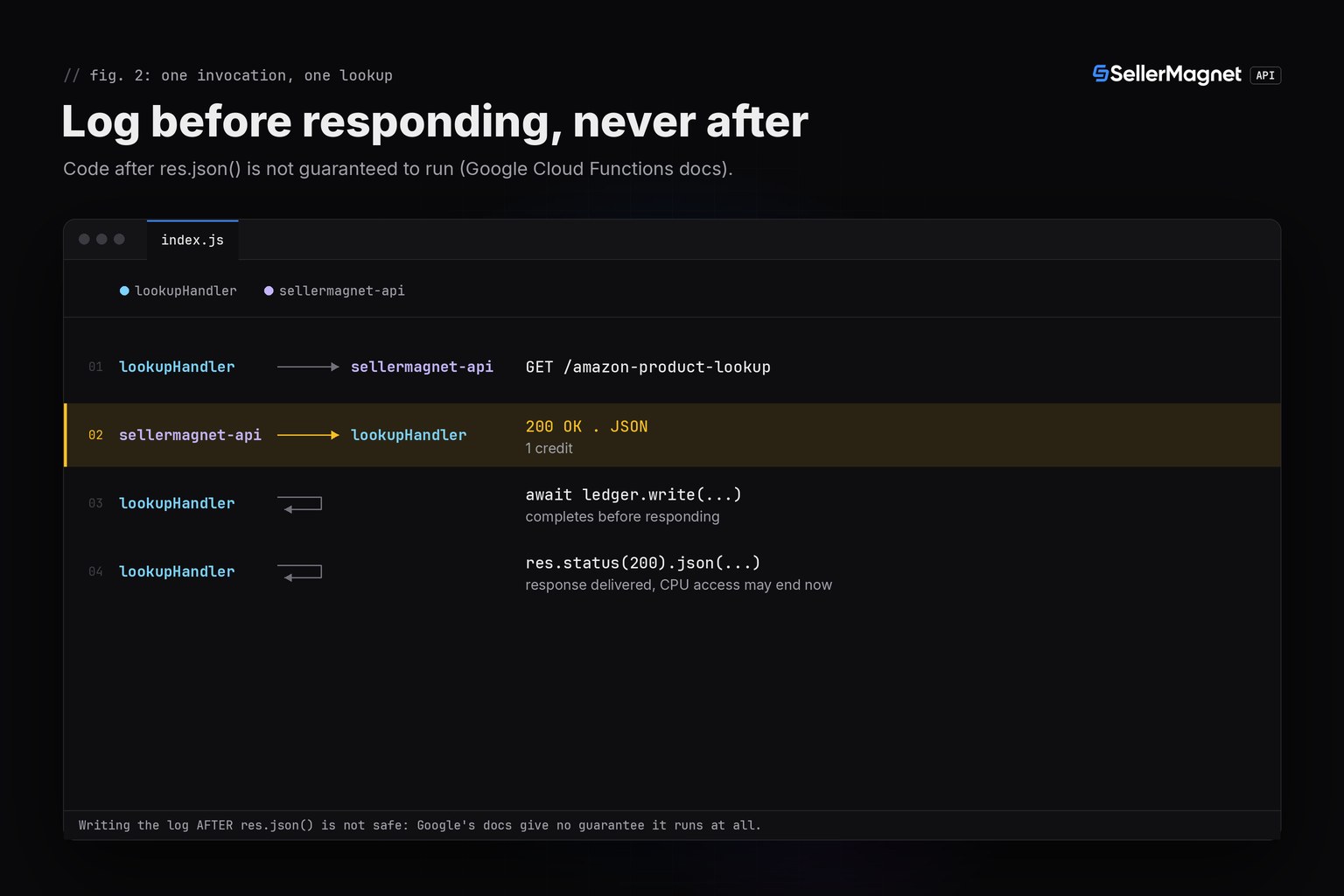
- Code run after the HTTP response is sent is not guaranteed to execute, per Google's own documentation; this handler awaits its request log write before res.json(), never after.
- A malformed ASIN or marketplace ID is rejected inside the handler before any call is made, so it never spends a credit.
- Unlike the Lambda version of this proxy, a Cloud Functions HTTP trigger has no separate API-Gateway-style integration timeout in front of it, so only the function's own --timeout needs raising.
Why does the default deploy time out before SellerMagnet answers?
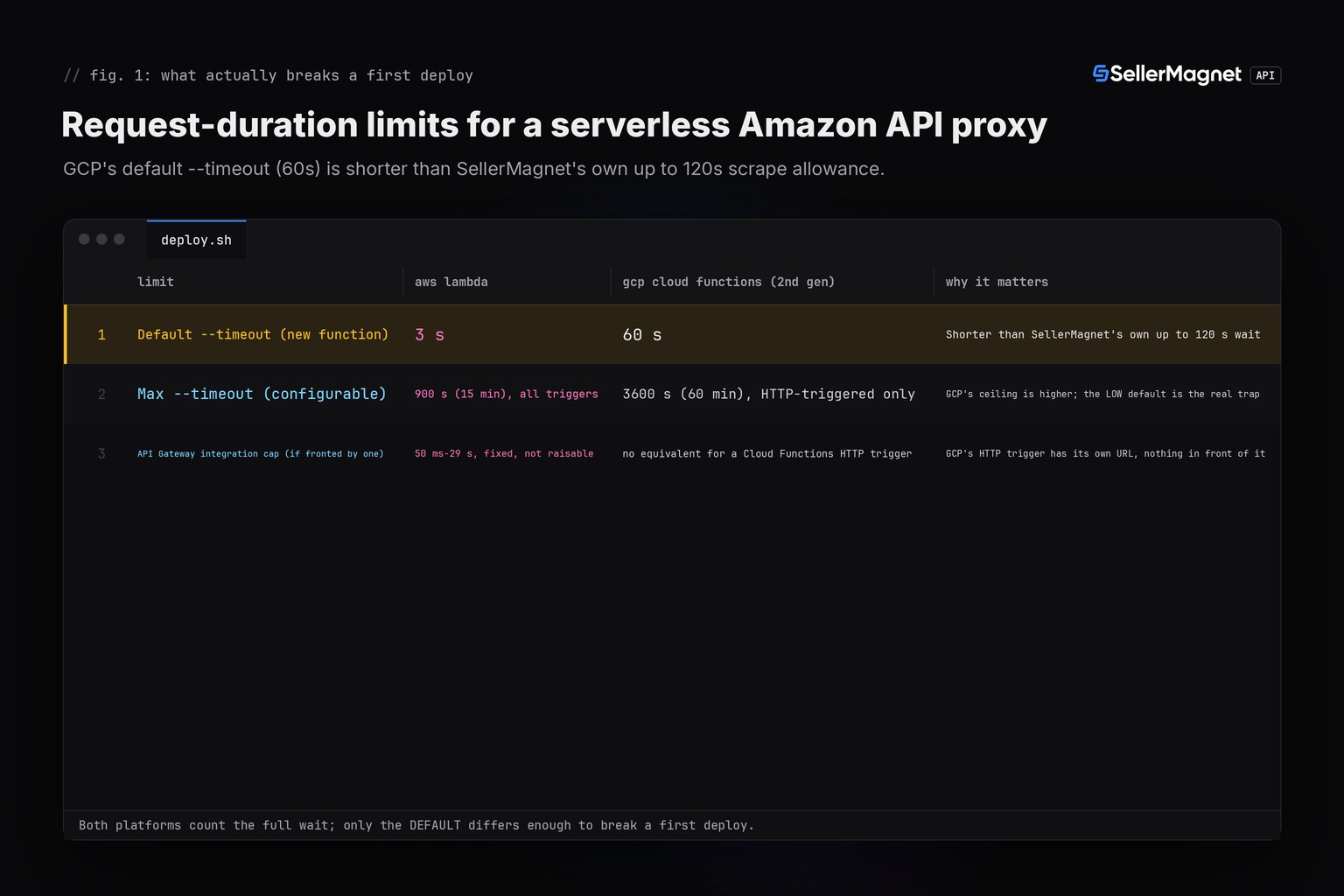
Google's own gcloud functions deploy reference states it plainly: --timeout "defaults to original value for existing function or 60 seconds for new functions", and for 2nd gen functions "cannot be more than 3600s". A fresh deploy of this proxy, left at its default, gives SellerMagnet only 60 seconds to answer, less than half of SellerMagnet's own up to 120-second scrape allowance (already documented in the quickstart series), so a slower lookup is killed by GCP's own DEADLINE_EXCEEDED long before SellerMagnet would have answered. The fix is one explicit flag at deploy time, not a code change.
| Limit | AWS Lambda (this series) | GCP Cloud Functions (2nd gen, HTTP) | Why it matters here |
|---|---|---|---|
| Default --timeout (new function) | 3 s | 60 s | Shorter than SellerMagnet's own up to 120 s wait |
| Max --timeout (configurable) | 900 s (15 min), all triggers | 3600 s (60 min), HTTP-triggered only | GCP's ceiling is higher; the LOW default is the real trap |
| API Gateway integration cap (if fronted by one) | 50 ms-29 s, fixed, not raisable | no equivalent for a Cloud Functions HTTP trigger | GCP's HTTP trigger has its own URL, nothing in front of it |
deploy.sh - the flag that must be set explicitly
# deploy.sh - deploy flags for the handler below. --timeout MUST be set explicitly:
# a new function defaults to 60s even on 2nd gen (max 3600s for an HTTP trigger), and
# SellerMagnet's own scrape allowance can run up to ~120s.
gcloud functions deploy amazon-lookup \
  --gen2 \
  --runtime=nodejs20 \
  --region=us-central1 \
  --source=. \
  --entry-point=lookupHandler \
  --trigger-http \
  --timeout=130s \
  --set-env-vars=SELLERMAGNET_API_KEY=your-key-here \
  --allow-unauthenticated   # or add IAM auth in front, this flag only controls invocation auth
Reusing client.js, retry.js and lookup.js unmodified
Cloud Functions' Node.js runtime reads environment variables the ordinary Node.js way, set with --set-env-vars or pulled from Secret Manager, with no special compatibility flag the way Cloudflare Workers need one. That means the TypeScript quickstart's client.js, which reads process.env.SELLERMAGNET_API_KEY directly, needs no edits at all; retry.js is copied in exactly as published, and lookup.js is adapted to inline its one decodePrice helper instead of importing a separate types.js, since this proxy intentionally ships three files, not four.
client.js - unmodified from the TypeScript quickstart
// client.js - one fetch-based client, X-Api-Key header, 120 s timeout.

// Overridable only for pointing the client at a local test server; a real
// program never needs to set SELLERMAGNET_API_BASE.
const API_BASE = process.env.SELLERMAGNET_API_BASE ?? "https://sellermagnet-api.com/api/";

/**
 * @typedef {Object} ApiErrorShape
 * @property {number} status
 * @property {string} message
 * @property {number} retryAfter - seconds, 0 when the header was absent.
 */

/** Thrown for any non-2xx response or a failed JSON decode. */
export class ApiError extends Error {
  /** @param {ApiErrorShape} shape */
  constructor({ status, message, retryAfter }) {
    super(`${status}: ${message}`);
    this.name = "ApiError";
    this.status = status;
    this.retryAfter = retryAfter;
  }
}

/**
 * Send one GET to the API and return the decoded `data` field.
 * @template T
 * @param {string} endpoint - e.g. "amazon-product-lookup"
 * @param {Record<string, string>} params
 * @returns {Promise<T>}
 */
export async function get(endpoint, params) {
  const url = new URL(API_BASE + endpoint);
  for (const [key, value] of Object.entries(params)) url.searchParams.set(key, value);

  const controller = new AbortController();
  const timeout = setTimeout(() => controller.abort(), 120_000); // server allows up to ~120 s
  let response;
  try {
    response = await fetch(url, {
      headers: { "X-Api-Key": process.env.SELLERMAGNET_API_KEY ?? "" },
      signal: controller.signal,
    });
  } finally {
    clearTimeout(timeout);
  }

  const retryAfter = Number.parseInt(response.headers.get("retry-after") ?? "0", 10) || 0;
  let body;
  try {
    body = await response.json(); // a proxy's error page is HTML, not JSON
  } catch {
    throw new ApiError({ status: response.status, message: response.statusText, retryAfter });
  }
  if (response.ok && body.success) return body.data;
  throw new ApiError({ status: response.status, message: body.message ?? response.statusText, retryAfter });
}
retry.js - unmodified from the TypeScript quickstart
// retry.js - retries that respect billing: 429/500(once)/502/503 only.

import { ApiError } from "./client.js";

const RETRYABLE = new Set([429, 500, 502, 503]);

/**
 * @template T
 * @param {() => Promise<T>} call
 * @param {number} [attempts]
 * @returns {Promise<T>}
 */
export async function withRetry(call, attempts = 4) {
  let seen500 = false;
  for (let attempt = 1; ; attempt++) {
    try {
      return await call();
    } catch (err) {
      if (!(err instanceof ApiError)) throw err;
      const give500Twice = err.status === 500 && seen500;
      if (!RETRYABLE.has(err.status) || give500Twice || attempt === attempts) throw err;
      seen500 = seen500 || err.status === 500;
      const backoff = 2 ** attempt * 100; // ms, small for the test harness
      const wait = Math.max(backoff, err.retryAfter * 1000);
      await new Promise((resolve) => setTimeout(resolve, wait));
    }
  }
}
lookup.js - inlines decodePrice; no separate types.js is shipped
// lookup.js - typed product lookup; buyBoxInfo.price decoded to number|null.

import { get } from "./client.js";

/**
 * Decode a lookup/offers price field into a number or null.
 * @param {number|string|null|undefined} raw
 * @returns {number|null}
 */
export function decodePrice(raw) {
  return typeof raw === "number" ? raw : null;
}

/**
 * @param {string} asin
 * @param {string} marketplaceId
 */
export async function lookupProduct(asin, marketplaceId) {
  const data = await get("amazon-product-lookup", { asin, marketplaceId });
  const info = data.productInfo;
  return {
    asin: info.asin,
    title: info.title,
    link: info.link,
    buyBoxInfo: {
      price: decodePrice(info.buyBoxInfo.price),
      currencyCode: info.buyBoxInfo.currencyCode,
      sellerId: info.buyBoxInfo.sellerId,
    },
  };
}
The function's own HTTP handler
index.js is the only new file, using the classic functions-framework (req, res) signature. It parses asin and marketplaceId from the query string, rejects a malformed value before any call is made, calls the quickstart's own lookupProduct through withRetry, and awaits a per-request log write before responding, since Google's own docs warn that anything run after the response is not guaranteed to execute.
index.js - the only new file: a thin HTTP handler
// index.js - Google Cloud Functions (2nd gen, HTTP trigger) entry point.
// Imports client.js/retry.js/lookup.js from the TypeScript quickstart (amazon-product-api-
// typescript.py): client.js and retry.js are UNCHANGED; lookup.js is adapted to inline its
// one decodePrice helper instead of importing a separate types.js, since this proxy
// intentionally ships three files, not four.
//   gcloud functions deploy amazon-lookup --gen2 --runtime=nodejs20 --region=us-central1 \
//     --trigger-http --entry-point=lookupHandler --timeout=130s --allow-unauthenticated
// --timeout MUST be set explicitly above 60: new functions default to a 60-second
// timeout even on gen2 (max 3600s for HTTP functions), and SellerMagnet's own scrape
// allowance (up to ~120 s) is itself what the wait is spent on, so the platform's own
// default would kill this proxy with a DEADLINE_EXCEEDED well before SellerMagnet answers
// (facts-additions.md #1).

import { lookupProduct } from "./lookup.js";
import { withRetry } from "./retry.js";
import { ApiError } from "./client.js";

const ASIN_RE = /^[A-Z0-9]{10}$/;
const MARKETPLACE_RE = /^A[A-Z0-9]{9,12}$/; // Amazon marketplace IDs, e.g. ATVPDKIKX0DER

/**
 * Write one line to the per-request ledger. Awaited and completed BEFORE the HTTP
 * response is sent: Cloud Functions gives no guarantee that code after res.json()/
 * res.send() runs at all, since CPU access can be withdrawn the moment the response is
 * delivered (facts-additions.md #2) - so any logging that must happen goes here, not
 * after the response.
 * @param {string} line
 * @param {{write: (line: string) => Promise<void>}} ledger
 */
async function logBeforeResponding(line, ledger) {
  await ledger.write(line);
}

/**
 * Cloud Functions (2nd gen) HTTP entry point: GET /?asin=...&marketplaceId=...
 * @param {{query: Record<string, string>}} req
 * @param {{status: (code: number) => any, json: (body: any) => void}} res
 * @param {{write: (line: string) => Promise<void>}} ledger - injected for the test harness;
 *   a real deploy uses the default console-backed ledger (see deploy.js).
 */
export async function lookupHandler(req, res, ledger) {
  const asin = (req.query.asin ?? "").toUpperCase();
  const marketplaceId = req.query.marketplaceId ?? "";

  // Reject a malformed ASIN or marketplace ID before any call is made: a bad shape can
  // never succeed, so failing closed here never spends a credit (same convention as
  // every other quickstart's pre-flight check).
  if (!ASIN_RE.test(asin)) {
    res.status(400).json({ error: `"${asin}" is not a 10-character ASIN - rejected, no credit spent` });
    return;
  }
  if (!MARKETPLACE_RE.test(marketplaceId)) {
    res.status(400).json({ error: `"${marketplaceId}" is not a marketplace ID - rejected, no credit spent` });
    return;
  }

  try {
    // withRetry caps at 4 attempts, same series-wide billing-aware policy.
    const product = await withRetry(() => lookupProduct(asin, marketplaceId));
    await logBeforeResponding(`${asin} 200 price=${product.buyBoxInfo.price}`, ledger);
    res.status(200).json({
      asin: product.asin, title: product.title, link: product.link,
      price: product.buyBoxInfo.price, currencyCode: product.buyBoxInfo.currencyCode,
    });
  } catch (err) {
    if (err instanceof ApiError) {
      // Pass through the API's own status for anything retry.js already gave up on
      // (404 not found, 401/403 key or credit problems, an exhausted 429); only a
      // genuine upstream failure (500/502/503) is reported to the caller as 502.
      const status = err.status >= 500 ? 502 : err.status;
      await logBeforeResponding(`${asin} ${status} ${err.message}`, ledger);
      res.status(status).json({ error: err.message });
      return;
    }
    throw err;
  }
}
Is it safe to log a lookup's outcome after responding, to shave off latency?
No. Google's "Tips & Tricks" guidance for Cloud Functions and its own "Running effective Node.js apps on Cloud Functions" post both say the same thing in different words: a function has access to CPU only for the duration of its execution, and code run outside that period "is not guaranteed to execute, and it can be stopped at any time". A fire-and-forget ledger.write() called after res.json() can simply never finish, and on a warm instance its leftover async work can resume and interfere with the NEXT invocation. This proxy awaits the write first, so the response always reflects a completed log line.
| Status | Meaning | Billed | Handler action |
|---|---|---|---|
200 | Success | Yes | Use data |
400 (bad asin/marketplace) | Rejected before any call | No | Fix the input |
401 / 403 | Key or credits | No | Stop, status passed through |
404 | Not on this marketplace | Yes | Store as missing, status passed through |
429 | Concurrency cap | No | Wait Retry-After, retried |
500 | Internal error | No, refunded | Retry once |
502 / 503 | Upstream / breaker | Yes | Wait, then retry, capped at 4, reported as 502 |
Real output from the tested harness (fakefetch.mjs, illustrative data)
happy: calls=1 order=before-response>response status=200 body={"asin":"B0CL61F39H","title":"t","link":"x","price":444.99,"currencyCode":"USD"}
no-offer-na: calls=1 order=before-response>response status=200 body={"asin":"B0NOOFFER1","title":"t","link":"x","price":null,"currencyCode":"USD"}
bad-asin: calls=0 order=response status=400 body={"error":"\"BAD-ASIN\" is not a 10-character ASIN - rejected, no credit spent"}
bad-marketplace: calls=0 order=response status=400 body={"error":"\"not-a-marketplace\" is not a marketplace ID - rejected, no credit spent"}
not-found-404: calls=1 order=before-response>response status=404 body={"error":"404: Product not found"}
rate-limited-429: calls=2 order=before-response>response status=200 body={"asin":"B0RETRY429","title":"t","link":"x","price":19.99,"currencyCode":"USD"}
internal-error-500: calls=2 order=before-response>response status=200 body={"asin":"B0RETRY500","title":"t","link":"x","price":29.99,"currencyCode":"USD"}
gateway-errors-capped: calls=4 order=before-response>response status=502 body={"error":"503: breaker open"}
unauthorized-401: calls=1 order=before-response>response status=401 body={"error":"401: Invalid or inactive API key."}
log-before-response-order: calls=1 order=before-response>response status=200 body={"asin":"B0CL61F39H","title":"t","link":"x","price":9.99,"currencyCode":"USD"}
order-check: ["before-response","response"] expected=["before-response","response"]
---
ALL 10 SCENARIOS PASS (10/10 assertions, calls counted per scenario above)
Frequently Asked Questions
Why does a Cloud Function time out even though SellerMagnet answered inside 120 seconds?
Because gcloud functions deploy defaults a brand-new function's --timeout to 60 seconds, even on 2nd gen (whose ceiling is 3600 seconds for an HTTP trigger). The platform enforces its own low default, not SellerMagnet's allowance, so --timeout must be set explicitly.
Is the 120-second wait as cheap on Cloud Functions as it is on Cloudflare Workers?
No. Cloudflare only meters CPU time, so waiting on fetch() is free there. Cloud Functions, like AWS Lambda, bills and times out on the FULL wall-clock duration, so the function's own configured timeout, not just its CPU usage, must cover the wait.
Can I log the outcome of a lookup after sending the HTTP response, to save latency?
Not reliably. Google's own docs state that code run after the response is sent is not guaranteed to execute and can be stopped at any time, since CPU access can be withdrawn the instant the response is delivered. Await anything that must happen before res.json().
Do I need to edit the TypeScript quickstart's client.js to use it on Cloud Functions?
No. Cloud Functions' Node.js runtime populates process.env from --set-env-vars or Secret Manager the normal Node.js way, with no special compatibility flag, so the unmodified client.js (which reads process.env.SELLERMAGNET_API_KEY) works as-is.
How is this different from the AWS Lambda version of this proxy?
Lambda's own timeout can reach 900 seconds, but a Lambda sitting behind API Gateway is further capped at a fixed, non-raisable 29-second integration timeout, which is why that guide uses a Function URL instead. A Cloud Functions HTTP trigger has no separate gateway layer in front of it, so only the function's own --timeout matters, once it is raised.
Which Node.js runtime should I deploy with?
nodejs18 or later: global fetch and AbortController, which client.js relies on, ship without a package starting there (same minimum as the TypeScript quickstart); the deploy example below uses nodejs20 simply as GCP's current recommended runtime.
Bottom line: Google Cloud Functions can run this proxy with zero changes to the TypeScript quickstart's client.js, retry.js and lookup.js, provided --timeout is raised explicitly above the platform's own 60-second default and any logging is awaited before the response is sent. That combination of "the full wait counts, like Lambda" plus "the default is just low, unlike Lambda's fixed API-Gateway cap" is what makes this platform's failure mode different from either of the other two serverless versions of this proxy. Every endpoint is documented on the API documentation page, and more runnable snippets are on the code examples page; a free account includes 150 credits to try it.


