
An Amazon MCP server is a small program that exposes Amazon marketplace data - products, prices, offers, not AWS - as tools an AI assistant can call. The one below wraps three SellerMagnet endpoints - product lookup, keyword search and offers - in about 80 lines of Python with the official MCP SDK 2.x. Claude Desktop or Claude Code starts it over stdio, the model decides when to call a tool, and every call spends one credit, so the server caps the budget, trims results and returns errors the model can act on.
Key Takeaways
- MCP SDK 2.x renamed FastMCP to MCPServer: import it from mcp.server.mcpserver, or pin mcp<2 for old code.
- Raise ToolError for failures the model should see; any other exception reaches it only as a generic error.
- Every tool call costs one credit, so cap calls per session and validate ASINs before calling the API.
- Return a few useful fields, not whole responses: Claude Code warns when a tool result passes 10,000 tokens.
- Pass the API key as an environment variable in the client config, never in the server code.
What do I need for an Amazon MCP server?
- Python 3.10 or later, and the packages
mcp(2.x) andhttpx- MCP SDK 2.x no longer installshttpxfor you. - An API key - a free account includes 150 credits, one per tool call.
- An MCP client such as Claude Desktop or Claude Code.
A dedicated virtual environment for the server
python3 -m venv ~/sellermagnet-mcp/.venv
~/sellermagnet-mcp/.venv/bin/pip install "mcp>=2,<3" httpx
How do I write the MCP server?
Each decorated function becomes a tool; its docstring is the description the model reads when it decides what to call, so the docstrings name the cost and the common marketplace IDs. Arguments get a JSON schema from the type hints. The helper _get enforces the credit budget, sends the key in the X-Api-Key header with a 120-second timeout, and turns every API or network failure into a ToolError.
server.py - three read-only tools over the SellerMagnet API
"""Amazon product data for AI assistants: a stdio MCP server over the SellerMagnet API."""
import os
import re

import httpx
from mcp.server.mcpserver import MCPServer
from mcp.server.mcpserver.exceptions import ToolError   # its message reaches the model
from mcp.types import ToolAnnotations

API = "https://sellermagnet-api.com/api"
ASIN = re.compile(r"^(?:B[0-9A-Z]{9}|[0-9]{9}[0-9X])$")
MAX_CALLS = int(os.environ.get("SELLERMAGNET_MAX_CALLS", "25"))   # credits this server process may spend
READ_ONLY = ToolAnnotations(read_only_hint=True, open_world_hint=True)

mcp = MCPServer("sellermagnet")
_calls = 0


async def _get(endpoint: str, **params) -> dict:
    global _calls
    key = os.environ.get("SELLERMAGNET_API_KEY")
    if not key:
        raise ToolError("SELLERMAGNET_API_KEY is not set in the MCP client configuration; no credit was used.")
    if _calls >= MAX_CALLS:
        raise ToolError(f"Credit budget of {MAX_CALLS} calls is used up; restart the MCP client to reset it.")
    _calls += 1
    try:
        async with httpx.AsyncClient(timeout=120) as client:
            resp = await client.get(f"{API}/{endpoint}", params=params,
                                    headers={"X-Api-Key": key})
    except httpx.HTTPError as exc:
        raise ToolError(f"Network error calling SellerMagnet: {type(exc).__name__}") from exc
    try:
        body = resp.json()
    except ValueError:
        body = {}
    if resp.status_code == 200 and body.get("success"):
        return body["data"]
    raise ToolError(f"SellerMagnet API {resp.status_code}: {body.get('message', 'request failed')}")


def _check_asin(asin: str) -> str:
    asin = asin.strip().upper()
    if not ASIN.match(asin):
        raise ToolError(f"'{asin}' is not a valid ASIN (10 characters, e.g. B0CL61F39H); no credit was used.")
    return asin


@mcp.tool(annotations=READ_ONLY)
async def lookup_product(asin: str, marketplace_id: str = "ATVPDKIKX0DER") -> dict:
    """Title, featured price, rating, rank and link of one Amazon product. Costs 1 credit.
    marketplace_id: ATVPDKIKX0DER = amazon.com, A1PA6795UKMFR9 = amazon.de, A1F83G8C2ARO7P = amazon.co.uk."""
    p = (await _get("amazon-product-lookup", asin=_check_asin(asin), marketplaceId=marketplace_id))["productInfo"]
    box, reviews = p.get("buyBoxInfo") or {}, p.get("reviews") or {}
    return {
        "asin": p.get("asin"), "title": p.get("title"), "link": p.get("link"),
        "price": box.get("price"), "currency": box.get("currencyCode"), "buyBoxSellerId": box.get("sellerId"),
        "rating": reviews.get("averageRating"), "ratings": reviews.get("totalReviews"),
        "bestsellerRanks": p.get("bestsellerRanks"), "listedSince": p.get("listedSinceDate"),
        "bullets": (p.get("bulletPoints") or [])[:5],
    }


@mcp.tool(annotations=READ_ONLY)
async def search_products(query: str, marketplace_id: str = "ATVPDKIKX0DER", count: int = 10) -> list[dict]:
    """Amazon keyword search, first results page, organic and sponsored flagged. Costs 1 credit.
    count is capped at 20 to keep answers short."""
    data = await _get("amazon-search", q=query, marketplaceId=marketplace_id, count=max(1, min(count, 20)))
    return [{"position": r.get("position"), "asin": r.get("asin"), "title": r.get("productTitle"),
             "price": ((r.get("listingPrice") or {}).get("price") or {}).get("total"),
             "rating": r.get("reviewRating"), "sponsored": r.get("sponsored")}
            for r in data.get("searchResults") or []]


@mcp.tool(annotations=READ_ONLY)
async def product_offers(asin: str, marketplace_id: str = "ATVPDKIKX0DER") -> dict:
    """Featured offer and the other sellers on a listing: seller, condition, FBA/FBM, landed price. Costs 1 credit."""
    d = await _get("amazon-product-offers", asin=_check_asin(asin), marketplaceId=marketplace_id)
    keep = ("sellerId", "sellerName", "condition", "fulfillmentType", "totalPrice", "deliveryDate")
    return {"currency": (d.get("currency") or {}).get("code"),
            "buyBox": {k: (d.get("buyBox") or {}).get(k) for k in keep},
            "offers": [{k: o.get(k) for k in keep} for o in d.get("offers") or []]}


if __name__ == "__main__":
    mcp.run()          # stdio: the client starts this process and talks over stdin/stdout
Code written for MCP SDK 1.x breaks on 2.x
from mcp.server.fastmcp import FastMCP fails on SDK 2.x with a message pointing to the migration guide: the class is now MCPServer in mcp.server.mcpserver, and tool annotations use snake_case fields such as read_only_hint. Pin mcp<2 if you must keep older code running.
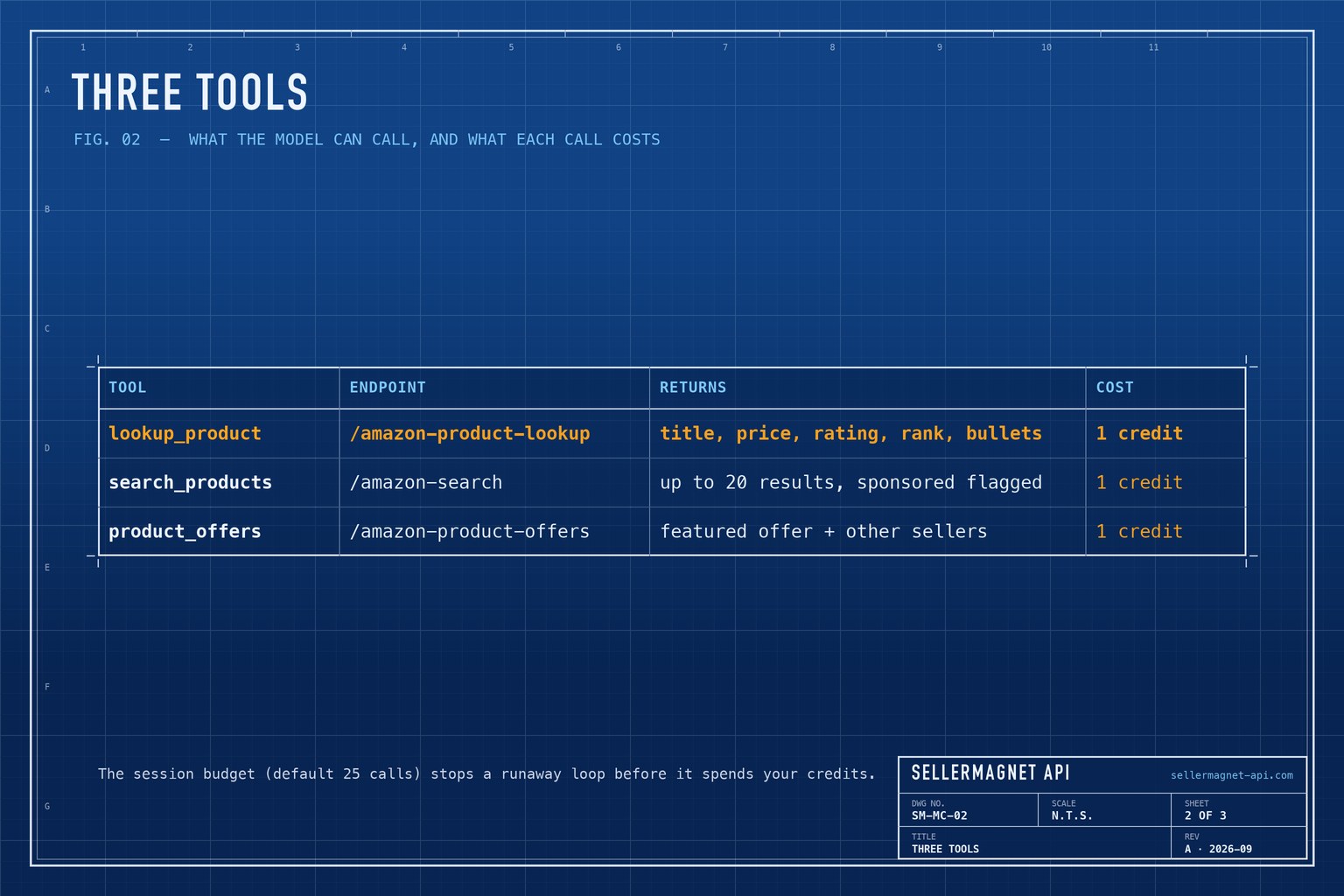
| Tool | Endpoint | Returns | Cost |
|---|---|---|---|
lookup_product | /amazon-product-lookup | Title, price, rating, rank, bullets | 1 credit |
search_products | /amazon-search | Up to 20 results, sponsored flagged | 1 credit |
product_offers | /amazon-product-offers | Featured offer + other sellers | 1 credit |
How do I add the server to Claude Desktop?
Open Settings, Developer, Edit Config - or the file directly: ~/Library/Application Support/Claude/claude_desktop_config.json on macOS, %APPDATA%\Claude\claude_desktop_config.json on Windows. Add the server under mcpServers with absolute paths, then quit Claude Desktop completely and start it again.
claude_desktop_config.json - the server with its key in env
{
  "mcpServers": {
    "sellermagnet": {
      "command": "/Users/you/sellermagnet-mcp/.venv/bin/python",
      "args": ["/Users/you/sellermagnet-mcp/server.py"],
      "env": {
        "SELLERMAGNET_API_KEY": "your-key-here",
        "SELLERMAGNET_MAX_CALLS": "25"
      }
    }
  }
}
How do I add it to Claude Code?
Use claude mcp add: options first, then the server name, then -- and the command that starts the server - a name right after --env is read as another variable. The default scope is local to you. --scope project writes a .mcp.json to share with your team; pass --env 'SELLERMAGNET_API_KEY=${SELLERMAGNET_API_KEY}' in single quotes so the file stores the placeholder, which Claude Code expands from each developer's environment - with double quotes the shell writes your real key into the file. The check_server.py script starts the server the same way a client does and lists the tools without spending a credit.
Register the server with Claude Code, then check it
claude mcp add --env SELLERMAGNET_API_KEY="$SELLERMAGNET_API_KEY" --transport stdio \
  sellermagnet -- ~/sellermagnet-mcp/.venv/bin/python ~/sellermagnet-mcp/server.py

cd ~/sellermagnet-mcp && .venv/bin/python check_server.py   # lists the tools, no credit used
check_server.py - start the server like a client and list its tools
"""Start server.py like Claude would and list its tools. Listing costs no credits."""
import asyncio
import os
import sys

from mcp import ClientSession
from mcp.client.stdio import StdioServerParameters, stdio_client


async def main() -> None:
    params = StdioServerParameters(command=sys.executable, args=["server.py"],
                                   env={"SELLERMAGNET_API_KEY": os.environ["SELLERMAGNET_API_KEY"]})
    async with stdio_client(params) as (read, write):
        async with ClientSession(read, write) as session:
            await session.initialize()
            for tool in (await session.list_tools()).tools:
                print(f"{tool.name:<16} {(tool.description or '').splitlines()[0]}")


asyncio.run(main())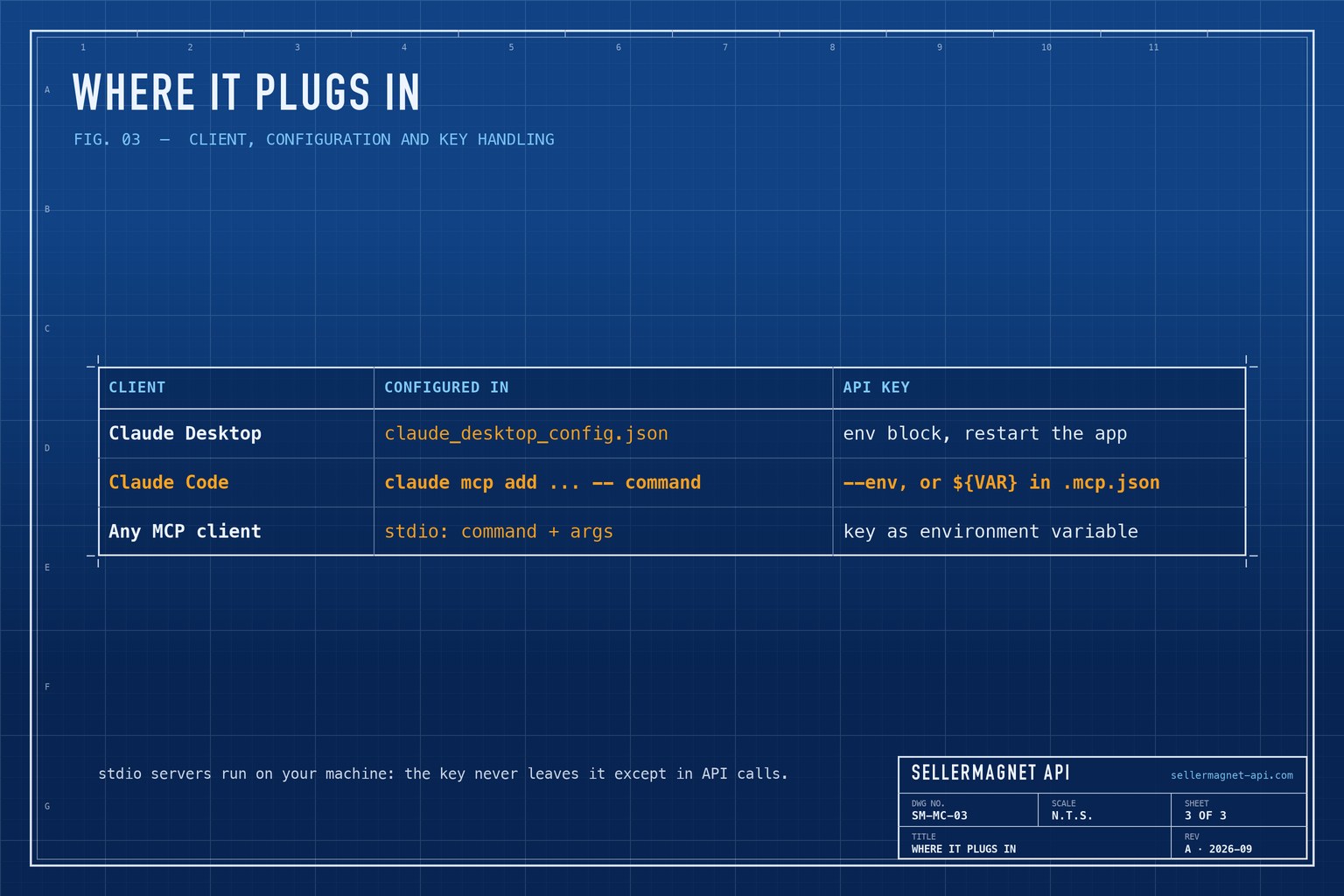
How do I keep the credit spend under control?
A model answering "compare the top five chargers" may make a search call and five lookups - six credits - and it may try again on its own when a call fails. Three things keep that predictable: the budget in SELLERMAGNET_MAX_CALLS - it counts per server process, so in Claude Desktop it lasts until you quit the app - a search count capped at 20, and an ASIN check that rejects malformed codes before any request, because lookup would otherwise bill them. Errors carry the API's own message, so the model can tell a missing product (404, do not retry) from a busy moment. More tools follow the same pattern - a fourth over /amazon-product-statistics would add price history. The AI agent tool-calling guide shows a lookup tool wired directly into the Claude API.
Frequently Asked Questions
What is an Amazon MCP server?
A local program that exposes Amazon product data as Model Context Protocol tools, so an AI assistant such as Claude can look up products, search and read offers on its own.
Why does from mcp.server.fastmcp import FastMCP fail?
MCP SDK 2.x renamed FastMCP to MCPServer in mcp.server.mcpserver. Update the import, or pin mcp<2 for code written against 1.x.
Does every tool call cost a credit?
One credit per API request, including a 404. Listing tools is free, invalid ASINs are rejected before any request, and 401, 429 and unknown-marketplace errors are not billed.
Where does the API key go?
In the client configuration as an environment variable: the env block in Claude Desktop, --env or ${VAR} expansion in Claude Code. Never in server.py.
Why not return the full API response?
Full lookups include long descriptions and image lists. Trimmed results keep the model's context small; Claude Code warns above 10,000 tokens per tool result.
Bottom line: about 80 lines of Python turn three endpoints into tools any MCP client can use, and a budget, compact results and ToolError messages keep it cheap and predictable. The same calls without MCP are in the Python quickstart, and every endpoint is in the API documentation.


