
An AI agent built on a language model knows Amazon product data only as of its training cutoff, so it cannot tell you today's Buy Box price or bestseller rank. Tool calling fixes that: you describe a function, the model decides when a question needs it, your code runs the real request and hands the result back. With one tool wrapping the SellerMagnet API's product lookup, an agent answers from live data - and cites which ASIN and marketplace the answer came from.
Key Takeaways
- A language model's knowledge of prices and ranks is frozen at training time; a tool supplies current data.
- The model only requests a tool call; your code executes it and decides what it is allowed to spend.
- Returning seven fields instead of the full listing keeps every later turn smaller.
- An enum of the 23 marketplace IDs stops the model from inventing one.
- A hard cap on tool calls per question caps the credits a single conversation can spend.
What is tool calling for an AI agent?
Tool calling is a protocol between your code and a model. You send a list of tools, each with a name, a description and a JSON Schema for its input. When the model wants one, it stops with stop_reason: "tool_use" and a tool_use block naming the tool and its arguments. You run it, send back a tool_result, and the model continues until it stops with end_turn.
The important property is that the model never touches the network or your API key. It can only ask. Your code validates the arguments, calls the product lookup endpoint, trims the result and enforces a budget, which is where the guardrails below live.
How do I define an Amazon product tool?
Describe what the tool returns and when to use it, and constrain the input as tightly as the API does. strict: true guarantees the arguments match the schema, and the marketplace enum lists the 23 IDs from the marketplace ID list, so the model cannot send DE.
Two packages and two keys
pip install anthropic requests
export ANTHROPIC_API_KEY="..."        # read by anthropic.Anthropic()
export SELLERMAGNET_API_KEY="..."     # read by the tool, never shown to the model
tools.py - the tool definition and its implementation
import json
import os
import re

import requests

ASIN_RE = re.compile(r"^[A-Z0-9]{10}$")

LOOKUP_TOOL = {
    "name": "amazon_product_lookup",
    "description": (
        "Fetch live data for one Amazon product: title, current Buy Box price and "
        "currency, and main-category bestseller rank. Use it whenever the user asks "
        "about a current price, rank or listing. Each call costs one API credit."
    ),
    "strict": True,
    "input_schema": {
        "type": "object",
        "properties": {
            "asin": {"type": "string", "description": "10-character ASIN, e.g. B0CL61F39H"},
            "marketplace_id": {
                "type": "string",
                "description": "Amazon marketplace ID, e.g. ATVPDKIKX0DER for amazon.com",
                "enum": [
                "ATVPDKIKX0DER", "A2EUQ1WTGCTBG2", "A1AM78C64UM0Y8", "A2Q3Y263D00KWC",
                "A1F83G8C2ARO7P", "A28R8C7NBKEWEA", "A1PA6795UKMFR9", "A13V1IB3VIYZZH",
                "APJ6JRA9NG5V4", "A1RKKUPIHCS9HS", "A1805IZSGTT6HS", "AMEN7PMS3EDWL",
                "A2NODRKZP88ZB9", "A1C3SOZRARQ6R3", "A33AVAJ2PDY3EV", "A2VIGQ35RCS4UG",
                "A17E79C6D8DWNP", "ARBP9OOSHTCHU", "AE08WJ6YKNBMC", "A1VC38T7YXB528",
                "A21TJRUUN4KGV", "A19VAU5U5O7RUS", "A39IBJ37TRP1C6",
                ],
            },
        },
        "required": ["asin", "marketplace_id"],
        "additionalProperties": False,
    },
}


def amazon_product_lookup(asin: str, marketplace_id: str) -> str:
    asin = asin.strip().upper()
    if not ASIN_RE.match(asin):
        raise ValueError(f"{asin!r} is not a valid 10-character ASIN")
    resp = requests.get(
        "https://sellermagnet-api.com/api/amazon-product-lookup",
        params={"asin": asin, "marketplaceId": marketplace_id,
                "api_key": os.environ["SELLERMAGNET_API_KEY"]},
        timeout=120,
    )
    body = resp.json()
    if resp.status_code != 200 or not body.get("success"):
        raise RuntimeError(f"lookup failed ({resp.status_code}): {body.get('message')}")
    p = body["data"]["productInfo"]
    box = p.get("buyBoxInfo") or {}
    rank = (p.get("bestsellerRanks") or {}).get("main_category") or {}
    return json.dumps({  # seven fields, not the whole listing
        "asin": asin, "marketplace_id": marketplace_id, "title": p.get("title"),
        "buy_box_price": box.get("price"), "currency": box.get("currencyCode"),
        "rank": rank.get("rank"), "rank_category": rank.get("name"),
    })
How does the Claude tool-use loop work in Python?
Call the model with the tool, and while it stops with tool_use, run every requested call and send all results back in one message. A failed call goes back as a tool_result with is_error: true, so the model can correct its input or explain the problem instead of guessing. The loop ends on any other stop reason; a refusal is reported as such. Once the budget is spent, tool_choice: none forces a final answer. Status codes, retries and Retry-After are covered in rate limits and error handling.
agent.py - a manual tool-use loop with a hard budget
import anthropic

from tools import LOOKUP_TOOL, amazon_product_lookup

client = anthropic.Anthropic()
MAX_TOOL_CALLS = 10  # one credit each: the most a single question may spend
SYSTEM = (
    "You answer questions about Amazon products. Use amazon_product_lookup for any "
    "current price, rank or title - never quote them from memory. Always name the "
    "ASIN and marketplace your answer is based on."
)


def ask(question: str) -> str:
    messages = [{"role": "user", "content": question}]
    calls = 0
    while True:
        response = client.messages.create(
            model="claude-opus-5",
            max_tokens=16000,
            system=SYSTEM,
            tools=[LOOKUP_TOOL],
            # once the budget is spent, force a final answer instead of more calls
            tool_choice={"type": "none"} if calls >= MAX_TOOL_CALLS else {"type": "auto"},
            messages=messages,
        )
        if response.stop_reason == "refusal":
            return "The request was declined."
        if response.stop_reason != "tool_use":
            return "".join(b.text for b in response.content if b.type == "text")

        messages.append({"role": "assistant", "content": response.content})
        results = []
        for block in response.content:
            if block.type != "tool_use":
                continue
            calls += 1
            if calls > MAX_TOOL_CALLS:
                content, is_error = "Tool budget used up. Answer with what you have.", True
            else:
                try:
                    content, is_error = amazon_product_lookup(**block.input), False
                except Exception as exc:
                    content, is_error = f"Error: {exc}", True
            results.append({"type": "tool_result", "tool_use_id": block.id,
                            "content": content, "is_error": is_error})
        messages.append({"role": "user", "content": results})  # all results, one message


print(ask("What does B0CL61F39H cost on amazon.com right now, and how does it rank?"))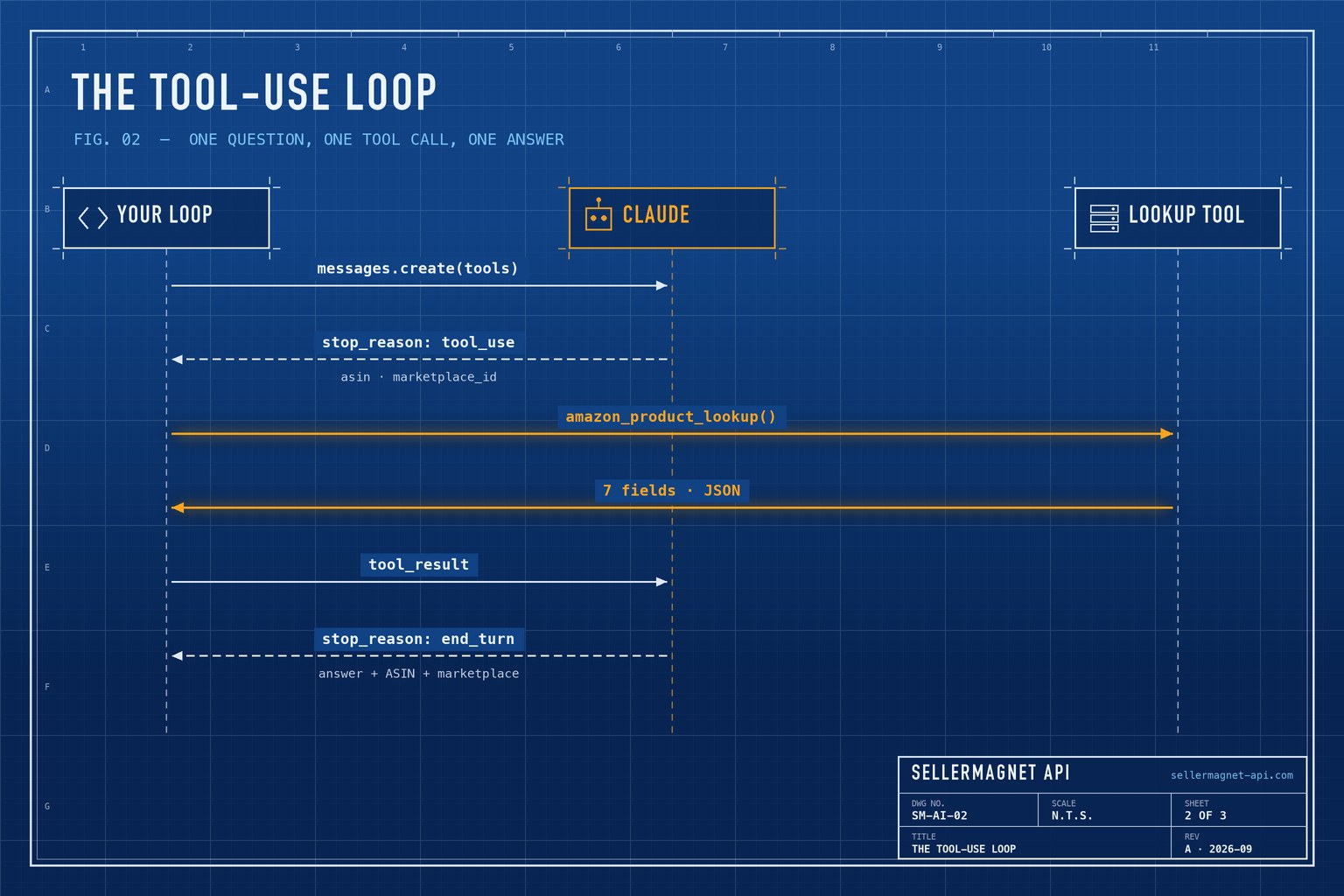
What the model receives as the tool result
{
  "asin": "B0CL61F39H",
  "marketplace_id": "ATVPDKIKX0DER",
  "title": "PlayStation®5 console (slim)",
  "buy_box_price": 444.99,
  "currency": "USD",
  "rank": 31,
  "rank_category": "Video Games"
}
Which guardrails keep an agent cheap and honest?
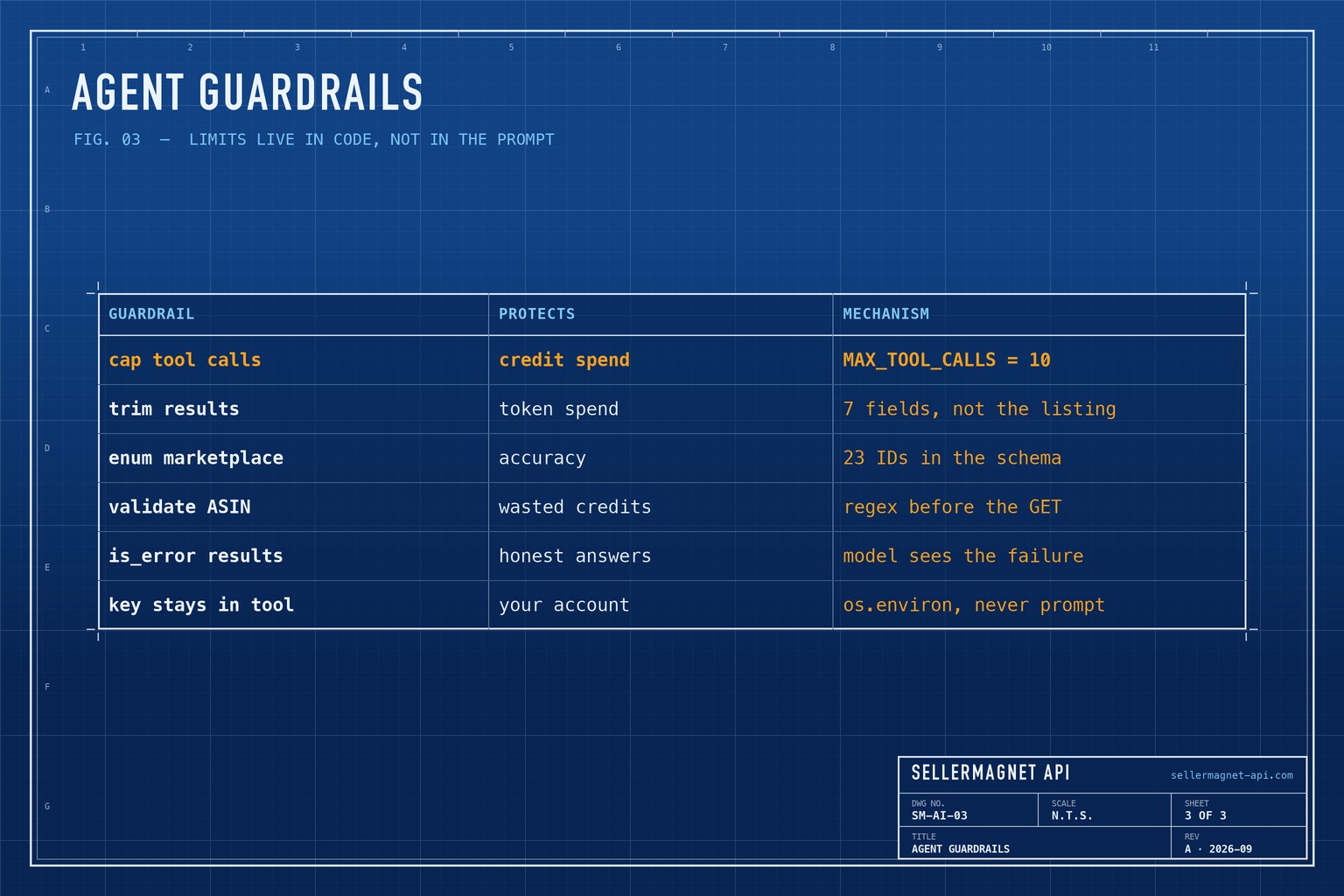
An agent spends credits and tokens on its own initiative, so the limits belong in code, not in the prompt. Each guardrail below is a few lines in the example above.
| Guardrail | Why it matters | Where it lives |
|---|---|---|
| Cap tool calls per question | Each call spends one API credit | MAX_TOOL_CALLS in the loop |
| Trim the tool result | Tool results are resent as input on every later turn | Seven fields in amazon_product_lookup |
| Enum the marketplace ID | The model cannot invent or misspell an ID | enum in the input schema |
| Validate the ASIN locally | Product lookup bills malformed ASINs; a local check is free | ASIN_RE before the request |
| Report failures with is_error | The model can recover instead of guessing | tool_result with is_error: true |
| Keep the API key in the tool | The model never needs to see it | os.environ inside the function |
How do I give the agent more tools?
Users rarely know the ASIN. A second tool wrapping /api/amazon-search - query q, a marketplace ID and a count of up to 50 - lets the agent go from a product name to an ASIN, then call the lookup. The model can request several tool calls in one turn, and the loop above already returns every result in one message, so adding a tool is a new schema and a new function.
The same functions can also be exposed through the Model Context Protocol (MCP), an open standard for connecting tools to AI applications. Wrapped as an MCP server, the lookup becomes available to any MCP-capable client, such as Claude Desktop, without writing the loop yourself.
Never let the model quote prices from memory
Say so in the system prompt and make the tool the only source. A model answering from training data will state an out-of-date price with full confidence.
Frequently Asked Questions
Does the model call the SellerMagnet API directly?
No. The model only requests a tool call; your code makes the HTTP request and returns the result.
How much does one agent question cost in API credits?
Each tool call is one SellerMagnet request and costs one credit; requests rejected by authentication or rate limits (401, 429) are free. Capping calls at 10 per question limits one question to at most 10 credits.
Why not return the full product response to the model?
Every tool result is sent back as input on each later turn, so a trimmed result keeps the whole conversation cheaper.
Does this work with other models?
The tool definition is plain JSON Schema, so the same design carries over to any model that supports tool calling.
Can the agent look up several products at once?
Yes. The model can request several tool calls in one turn; the loop runs them all and returns every result in one message.
Bottom line: one well-described tool turns a model with stale knowledge into an agent that answers from live Amazon data, and a handful of code-level guardrails keep its spend predictable. There is no batch endpoint, so each ASIN is one call - the bulk ASIN lookup guide covers large lists. The API documentation lists every endpoint you could wrap as a further tool, and a free account includes 150 credits to test with.


