
Amazon MAP monitoring means checking the offers on your listings against your minimum advertised price (MAP) and knowing who sells below it. One /api/amazon-product-offers call per ASIN returns the New offers on the first page of the offer listing with seller ID, seller name, item price, shipping and fulfilment type. The script below flags offers under MAP and sellers missing from your authorized list, and logs each finding with a UTC timestamp - one credit per ASIN per check.
Key Takeaways
- One offers call per ASIN shows every New offer on the first page with seller ID, name, item price, shipping and fulfilment type.
- Compare the item price without shipping, unless your MAP policy counts shipping.
- An allowlist of seller IDs flags unauthorized sellers at any price, not only below MAP.
- An append-only CSV with UTC timestamps and first-seen dates is the record to follow up with a reseller.
- Coupons and checkout discounts are not part of the offer data; the watch sees the listed price.
What counts as a MAP violation on Amazon?
An offer whose advertised item price is below the minimum set in your MAP policy. A MAP policy is the brand's own rule, so monitoring it and following up are up to the brand. On Amazon the advertised price is the price on the offer: priceWithoutShipping in the offer data, or totalPrice if your policy includes shipping. Sellers who are not on your list are worth knowing about even at MAP, because their stock may not have come through your distribution.
| Issue | When | Next step |
|---|---|---|
| Below MAP | Item price under your MAP | Contact the reseller under your policy |
| Unauthorized | Seller ID not on your list | Find out where the stock comes from |
| Both | Unknown seller, under MAP | Start here: usually the first call |
Written for amazon.com
In the EU, the 2022 Vertical Guidelines list minimum advertised prices as an indirect form of resale price maintenance, which is a hardcore restriction. Get legal advice before you set or enforce a MAP policy for European stores; the monitoring below is the same, what you may do with it is not.
How do I find sellers below MAP with an API?
Read the offer listing for each ASIN and compare every New offer with its MAP. check() makes one call per ASIN and keeps one row per seller - its lowest offer below MAP when a seller has both an FBA and an FBM offer. The main block appends the rows to map_violations.csv and remembers when each issue was first seen; an ASIN whose call failed or returned no offers keeps its history for the next run. get_with_retry() comes from retry.py, new_session() and ApiError from sellermagnet.py in the Python quickstart.
map_watch.py - offers below MAP and unauthorized sellers, logged with UTC time
"""MAP watch: New offers below your minimum advertised price, and sellers who are not on your authorized list."""
import csv
import json
import threading
from concurrent.futures import ThreadPoolExecutor
from datetime import datetime, timezone
from pathlib import Path

import requests

from retry import get_with_retry
from sellermagnet import ApiError, new_session

MARKETPLACE, DOMAIN = "ATVPDKIKX0DER", "amazon.com"
MAP = {"B0CL61F39H": 449.99}                  # ASIN -> minimum advertised price, one entry per product
PRICE_FIELD = "priceWithoutShipping"         # "totalPrice" if your policy counts shipping
AUTHORIZED = {"Amazon", "A1EXAMPLESELLER"}    # seller IDs allowed to sell your products; "Amazon" = Amazon itself
LOG, SEEN = Path("map_violations.csv"), Path("map_first_seen.json")
FIELDS = ["checked", "asin", "seller_id", "seller_name", "issue", "price", "map", "gap_pct", "buy_box",
          "fulfilment", "first_seen", "seller_page"]
_local = threading.local()


def session():
    if not hasattr(_local, "session"):
        _local.session = new_session()
    return _local.session


def check(asin: str, map_price: float) -> tuple[list[dict], str]:
    try:
        o = get_with_retry(session(), "amazon-product-offers", asin=asin, marketplaceId=MARKETPLACE)
    except ApiError as err:
        return [], f"error {err.status}"
    except requests.RequestException as err:
        return [], type(err).__name__
    if not o.get("offers"):                                   # stock-out or unreadable page: check again
        return [], "no offers"
    holder = (o.get("buyBox") or {}).get("sellerId")
    found = {}
    for x in o.get("offers") or []:
        seller, price = x.get("sellerId"), x.get(PRICE_FIELD)
        if x.get("condition") != "New" or not seller:
            continue
        readable = (x.get("priceWithoutShipping") or 0) > 0      # 0.0 = the item price could not be read
        below = readable and isinstance(price, (int, float)) and price < map_price - 0.005
        issues = [name for name, hit in (("below MAP", below), ("unauthorized", seller not in AUTHORIZED)) if hit]
        old = found.get(seller)                               # one row per seller: its lowest offer below MAP
        if issues and (old is None or below and (old["gap_pct"] == "" or price < old["price"])):
            found[seller] = {
                "asin": asin, "seller_id": seller, "seller_name": x.get("sellerName"), "issue": " + ".join(issues),
                "price": price, "map": map_price, "buy_box": seller == holder, "fulfilment": x.get("fulfillmentType"),
                "gap_pct": round((map_price - price) / map_price * 100, 1) if below else "",
                "seller_page": "" if seller == "Amazon" else f"https://www.{DOMAIN}/sp?seller={seller}"}
    return list(found.values()), ""


if __name__ == "__main__":
    now = datetime.now(timezone.utc).strftime("%Y-%m-%d %H:%M UTC")
    with ThreadPoolExecutor(max_workers=4) as pool:
        results = dict(zip(MAP, pool.map(lambda a: check(a, MAP[a]), MAP)))
    seen = json.loads(SEEN.read_text()) if SEEN.exists() else {}
    rows, current = [], {}
    for asin, (found, error) in results.items():
        if error:                                            # keep this ASIN's history; check it next run
            print(f"{asin}: {error}")
            current.update({k: v for k, v in seen.items() if k.startswith(f"{asin}:")})
            continue
        for r in found:
            keys = [f"{asin}:{r['seller_id']}:{i}" for i in r["issue"].split(" + ")]
            for key in keys:                                 # first seen per issue, while it lasts
                current[key] = seen.get(key, now)
            rows.append({"checked": now, **r, "first_seen": current[keys[0]]})
    new_log = not LOG.exists()
    with LOG.open("a", newline="", encoding="utf-8") as fh:  # append-only: the evidence trail
        writer = csv.DictWriter(fh, fieldnames=FIELDS)
        if new_log:
            writer.writeheader()
        writer.writerows(rows)
    SEEN.write_text(json.dumps(current, indent=1))
    for r in sorted(rows, key=lambda r: (r["asin"], r["price"] or 0)):
        price = f"{r['price']:.2f}" if isinstance(r["price"], (int, float)) else "-"
        print(f"{r['asin']} {r['seller_name'] or r['seller_id']:<18} {price:>8} MAP {r['map']:.2f}  "
              f"{r['issue']:<24} since {r['first_seen'][:10]}")
The offer fields the watch reads (trimmed, illustrative values)
{
  "success": true,
  "data": {
    "asin": "B0CL61F39H",
    "currency": {"symbol": "$", "code": "USD"},
    "buyBox": {"sellerId": "Amazon", "sellerName": "Amazon", "totalPrice": 449.99},
    "offers": [
      {"sellerId": "Amazon", "amazonSellerId": "ATVPDKIKX0DER", "sellerName": "Amazon",
       "condition": "New", "fulfillmentType": "FBA",
       "priceWithoutShipping": 449.99, "shippingPrice": 0.0, "totalPrice": 449.99},
      {"sellerId": "AXCHEAP", "amazonSellerId": null, "sellerName": "Price Breaker",
       "condition": "New", "fulfillmentType": "FBA",
       "priceWithoutShipping": 429.0, "shippingPrice": 0.0, "totalPrice": 429.0}
    ]
  }
}
Two daily runs over three ASINs (illustrative values: one 503, one listing without offers)
# day 1
B0EXAMPLE5: error 503
B0EXAMPLE6: no offers
B0CL61F39H Price Breaker        429.00 MAP 449.99  below MAP + unauthorized since 2026-09-29
B0CL61F39H Authorized Shop      445.00 MAP 449.99  below MAP                since 2026-09-29
B0CL61F39H AZGREY               449.99 MAP 449.99  unauthorized             since 2026-09-29
# day 2
B0EXAMPLE6: no offers
B0CL61F39H Price Breaker        429.00 MAP 449.99  below MAP + unauthorized since 2026-09-29
B0CL61F39H AZGREY               449.99 MAP 449.99  unauthorized             since 2026-09-29
B0EXAMPLE5 Cheap Deals           89.00 MAP 99.00  below MAP + unauthorized since 2026-09-30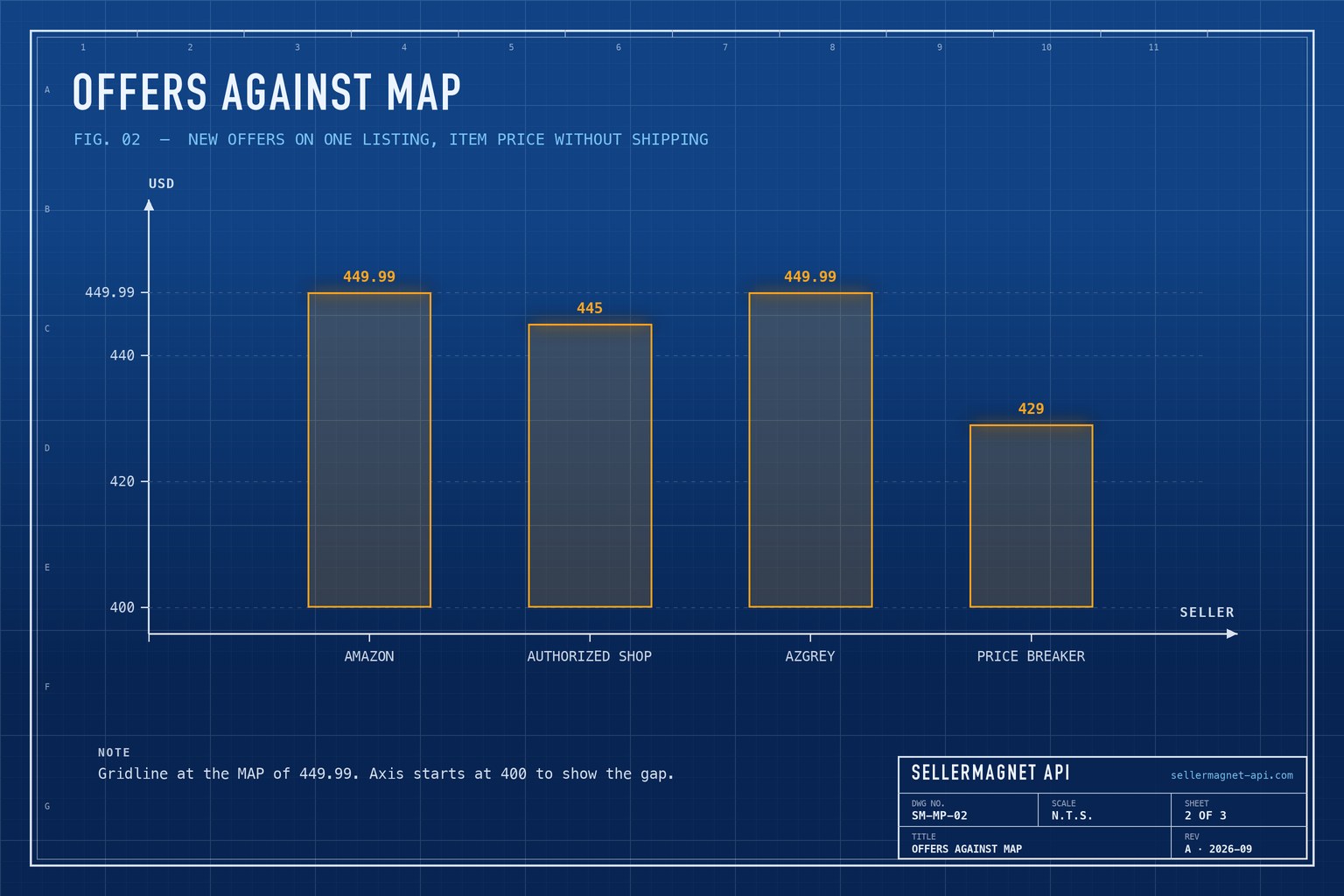
Who is selling my product below MAP?
The seller ID tells you. Each row carries the seller's profile link, amazon.com/sp?seller=<ID>, and a seller keeps the same ID on every Amazon store; the seller ID guide explains where else it appears. For the seller's display name, rating and recent feedback, the seller feedback guide reads the seller's profile. How long a seller has been below MAP, and whether it reprices automatically, shows in its recorded price history on the 11 marketplaces with statistics - the repricer detection guide reads it per seller.
What the offer data cannot show
- Coupons and checkout discounts. The offer data has the listed item price and shipping; a coupon that takes the checkout price below MAP is not in it.
- Offers beyond the first page. The call reads the first page of the offer listing - the offer listing guide explains what it contains - so the list of unauthorized sellers is a lower bound on busy listings.
- What happens between checks. A seller who drops below MAP for two hours between two daily runs is not seen; check more often on the ASINs where it matters.
How often should I check, and what does it cost?
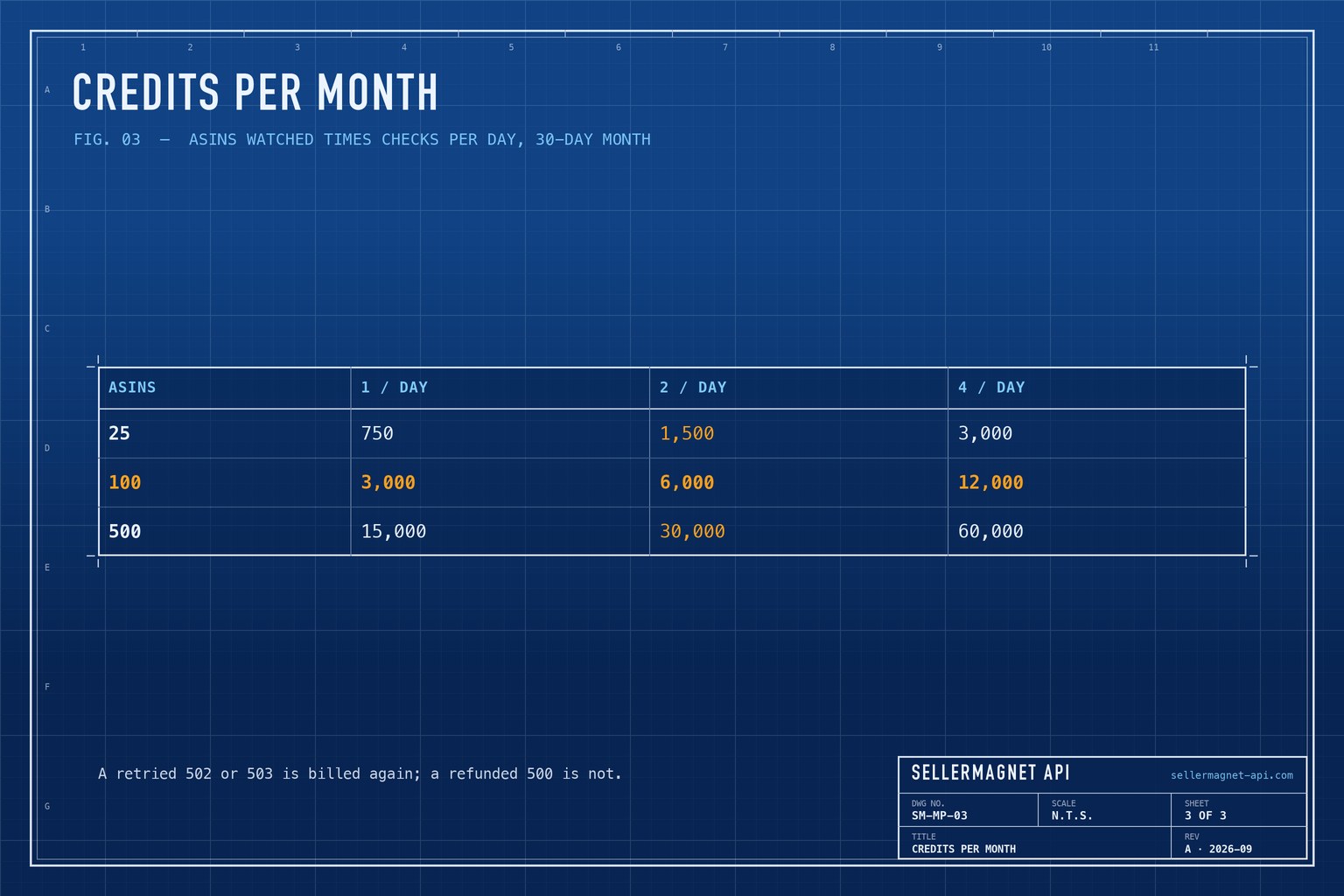
Once or twice a day is a common starting point: one credit per ASIN per check. The table shows 30-day months for three catalogue sizes; pricing lists the plans. Check your best sellers more often and the long tail once a day - the script accepts any subset of the MAP list.
Frequently Asked Questions
How do I monitor MAP on Amazon?
Check the New offers on your ASINs on a schedule, compare the item price with your MAP and log seller ID, name, price and time for each offer below it.
Does the check see coupons?
No. The offer data carries the listed item price and shipping; coupons and checkout discounts are not in it.
How much does MAP monitoring cost?
One credit per ASIN per check. 100 ASINs checked once a day use about 3,000 credits in a 30-day month.
How do I find out who a seller is?
Use the seller ID from the offer: it opens the seller's profile on Amazon, and the seller feedback endpoint returns the seller's display name, rating and recent feedback.
Can I use this for European Amazon stores?
The monitoring works on every store the offers endpoint supports, but the EU treats minimum advertised prices as resale price maintenance - get legal advice before enforcing MAP there.
Bottom line: one offers call per ASIN, a seller allowlist and an append-only log give you a dated record of who sells below MAP and who should not be selling at all. A free account includes 150 credits to try it on your catalogue.


