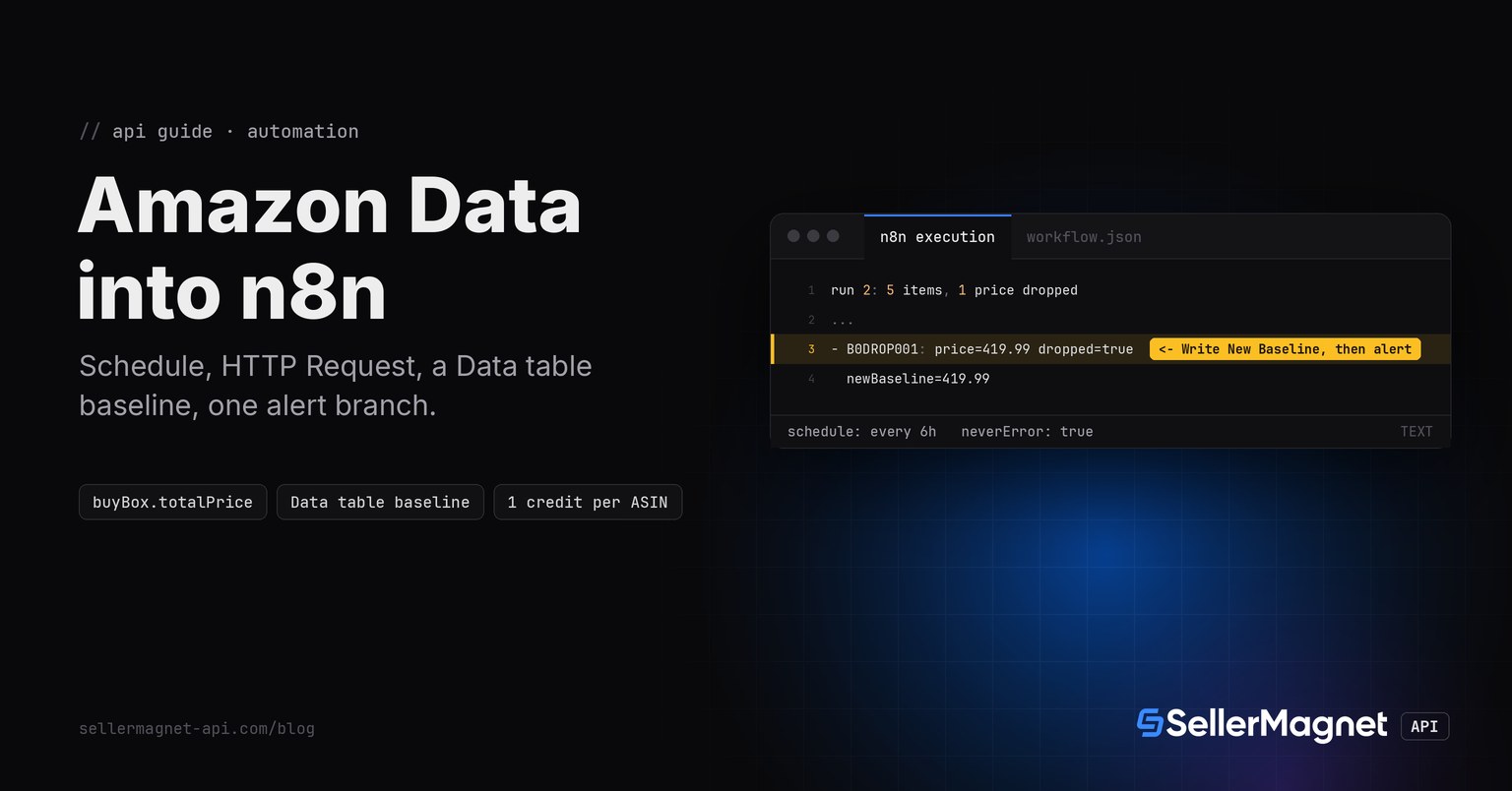
n8n reaches the SellerMagnet API the same way any HTTP client does: the built-in HTTP Request node, no custom backend. A Schedule Trigger node fires every few hours, a small Code node emits one item per tracked ASIN, the HTTP Request node calls /amazon-product-offers for each of them, and the workflow compares today's Buy Box price with a baseline it keeps in an n8n Data table, the built-in store made for this: it survives between workflow executions, including test runs. The workflow below was built, imported and executed twice in a real, local n8n instance before this page was written; both runs and their output are shown further down.
Key Takeaways
- The HTTP Request node sends
X-Api-Keyas a header credential, never in the URL query string. - n8n's Generic Credential type (Header Auth) keeps the key out of every node's visible parameters.
- State lives in an n8n Data table (get all rows once, compare, upsert), not in a Set node or a file: a Set node only edits items inside the current execution and cannot carry a value to the next run.
- The HTTP Request node needs Never Error on, or a non-2xx response (a delisted ASIN's billed 404) throws and stops the whole execution instead of reaching the IF node.
- An unrounded landed price (two decimals added together) carries floating-point noise and can misread as a price drop against an already-rounded baseline; round before comparing and before storing.
How does n8n authenticate to the API?
Create one credential: Credentials, New, Header Auth, name X-Api-Key, value your SellerMagnet API key. Attach it to the HTTP Request node under Authentication, Generic Credential Type, Header Auth. The node then sends the header on every execution without the key ever appearing in the node's own JSON, which matters because exported or shared workflows carry node parameters in plain text; the credential VALUE is never part of that export, only a reference to it by name.
The workflow, exported and re-imported
Eight nodes: Schedule Trigger, a Code node that lists the tracked ASINs, HTTP Request, a Data table read of every stored baseline, a Code node that rounds and compares, an IF node, an alert node, and a Data table upsert of the new baseline. Import this JSON (Workflows, Import from File or paste), attach the Header Auth credential to the HTTP Request node, point it at your own Data table, and it runs as is.
The full workflow, exported from a local n8n instance after two real executions
{
  "nodes": [
    {
      "id": "sched",
      "name": "Schedule Trigger",
      "type": "n8n-nodes-base.scheduleTrigger",
      "typeVersion": 1.2,
      "position": [
        0,
        0
      ],
      "parameters": {
        "rule": {
          "interval": [
            {
              "field": "hours",
              "hoursInterval": 6
            }
          ]
        }
      }
    },
    {
      "id": "asins",
      "name": "Tracked ASINs",
      "type": "n8n-nodes-base.code",
      "typeVersion": 2,
      "position": [
        220,
        0
      ],
      "parameters": {
        "mode": "runOnceForAllItems",
        "jsCode": "const asins = ['B0BASE001', 'B0DROP001', 'B0NOISE001', 'B0NOBB001', 'B0GONE001'];\nreturn asins.map(asin => ({ json: { asin } }));"
      }
    },
    {
      "id": "http",
      "name": "HTTP Request",
      "type": "n8n-nodes-base.httpRequest",
      "typeVersion": 4.2,
      "position": [
        440,
        0
      ],
      "parameters": {
        "method": "GET",
        "url": "https://sellermagnet-api.com/api/amazon-product-offers",
        "authentication": "genericCredentialType",
        "genericAuthType": "httpHeaderAuth",
        "sendQuery": true,
        "queryParameters": {
          "parameters": [
            {
              "name": "asin",
              "value": "={{ $json.asin }}"
            },
            {
              "name": "marketplaceId",
              "value": "ATVPDKIKX0DER"
            }
          ]
        },
        "options": {
          "timeout": 120000,
          "response": {
            "response": {
              "neverError": true,
              "responseFormat": "json"
            }
          }
        }
      },
      "credentials": {
        "httpHeaderAuth": {
          "id": "eZPgilB2TpvGea9n",
          "name": "SellerMagnet X-Api-Key"
        }
      }
    },
    {
      "id": "getbaseline",
      "name": "Get Baseline",
      "type": "n8n-nodes-base.dataTable",
      "typeVersion": 1.1,
      "position": [
        660,
        0
      ],
      "alwaysOutputData": true,
      "parameters": {
        "resource": "row",
        "operation": "get",
        "dataTableId": {
          "__rl": true,
          "value": "c4zDbmKQJq9RXc6u",
          "mode": "list",
          "cachedResultName": "buybox_baseline"
        },
        "filters": {
          "conditions": []
        },
        "returnAll": true
      }
    },
    {
      "id": "compare",
      "name": "Compare With Baseline",
      "type": "n8n-nodes-base.code",
      "typeVersion": 2,
      "position": [
        880,
        0
      ],
      "parameters": {
        "mode": "runOnceForAllItems",
        "jsCode": "// One Get Baseline call reads every row in the data table once; this\n// node joins it with the HTTP Request output by ASIN (no per-item\n// Data Table query, so there is no pairedItem ambiguity to resolve).\nconst httpItems = $('HTTP Request').all();\nconst trackedAsins = $('Tracked ASINs').all();\nconst baselineRows = $input.all();\nconst baselineByAsin = {};\nfor (const row of baselineRows) {\n  if (row.json && typeof row.json.asin === 'string') baselineByAsin[row.json.asin] = row.json.baseline;\n}\nreturn httpItems.map((item, i) => {\n  const current = item.json;\n  // the HTTP Request node's output is the response body only, so the ASIN\n  // comes from the same-index request item, not from the response.\n  const asin = trackedAsins[i].json.asin;\n  const apiOk = current.success === true;\n  let price = null;\n  if (apiOk) {\n    // data.buyBox is {} (an empty object, still truthy in JS) when nobody\n    // holds the Buy Box right now.\n    const buyBox = current.data && current.data.buyBox;\n    const raw = buyBox && typeof buyBox.totalPrice === 'number' ? buyBox.totalPrice : null;\n    // round to cents: an unrounded landed price (e.g. 15.02 + 3.99) carries\n    // IEEE754 noise and compares unequal to an equal, already-rounded baseline.\n    price = raw !== null ? Math.round(raw * 100) / 100 : null;\n  }\n  const baseline = typeof baselineByAsin[asin] === 'number' ? baselineByAsin[asin] : null;\n  const priceDropped = apiOk && price !== null && baseline !== null && price < baseline;\n  const newBaseline = price !== null ? price : baseline;\n  return { json: { asin, apiOk, price, baseline, priceDropped, newBaseline } };\n});"
      }
    },
    {
      "id": "ifdrop",
      "name": "IF Price Dropped",
      "type": "n8n-nodes-base.if",
      "typeVersion": 2.2,
      "position": [
        1100,
        0
      ],
      "parameters": {
        "conditions": {
          "options": {
            "caseSensitive": true,
            "leftValue": "",
            "typeValidation": "strict"
          },
          "conditions": [
            {
              "leftValue": "={{ $json.priceDropped }}",
              "rightValue": true,
              "operator": {
                "type": "boolean",
                "operation": "true",
                "singleValue": true
              }
            }
          ],
          "combinator": "and"
        }
      }
    },
    {
      "id": "alert",
      "name": "Alert (Slack / email / webhook)",
      "type": "n8n-nodes-base.noOp",
      "typeVersion": 1,
      "position": [
        1320,
        -120
      ],
      "parameters": {}
    },
    {
      "id": "upsert",
      "name": "Write New Baseline",
      "type": "n8n-nodes-base.dataTable",
      "typeVersion": 1.1,
      "position": [
        1320,
        120
      ],
      "parameters": {
        "resource": "row",
        "operation": "upsert",
        "dataTableId": {
          "__rl": true,
          "value": "c4zDbmKQJq9RXc6u",
          "mode": "list",
          "cachedResultName": "buybox_baseline"
        },
        "filters": {
          "conditions": [
            {
              "keyName": "asin",
              "condition": "eq",
              "keyValue": "={{ $json.asin }}"
            }
          ]
        },
        "columns": {
          "mappingMode": "defineBelow",
          "value": {
            "asin": "={{ $json.asin }}",
            "baseline": "={{ $json.newBaseline }}"
          },
          "matchingColumns": [
            "asin"
          ],
          "schema": [
            {
              "id": "asin",
              "displayName": "asin",
              "type": "string",
              "required": false,
              "defaultMatch": false,
              "canBeUsedToMatch": true
            },
            {
              "id": "baseline",
              "displayName": "baseline",
              "type": "number",
              "required": false,
              "defaultMatch": false,
              "canBeUsedToMatch": true
            }
          ]
        }
      }
    }
  ],
  "connections": {
    "Schedule Trigger": {
      "main": [
        [
          {
            "node": "Tracked ASINs",
            "type": "main",
            "index": 0
          }
        ]
      ]
    },
    "Tracked ASINs": {
      "main": [
        [
          {
            "node": "HTTP Request",
            "type": "main",
            "index": 0
          }
        ]
      ]
    },
    "HTTP Request": {
      "main": [
        [
          {
            "node": "Get Baseline",
            "type": "main",
            "index": 0
          }
        ]
      ]
    },
    "Get Baseline": {
      "main": [
        [
          {
            "node": "Compare With Baseline",
            "type": "main",
            "index": 0
          }
        ]
      ]
    },
    "Compare With Baseline": {
      "main": [
        [
          {
            "node": "IF Price Dropped",
            "type": "main",
            "index": 0
          }
        ]
      ]
    },
    "IF Price Dropped": {
      "main": [
        [
          {
            "node": "Alert (Slack / email / webhook)",
            "type": "main",
            "index": 0
          },
          {
            "node": "Write New Baseline",
            "type": "main",
            "index": 0
          }
        ],
        [
          {
            "node": "Write New Baseline",
            "type": "main",
            "index": 0
          }
        ]
      ]
    }
  }
}
How do I compare today's price with yesterday's?
With a Data table: n8n's Data table node reads and writes rows that persist between executions, including manual test runs, which is why it is the one used here, not $getWorkflowStaticData (that call only persists in production executions, so it never carries a value between manual test runs) and not a Set node (an Edit Fields node only edits the items already inside the current execution; nothing it writes is there on the next run). One Data table read at the start of the run returns every stored baseline, a Code node joins each ASIN's current price against it by ASIN, and a Data table upsert at the end writes the new baseline back, one row per ASIN, matched on the asin column.
Code node: compare today's rounded Buy Box price with the stored baseline (paste the function body into the node)
// Code node (mode: Run Once for All Items). Paste just the BODY below
// (everything inside this wrapper's braces) into the node; the wrapper
// here only lets the snippet parse and run standalone with Node.js.
function compareWithBaseline($input, $) {
// One Get Baseline call reads every row in the data table once; this
// node joins it with the HTTP Request output by ASIN (no per-item
// Data Table query, so there is no pairedItem ambiguity to resolve).
const httpItems = $('HTTP Request').all();
const trackedAsins = $('Tracked ASINs').all();
const baselineRows = $input.all();
const baselineByAsin = {};
for (const row of baselineRows) {
  if (row.json && typeof row.json.asin === 'string') baselineByAsin[row.json.asin] = row.json.baseline;
}
return httpItems.map((item, i) => {
  const current = item.json;
  // the HTTP Request node's output is the response body only, so the ASIN
  // comes from the same-index request item, not from the response.
  const asin = trackedAsins[i].json.asin;
  const apiOk = current.success === true;
  let price = null;
  if (apiOk) {
    // data.buyBox is {} (an empty object, still truthy in JS) when nobody
    // holds the Buy Box right now.
    const buyBox = current.data && current.data.buyBox;
    const raw = buyBox && typeof buyBox.totalPrice === 'number' ? buyBox.totalPrice : null;
    // round to cents: an unrounded landed price (e.g. 15.02 + 3.99) carries
    // IEEE754 noise and compares unequal to an equal, already-rounded baseline.
    price = raw !== null ? Math.round(raw * 100) / 100 : null;
  }
  const baseline = typeof baselineByAsin[asin] === 'number' ? baselineByAsin[asin] : null;
  const priceDropped = apiOk && price !== null && baseline !== null && price < baseline;
  const newBaseline = price !== null ? price : baseline;
  return { json: { asin, apiOk, price, baseline, priceDropped, newBaseline } };
});
}
The Code node logic run standalone with Node.js on 5 cases (illustrative data, matches the real n8n run below)
run 1: 5 items, 0 price drops (no baseline yet)
- B0BASE001: price=444.99 newBaseline=444.99
- B0DROP001: price=444.99 newBaseline=444.99
- B0NOISE001: price=19.01 newBaseline=19.01
- B0NOBB001: price=null newBaseline=null
- B0GONE001: price=null newBaseline=null
run 2: 5 items, 1 price dropped
- B0BASE001: price=444.99 dropped=false newBaseline=444.99
- B0DROP001: price=419.99 dropped=true newBaseline=419.99
- B0NOISE001: price=19.01 dropped=false newBaseline=19.01
- B0NOBB001: price=null dropped=false newBaseline=null
- B0GONE001: price=null dropped=false newBaseline=null| Node | Does | Cost |
|---|---|---|
| Schedule Trigger | Fires every N hours | free |
| Tracked ASINs (Code) | Emits one item per tracked ASIN | free |
| HTTP Request | Calls /amazon-product-offers, one call per ASIN | 1 credit per ASIN |
| Get Baseline (Data table) | Reads every stored baseline once per run | free |
| Compare With Baseline (Code) | Rounds the price, compares it with the baseline | free |
| IF Price Dropped | Branches to the alert | free |
| Write New Baseline (Data table) | Upserts the new baseline per ASIN | free |
| Alert (Slack / email / webhook) | Runs on the IF node's true branch only | free |
Same comparison ported to Python and run standalone, to prove the logic before it went into the Code node
"""Logic behind the n8n Code node, tested standalone before import."""


def compare(api_ok, buy_box, baseline):
    # buy_box is data.buyBox from /amazon-product-offers: {} (falsy-looking,
    # still truthy in Python/JS) when nobody holds the Buy Box right now.
    price = None
    if api_ok:
        raw = buy_box.get("totalPrice") if buy_box else None
        price = round(raw, 2) if isinstance(raw, (int, float)) else None
    dropped = api_ok and price is not None and baseline is not None and price < baseline
    new_baseline = price if price is not None else baseline
    return {"priceDropped": dropped, "newBaseline": new_baseline}


if __name__ == "__main__":
    print("run 1, B0BASE001, no stored baseline yet:", compare(True, {"totalPrice": 444.99}, baseline=None))
    print("run 2, B0DROP001, real price drop:", compare(True, {"totalPrice": 419.99}, baseline=444.99))
    print("run 2, B0NOISE001, float-noise price, rounds to the stored baseline:",
          compare(True, {"totalPrice": 15.02 + 3.99}, baseline=19.01))
    print("run 1/2, B0NOBB001, nobody holds the Buy Box:", compare(True, {}, baseline=None))
    print("run 1/2, B0GONE001, delisted ASIN, billed 404, success:false:", compare(False, None, baseline=None))
Python port output (matches the Node.js run above on the same 5 cases)
run 1, B0BASE001, no stored baseline yet: {'priceDropped': False, 'newBaseline': 444.99}
run 2, B0DROP001, real price drop: {'priceDropped': True, 'newBaseline': 419.99}
run 2, B0NOISE001, float-noise price, rounds to the stored baseline: {'priceDropped': False, 'newBaseline': 19.01}
run 1/2, B0NOBB001, nobody holds the Buy Box: {'priceDropped': False, 'newBaseline': None}
run 1/2, B0GONE001, delisted ASIN, billed 404, success:false: {'priceDropped': False, 'newBaseline': None}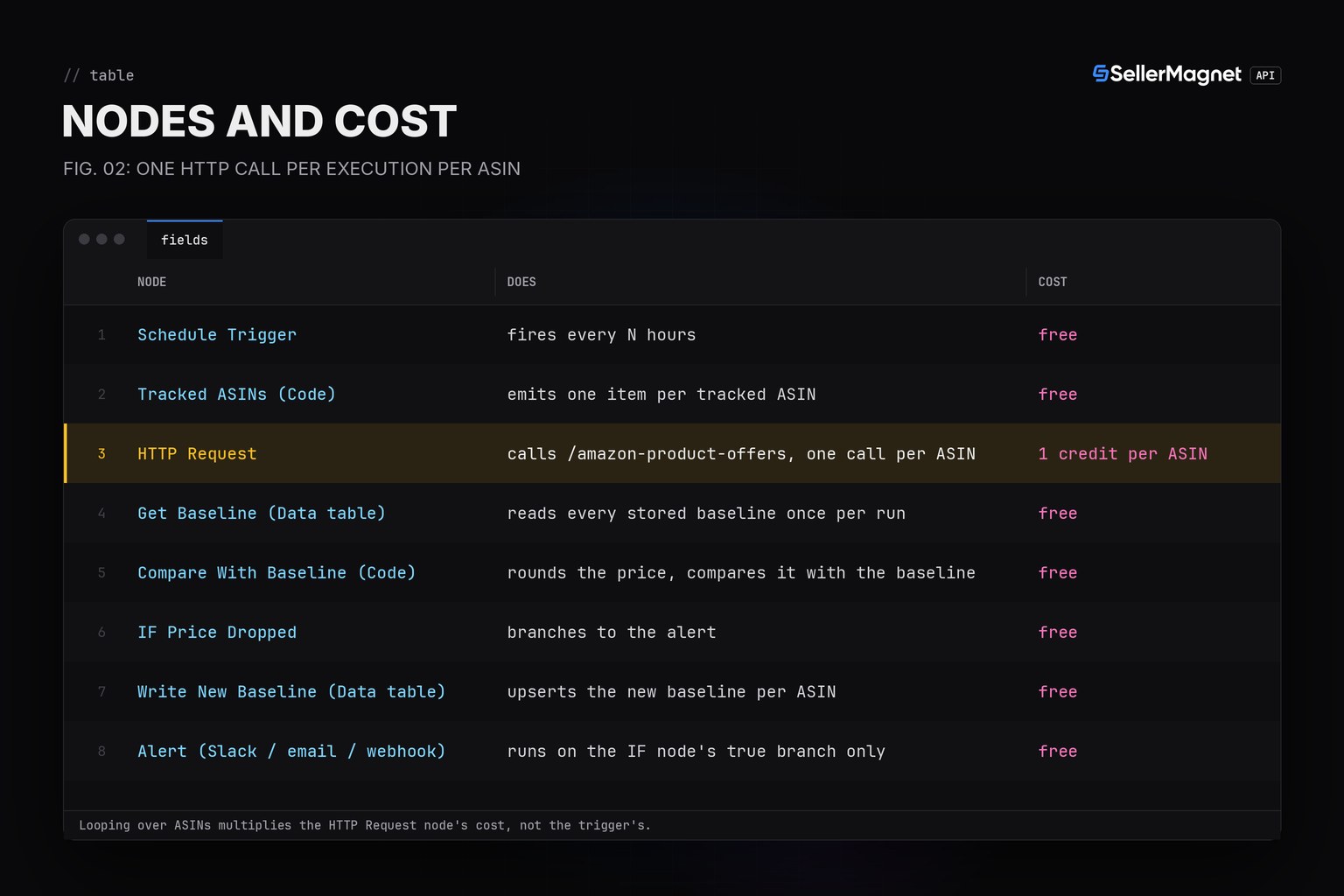
A non-2xx response needs Never Error on
Without Options, Response, Never Error, the HTTP Request node raises on any status outside 2xx and the whole execution stops there, so the other ASINs in the same run never get checked. With Never Error on, a delisted ASIN's billed 404 body (success: false) reaches the Code node like any other response; check success there, not the HTTP status code.
What happens with more than a handful of ASINs?
The HTTP Request node sends one request per input item, all at once, unless Options, Batching is set. With more than about 40 tracked ASINs in one run the API's per-key rate limit applies (the gate holds the extra requests for up to 20 seconds, then answers free 429s with a Retry-After header); setting Batching to 10 items per batch spaces the calls out and avoids that. Turning on Retry On Fail resends a request that failed, and 404/502/503 are billed on every attempt, so retry settings change the credit math, not just the reliability.
How often should the schedule run?
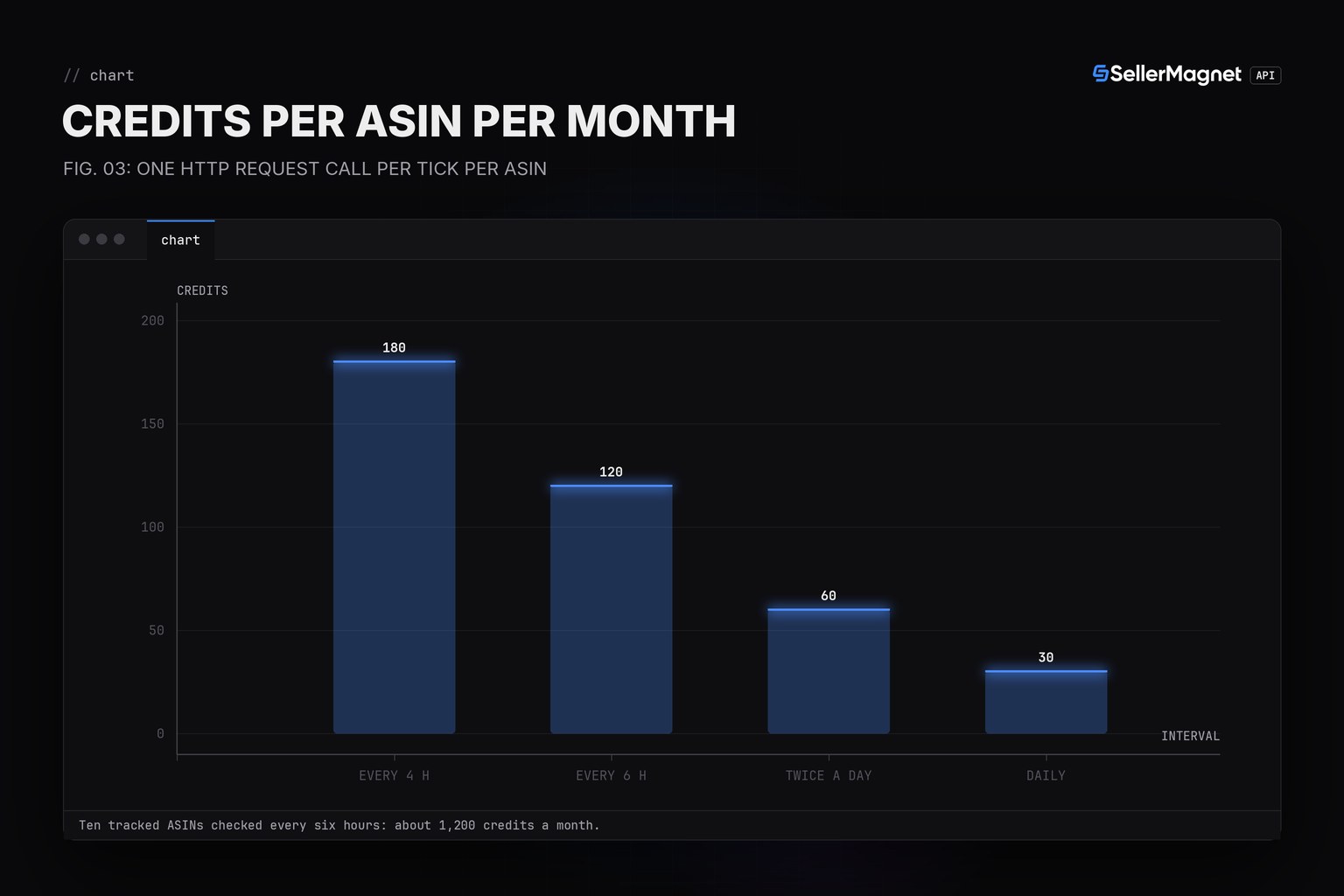
Each run is one call per tracked ASIN; every six hours is about 120 credits per ASIN a month and sees any Buy Box change that lasts longer than six hours, at most six hours late (a shorter rotation between two sellers can be missed), daily checks cost 30. For a single account watching many ASINs the Buy Box polling guide has the full interval-versus-cost table, and the Slack alert build shows the same compare-then-alert idea in Python, posting a confirmed Buy Box loss to a Slack webhook.
Frequently Asked Questions
Do I need to write any code to use the SellerMagnet API in n8n?
Almost none. The HTTP Request node calls the API directly; the only JavaScript in this workflow is the one Code node that joins the Data table baseline with the current price and rounds it.
Where does the API key go?
Into a Header Auth credential attached to the HTTP Request node, never typed into the URL or query parameters.
What happens when the loop checks a delisted ASIN?
With Never Error on, the HTTP Request node still outputs the billed 404 body; check success there and skip the comparison for that ASIN instead of letting the whole execution stop.
Why a Data table instead of a Set node or a file?
A Set (Edit Fields) node only edits items already inside the current execution and cannot carry a value to the next run; Read/Write Files from Disk are explicitly not guaranteed to persist on n8n Cloud. A Data table row survives between executions, including manual test runs.
Can I post the alert to Slack instead of email?
Yes, swap the alert branch for a Slack node or a Webhook call; the Data table read, compare and upsert before it do not change.
Bottom line: one HTTP Request node, one Header Auth credential, a Data table for state and a small Code node turn n8n into an Amazon price and Buy Box watcher with zero custom backend, and this exact workflow has run twice against a real request and response, not just once in a unit test. Every field the node reads is on the product offers page.