Amazon does not always bill FBA fulfillment fees on an item's scale weight. For large standard-size, bulky and oversize items it uses whichever is greater: the unit weight or the dimensional weight, a volume-based estimate equal to length x width x height in inches divided by 139. /api/amazon-product-lookup returns both the size and weight as page text, so one lookup (1 credit) is enough to compute the dimensional weight the same way Amazon's own help pages do, and to see which number actually governs.
Key Takeaways
- Dimensional weight = length x width x height in INCHES, divided by 139 (Amazon's own formula).
- Bulky and oversize items get a 2-inch floor on width and height before the division; a thin side is never read as thinner than 2 inches.
- Shipping weight is the greater of unit weight or dimensional weight for large standard-size, bulky and oversize items; small standard-size and special-oversize-heavy items use unit weight only (Amazon's core-FBA rule; apparel and dangerous-goods listings follow separate shipping-weight rules on Amazon's own pages).
- Size and weight come from productInfo.details / additionalDetails as page-label text, the same fields and parsing used across SellerMagnet's other Amazon dimension/weight guides.
- This script computes the governing weight, not a full product size tier: that also needs the item's category and length-plus-girth, neither returned by this API.
What is Amazon's dimensional weight formula?
Volume divided by 139, with the volume in cubic inches. Amazon's own "Dimensional weight" help page states it as unit volume (length x width x height) / 139, and for bulky and oversize items assumes a minimum width and height of 2 inches before that division, so a flat or thin package is never treated as thinner than 2 inches on those two sides. Amazon's own worked example: a 40 x 1 x 25 inch whiteboard with a 4.5 lb unit weight floors the 1-inch side to 2 inches first (40 x 2 x 25 = 2,000 cubic inches), divides by 139, and gets a 14.4 lb dimensional weight. That is well above the 4.5 lb unit weight, so the item ships at the higher dimensional weight.
| Step | Rule | Note |
|---|---|---|
| Dimensional weight | L x W x H (inches) / 139 | Volume-based estimate of shipping weight |
| 2-inch minimum | max(side, 2) for width and height on bulky/oversize items | Never shrinks a thin side below 2 in |
| Shipping weight | greater of unit weight or dimensional weight | Small standard-size and special-oversize-heavy use unit weight only |
| Item | Size | Unit weight | Dimensional weight | Governs |
|---|---|---|---|---|
| White dry erase board (Amazon's own example) | 40 x 1 x 25 in | 4.5 lb | 14.4 lb (2-in floor on the 1-in side) | Dimensional weight |
| Documented PS5 console (B0CL61F39H) | 14 x 17 x 7 in | 10.6 lb | 11.99 lb | Dimensional weight |
| Small dense item | 5 x 4 x 3 in | 2 lb | 0.43 lb | Unit weight |
Pull one ASIN's size and weight labels with curl and jq
# One lookup (1 credit): every size and weight label from both tables, as the page shows them
curl -sG "https://sellermagnet-api.com/api/amazon-product-lookup" \
  -H "X-Api-Key: $SELLE...KEY" \
  --data-urlencode "asin=B0CL61F39H" --data-urlencode "marketplaceId=ATVPDKIKX0DER" \
  | jq '.data.productInfo | (.details // {}) + (.additionalDetails // {})
        | with_entries(select(.key | test("dimension|weight"; "i")))'
How do I compute dimensional weight from the API in Python?
Read productInfo.details and productInfo.additionalDetails for a dimensions label and a weight label, parse the three numbers and the unit from the dimensions value (converting to inches), parse the weight to pounds, apply the 2-inch floor to the two shorter sides, divide the volume by 139, then take the greater of the two weights. The number-parsing reuses the same tested helpers as SellerMagnet's other Amazon dimension/weight guides, including the fix for a leading-zero decimal comma (0,748 kg reads as 0.748 kg, never 748 kg). The script uses get_with_retry from retry.py and new_session / ApiError from sellermagnet.py, both from the Python quickstart.
dim_weight_calc.py: dimensional weight and the governing weight, one CSV row per ASIN
"""Compute Amazon's FBA dimensional weight from the lookup response and flag which weight (unit or
dimensional) sets the shipping weight. Amazon's formula (sellercentral.amazon.com/help/hub/reference/
external/G53Z9EKF8VVZVH29, "Calculate dimensional weight", fetched 2026-11-19): dimensional weight =
unit volume (L x W x H in INCHES) / 139; bulky/oversize items assume a 2-inch minimum width AND height
before the division. Shipping weight = the greater of unit weight or dimensional weight for large
standard-size, bulky and oversize items; small standard-size and special-oversize-heavy items use unit
weight only (sellercentral.amazon.com/help/hub/reference/external/GEVWP48HPBLEFJEY, "Determine the
shipping weight"). This script computes dimensional weight and the governing weight; it does NOT assign
a full product size tier (that also needs the item's category and length-plus-girth, not returned by
this API) - see "What this calculator cannot tell you".

productInfo.details / productInfo.additionalDetails hold the page's own label text (no numeric field),
so size and weight have to be parsed first; parse_dims_in/parse_weight_lb/number are the exact,
re-tested helpers used across SellerMagnet's other Amazon dimension/weight guides (same fix: a comma
preceded by a lone '0' is always a decimal comma, never thousands grouping).
Helpers: sellermagnet.py and retry.py from the Python quickstart post.
"""
import csv
import re

import requests

from retry import get_with_retry
from sellermagnet import ApiError, new_session

MARKETPLACE = "ATVPDKIKX0DER"            # amazon.com
ASINS = ["B0CL61F39H", "B0EXAMPLE1", "B0EXAMPLE2", "B0EXAMPLE3", "B0EXAMPLE4"]
OUT_FILE = "dimweight.csv"
DIMENSION_WORDS = ("dimensions",)       # labels are in the marketplace language: add yours for non-English stores
WEIGHT_WORDS = ("weight",)
MAX_FAILED = 3
DIM_DIVISOR = 139.0                     # Amazon's dimensional weight divisor, inches only
BULKY_MIN_SIDE_IN = 2.0                 # 2-inch minimum width/height for bulky/oversize items
ASIN_RE = re.compile(r"^[A-Z0-9]{10}$")
TO_IN = {"in": 1.0, "inch": 1.0, "inches": 1.0, "cm": 1 / 2.54, "centimeters": 1 / 2.54,
         "centimetres": 1 / 2.54, "mm": 1 / 25.4, "millimeters": 1 / 25.4, "millimetres": 1 / 25.4}
TO_LB = {"lb": 1.0, "lbs": 1.0, "pound": 1.0, "pounds": 1.0, "oz": 1 / 16, "ounce": 1 / 16, "ounces": 1 / 16,
          "kg": 2.2046226218, "kilogram": 2.2046226218, "kilograms": 2.2046226218,
          "g": 2.2046226218 / 1000, "gram": 2.2046226218 / 1000, "grams": 2.2046226218 / 1000}
NUM = r"(\d+(?:[.,]\d+)*)"
DIMS_RE = re.compile(rf"{NUM}\s*[xX\u00d7]\s*{NUM}\s*[xX\u00d7]\s*{NUM}\s*([a-zA-Z]+)")
WEIGHT_RE = re.compile(rf"{NUM}\s*([a-zA-Z]+)")


def number(text: str) -> float:
    """'10.6' -> 10.6, '1,2' -> 1.2 (decimal comma), '1,234' -> 1234.0 (thousands), '1.299,5' -> 1299.5.
    A single comma preceded by a lone '0' (e.g. '0,748') is always a decimal comma, never thousands
    grouping (nobody writes '0,748' to mean 748) - same fix used in SellerMagnet's other Amazon
    dimension/weight guides."""
    if "," in text and "." in text:
        dec = "," if text.rfind(",") > text.rfind(".") else "."
        text = text.replace("." if dec == "," else ",", "").replace(dec, ".")
    elif "," in text:
        whole, _, tail = text.rpartition(",")
        text = whole.replace(",", "") + ("" if len(tail) == 3 and whole != "0" else ".") + tail
    return float(text)


def parse_dims_in(value: str):
    """'14 x 17 x 7 inches; 10.6 Pounds' -> (14.0, 17.0, 7.0) in INCHES, longest side first. None if
    unreadable or the unit is not one of the known length units."""
    m = DIMS_RE.search(value)
    if not m or m.group(4).lower() not in TO_IN:
        return None
    factor = TO_IN[m.group(4).lower()]
    return tuple(sorted((round(number(g) * factor, 3) for g in m.groups()[:3]), reverse=True))


def parse_weight_lb(value: str):
    """'10.6 pounds' -> 10.6 lb. Reads the part after ';' when a dimensions value carries the weight."""
    for part in reversed(value.split(";")):
        for m in WEIGHT_RE.finditer(part):
            unit = m.group(2).lower()
            if unit in TO_LB:
                return round(number(m.group(1)) * TO_LB[unit], 3)
    return None


def dimensional_weight_lb(dims_in, bulky: bool) -> float:
    """Amazon's formula: volume (inches) / 139. Bulky/oversize items floor width AND height at 2 in
    (the longest side, "length", is never floored - only the other two sides are)."""
    length, median, shortest = dims_in
    if bulky:
        median = max(median, BULKY_MIN_SIDE_IN)
        shortest = max(shortest, BULKY_MIN_SIDE_IN)
    return round((length * median * shortest) / DIM_DIVISOR, 3)


def shipping_weight(unit_lb, dim_lb, size_tier_uses_dimensional: bool) -> float:
    """The weight Amazon bills on: small standard-size and special-oversize-heavy use unit weight only;
    every other tier uses whichever of unit or dimensional weight is larger."""
    if not size_tier_uses_dimensional or dim_lb is None:
        return unit_lb
    return max(unit_lb, dim_lb)


def measurements(product: dict) -> dict:
    """Item and package size/weight from both tables. details is read first; a label only in
    additionalDetails still counts. Each value remembers the label it came from."""
    found = {}
    for table in ("details", "additionalDetails"):
        for label, value in (product.get(table) or {}).items():
            low = label.lower()
            kind = "package" if "package" in low else "item"
            if any(w in low for w in DIMENSION_WORDS):
                dims = parse_dims_in(str(value))
                if dims:
                    found.setdefault(f"{kind}_in", (dims, label))
                weight = parse_weight_lb(str(value))
                if weight is not None:
                    found.setdefault(f"{kind}_lb_from_dims", (weight, label))
            elif any(w in low for w in WEIGHT_WORDS):
                weight = parse_weight_lb(str(value))
                if weight is not None:
                    found.setdefault(f"{kind}_lb", (weight, label))
    for kind in ("item", "package"):
        if f"{kind}_lb_from_dims" in found:
            found.setdefault(f"{kind}_lb", found[f"{kind}_lb_from_dims"])
            del found[f"{kind}_lb_from_dims"]
    return found


def clean_asins(raw: list) -> list:
    """The lookup does not validate the ASIN format: a typo is a billed call, so filter first."""
    seen, out = set(), []
    for value in raw:
        asin = str(value).strip().upper()
        if not ASIN_RE.match(asin):
            print(f"skip {value!r}: not an ASIN, no call made")
        elif asin not in seen:
            seen.add(asin)
            out.append(asin)
    return out


def main():
    session = new_session()
    rows, failed, lookups = [], 0, 0
    for asin in clean_asins(ASINS):
        lookups += 1
        row = {"asin": asin}
        try:
            product = get_with_retry(session, "amazon-product-lookup", asin=asin,
                                     marketplaceId=MARKETPLACE)["productInfo"]
        except ApiError as err:
            if err.status in (401, 403) or (err.status == 400 and "marketplace" in str(err).lower()):
                raise
            row["note"] = f"error {err}"
            failed += err.status != 404
        except requests.RequestException as err:
            row["note"] = f"no answer ({type(err).__name__}), try again later"
            failed += 1
        else:
            found = measurements(product)
            dims, dims_label = found.get("item_in") or found.get("package_in") or (None, None)
            unit_lb, lb_label = found.get("item_lb") or found.get("package_lb") or (None, None)
            if dims is None or unit_lb is None:
                row.update(dim_lb=None, unit_lb=unit_lb, ship_lb=None,
                           note="dims and unit weight both needed; page is missing one")
            else:
                # Bulky/oversize floor only applies above large standard-size; this script always applies
                # it (a conservative, slightly-higher estimate) and says so, since the API has no field
                # for "which size tier" - it never UNDERSTATES the governing weight.
                dim_lb = dimensional_weight_lb(dims, bulky=True)
                ship_lb = shipping_weight(unit_lb, dim_lb, size_tier_uses_dimensional=True)
                row.update(dim_lb=dim_lb, unit_lb=unit_lb, ship_lb=ship_lb,
                           note="dimensional weight governs" if ship_lb > unit_lb else "unit weight governs",
                           source=" / ".join(dict.fromkeys(x for x in (dims_label, lb_label) if x)))
        rows.append(row)
        if failed >= MAX_FAILED:
            print(f"stopped after {failed} failed lookups")
            break

    with open(OUT_FILE, "w", newline="", encoding="utf-8") as f:
        out = csv.writer(f)
        out.writerow(["asin", "unit_lb", "dim_lb", "shipping_lb", "governs", "source_label", "note"])
        for r in rows:
            out.writerow([r["asin"], r.get("unit_lb") or "", r.get("dim_lb") or "", r.get("ship_lb") or "",
                          r.get("note", "") if r.get("ship_lb") is not None else "", r.get("source") or "",
                          r.get("note", "") if r.get("ship_lb") is None else ""])
    for r in rows:
        if r.get("ship_lb") is not None:
            print(f"{r['asin']}  unit {r['unit_lb']:g} lb  dim {r['dim_lb']:g} lb  "
                  f"ships at {r['ship_lb']:g} lb ({r['note']})")
        else:
            print(f"{r['asin']}  {r.get('note', '')}")
    print(f"lookups {lookups}, credits {lookups} (+1 per billed retry), wrote {OUT_FILE}")


if __name__ == "__main__":
    try:
        main()
    except ApiError as err:
        raise SystemExit(f"stopped: {err}")
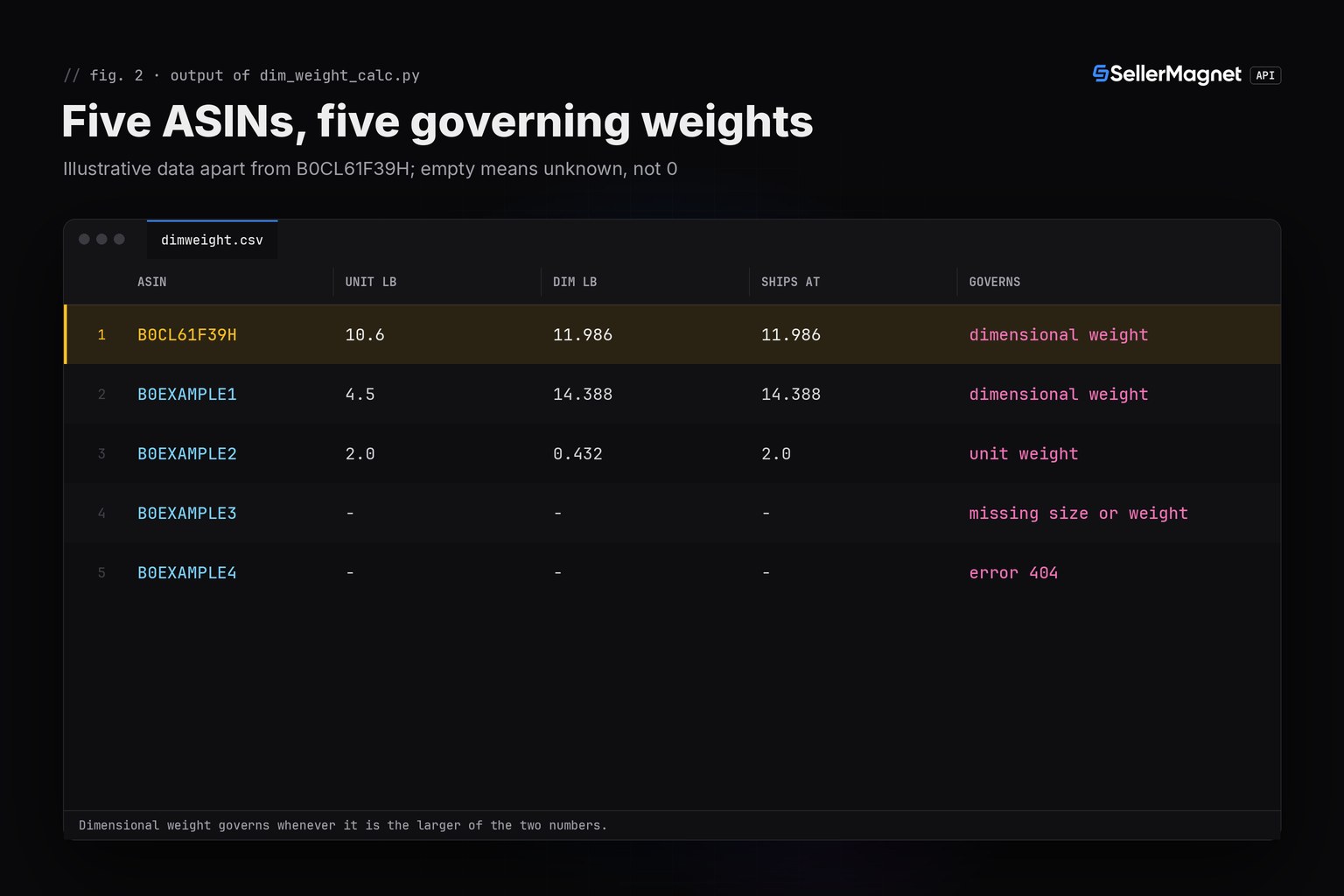
Output for five ASINs (the PS5 console values are documented; the rest are illustrative)
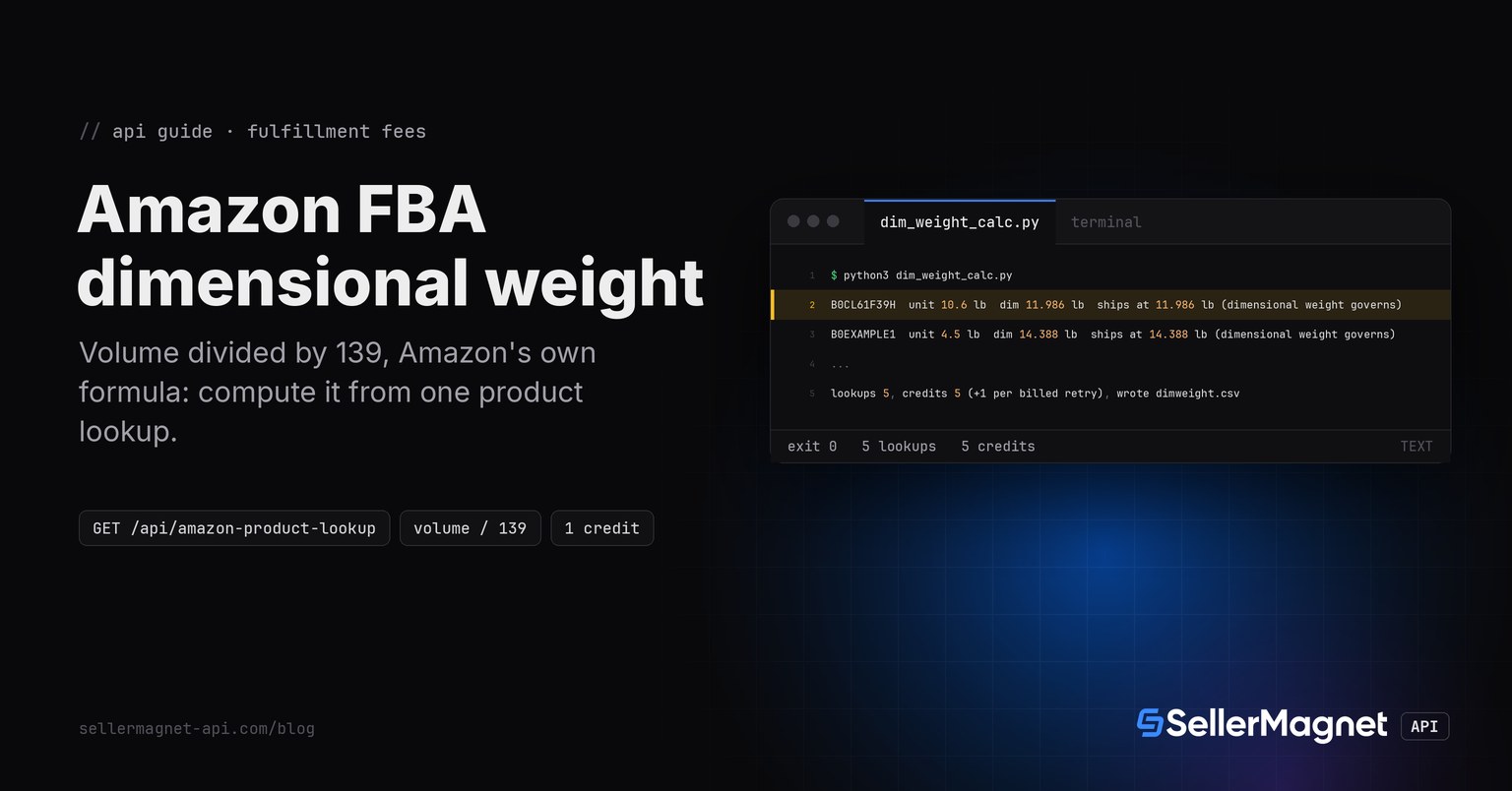
B0CL61F39H  unit 10.6 lb  dim 11.986 lb  ships at 11.986 lb (dimensional weight governs)
B0EXAMPLE1  unit 4.5 lb  dim 14.388 lb  ships at 14.388 lb (dimensional weight governs)
B0EXAMPLE2  unit 2 lb  dim 0.432 lb  ships at 2 lb (unit weight governs)
B0EXAMPLE3  dims and unit weight both needed; page is missing one
B0EXAMPLE4  error 404: Invalid product
lookups 5, credits 5 (+1 per billed retry), wrote dimweight.csv
dimweight.csv from the same run
asin,unit_lb,dim_lb,shipping_lb,governs,source_label,note
B0CL61F39H,10.6,11.986,11.986,dimensional weight governs,Product Dimensions / Item Weight,
B0EXAMPLE1,4.5,14.388,14.388,dimensional weight governs,Product Dimensions / Item Weight,
B0EXAMPLE2,2.0,0.432,2.0,unit weight governs,Product Dimensions / Item Weight,
B0EXAMPLE3,,,,,,dims and unit weight both needed; page is missing one
B0EXAMPLE4,,,,,,error 404: Invalid product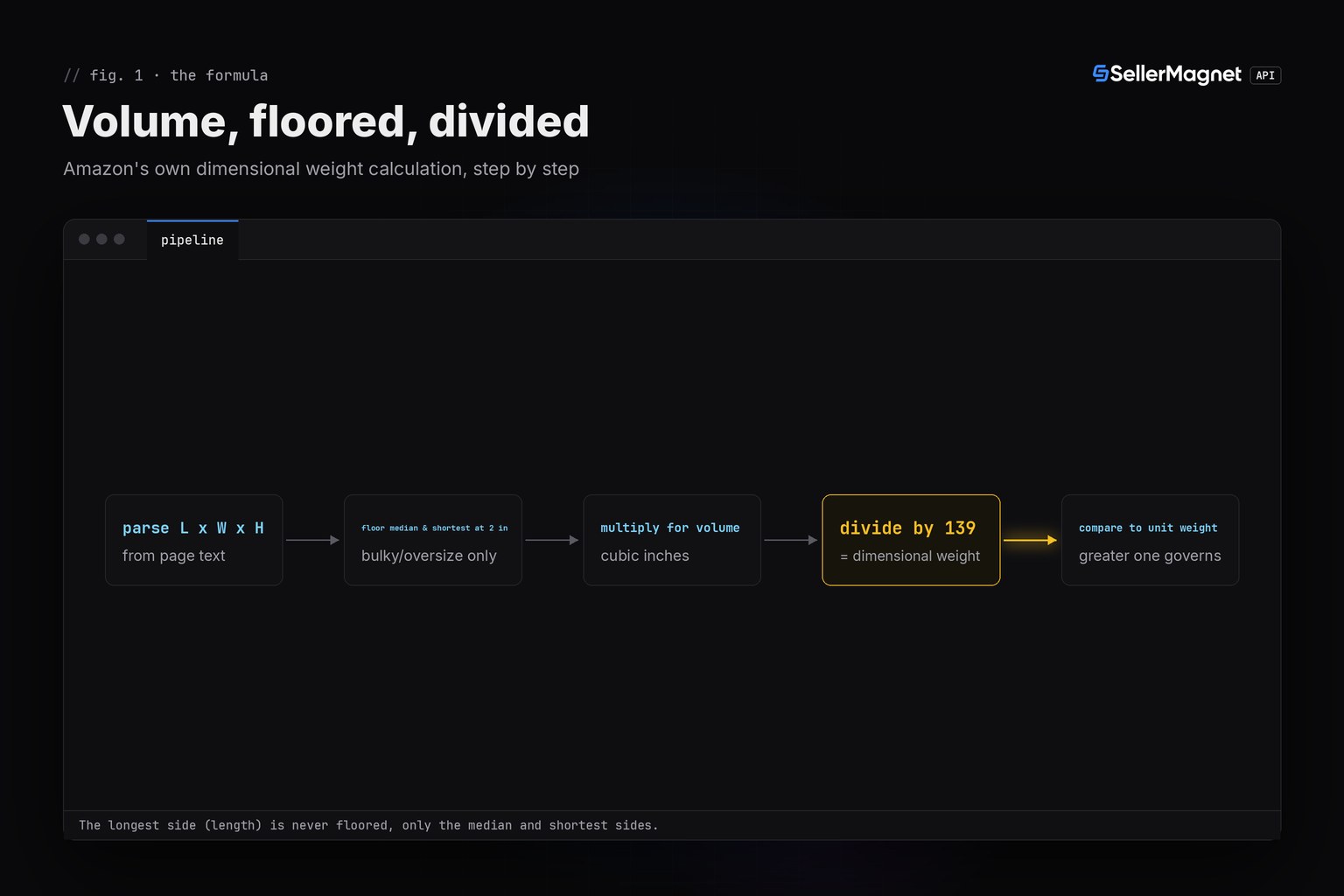
What does it cost?
1 credit per lookup, whatever you read from the response. The lookup does not validate the ASIN format, so the script drops anything that is not 10 letters or digits before paying, stops at once on a 401, 403 or an unknown marketplace, and gives up after three failed lookups. For a full catalogue, run the same function inside the worker pool from the bulk ASIN lookup guide.
| Step | Credits | Note |
|---|---|---|
One /api/amazon-product-lookup per ASIN | 1 each | Size and weight text, nothing converted |
| An ASIN that does not exist (404) | 1 | Billed; the script counts it as an answer, not a failure |
| Retry after a 502 or 503 | 1 per attempt | A 500 without Retry-After is refunded |
| Example run below (5 ASINs) | 5 | No retries |
What this calculator cannot tell you
- It is not a full size tier. Amazon's product size tiers also depend on the item's category and length-plus-girth, neither of which this API returns; this script tells you which weight governs, not which tier (small standard, large bulky, and so on) the item sits in.
- It is what the page shows. Size and weight are the listing's own text; the API measures nothing and returns no fees. Combine the governing weight with your own fee rates, as in the referral fee calculator or the FBA vs FBM comparison.
- Item or package. A page can show product dimensions, package dimensions, both or neither. The script prefers item values, matching how most listings that will actually ship are packed.
- Labels follow the marketplace. Keys are in the page's language, so add your marketplace's words to
DIMENSION_WORDSandWEIGHT_WORDSbefore running it on a non-English store. - Unknown units stay empty. A value in feet, or any unit outside the table, is not converted; check those rows by hand instead of trusting a guess.
- Small standard-size and special-oversize-heavy never use dimensional weight. This script always applies the bulky 2-inch floor as a conservative, never-understating estimate; it does not know the item's actual size tier, so treat the result as an upper bound for those two tiers, not a certainty.
Frequently Asked Questions
What is Amazon's dimensional weight formula?
Length x width x height in inches, divided by 139. Bulky and oversize items get a 2-inch minimum on width and height before that division.
Does the SellerMagnet API return dimensional weight directly?
No. /api/amazon-product-lookup returns size and weight as page text; you compute dimensional weight from those values with Amazon's own formula, as this post does.
When does Amazon use dimensional weight instead of actual weight?
For large standard-size, bulky and oversize items, Amazon uses whichever is greater: unit weight or dimensional weight. Small standard-size and special-oversize-heavy items use unit weight only.
Can this script tell me my product's exact size tier?
No. A size tier also depends on the category and length-plus-girth, which this API does not return. It tells you which weight governs, not the tier itself.
Why is the 2-inch floor only applied to two sides?
Amazon's own help page states the minimum applies to width and height, not length: the longest side is used as measured, and the other two are floored at 2 inches each for bulky and oversize items.
Bottom line: Amazon's dimensional weight is one formula away from one product lookup, volume in inches divided by 139 with a 2-inch floor on bulky items. Compute it, compare it with the page's own unit weight, and you know which number actually governs the shipping fee, without guessing. A free account includes 150 credits.