
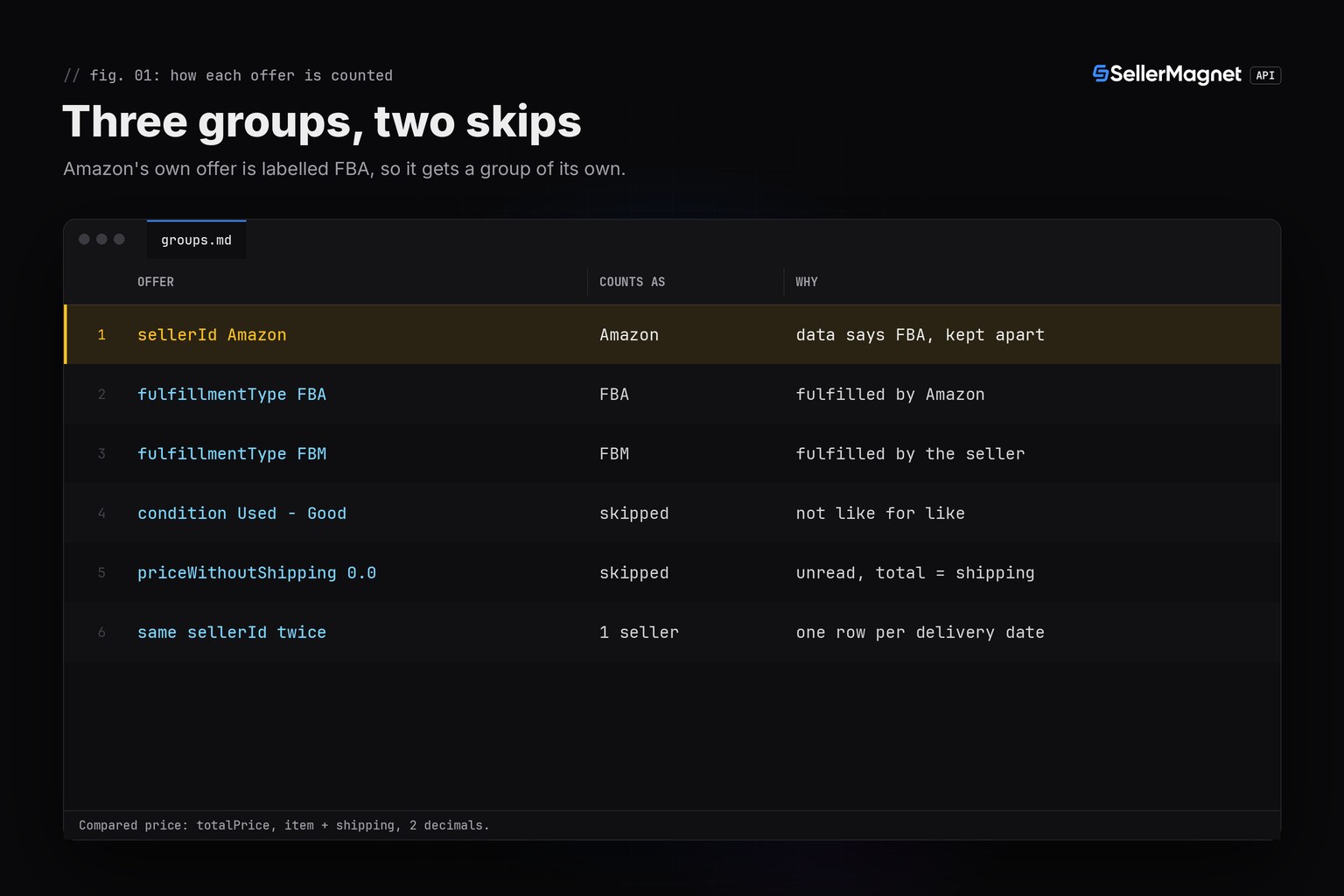
An Amazon FBA vs FBM price comparison is only fair on landed prices: item price plus shipping, New offers only. /amazon-product-offers returns one page of an ASIN's live offers, each with fulfillmentType (FBA or FBM) and totalPrice. Group the offers by channel, take the cheapest of each, and you get the FBA premium or discount per ASIN and the channel of the featured offer. Amazon's own offer is labelled FBA, so keep it apart.
Key Takeaways
- Compare FBA and FBM on
totalPrice, the item price plus shipping: an FBM offer with a lower item price can still cost the buyer more. - Amazon's own offer comes back with
sellerIdAmazon andfulfillmentTypeFBA; give it its own group, or it hides the price of the third-party FBA sellers. - Keep New offers only and skip offers with
priceWithoutShipping0.0: theirtotalPriceis only the shipping. - One offers call per ASIN costs 1 credit; a 404 and every 502 or 503 attempt are billed, a 500 without Retry-After is refunded.
- The comparison covers the first page of offers for one delivery location and shows which offer is featured, not why.
Amazon FBA vs FBM price: what should you compare?
/amazon-product-offers takes an asin and a marketplaceId and reads one page of the live offer listing: the featured offer plus the offers Amazon loads first, with no paging parameter. Every offer names its seller, condition and fulfillment type and splits the price into priceWithoutShipping, shippingPrice and totalPrice. FBA and FBM offers differ in how they ship, so compare what the buyer pays: totalPrice, the item price plus shipping. Amazon's US seller blog gives the same advice for pricing an offer: "When pricing products, be sure to consider the total price for the product, which includes shipping costs." Field details are on the Product Offers endpoint page and in the Offer Listing API guide.
| Field | What it holds | How the script uses it |
|---|---|---|
fulfillmentType | FBA or FBM for each offer; Amazon's own offer is labelled FBA | Puts the offer in the FBA or the FBM group |
sellerId | The seller; the literal Amazon for Amazon's own offer, which also carries amazonSellerId | Moves Amazon's own offer into a group of its own and counts distinct sellers |
condition | New, or Used - Like New, Used - Very Good, Used - Good, Used - Acceptable | Keeps New offers only |
priceWithoutShipping | The item price; 0.0 when the price on the page could not be read | Skips offers with 0.0 |
shippingPrice | The delivery price the listing shows for the offer; 0.0 for free delivery or when none is shown | Part of the compared price |
totalPrice | Item price plus shipping, rounded to 2 decimals | The compared (landed) price |
buyBox, buyBoxSuppressed | The featured offer, {} when there is none; true when offers exist but none is featured | The featured offer column |
How do you compare FBA and FBM prices for a list of ASINs?
Put the ASINs in asins.txt, one per line, and call /amazon-product-offers once per ASIN. The script uppercases each line, skips anything that is not 10 letters or digits (the offers endpoint does not check the format and bills a malformed ASIN like any other call) and drops repeats. get_with_retry comes from retry.py, and ApiError and new_session from sellermagnet.py, both published in the Python quickstart. For each ASIN it prints the cheapest New landed price of the FBA and the FBM group with the number of distinct sellers, the gap FBA minus FBM in money and as a percentage of the FBM price, and the featured offer. Errors are reported per row: a 404 is a billed answer and the run goes on, while a 400, 401 or 403 (a parameter, key or credits problem that would repeat on every ASIN) stops it, and so do three ASINs that keep failing, because 502 and 503 retries are billed on every attempt.
Install requests, set the key, list the ASINs, run the comparison
pip install requests
export SELLERMAGNET_API_KEY="your-key-here"
echo B0CL61F39H > asins.txt
python3 fba_vs_fbm.py
fba_vs_fbm.py: cheapest New FBA and FBM landed price per ASIN, the gap and the featured offer
"""FBA vs FBM price comparison for a list of ASINs: the cheapest New FBA and FBM offer, the gap, the featured offer.

/amazon-product-offers reads one page of an ASIN's live offer listing. Every offer carries fulfillmentType (FBA or
FBM) and totalPrice, the item price plus shipping rounded to 2 decimals, so both channels are compared on what a
buyer pays. Amazon's own offer is labelled FBA in the data; it is kept apart, so FBA here means third-party sellers.
Helpers: sellermagnet.py and retry.py from https://sellermagnet-api.com/blog/amazon-product-api-python
"""
import re
import statistics
from collections import Counter

import requests

from retry import get_with_retry
from sellermagnet import ApiError, new_session

MARKETPLACE = "ATVPDKIKX0DER"   # amazon.com
ASIN_FILE = "asins.txt"         # one ASIN per line, for example a column pasted from a spreadsheet
MAX_FAILED = 3                  # 502/503 are billed on every retry: stop after 3 ASINs that keep failing


def read_asins(path):
    asins, rejected = [], []
    with open(path, encoding="utf-8-sig") as fh:   # utf-8-sig also reads a file that starts with a byte order mark
        for line in fh:
            value = line.strip().upper()
            if value and not re.fullmatch(r"[A-Z0-9]{10}", value):
                rejected.append(value)    # the offers endpoint does not check the format: a typo is a billed call
            elif value and value not in asins:
                asins.append(value)       # each ASIN once: a repeat would cost another credit
    return asins, rejected


# Used offers are not like for like, and an offer whose item price could not be read comes back with
# priceWithoutShipping 0.0 and a totalPrice that is only its shipping: both stay out of the comparison.
def cheapest_by_group(offers):
    low, sellers = {}, {}
    for o in offers:
        if o.get("condition") != "New":
            continue
        if not o.get("priceWithoutShipping"):
            continue
        seller = o.get("sellerId")
        kind = o.get("fulfillmentType")
        group = "Amazon" if seller == "Amazon" else kind
        sellers.setdefault(group, set()).add(seller)
        if group not in low or o["totalPrice"] < low[group]:
            low[group] = o["totalPrice"]
    return low, {g: len(s) for g, s in sellers.items()}


def featured(data):
    box = data.get("buyBox") or {}
    if data.get("buyBoxSuppressed") or not box.get("totalPrice"):
        return "none", None                     # no featured offer, never a price of 0
    group = "Amazon" if box.get("sellerId") == "Amazon" else box.get("fulfillmentType")
    return group, round(box["totalPrice"], 2)   # buyBox.totalPrice is an unrounded float sum


def cell(low, sellers, group):
    return f"{low[group]:.2f} ({sellers[group]})" if group in low else "-"


def row(asin, fba="-", fbm="-", gap="-", box="-", note=""):
    print(f"{asin:<10}  {fba:>13}  {fbm:>13}  {gap:>15}  {box:<14}  {note}".rstrip())


def compare(asin, data, boxes):
    offers = data.get("offers") or []
    low, sellers = cheapest_by_group(offers)
    group, price = featured(data)
    boxes[group] += 1
    notes = [f"Amazon {low['Amazon']:.2f}"] if "Amazon" in low else []
    if not offers:
        notes.append("no offers returned")
    elif not low:
        notes.append("no New offer")
    else:
        notes += [f"no {g} offer" for g in ("FBA", "FBM") if g not in low]
    gap = round(low["FBA"] - low["FBM"], 2) if "FBA" in low and "FBM" in low else None
    if gap is None:
        diff = "-"                              # one channel only: nothing to compare, not a win for the other
    else:
        diff = "same" if gap == 0 else f"{gap:+.2f} ({gap / low['FBM']:+.1%})"
    row(asin, cell(low, sellers, "FBA"), cell(low, sellers, "FBM"), diff,
        group if price is None else f"{group} {price:.2f}", "; ".join(notes))
    return None if gap is None else (gap, gap / low["FBM"])


def summary(gaps, boxes):
    print()
    print(f"ASINs with both FBA and FBM offers: {len(gaps)}")
    if gaps:
        pct = [p for _, p in gaps]
        print(f"FBA cheaper on {sum(g < 0 for g, _ in gaps)}, FBM cheaper on {sum(g > 0 for g, _ in gaps)}, "
              f"same price on {sum(g == 0 for g, _ in gaps)}")
        print(f"FBA - FBM: median {statistics.median(pct):+.1%}, lowest {min(pct):+.1%}, highest {max(pct):+.1%}")
    if boxes:
        print("featured offer: " + ", ".join(f"{group} {n}" for group, n in boxes.most_common()))


def main():
    asins, rejected = read_asins(ASIN_FILE)
    if rejected:
        print("skipped, not an ASIN: " + ", ".join(rejected))
    session = new_session()
    row("asin", "FBA (sellers)", "FBM (sellers)", "FBA - FBM", "featured offer", "note")
    gaps, boxes, failed = [], Counter(), 0
    for asin in asins:
        try:
            data = get_with_retry(session, "amazon-product-offers", asin=asin, marketplaceId=MARKETPLACE)
        except ApiError as err:
            if err.status in (400, 401, 403):   # parameter, key or credits problem: it repeats on every ASIN
                print(f"stopped: {err}")
                break
            failed += err.status != 404         # a 404 is a billed answer (no such product), not an outage
            row(asin, note=f"error {err.status}")
        except requests.RequestException as err:
            failed += 1
            row(asin, note=type(err).__name__)
        else:
            result = compare(asin, data, boxes)
            if result:
                gaps.append(result)
        if failed >= MAX_FAILED:
            print(f"stopped after {failed} failed ASINs")
            break
    summary(gaps, boxes)


if __name__ == "__main__":
    main()
Output of fba_vs_fbm.py on amazon.com (illustrative data, prices in USD)
skipped, not an ASIN: 4.00638E+12
asin        FBA (sellers)  FBM (sellers)        FBA - FBM  featured offer  note
B0CL61F39H     449.00 (2)     439.98 (2)    +9.02 (+2.1%)  Amazon 444.99   Amazon 444.99
B0EXAMPLE1      24.99 (1)      25.98 (2)    -0.99 (-3.8%)  FBA 24.99
B0EXAMPLE2      34.99 (2)      29.49 (1)   +5.50 (+18.7%)  FBA 34.99
B0EXAMPLE3              -      19.98 (2)                -  FBM 19.98       no FBA offer
B0EXAMPLE4      59.99 (1)      59.99 (1)             same  none
B0EXAMPLE5              -              -                -  -               error 404
B0EXAMPLE6              -              -                -  -               error 502

ASINs with both FBA and FBM offers: 4
FBA cheaper on 1, FBM cheaper on 2, same price on 1
FBA - FBM: median +1.0%, lowest -3.8%, highest +18.7%
featured offer: FBA 2, Amazon 1, FBM 1, none 1
The illustrative asins.txt had nine lines: seven ASINs (one typed in lowercase), a repeat and 4.00638E+12, a barcode in scientific notation that never reaches the API. B0CL61F39H shows why Amazon gets its own group: its own offer at 444.99 is featured and cheaper than every third-party FBA offer, and counted as FBA it would shrink the gap from +9.02 to +5.01. On B0EXAMPLE1 the FBM item price of 19.99 is the lowest on the page, but with 5.99 shipping the offer lands at 25.98, above the FBA offer at 24.99. B0EXAMPLE2 also lists an FBM offer whose item price could not be read: its totalPrice of 6.49 is only the shipping, and without the filter it would turn a +5.50 gap into a fake +28.50. B0EXAMPLE3 has no FBA offer, so there is nothing to compare, and B0EXAMPLE4 has offers in both channels at the same price but no featured offer.
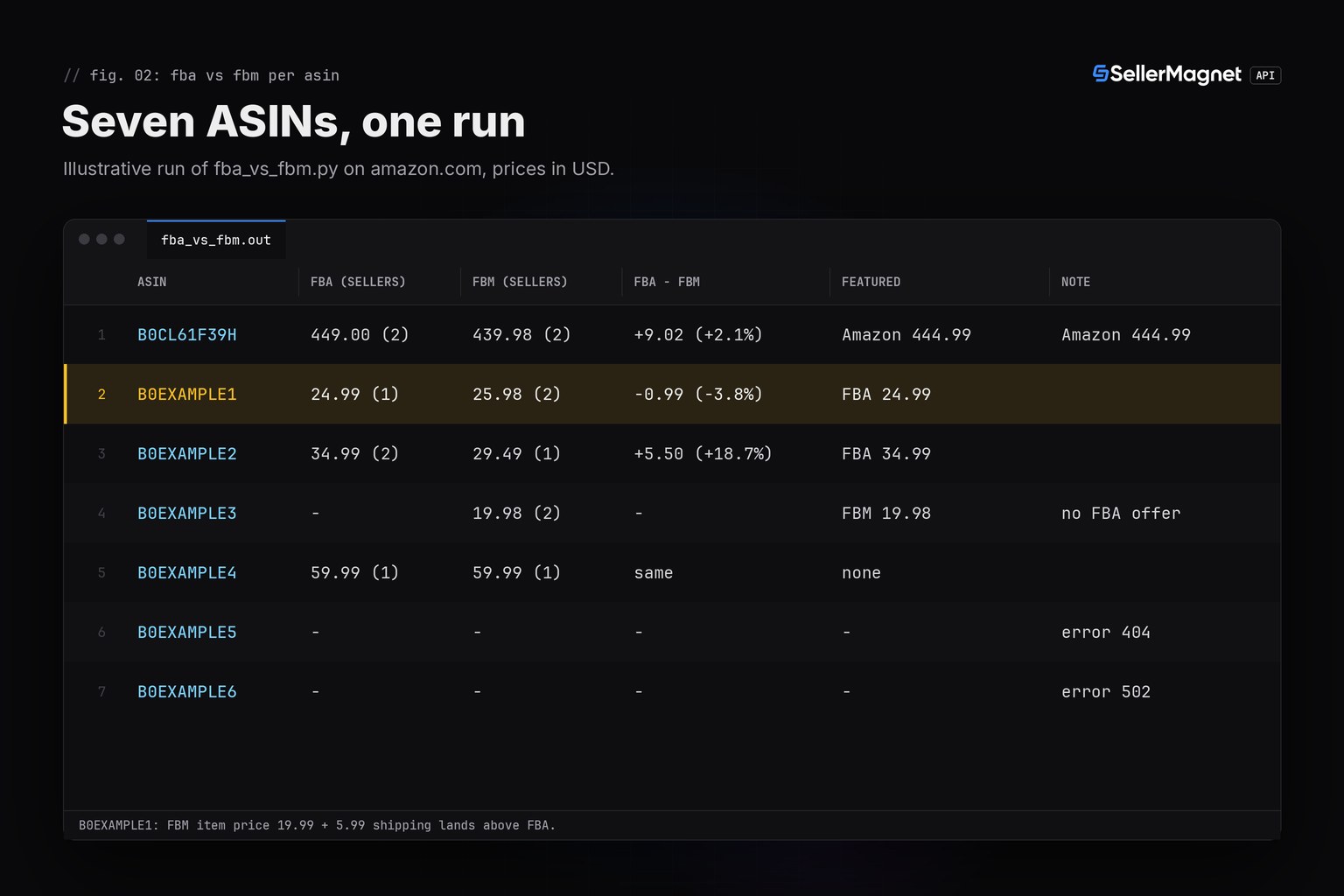
The summary lines count only ASINs with offers in both channels. A one-channel ASIN is not a win for the channel that is there, and the median of four ASINs is an illustration, not a market figure: run the script on your own list and read the gap per ASIN first.
Reading one offers response
This is the B0EXAMPLE1 response the run used, trimmed to the currency and the seller, condition, fulfillment and price fields. offers[0] is the featured offer whenever buyBox is not empty. In offers[] every totalPrice is rounded to 2 decimals, while buyBox.totalPrice is the unrounded float sum of item price and shipping, so the script rounds it before printing.
Trimmed /amazon-product-offers response for B0EXAMPLE1 (illustrative values)
{
  "data": {
    "asin": "B0EXAMPLE1",
    "buyBox": {
      "fulfillmentType": "FBA",
      "priceWithoutShipping": 24.99,
      "sellerId": "A6EXAMPLESELLR",
      "shippingPrice": 0.0,
      "totalPrice": 24.99
    },
    "buyBoxSuppressed": false,
    "currency": {
      "code": "USD",
      "name": "United States Dollar",
      "symbol": "$"
    },
    "offers": [
      {
        "condition": "New",
        "fulfillmentType": "FBA",
        "priceWithoutShipping": 24.99,
        "sellerId": "A6EXAMPLESELLR",
        "shippingPrice": 0.0,
        "totalPrice": 24.99
      },
      {
        "condition": "New",
        "fulfillmentType": "FBM",
        "priceWithoutShipping": 19.99,
        "sellerId": "A7EXAMPLESELLR",
        "shippingPrice": 5.99,
        "totalPrice": 25.98
      },
      {
        "condition": "New",
        "fulfillmentType": "FBM",
        "priceWithoutShipping": 21.49,
        "sellerId": "A8EXAMPLESELLR",
        "shippingPrice": 4.99,
        "totalPrice": 26.48
      }
    ]
  },
  "success": true
}
Why is the featured offer not always the cheaper channel?
On B0EXAMPLE2 the featured offer is FBA at 34.99 while an FBM offer lands at 29.49. The response shows which offer is featured and what it costs; it does not say why. Amazon's US seller blog on the Featured Offer (the Buy Box) says that "Featured Offer prices are commonly at or below the lowest priced alternatives" and that "Offers with fast, free shipping are more likely to be featured, as are offers with delivery dates that are higher certainty". The same page says that fulfilling orders yourself can be just as effective at increasing your chances of becoming the Featured Offer as fulfillment through Amazon's fulfillment network. So treat a featured offer above the cheapest one as a reading to look into, using the deliveryDate, shippingPrice and positivePercentage (seller rating) fields of the same offers, not as proof that one channel wins. The Buy Box price gap guide measures that gap for the featured offer against the cheapest New offer.
This compares prices, not fees
The gap shows what buyers pay in each channel. It says nothing about which channel earns a seller more: the API returns no fees, so referral and fulfillment fees have to come from your own numbers.
Credit math for an ASIN list
Every request costs 1 credit, so a list of 100 valid ASINs costs 100 credits when nothing fails. The run above made 10 billed requests: 5 that answered, the 404 and 4 attempts for the ASIN that kept failing with 502; the spreadsheet number and the repeat cost nothing. A 404 is billed and not retried, 502 and 503 are billed on every attempt (up to 4 here), a 500 without a Retry-After header is refunded and retried once, and 429, 401, 403 and gate 400s such as an unknown marketplaceId are free. MAX_FAILED caps the damage when a marketplace keeps answering 503: after 3 failing ASINs, at most 12 billed attempts, the script stops. Plans and credit prices are on the pricing page.
What the data cannot show
- Every offer: one call reads the first page of the offer listing, the featured offer plus the offers Amazon loads first, and there is no paging parameter.
- Fees and margins: the API returns no fees, so the gap says nothing about which channel is more profitable for you.
- Every buyer's price: shipping depends on the delivery address, and one call reads one address; without
geo_location(a ZIP or postcode) the marketplace's default postcode is used. Amazon's US help adds that shoppers can see a different Featured Offer from a different shipping location or with a Prime membership. - Free shipping versus no shipping shown:
shippingPriceis 0.0 in both cases. - Coupons and promotions: the offer data has no coupon field, so a coupon-adjusted checkout price is not visible.
- A trend: one call is one reading. The price history guide covers the recorded FBA and FBM series, where the FBM series is landed and the FBA series is not.
Frequently Asked Questions
Are FBA offers more expensive than FBM offers on Amazon?
It differs by ASIN, which is why you measure it. Compare the cheapest New FBA and FBM landed prices, item plus shipping, for each ASIN: an FBM offer with a lower item price can cost the buyer more once its shipping is added.
Does the API say whether an offer is FBA or FBM?
Yes. Every offer from /amazon-product-offers has fulfillmentType FBA or FBM. Amazon's own offer is labelled FBA and has sellerId Amazon, so check sellerId when you want third-party FBA sellers only.
Why compare totalPrice instead of the item price?
Because shipping is part of what the buyer pays. totalPrice is the item price plus the offer's shippingPrice, rounded to 2 decimals; item prices alone make offers that charge shipping look cheaper than they are.
What does an FBA vs FBM comparison cost in credits?
One credit per ASIN when nothing fails. A 404 is billed, 502 and 503 are billed on every attempt, a 500 without Retry-After is refunded, and 429, 401, 403 and gate 400s are free.
Can I compare FBA and FBM price history?
Yes, with /amazon-product-statistics on its 11 marketplaces, but lowestFBMPriceHistory is a landed price and lowestFBAPriceHistory an item price, both in integer minor units, so a difference between the two series mixes in shipping.
Bottom line: compare FBA and FBM on the landed price of New offers, give Amazon's own offer a group of its own, and treat an ASIN with only one channel as no comparison at all. One /amazon-product-offers call per ASIN returns the cheapest offer of each channel and the featured offer; it cannot tell you fees, every offer or why an offer is featured.


