To monitor an Amazon Buy Box price in Grafana, run a small Python script on a schedule that calls the SellerMagnet API, sets a handful of Prometheus Gauges, and pushes them to a Prometheus Pushgateway with push_to_gateway, which Prometheus then scrapes and Grafana graphs. The client code is the unmodified Python quickstart's sellermagnet.py and retry.py. The part worth getting right on purpose is which Pushgateway function to call: push_to_gateway (PUT) replaces the whole job's metrics on every run, so an ASIN you stop watching simply disappears from the dashboard; pushadd_to_gateway (POST) only merges, so a dropped ASIN keeps showing its last known price forever.
Key Takeaways
- A price-watch script is a short-lived batch job, so its metrics belong in a Prometheus Pushgateway, not a scraped HTTP exporter - Prometheus's own instrumentation guide says exactly that.
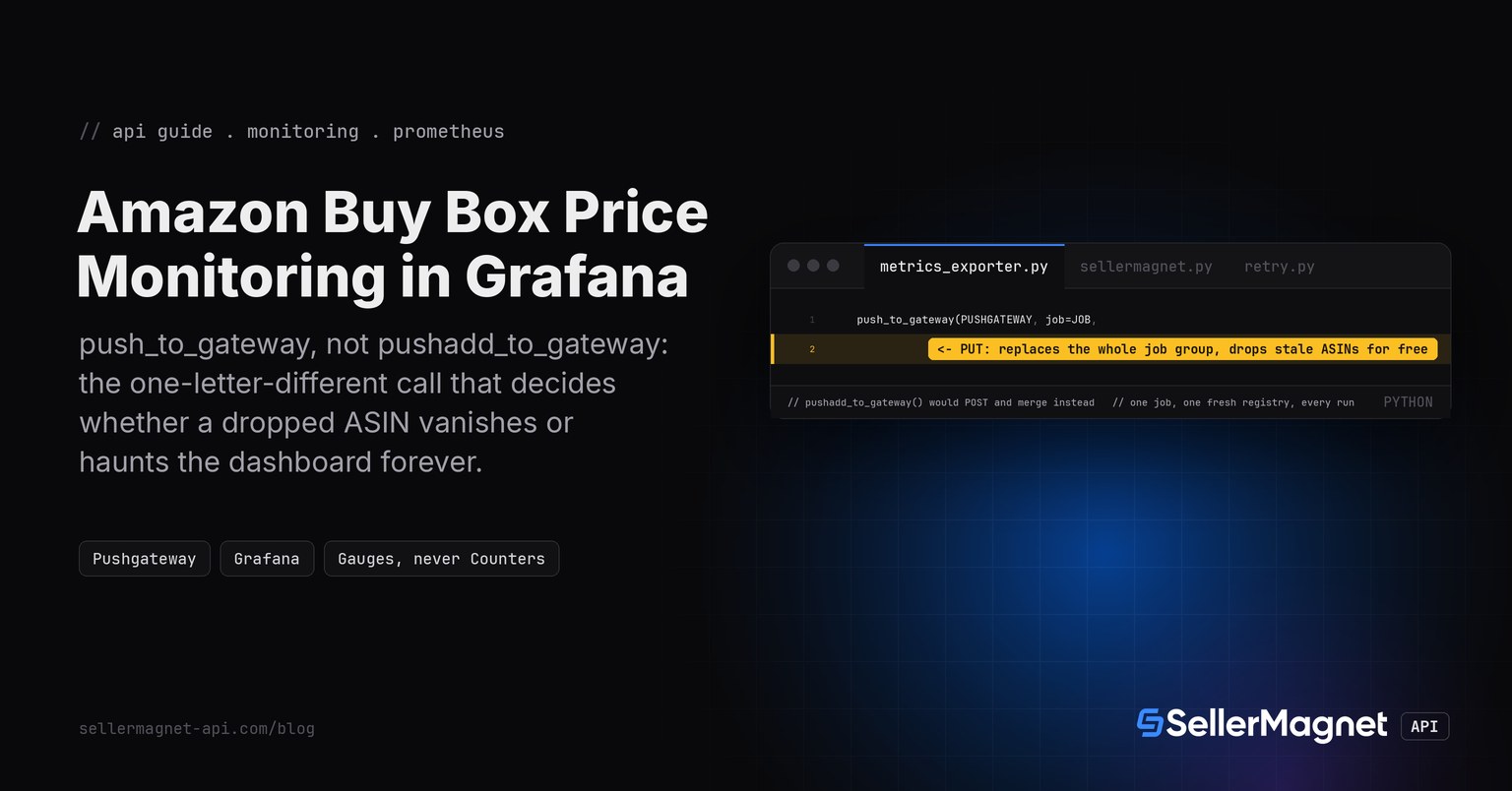
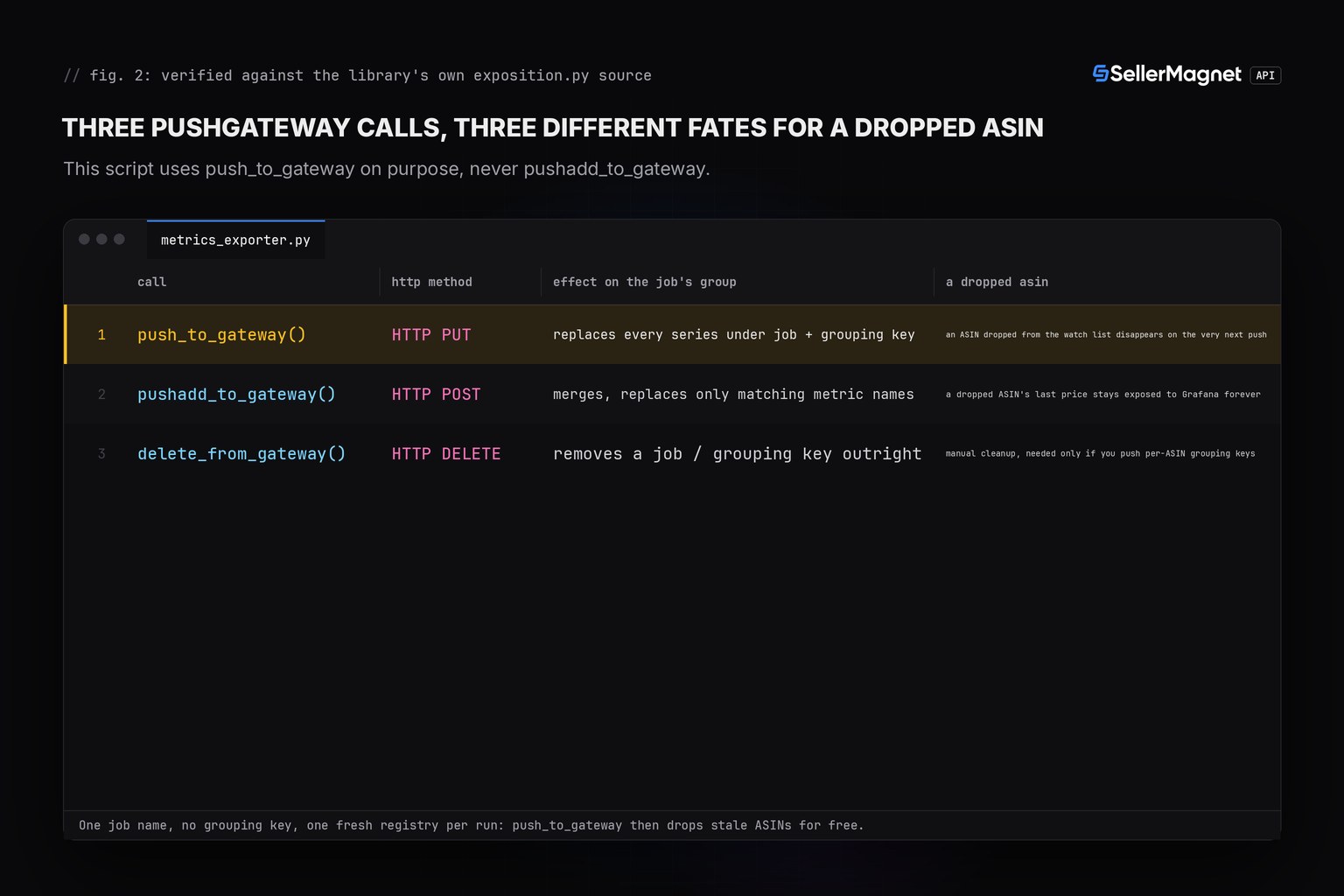
- push_to_gateway() sends an HTTP PUT and replaces every series under the job's group with whatever is in the registry right now. pushadd_to_gateway() sends a POST and only merges - verified by reading both functions' calls into the library's own HTTP handler, not assumed from the name.
- Using ONE fixed job name, no grouping key, and a FRESH CollectorRegistry per run that holds only the currently watched ASINs makes stale-ASIN cleanup automatic: it falls out of using PUT, not out of any extra delete step.
- Model the price, availability and FBA flag as Gauges, never Counters - Prometheus's own best practice is "if the value can go down, it is a gauge", and a Buy Box price can go down.
- A real $0.00 Buy Box price is a legitimate value, not a signal that no offer is featured - check for it with a dedicated availability gauge, never with a truthiness check on the price itself.
Why push metrics instead of exposing a /metrics endpoint?
Prometheus normally pulls metrics by scraping a long-running server's /metrics endpoint. A price-watch script is the opposite: it runs on a schedule, does its work, and exits. Prometheus's own instrumentation guide classifies this as a batch job and says its key metrics, including the last time it succeeded, "should be pushed to a PushGateway" - there is nothing left running for Prometheus to scrape by the time it would try.
Install the client and the SellerMagnet API key
python3 -m venv .venv
.venv/bin/pip install requests prometheus-client
export SELLERMAGNET_API_KEY="your-key-here"
What does the exporter script actually push?
Each run builds one fresh CollectorRegistry, never the module-level default registry - a batch job that reused the global registry across imports could carry a leftover series into a run it has nothing to do with. Five Gauges go into it: the Buy Box price in cents, an availability flag, an FBA flag, the first-page offer count, and the run's own last-success timestamp. /amazon-product-offers is the source endpoint, reused byte-for-byte from the quickstart's sellermagnet.py and retry.py.
sellermagnet.py - unmodified from the Python quickstart
import os

import requests

API = "https://sellermagnet-api.com/api"


class ApiError(Exception):
    def __init__(self, status: int, message: str, retry_after: float = 0.0):
        super().__init__(f"{status}: {message}")
        self.status, self.retry_after = status, retry_after


def new_session() -> requests.Session:
    session = requests.Session()
    session.headers["X-Api-Key"] = os.environ["SELLERMAGNET_API_KEY"]
    return session


def get(session: requests.Session, endpoint: str, **params) -> dict:
    resp = session.get(f"{API}/{endpoint}", params=params, timeout=120)
    try:
        body = resp.json()
    except ValueError:                      # e.g. an HTML page from a proxy
        body = {}
    if resp.status_code == 200 and body.get("success"):
        return body["data"]
    try:
        wait = float(resp.headers.get("Retry-After", 0))
    except ValueError:
        wait = 0.0
    raise ApiError(resp.status_code, body.get("message", "request failed"), wait)
retry.py - unmodified from the Python quickstart
import random
import time

import requests

from sellermagnet import ApiError, get

RETRYABLE = {429, 500, 502, 503}


def get_with_retry(session, endpoint: str, attempts: int = 4, **params) -> dict:
    internal_errors = 0
    for attempt in range(1, attempts + 1):
        try:
            return get(session, endpoint, **params)
        except ApiError as err:
            internal_errors += err.status == 500
            if err.status not in RETRYABLE or attempt == attempts or internal_errors > 1:
                raise                      # a second 500 in a row: report it, don't loop
            backoff = min(2 ** attempt, 30) + random.uniform(0, 1)
            time.sleep(max(backoff, err.retry_after))
        except (requests.ConnectionError, requests.Timeout):
            if attempt == attempts:
                raise
            time.sleep(min(2 ** attempt, 30))
Trimmed /amazon-product-offers response (example values)
{
  "success": true,
  "data": {
    "asin": "B0CL61F39H",
    "marketplaceId": "ATVPDKIKX0DER",
    "buyBox": {"sellerId": "Amazon", "totalPrice": 444.99, "fulfillmentType": "FBA"},
    "buyBoxSuppressed": false,
    "offers": [
      {"sellerId": "Amazon", "totalPrice": 444.99, "fulfillmentType": "FBA"},
      {"sellerId": "acme-llc", "totalPrice": 459.00, "fulfillmentType": "FBM"}
    ]
  }
}
metrics_exporter.py - builds the registry and pushes it
"""Push Amazon Buy Box and offer-count metrics to a Prometheus Pushgateway for a Grafana dashboard.

Reuses sellermagnet.py / retry.py from the Python quickstart unchanged.
"""
from prometheus_client import CollectorRegistry, Gauge, push_to_gateway

from retry import get_with_retry
from sellermagnet import ApiError, new_session

PUSHGATEWAY = "localhost:9091"
JOB = "amazon_pricewatch"   # one job, no per-ASIN grouping key - see watch()'s own note


def watch(session, asins: list[str], marketplace_id: str) -> CollectorRegistry:
    """Build a FRESH registry for this run. A batch job must not reuse the global REGISTRY:
    a leftover series from an earlier, unrelated import would be pushed again every run."""
    registry = CollectorRegistry()
    price = Gauge("amazon_buybox_price_cents", "Buy Box total price in minor units (cents)",
                   ["asin", "marketplace"], registry=registry)
    available = Gauge("amazon_buybox_available", "1 if a Buy Box offer is featured, else 0",
                       ["asin", "marketplace"], registry=registry)
    fba = Gauge("amazon_buybox_is_fba", "1 if the Buy Box offer ships FBA, else 0",
                ["asin", "marketplace"], registry=registry)
    offer_count = Gauge("amazon_offers_count", "Number of offers on the first offer-listing page",
                         ["asin", "marketplace"], registry=registry)
    last_run = Gauge("amazon_pricewatch_last_success_unixtime",
                      "Unix time the watch run last completed without a fatal error", registry=registry)

    for asin in asins:
        labels = {"asin": asin, "marketplace": marketplace_id}
        try:
            data = get_with_retry(session, "amazon-product-offers", asin=asin, marketplaceId=marketplace_id)
        except ApiError as err:
            if err.status in (401, 403):
                raise                      # bad key or no credits: stop before pushing partial data
            available.labels(**labels).set(0)      # a billed 404/502/503 for one ASIN keeps the rest of the batch
            offer_count.labels(**labels).set(0)
            continue
        box = data.get("buyBox") or {}
        offers = data.get("offers") or []
        # check "is None", never "if not box.get(...)": a real 0.0 price (a free item) is falsy in Python
        # and would be misread as "no Buy Box" by a naive truthiness check.
        if box.get("totalPrice") is None:
            available.labels(**labels).set(0)
        else:
            available.labels(**labels).set(1)
            price.labels(**labels).set(round(box["totalPrice"] * 100))   # decimal units -> integer cents
            fba.labels(**labels).set(1 if box.get("fulfillmentType") == "FBA" else 0)
        offer_count.labels(**labels).set(len(offers))
    last_run.set_to_current_time()
    return registry


def run(asins: list[str], marketplace_id: str = "ATVPDKIKX0DER") -> None:
    registry = watch(new_session(), asins, marketplace_id)
    # push_to_gateway (HTTP PUT) REPLACES every series already stored under this job. An ASIN dropped
    # from `asins` since the last run therefore disappears from the NEXT push instead of freezing at
    # its last known price on the Grafana panel. pushadd_to_gateway (HTTP POST) merges instead, so a
    # removed ASIN's series would never be deleted and Prometheus would expose a stale value forever
    # (Prometheus docs, "When to use the Pushgateway": "The Pushgateway never forgets series pushed to
    # it ... unless manually deleted"). Using one job, one registry, no grouping key, and push_to_gateway
    # every run is what makes the replace automatic.
    push_to_gateway(PUSHGATEWAY, job=JOB,
                     registry=registry)


if __name__ == "__main__":
    import sys
    run(sys.argv[1:] or ["B0CL61F39H", "B0CLTBHXWQ"])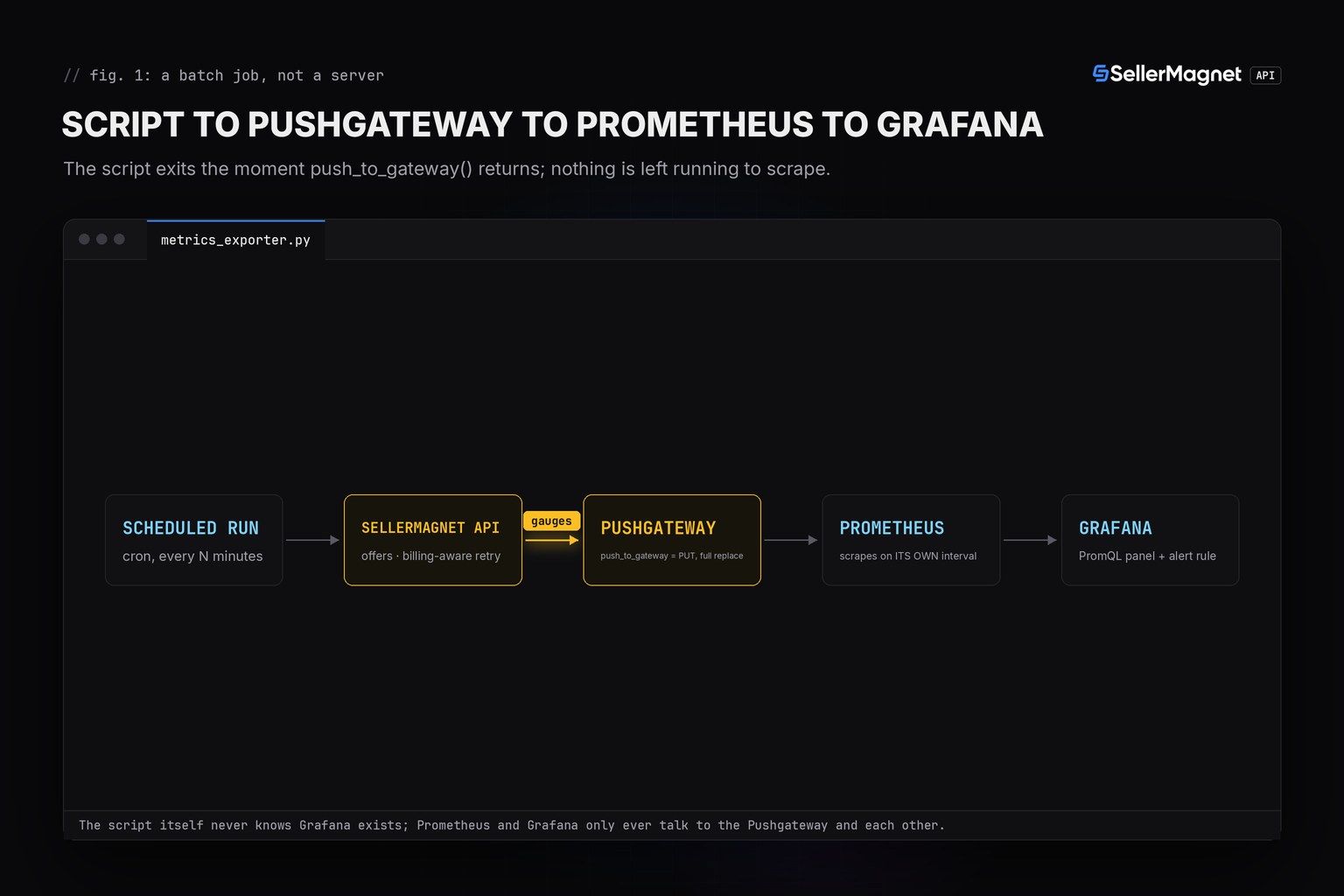
Which SellerMagnet errors should stop the run versus just one ASIN?
A 401 or 403 means the key or the credit balance is the problem, not any one ASIN, so the whole run raises before anything is pushed - pushing a half-built registry under a bad key would just overwrite good metrics with an incomplete run. Every other error (a billed 404, or 502/503 exhausted after the retry cap) marks only that ASIN unavailable and the batch carries on, the same convention as every other price-watch post in this series.
| Status | Meaning | Billed | Reaction |
|---|---|---|---|
200 | Success | Yes | Use data |
401 / 403 | Key or credits | No | Stop the whole run before any push |
404 | ASIN not on this marketplace | Yes | ASIN marked unavailable, batch continues |
429 | Concurrency cap | No | Wait Retry-After, retried |
500 | Internal error | No, refunded | Retry once |
502 / 503 | Upstream / breaker | Yes | Wait, then retry, capped at 4, then ASIN marked unavailable |
push_to_gateway or pushadd_to_gateway: why the choice decides whether stale ASINs haunt the dashboard
Prometheus's own documentation is direct about this: "The Pushgateway never forgets series pushed to it and will expose them to Prometheus forever unless those series are manually deleted." push_to_gateway sends an HTTP PUT that replaces every series under the job's group with exactly what this run's registry contains, so an ASIN that is no longer in the watch list is simply absent from the next push and disappears on the next Prometheus scrape. pushadd_to_gateway sends an HTTP POST that only merges by metric name, so a dropped ASIN's series is never replaced and keeps showing its last pushed value on the Grafana panel indefinitely. The fix costs nothing extra: use one fixed job name, no per-ASIN grouping key, one fresh registry per run holding only today's watch list, and call push_to_gateway, not pushadd_to_gateway.
Never rate() a Gauge
Price, availability and the FBA flag are Gauges because they can go down, not just up. Prometheus's own guidance is blunt about this: counters are for values that only increase, and "you should never take a rate() of a gauge." Graph these metrics directly, or with a plain subtraction over time, never through rate().
What does the PromQL and Grafana side look like?
A time series panel on amazon_buybox_price_cents{asin="B0CL61F39H"} / 100 plots the dollar price directly from the Pushgateway's scrape. An alert rule compares the current value against itself a window ago using the offset modifier, which needs no extra storage in the script at all - Prometheus already has the history.
A PromQL alert expression for a 10% Buy Box price drop in the last hour (Grafana/Prometheus alert rule body)
expr: |
  (
    amazon_buybox_price_cents{job="amazon_pricewatch"} offset 1h
    - amazon_buybox_price_cents{job="amazon_pricewatch"}
  )
  / amazon_buybox_price_cents{job="amazon_pricewatch"} offset 1h > 0.10
for: 10m
labels:
  severity: warning
annotations:
  summary: "Buy Box price for {{ $labels.asin }} dropped more than 10% in the last hour"
Real output from the tested harness (fakehttp.py faking only requests.Session.get; prometheus_client itself runs unmodified)
PASS 1 happy path: price in cents
PASS 1 happy path: available=1
PASS 1 happy path: is_fba=1
PASS 1 happy path: offer count=3
PASS 1 happy path: two ASINs both billed
PASS 2 no buybox: available=0
PASS 2 no buybox: no price SAMPLE line (metric family exists, no series)
PASS 2 no buybox: offer count still recorded
PASS 3 fbm buybox: is_fba=0
PASS 3 fbm buybox: available=1
PASS 4 zero price: available=1 (not misread as missing)
PASS 4 zero price: price_cents=0
PASS 5 404: missing ASIN available=0
PASS 5 404: sibling ASIN still recorded
PASS 6 429-then-ok: 2 attempts
PASS 6 429-then-ok: final price recorded
PASS 7 500-then-ok: 2 attempts
PASS 7 500-then-ok: final price recorded
PASS 8 502 exhausted: B0DOWN capped at 4 attempts, B0OK2 billed once (5 total)
PASS 8 502 exhausted: ASIN marked unavailable, batch continues
PASS 9 401 aborts the run
PASS 10 last-success gauge present
PASS 11 push_to_gateway uses PUT (full group replace)
PASS 11 push_to_gateway targets the configured job
PASS 11b pushadd_to_gateway uses POST (merge, would leave stale ASINs)

25 passed, 0 failed
A real $0.00 Buy Box price is deliberately kept visible rather than hidden: amazon_buybox_available is set to 1 and amazon_buybox_price_cents is set to 0, so a dashboard viewer sees a genuine zero rather than a gap that looks identical to "no data for this ASIN". Only a missing totalPrice (no featured offer at all) sets availability to 0 and leaves the price gauge without a sample for that ASIN.
Frequently Asked Questions
Why Prometheus Pushgateway instead of a Prometheus HTTP exporter?
A price-watch script is a short-lived batch job, not a server. Prometheus's own best practices say a batch job's metrics belong in the Pushgateway, because the job exits before Prometheus could ever scrape it directly.
Why does a dropped ASIN not haunt the Grafana dashboard forever?
Because the script calls push_to_gateway (HTTP PUT) once per run with one fixed job name and a fresh registry holding only the currently watched ASINs. A PUT replaces the whole group, so an ASIN missing from this run's registry is simply gone from the next scrape.
What happens if I use pushadd_to_gateway instead?
It sends an HTTP POST that only merges, so an ASIN you stop watching keeps showing its last pushed price on the Grafana panel forever, until you delete it by hand through the Pushgateway API.
Why is the price stored in cents instead of a decimal dollar amount?
PromQL and Grafana handle integers cleanly; a Gauge storing 444.99 and one storing 444.9899999 after float drift look identical on a graph but not in an alert threshold. Cents sidesteps it and the dashboard panel divides by 100 for display.
Why a separate availability gauge instead of just checking for price equal to zero?
A real Buy Box price can legitimately be 0.0 for a free item. Checking price == 0 as a stand-in for "no offer" would hide that case; a dedicated amazon_buybox_available gauge keeps the two meanings apart.
Bottom line: push five Gauges per run with push_to_gateway, not pushadd_to_gateway, keep one fixed job name and a fresh registry per run, and a dropped ASIN cleans itself out of Grafana on the next run instead of freezing there forever. The retry and error-handling pattern underneath is identical to the Python quickstart and the Discord price-drop alert post; the rate limits and error handling guide covers the concurrency cap this script's retry policy respects. Every endpoint is on the API documentation page, and a free account includes 150 credits to try it.