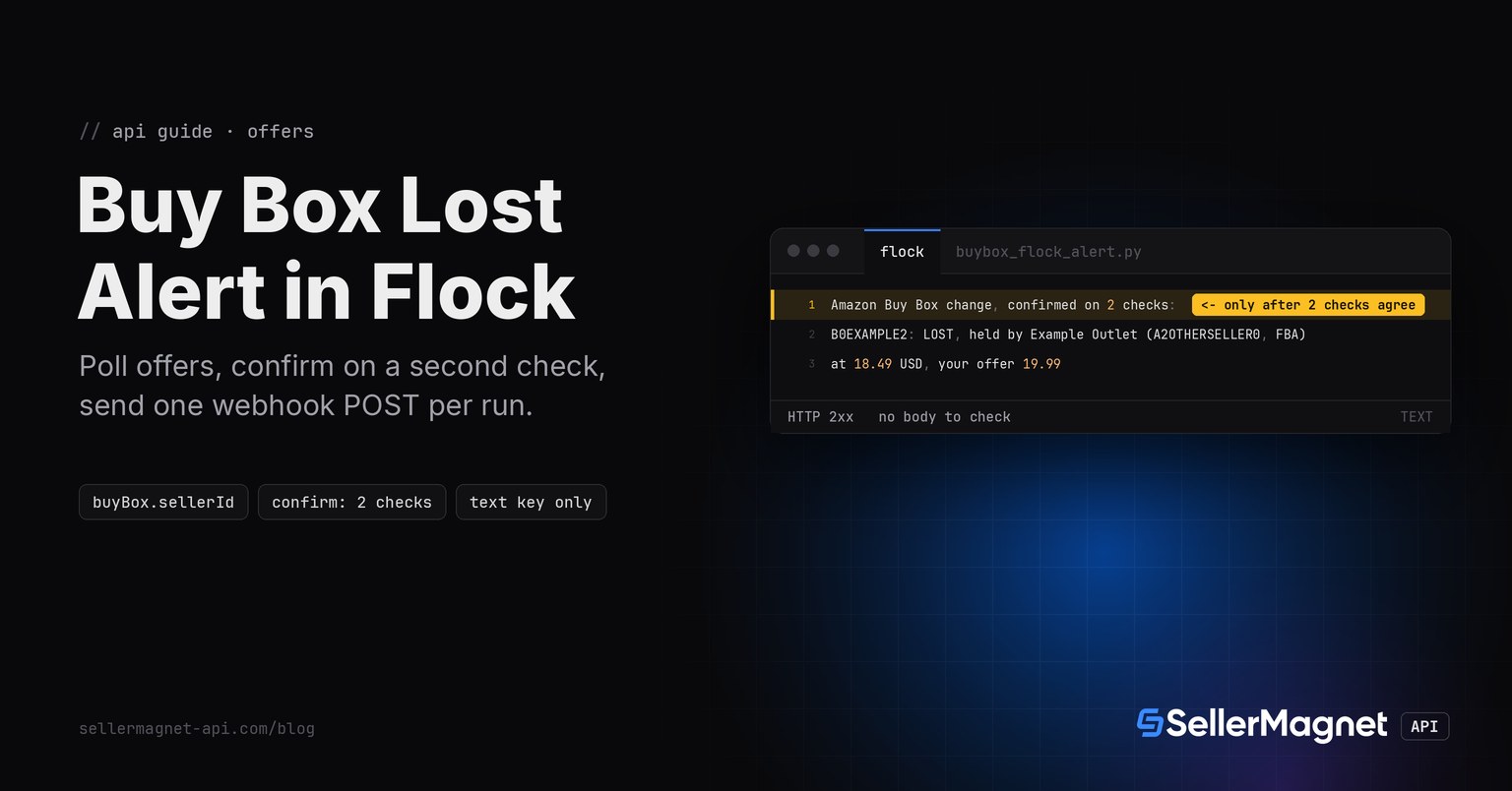
To get an Amazon Buy Box lost alert posted to Flock today, poll /amazon-product-offers for each of your ASINs, compare buyBox.sellerId with your own seller ID, and POST once per run to the incoming webhook URL Flock generated for your channel: a JSON body with one text key, no auth header, the secret already baked into the URL's path. The catch is what comes back: Flock's own docs document the request format only and never show a response body for success or failure, so this script can confirm the webhook accepted the POST, never that a message actually appeared. The script below gets the one key right that Flock's docs warn about, and costs one SellerMagnet credit per ASIN per check.
Key Takeaways
- Flock's incoming webhook is a fixed URL with the secret baked into the path (
api.flock.com/hooks/sendMessage/<token>), the same shape as Mattermost or Rocket.Chat, not Gotify's self-hosted base. - Flock's own support article documents the REQUEST format only (a JSON body with a "text" or "flockml" key) and shows no response body at all for success or failure - the only channel in this series with zero documented response schema.
- A JSON payload that skips "text"/"flockml" for other keys "is not parsed, and hence...no message is generated" per Flock's own docs, while the webhook still answers normally - so this script only ever sends a non-empty "text" key.
- buyBox is the featured offer: its sellerId is the seller who holds the Buy Box, the literal "Amazon" when Amazon does.
- Alert only when two checks in a row agree: an offer page can come back without parsable offers, and one reading should not page you.
- Each check costs 1 SellerMagnet credit per ASIN; 502/503 retries are billed per attempt, a 500 is refunded, and a free 401/403 stops the run with one STOP message.
How is Flock's webhook different from Gotify, DingTalk or Telegram?
Every other channel in this series gives the script something in the response to check: Telegram's ok, Gotify's echoed id, DingTalk's errcode, Rocket.Chat's {"success": true}. Flock's own support article (support.flock.com, Incoming webhooks, checked 2026-11-26) shows the request format - curl -X POST <webhook URL> -d '{"text": "..."}' - and stops there: no example response, no documented status code, no field name to read. The article's own worked example of an incompatible payload (keys like "product"/"customer" instead of "text") says plainly: "the JSON payload received is not in a compatible format, so no message is generated" - with no mention that the request itself is rejected. That is the trap: a malformed payload and a delivered one can look identical to the caller.
| Response | Reading | Flock message |
|---|---|---|
| buyBox.sellerId is your sellerId | mine | BACK, after a confirmed loss |
| buyBox.sellerId is any other seller or "Amazon" | lost | LOST, with holder, price and your offer |
| buyBox is {} and buyBoxSuppressed is true | suppressed | NONE |
| buyBox is {} and offers is [] | no-offers | EMPTY |
How do I build the Amazon Buy Box lost alert for Flock?
read_buy_box() turns one offers response into a reading, check() keeps a streak per ASIN in buybox_state.json and queues a line once a new reading has been seen CONFIRM times in a row, and post_to_flock() sends every queued line as one webhook POST. get_with_retry comes from retry.py and ApiError/new_session from sellermagnet.py, both from the Python quickstart. Malformed ASINs are skipped before any call, because the offers endpoint bills a typo like any other request. MY_SELLER_ID has no default on purpose: without it every ASIN would read as lost, so the script refuses to start. A new ASIN seeds its state to whatever it first reads, so a listing that starts out suppressed never fires a false alert just for staying that way. The payload is always {"text": ...}, never any other key, and a 2xx only marks the alert reported - it is logged as "accepted", never as "delivered", because Flock's own docs give the script nothing stronger to claim.
buybox_flock_alert.py - offers check, 2-check confirmation, one webhook POST per run
import json
import os
import re

import requests

from retry import get_with_retry
from sellermagnet import ApiError, new_session

MARKETPLACE_ID = "ATVPDKIKX0DER"                 # amazon.com
MY_SELLER_ID = os.environ["MY_SELLER_ID"]        # your sellerId as it appears in offers[]; no default on purpose
ASINS = ["B0CL61F39H", "B0EXAMPLE2", "B0EXAMPLE3"]
CONFIRM = 2                                      # same reading on 2 checks in a row before Flock hears about it
STATE_FILE = "buybox_state.json"
ASIN_RE = re.compile(r"^[A-Z0-9]{10}$")           # offers calls are billed even for a typo, so filter first
MAX_MESSAGE_CHARS = 4000                          # Flock's docs publish no hard cap; integration guides warn long
                                                   # messages get truncated in the channel preview, so stay well
                                                   # under what every other channel in this series already caps at
MAX_LINES = 200                                   # keep well under the char cap even with long lines


def read_buy_box(session, asin: str) -> tuple[str, str]:
    """('mine' | 'lost' | 'suppressed' | 'no-offers', detail for the message)."""
    data = get_with_retry(session, "amazon-product-offers", asin=asin, marketplaceId=MARKETPLACE_ID)
    box = data.get("buyBox") or {}
    if not box:
        # {} has two causes: offers exist but Amazon features none, or no offer at all (or none parsable)
        return ("suppressed", "") if data.get("buyBoxSuppressed") else ("no-offers", "")
    holder = box.get("sellerId") or "unknown"
    if holder == MY_SELLER_ID:
        return "mine", ""
    currency = (data.get("currency") or {}).get("code", "")
    detail = f"{box.get('sellerName', '?')} ({holder}, {box.get('fulfillmentType', '?')})"
    if isinstance(box.get("totalPrice"), (int, float)):      # price + shipping as floats, not rounded by the API
        detail += f" at {box['totalPrice']:.2f} {currency}"
    mine = [o["totalPrice"] for o in data.get("offers") or []
            if o.get("sellerId") == MY_SELLER_ID and isinstance(o.get("totalPrice"), (int, float))]
    detail += f", your offer {min(mine):.2f}" if mine else ", your offer: not on the first offer page"
    return "lost", detail                      # any other holder is the same reading: a rotation still confirms


def line_for(asin: str, key: str, detail: str) -> str:
    text = {"mine": "BACK, you hold the Buy Box again",
            "suppressed": "NONE, offers exist but Amazon features none",
            "no-offers": "EMPTY, no offers on the listing"}.get(key, f"LOST, held by {detail}")
    return f"{asin}: {text}"


def build_message(lines: list[str]) -> str:
    header = "Amazon Buy Box change, confirmed on 2 checks:\n"
    total = len(lines)
    shown = lines[:MAX_LINES]
    while True:
        hidden = total - len(shown)
        body_lines = shown + ([f"+{hidden} more, see the dashboard"] if hidden else [])
        body = header + "\n".join(body_lines)
        if len(body) <= MAX_MESSAGE_CHARS or not shown:
            return body
        shown = shown[:-1]       # drop one more real line and recompute the hidden count, actually shrinking


def post_to_flock(webhook_url: str, lines: list[str]) -> bool:
    """One message per run, POSTed straight to the webhook URL Flock generated (api.flock.com/hooks/sendMessage/
    <token>): a fixed vendor domain with the secret baked into the path, the same shape as Mattermost/Rocket.Chat,
    not Gotify's self-hosted base. Flock's own support article (support.flock.com, Incoming webhooks, checked
    2026-11-26) documents the REQUEST format only - a JSON body with a "text" or "flockml" key - and never shows a
    response body for either success or failure, the only channel in this whole series with no documented response
    schema at all: no id, no ok/success flag, no errcode. The same article is explicit about the real trap: a JSON
    payload that does not use the "text"/"flockml" keys "is not parsed, and hence...no message is generated" -
    it is silently dropped while Flock still accepts the POST, so the script always sends a non-empty "text" key
    and never anything else. Third-party integration guides (not Flock's own docs, since Flock documents no error
    responses) report a deleted or invalid webhook URL answering 403/404; since Flock's docs describe no retryable
    condition at all, the script treats any non-2xx as a non-retryable setup problem and only accepts 2xx as
    "accepted by Flock's servers" - which, per the docs above, is not the same thing as "a message appeared".
    """
    if not lines:
        return True
    payload = {"text": build_message(lines)}
    try:
        resp = requests.post(webhook_url, json=payload, timeout=10)
    except requests.RequestException as err:
        print(f"flock unreachable: {type(err).__name__}")
        return False
    if 200 <= resp.status_code < 300:
        # Flock documents no success body to check; a 2xx only means the webhook accepted the POST, not that a
        # non-empty "text" key reached a live channel - this script cannot tell the two apart from the response.
        return True
    print(f"flock rejected the webhook POST: {resp.status_code} {resp.text[:200]}")   # setup problem, not retried
    return False


def load_state() -> dict:
    try:
        with open(STATE_FILE, encoding="utf-8") as fh:
            return json.load(fh)
    except FileNotFoundError:
        return {}


def save_state(state: dict) -> None:
    tmp = STATE_FILE + ".tmp"
    with open(tmp, "w", encoding="utf-8") as fh:
        json.dump(state, fh, indent=1, sort_keys=True)
    os.replace(tmp, STATE_FILE)                     # a crash mid-write keeps the last good state


def check(asins: list[str], webhook_url: str) -> None:
    session, state = new_session(), load_state()
    alerts, problems, checked, stopped = [], [], 0, ""
    for asin in dict.fromkeys(a.strip().upper() for a in asins):            # dedupe, keep order
        if not ASIN_RE.match(asin):
            problems.append(f"{asin}: not an ASIN, skipped")
            continue
        try:
            key, detail = read_buy_box(session, asin)
        except ApiError as err:
            if err.status in (401, 403):
                stopped = str(err)                       # bad key or no credits: every further call fails too
                problems.append(f"stopped: {stopped}")
                break
            problems.append(f"{asin}: {err}")            # 404 = listing gone (billed); state stays as it was
            continue
        except requests.RequestException as err:
            problems.append(f"{asin}: {type(err).__name__} after retries, state kept")
            continue
        checked += 1
        s = state.get(asin)
        if s is None:
            # first-ever sighting of this ASIN: seed state to it so a steady reading never alerts as a change
            s = state[asin] = {"last": key, "streak": 1, "reported": key}
            continue
        s["streak"] = s["streak"] + 1 if key == s["last"] else 1
        s["last"] = key
        if s["streak"] >= CONFIRM and key != s["reported"]:
            alerts.append((asin, key, line_for(asin, key, detail)))
    lines = [line for _, _, line in alerts]
    if stopped and state.get("_stopped") != stopped:
        lines.append(f"STOP: checks stopped: {stopped}")       # said once, not every run
    sent = post_to_flock(webhook_url, lines)
    if sent:
        for asin, key, _ in alerts:
            state[asin]["reported"] = key               # only after Flock's 2xx, else re-sent next run
        if stopped:
            state["_stopped"] = stopped
    if not stopped:
        state.pop("_stopped", None)
    save_state(state)
    for line in problems:
        print(line)
    print(f"{checked} checked, {len(alerts)} alert(s) {'sent' if sent else 'NOT sent, retried next run'}")


if __name__ == "__main__":
    check(ASINS, os.environ["FLOCK_WEBHOOK_URL"])
Five runs of the script (illustrative ASIN and seller; [flock] = the message sent)
--- run 1 (illustrative ASIN and seller)
1 checked, 0 alert(s) sent
--- run 2, B0EXAMPLE2 lost (1st sighting, not yet confirmed)
1 checked, 0 alert(s) sent
--- run 3, same reading confirmed
1 checked, 1 alert(s) sent
[flock] Amazon Buy Box change, confirmed on 2 checks:
B0EXAMPLE2: LOST, held by Example Outlet (A2OTHERSELLER0, FBA) at 18.49 USD, your offer 19.99
--- run 4, back to mine (1st sighting, not yet confirmed)
1 checked, 0 alert(s) sent
--- run 5, back to mine, confirmed
1 checked, 1 alert(s) sent
[flock] Amazon Buy Box change, confirmed on 2 checks:
B0EXAMPLE2: BACK, you hold the Buy Box again
What the script actually POSTs (curl equivalent, illustrative values)
curl -s -X POST https://api.flock.com/hooks/sendMessage/134b8gh0-eba0-4fa9-ab9c-257ced0e8221 \\
  -H "Content-Type: application/json" \\
  -d '{"text": "Amazon Buy Box change, confirmed on 2 checks:
B0EXAMPLE2: LOST, held by Example Outlet (A2OTHERSELLER0, FBA) at 18.49 USD, your offer 19.99"}'
# HTTP 200, no documented response body at all (support.flock.com, checked 2026-11-26)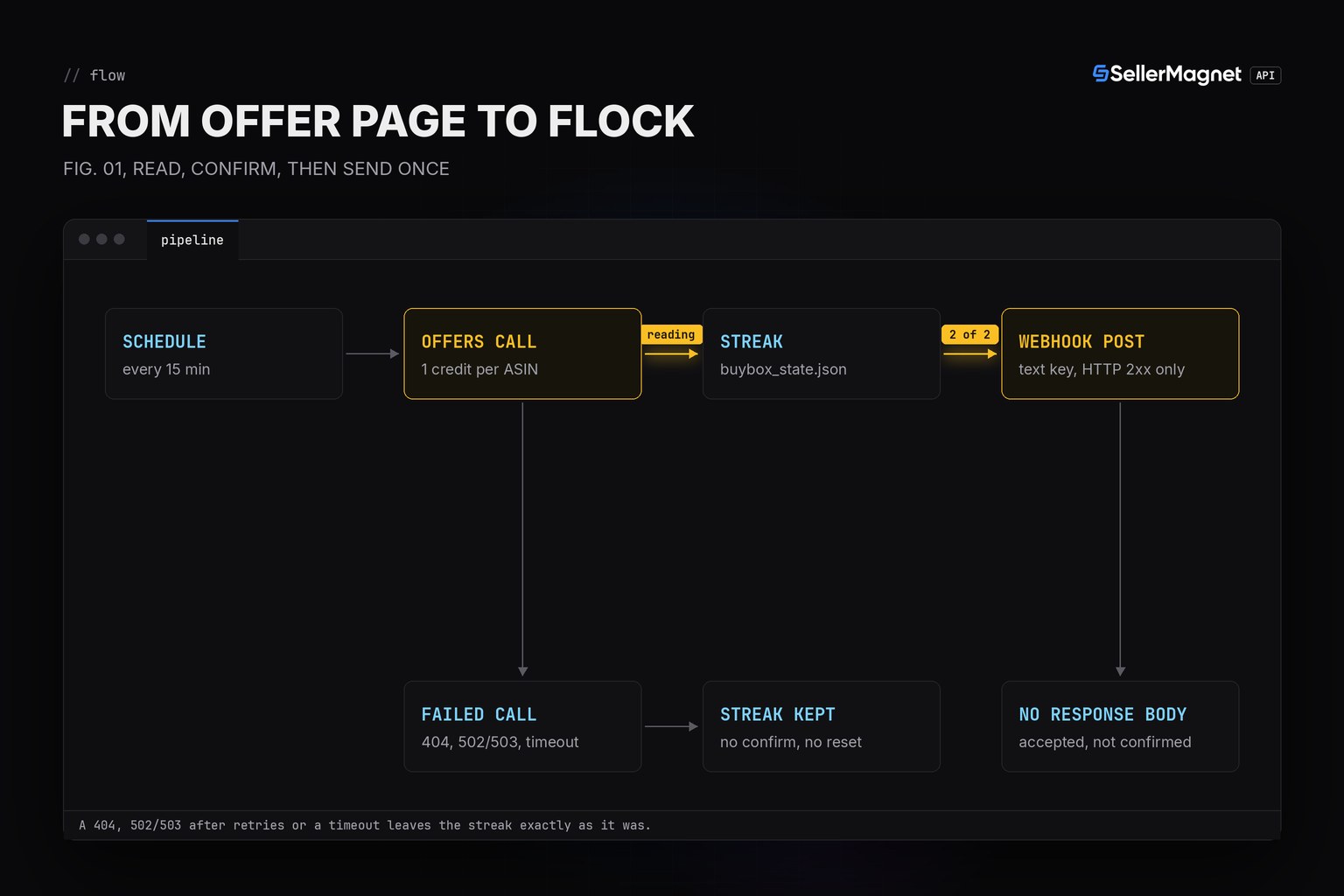
How do I create the Flock incoming webhook?
- Open the Flock Developer DashboardSign in at dev.flock.com and click Webhooks on the left.
- Add an Incoming WebhookPick Incoming Webhook, then the channel you want the alert posted to.
- Name it and generate the URLGive the webhook a name and icon, click Save and Generate URL. Flock hands you the full URL once; it already contains the secret token in its path.
- Send a test message
curl -X POST <webhook URL> -H \"Content-Type: application/json\" -d '{\"text\": \"test\"}'; check the channel itself, since the response body confirms nothing.
Environment file and a cron entry for a 15-minute check (flock -n prevents overlapping runs)
# .env (keep it out of git: the token is baked into the webhook URL itself)
export SELLERMAGNET_API_KEY="your-key-here"
export FLOCK_WEBHOOK_URL="https://api.flock.com/hooks/sendMessage/134b8gh0-eba0-4fa9-ab9c-257ced0e8221"
export MY_SELLER_ID="A1MYSELLER0001"              # your sellerId as it appears in offers[]

# crontab -e: every 15 minutes, 3 ASINs = 288 credits a day; flock -n skips a run while the last one still runs
*/15 * * * * cd /opt/buybox && . ./.env && flock -n .lock .venv/bin/python buybox_flock_alert.py >> alert.log 2>&1
Flock's own documentation (support.flock.com, Incoming webhooks, checked 2026-11-26) covers the request side only: a JSON body under a "text" or "flockml" key, up to 10 incoming webhooks per user, and an optional JSON-to-text template for payloads that do not already use those keys. It never documents a response schema, a status code contract, or any error format, so this script treats a 2xx as the only signal it gets and a non-2xx (reported by third-party integration guides, not Flock itself, as 403/404 for a deleted or invalid webhook) as a setup problem that is logged and left for the next run rather than retried.
What should you check when a LOST alert fires?
The alert tells you who holds the Buy Box and at what total price, not why Amazon featured that offer. Amazon's US help page Becoming the Featured Offer (Seller Central, checked 2026-10-23) lists what it weighs: the total price including shipping, a fast and specific delivery promise, free shipping, free returns and seller performance, and an out-of-stock offer cannot be featured. Its Featured Offer guide on sell.amazon.com adds that fulfilling orders yourself can be just as effective as FBA. Start with the gap between the holder's price and your offer in the message, then your delivery date and stock. The Buy Box price gap guide shows why the lowest price alone does not decide it.
How many credits does a Buy Box alert cost?
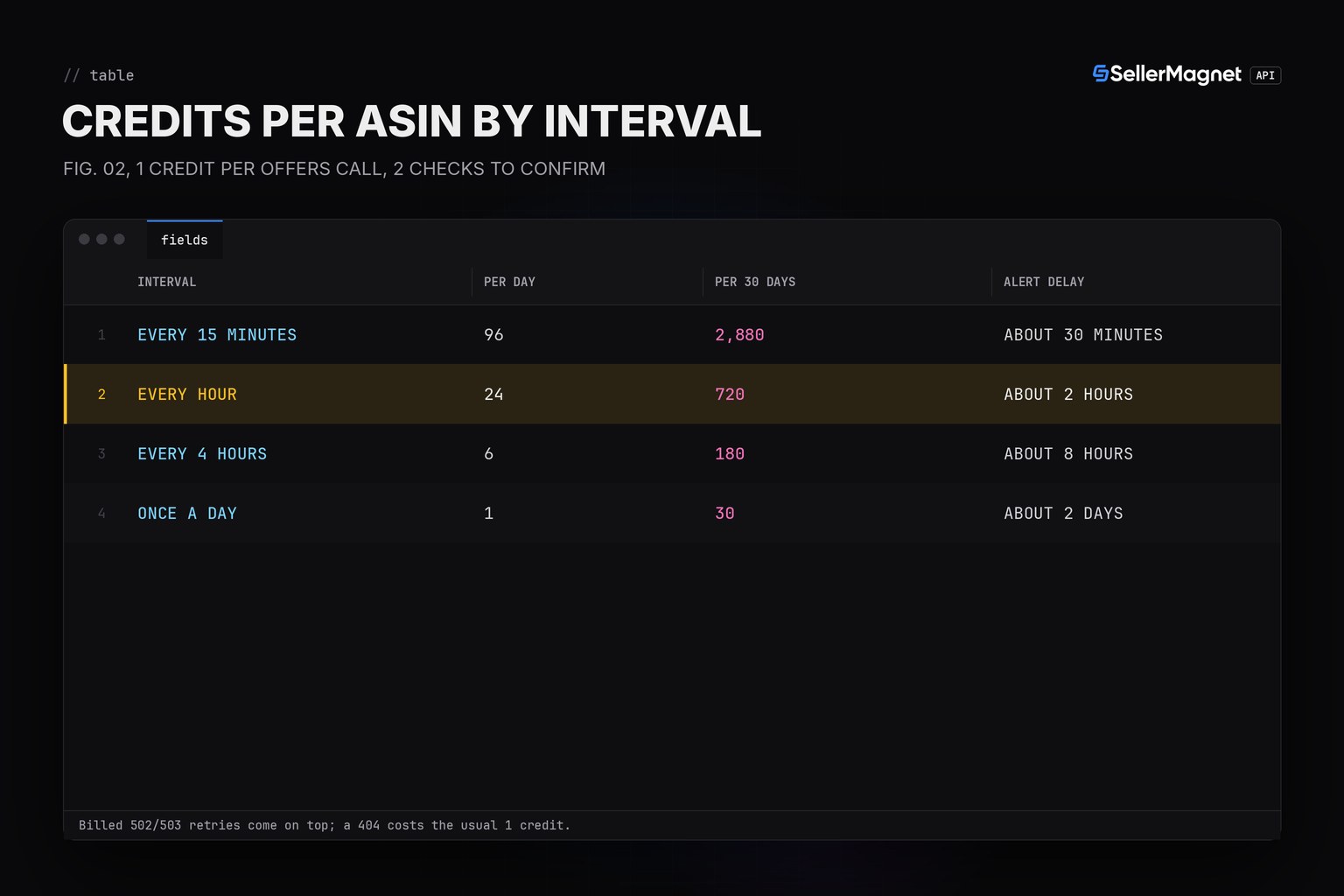
One offers call per ASIN per check, so the SellerMagnet cost is the number of ASINs times the number of checks; posting to Flock is free on Flock's side at this volume. With a 2-check confirmation the worst-case delay before Flock hears about a loss is about two intervals. Errors add to the SellerMagnet bill in different ways: a 404 is billed once and not retried, a 502 or 503 is billed on every attempt, a 500 is refunded, and the free gate errors (400 for a missing parameter, 401, 403) cost nothing. The Buy Box monitoring interval guide compares intervals in more detail, and Pricing lists the plans.
| Check interval | Credits per day | Credits per 30 days | Worst-case alert delay |
|---|---|---|---|
| Every 15 minutes | 96 | 2,880 | about 30 minutes |
| Every hour | 24 | 720 | about 2 hours |
| Every 4 hours | 6 | 180 | about 8 hours |
| Once a day | 1 | 30 | about 2 days |
Frequently Asked Questions
What does Flock send back when a webhook POST succeeds?
Nothing you can check. Flock's own support article (Incoming webhooks, support.flock.com, checked 2026-11-26) shows only the request format - a JSON body with a "text" or "flockml" key - and never shows a response body for success or failure at all. Every other channel in this series gives the script something to check (Telegram's ok, Gotify's echoed id, DingTalk's errcode); Flock gives nothing, so this script can only treat a 2xx status code as "the webhook accepted the POST", never as proof a message appeared in the channel.
Why does the script only ever send a "text" key?
Flock's own docs warn that a JSON payload using any other keys "is not parsed, and hence...no message is generated" - and the webhook still answers success. A signup event sent as {"product": ..., "customer": ...} is silently discarded unless you add a template to rewrite it. The script never risks that: it always wraps the alert text under the "text" key, the one format Flock's docs confirm gets parsed without extra setup.
Does a bad or deleted webhook URL get retried?
No. Flock's own docs describe no error responses at all, so this script leans on third-party integration reports (not Flock's docs) that a deleted or invalid webhook answers 403/404. Either way a non-2xx here is a setup problem, not a transient one, so the script logs it and leaves the alert queued for the next run instead of retrying the same broken URL.
Why does the script wait for a second check before posting?
An offer page can come back without parsable offers, which looks like a stock-out. Waiting for the same reading on two checks in a row filters one-off readings at the cost of one interval.
What happens when my SellerMagnet credits run out?
The API answers 401 (or 403 during a burst), which is not billed. The script stops instead of calling the remaining ASINs, sends one STOP message and does not repeat it until a run gets through without a 401 or 403.
Bottom line: compare buyBox.sellerId with your own seller ID, keep a streak per ASIN, and send one Flock webhook POST per run with only a "text" key - and remember a 2xx confirms the webhook accepted the call, never that a message actually reached the channel. To see who held the Buy Box and for how long after the fact, use the Buy Box history API; a free account includes 150 credits to try the alert.