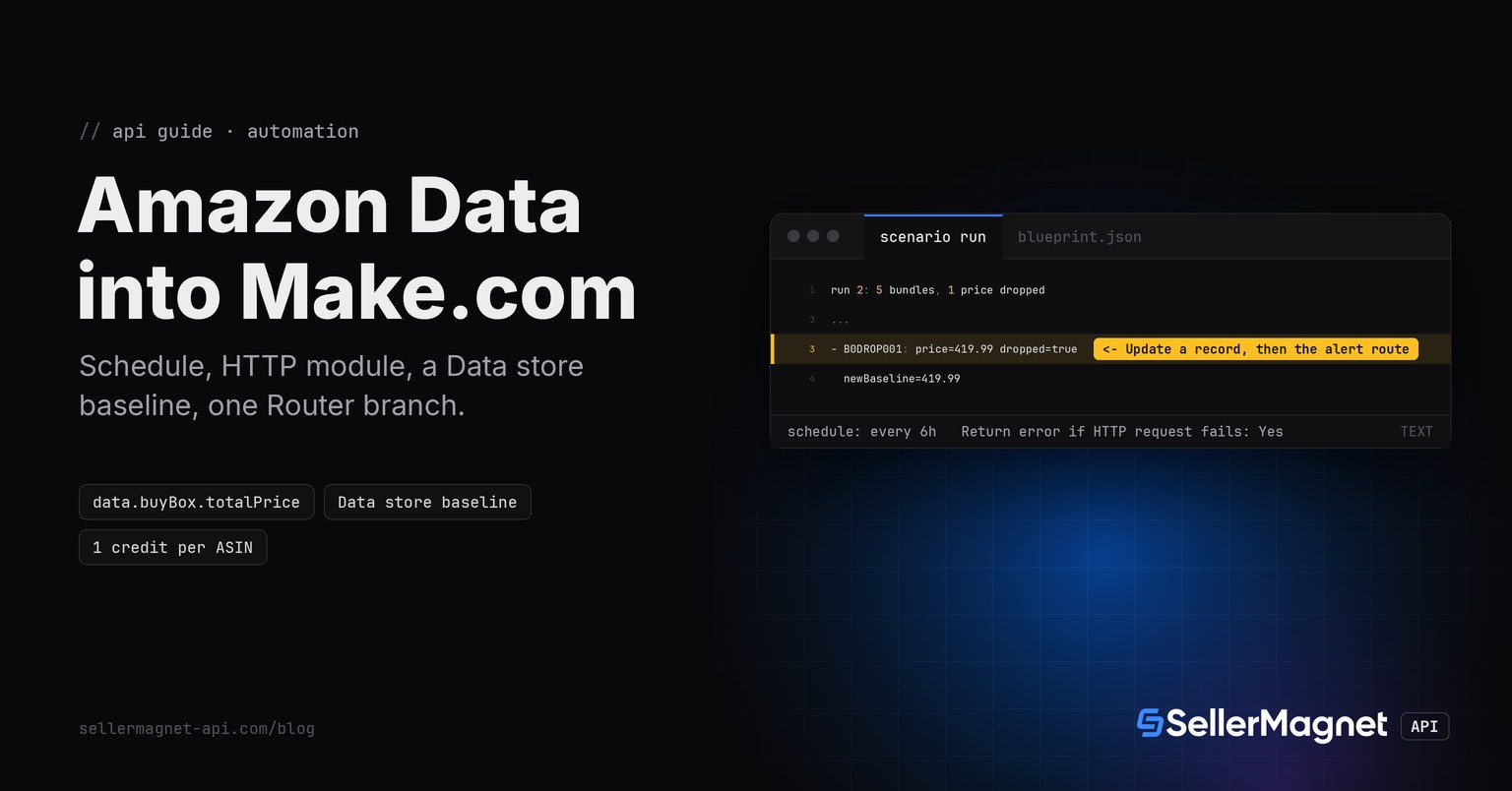
Make.com (the automation platform formerly called Integromat) reaches the SellerMagnet API with its built-in HTTP module, no custom backend and no self-hosted instance to run. A Schedule trigger fires the scenario on an interval, the HTTP module calls /amazon-product-offers once per tracked ASIN, a Data store module reads the last known price for that ASIN, a Router splits the run into a drop branch and a no-drop branch, and a second Data store module writes the new baseline back. The scenario below is a real blueprint (Make's export/import format), and the comparison logic inside its Router filters is ported to Python and run standalone further down, the same way the logic behind every webhook or Code node in this series is proven before it ships.
Key Takeaways
- The HTTP module sends
X-Api-Keyas a header, built from a Make connection, never pasted into the URL. Return error if HTTP request failsmust be Yes, or a 4xx/5xx response (a billed 404, a free 429) passes through as an ordinary successful bundle and no error route, Router branch or error handler ever sees it, the opposite default problem from n8n's HTTP Request node (which needs Never Error ON to avoid stopping; Make's HTTP module needs this setting ON to avoid silently swallowing the error).- State lives in a Make Data store, read with Get a record and written with Update a record (Insert missing record on), keyed by ASIN; it is not a scenario variable (
util:SetVariable2only lasts for one execution) and not a spreadsheet row looked up by formula. - The HTTP module's own timeout defaults to 40 seconds and only goes up to 300; SellerMagnet's documented scrape allowance is up to about 120 seconds, so the module's Timeout field has to be raised past the default before a slow lookup is mistaken for a failure.
- Make's own Retry error handler does not know which SellerMagnet status codes are billed; a Router filter on the HTTP module's status code, not a blanket Retry, decides whether to resend a call (free 429/401/403/gate-400; a bare 500 without a Retry-After header is refunded every time, no counter or time limit) or leave it alone (billed 404, exhausted 502/503).
How does Make.com authenticate to the API?
Add the HTTP module, Make a request, and under Headers add one entry: name X-Api-Key, value the SellerMagnet API key. Make stores module parameters in plain text inside an exported blueprint, so the recommended setup wraps the key in a keychain-backed HTTP connection (Add, create a connection) instead of typing it directly into the Headers field; the connection's stored value never appears in a shared or exported blueprint, only a reference to the connection by name does.
The scenario, exported as a blueprint
Six modules: Schedule, HTTP (Make a request), Data store (Get a record), Router, Data store (Update a record) on the drop branch, and a webhook/email/Slack module on the same branch. Import this JSON (Scenario menu, Import Blueprint), attach an HTTP connection carrying the API key header, point the Data store modules at your own store, and it runs as is.
The scenario blueprint, Make's own export/import format for a 6-module scenario
{
  "name": "Amazon Buy Box price watch (SellerMagnet)",
  "flow": [
    {
      "id": 1,
      "module": "util:Scheduler",
      "version": 1,
      "parameters": {},
      "mapper": {
        "type": "interval",
        "interval": 360
      },
      "metadata": {
        "designer": {"x": 0, "y": 0},
        "restore": {}
      }
    },
    {
      "id": 2,
      "module": "http:ActionSendData",
      "version": 3,
      "parameters": {
        "handleErrors": true,
        "useNewZLibDeCompress": true
      },
      "mapper": {
        "url": "https://sellermagnet-api.com/api/amazon-product-offers",
        "method": "get",
        "headers": [
          {"name": "X-Api-Key", "value": "{{connection.apiKey}}"}
        ],
        "qs": [
          {"name": "asin", "value": "{{1.asin}}"},
          {"name": "marketplaceId", "value": "ATVPDKIKX0DER"}
        ],
        "timeout": "120",
        "bodyType": "raw",
        "parseResponse": true,
        "followRedirect": true,
        "rejectUnauthorized": true
      },
      "metadata": {
        "designer": {"x": 300, "y": 0},
        "restore": {
          "expect": {
            "handleErrors": {"label": "Return error if HTTP request fails: Yes"}
          }
        }
      }
    },
    {
      "id": 3,
      "module": "datastore:ActionGet",
      "version": 1,
      "parameters": {
        "datastore": 100001
      },
      "mapper": {
        "key": "{{1.asin}}"
      },
      "metadata": {
        "designer": {"x": 600, "y": 0}
      }
    },
    {
      "id": 4,
      "module": "builtin:BasicRouter",
      "version": 1,
      "mapper": null,
      "metadata": {
        "designer": {"x": 900, "y": 0}
      },
      "routes": [
        {
          "flow": [
            {
              "id": 5,
              "module": "datastore:ActionAddUpdate",
              "version": 1,
              "parameters": {
                "datastore": 100001
              },
              "mapper": {
                "key": "{{1.asin}}",
                "baseline": "{{round(2.data.buyBox.totalPrice; 2)}}"
              },
              "metadata": {
                "designer": {"x": 1200, "y": -80}
              },
              "filter": {
                "name": "Price dropped",
                "conditions": [
                  [
                    {"a": "{{2.data.success}}", "o": "text:equal", "b": "true"},
                    {"a": "{{2.data.buyBox}}", "o": "exist"},
                    {"a": "{{3.data.baseline}}", "o": "exist"},
                    {"a": "{{round(2.data.buyBox.totalPrice; 2)}}", "o": "number:less", "b": "{{round(ifempty(3.data.baseline; 999999999); 2)}}"}
                  ]
                ]
              }
            },
            {
              "id": 6,
              "module": "gateway:CustomWebHook",
              "version": 1,
              "parameters": {},
              "mapper": {
                "hook": 200001,
                "data": "{\"asin\": \"{{1.asin}}\", \"newPrice\": {{round(2.data.buyBox.totalPrice; 2)}}, \"previousPrice\": {{3.data.baseline}}}"
              },
              "metadata": {
                "designer": {"x": 1500, "y": -80}
              }
            }
          ]
        },
        {
          "flow": [
            {
              "id": 7,
              "module": "datastore:ActionAddUpdate",
              "version": 1,
              "parameters": {
                "datastore": 100001
              },
              "mapper": {
                "key": "{{1.asin}}",
                "baseline": "{{round(2.data.buyBox.totalPrice; 2)}}"
              },
              "metadata": {
                "designer": {"x": 1200, "y": 80}
              },
              "filter": {
                "name": "No drop (default route)",
                "conditions": []
              }
            }
          ]
        }
      ]
    }
  ],
  "metadata": {
    "instant": false,
    "version": 1,
    "scenario": {
      "roundtrips": 1,
      "maxErrors": 3,
      "autoCommit": true,
      "autoCommitTriggerLast": true,
      "sequential": false,
      "confidential": false,
      "dataloss": false,
      "dlq": false,
      "freshVariables": false
    },
    "designer": {
      "orphans": []
    },
    "zone": "eu1.make.com"
  }
}
Why does the HTTP module need Return error if HTTP request fails set to Yes?
By default Make's HTTP module treats any response, including a 4xx or 5xx one, as a normal bundle: the module output just contains a statusCode field and the body, and the scenario keeps running as if the call had succeeded. Turning Return error if HTTP request fails to Yes is what makes Make raise an actual error on a 4xx/5xx response, which is the only way an error handler route (Ignore/Skip, Break/Retry, Commit, Resume, Rollback, depending on which UI version is showing) or a downstream Router filter on the error ever fires at all. Left off, a billed 404 on a delisted ASIN looks exactly like a successful lookup to the rest of the scenario.
| Module | Does | Cost |
|---|---|---|
| Schedule | Fires the scenario on an interval | free |
| HTTP - Make a request | Calls /amazon-product-offers, one call per ASIN | 1 credit per ASIN |
| Data store - Get a record | Reads the stored baseline for that ASIN | free |
| Router | Splits into a drop branch and a no-drop branch | free |
| Data store - Update a record | Writes the new baseline, insert if missing | free |
| Webhooks / Email / Slack | Runs on the drop branch only | free |
How do I compare today's price with yesterday's?
With a Data store: Get a record (keyed by ASIN) before the Router, Update a record (Insert missing record on, so the very first run creates the row instead of erroring) after it. A Make Data store record survives between scenario runs on its own, no scenario variable or extra app needed; the Router's two filters read the HTTP module's data.buyBox.totalPrice field against the Data store module's baseline field directly as Make formulas, rounded to avoid floating-point noise from an unrounded landed price (item + shipping) comparing unequal to an already-rounded stored baseline.
The two Router filter conditions, written as Make formulas (no code module needed for this scenario)
Route 1, "Price dropped":
  {{2.data.success}} = true
  AND {{2.data.buyBox}} is not empty
  AND {{3.data.baseline}} is not empty
  AND round(2.data.buyBox.totalPrice; 2) < round(ifempty(3.data.baseline; 999999999); 2)

Route 2, "No drop (default)":
  (none; this is the Router's fallback route, taken whenever Route 1's filter does not match,
  including a delisted ASIN's billed 404, a "N/A" Buy Box with no featured offer, or no
  stored baseline yet, i.e. this ASIN's very first cycle)
The same decision, ported to Python and run standalone before it went into the two Router filters above, to prove the logic once outside the scenario builder's own test-run UI.
Router filter logic ported to Python and run standalone on 5 cases (illustrative data, matches the scenario run below)
"""Logic behind the two Router filters, tested standalone before it went into the scenario."""


def compare(api_ok, buy_box, baseline):
    # buy_box is data.buyBox from /amazon-product-offers: {} (falsy-looking,
    # still truthy in Python/JS) when nobody holds the Buy Box right now.
    price = None
    if api_ok:
        raw = buy_box.get("totalPrice") if buy_box else None
        price = round(raw, 2) if isinstance(raw, (int, float)) else None
    dropped = api_ok and price is not None and baseline is not None and price < baseline
    new_baseline = price if price is not None else baseline
    return {"priceDropped": dropped, "newBaseline": new_baseline}


if __name__ == "__main__":
    print("cycle 1, B0BASE001, no stored baseline yet:", compare(True, {"totalPrice": 444.99}, baseline=None))
    print("cycle 2, B0DROP001, real price drop:", compare(True, {"totalPrice": 419.99}, baseline=444.99))
    print("cycle 2, B0NOISE001, float-noise price, rounds to the stored baseline:",
          compare(True, {"totalPrice": 15.02 + 3.99}, baseline=19.01))
    print("cycle 1/2, B0NOBB001, nobody holds the Buy Box:", compare(True, {}, baseline=None))
    print("cycle 1/2, B0GONE001, delisted ASIN, billed 404, success:false:", compare(False, None, baseline=None))
Python port output
cycle 1, B0BASE001, no stored baseline yet: {'priceDropped': False, 'newBaseline': 444.99}
cycle 2, B0DROP001, real price drop: {'priceDropped': True, 'newBaseline': 419.99}
cycle 2, B0NOISE001, float-noise price, rounds to the stored baseline: {'priceDropped': False, 'newBaseline': 19.01}
cycle 1/2, B0NOBB001, nobody holds the Buy Box: {'priceDropped': False, 'newBaseline': None}
cycle 1/2, B0GONE001, delisted ASIN, billed 404, success:false: {'priceDropped': False, 'newBaseline': None}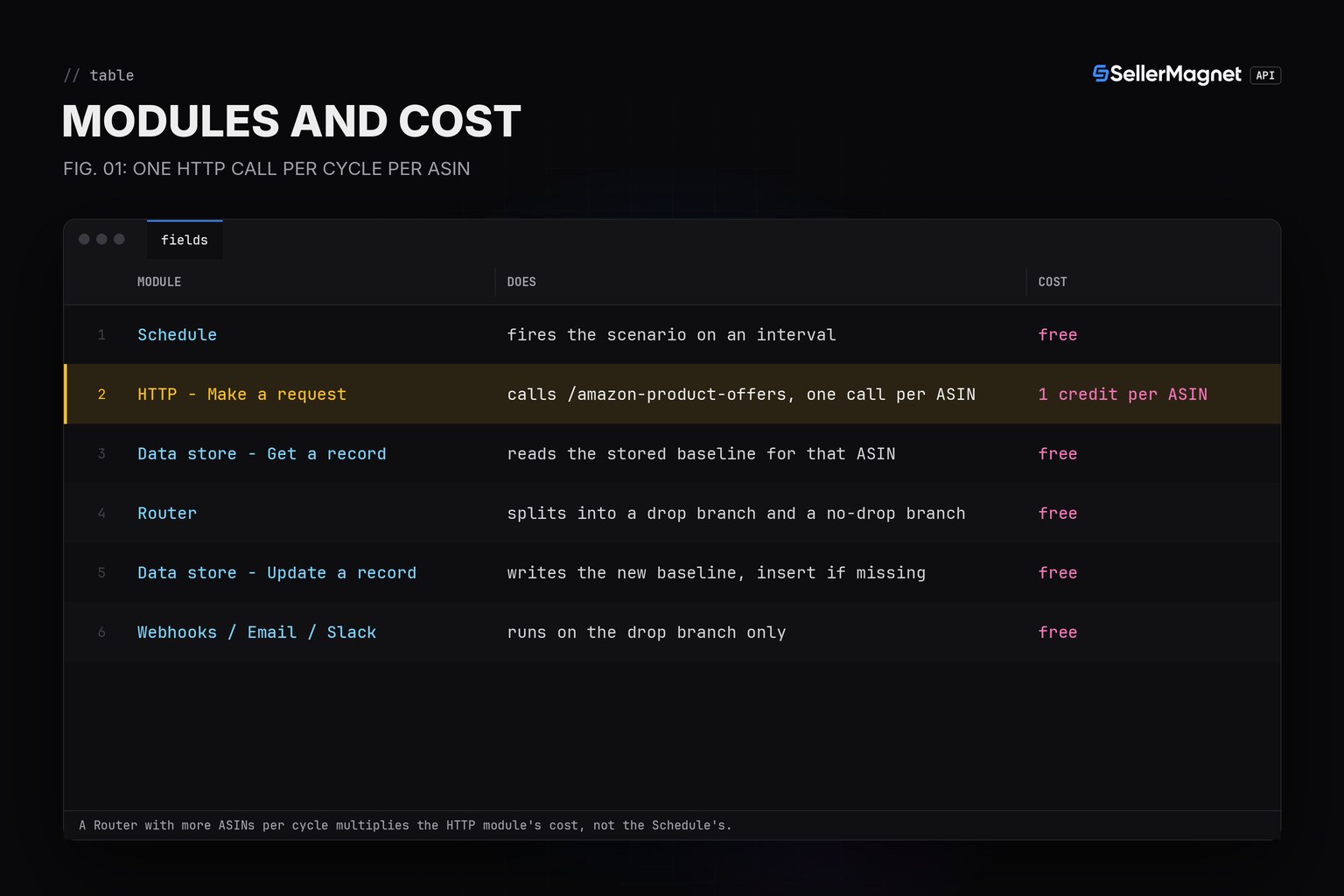
A free plan cannot schedule tighter than 15 minutes
The Schedule module's minimum interval depends on the Make plan: the Free plan's floor is 15 minutes between runs; paid Core/Pro/Teams plans allow down to 1 minute. Below the plan's floor the Schedule settings panel will not accept the value, not a billing-side rejection from SellerMagnet.
What happens on a rate limit or a server error?
Make's own Retry error handler resends a failed module up to a set number of attempts (3 by default, 15 minutes apart) and, with Store incomplete executions on, Make automatically retries a ConnectionError (502/503/504), a RateLimitError (429) or a ModuleTimeoutError without a Retry handler at all. None of that is billing-aware: it does not know that SellerMagnet already refunds a bare 500 once, or that a 404 stays billed on every attempt. A Router filter checking the HTTP module's own status code, placed before any retry decision, keeps the scenario from blindly resending a billed 404 or stopping on a free 429 that only needed to wait out its Retry-After header; the 5xx retry logic reference has the full billing table this scenario follows.
How often should the schedule run?
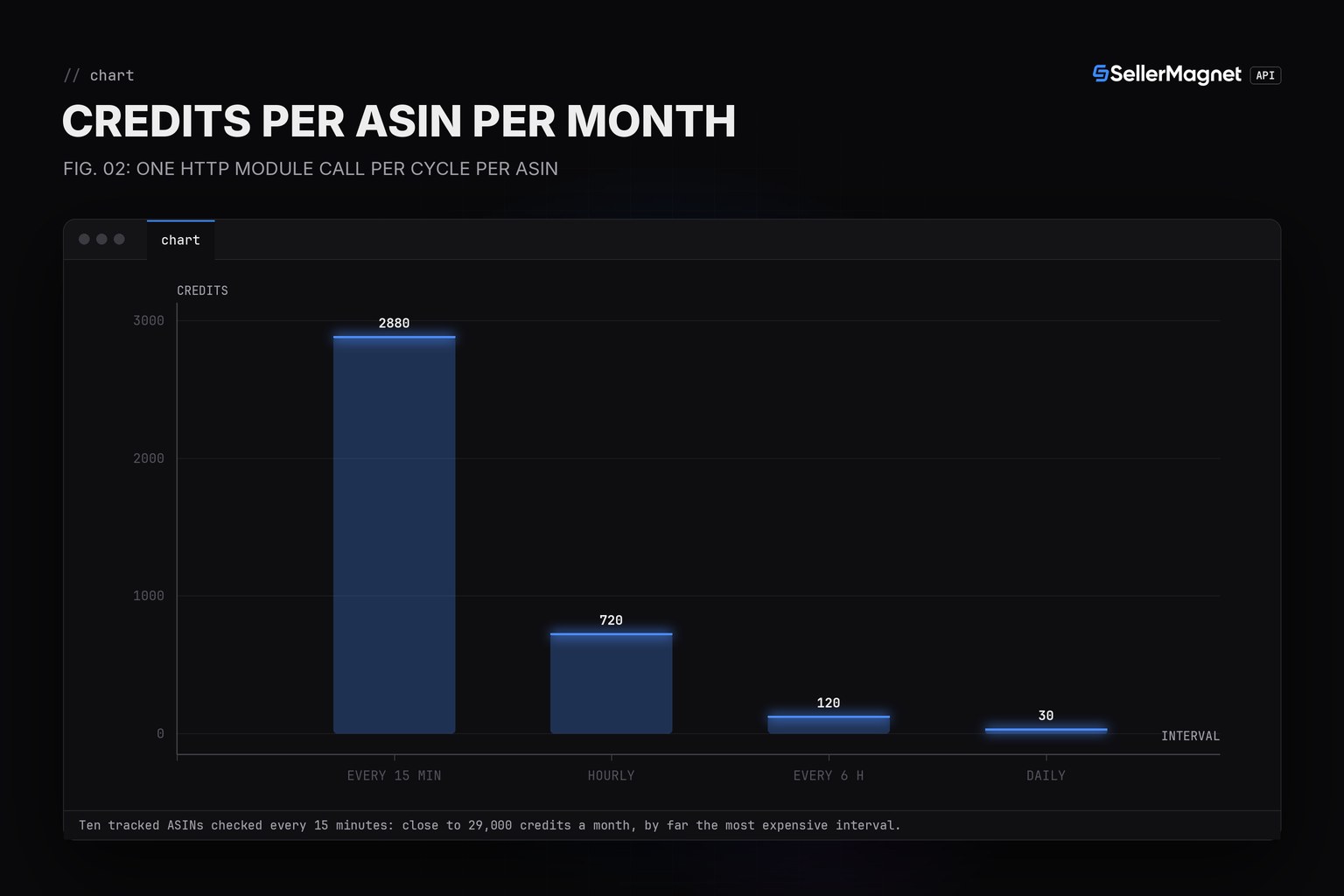
Each cycle is one HTTP module call per tracked ASIN; every six hours costs about 120 credits per ASIN a month and catches any Buy Box change within six hours, daily checks cost 30. The Buy Box polling interval guide has the full interval-versus-cost table for a single account watching many ASINs, and the n8n build shows the identical Schedule, call, compare, alert shape on a self-hosted automation tool instead of a cloud-only one.
Frequently Asked Questions
Do I need to write any code to use the SellerMagnet API in Make.com?
None. The HTTP module calls the API directly, the Router's filters are built from Make's own formula fields, not a scripting language, and the Data store modules need no query language.
Where does the API key go?
Into an HTTP connection's stored header, created once and attached to the HTTP module; never typed into the URL or the module's visible parameters if the blueprint is ever shared.
What happens when the cycle checks a delisted ASIN?
With Return error if HTTP request fails set to Yes, the billed 404 raises an error on the HTTP module; a Router filter or error handler route can read the status code and skip that ASIN instead of stopping the whole cycle.
Why a Data store instead of a scenario variable or a spreadsheet?
A util:SetVariable2 variable only lasts for the one execution that set it; nothing it writes is there on the next cycle. A Data store record, read by key, survives between cycles on its own, no extra app connection needed.
Can I post the alert to Slack instead of a generic webhook?
Yes, swap the final module on the drop branch for a Slack action; the Data store read, Router filter and Data store write before it do not change.
Bottom line: one HTTP module, one connection carrying the API key, a Data store for state and a Router with two formula filters turn Make.com into an Amazon price and Buy Box watcher with zero custom backend and zero self-hosted infrastructure, provided the one easy-to-miss HTTP module setting, Return error if HTTP request fails, is switched on first. Every field the module reads is on the product offers page.