
To cache Amazon API responses, store each successful answer under a key built from the endpoint and its parameters, and reuse it until a TTL that matches how fast that data changes: minutes for live offers, hours for product pages, a day for price history. Every SellerMagnet call costs one credit, even an identical repeat, and the API sends no cache headers - so the cache has to live in your code.
Key Takeaways
- Every request costs one credit, including an identical repeat seconds later; the API keeps no response cache of its own.
- Responses carry no Cache-Control, ETag or Last-Modified header, so set the TTL yourself, per endpoint.
- Build the cache key from the endpoint and the sorted parameters, including marketplaceId and geo_location, never from the API key.
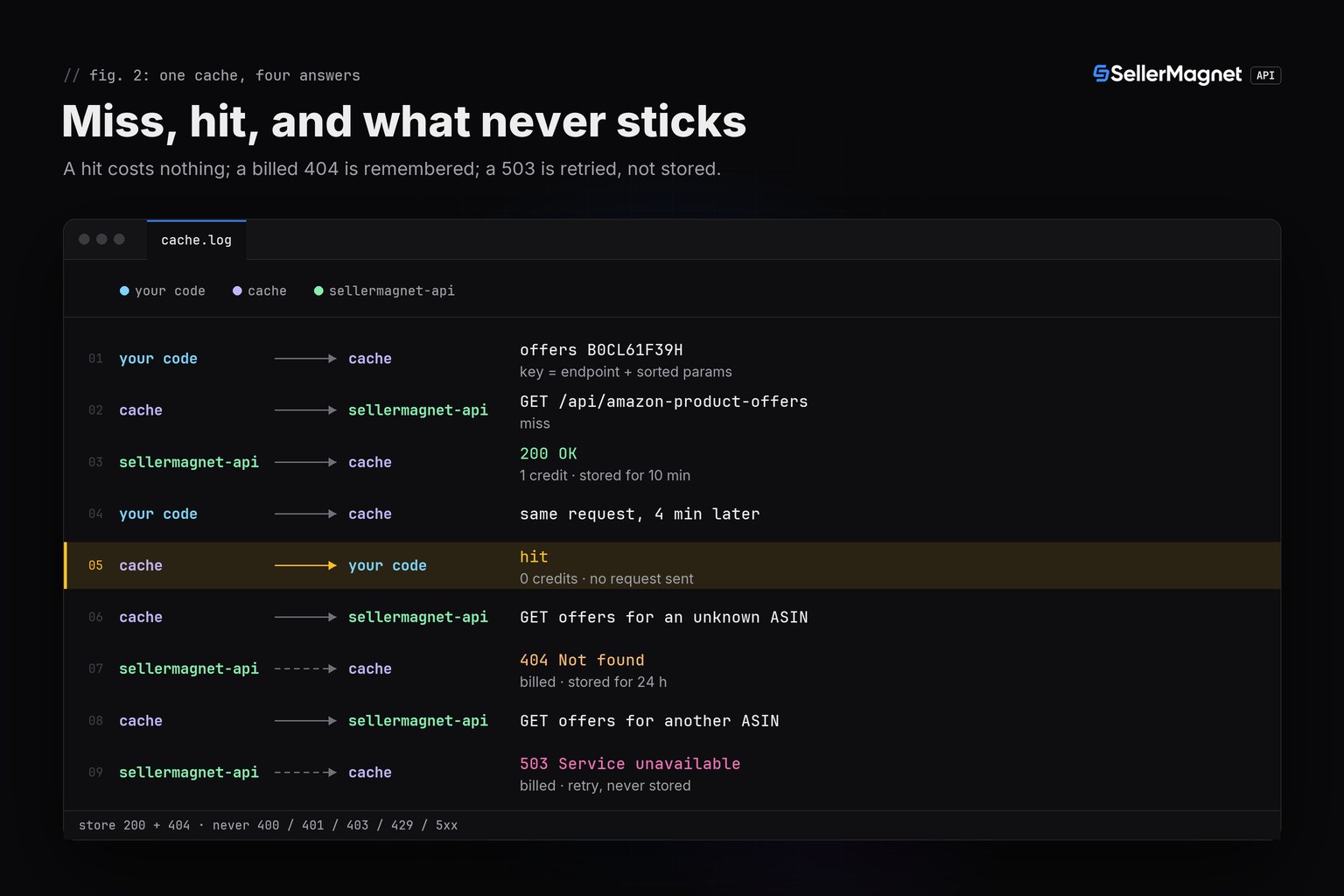
- Keep billed 404s for about a day so a missing ASIN is not paid for again; never cache 429, 5xx, 401 or 403 answers.
- Share one in-flight request between concurrent callers, so ten callers asking for the same ASIN pay one credit.
Why cache Amazon API responses?
Because each call costs one credit whether or not the data changed since your last call. The API fetches every request fresh and bills it before the fetch, and its responses carry no Cache-Control, ETag or Last-Modified header (as of October 2026), so HTTP caches and conditional requests have nothing to work with. A cache also makes reads instant: a live fetch can take up to 120 seconds.
The savings scale with how often the same question is asked. Take a dashboard that shows 200 ASINs to 10 users who each open it 6 times a day: uncached, that is 200 x 10 x 6 = 12,000 lookups, or 12,000 credits a day. With a 6-hour TTL each ASIN is fetched at most 4 times a day - 800 credits, 93 % less. Credit prices per plan are on the pricing page.
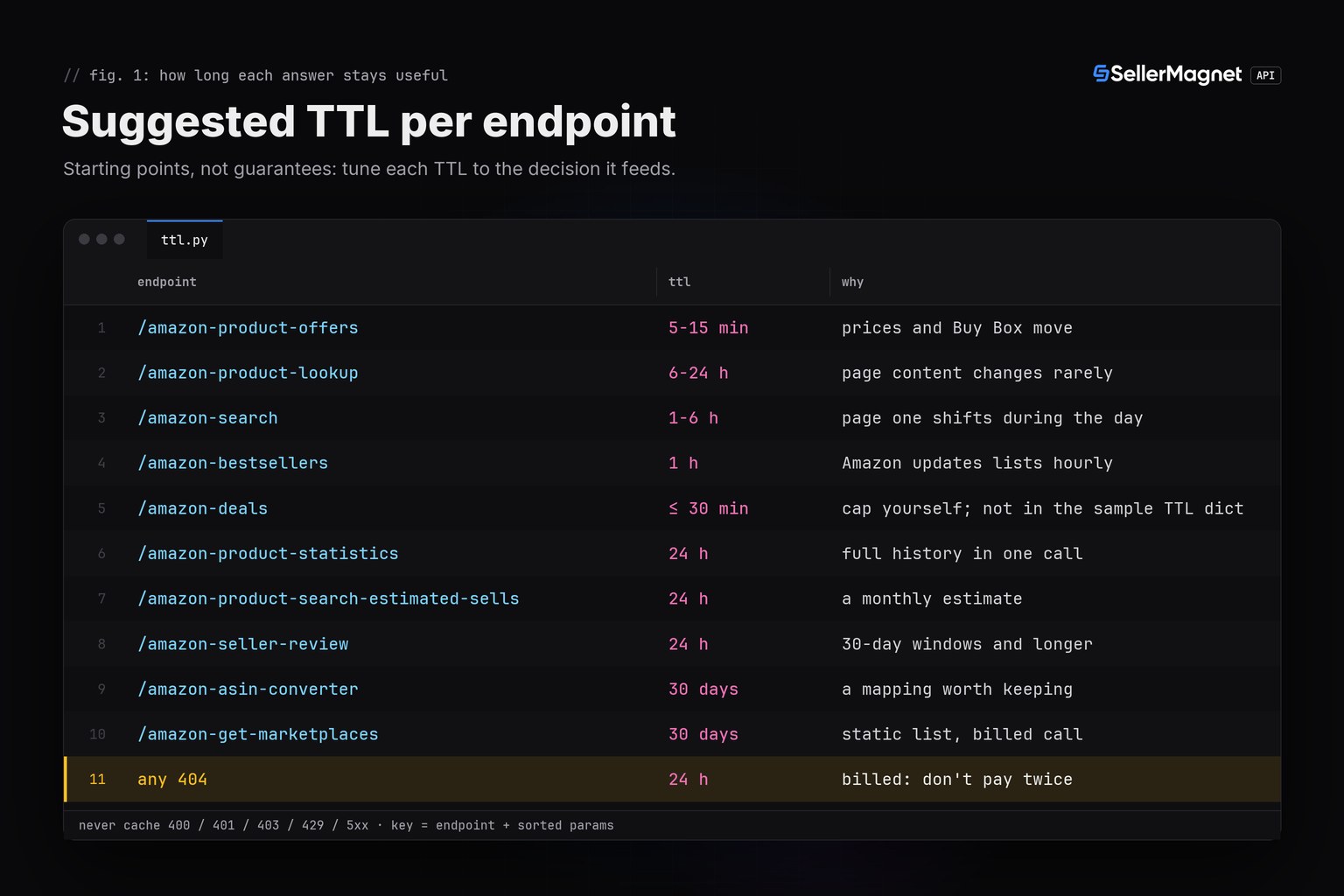
How long should you cache each endpoint?
As long as the data stays good enough for the decision it feeds: live offers for minutes, product pages for hours, history and barcode mappings for days. The TTLs below are starting points, not promises about when Amazon changes anything - the one exception is bestsellers, because Amazon updates its Best Sellers lists hourly. For repricing, the offers TTL must not exceed your polling interval; the Buy Box monitoring guide covers how often to poll.
| Endpoint | What it returns | Suggested TTL | Why |
|---|---|---|---|
/amazon-product-offers | Live offer page: sellers, prices, Buy Box | 5-15 minutes | Prices and the Buy Box can change at any time |
/amazon-product-lookup | Live product page: title, bullets, images, rank | 6-24 hours | Content changes rarely; take prices from offers |
/amazon-search | Page one for a keyword | 1-6 hours | Positions shift; the key must include count and geo_location |
/amazon-bestsellers | Ranked list of a category | 1 hour | Amazon updates Best Sellers lists hourly |
/amazon-deals | Current deals with dealEndTime | ≤ 30 minutes, capped by you | dealEndTime lets you expire a cached deal early - not shown in the code sample above; add it yourself if you cache deals |
/amazon-product-statistics | Full recorded history in one call | 24 hours | A day-old history is still the history |
/amazon-product-search-estimated-sells | Monthly unit estimate | 24 hours | A monthly figure |
/amazon-seller-review | Feedback counts for 30 days to lifetime | 24 hours | The shortest window is 30 days |
/amazon-asin-converter | Barcode to ASIN and back | 30 days | A mapping you looked up is worth keeping |
/amazon-get-marketplaces | The 23 supported marketplaces | 30 days, or ship it as config | Static, but every call is billed |
Any 404 | Not found | 24 hours | Billed with no refund: do not pay twice |
Cache API responses in Python with SQLite
This cache keeps answers in a local SQLite file, so they survive restarts and can be shared by cron jobs on one machine. It wraps get() and ApiError from the Python quickstart, which reads the key from SELLERMAGNET_API_KEY and sends it in the X-Api-Key header - so the key never ends up in a cache key.
cache.py - SQLite cache with a TTL per endpoint and remembered 404s
"""SQLite cache for SellerMagnet API answers: one credit per key per TTL, not per call."""
import json
import sqlite3
import time

from sellermagnet import ApiError, get

TTL = {  # seconds; starting points, tune per use case
    "amazon-product-offers": 10 * 60,
    "amazon-product-lookup": 12 * 3600,
    "amazon-bestsellers": 3600,
    "amazon-product-statistics": 24 * 3600,
    "amazon-asin-converter": 30 * 86400,
}
NOT_FOUND_TTL = 24 * 3600  # a 404 is billed: remember it

db = sqlite3.connect("api_cache.sqlite")
db.execute("CREATE TABLE IF NOT EXISTS cache (key TEXT PRIMARY KEY, status INT, body TEXT, expires REAL)")


def _store(key: str, status: int, body: str, ttl: float) -> None:
    db.execute("INSERT OR REPLACE INTO cache VALUES (?, ?, ?, ?)", (key, status, body, time.time() + ttl))
    db.commit()


def cached_get(session, endpoint: str, **params) -> dict:
    key = endpoint + "?" + json.dumps(params, sort_keys=True)  # never the API key
    row = db.execute("SELECT status, body FROM cache WHERE key = ? AND expires > ?",
                     (key, time.time())).fetchone()
    if row and row[0] == 404:
        raise ApiError(404, row[1] + " (cached)")  # 0 credits
    if row:
        return json.loads(row[1])  # 0 credits
    try:
        data = get(session, endpoint, **params)  # 1 credit
    except ApiError as err:
        if err.status == 404:
            _store(key, 404, str(err).split(": ", 1)[-1], NOT_FOUND_TTL)
        raise  # 400, 401, 403, 429 and 5xx are never cached
    _store(key, 200, json.dumps(data), TTL.get(endpoint, 3600))
    return data
Call it like get(): cached_get(new_session(), "amazon-product-lookup", asin="B0CL61F39H", marketplaceId="ATVPDKIKX0DER"). Normalise parameters before they reach the key - strip spaces and upper-case ASINs - or b0cl61f39h and B0CL61F39H become two keys and two credits. For a fleet of workers on several machines, put the same logic in Redis or your database instead of a local file.
Which responses should you never cache?
Never cache an answer that a retry can change: 429, 5xx, 401 and 403 describe a moment or your account, not the product. Cache 200s, and cache 404s for a while, because a 404 is billed and has no refund path. The full retry rules are in the error handling guide.
404(billed): cache it for about a day; the body to store is shown below.400: a missing parameter or unknown marketplace is free, whilecountabove 50 or an invalid category ID is billed - fix the request, do not cache it.429(free): the per-key concurrency cap; waitRetry-After(2 seconds) and retry.500withoutRetry-Afteris refunded;502and503are billed and retryable - keep serving your last good copy while you retry.401and403: a key or credit problem; caching it would hide the fix.
A billed 404 from /amazon-product-offers - worth remembering
{
  "success": false,
  "error": "Not found",
  "message": "Invalid product"
}
One 200 needs care: an offers answer with an empty offers list can be a parsing miss rather than a stock-out. Cache it for a short time only, or confirm it with a second call before you act on it.
Share one request between concurrent callers
A TTL cache alone still pays twice when two callers miss at the same moment: both see no entry and both send the request. Store the in-flight promise instead of the result, and every caller that arrives while the first request runs shares it. This Node.js 18+ version keeps a billed 404 for the TTL and drops every other failure, so the next caller retries. With many ASINs, combine it with the batching from the bulk ASIN lookup guide.
cache.js - in-memory TTL cache with request coalescing (Node.js 18+)
// cache.js - in-memory TTL cache with request coalescing (Node.js 18+)
const API = "https://sellermagnet-api.com/api";
const cache = new Map(); // key -> { expires, promise }

async function fetchJson(endpoint, params) {
  const res = await fetch(`${API}/${endpoint}?${new URLSearchParams(params)}`, {
    headers: { "X-Api-Key": process.env.SELLERMAGNET_API_KEY },
    signal: AbortSignal.timeout(120_000),
  });
  const body = await res.json().catch(() => ({}));
  if (res.ok && body.success) return body.data;
  const err = new Error(`${res.status}: ${body.message || "request failed"}`);
  err.status = res.status;
  throw err;
}

function cachedGet(endpoint, params, ttlMs) {
  const sorted = Object.entries(params).sort();
  const key = `${endpoint}?${new URLSearchParams(sorted)}`;
  const hit = cache.get(key);
  if (hit && hit.expires > Date.now()) return hit.promise; // 0 credits
  const promise = fetchJson(endpoint, params); // 1 credit, shared by every caller
  cache.set(key, { expires: Date.now() + ttlMs, promise });
  promise.catch((err) => {
    if (err.status !== 404) cache.delete(key); // keep only a billed 404
  });
  return promise;
}

// Ten concurrent callers, one paid request
const params = { asin: "B0CL61F39H", marketplaceId: "ATVPDKIKX0DER" };
const calls = Array.from({ length: 10 }, () => cachedGet("amazon-product-offers", params, 10 * 60_000));
Promise.all(calls)
  .then((results) => console.log(`${results[0].offers.length} offers, 1 request`))
  .catch((err) => console.error(err.message));
Frequently Asked Questions
Does the SellerMagnet API cache responses itself?
No. Every request is fetched and billed, even an identical repeat seconds later, and responses carry no Cache-Control or ETag header. Caching is up to your client.
Can I use ETag or If-None-Match to revalidate?
No. The API sends no ETag or Last-Modified header, so there is nothing to revalidate against. Use a time-based TTL per endpoint instead.
How long should I cache offers data?
As long as your decision allows. For repricing, no longer than your polling interval; for a dashboard, 5 to 15 minutes is a sensible start. Each refresh costs one credit.
Should I cache 404 responses?
Yes, for a while. A 404 is billed and has no refund path, so remembering it for about a day stops you paying again for the same missing ASIN.
What belongs in the cache key?
The endpoint and every parameter that changes the answer - asin, marketplaceId, count, geo_location - sorted, so one request always maps to one key. Leave the API key out; send it in the X-Api-Key header.
Bottom line: the API bills every request and sends no cache headers, so a cache in your code is the cheapest optimisation you can make - a TTL per endpoint, 404s remembered, 429 and 5xx never stored, concurrent misses shared. Try it on the 150 credits a free account gets after e-mail verification.


