
To call the Amazon product API in Java, send a GET request with java.net.http.HttpClient to /api/amazon-product-lookup with an ASIN, a marketplace ID and your key in the X-Api-Key header, then decode the JSON into typed records, no third-party library, request signing or associate tag. The Java libraries that come up first wrap Amazon's Product Advertising API, which now refuses calls, see the PA-API alternative guide. This quickstart builds a client, records for lookup and statistics, billing-aware retries and a thread pool for bulk lookups.
Key Takeaways
- The standard library is enough: java.net.http.HttpClient, a small hand-rolled JSON reader and records. HttpClient has been standard since Java 11; records need Java 16 or later.
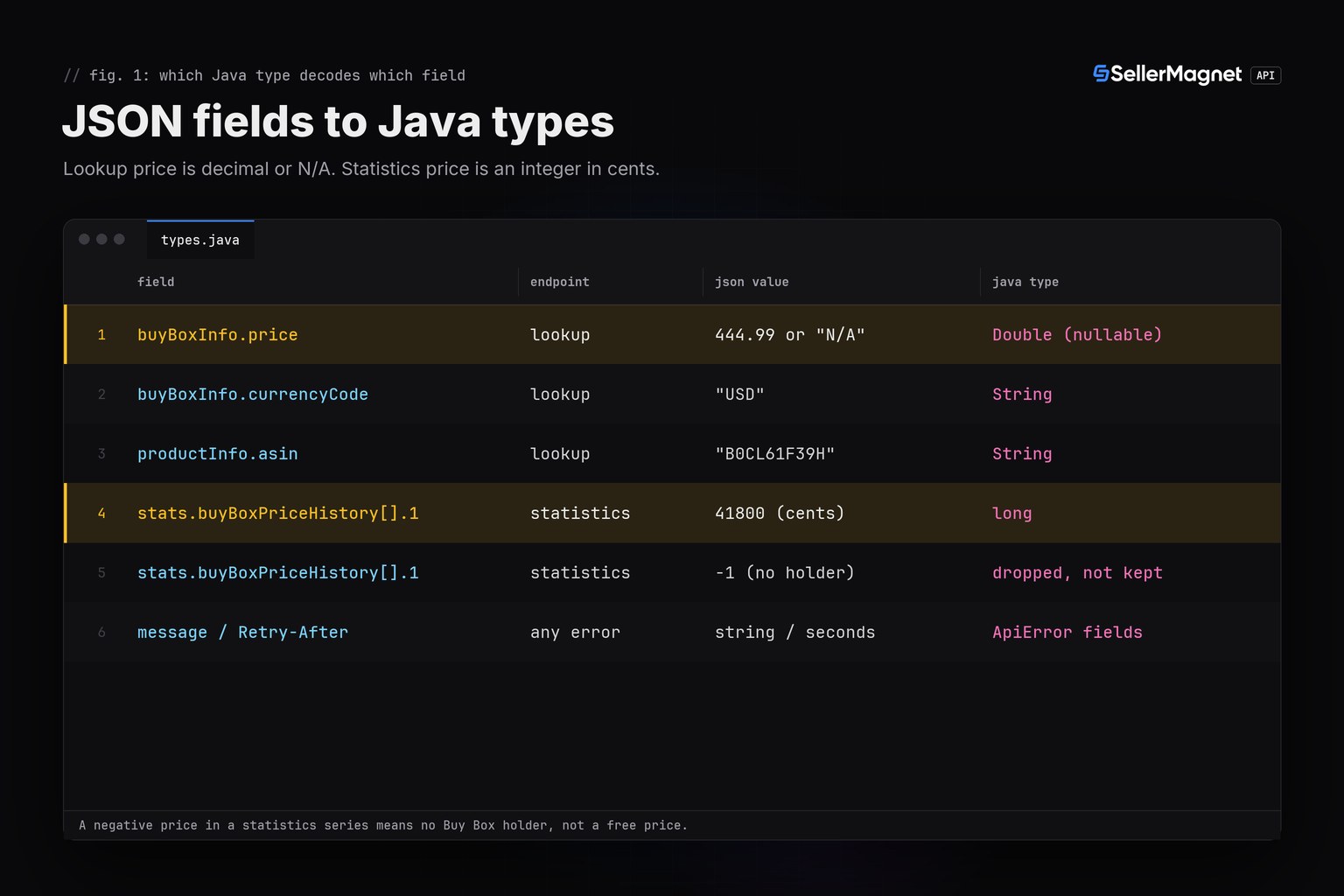
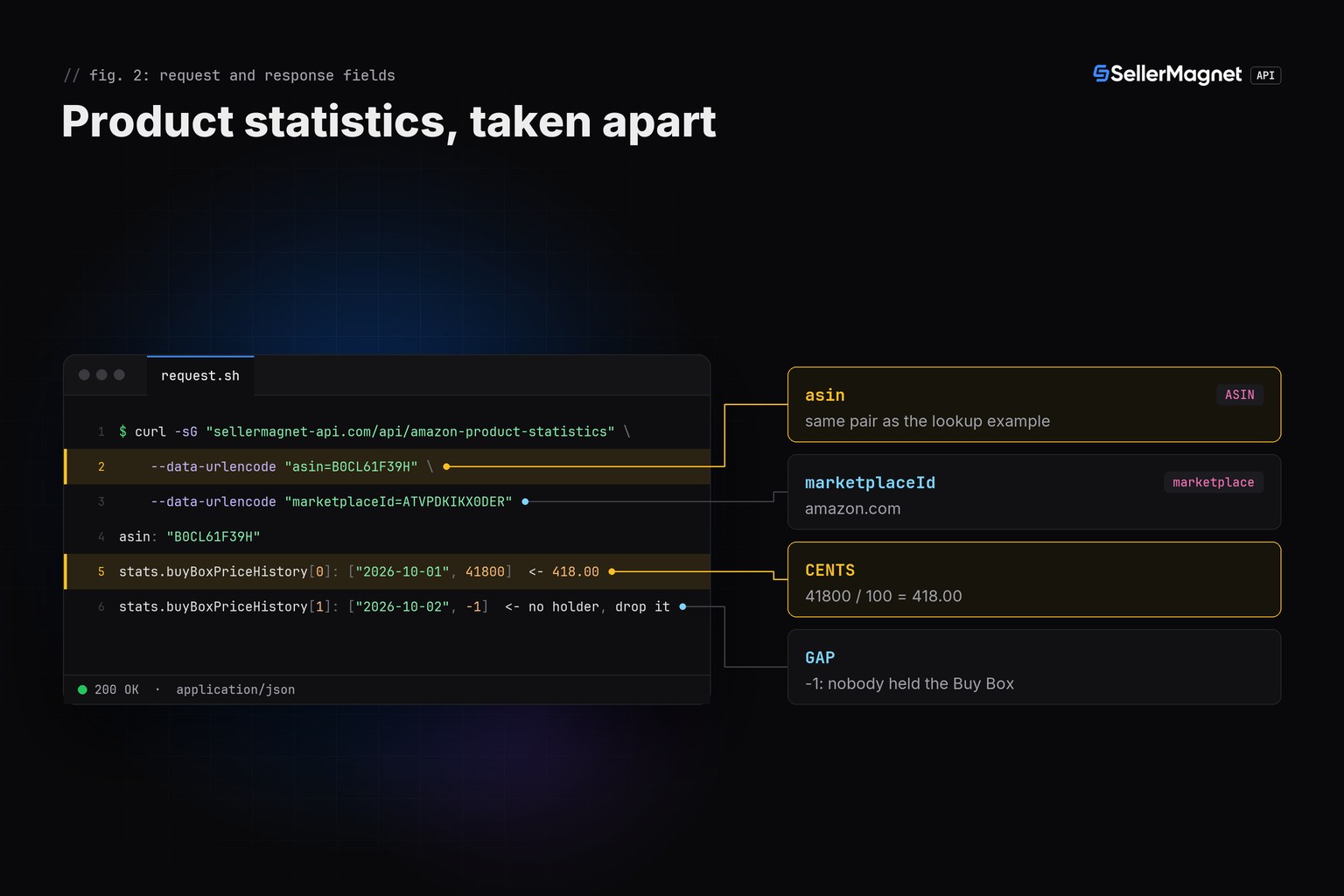
- buyBoxInfo.price on product lookup is a decimal like 444.99, or the string "N/A". buyBoxPrice on product statistics is an integer in CENTS, such as 41800 for 418.00: decode each into its own type.
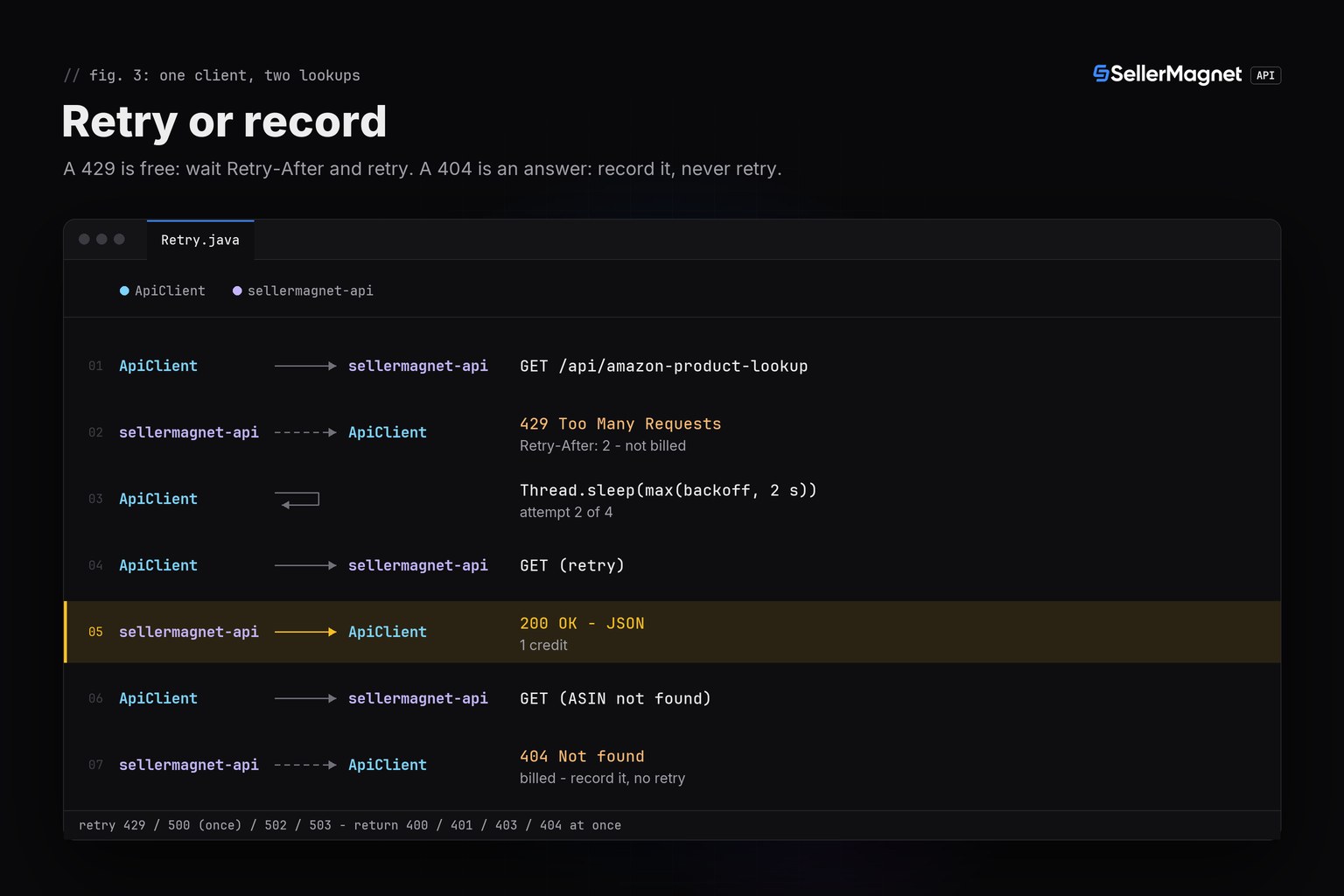
- Retry 429, 500, 502 and 503 only. A 404 means the ASIN was not found, delisted, invalid or not sold on that marketplace; retrying it pays again for the same answer.
- HttpClient's own documentation states that once built, a client is immutable and can be used to send multiple requests: one shared instance is enough for every thread.
- Set the request timeout to 120 seconds; the API allows a request that long, and an abandoned request is still billed.
Prerequisites: Java and an API key
- Java 17 or later (any LTS from 16 onward works) so records compile; HttpClient itself only needs Java 11.
- An API key, a free account includes 150 credits after e-mail verification, one credit per request.
- The key in the
SELLERMAGNET_API_KEYenvironment variable, so it never lands in your repository or a logged URL.
Put the key in the environment and compile with no build tool
javac -version                 # javac 16 or later (records); verified here with Temurin 21
export SELLERMAGNET_API_KEY="your-key-here"
javac Json.java ApiError.java ApiClient.java Lookup.java Statistics.java Retry.java BatchLookup.java TestServer.java Main.java
java Main                      # runs the tested scenarios below, no build tool, no jar
How do I call the Amazon product API in Java?
Build one HttpClient and reuse it. Its own Javadoc states that once built, an HttpClient is immutable and can be used to send multiple requests, so a single shared instance is safe for every thread in the batch runner below. Send the API key in the X-Api-Key header, never as an api_key query parameter, so it never ends up in a proxy's access log. A proxy's own error page is HTML, not JSON, so a failed parse is treated the same as a non-2xx status. Every non-2xx response becomes one exception type, ApiError, carrying the status code, the API's own message and any Retry-After seconds.
ApiError.java - one exception for every non-2xx response
/** One exception for every non-2xx response: status, the API's own message, and any Retry-After. */
final class ApiError extends RuntimeException {
    final int status;
    final int retryAfterSeconds;

    ApiError(int status, String message, int retryAfterSeconds) {
        super(status + ": " + message);
        this.status = status;
        this.retryAfterSeconds = retryAfterSeconds;
    }
}
ApiClient.java - one shared HttpClient, one decode path
import java.net.URI;
import java.net.http.HttpClient;
import java.net.http.HttpRequest;
import java.net.http.HttpResponse;
import java.time.Duration;
import java.util.Map;

/** One shared HttpClient; the base URL is injected so tests point it at a local stub. */
final class ApiClient {
    private final HttpClient http = HttpClient.newBuilder()
            .connectTimeout(Duration.ofSeconds(10))
            .build();
    private final String base;
    private final String apiKey;

    ApiClient(String base, String apiKey) {
        this.base = base;
        this.apiKey = apiKey;
    }

    /** One GET, decoded as {"success":bool,"data":...} or thrown as an ApiError. */
    @SuppressWarnings("unchecked")
    Map<String, Object> get(String endpoint, Map<String, String> params) throws Exception {
        StringBuilder query = new StringBuilder();
        for (Map.Entry<String, String> e : params.entrySet()) {
            if (query.length() > 0) query.append('&');
            query.append(e.getKey()).append('=')
                 .append(java.net.URLEncoder.encode(e.getValue(), "UTF-8"));
        }
        HttpRequest request = HttpRequest.newBuilder()
                .uri(URI.create(base + endpoint + "?" + query))
                .header("X-Api-Key", apiKey) // header only: a query parameter would leak into access logs
                .timeout(Duration.ofSeconds(120)) // the API allows a request this long
                .GET()
                .build();
        HttpResponse<String> response = http.send(request, HttpResponse.BodyHandlers.ofString());

        Object parsed;
        try {
            parsed = Json.parse(response.body());
        } catch (RuntimeException notJson) {
            parsed = null; // a proxy's HTML error page is not JSON
        }
        Map<String, Object> body = (parsed instanceof Map) ? (Map<String, Object>) parsed : Map.of();

        if (response.statusCode() == 200 && Boolean.TRUE.equals(body.get("success"))) {
            return (Map<String, Object>) body.get("data");
        }
        String message = body.get("message") != null ? String.valueOf(body.get("message")) : "request failed";
        int retryAfter = 0;
        var header = response.headers().firstValue("Retry-After");
        if (header.isPresent()) {
            try {
                retryAfter = Integer.parseInt(header.get());
            } catch (NumberFormatException ignored) {
                // non-numeric Retry-After: treat as not specified
            }
        }
        throw new ApiError(response.statusCode(), message, retryAfter);
    }
}
Json.parse is a small recursive-descent reader, about 100 lines, enough for this API's own shape (objects, arrays, strings, numbers, booleans and null). It adds no dependency and no build tool: every sample here compiles with a plain javac.
Json.java - a JSON reader with no dependency
import java.util.*;

/** Minimal recursive-descent JSON reader: enough for the API's own shape, no dependency. */
final class Json {
    private final String s;
    private int i;

    private Json(String s) { this.s = s; }

    static Object parse(String text) {
        Json p = new Json(text);
        p.skipWs();
        Object v = p.readValue();
        p.skipWs();
        return v;
    }

    private Object readValue() {
        char c = s.charAt(i);
        if (c == '{') return readObject();
        if (c == '[') return readArray();
        if (c == '"') return readString();
        if (c == 't' || c == 'f') return readBoolean();
        if (c == 'n') { i += 4; return null; }
        return readNumber();
    }

    private Map<String, Object> readObject() {
        Map<String, Object> map = new LinkedHashMap<>();
        i++; // {
        skipWs();
        if (s.charAt(i) == '}') { i++; return map; }
        while (true) {
            skipWs();
            String key = readString();
            skipWs();
            i++; // :
            skipWs();
            map.put(key, readValue());
            skipWs();
            if (s.charAt(i) == ',') { i++; continue; }
            i++; // }
            break;
        }
        return map;
    }

    private List<Object> readArray() {
        List<Object> list = new ArrayList<>();
        i++; // [
        skipWs();
        if (s.charAt(i) == ']') { i++; return list; }
        while (true) {
            skipWs();
            list.add(readValue());
            skipWs();
            if (s.charAt(i) == ',') { i++; continue; }
            i++; // ]
            break;
        }
        return list;
    }

    private String readString() {
        StringBuilder out = new StringBuilder();
        i++; // opening quote
        while (s.charAt(i) != '"') {
            char c = s.charAt(i);
            if (c == '\\') {
                i++;
                char esc = s.charAt(i);
                switch (esc) {
                    case 'n': out.append('\n'); break;
                    case 't': out.append('\t'); break;
                    case 'r': out.append('\r'); break;
                    case 'u':
                        out.append((char) Integer.parseInt(s.substring(i + 1, i + 5), 16));
                        i += 4;
                        break;
                    default: out.append(esc);
                }
            } else {
                out.append(c);
            }
            i++;
        }
        i++; // closing quote
        return out.toString();
    }

    private Boolean readBoolean() {
        if (s.startsWith("true", i)) { i += 4; return Boolean.TRUE; }
        i += 5;
        return Boolean.FALSE;
    }

    private Double readNumber() {
        int start = i;
        while (i < s.length() && "-+.eE0123456789".indexOf(s.charAt(i)) >= 0) i++;
        return Double.parseDouble(s.substring(start, i));
    }

    private void skipWs() {
        while (i < s.length() && Character.isWhitespace(s.charAt(i))) i++;
    }
}
Why does buyBoxPrice come back as cents instead of dollars?
The two endpoints format the same kind of value differently. Product lookup's productInfo.buyBoxInfo.price is a decimal number in currency units, such as 444.99, or the string "N/A" when no offer is featured. Product statistics' buyBoxPrice and every price series in data.stats are integers in minor units (cents): 41800 means 418.00. A record gives each shape its own type instead of silently coercing one into the other.
Lookup.java - buyBoxInfo.price as a nullable decimal
import java.util.Map;

/**
 * Product lookup: buyBoxInfo.price is a decimal in currency units (444.99), or the
 * string "N/A" when no offer is featured - never a plain double field.
 */
record BuyBoxInfo(Double price, String currencyCode, String sellerId) {
    static BuyBoxInfo fromJson(Map<String, Object> json) {
        Object rawPrice = json.get("price");
        Double price = (rawPrice instanceof Double) ? (Double) rawPrice : null; // "N/A" stays null, not 0.0
        return new BuyBoxInfo(price, (String) json.get("currencyCode"), (String) json.get("sellerId"));
    }
}

record ProductLookup(String asin, String title, String link, BuyBoxInfo buyBoxInfo) {
    @SuppressWarnings("unchecked")
    static ProductLookup fromJson(Map<String, Object> data) {
        Map<String, Object> product = (Map<String, Object>) data.get("productInfo");
        Map<String, Object> buyBox = (Map<String, Object>) product.get("buyBoxInfo");
        return new ProductLookup(
                (String) product.get("asin"),
                (String) product.get("title"),
                (String) product.get("link"),
                BuyBoxInfo.fromJson(buyBox));
    }
}
Trimmed lookup response (documented example: B0CL61F39H on amazon.com)
{
  "success": true,
  "data": {
    "productInfo": {
      "asin": "B0CL61F39H",
      "title": "PlayStation®5 console (slim)",
      "buyBoxInfo": {"price": 444.99, "currencyCode": "USD", "sellerId": "Amazon"},
      "link": "https://www.amazon.com/dp/B0CL61F39H"
    }
  }
}
Statistics returns the full recorded history in one call, with no days parameter. A negative value in a price series means nobody held the Buy Box at that point, it is a gap, not a free price, so Statistics.fromJson drops it instead of charting it as zero.
Statistics.java - buyBoxPrice history in cents, gaps dropped
import java.util.ArrayList;
import java.util.List;
import java.util.Map;

/**
 * Product statistics: buyBoxPrice and every history series are INTEGER CENTS
 * (41800 = 418.00), the opposite of the decimal price on product lookup.
 * A negative value means no Buy Box holder at that point: drop it, don't treat it as free.
 */
record PricePoint(String timestamp, long priceCents) {
    double toDecimal() {
        return priceCents / 100.0;
    }
}

record Statistics(String asin, List<PricePoint> buyBoxPriceHistory) {
    @SuppressWarnings("unchecked")
    static Statistics fromJson(Map<String, Object> data) {
        Map<String, Object> stats = (Map<String, Object>) data.get("stats");
        List<Object> rawHistory = (List<Object>) stats.getOrDefault("buyBoxPriceHistory", List.of());
        List<PricePoint> points = new ArrayList<>();
        for (Object rawPoint : rawHistory) {
            List<Object> pair = (List<Object>) rawPoint;
            String ts = (String) pair.get(0);
            long cents = ((Double) pair.get(1)).longValue();
            if (cents < 0) continue; // no Buy Box holder at that point: not a free price
            points.add(new PricePoint(ts, cents));
        }
        return new Statistics((String) data.get("asin"), points);
    }
}| Field | Endpoint | JSON value | Java type |
|---|---|---|---|
buyBoxInfo.price | lookup | 444.99 or "N/A" | Double (nullable) |
buyBoxInfo.currencyCode | lookup | "USD" | String |
productInfo.asin | lookup | "B0CL61F39H" | String |
stats.buyBoxPriceHistory[].1 | statistics | 41800 (cents) | long |
stats.buyBoxPriceHistory[].1 | statistics | -1 (no holder) | dropped, not kept |
message / Retry-After | any error | string / seconds | ApiError fields |
Which errors should a Java client retry?
Retry only what can succeed on a second try. A 429 from the per-key concurrency cap is free and carries Retry-After: 2. A 500 without a Retry-After header is our internal error and its credit is refunded, so one retry usually costs nothing; a 500 that does carry Retry-After stays charged. 502 and 503 are billed per attempt, so wait at least the Retry-After and cap the attempts. A missing parameter is a free 400, but an endpoint's own 400 is billed, and the two endpoints treat a malformed ASIN differently. Product lookup passes it straight through to the backend with no local format check, so the result depends on what that backend does with it. Product statistics validates the ASIN itself and returns a billed 400 with the message "Invalid product ASIN" when it is malformed, so check the format before sending either request.
| Status | Meaning | Charged | Client action |
|---|---|---|---|
200 | Success | Yes | Decode data |
400 | Bad or missing parameter | Only an endpoint's own 400 | Fix the call |
401 / 403 | Key or credits | No | Stop |
404 | Not found (delisted, invalid or wrong marketplace) | Yes | Record, never retry |
429 | Concurrency cap | No | Wait Retry-After |
500 | Internal error, no Retry-After | No, refunded | Retry once |
502 / 503 | Upstream / breaker | Yes | Wait, then retry |
Retry.java - retries that respect billing
import java.util.Set;
import java.util.concurrent.Callable;

/** Retries only what a second attempt can fix: 429 (free), 500 (refunded, once),
 *  502/503 (billed per attempt). 400, 401, 403 and 404 are answers, not retried. */
final class Retry {
    private static final Set<Integer> RETRYABLE = Set.of(429, 500, 502, 503);

    private Retry() {
    }

    static <T> T withRetry(int attempts, Callable<T> call) throws Exception {
        boolean seen500 = false;
        for (int attempt = 1; ; attempt++) {
            try {
                return call.call();
            } catch (ApiError e) {
                boolean isSecond500 = e.status == 500 && seen500;
                if (!RETRYABLE.contains(e.status) || attempt == attempts || isSecond500) {
                    throw e;
                }
                seen500 = seen500 || e.status == 500;
                long backoffMs = (1L << attempt) * 1000 + (long) (Math.random() * 1000);
                long waitMs = Math.max(backoffMs, e.retryAfterSeconds * 1000L);
                Thread.sleep(waitMs);
            }
        }
    }
}
Run bulk lookups with a fixed thread pool
Submit ASINs to a small ExecutorService and let it drain them. All workers share the one HttpClient; there is no mutable state to guard because each result is its own record. Three to five workers stay well under the per-key concurrency cap, and there is no batch endpoint, one ASIN per request, see the bulk ASIN lookup guide for pacing thousands of products. lookupRow checks the 10-character ASIN shape before it spends a credit, and a failed lookup is recorded on its row instead of failing the whole batch.
BatchLookup.java - a fixed thread pool, one record per ASIN
import java.util.List;
import java.util.Map;
import java.util.concurrent.ExecutorService;
import java.util.concurrent.Executors;
import java.util.concurrent.Future;
import java.util.regex.Pattern;

/** Looks up many ASINs with a small fixed thread pool: no batch endpoint exists,
 *  so this is one request per ASIN, each with its own retry policy. */
final class BatchLookup {
    private static final Pattern ASIN = Pattern.compile("^[A-Z0-9]{10}$");

    record Row(String asin, Double price, String currencyCode, String error) {
    }

    static List<Row> run(ApiClient client, String marketplaceId, List<String> asins, int workers) throws Exception {
        ExecutorService pool = Executors.newFixedThreadPool(workers);
        try {
            List<Future<Row>> futures = asins.stream()
                    .map(asin -> pool.submit(() -> lookupRow(client, marketplaceId, asin)))
                    .toList();
            List<Row> rows = new java.util.ArrayList<>();
            for (Future<Row> future : futures) {
                rows.add(future.get());
            }
            return rows;
        } finally {
            pool.shutdown();
        }
    }

    private static Row lookupRow(ApiClient client, String marketplaceId, String asin) {
        if (!ASIN.matcher(asin).matches()) {
            return new Row(asin, null, null, "not a 10-character ASIN - skipped, no credit spent");
        }
        try {
            ProductLookup p = Retry.withRetry(4, () ->
                    ProductLookup.fromJson(client.get("amazon-product-lookup",
                            Map.of("asin", asin, "marketplaceId", marketplaceId))));
            return new Row(asin, p.buyBoxInfo().price(), p.buyBoxInfo().currencyCode(), null);
        } catch (Exception e) {
            return new Row(asin, null, null, e.getMessage()); // recorded, batch continues
        }
    }
}
Main runs every scenario above against TestServer, a tiny local stand-in for the real API that serves the fixed responses used in this post (a happy-path lookup, a lookup with no featured offer, a 404, a 429 then 200, a 500 then 200 and two 502s then 200), so the retry and error behaviour is shown deterministically instead of depending on live data at the moment you run it. Point base at https://sellermagnet-api.com/api/ with your real SELLERMAGNET_API_KEY to call the production API instead.
TestServer.java - a local stand-in for the real API, used only to demonstrate the scenarios
import com.sun.net.httpserver.HttpExchange;
import com.sun.net.httpserver.HttpHandler;
import com.sun.net.httpserver.HttpServer;

import java.io.IOException;
import java.net.InetSocketAddress;
import java.nio.charset.StandardCharsets;
import java.util.Map;
import java.util.concurrent.ConcurrentHashMap;
import java.util.concurrent.atomic.AtomicInteger;

/** A tiny local stub of the real API: fails closed (unknown paths -> 500) so no
 *  scenario can silently fall through to an unintended response. */
final class TestServer {
    final Map<String, AtomicInteger> calls = new ConcurrentHashMap<>();
    private final HttpServer server;

    TestServer() throws IOException {
        server = HttpServer.create(new InetSocketAddress("127.0.0.1", 0), 0);
        server.createContext("/", this::route);
        server.setExecutor(null);
    }

    int port() {
        return server.getAddress().getPort();
    }

    void start() {
        server.start();
    }

    void stop() {
        server.stop(0);
    }

    private void route(HttpExchange ex) throws IOException {
        String path = ex.getRequestURI().getPath().substring(1); // drop leading /
        int n = calls.computeIfAbsent(path, k -> new AtomicInteger()).incrementAndGet();
        if (!"test-key".equals(ex.getRequestHeaders().getFirst("X-Api-Key"))) {
            respond(ex, 401, "{\"success\":false,\"message\":\"Invalid or inactive API key.\"}");
            return;
        }
        switch (path) {
            case "amazon-product-lookup" -> handleLookup(ex, n);
            case "amazon-product-statistics" -> handleStatistics(ex);
            case "flaky-429-then-200" -> handleFlaky429(ex, n);
            case "flaky-500-then-200" -> handleFlaky500(ex, n);
            case "flaky-502-502-200" -> handleFlaky502(ex, n);
            case "always-404" -> respond(ex, 404, "{\"success\":false,\"message\":\"Product not found\"}");
            default -> respond(ex, 500, "{\"success\":false,\"message\":\"no route installed for \" + path}");
        }
    }

    private void handleLookup(HttpExchange ex, int n) throws IOException {
        String query = ex.getRequestURI().getQuery();
        if (query != null && query.contains("asin=B0CL61F39H")) {
            respond(ex, 200, "{\"success\":true,\"data\":{\"productInfo\":{"
                    + "\"asin\":\"B0CL61F39H\",\"title\":\"PlayStation\\u00ae5 console (slim)\","
                    + "\"link\":\"https://www.amazon.com/dp/B0CL61F39H\","
                    + "\"buyBoxInfo\":{\"price\":444.99,\"currencyCode\":\"USD\",\"sellerId\":\"Amazon\"}}}}");
        } else if (query != null && query.contains("asin=B0NOOFFER01")) {
            respond(ex, 200, "{\"success\":true,\"data\":{\"productInfo\":{"
                    + "\"asin\":\"B0NOOFFER01\",\"title\":\"Listing without a featured offer\","
                    + "\"link\":\"https://www.amazon.com/dp/B0NOOFFER01\","
                    + "\"buyBoxInfo\":{\"price\":\"N/A\",\"currencyCode\":\"N/A\",\"sellerId\":\"N/A\"}}}}");
        } else {
            respond(ex, 404, "{\"success\":false,\"message\":\"Product not found\"}");
        }
    }

    private void handleStatistics(HttpExchange ex) throws IOException {
        respond(ex, 200, "{\"success\":true,\"data\":{\"asin\":\"B0CL61F39H\",\"stats\":{"
                + "\"buyBoxPriceHistory\":[[\"2026-10-01 00:00:00\",41800],"
                + "[\"2026-10-02 00:00:00\",-1],"
                + "[\"2026-10-03 00:00:00\",41299]]}}}");
    }

    private void handleFlaky429(HttpExchange ex, int n) throws IOException {
        if (n == 1) {
            ex.getResponseHeaders().add("Retry-After", "2");
            respond(ex, 429, "{\"success\":false,\"message\":\"Max 5 concurrent requests per API key. Retry shortly.\"}");
        } else {
            respond(ex, 200, "{\"success\":true,\"data\":{\"ok\":true,\"attempt\":" + n + "}}");
        }
    }

    private void handleFlaky500(HttpExchange ex, int n) throws IOException {
        if (n == 1) {
            respond(ex, 500, "{\"success\":false,\"message\":\"internal error\"}"); // no Retry-After: refunded
        } else {
            respond(ex, 200, "{\"success\":true,\"data\":{\"ok\":true,\"attempt\":" + n + "}}");
        }
    }

    private void handleFlaky502(HttpExchange ex, int n) throws IOException {
        if (n <= 2) {
            respond(ex, 502, "{\"success\":false,\"message\":\"upstream error\"}"); // billed each time
        } else {
            respond(ex, 200, "{\"success\":true,\"data\":{\"ok\":true,\"attempt\":" + n + "}}");
        }
    }

    private void respond(HttpExchange ex, int status, String body) throws IOException {
        byte[] bytes = body.getBytes(StandardCharsets.UTF_8);
        ex.getResponseHeaders().add("Content-Type", "application/json");
        ex.sendResponseHeaders(status, bytes.length);
        ex.getResponseBody().write(bytes);
        ex.close();
    }
}
Main.java - runs every scenario above against TestServer
import java.util.Map;

public final class Main {
    public static void main(String[] args) throws Exception {
        TestServer server = new TestServer();
        server.start();
        try {
            String base = "http://127.0.0.1:" + server.port() + "/";
            ApiClient client = new ApiClient(base, "test-key");

            // 1. Happy path lookup: decimal price.
            ProductLookup p = ProductLookup.fromJson(
                    client.get("amazon-product-lookup", Map.of("asin", "B0CL61F39H", "marketplaceId", "ATVPDKIKX0DER")));
            System.out.println("lookup " + p.asin() + " price=" + p.buyBoxInfo().price()
                    + " " + p.buyBoxInfo().currencyCode());

            // 2. Lookup with no featured offer: "N/A" must not become 0.0.
            ProductLookup noOffer = ProductLookup.fromJson(
                    client.get("amazon-product-lookup", Map.of("asin", "B0NOOFFER01", "marketplaceId", "ATVPDKIKX0DER")));
            System.out.println("lookup " + noOffer.asin() + " price=" + noOffer.buyBoxInfo().price() + " (N/A -> null)");

            // 3. Statistics: the SAME kind of price, in integer cents, with a gap dropped.
            Statistics stats = Statistics.fromJson(
                    client.get("amazon-product-statistics", Map.of("asin", "B0CL61F39H", "marketplaceId", "ATVPDKIKX0DER")));
            System.out.println("statistics " + stats.asin() + " points=" + stats.buyBoxPriceHistory().size());
            for (PricePoint point : stats.buyBoxPriceHistory()) {
                System.out.println("  " + point.timestamp() + " " + point.priceCents()
                        + " cents = " + point.toDecimal());
            }
            System.out.println("lookup price type=" + p.buyBoxInfo().price().getClass().getSimpleName()
                    + " vs statistics price type=long (cents)");

            // 4. 404: billed, never retried. Confirm exactly one call reached the server.
            try {
                client.get("always-404", Map.of());
            } catch (ApiError e) {
                System.out.println("404 caught: " + e.getMessage()
                        + " calls=" + server.calls.get("always-404"));
            }

            // 5. 429 (free) then 200: Retry.withRetry must wait Retry-After and succeed.
            Map<String, Object> afterRetry429 = Retry.withRetry(4,
                    () -> client.get("flaky-429-then-200", Map.of()));
            System.out.println("429-then-200: " + afterRetry429
                    + " calls=" + server.calls.get("flaky-429-then-200"));

            // 6. 500 (refunded) retried once, then 200.
            Map<String, Object> afterRetry500 = Retry.withRetry(4,
                    () -> client.get("flaky-500-then-200", Map.of()));
            System.out.println("500-then-200: " + afterRetry500
                    + " calls=" + server.calls.get("flaky-500-then-200"));

            // 7. 502 (billed each attempt) twice, then 200: 3 billed calls total.
            Map<String, Object> afterRetry502 = Retry.withRetry(4,
                    () -> client.get("flaky-502-502-200", Map.of()));
            System.out.println("502-502-then-200: " + afterRetry502
                    + " calls=" + server.calls.get("flaky-502-502-200"));

            // 8. Batch lookup: a mix of a real ASIN, a bad-input value and an unknown ASIN.
            java.util.List<BatchLookup.Row> rows = BatchLookup.run(client, "ATVPDKIKX0DER",
                    java.util.List.of("B0CL61F39H", "4.00638E+12", "B0UNKNOWN1"), 3);
            for (BatchLookup.Row row : rows) {
                System.out.println("batch " + row.asin() + " price=" + row.price()
                        + " error=" + row.error());
            }
        } finally {
            server.stop();
        }
    }
}
Real output from the tested harness (illustrative ASINs, local test server)
lookup B0CL61F39H price=444.99 USD
lookup B0NOOFFER01 price=null (N/A -> null)
statistics B0CL61F39H points=2
  2026-10-01 00:00:00 41800 cents = 418.0
  2026-10-03 00:00:00 41299 cents = 412.99
lookup price type=Double vs statistics price type=long (cents)
404 caught: 404: Product not found calls=1
429-then-200: {ok=true, attempt=2.0} calls=2
500-then-200: {ok=true, attempt=2.0} calls=2
502-502-then-200: {ok=true, attempt=3.0} calls=3
batch B0CL61F39H price=444.99 error=null
batch 4.00638E+12 price=null error=not a 10-character ASIN - skipped, no credit spent
batch B0UNKNOWN1 price=null error=404: Product not found
Frequently Asked Questions
Is there a Java SDK for the SellerMagnet API?
No, and none is needed. Every endpoint is a plain GET with query parameters and a JSON body, so java.net.http.HttpClient and a small JSON reader cover it.
Which Java version do I need?
Java 16 or later for records; java.net.http.HttpClient itself has been standard since Java 11. Any LTS release from 17 onward is a safe default.
Can multiple threads share one HttpClient?
Yes. HttpClient's own Javadoc states that once built, a client is immutable and can be used to send multiple requests, so one shared instance is enough.
Why is buyBoxPrice an integer while buyBoxInfo.price is a decimal?
They come from different endpoints: lookup returns a decimal (444.99) or "N/A"; statistics returns the same kind of price in integer cents (41800). Decode each into its own type.
What timeout should a Java client use?
120 seconds on the request. The server allows a request that long, and a request the client abandons early is still charged.
Do the old Java PA-API libraries still work?
No. PA-API 5 answers every call with an AccessDenied error that points to Amazon's Creators API, which is for affiliates with qualifying sales.
Bottom line: one shared HttpClient with a 120-second timeout, records that decode only what you use, a nullable Double for lookup's "N/A" price, a long in cents for statistics, retries for 429, 500, 502 and 503 only, and a small fixed thread pool for the rest. The same client pattern exists for Python, more snippets are on the code examples page, and every endpoint is in the API documentation.


