
Send your SellerMagnet Amazon API key in the X-Api-Key header, not as the api_key query parameter. Both authenticate the same way and cost the same, but a key in the query string becomes part of the URL, and Python's requests and urllib3 copy that URL into their exception texts. From there it reaches tracebacks, log files and error trackers. The header appears in none of those texts. One more catch: if a request carries both, the server reads the query parameter first.
Key Takeaways
- The API accepts the key as the
api_keyquery parameter or theX-Api-Keyheader; both are checked before any credit is deducted. - requests'
raise_for_status()names the full URL and urllib3's "Max retries exceeded" message names path plus query, so a query-string key shows up in both. - When both are sent, the
api_keyparameter wins: a stale key in the URL returns a free 401 even with a valid header. - A logging filter belongs on the handler, not the logger, or records from libraries skip it.
- A key that already reached a log file is reset on the dashboard: the old value stops working at once.
Header or query string: what is the difference?
For the API itself there is none. Every endpoint is a GET with its parameters in the query string, and authentication takes the key from api_key or from the X-Api-Key header. Both go through the same check: a missing, unknown or inactive key is a 401 and is not billed. The difference is what the rest of your stack does with a URL. A URL is meant to be shown, logged and passed around; a request header normally is not.
X-Api-Key header | api_key query parameter | |
|---|---|---|
| Accepted by every endpoint | yes | yes |
| Cost of a rejected key | free 401 | free 401 |
| Part of the URL | no | yes |
| In requests/urllib3 error texts | no | yes |
| Read first when both are sent | no | yes |
Where does a key in the query string leak?
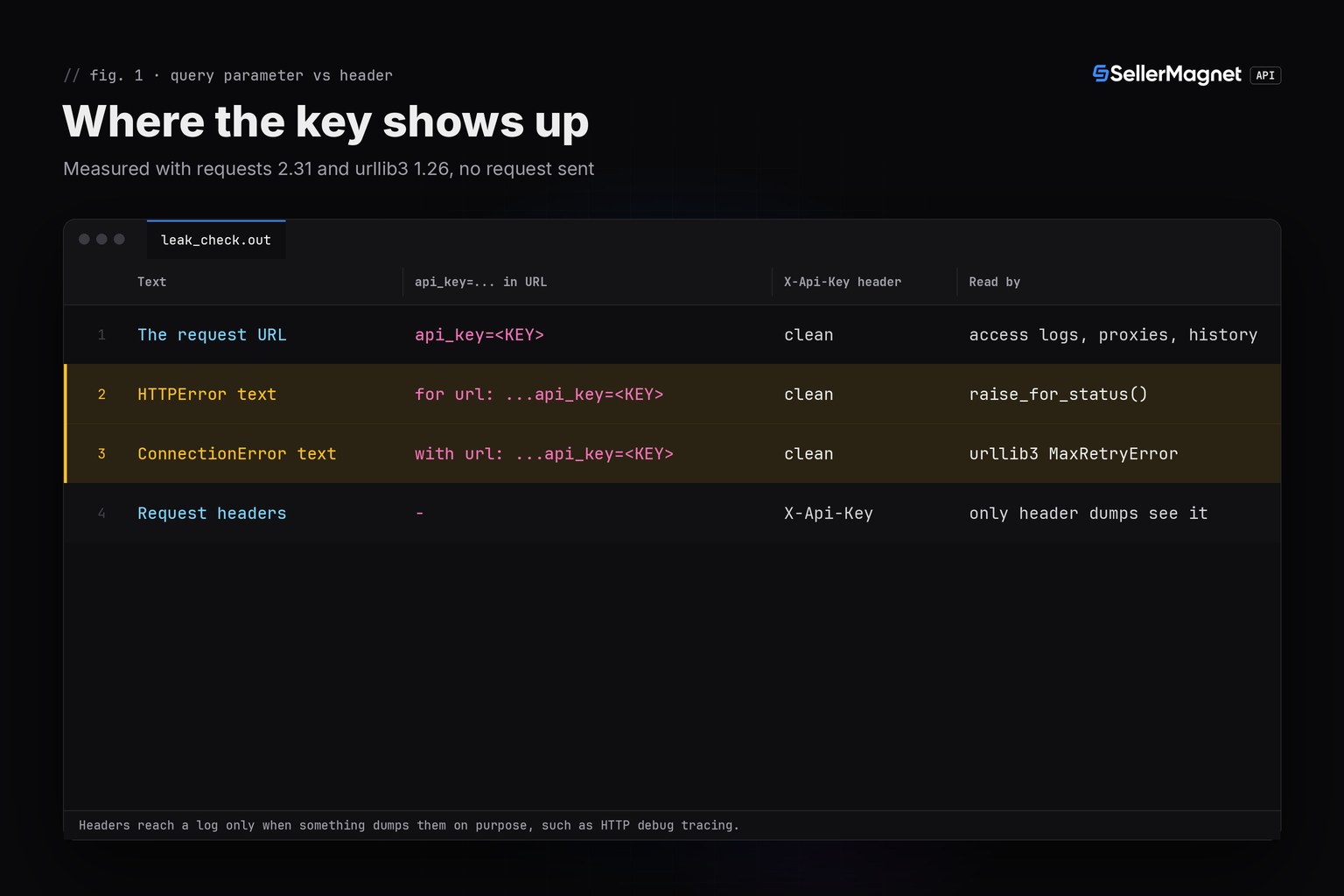
The script below builds the same product lookup request twice, once with the key as a parameter and once in the header, and prints the three texts that usually end up in a log. It only prepares the requests and constructs the error objects locally, so it sends nothing and is safe to run with your real key. The texts come from the libraries themselves: Response.raise_for_status() in requests builds "404 Client Error: Not Found for url: <full URL>", and the urllib3 MaxRetryError that requests wraps in its ConnectionError reads "Max retries exceeded with url: <path and query>" (checked against requests 2.31 and urllib3 1.26).
leak_check.py - where a query-string key shows up
"""Where does an API key end up when it travels in the query string? Offline check, no request is sent.

The SellerMagnet API accepts the key as the api_key query parameter or as the X-Api-Key header. This script builds the
same lookup request both ways with requests and prints the three texts that usually reach a log file: the URL itself,
the HTTPError text of raise_for_status() and the urllib3 "Max retries exceeded" text that requests wraps in its
ConnectionError when the connection fails. It only prepares requests, so it is safe to run with a real key.
"""
import os
import textwrap

import requests
from urllib3 import HTTPSConnectionPool
from urllib3.exceptions import MaxRetryError

API = "https://sellermagnet-api.com/api/amazon-product-lookup"
PARAMS = {"asin": "B0CL61F39H", "marketplaceId": "ATVPDKIKX0DER"}
KEY = os.environ.get("SELLERMAGNET_API_KEY", "sm_demo_8f3k2q")


def prepare(style):
    if style == "query":
        return requests.Request("GET", API, params={**PARAMS, "api_key": KEY}).prepare()
    return requests.Request("GET", API, params=PARAMS, headers={"X-Api-Key": KEY}).prepare()


def http_error_text(prepared):
    """The message raise_for_status() builds for a 404: it names the full URL."""
    resp = requests.Response()
    resp.status_code, resp.reason, resp.url = 404, "Not Found", prepared.url
    try:
        resp.raise_for_status()
    except requests.HTTPError as err:
        return str(err)
    return ""


def connection_error_text(prepared):
    """The urllib3 message behind requests.ConnectionError: it names the path and the query string."""
    pool = HTTPSConnectionPool("sellermagnet-api.com", 443)      # creating a pool opens no connection
    return str(MaxRetryError(pool, prepared.path_url))          # reason left out: it does not change the URL part


def mask(text):
    return text.replace(KEY, "<KEY>")


def main():
    seen = {}
    for style in ("query", "header"):
        prepared = prepare(style)
        texts = {
            "URL": prepared.url,
            "HTTPError": http_error_text(prepared),
            "ConnectionError": connection_error_text(prepared),
        }
        seen[style] = {name: "KEY VISIBLE" if KEY in text else "clean" for name, text in texts.items()}
        print(f"key sent as {'api_key query parameter' if style == 'query' else 'X-Api-Key header'}")
        for name, text in texts.items():
            print(f"  {name:<16} {'KEY VISIBLE' if KEY in text else 'clean'}")
            wrapped = textwrap.fill(mask(text), 112, break_long_words=False, break_on_hyphens=False)
            print(textwrap.indent(wrapped, "    "))
        print(f"  X-Api-Key header {'sent' if 'X-Api-Key' in prepared.headers else 'not sent'}, and no text above "
              "contains a header")
        print()
    print(f"{'text':<16} {'query parameter':<16} X-Api-Key header")
    for name in seen["query"]:
        print(f"{name:<16} {seen['query'][name]:<16} {seen['header'][name]}")


if __name__ == "__main__":
    main()
Output (the key itself is masked as <KEY>)
key sent as api_key query parameter
  URL              KEY VISIBLE
    https://sellermagnet-api.com/api/amazon-product-lookup?asin=B0CL61F39H&marketplaceId=ATVPDKIKX0DER&api_key=<KEY>
  HTTPError        KEY VISIBLE
    404 Client Error: Not Found for url:
    https://sellermagnet-api.com/api/amazon-product-lookup?asin=B0CL61F39H&marketplaceId=ATVPDKIKX0DER&api_key=<KEY>
  ConnectionError  KEY VISIBLE
    HTTPSConnectionPool(host='sellermagnet-api.com', port=443): Max retries exceeded with url:
    /api/amazon-product-lookup?asin=B0CL61F39H&marketplaceId=ATVPDKIKX0DER&api_key=<KEY> (Caused by None)
  X-Api-Key header not sent, and no text above contains a header

key sent as X-Api-Key header
  URL              clean
    https://sellermagnet-api.com/api/amazon-product-lookup?asin=B0CL61F39H&marketplaceId=ATVPDKIKX0DER
  HTTPError        clean
    404 Client Error: Not Found for url:
    https://sellermagnet-api.com/api/amazon-product-lookup?asin=B0CL61F39H&marketplaceId=ATVPDKIKX0DER
  ConnectionError  clean
    HTTPSConnectionPool(host='sellermagnet-api.com', port=443): Max retries exceeded with url:
    /api/amazon-product-lookup?asin=B0CL61F39H&marketplaceId=ATVPDKIKX0DER (Caused by None)
  X-Api-Key header sent, and no text above contains a header

text             query parameter  X-Api-Key header
URL              KEY VISIBLE      clean
HTTPError        KEY VISIBLE      clean
ConnectionError  KEY VISIBLE      clean
Each of those texts has a common route into storage. An unhandled exception prints its message in the traceback; logger.exception() writes it to your log file; an error tracker attaches it to the event; and many access-log formats record the full request line, query string included, on any proxy or gateway you run in front of your workers. A URL opened in a browser adds two more copies: the browser history and the Referer header sent to the next site. With the header, the same three texts carry nothing secret.
Which one wins if I send both?
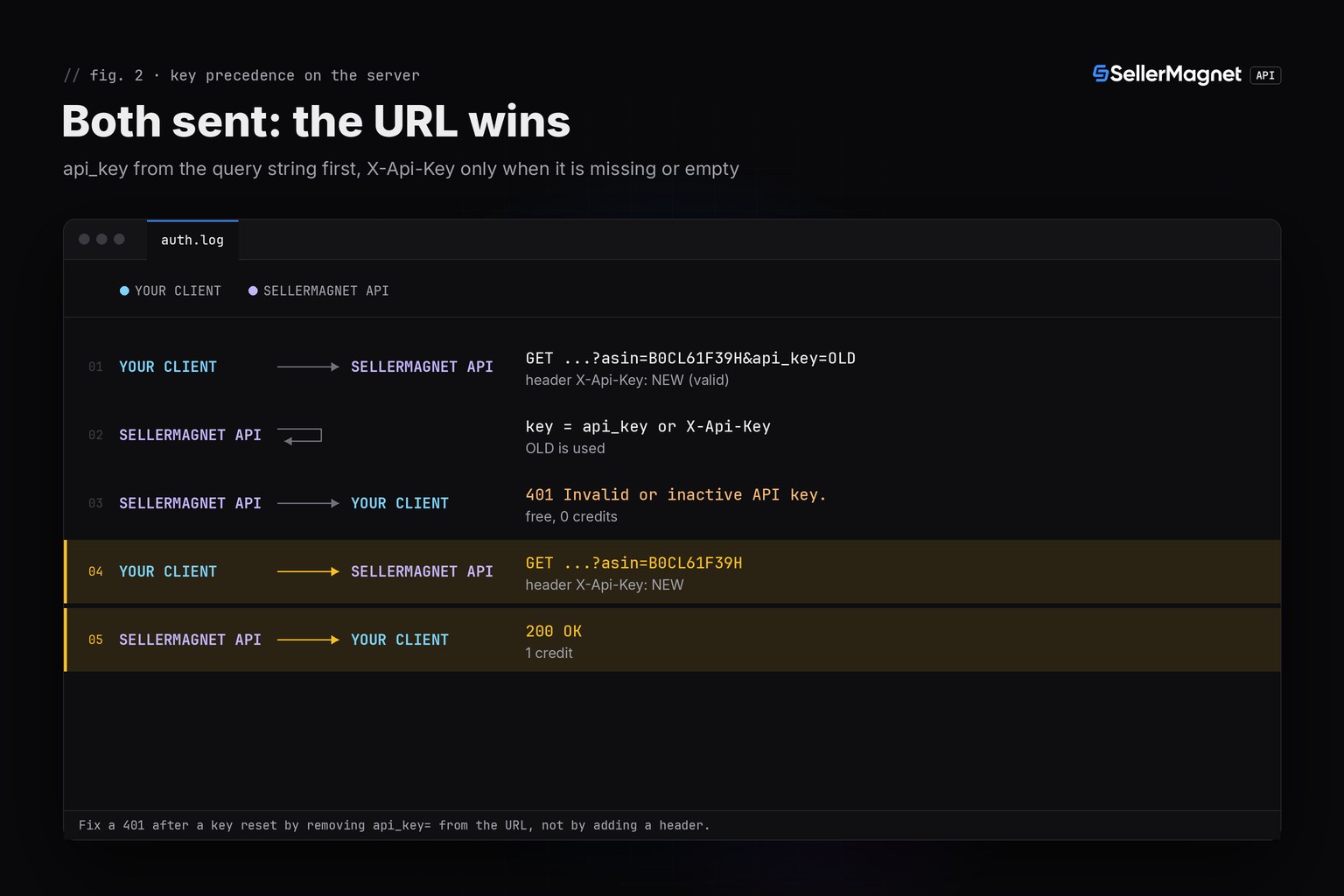
The server takes the key from the api_key query parameter first and falls back to the X-Api-Key header only when the parameter is missing or empty. That matters during a migration: if old code still appends api_key= to a URL while a newer session sends the header, the URL wins. After a key reset, that stale parameter makes every call fail with a 401 ("Invalid or inactive API key."), even though the header holds the new, valid key. The 401 is free, so nothing is lost but time; remove the parameter rather than adding the header next to it.
How do I keep the key out of logs in Python?
Start from the helpers in the Python quickstart: new_session() in sellermagnet.py sets the X-Api-Key header once on a requests.Session, and get_with_retry() in retry.py retries 429, 502, 503, a single 500 and dropped connections. The quickstart's ApiError carries the status and the API's message, not the URL. That covers new code. The script below adds two safety nets for a codebase that has been around for a while: a logging filter that scrubs api_key= values and the literal key from every record, and a scanner that finds keys older runs already wrote into *.log files.
safe_client.py - header session, redacting log filter and a scan for old leaks
"""Key-safe client setup: the key travels in the X-Api-Key header, a logging filter scrubs any key that still reaches a
log line, and a scanner finds keys that older code already wrote into log files.

Helpers: sellermagnet.py and retry.py from https://sellermagnet-api.com/blog/amazon-product-api-python
(new_session() in sellermagnet.py puts the key in the X-Api-Key header; never add api_key= to the parameters).
"""
import logging
import os
import re
import sys
from pathlib import Path

import requests

from retry import get_with_retry
from sellermagnet import ApiError, new_session

MARKETPLACE = "ATVPDKIKX0DER"                  # amazon.com
ASINS = ["B0CL61F39H", "B0NOTFOUND", "B0SLOWNET1"]
LOG_DIR = Path("logs")                         # where older runs wrote their logs
KEY_PARAM = re.compile(r"(api_key=)([^&\s'\"]+)", re.IGNORECASE)


def scrub(text, key):
    text = KEY_PARAM.sub(r"\1[redacted]", text)
    return text.replace(key, "[redacted]") if key else text


class RedactKey(logging.Filter):
    """Scrubs the message, its arguments and the traceback before a handler writes the record.

    Attach it to the HANDLER: a filter on a logger only sees records logged on that logger, while a handler filter
    also sees what urllib3 or any other library logs through the same handler.
    """

    def __init__(self, key):
        super().__init__()
        self.key = key

    def filter(self, record):
        record.msg, record.args = scrub(record.getMessage(), self.key), ()
        if record.exc_info:
            record.exc_text = scrub(logging.Formatter().formatException(record.exc_info), self.key)
            record.exc_info = None
        return True


def find_leaks(log_dir, key):
    """Every line in *.log files that carries an api_key= value or the current key, value masked to its end."""
    hits = []
    for path in sorted(log_dir.glob("*.log")):
        with open(path, encoding="utf-8", errors="replace") as fh:
            for number, line in enumerate(fh, 1):
                found = [m.group(2) for m in KEY_PARAM.finditer(line)] + ([key] if key and key in line else [])
                hits += [(path, number, "..." + value[-4:]) for value in dict.fromkeys(found)]
    return hits


def main():
    key = os.environ["SELLERMAGNET_API_KEY"]
    handler = logging.StreamHandler(sys.stdout)
    handler.setFormatter(logging.Formatter("%(levelname)-7s %(name)s: %(message)s"))
    handler.addFilter(RedactKey(key))
    logging.basicConfig(level=logging.INFO, handlers=[handler])
    log = logging.getLogger("catalog")

    session = new_session()
    for asin in ASINS:
        try:
            info = get_with_retry(session, "amazon-product-lookup", asin=asin, marketplaceId=MARKETPLACE)
            log.info("%s %s", asin, info["productInfo"]["title"][:48])
        except ApiError as err:
            log.warning("%s failed: %s", asin, err)
            if err.status in (401, 403):        # key or credits: every other request would fail the same way
                break
        except (requests.ConnectionError, requests.Timeout) as err:
            log.warning("%s network error after retries: %s", asin, type(err).__name__)

    # Filter check: a URL the way older code builds it. The handler writes it with the key already replaced.
    log.info("legacy url: /api/amazon-product-lookup?asin=B0CL61F39H&api_key=%s", key)

    leaks = find_leaks(LOG_DIR, key)
    print(f"\nscan {LOG_DIR}/: {len(leaks)} line(s) with a key in {len({p for p, _, _ in leaks})} file(s)")
    for path, number, tail in leaks:
        print(f"  {path}:{number}  key {tail}")
    if leaks:
        print("reset every key listed above on the API keys page of your dashboard; old log copies keep the value")
    return 1 if leaks else 0


if __name__ == "__main__":
    sys.exit(main())
Output (illustrative data: one product, a 404, a dropped connection, two old log files)
INFO    catalog: B0CL61F39H PlayStation®5 console (slim)
WARNING catalog: B0NOTFOUND failed: 404: Product not found
WARNING catalog: B0SLOWNET1 network error after retries: ConnectionError
INFO    catalog: legacy url: /api/amazon-product-lookup?asin=B0CL61F39H&api_key=[redacted]

scan logs/: 4 line(s) with a key in 2 file(s)
  logs/access-2026-10-20.log:1  key ...9Kd4
  logs/access-2026-10-20.log:2  key ...9Kd4
  logs/worker.log:1  key ...9Kd4
  logs/worker.log:2  key ...q2Tz
reset every key listed above on the API keys page of your dashboard; old log copies keep the value
Why the filter goes on the handler
Python's logging runs a logger's filters only for records created on that exact logger. Records from urllib3 or any other library propagate to your handlers without passing your logger's filters. A filter attached to the handler sees every record that handler writes, whoever logged it. The filter also renders the traceback itself and scrubs it, because the exception message is where a URL usually hides.
The header is not invisible
Anything that dumps raw requests still shows the header: a debugging proxy, or http.client with a debug level above 0, which prints every sent request including its headers. Keep those off in production; the filter cannot scrub output that bypasses logging.
What should I do when a key has already leaked?
- Find it: run the scanner over your log folders and over any shared copies (CI artefacts, support tickets, error-tracker events).
- Reset it: on the API keys page of your dashboard, a reset gives that key a new value and the old one stops working at once. An account can hold up to three active keys, so you can also create a new key first and reset the old one after the switch.
- Update every client, and remove
api_key=from URLs while you are at it, since the parameter would override the new header. - Delete or truncate the log lines that hold the old value; a reset key is useless to anyone, but a habit of keys in logs is not.
What does this cost?
Nothing extra. The header and the parameter are billed the same: 1 credit per request, a rejected key is a free 401, and the leak check runs offline. The example run above makes six calls: one 200, one 404 (billed, not retried) and four attempts on the dropped connection. A dropped connection does not tell you whether the request reached the server first, so budget those attempts as possibly billed. See the billed vs free errors table for every status code.
Frequently Asked Questions
Should an API key go in the header or the query string?
In the header. Both authenticate the same way on SellerMagnet, but a query-string key becomes part of the URL, and URLs end up in exception texts, tracebacks and access logs. The X-Api-Key header stays out of all of them.
Is the X-Api-Key header encrypted?
Over HTTPS the header and the query string are both encrypted in transit. The difference is what happens after the request: the URL gets copied into logs and error messages, headers usually do not.
What happens if I send api_key and X-Api-Key together?
The server reads the api_key query parameter first and only looks at the header when the parameter is missing or empty. A stale key left in the URL therefore wins over a valid header and returns a free 401.
Does a 401 for a wrong key cost credits?
No. A missing, unknown or inactive key is rejected with a 401 before any credit is deducted, so testing your key setup is free.
How do I replace a key that leaked into a log?
Reset it on the API keys page of your SellerMagnet dashboard. A reset gives that key slot a new value, so the leaked one stops working at once; then update every client that still uses it.
Bottom line: put the key in X-Api-Key, keep it out of URLs, and give your log handlers a filter for the code you have not migrated yet. If the key has to live in a browser, route calls through a small proxy as in the browser extension guide. The API docs list every endpoint, and a free account includes 150 credits.


