To call an Amazon product API from Bun, send a GET request with Bun's built-in fetch() to /api/amazon-product-lookup with an ASIN, a marketplace ID and your key in the X-Api-Key header, then read the JSON body. Bun runs .ts files directly (no tsc build step, no ts-node), ships fetch() and a test runner in the runtime itself, so this quickstart needs zero npm dependencies: one client, one retry helper, and a bun:test suite that fakes only the network.
Key Takeaways
- Bun's
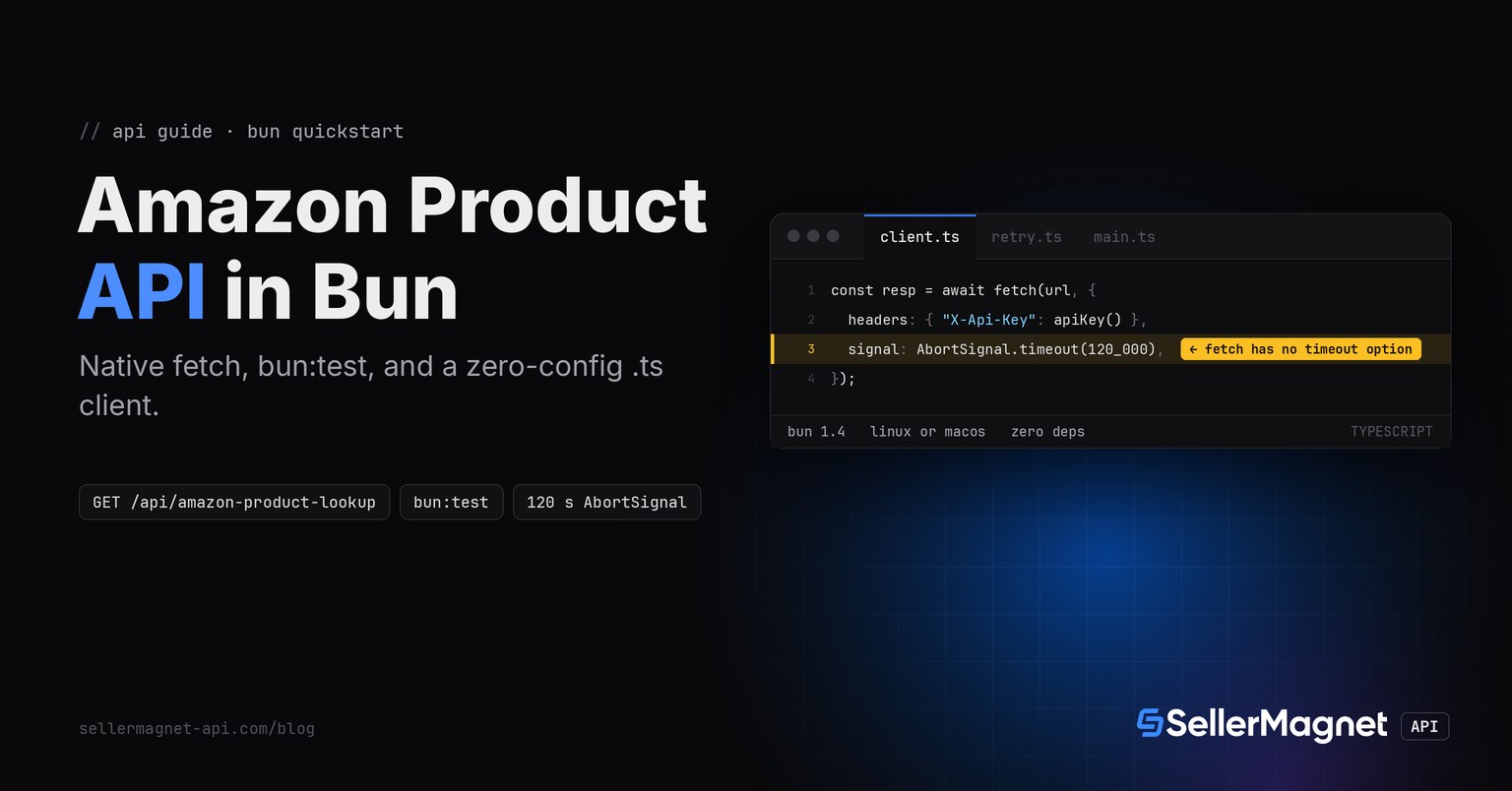
fetch()has notimeoutoption (unlike Node'shttp.requestor Python'srequests): the 120-second budget comes fromAbortSignal.timeout(120_000)passed as thesignaloption, the same pattern a browser fetch would use. .envfiles load automatically (process.envandBun.envboth see them), so the API key never needs a loader package, justSELLERMAGNET_API_KEY=... bun run main.ts.- Send the key in the
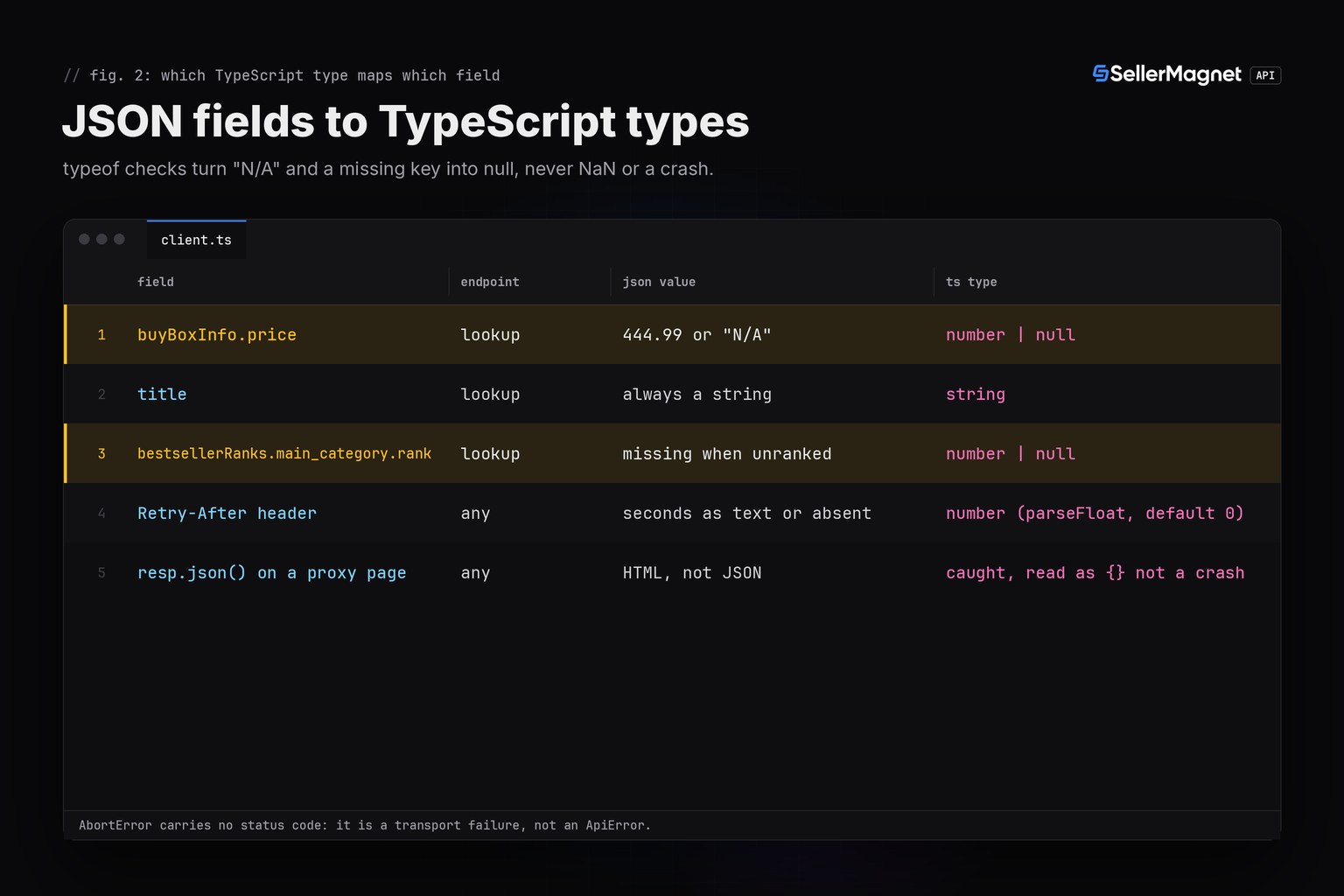
X-Api-Keyheader, not theapi_keyquery parameter: a key left in a URL lands in shell history and proxy logs. buyBoxInfo.priceis a JSON number or the string"N/A"; checktypeof price === "number"before using it; the sibling Python quickstart hits the same field.- Retry 429 and a lone 500 (refunded); stop after a second 500 in a row; retry 502/503 and a timeout (AbortError) up to 4 attempts; never retry 404 or a free 400, they are final, billed answers.
Prerequisites: Bun and an API key
- Bun 1.0 or later; this code was built and run on Bun 1.4.4 for Linux, installed with the one-line
curl -fsSL https://bun.sh/install | bash(no Node.js required alongside it). - No npm dependency for the client itself:
fetch,URLandAbortSignalare all globals in the Bun runtime. - An API key: a free account includes 150 credits after e-mail verification, one credit per request.
- The key in the
SELLERMAGNET_API_KEYenvironment variable (or a.envfile, which Bun loads with no extra package), so it never lands in your repository.
Install Bun and run the client directly
curl -fsSL https://bun.sh/install | bash   # installs to ~/.bun/bin, no Node.js required
mkdir amazon-bun && cd amazon-bun
# save client.ts, retry.ts and main.ts from this post - no npm install, no tsconfig needed
export SELLERMAGNET_API_KEY="your-key-here"
bun run main.ts                     # at most 1 credit per ASIN, see the credit math below
bun test test.ts                    # runs the fails-closed fake-fetch test suite, no credits spent
How do I call the Amazon product API from Bun?
Build the URL with URLSearchParams, send the key as a header, and set a 120-second AbortSignal because the API can take that long and plain fetch() never times out on its own. get() returns the decoded data object on a 200 with success: true, and raises an ApiError carrying the status, the API's own message and any Retry-After otherwise, the same shape as the Python and Swift clients.
client.ts - fetch, one exception type, no timeout option to lean on
// client.ts - a small client with one exception type, ported for Bun's native fetch
const API = "https://sellermagnet-api.com/api";

export class ApiError extends Error {
  status: number;
  retryAfter: number;
  constructor(status: number, message: string, retryAfter = 0) {
    super(`${status}: ${message}`);
    this.status = status;
    this.retryAfter = retryAfter;
  }
}

// Bun reads .env automatically and exposes it on both Bun.env and process.env;
// use process.env so the same source also runs unchanged under Node.
function apiKey(): string {
  const key = process.env.SELLERMAGNET_API_KEY;
  if (!key) throw new Error("SELLERMAGNET_API_KEY is not set");
  return key;
}

export async function get(endpoint: string, params: Record<string, string | number>): Promise<any> {
  const url = new URL(`${API}/${endpoint}`);
  for (const [k, v] of Object.entries(params)) url.searchParams.set(k, String(v));
  // Bun's fetch has no built-in per-request timeout option (unlike Node's { timeout }),
  // so the 120s budget is enforced with AbortSignal.timeout, same as plain browser fetch.
  const resp = await fetch(url, {
    headers: { "X-Api-Key": apiKey() },
    signal: AbortSignal.timeout(120_000),
  });
  let body: any = {};
  try {
    body = await resp.json();
  } catch {
    body = {}; // e.g. an HTML page from a proxy
  }
  if (resp.status === 200 && body?.success) return body.data;
  const retryAfterHeader = resp.headers.get("Retry-After");
  const retryAfter = retryAfterHeader ? parseFloat(retryAfterHeader) || 0 : 0;
  throw new ApiError(resp.status, body?.message ?? "request failed", retryAfter);
}

export async function lookup(asin: string, marketplaceId: string) {
  const data = await get("amazon-product-lookup", { asin, marketplaceId });
  const p = data.productInfo;
  const price = p.buyBoxInfo?.price;
  return {
    asin: p.asin,
    title: p.title,
    price: typeof price === "number" ? price : null, // "N/A" = no featured offer
    currency: p.buyBoxInfo?.currencyCode ?? null,
    rank: p.bestsellerRanks?.main_category?.rank ?? null,
    url: p.link,
  };
}

if (import.meta.main) {
  const result = await lookup("B0CL61F39H", "ATVPDKIKX0DER");
  console.log(result);
}
A non-2xx response is not always JSON: a proxy in front of the API can answer a 429 or 502 with an HTML page. resp.json() throwing is caught and treated as an empty body, so the status code still decides the outcome instead of a SyntaxError crashing the program. body?.success also guards against a 200 whose body is simply missing the field.
Which errors should a Bun client retry?
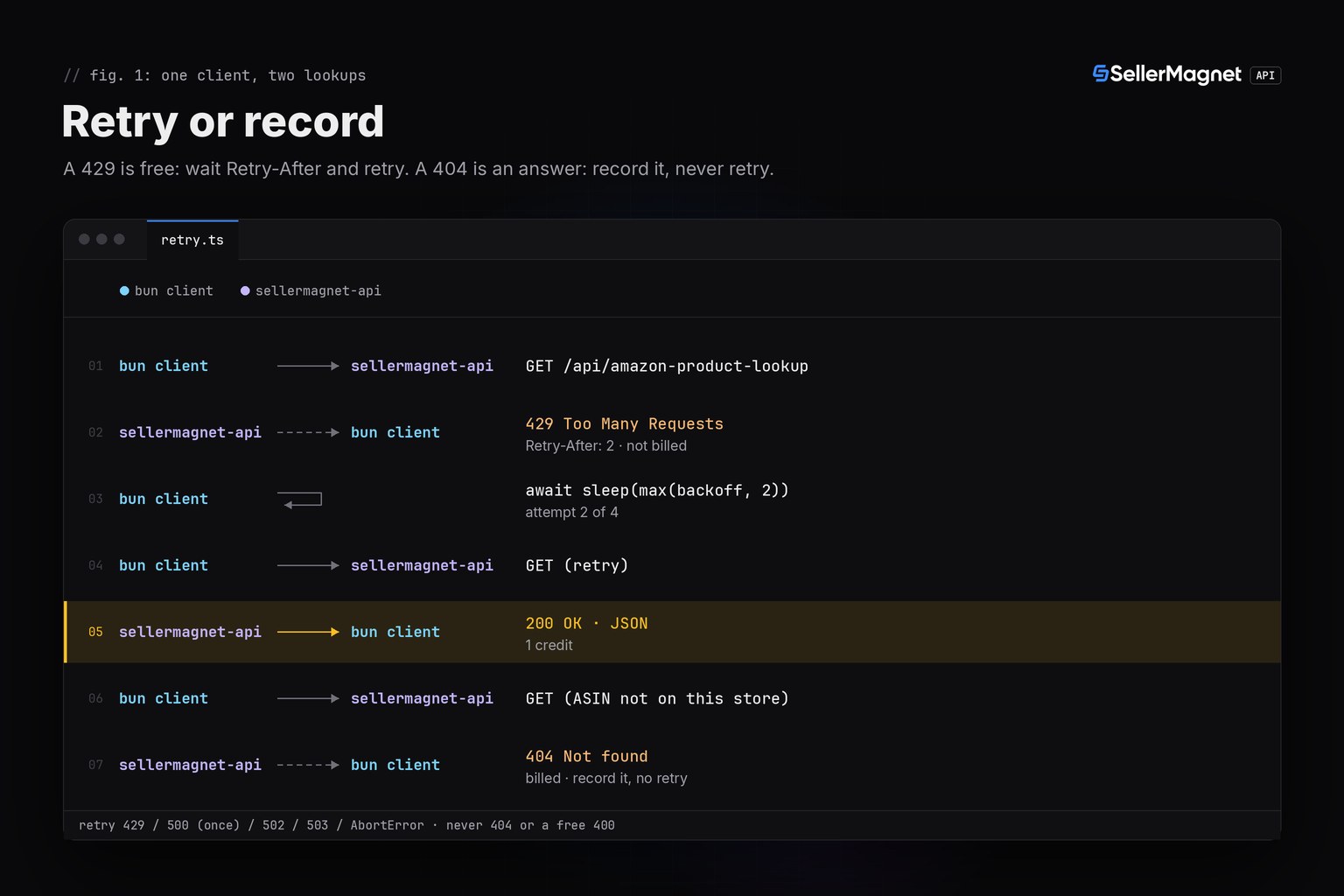
Only the ones a second try can fix. A 429 from the per-key concurrency cap is free and carries Retry-After. A lone 500 is refunded, so one retry costs nothing, but a second 500 in a row stops the loop rather than retrying forever. 502 and 503 are billed on every attempt, so cap the attempts and honour Retry-After. AbortSignal.timeout raises a DOMException named AbortError, not an ApiError, since no HTTP response ever arrived; this client retries that like any other transport failure, up to the same attempt cap. A 404 is a real, billed answer: the ASIN is not on that marketplace, and retrying only buys the same answer again.
| Status | Meaning | Charged | Client action |
|---|---|---|---|
200 | success | Yes | Decode data |
400 | bad parameter or uncovered marketplace | Only an endpoint's own 400 | Fix the call |
401 / 403 | key or credits | No | Stop the run |
404 | not on this marketplace | Yes | Record, never retry |
429 | concurrency cap full | No | Wait Retry-After, retry |
500 | internal error, no Retry-After | No, refunded | Retry once |
502 / 503 | retryable error / unavailable | Yes | Wait, retry, cap at 4 |
| AbortError (timeout) | no answer in 120 s | Yes | Report, retry like a transport error |
retry.ts - retries only what a second attempt can fix
// retry.ts - retries only where a second attempt can help
import { ApiError, get } from "./client";

const RETRYABLE = new Set([429, 500, 502, 503]);

export async function getWithRetry(endpoint: string, params: Record<string, string | number>, attempts = 4): Promise<any> {
  let internalErrors = 0;
  for (let attempt = 1; attempt <= attempts; attempt++) {
    try {
      return await get(endpoint, params);
    } catch (err) {
      if (err instanceof ApiError) {
        if (err.status === 500) internalErrors += 1;
        if (!RETRYABLE.has(err.status) || attempt === attempts || internalErrors > 1) {
          throw err; // a second 500 in a row: report it, don't loop
        }
        const backoff = Math.min(2 ** attempt, 30) + Math.random();
        await sleep(Math.max(backoff, err.retryAfter) * 1000);
        continue;
      }
      // Transport-level failure (timeout/AbortError, DNS, connection reset): worth a retry too,
      // same as requests.ConnectionError/Timeout in the Python client.
      if (attempt === attempts) throw err;
      await sleep(Math.min(2 ** attempt, 30) * 1000);
    }
  }
  throw new Error("unreachable");
}

function sleep(ms: number) {
  return new Promise((resolve) => setTimeout(resolve, ms));
}
How do I test a fetch client in Bun without spending credits?
Override globalThis.fetch before the test file imports the client, and fail closed: any call that reaches the fake without a scripted route throws, so an untested code path can never quietly hit the real API. bun:test ships in the runtime (no Jest, no ts-jest config) and runs the whole suite in milliseconds because there is no real network and no process-startup cost per test.
test.ts (excerpt) - a fails-closed fake fetch feeding bun:test
// test.ts (excerpt) - the fails-closed fake fetch and two representative scenarios
import { describe, expect, test } from "bun:test";
import { ApiError, lookup } from "./client";
import { getWithRetry } from "./retry";

process.env.SELLERMAGNET_API_KEY = "test-key";

let route: ((endpoint: string, params: URLSearchParams) => { status: number; body: any }) | null = null;

function install(r: typeof route) {
  route = r;
}

globalThis.fetch = async (url: any, init: any) => {
  if (!route) throw new Error("fakefetch: install(route) first - no real request may leave the harness");
  if (init?.headers?.["X-Api-Key"] !== "test-key") throw new Error("missing X-Api-Key header");
  const u = new URL(String(url));
  const res = route(u.pathname.split("/").pop()!, u.searchParams);
  return new Response(JSON.stringify(res.body), { status: res.status });
};

test("a SECOND consecutive 500 stops instead of looping forever", async () => {
  install(() => ({ status: 500, body: { success: false, message: "internal" } }));
  await expect(getWithRetry("amazon-product-lookup", { asin: "X" }, 4)).rejects.toBeInstanceOf(ApiError);
});

test("N/A price string becomes null, not NaN", async () => {
  install(() => ({ status: 200, body: { success: true,
    data: { productInfo: { asin: "X", title: "T", link: "u", buyBoxInfo: { price: "N/A" } } } } }));
  const r = await lookup("X", "ATVPDKIKX0DER");
  expect(r.price).toBeNull();
});| Field | Endpoint | JSON value | TypeScript type |
|---|---|---|---|
buyBoxInfo.price | lookup | 444.99 or "N/A" | number | null |
title | lookup | always a string | string |
bestsellerRanks.main_category.rank | lookup | missing when unranked | number | null |
Retry-After header | any | seconds as text or absent | number (parseFloat, default 0) |
resp.json() on a proxy page | any | HTML, not JSON | caught, read as {} not a crash |
What does a multi-ASIN run look like end to end?
main.ts looks up three ASINs with getWithRetry, prints one row per product and counts the credits actually charged. The run below replays recorded, illustrative responses through the same fake-fetch harness as the test suite (so it can never drift from the real code): a 429 the client retries for free, a 500 that is refunded and retried once, and a 404 that is recorded without a second attempt.
main.ts - three ASINs, one row each, one bad row never loses the batch
// main.ts - look up a few products, one row per ASIN, never losing the batch to one bad row
import { ApiError } from "./client";
import { getWithRetry } from "./retry";

const MARKETPLACE_US = "ATVPDKIKX0DER";
const MARKETPLACE_UK = "A1F83G8C2ARO7P";

type Row = { asin: string; marketplaceId: string };

const ROWS: Row[] = [
  { asin: "B0CL61F39H", marketplaceId: MARKETPLACE_US }, // happy path, but the key is rate-limited first
  { asin: "B0CLTBHXWQ", marketplaceId: MARKETPLACE_UK }, // a transient 500, refunded and retried once
  { asin: "B0NOTAREAL", marketplaceId: MARKETPLACE_US }, // 404: a real answer, never retried
];

function fmt(asin: string, marketplaceId: string, price: number | null, currency: string | null, title: string) {
  const priceStr = price === null ? "N/A" : `${price.toFixed(2)} ${currency}`;
  return `${asin}  ${marketplaceId.padEnd(15)} ${priceStr.padEnd(14)} ${title.slice(0, 40)}`;
}

export async function main() {
  console.log("asin        marketplace     price          title");
  let credits = 0;
  for (const row of ROWS) {
    try {
      const data = await getWithRetry("amazon-product-lookup", { asin: row.asin, marketplaceId: row.marketplaceId });
      const p = data.productInfo;
      const price = typeof p.buyBoxInfo?.price === "number" ? p.buyBoxInfo.price : null;
      console.log(fmt(p.asin, row.marketplaceId, price, p.buyBoxInfo?.currencyCode ?? null, p.title));
      credits += 1;
    } catch (e) {
      if (e instanceof ApiError) {
        console.error(`${row.asin}: ${e.status} ${e.message.replace(/^\d+:\s*/, "")}`);
        if (e.status !== 400 && e.status !== 401 && e.status !== 403) credits += 1; // 404/500-eventually/etc billed once each here
      } else {
        console.error(`${row.asin}: transport error - ${(e as Error).message}`);
      }
    }
  }
  console.log(`credits charged: ${credits}`);
}

if (import.meta.main) await main();
Program output (illustrative data, replayed through the fake-fetch harness)
asin        marketplace     price          title
B0CL61F39H  ATVPDKIKX0DER   444.99 USD     PlayStation®5 console (slim)
B0CLTBHXWQ  A1F83G8C2ARO7P  34.99 GBP      Echo Dot (5th Gen, 2022 release)
B0NOTAREAL: 404 Invalid product
credits charged: 3
Credit math for that run: 3 requests shown, 3 credits charged. The first ASIN's initial 429 cost nothing; the second's transient 500 was refunded, so only its successful retry was billed; the 404 on the third is itself a billed, final answer. A 502 or 503 would have cost a credit on every one of up to 4 attempts instead. To test without spending real credits, override globalThis.fetch exactly as test.ts does, which is also how this program's own output above was generated.
Frequently Asked Questions
Is there an official Bun SDK for the SellerMagnet API?
No, and none is needed. Every endpoint is a plain GET with query parameters and a JSON body, so Bun's built-in fetch() and a couple of small .ts files cover it with zero npm dependencies.
Does this client also run on Node.js, not just Bun?
Yes, unchanged: fetch, URL and AbortSignal are Node.js globals since Node 18, and the code uses nothing Bun-specific. Running it under Bun just skips Node's slower cold start and the ts-node/tsx step .ts files need on plain Node.
Why does fetch() never time out in Bun by itself?
Because the Fetch standard fetch() has no built-in timeout option at all, on Bun, Node or in a browser. Pass signal: AbortSignal.timeout(120_000) to cap a request at 120 seconds, matching the time the API itself can take to answer.
How do I know if a thrown error is an API error or a timeout?
Check instanceof ApiError first: that type only exists for a response the API actually sent. Anything else, including the AbortError from AbortSignal.timeout, is a transport failure where no HTTP response arrived at all, so it carries no status code or billing information to read.
Why did bun:test say my fetch mock leaked into another test file?
globalThis.fetch = ... in one test file affects the whole process bun:test runs test files in, not just that file, if several files assign it without resetting. Scope the fake inside the file that needs it and restore or reinstall the route per test with beforeEach, as this post's test.ts does with install(route).
Bottom line: Bun's own fetch() plus an AbortSignal timeout, a key in the X-Api-Key header, number | null types that treat "N/A" as the absence of a price, and retries for 429, a lone 500, 502, 503 and a timeout that never resend a 404 or a free 400. Related runtimes: Python, Node.js/TypeScript; every endpoint is in the API documentation.