
Amazon's Movers & Shakers lists the biggest gainers in sales rank compared with 24 hours ago. To build the same view for any category through an API, save the category's top 50 from /api/amazon-bestsellers once a day and compare it with yesterday's snapshot: products that climbed, products that fell, new entries and drop-outs. It costs one credit per category per day, and the gain uses Amazon's own definition - a product that moves from rank 30 to rank 10 gained 200 %.
Key Takeaways
- Movers & Shakers compares sales rank with 24 hours ago; a daily top-50 snapshot rebuilds that view for the top 50 of any category.
- Amazon's gain formula: (old rank - new rank) / new rank. Rank 30 to 10 is +200 %.
- A bestseller page holds 50 products, so gains are measured within the top 50; new entries came from below it.
- Store each day's snapshot once: a second run on the same day reads the file instead of spending a credit.
- Ten categories tracked daily cost about 300 credits a month.
How does Amazon define Movers & Shakers?
Amazon describes the list as the biggest gainers in sales rank over the past 24 hours and gives an example: an item ranked 30 a day ago and 10 now has a 200 % increase. The percentage is the rank improvement divided by the new rank, which makes a jump near the top count more than the same number of places further down. There is no separate Movers & Shakers endpoint here - the bestseller list plus yesterday's copy is enough to compute it.
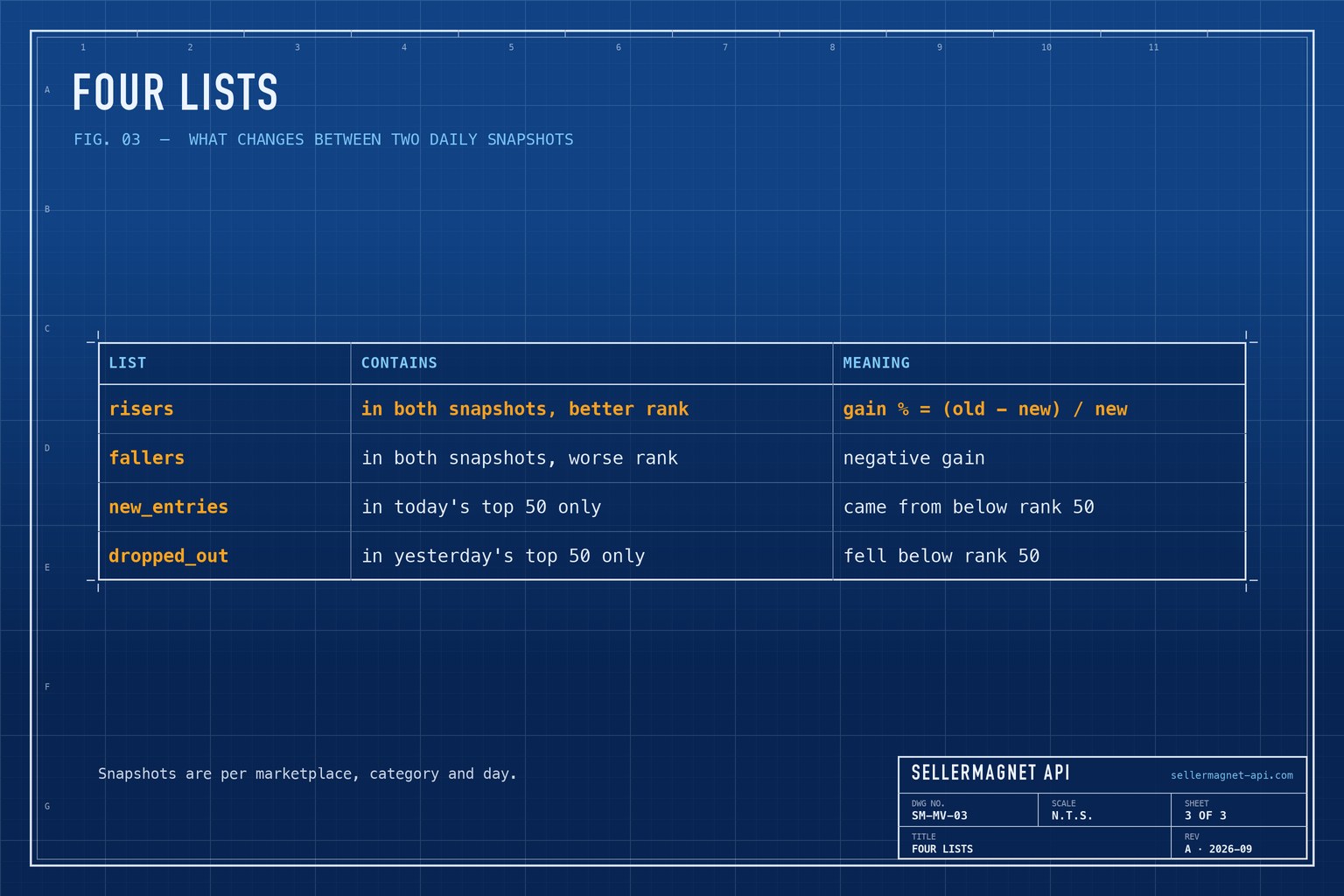
| List | Contains | Meaning |
|---|---|---|
risers | In both snapshots, better rank | Gain % = (old - new) / new |
fallers | In both snapshots, worse rank | Negative gain |
new_entries | In today's top 50 only | Came from below rank 50 |
dropped_out | In yesterday's top 50 only | Fell below rank 50 |
How do I build Movers & Shakers from daily snapshots?
snapshot() stores today's {asin: rank} per marketplace, category and date, and reads the file if it already exists; an ASIN listed twice keeps its best rank, and a day on which too many cards come back without an ASIN is not stored. movers() compares two snapshots. Run it once a day from cron at the same hour, away from midnight - Amazon refreshes the lists hourly, so a daily snapshot is one hourly state. After the second day you have your first list. Category IDs are explained in the category ID guide; get() and new_session() come from the Python quickstart.
movers.py - daily snapshots and the comparison
"""Your own Movers & Shakers: rank changes in a bestseller list between two daily snapshots."""
import json
from datetime import date, timedelta
from pathlib import Path

from sellermagnet import get, new_session

SNAPSHOTS = Path(__file__).resolve().parent / "snapshots"   # cron starts elsewhere: anchor to this file


def snapshot(category_id: str, marketplace_id: str, day: date) -> dict[str, int]:
    """Today's top 50 as {asin: rank}; stored so tomorrow's run can compare (1 credit)."""
    path = SNAPSHOTS / f"{marketplace_id}_{category_id}_{day}.json"
    if path.exists():
        return json.loads(path.read_text())
    top = get(new_session(), "amazon-bestsellers", category_id=category_id, marketplaceId=marketplace_id, count=50)["bestsellers"]
    ranks = {}
    for p in top:
        if p.get("asin") and p.get("rank"):
            ranks.setdefault(p["asin"], p["rank"])       # an ASIN listed twice keeps its best rank
    if len(ranks) < 0.9 * len(top):                      # do not lock in a broken day
        raise RuntimeError(f"only {len(ranks)} of {len(top)} cards usable - snapshot not stored")
    SNAPSHOTS.mkdir(exist_ok=True)
    path.write_text(json.dumps(ranks))
    return ranks


def movers(today: dict[str, int], yesterday: dict[str, int]) -> dict[str, list]:
    risers, fallers, new = [], [], []
    for asin, rank in today.items():
        old = yesterday.get(asin)
        if old is None:
            new.append((asin, rank))                          # was below rank 50, or not listed
        elif old != rank:
            gain = round(100 * (old - rank) / rank)           # Amazon's definition: rank 30 -> 10 is +200 %
            (risers if gain > 0 else fallers).append((asin, old, rank, gain))
    dropped = sorted((asin, old) for asin, old in yesterday.items() if asin not in today)
    return {"risers": sorted(risers, key=lambda r: -r[3]), "fallers": sorted(fallers, key=lambda r: r[3]),
            "new_entries": sorted(new, key=lambda r: r[1]), "dropped_out": dropped}


if __name__ == "__main__":
    today = date.today()
    now = snapshot("281407", "ATVPDKIKX0DER", today)
    before_path = SNAPSHOTS / f"ATVPDKIKX0DER_281407_{today - timedelta(days=1)}.json"
    if before_path.exists():
        report = movers(now, json.loads(before_path.read_text()))
        for asin, old, rank, gain in report["risers"][:10]:
            print(f"+{gain}%  {asin}  #{old} -> #{rank}")
        print("new in the top 50:", report["new_entries"][:10])
    else:
        print("snapshot saved; the comparison starts once yesterday's file exists")
Example output on the second day (illustrative values)
+200%  B0D1EXAMPL  #30 -> #10
+167%  B0C2EXAMPL  #24 -> #9
new in the top 50: [('B0E3EXAMPL', 7), ('B0F4EXAMPL', 18)]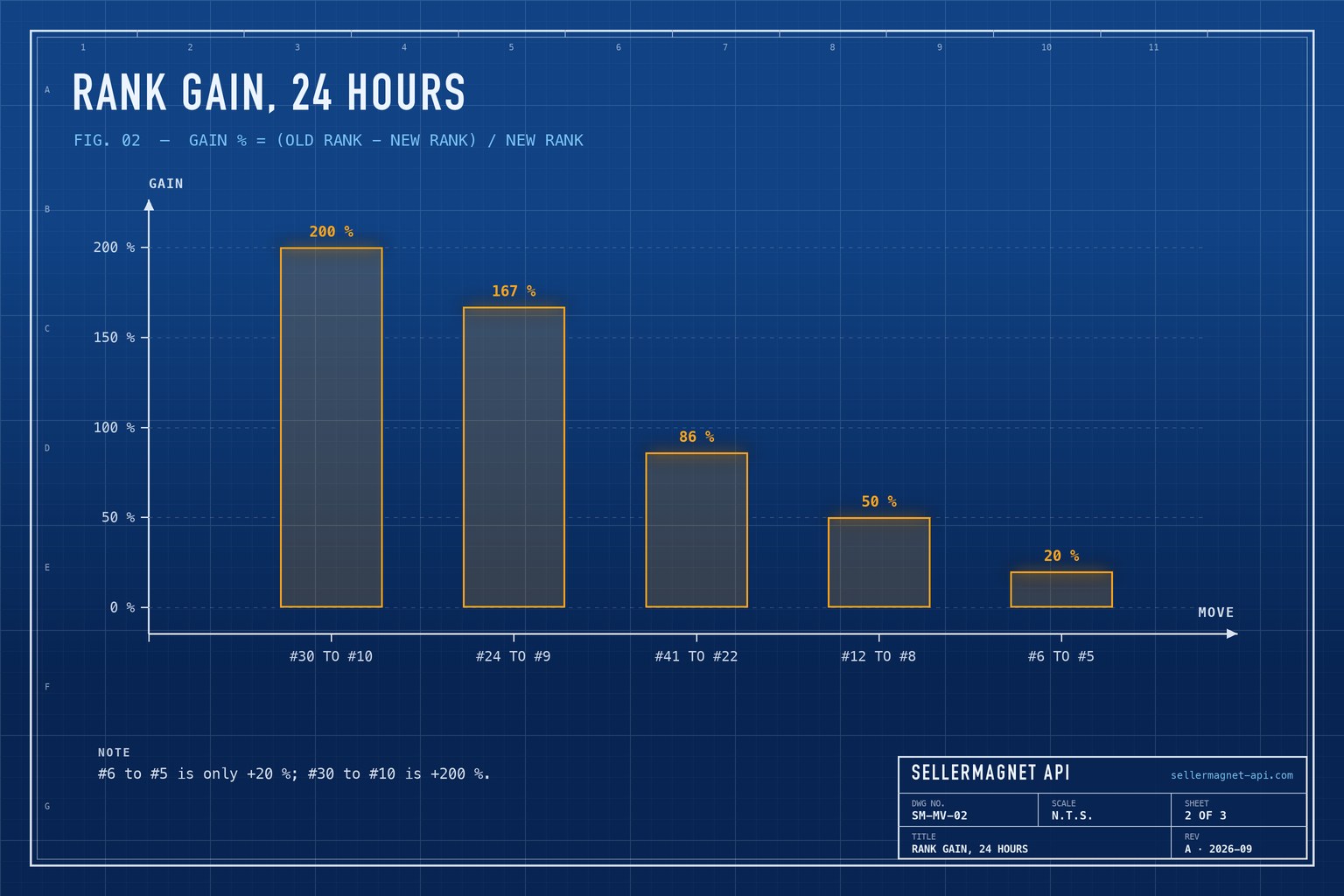
What can the top 50 not show?
Amazon's own list sees every product in the category; a top-50 snapshot sees only the top 50. A product that jumps from rank 4,000 to 400 is invisible until it reaches the top 50, and a new entry's previous rank is unknown. Services that scrape Amazon's own Movers & Shakers page get the whole-category view; this approach gives a top-50 view for any category you choose. For a specific product you already know, the sales rank history guide gives its recorded rank per category over time - including where a new entry was yesterday. Combine both: movers to find candidates, rank history to confirm a trend is more than one good day.
Can I take a snapshot from the command line?
Yes. One curl and one jq call write the same {asin: rank} file as snapshot(), so movers.py compares it without another credit. Run it from a script: in a crontab line, % must be written \%.
Today's top 50 as {asin: rank} in a dated file
mkdir -p snapshots
curl -sG "https://sellermagnet-api.com/api/amazon-bestsellers" \
  -H "X-Api-Key: $SELLERMAGNET_API_KEY" --max-time 120 \
  --data-urlencode "category_id=281407" \
  --data-urlencode "marketplaceId=ATVPDKIKX0DER" \
  --data-urlencode "count=50" \
  | jq 'if .success then reduce (.data.bestsellers[] | select((.asin // "") != "" and .rank)) as $p
           ({}; .[$p.asin] //= $p.rank) else error(.message) end' \
  > snapshots/.tmp && mv snapshots/.tmp "snapshots/ATVPDKIKX0DER_281407_$(date +%F).json"
Frequently Asked Questions
Is there an Amazon Movers & Shakers API?
Not as a separate endpoint here. Save a category's bestseller list once a day and compare it with the previous day to get the same kind of list.
How does Amazon calculate the Movers & Shakers percentage?
As the rank improvement over 24 hours divided by the new rank. An item that moves from rank 30 to rank 10 gains 200 %.
Why can't I see products that jumped from rank 4,000?
The bestseller list returns the top 50. Products below it are not in the snapshot until they climb into the top 50.
How often should I take snapshots?
Once a day at a fixed hour matches Amazon's 24-hour window. Amazon refreshes hourly; hourly snapshots compared with the one 24 hours earlier follow it hour by hour, at 24 times the credits.
How much does it cost?
One credit per category and snapshot. Ten categories once a day are about 300 credits a month.
Bottom line: one bestseller call per category per day and a comparison with yesterday give you a top-50 Movers & Shakers for any category and marketplace. The bestsellers page lists the fields, and a free account includes 150 credits.


