
For Amazon keyword research through an API, request the keyword's first results page from /api/amazon-search and read the competition off it: how many results are sponsored, the price band, how many reviews the top 10 organic products have, and which words their titles share. One call costs one credit and returns up to 50 results. It does not tell you search volume - it tells you what a new product would compete against on that page.
Key Takeaways
- One search call with count=50 returns the first results page, in page order, for one credit.
- Separate sponsored results before measuring anything; the sponsored share itself shows ad pressure.
- The median review count of the top 10 organic results is the review barrier a new product faces.
- Prices arrive as strings; quartiles of the page give the band a new offer has to fit into.
- No search volume comes back: take it from Brand Analytics (brand-registered sellers), your ads search-term reports or another source.
What can one search call tell me about a keyword?
Each result carries position, asin, productTitle, the price as a string in listingPrice.price.total, reviewRating (null when the page shows none), reviewAmount (0 when no count is shown or found), on_sale (true when a higher struck-through or list price is shown) and the sponsored flag. Products without a displayed price are skipped. That is enough for six signals.
| Signal | Computed from | Tells you |
|---|---|---|
sponsored_share | Share of results marked sponsored | Ad pressure |
price_p25_median_p75 | Price band of the organic results | Where a new offer fits |
top10_median_reviews | Reviews of the first 10 organic results | Review barrier |
top10_under_100_reviews | Young listings among them | Room for newcomers |
top10_avg_rating | Average stars of those 10 | Quality bar |
title_terms | Most common words in titles | Related keywords |
How do I measure keyword competition in Python?
keyword_report() makes one call and returns the signals as a dict; the block at the end compares keywords, keeps those whose organic price band fits your price and sorts them by review barrier. Title terms are split on letters and digits, so they work in German or French - not in Japanese, which does not separate words with spaces. The stop-word list is English and short on purpose. get() and new_session() come from the Python quickstart.
keyword_report.py - six signals from one search call
"""Competition signals for one Amazon keyword from a single search call (1 credit)."""
import re
from collections import Counter
from statistics import median, quantiles

from sellermagnet import get, new_session

STOP = {"and", "for", "the", "with", "pack", "set", "new", "of", "in", "to", "a", "by"}


def keyword_report(query: str, marketplace_id: str, count: int = 50) -> dict:
    results = get(new_session(), "amazon-search", q=query, marketplaceId=marketplace_id, count=count)["searchResults"]
    organic = [r for r in results if not r.get("sponsored")]
    top10 = organic[:10]
    prices = sorted(float(r["listingPrice"]["price"]["total"]) for r in organic)
    words = Counter(w for r in organic
                    for w in set(re.findall(r"[^\W_]+", (r.get("productTitle") or "").lower()))
                    if len(w) > 2 and w not in STOP)
    p25, p50, p75 = quantiles(prices, n=4, method="inclusive") if len(prices) > 1 else (prices * 3 or [None] * 3)
    ratings = [r["reviewRating"] for r in top10 if r.get("reviewRating")]
    return {
        "keyword": query,
        "results": len(results),
        "sponsored_share": round(100 * (len(results) - len(organic)) / len(results)) if results else None,
        "price_p25_median_p75": tuple(round(p, 2) if p is not None else None for p in (p25, p50, p75)),
        "top10_median_reviews": median(r.get("reviewAmount") or 0 for r in top10) if top10 else None,
        "top10_under_100_reviews": sum((r.get("reviewAmount") or 0) < 100 for r in top10) if top10 else None,
        "top10_avg_rating": round(sum(ratings) / len(ratings), 2) if ratings else None,
        "on_sale_share": round(100 * sum(bool(r.get("on_sale")) for r in results) / len(results)) if results else None,
        "title_terms": [w for w, _n in words.most_common(8)],
    }


if __name__ == "__main__":
    my_price = 34.99                                   # keep keywords whose organic price band fits
    reports = [keyword_report(kw, "ATVPDKIKX0DER") for kw in ["usb c charger", "usb c charger 100w", "gan charger"]]
    fits = [r for r in reports if r["price_p25_median_p75"][0] is not None
            and r["price_p25_median_p75"][0] <= my_price <= r["price_p25_median_p75"][2]]
    for r in sorted(fits, key=lambda r: r["top10_median_reviews"]):
        print(r["keyword"], r["top10_median_reviews"], r["price_p25_median_p75"], r["title_terms"][:5])
Example output for one keyword (illustrative values)
{'keyword': 'usb c charger', 'results': 50, 'sponsored_share': 20,
 'price_p25_median_p75': (26.78, 40.55, 47.79), 'top10_median_reviews': 267.5,
 'top10_under_100_reviews': 2, 'top10_avg_rating': 4.15, 'on_sale_share': 32,
 'title_terms': ['usb', 'charger', '65w', 'gan', 'fast', 'wall', 'charging', 'iphone']}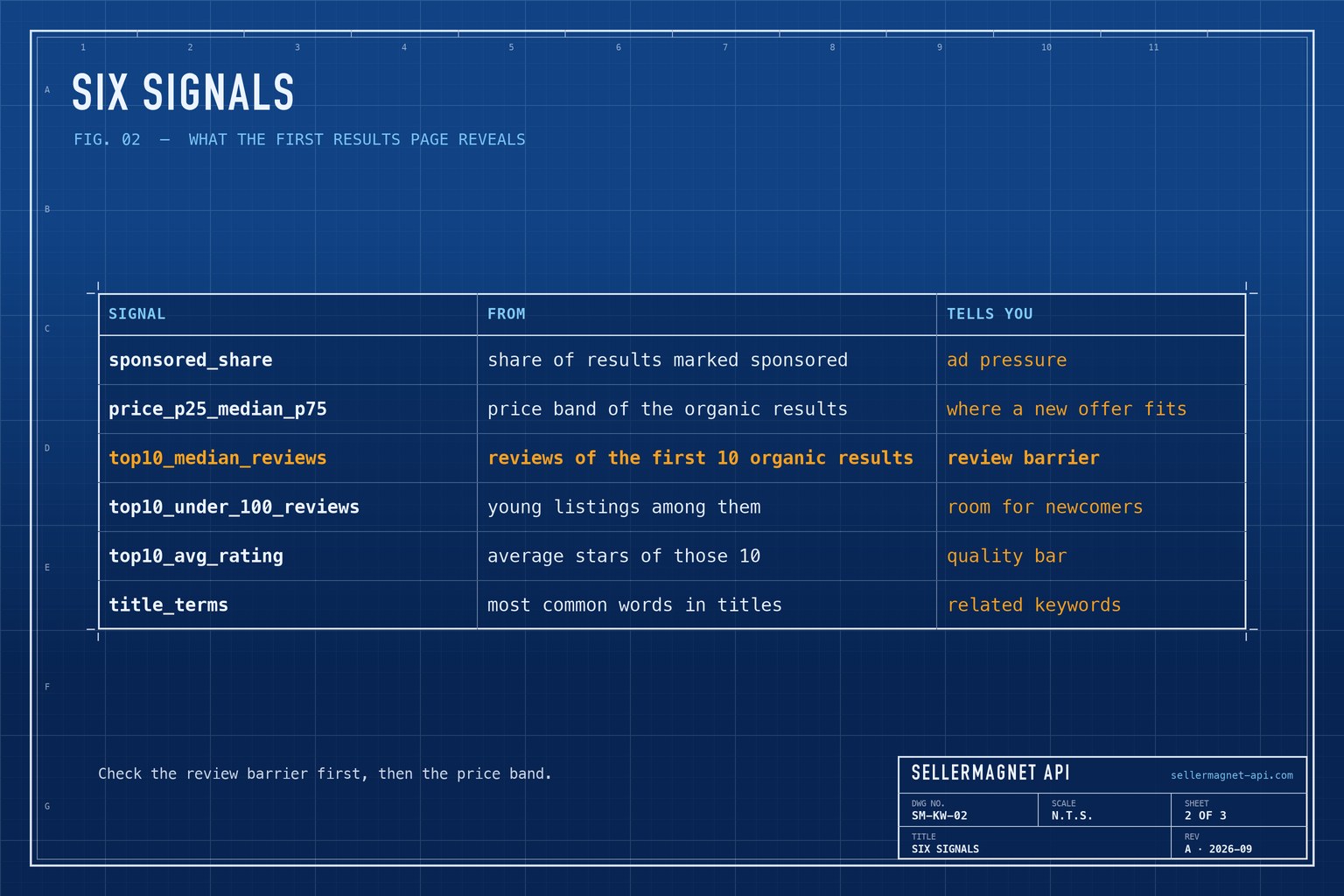
How do I compare keywords and pick the realistic ones?
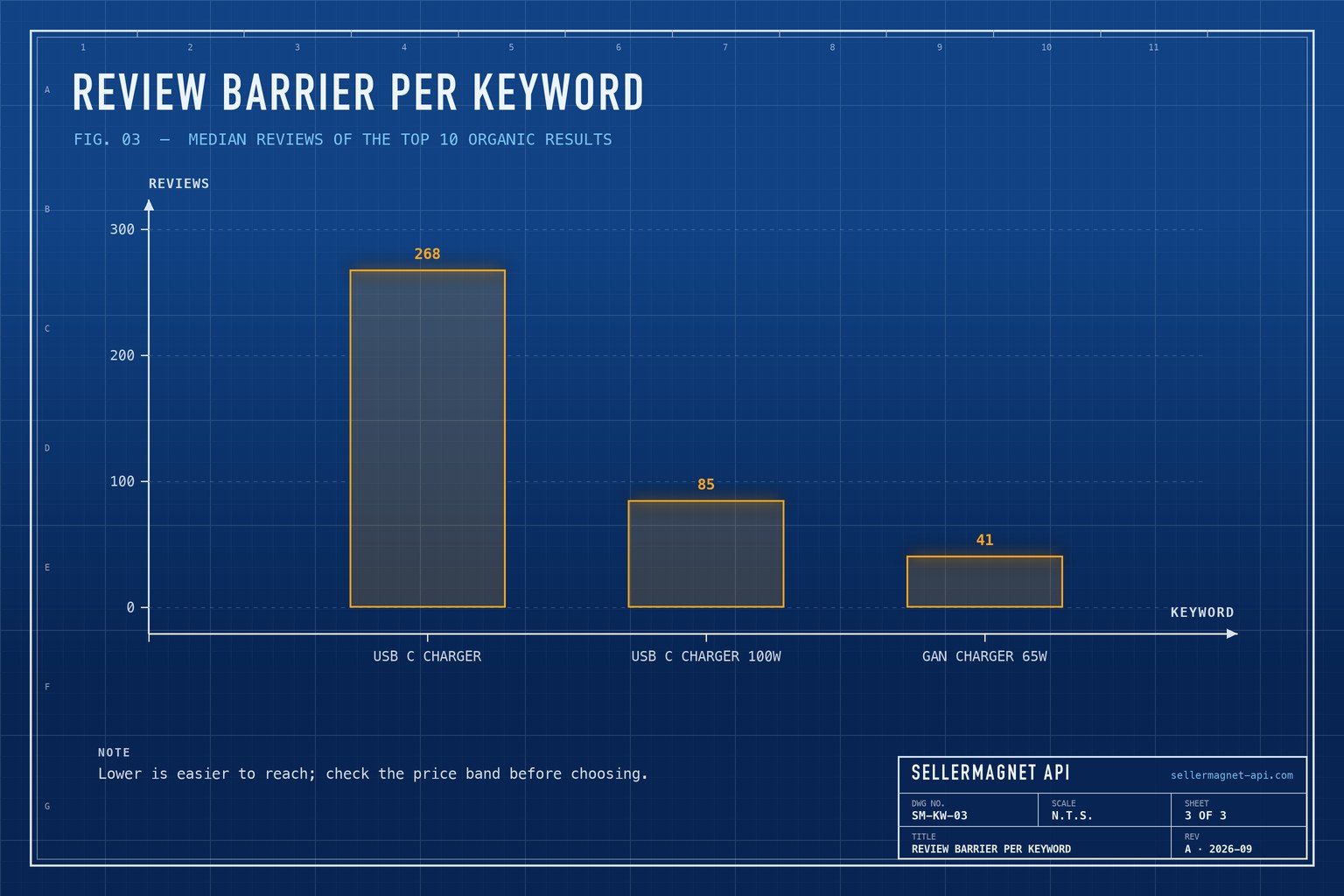
Run the report for a list of related keywords and sort by the review barrier. A broad keyword where the top 10 have hundreds of reviews each is a long-term goal; a narrower one where half the top 10 have fewer than 100 reviews is one a new product can reach. Check the price band before committing: a keyword is only useful if your price lands inside it. Once you are listed, the keyword rank tracker follows your position, and the market size guide estimates what the category sells.
Can I check a keyword from the command line?
Yes. For a quick look before writing code, jq can count sponsored results and list the review counts of the first organic ones.
Sponsored count and top-10 organic review counts with jq
curl -sG "https://sellermagnet-api.com/api/amazon-search" \
  -H "X-Api-Key: $SELLERMAGNET_API_KEY" --max-time 120 \
  --data-urlencode "q=usb c charger" \
  --data-urlencode "marketplaceId=ATVPDKIKX0DER" \
  --data-urlencode "count=50" \
  | jq -r 'if .success then (.data.searchResults
           | "sponsored: \(map(select(.sponsored)) | length) of \(length)",
             "top-10 organic reviews: \([.[] | select(.sponsored | not)][:10] | map(.reviewAmount) | join(" "))")
           else error(.message) end'
What this does not measure
The API returns what the page shows, not how often it is searched, and there is no autocomplete or reverse-ASIN endpoint - expand keywords from the title terms instead. The sponsored flag is read from the page's label markup. Results depend on the delivery location: pass geo_location for a postcode; it is best-effort, and the response does not say which location was used. Keep reports dated; pages change daily.
Frequently Asked Questions
Does the API return Amazon search volume?
No. It returns the results page for a keyword. Use it to judge competition, and take search volume from Brand Analytics, your ads search-term reports or another source.
How many results does one keyword call return?
Up to 50 from the first results page, sponsored ones included and flagged, for one credit. A count above 50 is a billed 400.
What is the review barrier?
The median review count of the top 10 organic results - roughly how many reviews a new product needs to look comparable on that page.
Why split sponsored and organic results?
Sponsored slots are bought, not earned. Mixing them in distorts the review barrier and the price band of the organic page.
Does it work outside amazon.com?
Yes, search accepts all 23 marketplaces. Title terms work in languages that separate words with spaces, not Japanese; extend the stop-word list for your language.
Bottom line: one search call per keyword gives the sponsored share, the price band, the review barrier and the vocabulary of the page - enough to shortlist keywords a new product can realistically reach. Every field is on the search endpoint page, and a free account includes 150 credits - 150 keywords.


