
OpenAI's Chat Completions API reaches the SellerMagnet API through function calling: describe a tool once in the tools parameter, and while the model keeps returning finish_reason: "tool_calls", your code runs the requested function and sends the result back as a role: "tool" message tagged with the call's id. The model never sees the API key or makes the HTTP request itself; your code does both, and only your code decides when to stop.
Key Takeaways
finish_reason: "tool_calls"with a non-emptymessage.tool_callsarray means the model wants one or more functions run before it continues.- Each tool result goes back as its own
{"role": "tool", "tool_call_id": ..., "content": ...}message, matched to its call by id, not by order. tool_choice: "none"forces a final answer without another tool call, which is how a credit budget gets enforced in code rather than hoped for in the prompt.- Validate the ASIN locally before calling the tool function's body; the lookup endpoint bills a malformed ASIN like any other request.
- Send errors back as JSON content on the tool message, not an exception that stops the loop, so the model can recover or explain the problem.
How do I describe the Amazon lookup tool to the model?
A tools entry is a type: "function" object with a JSON Schema parameters block. Marketplace IDs are an enum, not a free string, so the model cannot invent or misspell one; the ASIN itself stays a plain string, checked locally once the model calls the function.
tools.py: the tool schema and the function it describes
"""The Amazon product lookup tool, offered to the model via OpenAI's function-calling
schema. Reuses the quickstart's sellermagnet.py / retry.py for the real API call
(https://sellermagnet-api.com/blog/amazon-product-api-python).
"""
import json
import re

from retry import get_with_retry
from sellermagnet import ApiError, new_session

ASIN_RE = re.compile(r"^[A-Z0-9]{10}$")
MARKETPLACES = ["ATVPDKIKX0DER", "A1PA6795UKMFR9", "A13V1IB3VIYZZH", "A1F83G8C2ARO7P", "APJ6JRA9NG5V4"]

LOOKUP_TOOL = {
    "type": "function",
    "function": {
        "name": "amazon_product_lookup",
        "description": "Look up the current title, Buy Box price and bestseller rank for one Amazon ASIN.",
        "parameters": {
            "type": "object",
            "properties": {
                "asin": {"type": "string", "description": "10-character Amazon ASIN, e.g. B0CL61F39H"},
                "marketplace_id": {"type": "string", "enum": MARKETPLACES,
                                   "description": "Amazon marketplace ID; defaults to amazon.com"},
            },
            "required": ["asin"],
        },
    },
}

session = new_session()


def amazon_product_lookup(asin: str, marketplace_id: str = "ATVPDKIKX0DER") -> str:
    if not ASIN_RE.match(asin):
        return json.dumps({"error": f"'{asin}' is not a 10-character ASIN; check it before calling the tool"})
    try:
        data = get_with_retry(session, "amazon-product-lookup", asin=asin, marketplaceId=marketplace_id)
    except ApiError as err:
        return json.dumps({"error": f"lookup failed ({err.status}): {err}"})
    p = data["productInfo"]
    box = p.get("buyBoxInfo") or {}
    price = box.get("price")
    rank = (p.get("bestsellerRanks") or {}).get("main_category") or {}
    return json.dumps({  # a handful of fields, not the whole listing - this gets resent as input on every later turn
        "asin": asin, "marketplace_id": marketplace_id, "title": p.get("title"),
        "buy_box_price": price if isinstance(price, (int, float)) else None, "currency": box.get("currencyCode"),
        "rank": rank.get("rank"), "rank_category": rank.get("name"),
    })
How does the tool-calling loop work in Python?
Call the model with the tool, and while it keeps asking for one, run every requested call and append each result as its own tool message before calling the model again. The loop ends on any finish_reason other than tool_calls. Once the budget is spent, tool_choice: "none" forces a final answer instead of another round. Status codes, retries and Retry-After for the underlying SellerMagnet calls are covered in rate limits and error handling; the same tool-contract pattern for Claude is in the AI agent tool-calling guide.
agent.py: a manual tool-calling loop with a hard budget
"""A manual OpenAI tool-calling loop with a hard tool-call budget."""
import json

from openai import OpenAI

from tools import LOOKUP_TOOL, amazon_product_lookup

client = OpenAI()
MAX_TOOL_CALLS = 10  # one credit each: the most a single question may spend
SYSTEM = (
    "You answer questions about Amazon products. Use amazon_product_lookup for any "
    "current price, rank or title - never quote them from memory. Always name the "
    "ASIN and marketplace your answer is based on."
)


def ask(question: str) -> str:
    messages = [{"role": "system", "content": SYSTEM}, {"role": "user", "content": question}]
    calls = 0
    while True:
        response = client.chat.completions.create(
            model="gpt-5",
            messages=messages,
            tools=[LOOKUP_TOOL],
            # once the budget is spent, force a final answer instead of more tool calls
            tool_choice="none" if calls >= MAX_TOOL_CALLS else "auto",
        )
        choice = response.choices[0]
        message = choice.message
        if choice.finish_reason != "tool_calls" or not message.tool_calls:
            return message.content or ""

        messages.append({"role": "assistant", "content": message.content, "tool_calls": message.tool_calls})
        for call in message.tool_calls:
            calls += 1
            try:
                args = json.loads(call.function.arguments)
            except json.JSONDecodeError:
                content = json.dumps({"error": "arguments were not valid JSON"})
            else:
                if calls > MAX_TOOL_CALLS:
                    content = json.dumps({"error": "Tool budget used up. Answer with what you have."})
                else:
                    try:
                        content = amazon_product_lookup(**args)
                    except Exception as exc:
                        content = json.dumps({"error": str(exc)})
            # each tool result goes back as its own role:"tool" message, tagged with the call's id
            messages.append({"role": "tool", "tool_call_id": call.id, "content": content})


if __name__ == "__main__":
    question = "What does B0CL61F39H cost on amazon.com right now, and how does it rank?"
    print(f"Q: {question}")
    print(f"A: {ask(question)}")
Example run, from python agent.py (illustrative data)
Q: What does B0CL61F39H cost on amazon.com right now, and how does it rank?
A: B0CL61F39H costs $444.99 on amazon.com (ATVPDKIKX0DER) and ranks #31 in Video Games.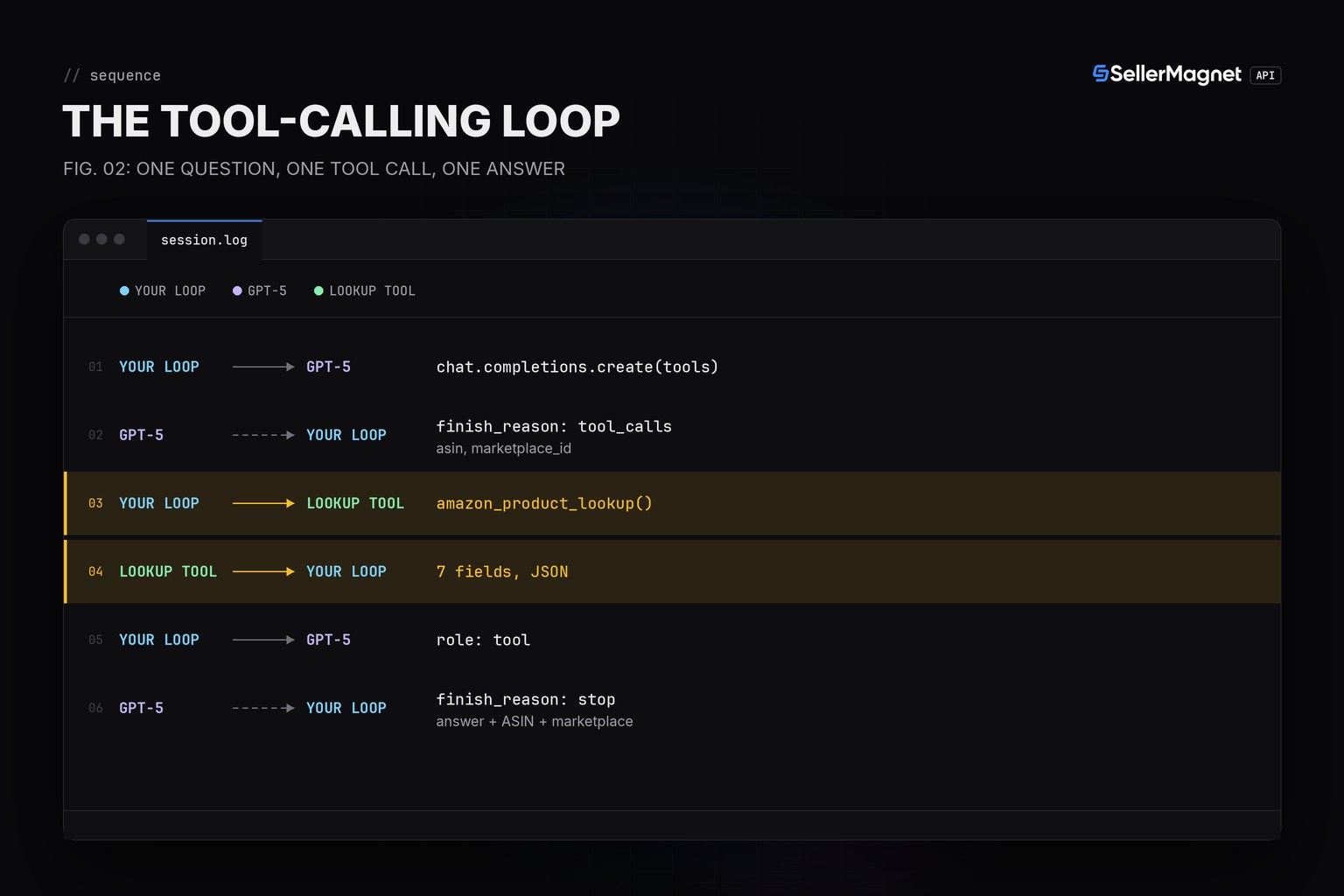
What the model receives as the tool result content
{
  "asin": "B0CL61F39H",
  "marketplace_id": "ATVPDKIKX0DER",
  "title": "PlayStation5 console (slim)",
  "buy_box_price": 444.99,
  "currency": "USD",
  "rank": 31,
  "rank_category": "Video Games"
}
Which guardrails keep an agent cheap and honest?
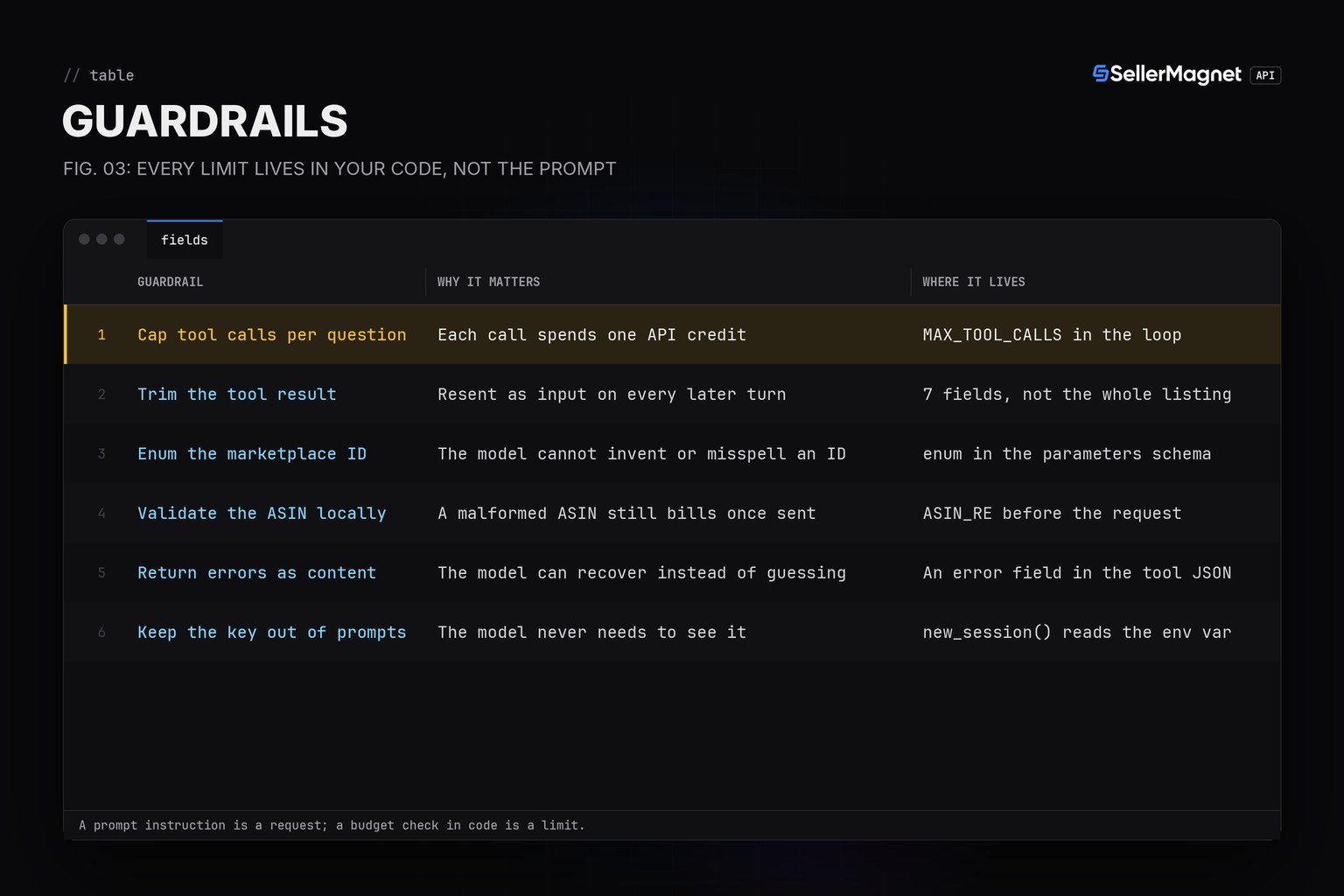
An agent spends credits and tokens on its own initiative, so the limits belong in code, not the prompt. Each guardrail below is a few lines in the example above.
| Guardrail | Why it matters | Where it lives |
|---|---|---|
| Cap tool calls per question | Each call spends one API credit | MAX_TOOL_CALLS in the loop |
| Trim the tool result | Resent as input on every later turn | 7 fields, not the whole listing |
| Enum the marketplace ID | The model cannot invent or misspell an ID | enum in the parameters schema |
| Validate the ASIN locally | A malformed ASIN still bills once sent | ASIN_RE before the request |
| Return errors as content | The model can recover instead of guessing | An error field in the tool JSON |
| Keep the key out of prompts | The model never needs to see it | new_session() reads the env var |
parallel_tool_calls can return more than one call at once
By default the model may return several tool_calls in one response. The loop above runs every one of them and sends back one role: "tool" message per call, in the order they arrived; set parallel_tool_calls: false in the request if the budget check needs to see calls one at a time instead of a batch.
Frequently Asked Questions
Does OpenAI call the SellerMagnet API directly?
No. The model only returns the function name and arguments; your own code runs amazon_product_lookup() and sends the JSON result back.
What happens on a malformed ASIN?
The tool function checks the ASIN format locally and returns an error in its JSON content before any billed call is made.
How do I stop an agent from making unlimited tool calls?
Count calls in your own loop and switch tool_choice to "none" once a budget is reached; the API has no built-in call limit.
What if the lookup fails (a 404 or a rejected key)?
Send the error back as the tool message's content instead of raising; the model can then explain the problem or try a different ASIN.
Is this different from the Claude tool-use pattern?
The contract differs in field names (tool_calls vs tool_use blocks, role:tool vs tool_result), but the loop shape (call, run, send results, repeat until done) is the same; see the Claude guide for that version.
Bottom line: one tool schema, a loop that runs every requested call and sends results back tagged by id, and a hard call budget in code turn an OpenAI model into an Amazon product assistant without ever showing it the API key. Every field the tool reads is on the product lookup page.


