
Amazon bestseller price vs Buy Box price: they are two different numbers, served by two endpoints. price.price on an /amazon-bestsellers card is the price printed on the bestseller page, and a card that shows a variation range resolves to the low end of that range. The Buy Box price is the featured offer on the ASIN's own offer listing: buyBox.totalPrice from /amazon-product-offers, the item price plus shipping, which you round yourself.
Key Takeaways
bestsellers[].price.priceis the price shown on the bestseller card when the list is read; it is not a Buy Box field.- A card that shows a variation range resolves to its low end, while Amazon picks the Featured Offer separately for each variation, so the card can sit far below the Buy Box of the ASIN on the card.
- The live Buy Box price is
buyBox.totalPricefrom/amazon-product-offers: item price plus shipping, returned unrounded, so round it to 2 decimals. - An empty
buyBox(no featured offer) and a card without a price are missing values, never a price of 0. - A list costs 1 credit for the bestsellers call plus 1 per ASIN; 404s and every 502/503 attempt are billed, a 500 without Retry-After is refunded.
Amazon bestseller price vs Buy Box: which number is which?
/amazon-bestsellers takes a category_id and a marketplaceId and returns up to 50 cards from one Best Sellers list (count defaults to 30). Each card carries rank, asin, productTitle and a price object with price, currency_code, currency_name and currency_symbol: the number printed on the card when the list page was read. That number does not say whether it came from a range, and a card can lack asin or rank or come without a price. /amazon-product-offers reads one page of the live offer listing for one ASIN, and its buyBox object is the featured offer, the offer pinned at the top of that listing. Amazon calls the Buy Box the Featured Offer, and its US Seller Central help says two things that matter here: the total price, item price plus shipping fee, plays an important role in choosing it, and for a product with variations the Featured Offer is determined separately for each variation. Field details are on the Bestsellers endpoint page and in the Offer Listing API guide.
| Field | Endpoint | What it holds |
|---|---|---|
bestsellers[].price.price | /amazon-bestsellers | The price printed on the bestseller card when the list was read; a variation range resolves to its low end; can be missing |
searchResults[].listingPrice.price.total | /amazon-search | The price shown in the search result, a string with two decimals; products without a price are skipped |
deals[].dealPrice.priceTotal | /amazon-deals | The deal's item price; 0.0 when the page price could not be read |
productInfo.buyBoxInfo.price | /amazon-product-lookup | The featured offer's item price without shipping, or N/A when there is no featured offer or no readable price |
buyBox.totalPrice | /amazon-product-offers | The featured offer's item price plus shipping, returned unrounded; buyBox is {} without a featured offer |
offers[].totalPrice | /amazon-product-offers | Each offer's item price plus shipping, rounded to 2 decimals; the featured offer, if any, comes first |
stats.buyBoxPriceHistory | /amazon-product-statistics | Recorded Buy Box prices including shipping, in integer minor units (cents), on 11 marketplaces |

How to get the real Buy Box price for every bestseller
Call /amazon-bestsellers once, then /amazon-product-offers once for every card that has an ASIN, and compare round(buyBox.totalPrice, 2) with the card price. get_with_retry comes from retry.py, and ApiError and new_session from sellermagnet.py, both published in the Python quickstart. buy_box() returns no price when buyBoxSuppressed is true or buyBox is empty, so a listing without a featured offer never turns into a price of 0. Errors are reported per row: a 404 is a billed answer and the run goes on, a 401 or 403 (a key or credits problem, never billed) stops it instead of calling the remaining ASINs, and three ASINs that keep failing stop it too, because 502 and 503 retries are billed on every attempt.
Install requests, set the key, run the check
pip install requests
export SELLERMAGNET_API_KEY="your-key-here"
python3 bestseller_vs_buybox.py
bestseller_vs_buybox.py: card price vs live Buy Box price for the top of one Best Sellers list
"""Bestseller card price vs live Buy Box price for the top of one Amazon Best Sellers list.

/amazon-bestsellers returns the price printed on each bestseller card (price.price); a variation range
resolves to its low end. The Buy Box price is the featured offer on the ASIN's offer listing: buyBox.totalPrice
from /amazon-product-offers, the item price plus shipping, returned unrounded.
Helpers: sellermagnet.py and retry.py from https://sellermagnet-api.com/blog/amazon-product-api-python
"""
import requests

from retry import get_with_retry
from sellermagnet import ApiError, new_session

MARKETPLACE = "ATVPDKIKX0DER"   # amazon.com
CATEGORY = "20972781011"        # Video Games > PlayStation 5: the last segment of that Best Sellers URL
COUNT = 8                       # 1 bestsellers call + 1 offers call per ASIN; above 50 is a billed 400
MAX_FAILED = 3                  # 502/503 are billed on every retry: stop after 3 ASINs that keep failing


def card_price(card):
    price = (card.get("price") or {}).get("price")
    return price if isinstance(price, (int, float)) and price > 0 else None   # None: no price on the card


def buy_box(offers):
    box = offers.get("buyBox") or {}
    landed = round(box.get("totalPrice") or 0, 2)
    if offers.get("buyBoxSuppressed") or not landed:
        return None, None
    return landed, box.get("shippingPrice") or 0.0


def verdict(card, landed, shipping):
    if landed is None:
        return "no featured offer"
    if card is None:
        return "no price on the card"
    gap = round(landed - card, 2)
    if abs(gap) < 0.01:
        return "same"
    if shipping and abs(gap - shipping) < 0.01:
        return f"{gap:+.2f} = shipping"
    return f"{gap:+.2f} ({gap / card:+.0%})"


def fmt(value):
    return "-" if value is None else f"{value:.2f}"


def row(rank, asin, card, landed, shipping, note):
    print(f"{rank:>4}  {asin:<10}  {fmt(card):>7}  {fmt(landed):>7}  {fmt(shipping):>5}  {note}")


def main():
    assert 1 <= COUNT <= 50, "count above 50 is a billed 400"
    session = new_session()
    cards = get_with_retry(session, "amazon-bestsellers", category_id=CATEGORY,
                           marketplaceId=MARKETPLACE, count=COUNT)["bestsellers"]
    print(f"{'rank':>4}  {'asin':<10}  {'card':>7}  {'buy box':>7}  {'ship':>5}  verdict")
    seen, failed = set(), 0
    for card in cards:
        asin, rank, price = card.get("asin"), card.get("rank") or "-", card_price(card)
        if not asin or asin in seen:    # nothing to look up, or an ASIN this run already paid for
            row(rank, asin or "-", price, None, None, "repeat: not looked up" if asin else "no ASIN on the card")
            continue
        seen.add(asin)
        try:
            offers = get_with_retry(session, "amazon-product-offers", asin=asin, marketplaceId=MARKETPLACE)
        except ApiError as err:
            if err.status in (401, 403):  # key or credits problem (never billed): stop, don't call the rest
                raise
            failed += err.status != 404   # a 404 is a billed answer (no such product), not an outage
            row(rank, asin, price, None, None, f"error {err.status}")
        except requests.RequestException as err:
            failed += 1
            row(rank, asin, price, None, None, type(err).__name__)
        else:
            landed, shipping = buy_box(offers)
            row(rank, asin, price, landed, shipping, verdict(price, landed, shipping))
        if failed >= MAX_FAILED:
            print(f"stopped after {failed} failed ASINs")
            break


if __name__ == "__main__":
    try:
        main()
    except ApiError as err:             # the list call failed (unknown category_id = billed 400), or 401/403
        raise SystemExit(f"stopped: {err}")
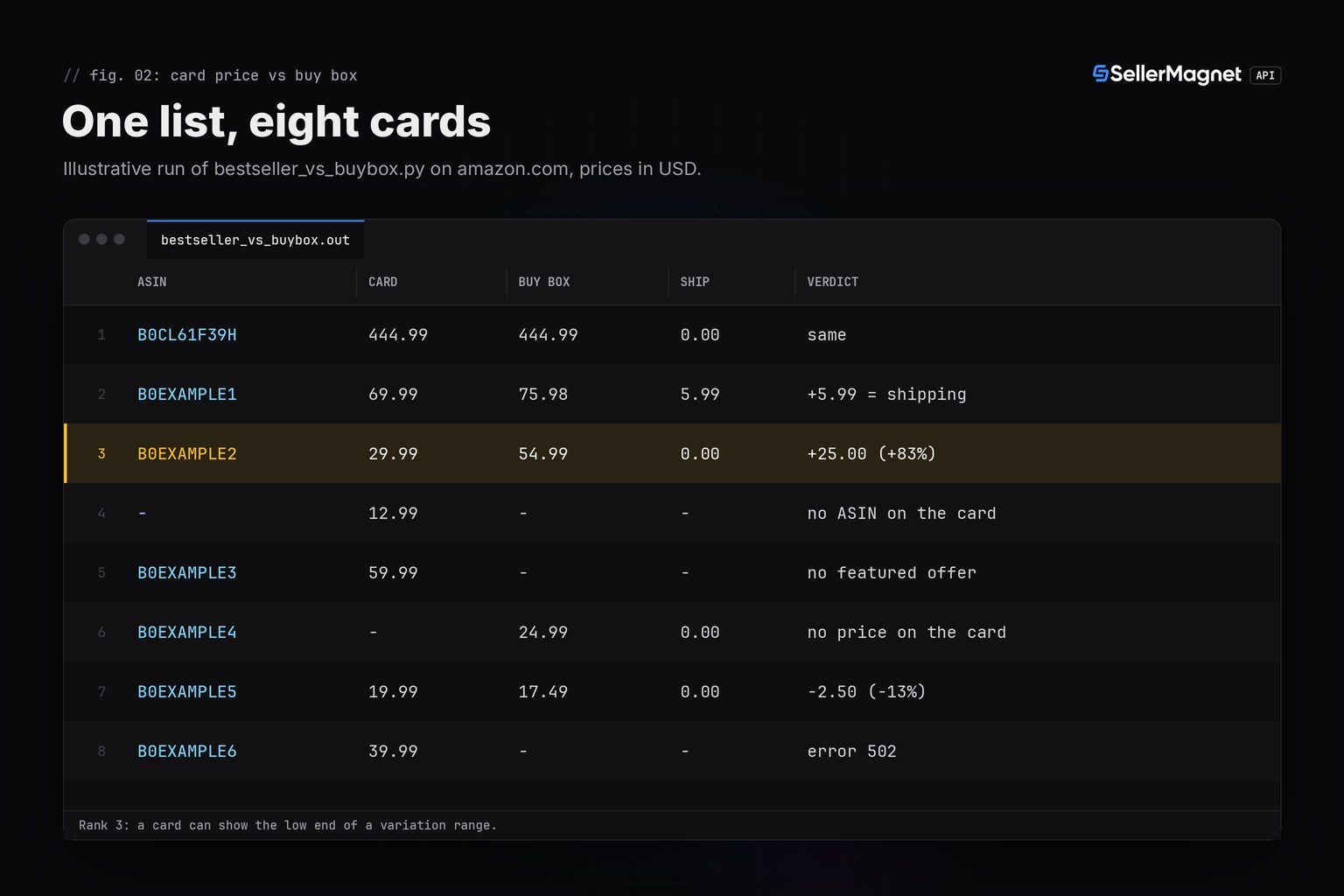
Output of bestseller_vs_buybox.py on amazon.com (illustrative data, prices in USD)
rank  asin           card  buy box   ship  verdict
   1  B0CL61F39H   444.99   444.99   0.00  same
   2  B0EXAMPLE1    69.99    75.98   5.99  +5.99 = shipping
   3  B0EXAMPLE2    29.99    54.99   0.00  +25.00 (+83%)
   4  -             12.99        -      -  no ASIN on the card
   5  B0EXAMPLE3    59.99        -      -  no featured offer
   6  B0EXAMPLE4        -    24.99   0.00  no price on the card
   7  B0EXAMPLE5    19.99    17.49   0.00  -2.50 (-13%)
   8  B0EXAMPLE6    39.99        -      -  error 502
Rank 2 is the shipping case: the card says 69.99, the featured offer costs 69.99 plus 5.99 shipping, and its unrounded totalPrice is 75.97999999999999 (the JSON below). Rank 3 shows how large the gap can get when a card displays the low end of a variation range: 29.99 on the card, 54.99 in the Buy Box. Rank 5 has offers but no featured offer, rank 6 has no price on its card, and rank 8 failed with 502 four times: the script reports it and moves on.
Why do the two prices differ?
Put the two responses for rank 2 side by side. The card carries one number. The offers call splits the featured offer into priceWithoutShipping, shippingPrice and totalPrice, and totalPrice is their float sum, returned without rounding. The first entry of offers[] is the same featured offer with totalPrice rounded to 2 decimals, which is why two totalPrice values in one response can disagree in the last digits.
Trimmed /amazon-bestsellers response, the rank 2 card (illustrative values)
{
  "data": {
    "bestsellers": [
      {
        "asin": "B0EXAMPLE1",
        "price": {
          "currency_code": "USD",
          "currency_name": "United States Dollar",
          "currency_symbol": "$",
          "price": 69.99
        },
        "productTitle": "Example charging station",
        "rank": 2
      }
    ],
    "categoryId": "20972781011"
  },
  "success": true
}
Trimmed /amazon-product-offers response for the same ASIN (illustrative values)
{
  "data": {
    "asin": "B0EXAMPLE1",
    "buyBox": {
      "fulfillmentType": "FBM",
      "priceWithoutShipping": 69.99,
      "sellerId": "A2EXAMPLESELLR",
      "sellerName": "Example Games Store",
      "shippingPrice": 5.99,
      "totalPrice": 75.97999999999999
    },
    "buyBoxSuppressed": false,
    "currency": {
      "code": "USD",
      "name": "United States Dollar",
      "symbol": "$"
    },
    "offers": [
      {
        "priceWithoutShipping": 69.99,
        "sellerId": "A2EXAMPLESELLR",
        "shippingPrice": 5.99,
        "totalPrice": 75.98
      }
    ]
  },
  "success": true
}| Verdict | What it means | What to do |
|---|---|---|
= shipping | The card matches the featured offer's item price; totalPrice adds its shippingPrice | Compare with buyBox.priceWithoutShipping for item to item |
| Large positive gap | The card can show the low end of a variation range, or the price changed | Price the exact ASIN with the offers call; never reuse the card price |
| Negative gap | The price can change between the list read and the offers call | Re-check before you act on a small gap |
no featured offer | buyBoxSuppressed is true, or the listing has no offers at all | There is no Buy Box price; do not fall back to the card price |
no price on the card | The card has no price object, or price.price is None | Take the price from the offers call |
Do not store the card price as the Buy Box price
A job that writes price.price into a Buy Box column records a Buy Box price for listings that have no featured offer and can store the low end of a variation range as the price of the ASIN on the card, and nothing in the data warns you. Keep the card price as the bestseller page's number and fill the Buy Box column from the offers call.
If you also want to know why the featured offer is not always the cheapest one, the Buy Box price gap guide compares buyBox with the cheapest New offer from the same offers response.
Credit math for a full list
Every request costs 1 credit. The check costs 1 credit for the bestsellers call plus 1 per ASIN, so the 8-card run above made 11 billed requests: 1 list call, 6 offers calls that answered and 4 attempts for the ASIN that kept failing with 502; the card without an ASIN cost nothing. A full list of 50 cards costs 51 credits when every card has an ASIN and nothing fails. A 404 is billed and not retried, 502 and 503 are billed on every attempt (up to 4 here), a 500 without a Retry-After header is refunded, and 429, 401 and 403 are free. MAX_FAILED caps the damage when a marketplace keeps answering 503: after 3 failing ASINs, at most 12 billed attempts, the script stops.
Two checks before the first request save credits: count above 50 is a billed 400, so the script asserts it locally, and an unknown category_id is a billed 400 (Invalid CategoryId). Take the ID from the category tree, as the category IDs guide shows. Plans and credit prices are on the pricing page.
What the data cannot show
- Page one of one list only: a Best Sellers page holds 50 products, so
offsetpluscountreaches rank 50 at most. - Which variation a card price came from: the card returns one number, the low end when it shows a range.
- Coupons and promotions: the offer data has no coupon field, so a coupon-adjusted checkout price is not visible.
- Both prices at the same moment: the list is read once and each offers call follows later, so a price change in between shows up as a gap.
- The Buy Box every shopper sees: Amazon's US help says the Featured Offer can differ by shipping location and Prime enrollment, and one offers call returns one reading.
Frequently Asked Questions
Is the price in the Amazon Bestsellers API the Buy Box price?
No. price.price is the price printed on the bestseller card when the list page was read, and a variation range resolves to its low end. The Buy Box price is buyBox.totalPrice from the offers endpoint.
Why does buyBox.totalPrice have so many decimals?
It is the featured offer's item price plus shipping, added as floating-point numbers and returned unrounded, for example 75.97999999999999. Round it to 2 decimals before you compare or store it; offers[].totalPrice is already rounded.
Does the product lookup endpoint return the Buy Box price?
It returns productInfo.buyBoxInfo.price, the featured offer's item price without shipping, or N/A when there is no featured offer or no readable price. Use the offers endpoint when you need the price including shipping.
What does it cost to check a whole bestseller list?
One credit for the bestsellers call (up to 50 cards) plus one per offers call: 51 credits for a full list of 50 ASINs when nothing fails. A 404 is billed, 502 and 503 retries are billed per attempt, and a 500 without Retry-After is refunded.
What does an empty buyBox mean?
That there is no featured offer. With buyBoxSuppressed true, offers exist but Amazon features none of them; with an empty offers list there is nothing to feature. Neither case is a price of 0.
Bottom line: use /amazon-bestsellers to decide which ASINs matter and /amazon-product-offers to price them. The card price is what the bestseller page printed; the Buy Box price is round(buyBox.totalPrice, 2) from the live offer listing, and an empty buyBox or a card without a price is a missing value, not a zero.


