
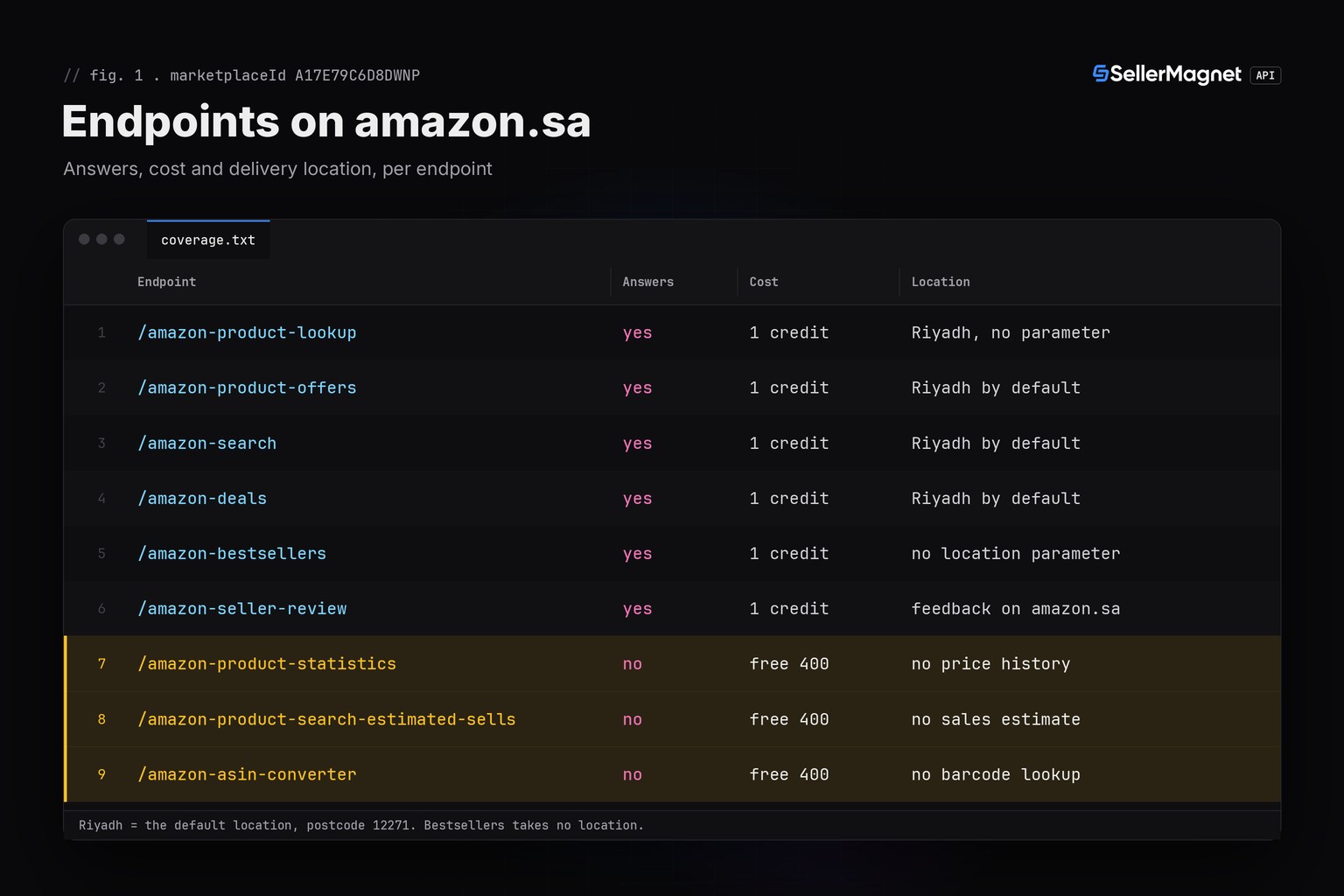
To use the SellerMagnet API as an Amazon Saudi Arabia product API, send marketplaceId=A17E79C6D8DWNP: the request goes to amazon.sa and prices come back in SAR. Product lookup, offers, search, bestsellers, deals and seller feedback answer for amazon.sa; price history, sales estimates and the ASIN converter return a free 400. Lookup, offers, search and deals prices are read for delivery to Riyadh, the store's default location, and titles and category names can come back in Arabic.
Key Takeaways
- amazon.sa is marketplace A17E79C6D8DWNP and is priced in SAR (Saudi Riyal).
- Lookup, offers, search and deals read amazon.sa for delivery to Riyadh, the default location (postcode 12271); amazon.sa picks the delivery location by city, so a different
geo_locationpostcode is not applied there. - Six endpoints answer on amazon.sa; statistics, estimated sales and the ASIN converter return a free 400 and no data.
- Bestseller category IDs come from amazon.sa's own tree, which shares no numeric ID with amazon.ae or amazon.com.
- Titles and rank names can be Arabic and
listedSinceDateis always null, so key your data on the ASIN.
What is different about the Amazon Saudi Arabia product API?
The request format is the same as for every other store: GET, query parameters, the key in the X-Api-Key header. What changes are a few values, the endpoint coverage, the delivery location and the language of the text fields. Prices come back as plain decimal numbers in SAR, so you never parse the right-to-left riyal symbol yourself; use currencyCode when you display them.
| Item | amazon.sa |
|---|---|
| Marketplace ID | A17E79C6D8DWNP |
| Store | amazon.sa |
| Currency | SAR (Saudi Riyal), symbol written right to left |
| Default delivery location | Riyadh (postcode 12271) |
| listedSinceDate | always null (no Arabic date label matched) |
| Bestseller category tree | amazon.sa's own: 27 top-level categories |
| Amazon's own seller ID | A2XPWB6MYN7ZDK |
| History endpoints | free 400, no data |
A trimmed /amazon-product-lookup answer on amazon.sa (illustrative data; Arabic text and the riyal symbol arrive JSON-escaped)
{
  "productInfo": {
    "asin": "B0SAPHONE1",
    "marketplaceId": "A17E79C6D8DWNP",
    "buyBoxInfo": {
      "currencySymbol": "\u0631.\u0633",
      "currencyCode": "SAR",
      "currencyName": "Saudi Riyal",
      "price": 1149.0,
      "sellerId": "Amazon",
      "amazonSellerId": "A2XPWB6MYN7ZDK"
    },
    "title": "\u0645\u0646\u062a\u062c \u062a\u0648\u0636\u064a\u062d\u064a",
    "link": "https://www.amazon.sa/dp/B0SAPHONE1",
    "listedSinceDate": null,
    "bestsellerRanks": {
      "main_category": {
        "name": "\u0627\u0644\u0625\u0644\u0643\u062a\u0631\u0648\u0646\u064a\u0627\u062a",
        "rank": 3
      },
      "subcategory": {
        "name": "\u0647\u0648\u0627\u062a\u0641",
        "rank": 1
      }
    }
  }
}
Which delivery location does the API use on amazon.sa?
Riyadh. Each marketplace except amazon.ae has a default delivery location that the API sets when you send no geo_location; for amazon.sa it is postcode 12271, which lies in Riyadh. amazon.sa itself chooses the delivery location from a list of cities, not by postcode, and does not take a postcode change. So a different geo_location postcode that you send to the offers, search or deals endpoint is not applied on amazon.sa: the call still answers and is billed, but not for that postcode. Product lookup has no location parameter at all and always uses the default.
The practical rule: on amazon.sa leave geo_location out and read every price, shipping charge and delivery date as a Riyadh figure. Setting a location is best effort on every store and product lookup does not say which location it was read for, so compare the same products between runs rather than against a price you saw for another city. amazon.ae is the opposite case: it has no default location at all, as the UAE guide explains.
Endpoint coverage on amazon.sa
Six of the ten endpoints only check that the marketplace ID is valid, so they answer on all 23 marketplaces, amazon.sa included. The three history endpoints cover 11 marketplaces and turn amazon.sa away before any credit is taken: a 400 with the message "This endpoint is not available for the requested marketplace" followed by the list of supported stores. That call costs nothing, but it returns no data either. The tenth endpoint, /amazon-get-marketplaces, lists amazon.sa with its currency and default postcode. The full grid for every store is in API marketplace coverage.
Amazon's own APIs cover amazon.sa too, for other jobs. SP-API works on your own seller account: your listings, orders and inventory. The Creators API, which has an amazon.sa locale with SAR prices, is for affiliates and needs at least 10 qualifying sales in the past 30 days. This API reads public amazon.sa product data with nothing but an API key.
How do I get amazon.sa bestsellers with their featured offer in Python?
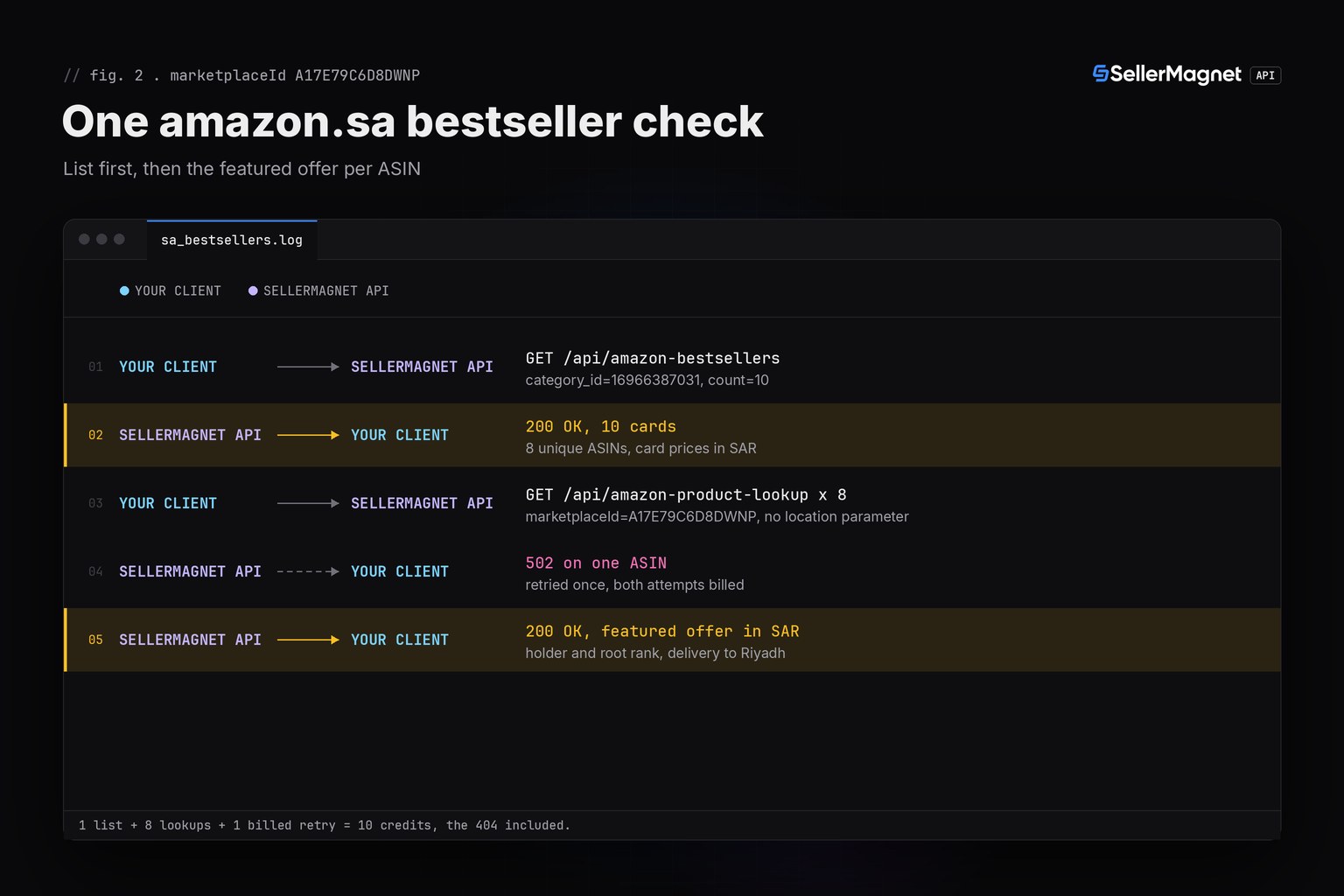
The script below reads the top of one amazon.sa bestseller category, then looks up each product to get its featured offer (the Buy Box) in SAR, who holds it and its rank in the root category. It reports a category ID that amazon.sa's tree does not know without sending any lookup, skips cards without an ASIN and ASINs it has already seen, reports a 404 per row and stops the whole run on a 401/403. It uses sellermagnet.py (ApiError, new_session) and retry.py (get_with_retry) from the Python quickstart.
sa_bestsellers.py - an amazon.sa bestseller list with each product's featured offer
"""Amazon Saudi Arabia (amazon.sa) product check: one bestseller list, each product's featured offer in SAR.

amazon.sa is marketplace A17E79C6D8DWNP, priced in SAR. Three things the script relies on:

1. category_id must come from amazon.sa's own category tree (SA.json, the file behind /amazon-categories).
   An ID from another store's tree gets a free 400 "Invalid CategoryId", reported before any lookup is sent.
2. The bestseller page price is not the featured offer: a variation range shows its low end. Product lookup
   returns the featured offer for amazon.sa's default delivery location (postcode 12271, Riyadh), so the
   script prints both. Pages come back in Arabic, so everything is keyed on the ASIN, never the title.
3. amazon.sa has no price history: statistics, estimated sales and the ASIN converter answer it with a
   free 400. The script never sends those calls.

Helpers: sellermagnet.py and retry.py from https://sellermagnet-api.com/blog/amazon-product-api-python
"""
import requests

from retry import get_with_retry
from sellermagnet import ApiError, new_session

SA = "A17E79C6D8DWNP"                  # amazon.sa, prices in SAR
CATEGORY = "16966387031"               # Electronics > Mobile Phones & Communication in amazon.sa's tree
TOP = 10                               # 1 bestsellers call + up to TOP lookups = at most 11 credits + retries
AMAZON_SA = "A2XPWB6MYN7ZDK"           # Amazon's own seller ID on amazon.sa
MAX_FAILED = 3                         # 502/503 are billed on every attempt: stop after 3 lookups that keep failing


class Stop(Exception):
    """401/403: the key or the credits are the problem, so every further call would fail the same way."""


def call(session, endpoint, **params):
    try:
        return get_with_retry(session, endpoint, **params)
    except ApiError as err:
        if err.status in (401, 403):
            raise Stop(str(err)) from err
        raise


def featured(info):
    """(price, holder) of the featured offer; price None when there is none or it could not be read."""
    box = info.get("buyBoxInfo") or {}
    price = box.get("price")
    if not isinstance(price, (int, float)) or price <= 0:      # "N/A" is a string, never a 0 SAR price
        return None, "no featured offer"
    seller = box.get("sellerId") or "?"
    if seller == "Amazon":
        return round(price, 2), f"Amazon {box.get('amazonSellerId') or AMAZON_SA}"
    return round(price, 2), seller


def root_rank(info):
    """Rank in the root category, None when the page showed none (the API then sends rank 0)."""
    main = (info.get("bestsellerRanks") or {}).get("main_category") or {}
    return main.get("rank") or None


def row(rank, asin, page="-", buybox="-", gap="-", holder="", root="-"):
    print(f"{rank:>4} {asin:<11} {page:>9} {buybox:>9} {gap:>6}  {root:>7}  {holder}")


def main():
    if not 1 <= TOP <= 50:                       # count above 50 is a billed 400 "Count Max: 50"
        print(f"TOP={TOP}: must be 1 to 50, nothing sent")
        return
    session = new_session()
    try:
        data = call(session, "amazon-bestsellers", category_id=CATEGORY, marketplaceId=SA, count=TOP)
    except Stop as err:
        print(f"stopped: {err}")
        return
    except (ApiError, requests.ConnectionError, requests.Timeout) as err:   # incl. the free 400 Invalid CategoryId
        print(f"bestsellers failed, no lookups sent: {err}")
        return
    cards, seen = [], set()
    for card in data.get("bestsellers") or []:
        asin = card.get("asin")
        if asin and asin not in seen:            # a card can lack its ASIN; never pay twice for one ASIN
            seen.add(asin)
            cards.append(card)
    print(f"amazon.sa bestsellers {CATEGORY}: {len(data.get('bestsellers') or [])} cards, {len(cards)} ASINs")
    row("rank", "asin", "page SAR", "featured", "gap", "holder", "root")
    failed = amazon = priced = sent = 0
    for card in cards:
        if failed >= MAX_FAILED:
            print(f"stopped after {MAX_FAILED} failed lookups")
            break
        asin, rank = card["asin"], card.get("rank", "?")
        page = (card.get("price") or {}).get("price")
        page_txt = f"{page:.2f}" if isinstance(page, (int, float)) and page > 0 else "-"
        sent += 1
        try:
            info = call(session, "amazon-product-lookup", asin=asin, marketplaceId=SA)["productInfo"]
        except Stop as err:
            print(f"stopped: {err}")
            return
        except ApiError as err:
            note = "billed 404: not found on amazon.sa" if err.status == 404 else f"error {err}"
            row(rank, asin, page_txt, holder=note)
            failed += err.status >= 500
            continue
        except (requests.ConnectionError, requests.Timeout) as err:
            row(rank, asin, page_txt, holder=f"error {type(err).__name__}")
            failed += 1
            continue
        price, holder = featured(info)
        root = root_rank(info)
        root_txt = f"#{root:,}" if root is not None else "-"
        if price is None:
            row(rank, asin, page_txt, holder=holder, root=root_txt)
            continue
        priced += 1
        amazon += holder.startswith("Amazon")
        gap = f"{(price - page) / page:+.0%}" if page_txt != "-" else "-"
        row(rank, asin, page_txt, f"{price:.2f}", gap, holder, root_txt)
    print(f"\nfeatured offer read for {priced} of {sent} lookups; Amazon itself holds {amazon}")
    print(f"credits: 1 bestsellers + {sent} lookups, plus every billed retry")


if __name__ == "__main__":
    main()
Output (illustrative data: a card without an ASIN, a duplicate, a billed 404 and a retried 502)
amazon.sa bestsellers 16966387031: 10 cards, 8 ASINs
rank asin         page SAR  featured    gap     root  holder
   1 B0SAPHONE1    1149.00   1149.00    +0%       #3  Amazon A2XPWB6MYN7ZDK
   2 B0SACABLE2      39.00     42.50    +9%      #41  A1SACABLES02
   3 B0SACASE03      29.00     29.00    +0%      #88  Amazon A2XPWB6MYN7ZDK
   5 B0SAPOWER5      89.00     99.00   +11%     #152  A3SAPOWER005
   7 B0SAWATCH7     199.00         -      -     #310  no featured offer
   8 B0SAGONE08      75.00         -      -        -  billed 404: not found on amazon.sa
   9 B0SABUDS09          -    129.00      -        -  A4SABUDS0009
  10 B0SAHOLD10      45.00     45.00    +0%     #405  Amazon A2XPWB6MYN7ZDK

featured offer read for 6 of 8 lookups; Amazon itself holds 3
credits: 1 bestsellers + 8 lookups, plus every billed retry- page SAR is the price on the bestseller card, where a product with variations shows its lowest price. featured is the featured offer from product lookup, read for delivery to Riyadh, while the card is read without a delivery location. The gap between them is why a bestseller list is no price list; the bestseller price vs Buy Box guide goes deeper.
- Amazon A2XPWB6MYN7ZDK is Amazon itself on amazon.sa: lookup says
sellerId"Amazon" and carries the first-party ID inamazonSellerId. - root is the rank in the root category from
bestsellerRanks. If amazon.sa writes it in Arabic-Indic digits, the API still returns a plain integer, and 0 when the page showed no rank (printed as "-"). - no featured offer means lookup returned the price "N/A": nothing is featured, or no price could be read. It is not a price of 0 SAR and not a stock-out on its own.
- Ranks 4 and 6 are missing on purpose: card 4 had no ASIN and card 6 repeated rank 1's ASIN, so neither cost a lookup. billed 404 is an ASIN that lookup could not find on amazon.sa; the credit is charged and the call is not retried.
Arabic text, Arabic-Indic digits and a null listing date
The API reads amazon.sa in Arabic, the same as amazon.ae and amazon.eg. That shows in three places. title and the category names in bestsellerRanks can come back in Arabic, so join and deduplicate your data on the ASIN, never on the title. Ranks that the page writes in Arabic-Indic digits (٣٬٤١٢) arrive as plain integers (3412). And productInfo.listedSinceDate is always null: the API finds that date by its "Date First Available" label and knows no Arabic label for it, so on amazon.sa a null says nothing about the listing's age.
amazon.sa's bestseller category tree
amazon.sa has its own tree with 27 top-level categories and 18,552 nodes in total. The top-level IDs are English slugs (electronics) with Arabic names (الإلكترونيات); every deeper category has a numeric ID and an English name, for example Electronics > Mobile Phones & Communication is 16966387031. No numeric ID is shared with the amazon.ae or amazon.com trees, so an ID copied from another store fails with "Invalid CategoryId", a free 400 that costs no credit. The category_id parameter also takes a category name as the tree writes it, for example Mobile Phones & Communication or the Arabic top-level name الإلكترونيات; the answer then adds resolved_category with the ID and path it was read as. Take IDs from the category explorer; the explorer loads its amazon.sa tree from the public file /static/data/SA.json.
Credit cost of an amazon.sa bestseller check
1 credit per request, as on every store. The script costs 1 credit for the bestseller list plus 1 per unique ASIN, plus each billed retry: a 502 or 503 is charged on every attempt, a 500 without Retry-After is refunded. The example run made 10 calls: the list, 8 lookups and one retried 502. The 404 for an ASIN that lookup cannot find is billed. Free: an invalid marketplace ID, a category ID that is not in amazon.sa's tree and the history endpoints' amazon.sa 400.
Frequently Asked Questions
What is the Amazon Saudi Arabia marketplace ID?
A17E79C6D8DWNP. Pass it as marketplaceId and the request goes to amazon.sa, with prices in SAR. A country code like "SA" or a domain like "amazon.sa" is rejected with a free 400 Invalid marketplaceId.
Can I set a delivery city or postcode on amazon.sa?
Not reliably. The API uses amazon.sa's default delivery location, Riyadh (postcode 12271). amazon.sa chooses the delivery location by city and does not take a postcode, so a different geo_location postcode is not applied there. Leave it out and read prices as Riyadh prices.
Can I get Amazon Saudi Arabia price history?
Not from this API. Statistics, estimated sales and the ASIN converter cover 11 marketplaces and answer amazon.sa with a free 400 and no data. Store your own lookup snapshots if you need a history.
Why is listedSinceDate null on amazon.sa?
The API reads amazon.sa in Arabic, and the labels it uses to find "Date First Available" include no Arabic one. The field is null for every amazon.sa product, so a null there says nothing about the listing's age.
Which category IDs work for amazon.sa bestsellers?
IDs from amazon.sa's own tree: 27 top-level slugs such as electronics, and numeric IDs below them; a category name from that tree works too. An ID from amazon.ae's, amazon.com's or any other store's tree returns a free 400 Invalid CategoryId.
Bottom line: use A17E79C6D8DWNP for amazon.sa, expect SAR and Arabic text, read every price as a Riyadh price, keep history calls for the 11 covered stores and take category IDs from amazon.sa's own tree. The product lookup page lists every field, and a free account includes 150 credits.


