![Terminal running a Python script that compares an Amazon product's mainImage and gallery images[0] and flags a different picture or a smaller stored file](https://sellermagnet-api.com/static/img/blog/amazon-product-main-image-vs-gallery-api-hero.jpg?v=7b4ed37530)
productInfo.mainImage is not productInfo.images[0]. In a SellerMagnet /api/amazon-product-lookup response, mainImage is the picture Amazon shows with the offer listing, while images is the product page's own image gallery, so the two fields can show a different picture, and even the same picture at a smaller stored size. A catalogue sync that assumes they match can silently ship a lower-resolution, or simply wrong, hero image.
Key Takeaways
- productInfo.mainImage comes from the offer listing, not the image gallery - they are two different parts of the page.
- images[] is deduplicated, highest-resolution gallery pictures in gallery order; mainImage is one picture from elsewhere.
- mainImage can be the same picture as images[0] at a smaller stored size, or a completely different picture.
- A hero-image sync should prefer images[0] and only fall back to mainImage when there is no gallery at all.
- The mismatch costs nothing extra to check: both fields come from the one product-lookup credit you already pay for.
Where does productInfo.mainImage actually come from?
An Amazon product page shows its image gallery and its offer listing as two separate parts. The lookup's images field is the gallery: every picture it holds, at the highest resolution offered, without duplicates, in gallery order. mainImage is the picture shown with the offer listing instead, and Amazon can use a different file there: sometimes the same picture at a smaller stored size, sometimes a different picture altogether. videos follows the gallery too, up to two HLS playlists.
| Field | Source on the page | What you get |
|---|---|---|
productInfo.images | Product image gallery | Every gallery picture, highest resolution offered, deduplicated, in gallery order |
productInfo.mainImage | Offer listing picture | One picture shown with the offers, can differ from the gallery and can be smaller |
productInfo.videos | Product image gallery | Up to two HLS playlists (.m3u8) |
searchResults[].mainImage | Search result card | Result thumbnail, e.g. ._AC_UY218_ |
bestsellers[].mainImage | Bestseller card | Card thumbnail, same source as the card itself |
A lookup response where mainImage is a smaller, different file than images[0] (trimmed)
{
  "success": true,
  "data": {
    "productInfo": {
      "asin": "B0CL61F39H",
      "images": [
        "https://m.media-amazon.com/images/I/71qZqX8nQBL._SL1500_.jpg",
        "https://m.media-amazon.com/images/I/61e8hPmeoYL._SL1500_.jpg"
      ],
      "mainImage": "https://m.media-amazon.com/images/I/41srF-iY93L._SL500_.jpg"
    }
  }
}
How do I detect the mismatch in Python?
One lookup returns both fields, so the check is free: compare the file ID in each URL - the filename segment before any size modifier - to tell a different picture from the same picture at a different size, then compare the ._SL<n>_ size segment itself (as in the image download guide) to see which one is bigger.
hero_source.py - pick the right hero and flag the two mismatch cases
"""Check whether productInfo.mainImage is safe to use as a catalogue's hero image, or whether it
should fall back to productInfo.images[0] (the gallery's own first picture).

productInfo.mainImage is the picture Amazon shows with the offer listing, a different part of the page
from the product image gallery that fills productInfo.images.
The two can show a different picture, and even when they show the same picture, mainImage can be a
smaller stored file than the gallery's own first entry. A catalogue sync that assumes
mainImage == images[0] can silently ship a lower-resolution (or simply different) hero image.
Helpers: sellermagnet.py and retry.py from https://sellermagnet-api.com/blog/amazon-product-api-python
"""
import re

from retry import get_with_retry
from sellermagnet import ApiError, new_session

MARKETPLACE = "ATVPDKIKX0DER"   # amazon.com

# The "._SL<n>_" / "._AC_SL<n>_" segment sets the longest side in pixels; missing it means "no size
# modifier on this URL" rather than "0 px", so None (not 0) is the right default for a bare file.
SIZE_RE = re.compile(r"\._(?:AC_)?SL(\d+)_")


def pixels(url: str | None) -> int | None:
    if not url:
        return None
    m = SIZE_RE.search(url)
    return int(m.group(1)) if m else None


def image_id(url: str | None) -> str | None:
    """The filename stem before any size segment, e.g. '41ECK5cY-2L' - identifies the stored file."""
    if not url:
        return None
    return url.rsplit("/", 1)[-1].split("._")[0].split(".")[0]


def hero_check(product: dict) -> dict:
    gallery = product.get("images") or []
    main = product.get("mainImage")
    first = gallery[0] if gallery else None
    if not main:
        return {"verdict": "no mainImage", "use": first, "gallery_count": len(gallery)}
    if not first:
        return {"verdict": "no gallery, mainImage only", "use": main, "gallery_count": 0}
    if image_id(main) != image_id(first):
        return {"verdict": "DIFFERENT IMAGE: mainImage is not images[0]", "use": first, "gallery_count": len(gallery)}
    main_px, first_px = pixels(main), pixels(first)
    if main_px is not None and first_px is not None and main_px < first_px:
        return {"verdict": f"SAME IMAGE, SMALLER FILE: mainImage {main_px}px < images[0] {first_px}px",
                "use": first, "gallery_count": len(gallery)}
    return {"verdict": "same image, same or unknown size", "use": first, "gallery_count": len(gallery)}


def audit(asin: str) -> dict:
    session = new_session()
    data = get_with_retry(session, "amazon-product-lookup", asin=asin, marketplaceId=MARKETPLACE)
    result = hero_check(data["productInfo"])
    result["asin"] = asin
    return result


def row(r: dict) -> str:
    return f"{r['asin']:<10}  gallery={r['gallery_count']:<2}  {r['verdict']}"


if __name__ == "__main__":
    for asin in ("B0CL61F39H", "B0EXAMPLE1", "B0EXAMPLE2", "B0EXAMPLE3"):
        try:
            print(row(audit(asin)))
        except ApiError as err:
            if err.status in (401, 403):
                raise
            print(f"{asin:<10}  error {err.status}: {err}")
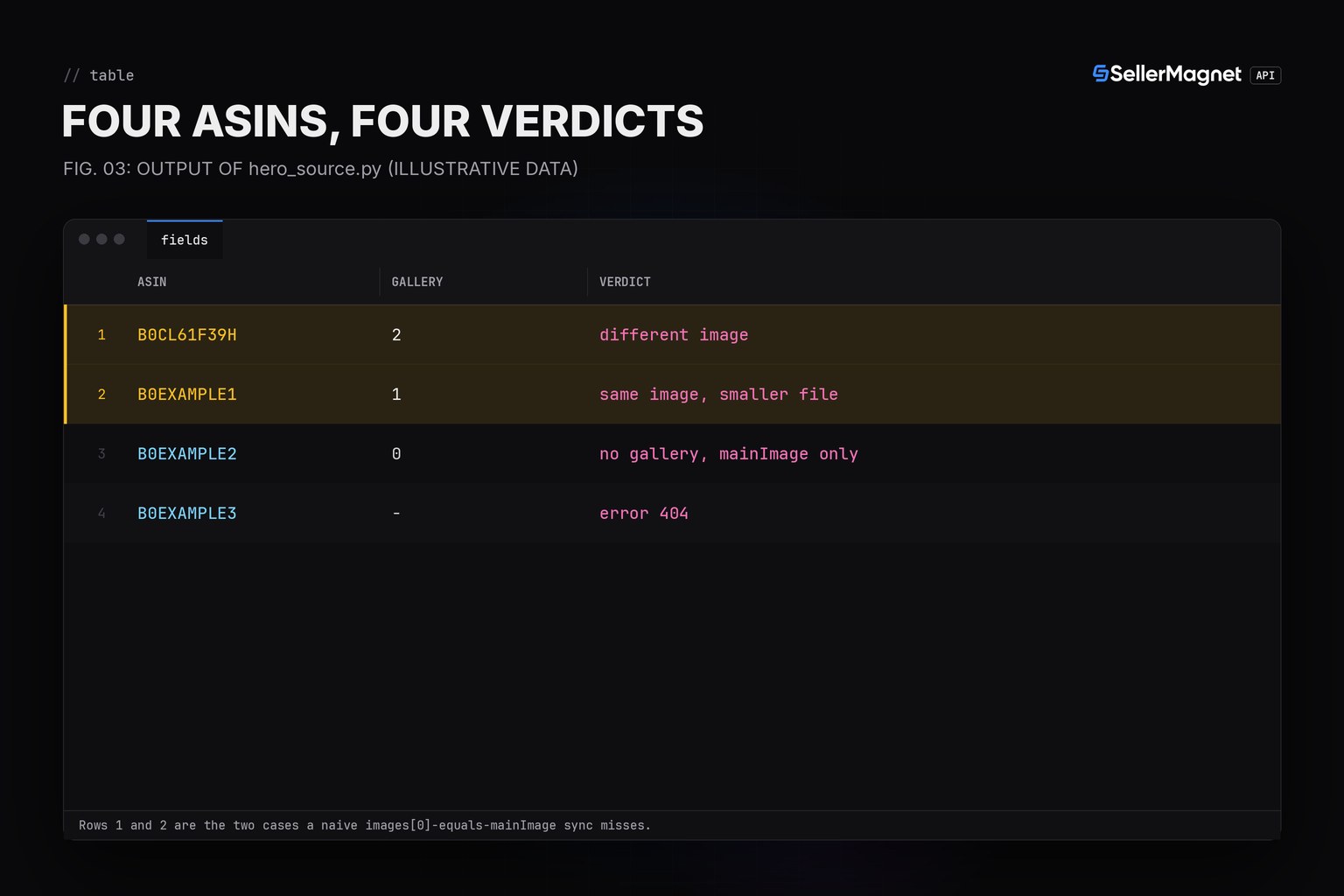
Output for four ASINs (illustrative data)
B0CL61F39H  gallery=2   DIFFERENT IMAGE: mainImage is not images[0]
B0EXAMPLE1  gallery=1   SAME IMAGE, SMALLER FILE: mainImage 500px < images[0] 1000px
B0EXAMPLE2  gallery=0   no gallery, mainImage only
B0EXAMPLE3  error 404: 404: no such product on this marketplace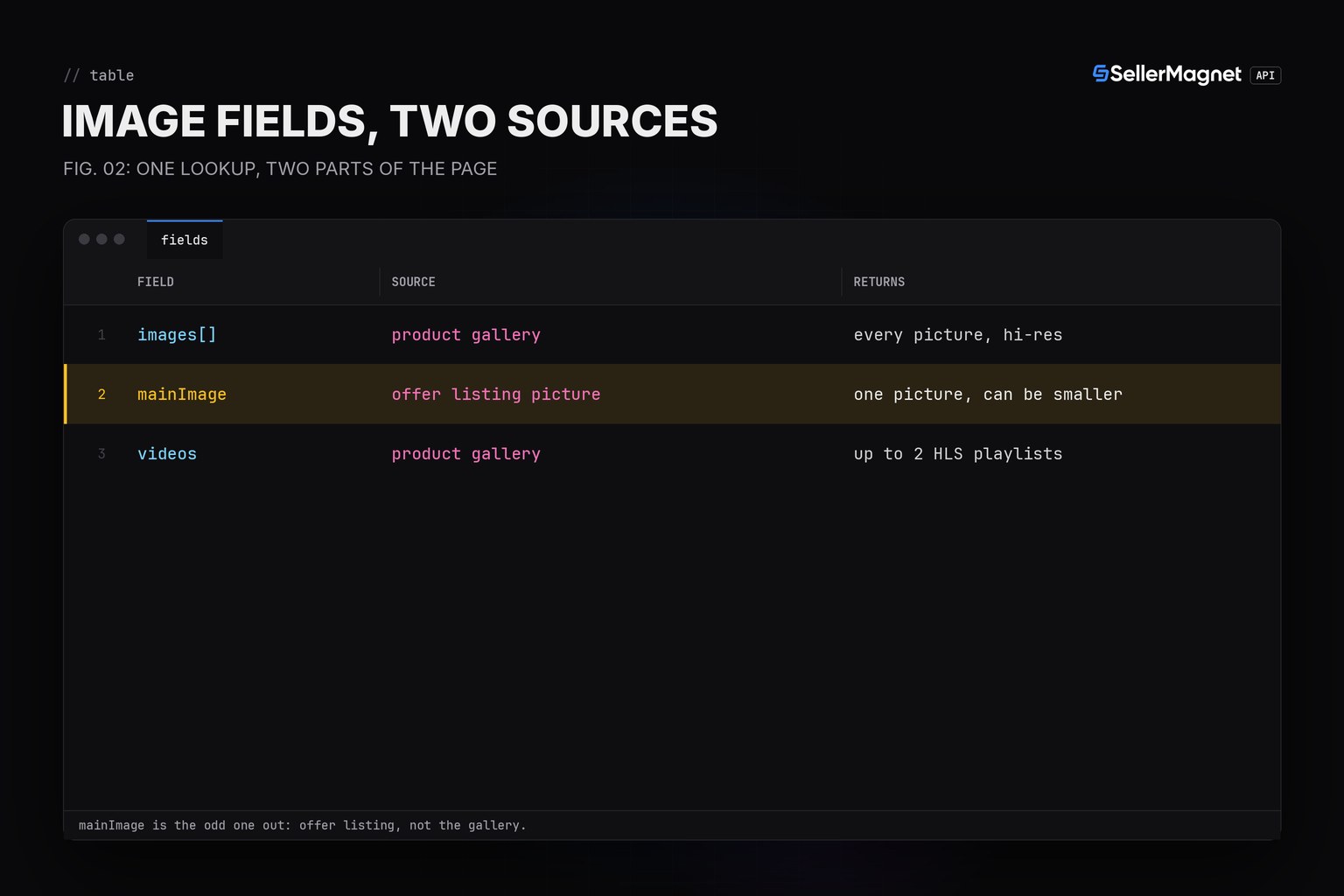
Which image should a catalogue sync actually use?
Prefer images[0] as the hero: it is the gallery's own first picture, already the highest resolution the page offers. Fall back to mainImage only when images is empty - some marketplaces return no gallery for a given ASIN, and mainImage is then the one picture available. Never write mainImage into a catalogue field named "hero image" or "primary image" without this check first: the sync keeps working (no error, no empty field), it just quietly stores the wrong, or a smaller, file.
Spot-check one ASIN's two image fields with curl and jq
curl -sG "https://sellermagnet-api.com/api/amazon-product-lookup" \
  --data-urlencode "asin=B0CL61F39H" \
  --data-urlencode "marketplaceId=ATVPDKIKX0DER" \
  --data-urlencode "api_key=$SELLERMAGNET_API_KEY" \
  | jq '.data.productInfo | {mainImage, first: .images[0]}'
Only the lookup itself costs a credit (one, regardless of how many image fields you read from the response); re-running the check costs nothing extra. For bulk catalogues, run it inside the worker pool from the bulk ASIN lookup guide.
What this check cannot tell you
A matching file ID and size does not prove the pictures are pixel-identical - Amazon can re-encode the same source image differently in each widget. Treat the check as a catalogue-quality flag, not a byte-for-byte guarantee, and always use images[0] when it exists.
Frequently Asked Questions
Why is productInfo.mainImage different from productInfo.images[0]?
They come from two different parts of the Amazon page: mainImage is the picture shown with the offer listing, images[] is the product image gallery. They can show a different picture.
Is productInfo.mainImage always smaller than images[0]?
No. It can be the same resolution, a smaller stored file of the same picture, or a different picture at any size. Compare both the file ID and the size segment to know which.
Which field should I use as a product's hero image?
images[0]: it is the gallery's own first, highest-resolution picture. Use mainImage only as a fallback when images is empty.
Does checking both fields cost extra credits?
No. Both fields come back on the same /amazon-product-lookup call, which costs one credit regardless of how many fields you read.
Can images[] be empty while mainImage is still set?
Yes, on some marketplaces or listings. That is the one case where mainImage is the only hero picture available, so fall back to it only then.
Bottom line: images[0] and mainImage are two different fields from two different parts of the Amazon page, not two names for the same picture. Compare the file ID first, the size segment second, prefer images[0], and fall back to mainImage only when there is no gallery at all. The product lookup page lists every field, and a free account includes 150 credits.


