
Set a client timeout of 120 seconds for the SellerMagnet API: that matches the API's own response window, the longest it holds a request open for you. The API may need almost that long for a slow Amazon page, and a credit is deducted before the fetch even starts, not when it finishes - so a client that gives up earlier does not get that credit back, it just never reads the answer it already paid for. A too-short timeout paired with retries spends MORE credits per lookup, never fewer.
Key Takeaways
- 120 seconds is the right client timeout: it matches the API's own response window, the longest the API holds a request open for you.
- The API answers within that window: a too-slow Amazon page comes back as a JSON error response, never as a hang.
- A credit is deducted before the Amazon page fetch starts, so a client timeout never gets refunded - only a server-side 500 without Retry-After is.
- A too-short timeout does not save credits: each retry is an independent request that is billed again, so it can cost MORE per lookup, not less.
- Treat a client timeout like a 500 or a 502 in your retry logic: a few attempts with backoff, never an unbounded loop.
Why 120 seconds?
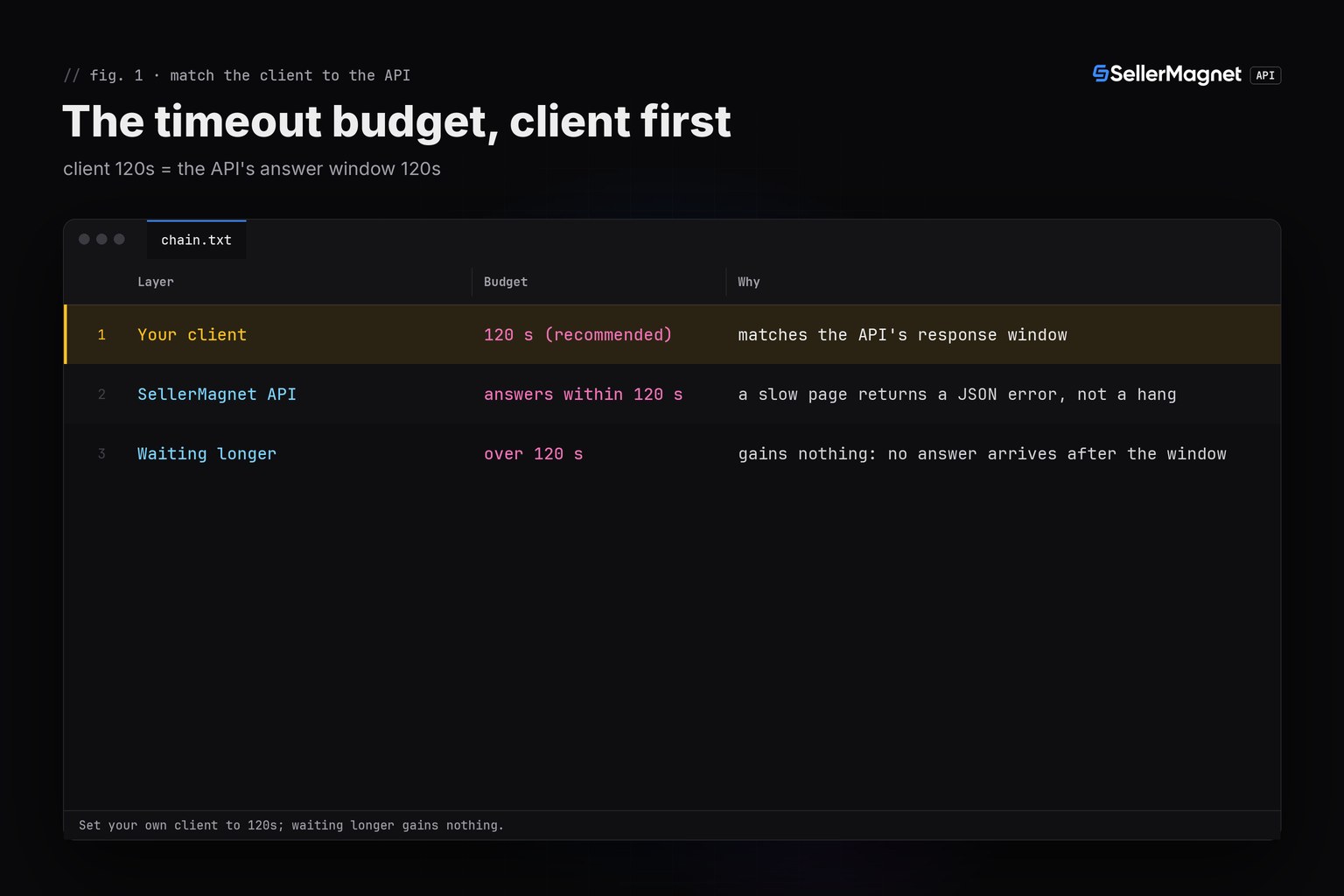
The SellerMagnet API reads Amazon live on every request, and a slow page can take close to the API's own budget. The API holds a request open for at most 120 seconds, so 120 seconds is the longest it will wait on your behalf before it gives up and returns its own error. Setting your client to exactly that number means you see every answer the server is able to produce, and you never wait past the point where the API would have closed the connection anyway.
| Layer | Budget | Why |
|---|---|---|
| Your client | 120 s (recommended) | matches the API's response window |
| SellerMagnet API | answers within 120 s | a slow page returns a JSON error, not a hang |
| Waiting longer | over 120 s | gains nothing: no answer arrives after the window |
Does a timeout get my credit back?
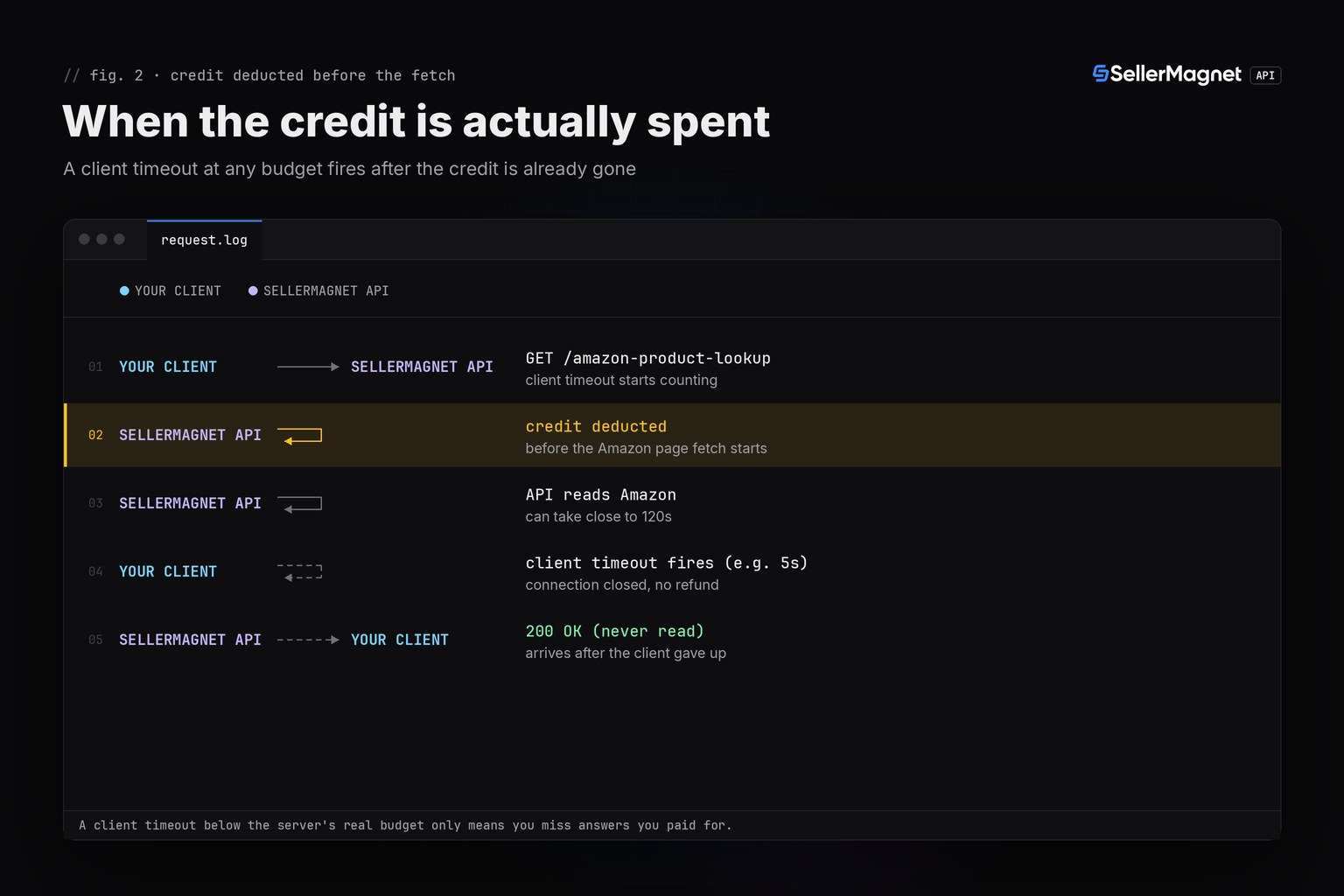
No. Every SellerMagnet request deducts the credit before the Amazon page is even fetched: the credit is spent first, then Amazon is read. If your own client gives up first, closing the connection, the API either keeps reading the page anyway or stops partway, but either way the credit it already took is not returned: refunds only exist for a server-side 500 without a Retry-After header. A timeout is not free like a 429 or a gate 400 - it is a paid request you chose not to wait for.
What a too-short client timeout looks like from the client's own side (requests)
{
  "exception": "requests.exceptions.ReadTimeout",
  "message": "HTTPSConnectionPool(host='sellermagnet-api.com', port=443): Read timed out. (read timeout=5)",
  "note": "the API may still be reading Amazon; the credit for this call is already spent"
}
How much does a too-short timeout actually cost?
The script below sends the same ASINs twice: once with a 5-second client timeout and once with the recommended 120 seconds, each retried up to 3 times client-side the way a real client often does. At 5 seconds, every attempt times out locally - 6 requests sent, 0 answers, and (since the credit is spent on the server's side regardless) 6 chances for a credit to be billed with nothing to show for it. At 120 seconds, both lookups answer on the first try. It then shows the recommended production pattern: the real 120-second timeout from sellermagnet.py, combined with get_with_retry from the Python quickstart, which only retries what a second attempt can actually fix.
timeout_budget.py - compare a too-short timeout against the recommended 120s
"""How long to set a client timeout for the SellerMagnet API, and why a too-short one does not
save credits - it just multiplies how many you spend on one lookup.

The API answers within 120 s, also when an Amazon page is slow.
Match that window with your own client: 120 s. A credit is deducted
BEFORE the Amazon page is even fetched, so a client that gives up early does not get it refunded - it only
means you never read an answer you already paid for. retry.py's get_with_retry retries a local
timeout, so pairing a too-short client timeout with retries multiplies the credits one lookup can
spend, it never saves any.
Helpers: sellermagnet.py (API, ApiError, new_session) and retry.py (get_with_retry) from
https://sellermagnet-api.com/blog/amazon-product-api-python
"""
import re

import requests

from retry import get_with_retry
from sellermagnet import API, ApiError, new_session

RECOMMENDED_TIMEOUT = 120                    # matches the API's own response window
TOO_SHORT_TIMEOUT = 5                        # a common mistake: far shorter than the server may need
MARKETPLACE = "ATVPDKIKX0DER"
TIMEOUT_DEMO_ASINS = ["B0CL61F39H", "B0SLOWLOOK1"]
BATCH_ASINS = ["B0CL61F39H", "B0NOTFOND1", "not-an-asin"]


def get(session: requests.Session, endpoint: str, timeout: float, **params) -> dict:
    """Like sellermagnet.get(), but with a configurable timeout - to compare budgets side by side.
    sellermagnet.get() itself always uses 120 s; this is only for the demonstration below."""
    resp = session.get(f"{API}/{endpoint}", params=params, timeout=timeout)
    try:
        body = resp.json()
    except ValueError:
        body = {}
    if resp.status_code == 200 and body.get("success"):
        return body["data"]
    raise ApiError(resp.status_code, body.get("message", "request failed"))


def try_budget(session: requests.Session, timeout: float, label: str) -> None:
    """Sends every ASIN up to 3 times at the given client timeout and reports how many requests
    were actually SENT (each one already billed server-side, win or lose) against how many
    answers actually came back."""
    sent = answered = 0
    for asin in TIMEOUT_DEMO_ASINS:
        for attempt in range(1, 4):
            sent += 1
            try:
                data = get(session, "amazon-product-lookup", timeout, asin=asin, marketplaceId=MARKETPLACE)
                answered += 1
                print(f"{label:<9} {asin:<11} attempt {attempt}  OK  price={data['buyBoxInfo'].get('price')}")
                break
            except requests.Timeout:
                print(f"{label:<9} {asin:<11} attempt {attempt}  client gave up at {timeout}s - the "
                      f"server may still finish and bill it; you just never see the answer")
    print(f"{label}: {sent} requests sent, {answered} answers received "
          f"({sent - answered} requests already paid for with nothing to show)\n")


def safe_batch(session: requests.Session) -> None:
    """The recommended pattern: the real 120 s timeout plus get_with_retry, which only retries
    what a second attempt can actually fix (429/500/502/503/local timeout), never a 404."""
    for raw in BATCH_ASINS:
        asin = raw.strip().upper()
        if not re.fullmatch(r"[A-Z0-9]{10}", asin):
            print(f"{asin:<11} skipped: not a 10-character ASIN")
            continue
        try:
            data = get_with_retry(session, "amazon-product-lookup", asin=asin, marketplaceId=MARKETPLACE)
            price = data["buyBoxInfo"].get("price")
            print(f"{asin:<11} OK   price={price}")
        except ApiError as err:
            label = "not found (billed 404, not retried)" if err.status == 404 else f"error {err}"
            print(f"{asin:<11} {label}")


def main() -> None:
    session = new_session()
    try_budget(session, TOO_SHORT_TIMEOUT, "5s")
    try_budget(session, RECOMMENDED_TIMEOUT, "120s")
    print("recommended pattern: 120s timeout + get_with_retry")
    safe_batch(session)


if __name__ == "__main__":
    main()
Output (illustrative data: the 5s client never answers, 120s always does)
5s        B0CL61F39H  attempt 1  client gave up at 5s - the server may still finish and bill it; you just never see the answer
5s        B0CL61F39H  attempt 2  client gave up at 5s - the server may still finish and bill it; you just never see the answer
5s        B0CL61F39H  attempt 3  client gave up at 5s - the server may still finish and bill it; you just never see the answer
5s        B0SLOWLOOK1 attempt 1  client gave up at 5s - the server may still finish and bill it; you just never see the answer
5s        B0SLOWLOOK1 attempt 2  client gave up at 5s - the server may still finish and bill it; you just never see the answer
5s        B0SLOWLOOK1 attempt 3  client gave up at 5s - the server may still finish and bill it; you just never see the answer
5s: 6 requests sent, 0 answers received (6 requests already paid for with nothing to show)

120s      B0CL61F39H  attempt 1  OK  price=444.99
120s      B0SLOWLOOK1 attempt 1  OK  price=29.99
120s: 2 requests sent, 2 answers received (0 requests already paid for with nothing to show)

recommended pattern: 120s timeout + get_with_retry
B0CL61F39H  OK   price=444.99
B0NOTFOND1  not found (billed 404, not retried)
NOT-AN-ASIN skipped: not a 10-character ASIN- "requests already paid for with nothing to show" is the number of local timeouts at that budget - each one an independent, already-billed request.
- the 120s client never shows a wasted request in this example, because the fixture data answers inside that budget - real Amazon pages can still be slower.
- safe_batch() is the pattern to copy: the real 120s timeout plus
get_with_retry, which retries a 429/500/502/503/local timeout but never a 404. - a 404 is billed and not retried even inside the recommended pattern - an unknown ASIN costs the same whether your timeout is 5s or 120s.
What does this cost in practice?
Exactly the credits your traffic would have spent anyway, plus whatever extra a too-short timeout's own retries add on top - the timeout setting does not change the price of a single successful call. Pair the 120-second timeout with get_with_retry's small, capped retry count (never an unbounded loop) so a genuine network blip does not turn into dozens of billed attempts. For the API's wider status-code and billing rules, see API rate limits and error handling.
Frequently Asked Questions
What timeout should I set for the SellerMagnet API?
120 seconds, the same window the API itself allows for an answer. A shorter timeout does not make failures less likely, since the API itself can take that long on a slow Amazon page; it only means you give up before an answer you already paid for arrives.
Does a client timeout get my credit refunded?
No. The credit is deducted before the Amazon page is even fetched, so by the time your client's timeout fires, the credit is already gone. Refunds only exist for a server-side 500 without a Retry-After header.
Does the API ever take longer than 120 seconds?
No. The API answers within 120 seconds: a slow Amazon page comes back as a JSON error response before that, never as a hang. A client that waits longer gains nothing.
Does retrying with a shorter timeout save credits?
No, the opposite: each retry is a new request that independently reaches the billing step, so a too-short timeout paired with retries can spend several credits on one lookup without ever returning an answer.
What should my client do on a timeout?
Retry it like a 500 or a 502: a small number of attempts with backoff, never an unbounded loop. A single slow attempt does not mean the API is down.
Bottom line: set your client timeout to 120 seconds, the same window the API itself uses, and let get_with_retry-style logic handle genuine failures instead of shortening the timeout - a shorter timeout never saves a credit, it only risks missing an answer you already bought. The API documentation covers every endpoint's limits, and a free account includes 150 credits to measure your own numbers.


