
An Amazon product image resize URL is the image's normal URL with its size segment changed. In 41ECK5cY-2L._SL1000_.jpg, the ._SL1000_ part asks Amazon's image CDN for a longest side of 1000 px: write ._SL500_ for 500 px, or drop the segment for the full stored file. Above the stored size SL returns the full file, never an upscale. One /amazon-product-lookup request returns every gallery URL of an ASIN, and the resized files cost no credits.
Key Takeaways
- The size segment sits between the image ID and
.jpg:._SL500_scales the longest side to 500 px and keeps the aspect ratio, so a 2560 x 1707 image comes back as 500 x 333. - Without a segment you get the full stored file. Asking
SLfor more returns that same file byte for byte (._SL3000_on a 2000 x 2000 image returned 2000 x 2000), whileULreally upscales andSSpads with white. _AC_trims the white margin around the product, so the shape can change: one 1000 x 1000 gallery image came back as 1000 x 284 with._AC_.- One lookup (1 credit) returns the gallery URLs; the resized files, and a 64 KB size check per image, come from Amazon's CDN and cost no credits.
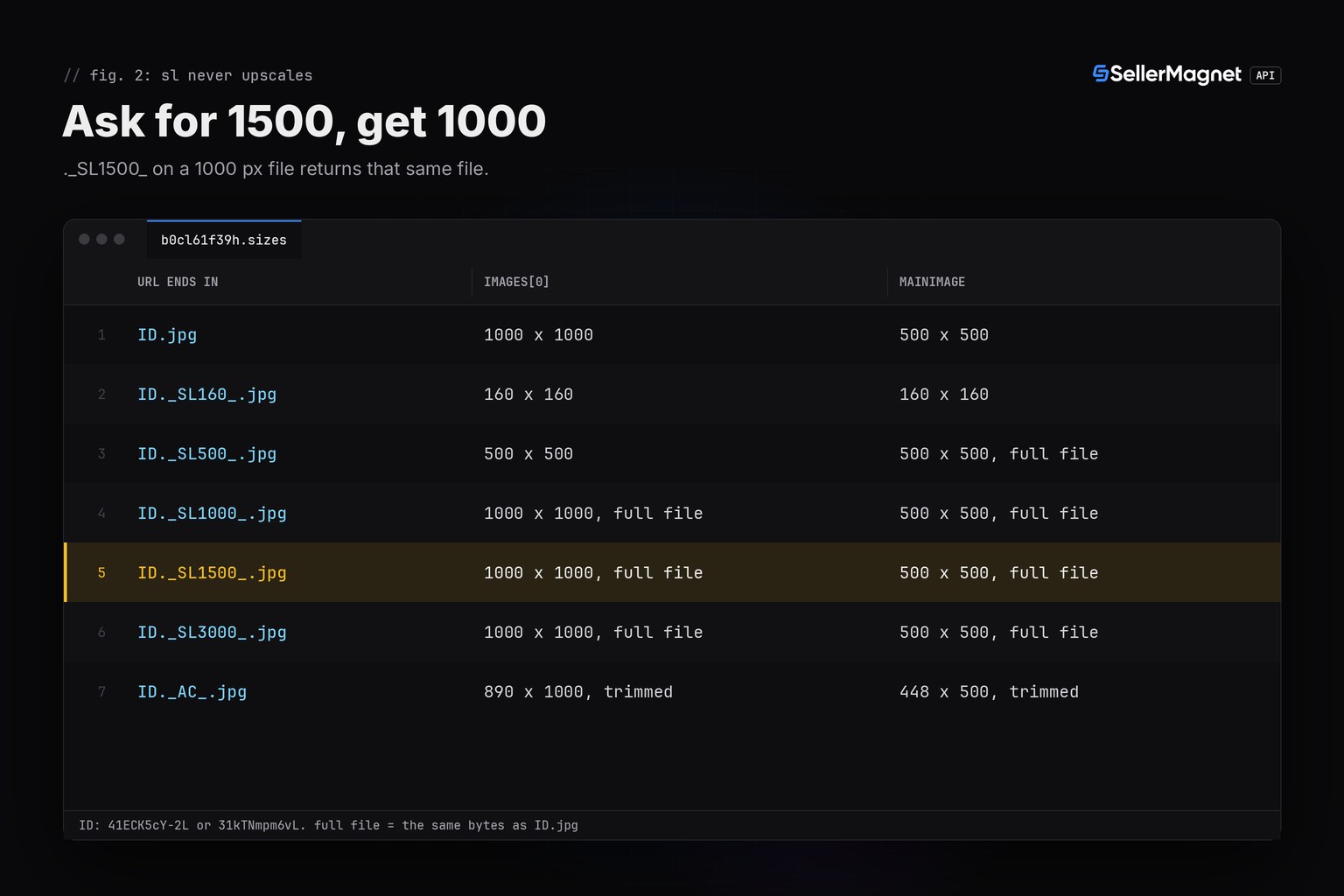
mainImagecan be a separate, smaller file: 500 px in the documented B0CL61F39H example, while each file inimagesis 1000 px. Resize fromimages.
How does an Amazon product image resize URL work?
Every product image on Amazon's CDN has an ID that names one stored file, such as 615e1kGV9FL. Between that ID and .jpg an optional segment tells the CDN how to render it: ._AC_SL1500_ holds two instructions, AC (trim the white margin) and SL1500 (scale the longest side to 1500 px). You pick the number: every SL size we tried, from 160 to 1500 px, came back at exactly that size when the stored file was larger. Keep the extension as it is, because the same file asked for as .png, .jpeg or .webp answered 404.
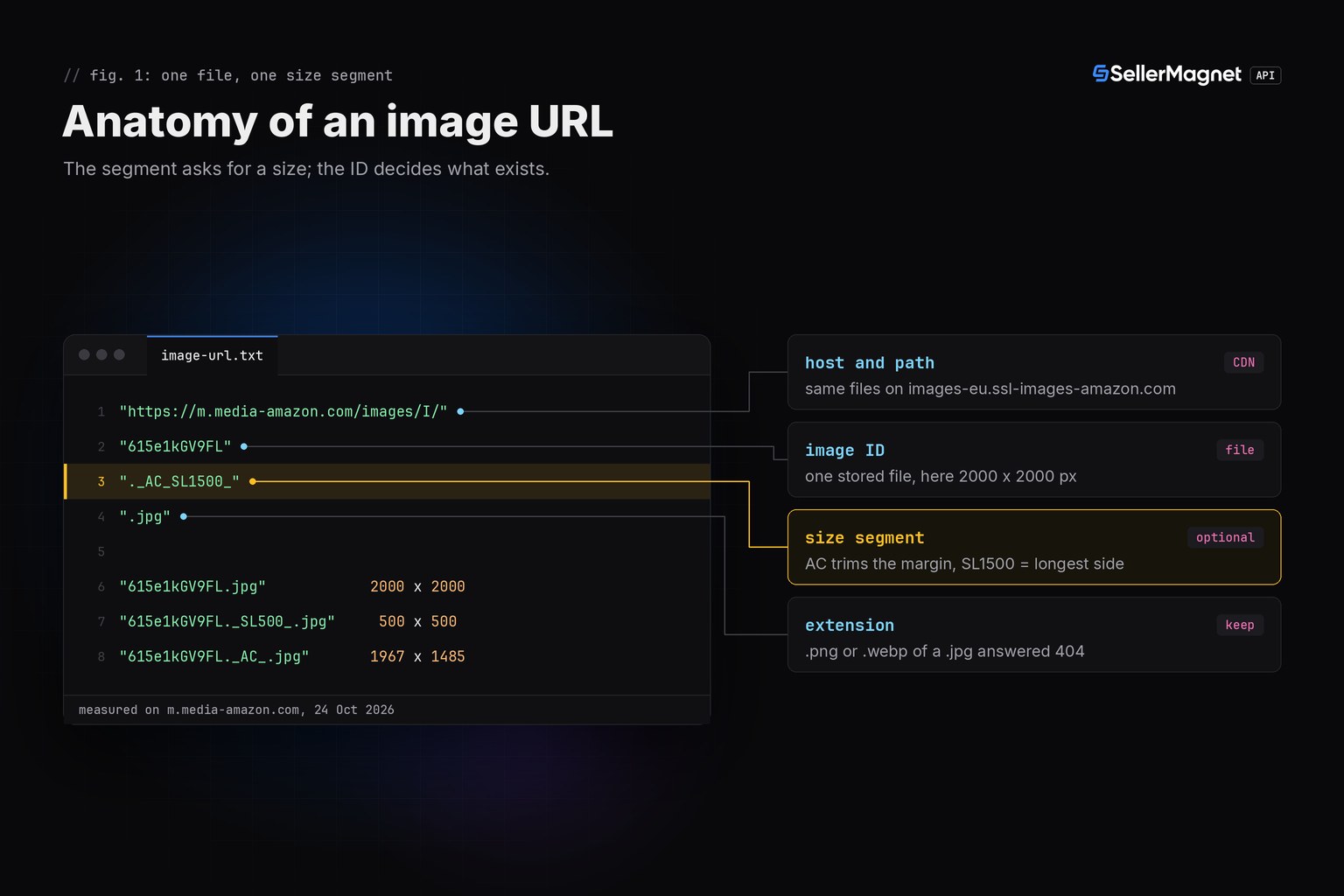
The sizes below are what the CDN returned on 24 October 2026, in more than 100 requests to m.media-amazon.com: observed behaviour of Amazon's servers, not something the SellerMagnet API controls or can promise. The script further down reads the real pixel size of every full file instead of trusting the number in the URL, so a changed rule would show up in its output rather than in your page layout.
Which size segments work, and what do they return?
We asked for two files with nine segments: a square gallery image stored at 2000 x 2000 px with a white margin around the product, and a wide image stored at 2560 x 1707 px. The table shows the pixel size of each answer.
| Segment | What it does | 2000 x 2000 file | 2560 x 1707 file |
|---|---|---|---|
| none | Full stored file | 2000 x 2000 | 2560 x 1707 |
._SL500_ | Longest side 500 px, aspect ratio kept | 500 x 500 | 500 x 333 |
._SX500_ | Width 500 px | 500 x 500 | 500 x 333 |
._SY500_ | Height 500 px | 500 x 500 | 750 x 500 |
._SS500_ | 500 px square, padded with white | 500 x 500 | 500 x 500 |
._AC_ | White margin trimmed, full size | 1967 x 1485 | 1166 x 1229 |
._AC_SL500_ | Trimmed, then longest side 500 px | 500 x 377 | 474 x 500 |
._AC_UL300_ | Trimmed, longest side 300 px (a bestseller thumbnail) | 300 x 226 | 285 x 300 |
._AC_UY218_ | Trimmed, height 218 px (a search thumbnail) | 289 x 218 | 207 x 218 |
The number after SL sets the longest side and keeps the aspect ratio, while SX and SY set the width or the height. SS puts the scaled image on a white square instead of cropping it (and ._SR500,500_ returned the same bytes): the wide file's product kept its 227 x 239 px box inside the 500 x 500 answer. _AC_ changes the shape. In the documented B0CL61F39H gallery all eight files are stored at 1000 x 1000; with ._AC_ four of them came back as 890 x 1000, 1000 x 284, 378 x 1000 and 932 x 714, and the four photos that fill the frame stayed at 1000 x 1000.
Asking for more than the stored size
A page or a feed often wants one size for every image, so the real question is what happens when that size is bigger than the file. We asked both files for 3000 px, more than either has:
| Segment | What you get | 2000 x 2000 file | 2560 x 1707 file |
|---|---|---|---|
._SL3000_ | The full stored file, byte for byte | 2000 x 2000 | 2560 x 1707 |
._SX3000_ | The full stored file, byte for byte | 2000 x 2000 | 2560 x 1707 |
._SY3000_ | The full stored file, byte for byte | 2000 x 2000 | 2560 x 1707 |
._AC_SL3000_ | The trimmed file, same as ._AC_ | 1967 x 1485 | 1166 x 1229 |
._SS3000_ | White square, product at its stored size | 3000 x 3000 | 3000 x 3000 |
._UL3000_ | Upscaled: the product is enlarged | 3000 x 3000 | 3000 x 2000 |
SL, SX and SY are safe: above the stored size they return the full file itself, so a URL ending in ._SL1500_ can quietly be a 1000 px image. SS puts the product, still at its stored size, on a bigger white square. UL is the exception: up to the stored size it returned the same bytes as SL, past it the CDN enlarged the image, and the 1946 x 1462 px product of the square file grew to 2916 x 2192 px at ._UL3000_. That adds pixels, not detail, which is why the script below writes SL URLs only and leaves a size empty when the file is smaller.
How do you get the gallery URLs from the API?
/amazon-product-lookup returns the gallery in productInfo.images: one URL per picture, in gallery order and deduplicated, each the largest version the product page lists (its hi-res image where there is one). productInfo.mainImage comes from the offer listing instead and can be a smaller, separate file. The documented example for B0CL61F39H on amazon.com shows both (all fields on the Product Lookup endpoint page):
Trimmed /amazon-product-lookup response for B0CL61F39H (the documented example)
{
  "data": {
    "productInfo": {
      "asin": "B0CL61F39H",
      "images": [
        "https://m.media-amazon.com/images/I/41ECK5cY-2L._SL1000_.jpg",
        "https://m.media-amazon.com/images/I/41srF-iY93L._SL1000_.jpg",
        "https://m.media-amazon.com/images/I/41tVr19I3zL._SL1000_.jpg",
        "https://m.media-amazon.com/images/I/41HMaO9jO3L._SL1000_.jpg",
        "https://m.media-amazon.com/images/I/61e8hPmeoYL._SL1000_.jpg",
        "https://m.media-amazon.com/images/I/61Gj1Kc5R5L._SL1000_.jpg",
        "https://m.media-amazon.com/images/I/61r6PutKGwL._SL1000_.jpg",
        "https://m.media-amazon.com/images/I/717Id5h1fhL._SL1000_.jpg"
      ],
      "mainImage": "https://m.media-amazon.com/images/I/31kTNmpm6vL.jpg",
      "marketplaceId": "ATVPDKIKX0DER"
    }
  },
  "success": true
}
Here every URL in images ends in ._SL1000_ and returns the stored 1000 x 1000 file itself, so 1000 px is the ceiling for this product; on other listings the same field holds ._AC_SL1500_ URLs in the trimmed framing. mainImage, 31kTNmpm6vL.jpg, has no segment and is a 500 x 500 file, so no URL gives it more detail. Thumbnails from other endpoints carry segments too, such as ._AC_UY218_ on the documented search result and ._AC_UL300_SR300,200_ on the documented bestseller entry. Without the segment you get that file's own full size: 2560 x 1707 px for the search thumbnail 51fM0CKG+HL and 1772 x 2560 px for the bestseller thumbnail 81AZ+P-42vL, which is served from images-eu.ssl-images-amazon.com with the same rules.
Resize every gallery image in Python
Put your ASINs in asins.txt, one per line. The script checks each line first, because the lookup bills a malformed ASIN like any other: a header, a barcode that Excel turned into 4.00638E+12 or a repeat never reaches the API. For each ASIN it calls /amazon-product-lookup once and passes every URL in images through resize(), which keeps the image ID, the .jpg extension and, unless you set TRIM, the URL's _AC_ framing. To tell which sizes are real, it reads each full file's pixel size from its first 64 KB with an HTTP Range request (Pillow parses the header), from a second session, so your API key never goes to Amazon's CDN. get_with_retry comes from retry.py, and ApiError and new_session from sellermagnet.py, both published in the Python quickstart.
Install requests and Pillow, set the key, list the ASINs, run the script
pip install requests pillow
export SELLERMAGNET_API_KEY="your-key-here"
echo B0CL61F39H > asins.txt
python3 image_sizes.py
image_sizes.py: every gallery image of your ASINs in four sizes, with the real size of each full file
"""Amazon product image resize URLs: every gallery image of your ASINs in the sizes you need, one lookup per ASIN.

Amazon's image CDN reads the size from the file name: in .../615e1kGV9FL._AC_SL1500_.jpg the segment ._AC_SL1500_
asks for the white margin trimmed (_AC_) and the longest side scaled to 1500 px (SL1500). For each ASIN the script
calls /amazon-product-lookup once, rewrites every gallery URL to the sizes in SIZES and reads the full file's pixel
size from its first 64 KB: an SL size above the stored file returns that file, so the cell stays empty in images.csv.
Helpers: sellermagnet.py and retry.py from https://sellermagnet-api.com/blog/amazon-product-api-python
"""
import csv
import io
import re

import requests
from PIL import Image

from retry import get_with_retry
from sellermagnet import ApiError, new_session

MARKETPLACE = "ATVPDKIKX0DER"     # amazon.com
ASIN_FILE = "asins.txt"           # one ASIN per line
CSV_FILE = "images.csv"           # one row per gallery image
SIZES = (160, 500, 1000, 1500)    # longest side in px: the sizes your pages show
TRIM = None                       # None keeps each URL's framing; True trims the white margin; False keeps it
MAX_FAILED = 3                    # 502/503 are billed on every attempt: stop after 3 ASINs that keep failing
ASIN = re.compile(r"B[0-9A-Z]{9}|[0-9]{9}[0-9X]")   # product ASIN or ISBN-10
FIRST_64KB = {"Range": "bytes=0-65535"}             # the pixel size sits in the file header, not in the pixels
ROW = "{:<10}  {:<6}  {:<14}" + "  {:>4}" * len(SIZES) + "  {}"


# resize(url, 500): the same image with a longest side of 500 px; resize(url): the full size. trim=None keeps the
# URL's _AC_ framing (white margin trimmed), True adds it, False drops it. The extension stays: .jpg as .png is a 404.
def resize(url, longest=None, trim=None):
    head, _, name = url.rpartition("/")
    image_id, _, rest = name.partition(".")
    ext = rest.rpartition(".")[2]
    if not head.endswith("/images/I") or ext != "jpg":
        raise ValueError(f"not an Amazon .jpg image: {url}")
    if trim is None:
        trim = "_AC_" in rest  # _AC_: white margin cut off
    seg = "AC_" if trim else ""
    if longest:
        seg += f"SL{longest}_"
    dot = "._" + seg if seg else ""
    return f"{head}/{image_id}{dot}.{ext}"


def full_size(cdn, url):
    """(width, height) of the file behind url, read from its first 64 KB; None when the CDN does not tell."""
    try:
        resp = cdn.get(url, headers=FIRST_64KB, timeout=30)
        resp.raise_for_status()
        return Image.open(io.BytesIO(resp.content)).size
    except (requests.RequestException, OSError):     # no answer, an error page, or a header Pillow cannot read
        return None


def read_asins(path):
    keep, skipped = [], []
    with open(path, encoding="utf-8-sig") as fh:      # utf-8-sig also reads a file saved with a byte order mark
        for line in fh:
            raw = line.strip()
            asin = raw.upper()
            if not raw:
                continue
            if not ASIN.fullmatch(asin):
                skipped.append(f"{raw} (not an ASIN)")   # the lookup bills a malformed ASIN like any other
            elif asin in keep:
                skipped.append(f"{raw} (repeat)")        # each ASIN once: a repeat costs another credit
            else:
                keep.append(asin)
    return keep, skipped


def gallery(asin, info, cdn, sizes):
    """One CSV row per gallery image. sizes caches (width, height) per full URL: each file is read once."""
    rows, seen = [], set()
    for position, url in enumerate(info.get("images") or [], 1):
        try:
            full = resize(url, trim=TRIM)
        except ValueError:
            continue                                     # not a .jpg image URL: nothing to resize
        image_id = full.rpartition("/")[2].partition(".")[0]
        if image_id in seen:
            continue                                     # the same file twice in one gallery
        seen.add(image_id)
        if full not in sizes:
            sizes[full] = full_size(cdn, full)
        wh = sizes[full]
        row = {"asin": asin, "position": position, "image_id": image_id,
               "width": wh[0] if wh else "", "height": wh[1] if wh else "", "full_url": full}
        for px in SIZES:
            # above the stored size an SL URL returns the same full file, so that cell stays empty
            row[f"url_{px}"] = resize(url, px, TRIM) if wh is None or px <= max(wh) else ""
        rows.append(row)
    return rows


def summary(asin, rows):
    sides = [max(r["width"], r["height"]) for r in rows if r["width"] != ""]
    if not sides:
        side = "-"
    elif min(sides) == max(sides):
        side = f"{min(sides)} px"
    else:
        side = f"{min(sides)} to {max(sides)} px"
    counts = [sum(1 for r in rows if r[f"url_{px}"]) for px in SIZES]
    note = "" if rows else "no gallery images"
    if len(sides) < len(rows):
        note = f"size unknown for {len(rows) - len(sides)}: all URLs kept"
    return ROW.format(asin, len(rows), side, *counts, note)


def main():
    asins, skipped = read_asins(ASIN_FILE)
    if skipped:
        print("skipped before paying: " + ", ".join(skipped))
    api, cdn = new_session(), requests.Session()     # two sessions: the API key never goes to Amazon's CDN
    sizes, rows, failed, out = {}, [], 0, CSV_FILE
    print(ROW.format("asin", "images", "longest side", *SIZES, "note").rstrip())
    for asin in asins:
        try:
            info = get_with_retry(api, "amazon-product-lookup", asin=asin, marketplaceId=MARKETPLACE)["productInfo"]
        except (ApiError, requests.RequestException) as err:
            status = getattr(err, "status", None)
            if status in (400, 401, 403):            # a parameter, key or credit problem repeats on every ASIN
                print(f"stopped at {asin}: {err}")
                out = "partial-" + CSV_FILE          # a stopped run never overwrites the last complete file
                break
            failed += status != 404                  # a 404 is an answer (no such product), not an outage
            note = "not found (404, billed)" if status == 404 else f"failed ({status or 'no answer'}) after retries"
            print(ROW.format(asin, "-", "-", *["-"] * len(SIZES), note))
            if failed >= MAX_FAILED:
                print(f"stopped: {failed} ASINs kept failing")
                out = "partial-" + CSV_FILE
                break
            continue
        found = gallery(asin, info, cdn, sizes)
        rows += found
        print(summary(asin, found).rstrip())

    with open(out, "w", newline="", encoding="utf-8") as fh:
        writer = csv.DictWriter(fh, ["asin", "position", "image_id", "width", "height", "full_url"]
                                + [f"url_{px}" for px in SIZES])
        writer.writeheader()
        writer.writerows(rows)
    print(f"\n{out}: {len(rows)} images; an empty url_<px> cell means the full-size image is smaller")
    print(f"size checks: {len(sizes)} files read from Amazon's CDN (64 KB each at most, no credits)")


if __name__ == "__main__":
    main()
Output of image_sizes.py on amazon.com (illustrative run: B0CL61F39H is the documented example with its measured file sizes, the B0EXAMPLE ASINs are made up)
skipped before paying: b0cl61f39h (repeat), 4.00638E+12 (not an ASIN)
asin        images  longest side     160   500  1000  1500  note
B0CL61F39H  8       1000 px            8     8     8     0
B0EXAMPLE1  4       500 to 1967 px     4     4     3     3
B0EXAMPLE2  0       -                  0     0     0     0  no gallery images
B0EXAMPLE3  -       -                  -     -     -     -  not found (404, billed)
B0EXAMPLE4  -       -                  -     -     -     -  failed (502) after retries

images.csv: 12 images; an empty url_<px> cell means the full-size image is smaller
size checks: 12 files read from Amazon's CDN (64 KB each at most, no credits)
B0CL61F39H has eight gallery images, all stored at 1000 x 1000, so each gets a 160, a 500 and a 1000 px URL and none for 1500 px: that URL would return the same 1000 px file. On B0EXAMPLE1 three of the four images are large enough for every size; the fourth is stored at 500 px, so its 1000 and 1500 cells stay empty. B0EXAMPLE2 answered with an empty gallery, B0EXAMPLE3 does not exist on amazon.com (404) and B0EXAMPLE4 failed with 502 on every attempt.
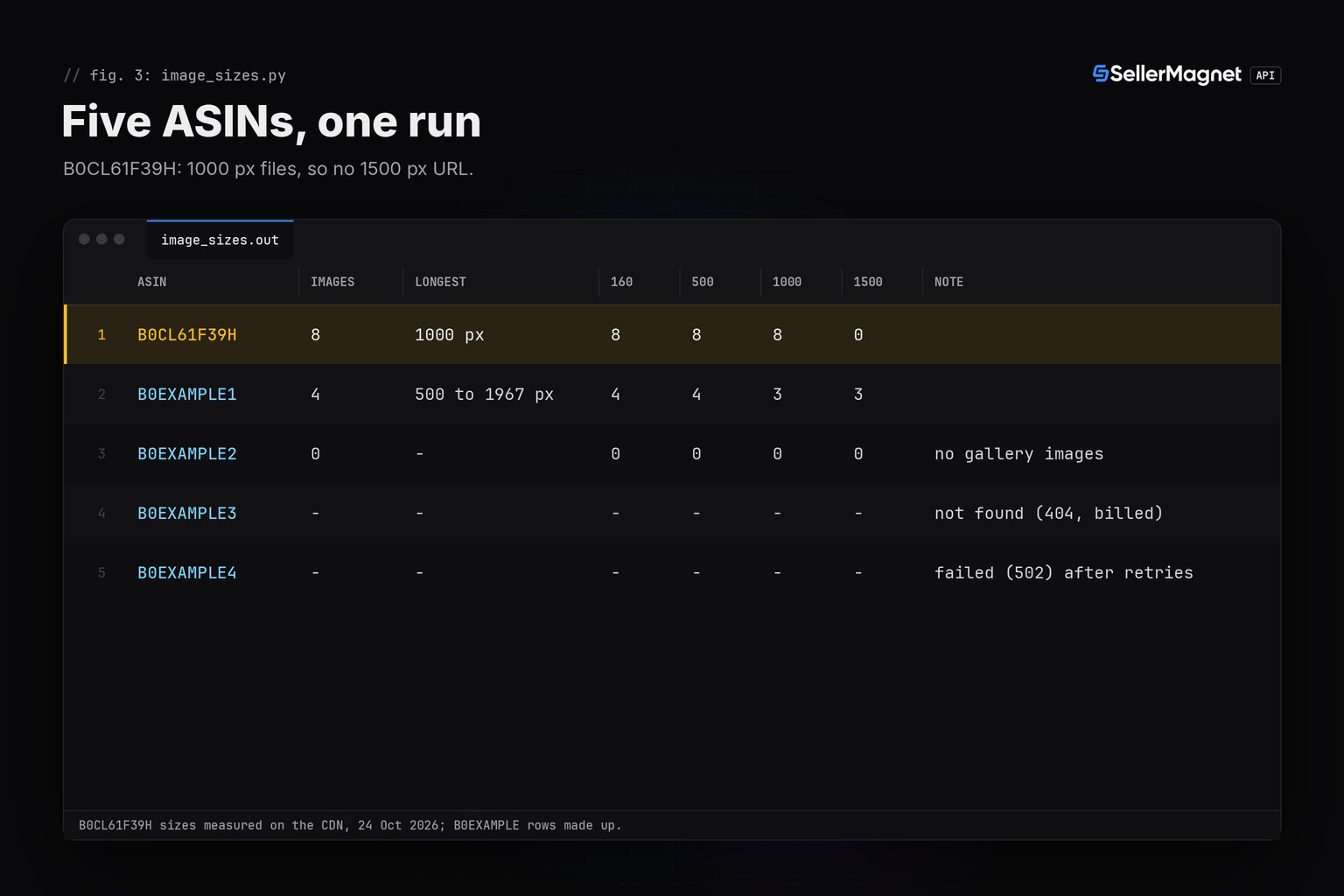
images.csv has one row per image: the ASIN, the gallery position, the image ID, the width and height of the full-size file, full_url and one url_<px> column per size. An empty cell means the full-size image is smaller than that size. When a size check fails (a timeout, an error page instead of an image), the row keeps every URL and leaves width and height empty, because the CDN still answers each URL, possibly with a smaller file. A run that stops early writes partial-images.csv and leaves the last complete images.csv alone. For thousands of ASINs, run the lookups from a worker pool like the one in the bulk ASIN lookup guide; to save the files to disk, the image download guide fetches every URL into a folder per ASIN.
Credit math for an image run
Every API request costs 1 credit, so the run costs 1 credit per ASIN when nothing fails; the size checks and every resized file come from Amazon's CDN and cost nothing. The run above made 8 billed requests: one lookup each for B0CL61F39H, B0EXAMPLE1 and B0EXAMPLE2, the 404 for B0EXAMPLE3 (billed, not retried) and 4 attempts for B0EXAMPLE4, which kept failing with 502. The repeat and the barcode cost nothing, and an empty gallery is a normal answer, billed like any lookup. A 500 without a Retry-After header is refunded and retried once, 502 and 503 are billed on every attempt (up to 4 here), and 429, 401, 403 and gate 400s are free; a 400, 401 or 403 also stops the run, since it would repeat on every ASIN. MAX_FAILED stops the run after 3 ASINs that keep failing, so an outage costs at most 12 failed attempts. Plans and credit prices are on the pricing page.
What the resize URL cannot do
- Add detail: above the stored size
SL,SXandSYreturn the full file, so 1500 px from a 1000 px file stays 1000 px;ULenlarges andSSpads with white, and neither adds detail. - Change the format: the extension stays
.jpg; the same file as.png,.jpegor.webpanswered 404. - Choose a framing for you: a trimmed (
_AC_) and an untrimmed URL of the same image can differ in shape, so pick one per page;TRIMin the script sets it for every URL. - Promise that it stays this way: the segments are behaviour we observed on Amazon's CDN, which the SellerMagnet API does not control. The script reads each full file's real size, so a change shows up in the width and height columns.
- Make a small file sharp: a 500 px
mainImageholds 500 px of detail whatever the URL asks for; resize the gallery URLs fromimagesinstead. - Grant rights: product images belong to the brand or seller who uploaded them, and resizing does not change that. Use them for your own listings and internal work, and ask the rights holder, or a lawyer, before you publish anyone else's.
Frequently Asked Questions
How do I resize an Amazon product image by URL?
Replace the segment between the image ID and .jpg, such as ._SL1000_, with ._SL500_ for a longest side of 500 pixels, or remove it for the full stored file. Keep AC in the segment if you want Amazon's trimmed framing.
Can I get a bigger image than the one in the URL?
Only if the stored file is bigger. Remove the segment to get the full file: a search thumbnail we tested came back at 2560 x 1707. An SL number above the stored size returns that file unchanged; UL enlarges it, which adds pixels but no detail.
What does _AC_ do in an Amazon image URL?
In our tests it trimmed the white margin around the product, so width and height can change: a 2000 x 2000 file came back as 1967 x 1485. Leave it out to keep the stored framing with its margin.
Do resized Amazon images cost API credits?
No. The lookup that returns the image URLs costs one credit. The resized files and the size checks come from Amazon's image CDN, not from the SellerMagnet API.
Why is mainImage smaller than the gallery images?
mainImage comes from the offer listing, not the gallery, and can be a separate, smaller file: 500 px in the documented B0CL61F39H example, against 1000 px for each URL in images. Resize from images.
Bottom line: an Amazon product image resize URL is the gallery URL with a new size segment, ._SL<px>_ for the longest side, nothing for the full file, _AC_ for the trimmed framing. One lookup per ASIN gives you the URLs, and reading each file's real size first keeps you from promising pixels the CDN does not have. A free account includes 150 credits after e-mail verification.


