
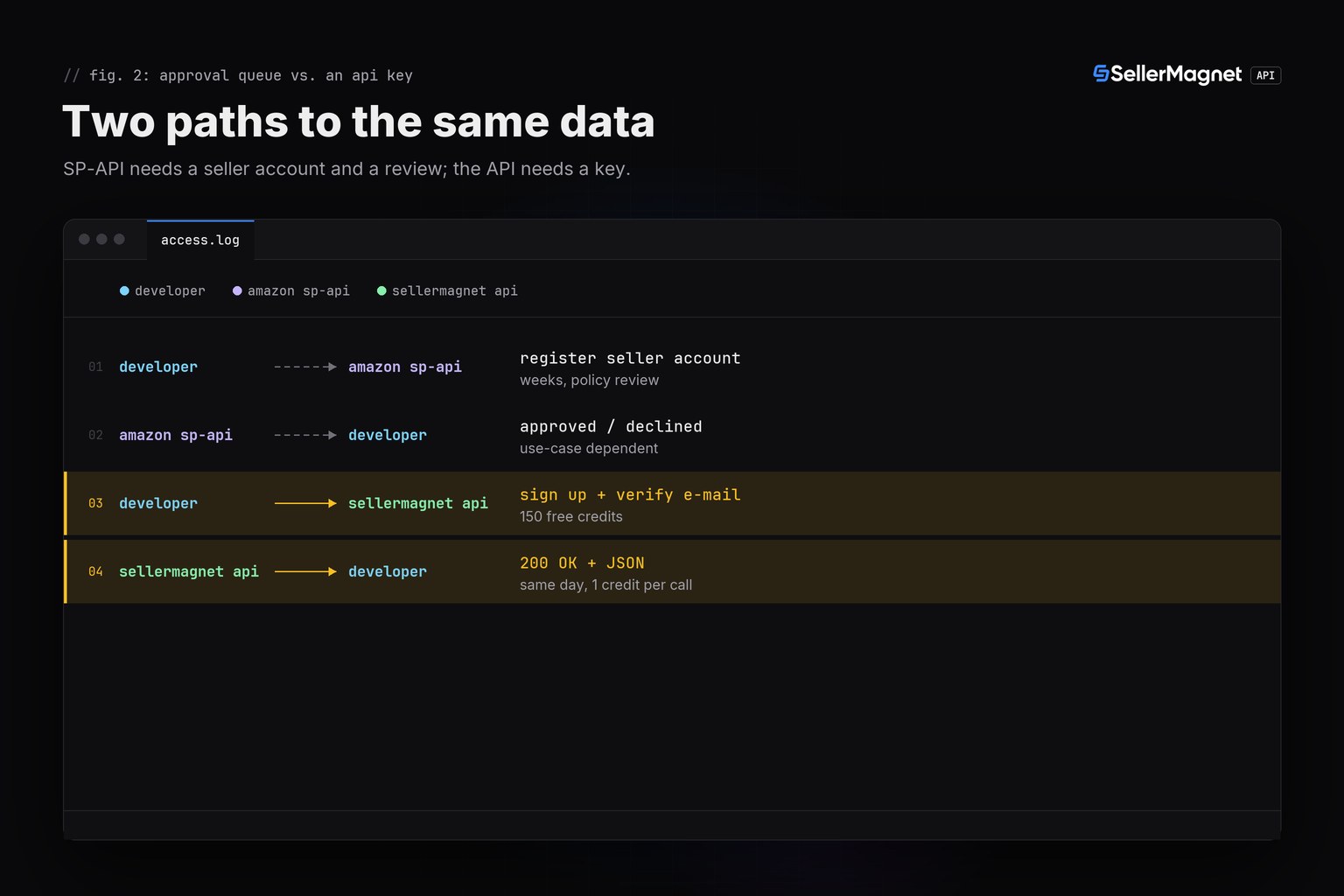
To get Amazon product data without SP-API approval, call a managed API such as SellerMagnet's /amazon-product-lookup endpoint with an ASIN, a marketplace ID and an API key; it returns title, price, bestseller rank, images, reviews and variations as JSON in one request. There is no seller registration, no use-case review and no waiting period: an account gets 150 free credits right after e-mail verification, and each request afterward costs one credit.
Key Takeaways
- SP-API requires a registered Amazon seller/vendor account plus an approved use case before any call works.
- A managed product-data API needs only an API key: no Amazon account, no approval queue.
- One GET request per ASIN returns title, price, BSR, images, reviews and variations as JSON.
- A 404 (product not found) is billed the same as a 200, so validate ASINs before calling at scale.
- Separate endpoints cover offers, search, bestseller lists and price/rank history for the same account.
Why doesn't SP-API just work for product data?
Amazon's Selling Partner API (SP-API) is built for sellers managing their own listings and orders, not for reading data about arbitrary products: access needs a registered seller or vendor account, and read-heavy product-data use cases go through an approval review that can take weeks and still be declined. Amazon's older advertising-data API, PA-API 5, now answers every call with a 403 AccessDeniedException pointing to its replacement, the Creators API, which itself requires at least 10 qualifying affiliate sales in the past 30 days before it grants access.
| Path | Setup time | What it needs |
|---|---|---|
| Business/seller account | weeks | needs an approved use case, ongoing policy reviews |
| Scraping Amazon yourself | hours to build, ongoing | proxies, CAPTCHAs, layout changes, ToS risk |
| SellerMagnet API | minutes | an API key, 1 credit per request, no approval step |
How do I get product data with just an API key?
Sign up, verify the e-mail address to unlock 150 free credits, then send a GET request with the api_key query parameter (or X-Api-Key header) and the parameters the endpoint needs. The response is always {"success": bool, "data": ...}, so a client only needs to branch on success and the HTTP status. A 404 means the ASIN or marketplace combination has no listing; it still costs a credit, since the API did the work of asking Amazon.
lookup.py - product data with one API key, no approval
"""Look up an Amazon product by ASIN without SP-API approval or scraping yourself.

SP-API needs a seller/vendor account and an approved use case; this uses the
SellerMagnet /amazon-product-lookup endpoint instead, with one credit per call
and no approval step. Handles the not-found case (billed) explicitly.
"""
import os

import requests

BASE = "https://sellermagnet-api.com/api"
SESSION = requests.Session()
SESSION.headers["X-Api-Key"] = os.environ["SELLERMAGNET_API_KEY"]


def lookup(asin: str, marketplace_id: str) -> dict:
    resp = SESSION.get(
        f"{BASE}/amazon-product-lookup",
        params={"asin": asin, "marketplaceId": marketplace_id},
        timeout=120,
    )
    body = resp.json()
    if resp.status_code == 404:
        raise LookupError(f"{asin} not found on {marketplace_id} (billed)")
    if resp.status_code != 200 or not body.get("success"):
        raise RuntimeError(f"{asin}: {resp.status_code} {body.get('message')}")
    info = body["data"]
    return {
        "asin": asin,
        "title": info["title"],
        "price": info["buyBoxInfo"]["price"],
        "currency": info["buyBoxInfo"]["currencyCode"],
        "bsr": (info.get("bestsellerRanks") or {}).get("main_category", {}).get("rank"),
        "reviews": info["reviews"]["totalReviews"],
    }


if __name__ == "__main__":
    for asin, mkt in [("B0CLTBHXWQ", "APJ6JRA9NG5V4"), ("B0DEADASIN00", "ATVPDKIKX0DER")]:
        try:
            print(lookup(asin, mkt))
        except (LookupError, RuntimeError) as err:
            print(f"skip {asin}: {err}")
Output: one hit, one clean miss
{'asin': 'B0CLTBHXWQ', 'title': 'Playstation 5 Slim', 'price': 444.99, 'currency': 'EUR', 'bsr': 12, 'reviews': 3129}
skip B0DEADASIN00: B0DEADASIN00 not found on ATVPDKIKX0DER (billed)
The lookup response shape (trimmed)
{
  "success": true,
  "data": {
    "asin": "B0CLTBHXWQ",
    "title": "Playstation 5 Slim",
    "buyBoxInfo": {"price": 444.99, "currencyCode": "EUR", "sellerId": "APJ6JRA9NG5V4-seller"},
    "bestsellerRanks": {"main_category": {"name": "Videogames", "rank": 12}},
    "reviews": {"averageRating": 4.7, "totalReviews": 3129},
    "images": ["https://m.media-amazon.com/images/..._SL1000_.jpg"]
  }
}
Which endpoints cover which product data?
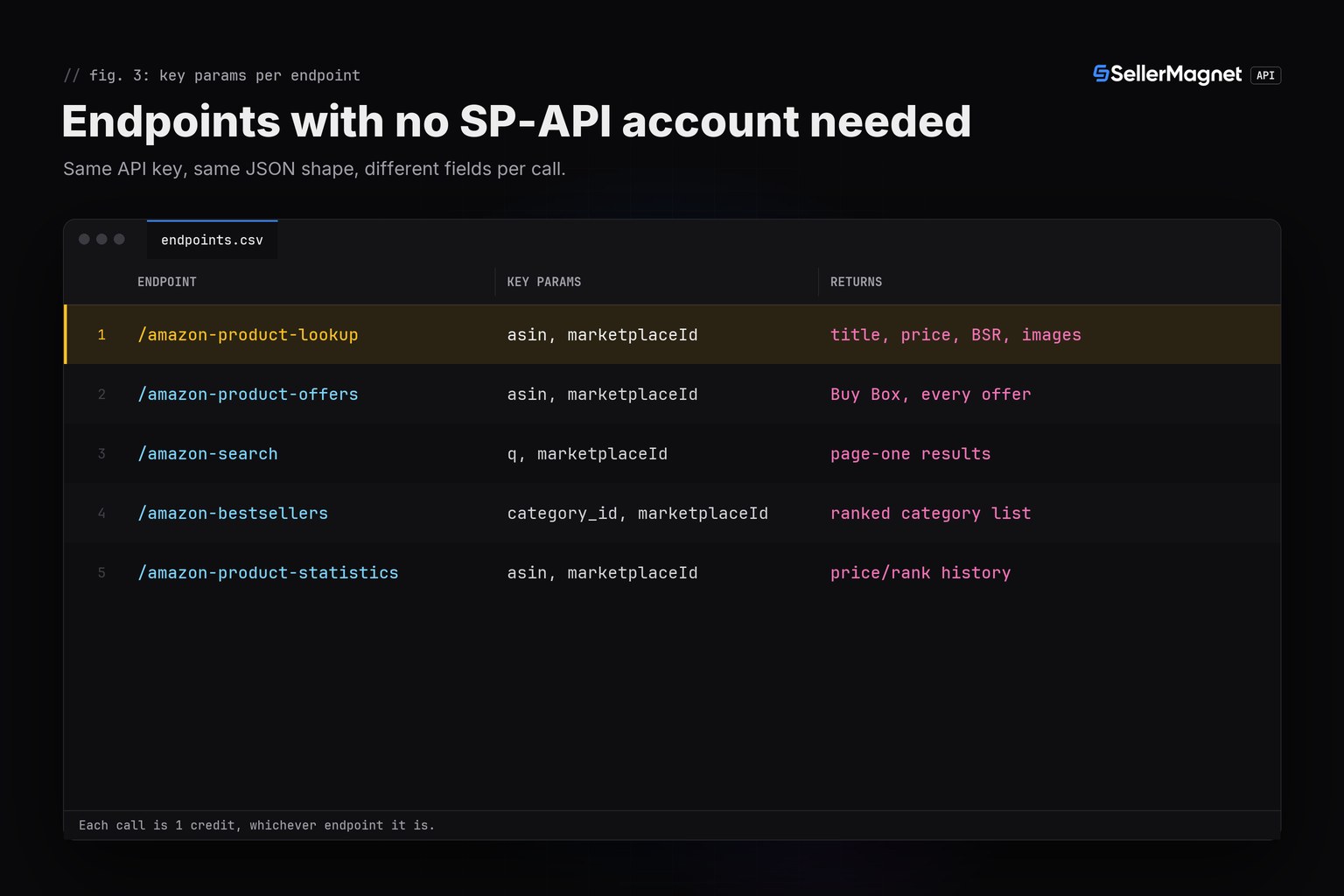
Product data splits across a few focused endpoints rather than one giant response: lookup for listing detail, offers for the live Buy Box and seller list, search and bestsellers for ranked lists, and statistics for history. Call only the endpoint that has the field you need to keep the credit count low.
| Endpoint | Key params | Returns |
|---|---|---|
| /amazon-product-lookup | asin, marketplaceId | title, price, BSR, images, reviews, variations |
| /amazon-product-offers | asin, marketplaceId | Buy Box, every visible offer, FBA/FBM, inventory cap |
| /amazon-search | q, marketplaceId | page-one results: position, price, rating, sponsored flag |
| /amazon-bestsellers | category_id, marketplaceId | ranked list for one category |
| /amazon-product-statistics | asin, marketplaceId | price/rank/Buy Box history over time |
Validate ASINs before calling at scale
A malformed ASIN passed to /amazon-product-lookup or /amazon-product-offers is sent on to Amazon unchecked and billed like any other call, and an unknown ASIN comes back as a billed 404. A simple 10-character alphanumeric check client-side catches most typos for free.
Frequently Asked Questions
Can I get Amazon product data without SP-API?
Yes. A managed API such as SellerMagnet's /amazon-product-lookup returns title, price, rank, images and reviews for any ASIN with just an API key, no seller account or approval review needed.
Why was my SP-API access denied?
SP-API access needs a registered seller or vendor account plus an approved use case; read-only product-data use cases are commonly declined because SP-API is built for managing one's own listings, not browsing arbitrary products.
Is PA-API 5 still usable for product data?
No. Every PA-API 5 call now answers with a 403 AccessDeniedException pointing to the Creators API, which itself requires at least 10 qualifying affiliate sales in the past 30 days.
Does a product-data API need my own Amazon account?
No. The API key authenticates against the API provider's account, not Amazon; it reads public listing pages on your behalf and returns the result as JSON.
What happens if the ASIN does not exist?
The lookup returns a 404, which is billed like a successful call since the API still did the work of checking. Validate ASIN format locally first to avoid paying for obvious typos.
Bottom line: skip the SP-API approval queue entirely for read-only product data. Sign up, verify the e-mail for 150 free credits, and call /amazon-product-lookup or the offers endpoint directly. See current credit costs on the pricing guide, and cache the responses you don't need fresh every call.


