
Node.js 18 and later ship fetch built in, so reading Amazon product data needs no SDK at all. One GET request to /api/amazon-product-lookup with an ASIN, a marketplace ID and your API key returns the title, images, Buy Box price and bestseller ranks as JSON. This quickstart builds a small, dependency-free client for product lookups and keyword search, then shows how to run requests in parallel safely.
Key Takeaways
- Node.js 18 and later can call the SellerMagnet API with the built-in fetch and no npm packages.
- Every request is a GET; parameters such as asin, q and marketplaceId go in the query string, together with api_key.
- Prices arrive in three formats: integer minor units, a decimal number, or a decimal string, depending on the endpoint.
- Keyword search returns at most 50 results per request; asking for more fails with HTTP 400 and still costs a credit.
- A small worker pool keeps parallel requests under the per-key concurrency cap.
What do I need before I start?
- Node.js 18 or later, for the global
fetchandAbortSignal.timeout. - An API key - a free account includes 150 credits.
- The key in an environment variable, so it never lands in your source code.
Check Node and put the key in the environment
node --version            # v18.0.0 or later
export SELLERMAGNET_API_KEY="your-key-here"
touch sellermagnet.mjs     # ES module, so top-level await works
How do I fetch one Amazon product in Node.js?
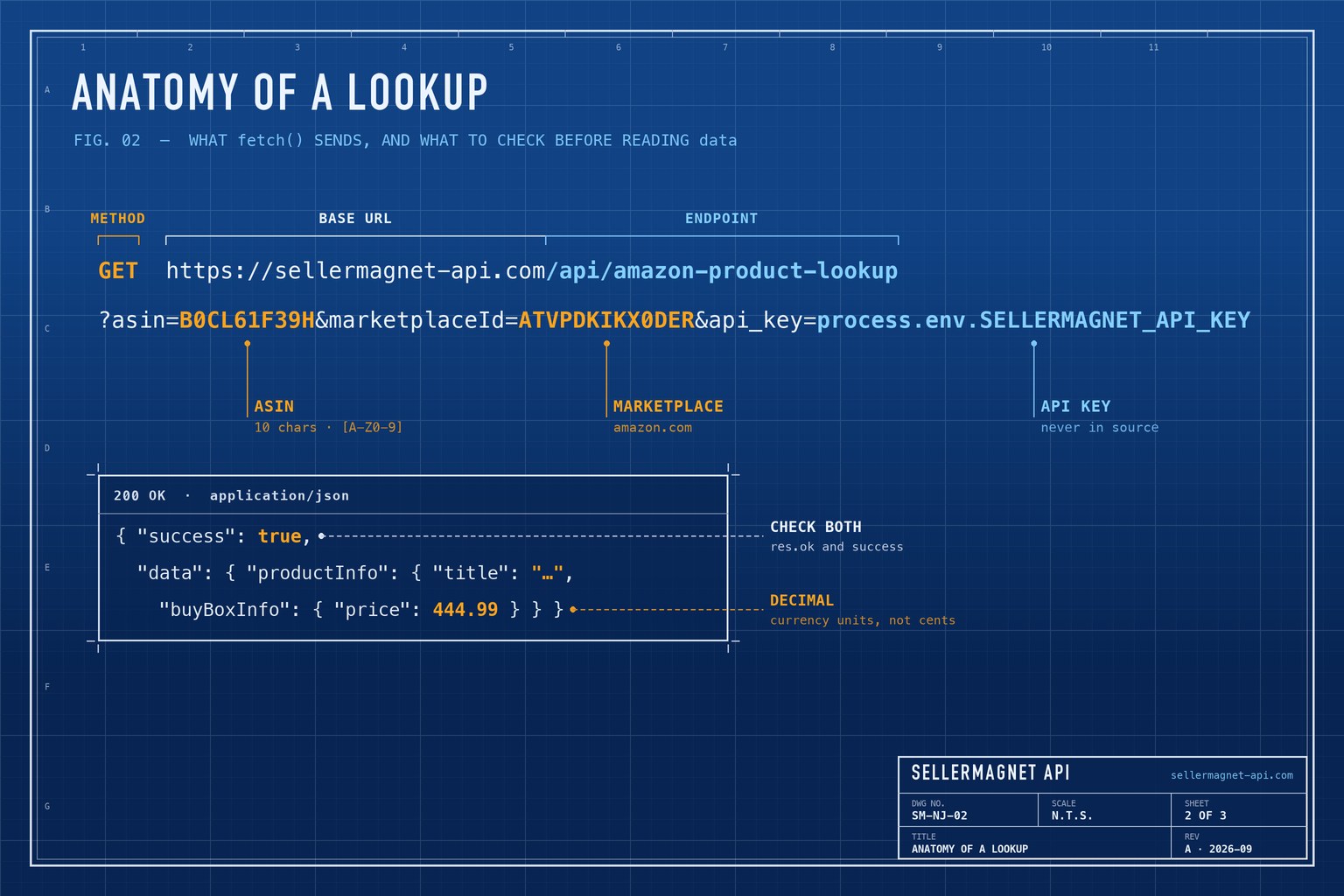
Wrap the request in one helper that adds the key and a timeout. The helper checks both res.ok and the success flag, so any failure (400, 401, 404, 429, 502 or 503) is thrown with the API's own message. The lookup then picks out the fields most applications need; marketplaceId values for all 23 storefronts are in the Amazon marketplace IDs list.
sellermagnet.mjs - a dependency-free client
const API = "https://sellermagnet-api.com/api";

export async function get(endpoint, params) {
  if (!process.env.SELLERMAGNET_API_KEY) throw new Error("Set SELLERMAGNET_API_KEY first");
  const url = new URL(`${API}/${endpoint}`);
  const query = { ...params, api_key: process.env.SELLERMAGNET_API_KEY };
  for (const [key, value] of Object.entries(query)) url.searchParams.set(key, value);

  const res = await fetch(url, { signal: AbortSignal.timeout(120_000) });
  const body = await res.json().catch(() => ({}));
  if (!res.ok || !body.success) {
    throw new Error(`${res.status} ${endpoint}: ${body.message ?? "request failed"}`);
  }
  return body.data;
}

export async function lookup(asin, marketplaceId) {
  const { productInfo: p } = await get("amazon-product-lookup", { asin, marketplaceId });
  return {
    asin: p.asin,
    title: p.title,
    price: p.buyBoxInfo?.price ?? null,          // decimal, e.g. 444.99
    currency: p.buyBoxInfo?.currencyCode ?? null,
    rank: p.bestsellerRanks?.main_category?.rank ?? null,
    image: p.mainImage,
    url: p.link,
  };
}
demo.mjs - one lookup (costs one credit)
import { lookup } from "./sellermagnet.mjs";

console.log(await lookup("B0CL61F39H", "ATVPDKIKX0DER"));
Trimmed lookup response (example values)
{
  "success": true,
  "data": {
    "productInfo": {
      "asin": "B0CL61F39H",
      "title": "PlayStation®5 console (slim)",
      "buyBoxInfo": { "price": 444.99, "currencyCode": "USD", "sellerId": "A3853PJW50SJG8" },
      "bestsellerRanks": {
        "main_category": { "name": "Video Games", "rank": 31 },
        "subcategory": { "name": "PlayStation", "rank": 1 }
      },
      "link": "https://www.amazon.com/dp/B0CL61F39H",
      "marketplaceId": "ATVPDKIKX0DER"
    }
  }
}
How do I search Amazon by keyword?
/api/amazon-search takes a query q, a marketplace ID and an optional count of up to 50. Each result carries its position, asin, productTitle, reviewRating, reviewAmount and a sponsored flag, so filtering out ads is a one-liner. The search endpoint page lists every field.
search.mjs - organic results only, with prices as numbers
import { get } from "./sellermagnet.mjs";

const { searchResults } = await get("amazon-search", {
  q: "usb c charger",
  marketplaceId: "A1PA6795UKMFR9",
  count: 20, // 50 is the maximum
});

const organic = searchResults
  .filter((r) => !r.sponsored)
  .map((r) => ({
    position: r.position,
    asin: r.asin,
    title: r.productTitle,
    rating: r.reviewRating,
    reviews: r.reviewAmount,
    price: Number(r.listingPrice?.price?.total ?? NaN), // arrives as a string
  }));

console.table(organic.slice(0, 5));
Why does price come back in three formats?
Different endpoints read prices from different sources, and each keeps its source's format. Mixing them without converting is the most common bug in integrations: an integer in cents compared against a decimal in euros is off by a factor of one hundred. Normalise everything to integer minor units once, at the edge - and remember that zero-decimal currencies such as the yen on amazon.co.jp have no cents, so their scale is 1, not 100.
| Endpoint | Field | Example | Format |
|---|---|---|---|
/amazon-product-statistics | buyBoxPrice | 41800 | Integer, minor units (cents; whole yen for JPY) |
/amazon-product-lookup | buyBoxInfo.price | 444.99 | Decimal number, currency units |
/amazon-product-offers | totalPrice | 444.99 | Decimal number, currency units |
/amazon-search | listingPrice.price.total | "449.00" | Decimal string, currency units |
One converter for every endpoint
// Everything becomes an integer in minor units (cents, pence, öre, whole yen).
const ZERO_DECIMAL = new Set(["JPY"]); // the only one among the 23 marketplaces

export function toMinorUnits(value, { currency = "USD", isMinor = false } = {}) {
  if (value === null || value === undefined || value === "") return null;
  const n = typeof value === "string" ? Number.parseFloat(value) : value;
  if (!Number.isFinite(n)) return null;
  const scale = ZERO_DECIMAL.has(currency) ? 1 : 100;
  return isMinor ? Math.round(n) : Math.round(n * scale);
}

toMinorUnits(41800, { isMinor: true });    // 41800  (statistics)
toMinorUnits(444.99);                      // 44499  (lookup, offers)
toMinorUnits("449.00");                    // 44900  (search)
toMinorUnits(1980, { currency: "JPY" });   // 1980   (amazon.co.jp)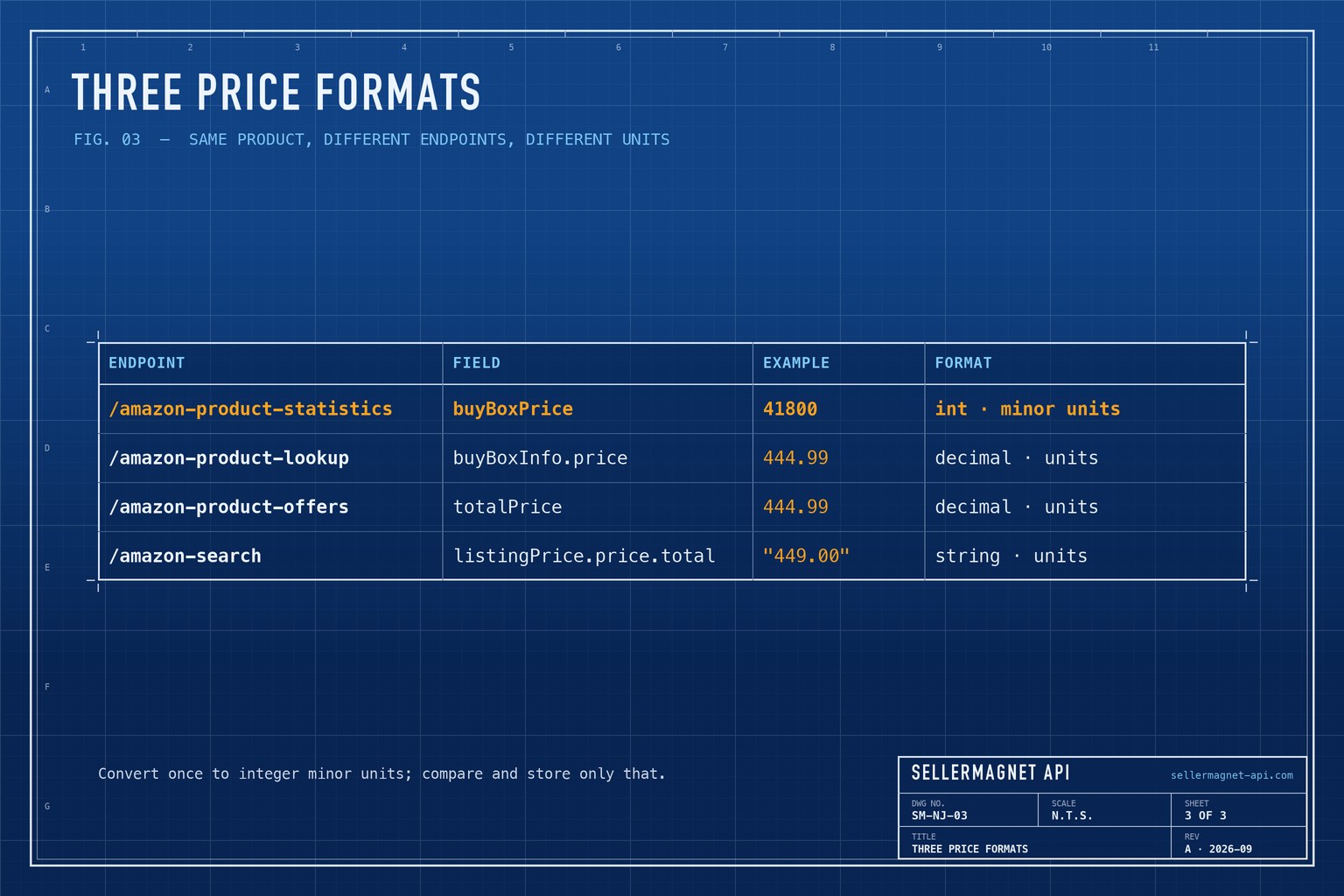
How many requests can I run in parallel?
Each API key has a cap on concurrent requests, and the API queues a short burst above it rather than rejecting it. Sustained overload returns HTTP 429, so a pool of 5 to 10 workers is a safe start. 401, 429 and a missing parameter are not charged; an endpoint's own 400 (such as a count above 50), 404, 502 and 503 cost one credit each, so validate first and retry only 429, 502 and 503 - the error-handling guide has the policy. There is no batch endpoint; the bulk ASIN lookup guide scales this pattern to thousands of products.
A bounded pool: at most limit requests in flight
export async function mapLimit(items, limit, fn) {
  const results = new Array(items.length);
  let next = 0;
  async function worker() {
    while (next < items.length) {
      const i = next++;
      try {
        results[i] = { ok: true, value: await fn(items[i]) };
      } catch (error) {
        results[i] = { ok: false, error: String(error) };
      }
    }
  }
  await Promise.all(Array.from({ length: Math.min(limit, items.length) }, worker));
  return results;
}

// const rows = await mapLimit(asins, 8, (asin) => lookup(asin, "ATVPDKIKX0DER"));
How is this different from Amazon's Product Advertising API?
Amazon retired the Product Advertising API (PA-API 5) in 2026: calls now answer 403 and point to its successor, the Creators API, which is limited to Amazon Associates with at least 10 qualifying sales in the past 30 days. The SellerMagnet API needs one API key and no sales history, and adds seller-side data such as live offers, Buy Box history and seller feedback. The PA-API alternative guide maps the old operations to endpoints.
| Requirement | Amazon Creators API | SellerMagnet API |
|---|---|---|
| Account | Amazon Associates, 10 qualifying sales in 30 days | SellerMagnet account (150 free credits) |
| Credentials | Generated in Associates Central | One API key, as api_key or X-Api-Key |
| Seller-side data | Not among its four operations | Offers, price history, seller feedback |
Frequently Asked Questions
Do I need an npm package to call the SellerMagnet API from Node.js?
No. Node.js 18 and later include fetch, which is all the API needs.
Which Node.js version do I need?
Node.js 18 or later, for the global fetch and AbortSignal.timeout used in these examples.
How many search results can one request return?
Up to 50. A count above 50 is rejected with HTTP 400 after the credit is charged, so cap it in your own code.
Is the Buy Box price in cents?
It depends on the endpoint: statistics returns integer minor units (cents for USD or EUR), lookup and offers return decimal currency units, and search returns a string.
Does the same code work in TypeScript?
Yes. The client is plain ES modules; adding type annotations for the returned fields is enough.
Bottom line: with Node 18+, a 20-line client covers lookups and search, and one converter removes the price-format trap for good. Other languages are on the code examples page, and every endpoint is in the API documentation.


