
productInfo.hasAPlusContent from /amazon-product-lookup is a single boolean that is true whenever a listing carries a brand story module, product documents, or both - three outcomes Amazon treats as one on the page, so the field cannot tell you which one you are looking at. It is still enough to build a cheap listing-quality screen: run it over a catalogue and you get every ASIN that has nothing at all, which is the gap worth fixing first.
Key Takeaways
- hasAPlusContent is true for a brand story OR product documents - one flag, no way to tell them apart.
- false is the specific case: neither module is on the page, within what this field covers.
- The field rides inside the /amazon-product-lookup response you already pay for - no extra credit to screen a catalogue.
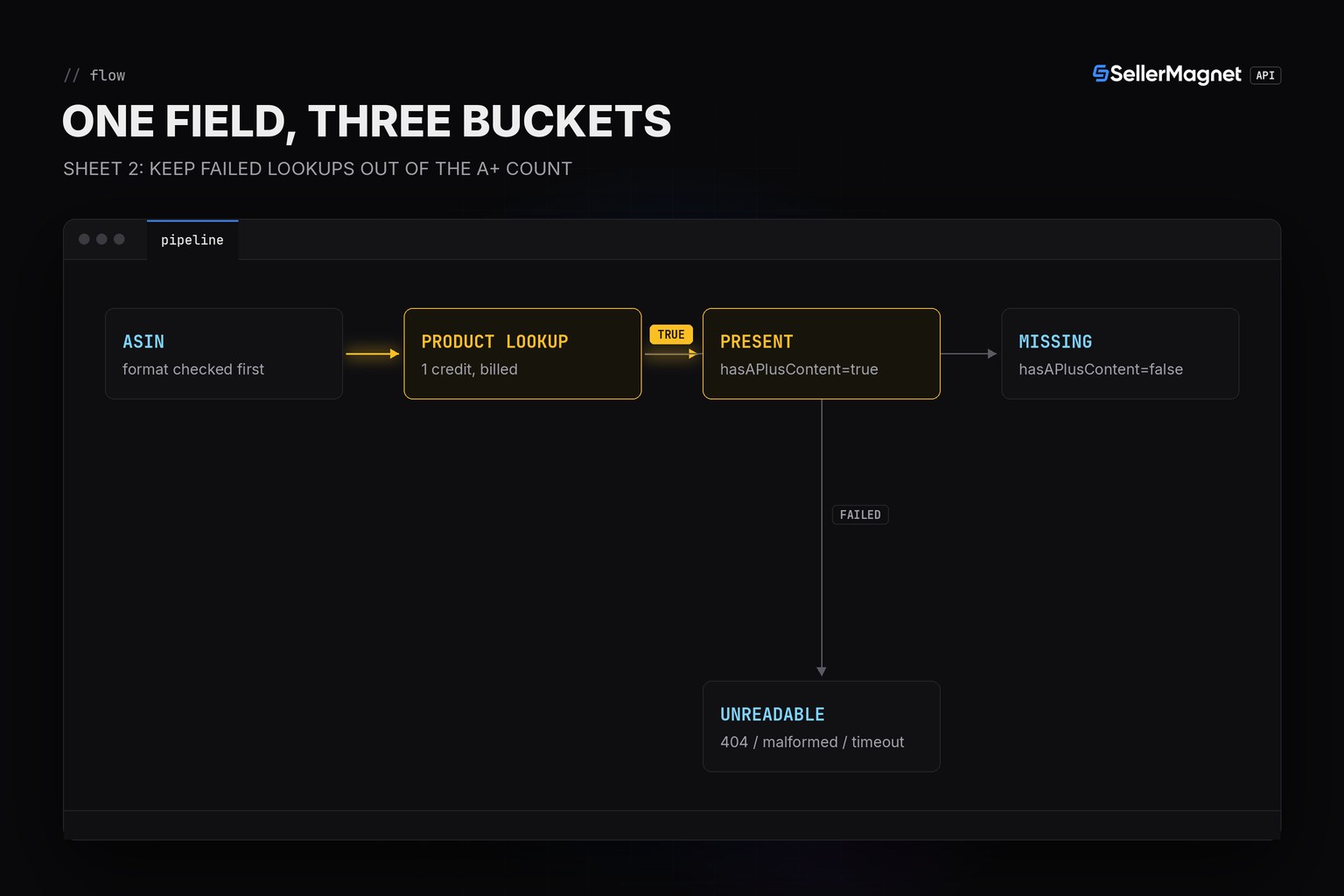
- A failed lookup (404, malformed ASIN) is not a false - count it separately or you will overcount missing A+ content.
- This only answers “missing or not”, never “missing a brand story specifically”.
What does hasAPlusContent actually tell you?
Amazon's A+ content tooling covers two separate modules: a brand story (shown across every ASIN under that brand) and product-specific documents (images and text attached to one ASIN). hasAPlusContent is true the moment either one is present, so a true result could mean a rich product-specific module, a generic brand story with nothing product-specific, or both - and the field gives you no way to tell which. The one case it is specific about is false: within what this field covers, neither module is on the page.
| Field value | What it could mean | What you can say |
|---|---|---|
| hasAPlusContent: true | a brand story module is on the page | cannot tell from this field alone |
| hasAPlusContent: true | product documents are on the page | cannot tell from this field alone |
| hasAPlusContent: true | both are on the page | cannot tell from this field alone |
| hasAPlusContent: false | neither is on the page | the one case the field is specific about |
hasAPlusContent inside a trimmed lookup response
{
  "success": true,
  "data": {
    "productInfo": {
      "asin": "B0CL61F39H",
      "title": "PlayStation\u00ae5 console (slim)",
      "hasAPlusContent": true
    }
  }
}
How do I screen a whole catalogue for missing A+ content?
Call /amazon-product-lookup once per ASIN and read productInfo.hasAPlusContent the same way you would read title or buyBoxInfo. Three things keep the count honest: skip a malformed ASIN locally before it burns a credit, dedupe repeated ASINs so you pay once per unique product, and keep a failed lookup (404, a timeout that exhausted its retries) out of the missing bucket - a page that never loaded has nothing to say about A+ content either way. The helpers are the same sellermagnet.py / retry.py pair from the Python quickstart.
aplus_screen.py - one lookup per ASIN, three buckets
"""Flag ASINs that are missing Amazon A+ content from one /amazon-product-lookup call each.

Lookup media fields (verified on the extraction code): productInfo.hasAPlusContent is a
single boolean that is true for a brand story OR product documents - two different things Amazon
shows under "A+ content" - so a true result never says which one is present, and this screen can only
answer "missing" or "has something", never "missing a brand story" specifically.
"""
import re

from retry import get_with_retry
from sellermagnet import ApiError, new_session

ASIN_RE = re.compile(r"^[A-Z0-9]{10}$")


def screen_catalogue(session, asins, marketplace_id: str) -> list[dict]:
    """One lookup per unique, well-formed ASIN. Never read hasAPlusContent as False on a failed call."""
    rows = []
    seen = set()
    for asin in asins:
        if asin in seen:
            continue                        # duplicate input: one credit per ASIN, not per row
        seen.add(asin)
        if not ASIN_RE.match(asin):
            rows.append({"asin": asin, "status": "skipped", "has_aplus": None, "title": None})
            continue                        # malformed input never reaches the billed call
        try:
            data = get_with_retry(session, "amazon-product-lookup", asin=asin, marketplaceId=marketplace_id)
            p = data["productInfo"]
            has_aplus = p.get("hasAPlusContent")   # missing key -> None, never read as "no A+ content"
            rows.append({"asin": asin, "status": "ok", "has_aplus": has_aplus, "title": p["title"][:48]})
        except ApiError as err:
            # a 404 (billed, not retried) is "this ASIN has no page", not "no A+ content" - keep it apart
            rows.append({"asin": asin, "status": f"error {err.status}", "has_aplus": None, "title": None})
    return rows


def report(rows: list[dict]) -> dict:
    missing = [r["asin"] for r in rows if r["status"] == "ok" and r["has_aplus"] is False]
    present = [r["asin"] for r in rows if r["status"] == "ok" and r["has_aplus"] is True]
    unreadable = [r["asin"] for r in rows if r["status"] != "ok"]
    return {"missing": missing, "present": present, "unreadable": unreadable}


if __name__ == "__main__":
    catalogue = ["B0CL61F39H", "B0CL61F39H", "B09ABCDEF0", "B0BADASIN!", "B07XJ8C8F5", "B0DEADLINK"]
    rows = screen_catalogue(new_session(), catalogue, "ATVPDKIKX0DER")
    for r in rows:
        tag = "-" if r["has_aplus"] is None else ("A+" if r["has_aplus"] else "no A+")
        print(f"{r['asin']:<12} {r['status']:<9} {tag:<6} {r['title'] or ''}")
    summary = report(rows)
    print(f"missing={len(summary['missing'])} present={len(summary['present'])} "
          f"unreadable={len(summary['unreadable'])}")
    print("missing A+ content:", ", ".join(summary["missing"]))
Output (illustrative catalogue)
B0CL61F39H   ok        A+     PlayStation5 console (slim)
B09ABCDEF0   ok        no A+  Generic USB-C charger 65W
B0BADASIN!   skipped   -
B07XJ8C8F5   ok        -      No-name phone case (old scrape, field not record
B0DEADLINK   error 404 -
missing=1 present=1 unreadable=2
missing A+ content: B09ABCDEF0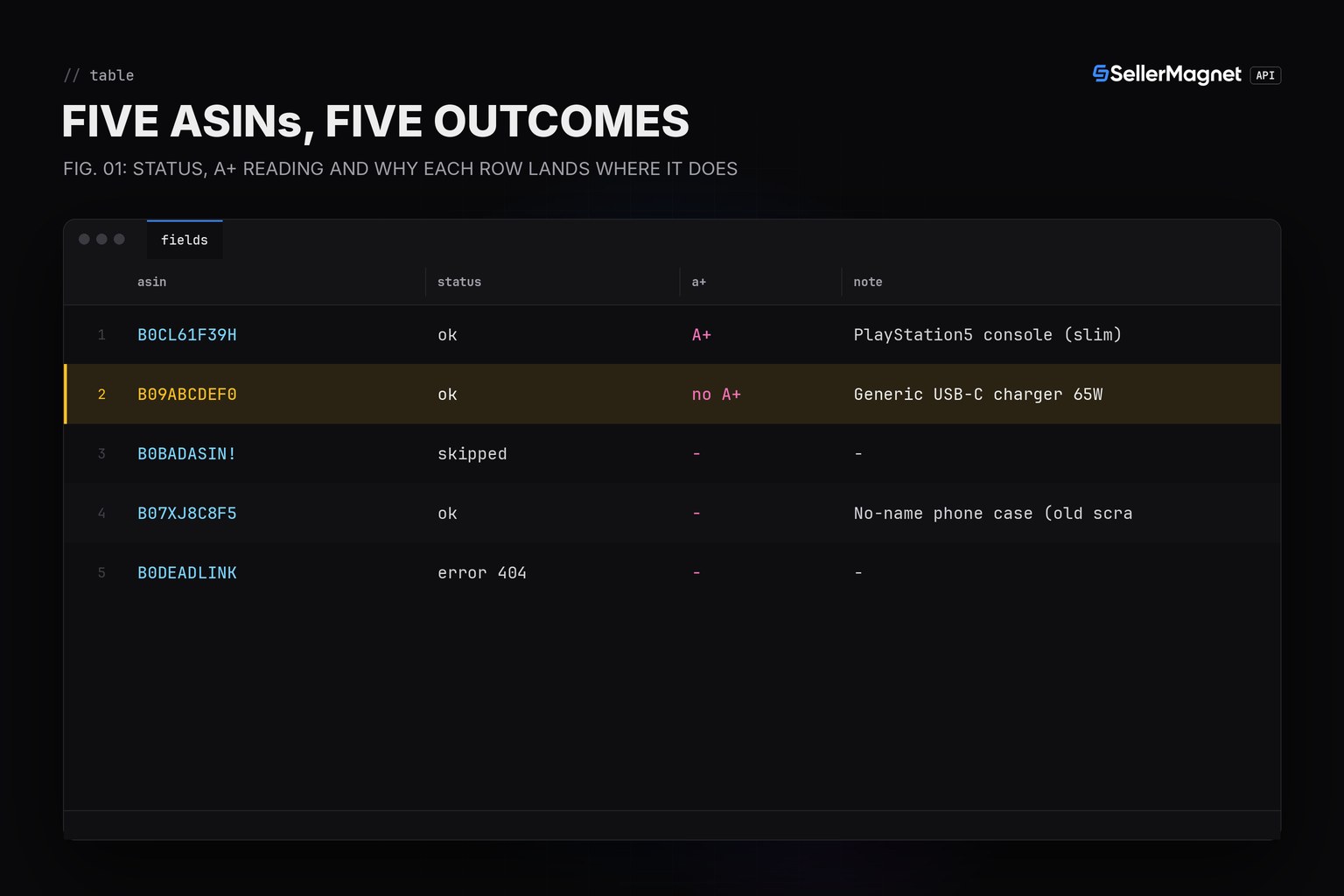
Why can't the field tell a brand story from product documents?
Because the lookup mirrors what a shopper's browser receives, and the page itself only exposes presence, not which module rendered it - the API does not parse the module markup into a type, it reads the same single flag. If the split matters for your use case (for example, confirming a product-specific document exists rather than just the brand's generic story), you would need to read the rendered listing yourself; this field cannot make that distinction for you.
What this costs in credits
Screening is exactly one credit per unique, well-formed ASIN - the same credit a normal product lookup already costs, since hasAPlusContent rides inside the response you are already paying for. A 404 is billed too (it is a real answer, not an outage) but a malformed ASIN never reaches the call, so filtering obviously bad input first keeps the run's cost equal to the catalogue size. 502/503 are retried and billed on every attempt, same as any other endpoint; see the retry and error handling guide for the caps. For the image and video fields on the same response see downloading Amazon product images; for a fuller competitor benchmark including A+ content among other signals see the listing audit API.
Frequently Asked Questions
What does productInfo.hasAPlusContent actually mean?
It is true whenever the listing shows a brand story, product documents, or both - three different things Amazon groups under “A+ content” on the page. The field does not say which one is present, only that at least one is.
Can I use hasAPlusContent to tell a brand story apart from product documents?
No. The lookup returns one boolean for both. If you need to know which module is on the page, you would have to read the rendered listing itself; the API does not expose that split.
Does a false result mean the listing has no enhanced content at all?
Within what this field covers, yes - false is the one case it is specific about: neither a brand story nor product documents are on the page. It says nothing about images, bullet points or video quality, which are separate fields.
Does checking hasAPlusContent for a whole catalogue cost extra credits?
No extra cost: it is one field inside the same /amazon-product-lookup response you are already paying one credit for per ASIN. Screening 500 ASINs costs the same 500 credits a plain catalogue lookup would.
Why did an ASIN come back as neither missing nor present in my screen?
A lookup can fail for reasons that have nothing to do with A+ content: a 404 means the ASIN has no page at all, and a malformed ASIN is skipped before the call is made. Keep those separate from a genuine false, or you will overcount “missing” listings.
Bottom line: hasAPlusContent answers one question well - missing or not - and no finer question at all. Build the catalogue screen on that one question, keep failed lookups in their own bucket, and don't ask the field to say which module is on the page, because it can't.


