
A SellerMagnet API key must never be sent to, stored in, or called from a browser extension, mobile app or any other front-end you ship to users: every byte of that code, including a background script's bundled JS, its manifest and its chrome.storage contents, reaches the user's machine and a Chrome extension unpacks from a plain zip. Put the key behind a small server-side proxy instead - the extension calls your own origin, the proxy adds the X-Api-Key header and forwards to SellerMagnet, and the key never leaves your server.
Key Takeaways
- Anything shipped to the browser - JS, manifest, chrome.storage - is readable by unpacking the extension; there is no client-side place to hide a key.
- A thin proxy on your own server holds the key, forwards the request, and returns the exact status code SellerMagnet sent, so billed/free and retry logic stay correct.
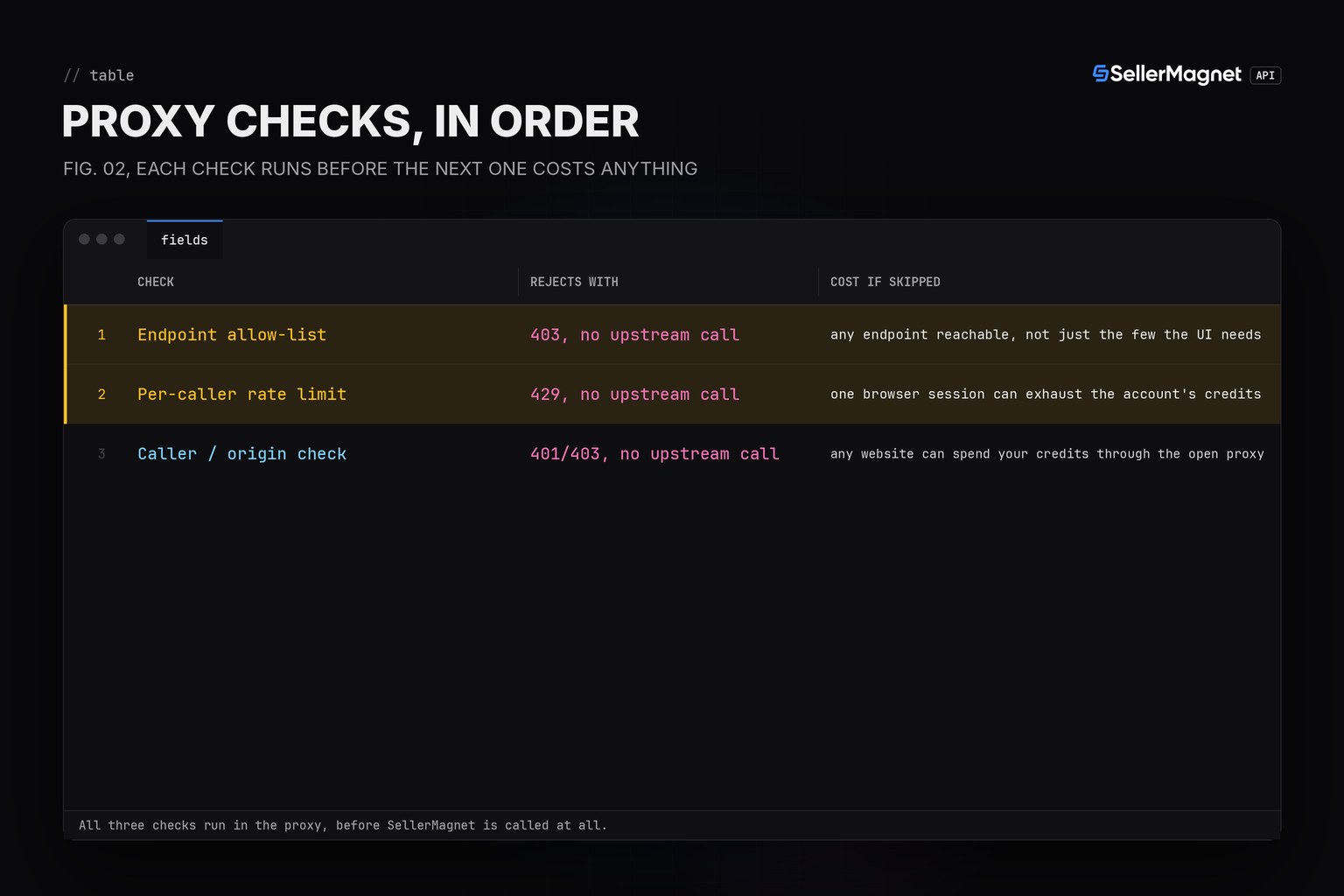
- Allow-list the endpoints the extension actually needs; reject anything else BEFORE a credit is spent, the same way SellerMagnet's own gate checks run before billing.
- Rate-limit per caller inside the proxy itself; without it one compromised or buggy browser session can spend your whole key's credits.
- CORS and an extension-ID or token check stop a RANDOM website from using your proxy, but none of this replaces keeping the key server-side.
Why can't the extension just call SellerMagnet directly?
X-Api-Key (or the api_key query parameter) authenticates every SellerMagnet request and is billed against your account the moment a request lands, whoever sent it. A browser extension ships as a zip: chrome://extensions -> "Pack extension" and the Chrome Web Store's own download both produce a .crx/.zip that any user can open with a normal archive tool, so a key written anywhere in that bundle - a content script, a background service worker, or values pulled into chrome.storage at install time - is visible to that user and to anyone they share the unpacked folder with. The same is true of any key embedded in a public front-end's JS bundle; a browser extension is simply the clearest case because the whole package is designed to be unpacked.
| Where the key lives | After unpacking | Why |
|---|---|---|
| Key hard-coded in extension JS | Visible | Extract it from the unpacked .crx/.zip in seconds; works on any user's machine |
| Key fetched once, kept in chrome.storage | Visible | Readable from the extension's own storage via devtools; still leaves the device |
| Key only in a server-side proxy | Not visible | The browser only ever talks to your own origin; nothing to extract from the extension |
How do I build a proxy that keeps the key server-side?
The proxy below is a small Node HTTP server with no framework dependency: it reads SELLERMAGNET_API_KEY from its own process environment (never from a request), allow-lists the endpoints this particular extension is allowed to call, applies a per-IP rate limit, and forwards everything else - query parameters, the upstream status code and body - unchanged. The extension's fetch() call only ever points at the proxy's own origin (/proxy/<endpoint>), so there is nothing in the shipped extension for anyone to extract.
proxy.js - holds the key, allow-lists, rate-limits
// proxy.js - a thin same-origin proxy that keeps the SellerMagnet API key server-side.
// The browser extension / front-end never sees the key: it calls THIS server,
// which adds X-Api-Key itself before forwarding to SellerMagnet.
"use strict";
const http = require("http");
const https = require("https");
const { URL } = require("url");

const API_KEY = process.env.SELLERMAGNET_API_KEY || "";
const UPSTREAM = process.env.UPSTREAM_BASE || "https://sellermagnet-api.com/api";
// Allow-list: only forward endpoints this extension actually needs. Anything
// else is rejected before a credit is ever spent.
const ALLOWED_ENDPOINTS = new Set(["amazon-product-lookup", "amazon-product-offers"]);
// Per-client-IP token bucket: caps how many SellerMagnet credits one visitor's
// browser can spend through this proxy, independent of SellerMagnet's own
// per-key 429 (which would otherwise apply to every user of the extension at once).
const WINDOW_MS = 60_000;
const MAX_PER_WINDOW = 30;
const hits = new Map(); // ip -> [timestamps]

function rateLimited(ip) {
  const now = Date.now();
  const arr = (hits.get(ip) || []).filter((t) => now - t < WINDOW_MS);
  arr.push(now);
  hits.set(ip, arr);
  return arr.length > MAX_PER_WINDOW;
}

function forward(endpoint, query, cb) {
  const upstream = new URL(`${UPSTREAM}/${endpoint}`);
  for (const [k, v] of Object.entries(query)) upstream.searchParams.set(k, v);
  const mod = upstream.protocol === "https:" ? https : http;
  const req = mod.request(
    upstream,
    { method: "GET", headers: { "X-Api-Key": API_KEY }, timeout: 120_000 },
    (res) => {
      let body = "";
      res.on("data", (c) => (body += c));
      res.on("end", () => cb(null, res.statusCode, body));
    },
  );
  req.on("error", (err) => cb(err));
  req.end();
}

const server = http.createServer((req, res) => {
  const url = new URL(req.url, "http://localhost");
  const endpoint = url.pathname.replace(/^\/proxy\//, "");
  const ip = req.socket.remoteAddress || "unknown";

  if (!url.pathname.startsWith("/proxy/")) {
    res.writeHead(404, { "content-type": "application/json" });
    return res.end(JSON.stringify({ error: "not found" }));
  }
  if (!ALLOWED_ENDPOINTS.has(endpoint)) {
    res.writeHead(403, { "content-type": "application/json" });
    return res.end(JSON.stringify({ error: `endpoint not allow-listed: ${endpoint}` }));
  }
  if (rateLimited(ip)) {
    res.writeHead(429, { "content-type": "application/json", "retry-after": "60" });
    return res.end(JSON.stringify({ error: "rate limited", retry_after: 60 }));
  }
  const query = Object.fromEntries(url.searchParams.entries());
  forward(endpoint, query, (err, status, body) => {
    if (err) {
      res.writeHead(502, { "content-type": "application/json" });
      return res.end(JSON.stringify({ error: "upstream unreachable" }));
    }
    // Pass the upstream status straight through (billed/free distinctions stay intact);
    // never attach the key or any upstream header the client didn't ask for.
    res.writeHead(status, { "content-type": "application/json" });
    res.end(body);
  });
});

if (require.main === module) {
  const port = Number(process.env.PORT || 8089);
  server.listen(port, () => console.log(`proxy listening on ${port}`));
}

module.exports = { server, ALLOWED_ENDPOINTS, MAX_PER_WINDOW };
Demo run: fake upstream standing in for sellermagnet-api.com, real HTTP calls through the proxy
fake upstream up
proxy listening on 8089
== allow-listed endpoint, within rate limit ==
{"success":true,"data":{"productInfo":{"asin":"B0CL61F39H","title":"Demo Product"}}} [http 200]
== endpoint NOT on the allow-list (blocked before any credit is spent) ==
{"error":"endpoint not allow-listed: amazon-product-statistics"} [http 403]
== unknown ASIN passed through from upstream (billed 404, forwarded as-is) ==
{"success":false,"error":"e","message":"Product not found"} [http 404]
== 31st request in one minute from the same IP: proxy's own rate limit fires ==
{"error":"rate limited","retry_after":60} [http 429]
What the extension's own request looks like (no key, no SellerMagnet host)
GET /proxy/amazon-product-lookup?asin=B0CL61F39H&marketplaceId=ATVPDKIKX0DER HTTP/1.1
Host: your-extension-backend.example.com
# no Authorization / X-Api-Key header - the extension never has one to send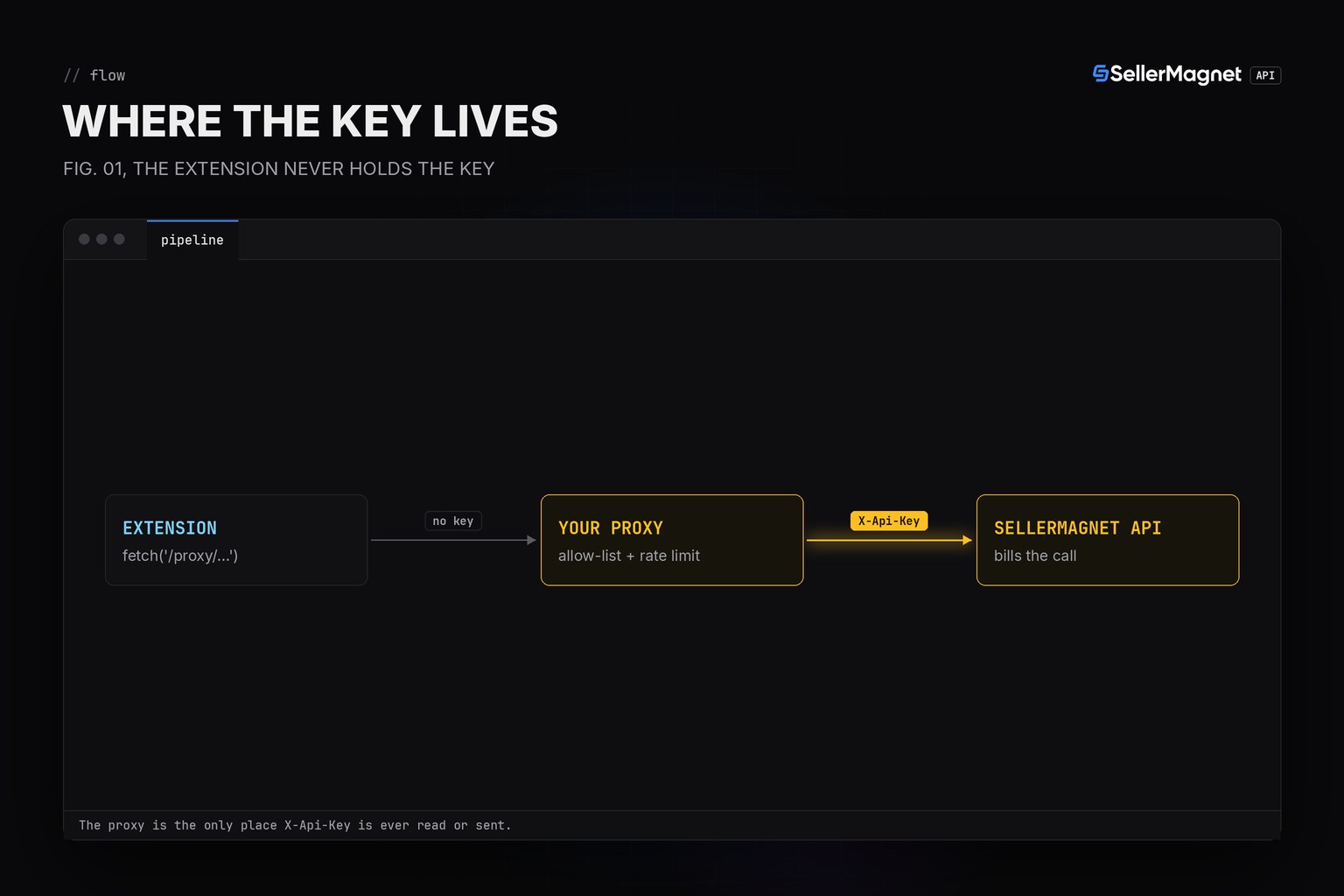
What should the proxy enforce besides forwarding the request?
Three checks, in order, before a call ever reaches SellerMagnet: an allow-list of endpoints (reject anything the extension has no legitimate reason to call), a per-caller rate limit (protects your credits from one runaway or compromised browser session, independent of SellerMagnet's own per-key concurrency cap which would otherwise apply to every user of the extension at once), and - for a public extension - a lightweight caller check such as validating the Origin/chrome-extension://<id> header or a short-lived token your own backend issued, which keeps a random website from reusing your proxy's open endpoint. None of these replace holding the key server-side; they limit what a caller can do once that much is already true.
Frequently Asked Questions
Can I just obfuscate or minify the key in the extension bundle?
No. Chrome extensions ship as a plain zip; chrome://extensions -> "Pack extension" output or the Web Store .crx both unpack with a zip tool, and minified JS still contains the literal key string.
Is a background service worker any safer than a content script?
Not for the key itself: the manifest, bundled JS and chrome.storage of every extension component are all readable once the extension is unpacked, so a fetch call built with the key in that code still exposes it, even if a content script can't reach it directly.
Does the proxy need its own API key management?
No extra product: the proxy reads ONE SellerMagnet key from its own server environment variable and never returns it in a response; browser users authenticate to the proxy with whatever your extension already uses (an extension ID check, a short-lived token, or nothing for a public demo).
Won't a proxy add latency?
One extra hop on your own infrastructure, typically single-digit milliseconds versus SellerMagnet's page-scrape time (up to 120 seconds on a slow upstream page); the proxy forwards the exact status and body it gets back, so retry logic in the extension works unchanged.
Can the proxy rate-limit without talking to SellerMagnet first?
Yes - keep a per-IP or per-user counter in the proxy itself and reject over-limit requests with a local 429 before forwarding, which protects your own credit balance from one runaway browser.
Bottom line: hold the SellerMagnet key only in a server-side proxy, never in a browser extension or front-end bundle, and have that proxy allow-list endpoints and rate-limit callers before it forwards anything. The Python quickstart and the rate limits and retries guide cover the same X-Api-Key header and status-code handling on the server side of this proxy; see API Documentation for every endpoint and Code Examples for runnable snippets in more languages, and Pricing for what each forwarded call costs.


