
/amazon-search has no sort, page or department parameter: the endpoint accepts exactly q, marketplaceId, an optional count (1 to 50, default 30) and an optional geo_location, and the request handler never reads anything else. Add &sort=price-asc-rank or &department=electronics to the call and you still get 200 with the same page-one, default-order results, because the extra name is never looked at and never forwarded to the scraper - no error, no effect.
Key Takeaways
- The request handler for /amazon-search reads only q, marketplaceId, count and geo_location; a sort, page or department parameter is never read and never forwarded - it is silently dropped, not rejected.
- Results are always Amazon's own default order for that keyword, on the first results page only; count just trims how many of those (up to 50) come back.
- No error means nothing here: count above 50 is a billed 400, but an unsupported parameter name produces no error of any kind, so "it didn't fail" is not proof it worked.
- The real sort workaround is client-side: sort the page you already paid for by price or rating; it costs nothing extra.
- The real department workaround is a different endpoint: /amazon-bestsellers takes a category_id against the marketplace's category tree - not a parameter on /amazon-search.
Does /amazon-search support a sort parameter?
No. The Flask view behind /amazon-search (search_amazon() in website/blueprints/dashboard_backend_views.py) reads q and geo_location with request.args.get(), count with a bounded int helper, and the marketplace ID from the route's own lookup, then forwards exactly those four as queryStringParameters to the Lambda that does the scrape. There is no line anywhere in that view that reads a sort, page, department or category parameter, so none of those names ever leaves your own process - they do not even reach the point where the API could reject them.
| Parameter | Used? | What happens if you send it |
|---|---|---|
| q | yes | the search keyword |
| marketplaceId | yes | which Amazon store |
| count | no, default 30 | 1-50, results on this one page |
| geo_location | no | ZIP/postcode used for the scrape |
| sort | ignored | read by nothing, forwarded to nothing |
| page | ignored | read by nothing, forwarded to nothing |
| department / category | ignored | read by nothing, forwarded to nothing |
Why didn't I get an error for sort or department?
Because an unsupported parameter is not a validation failure, it is simply invisible: nothing in the handler checks for it, so there is nothing to reject. Compare that with count: send count=90 and the handler does read count, sees it is over 50, and answers a billed 400 "Count Max: 50". That is the API actually looking at an input and rejecting it. A sort or department parameter never gets that treatment - the 200 you get back looks identical to a request without the parameter at all, which is exactly what makes this easy to miss in a code review.
The same call with &sort= and &department= attached - identical status, identical order
curl -sG "https://sellermagnet-api.com/api/amazon-search" \
  -H "X-Api-Key: $SELLERMAGNET_API_KEY" \
  --data-urlencode "q=usb c charger" \
  --data-urlencode "marketplaceId=ATVPDKIKX0DER" \
  --data-urlencode "count=20" \
  --data-urlencode "sort=price-asc-rank" \
  --data-urlencode "department=electronics"
# 200, same searchResults order as the call without sort/department -
# neither name is read by the view, so neither can change the answer
search_scope.py - catches the mistake before it costs a call
"""Why &sort= and &department= on /amazon-search do nothing, and what to use instead.

/amazon-search accepts exactly q, marketplaceId, count (1-50, default 30) and geo_location.
The Flask view (dashboard_backend_views.py search_amazon()) reads only those four with
request.args.get()/_int_arg() and forwards only {"q", "count", "marketplaceId", "geo_location"}
to the Lambda. Any other query string param - sort, page, department, category, department_id -
is never read by that view and never reaches the Lambda: it is silently dropped, not rejected.
A request with &sort=price-asc-rank returns 200 with the exact same default-order page-one
results as the same request without it, so "no error" is not proof it worked.

This module stops a caller from paying for that mistake (reject_unsupported), gives the real
client-side substitute for a sort (local_sort), and the real substitute for a department filter:
/amazon-bestsellers, which DOES take a category_id (a separate, separately-billed endpoint, not
a parameter on /amazon-search).
"""
from decimal import Decimal, InvalidOperation

from retry import get_with_retry
from sellermagnet import get

MARKETPLACE = "ATVPDKIKX0DER"  # amazon.com

# The only params /amazon-search's Flask view ever reads (dashboard_backend_views.py search_amazon()).
SUPPORTED_SEARCH_PARAMS = {"q", "marketplaceId", "count", "geo_location"}


def reject_unsupported(**params) -> None:
    """Raise before sending, instead of paying for a call that silently ignores the param.

    /amazon-search has no sort, page or department parameter. Passing one is not an error on
    the server - it is read by nothing and forwarded to nothing - so the only way to catch the
    mistake is to check for it before the request leaves your own code.
    """
    unsupported = sorted(set(params) - SUPPORTED_SEARCH_PARAMS)
    if unsupported:
        raise ValueError(
            f"/amazon-search ignores {unsupported}: no sort, page or department parameter exists. "
            "Sort the returned page locally (local_sort) or use /amazon-bestsellers with "
            "category_id for a department-scoped list."
        )


def _to_decimal(value) -> Decimal | None:
    try:
        return Decimal(str(value))
    except (InvalidOperation, TypeError):
        return None


def search_page(session, query: str, marketplace_id: str = MARKETPLACE, count: int = 30, **extra) -> list:
    """The one page /amazon-search can ever return: up to `count` results, Amazon's own order."""
    reject_unsupported(q=query, marketplaceId=marketplace_id, count=count, **extra)
    data = get_with_retry(session, "amazon-search", q=query, marketplaceId=marketplace_id, count=count)
    return [
        {"position": r["position"], "asin": r["asin"], "title": r["productTitle"],
         "price": _to_decimal(((r.get("listingPrice") or {}).get("price") or {}).get("total")),
         "rating": r.get("reviewRating"), "sponsored": bool(r.get("sponsored"))}
        for r in data["searchResults"]
    ]


def local_sort(results: list, by: str = "price", reverse: bool = False) -> list:
    """The real substitute for &sort=: sort the page you already paid for, client-side.

    A missing value (price=None for an unpriced listing, rating=None for no stars) always sorts
    last, in both directions, so a cheapest-first sort never promotes an unpriced row to #1.
    """
    if by not in ("price", "rating"):
        raise ValueError("by must be 'price' or 'rating'")
    present = [row for row in results if row.get(by) is not None]
    missing = [row for row in results if row.get(by) is None]
    present.sort(key=lambda row: row[by], reverse=reverse)
    return present + missing


def department_page(session, category_id: str, marketplace_id: str = MARKETPLACE, count: int = 30) -> list:
    """The real substitute for &department=: a separate, separately-billed endpoint.

    /amazon-bestsellers takes category_id against the marketplace's own category tree - this is
    the only department-style filter this API has; /amazon-search has none.
    """
    data = get_with_retry(session, "amazon-bestsellers", attempts=3, category_id=category_id,
                           marketplaceId=marketplace_id, count=count)
    return data["bestsellers"]


if __name__ == "__main__":
    from sellermagnet import new_session

    s = new_session()
    page = search_page(s, "usb c charger", count=20)
    cheapest = local_sort(page, by="price")
    print("cheapest on page one:", cheapest[0]["asin"], cheapest[0]["price"])
    try:
        search_page(s, "usb c charger", sort="price-asc-rank")
    except ValueError as exc:
        print("blocked:", exc)
    department = department_page(s, category_id="172282")
    print("electronics bestsellers:", len(department), "items")
Trimmed /amazon-search response - identical whether or not sort/department were sent
{
  "success": true,
  "data": {
    "searchResults": [
      {"position": 1, "asin": "B0CL5KNB9M", "sponsored": true,
       "listingPrice": {"price": {"total": "19.99"}}},
      {"position": 2, "asin": "B0DGY63Z2H", "sponsored": false,
       "listingPrice": {"price": {"total": "9.49"}}}
    ]
  }
}
Example run (illustrative data)
cheapest on page one: B0DGY63Z2H 9.49
blocked: /amazon-search ignores ['sort']: no sort, page or department parameter exists. Sort the returned page locally (local_sort) or use /amazon-bestsellers with category_id for a department-scoped list.
electronics bestsellers: 2 items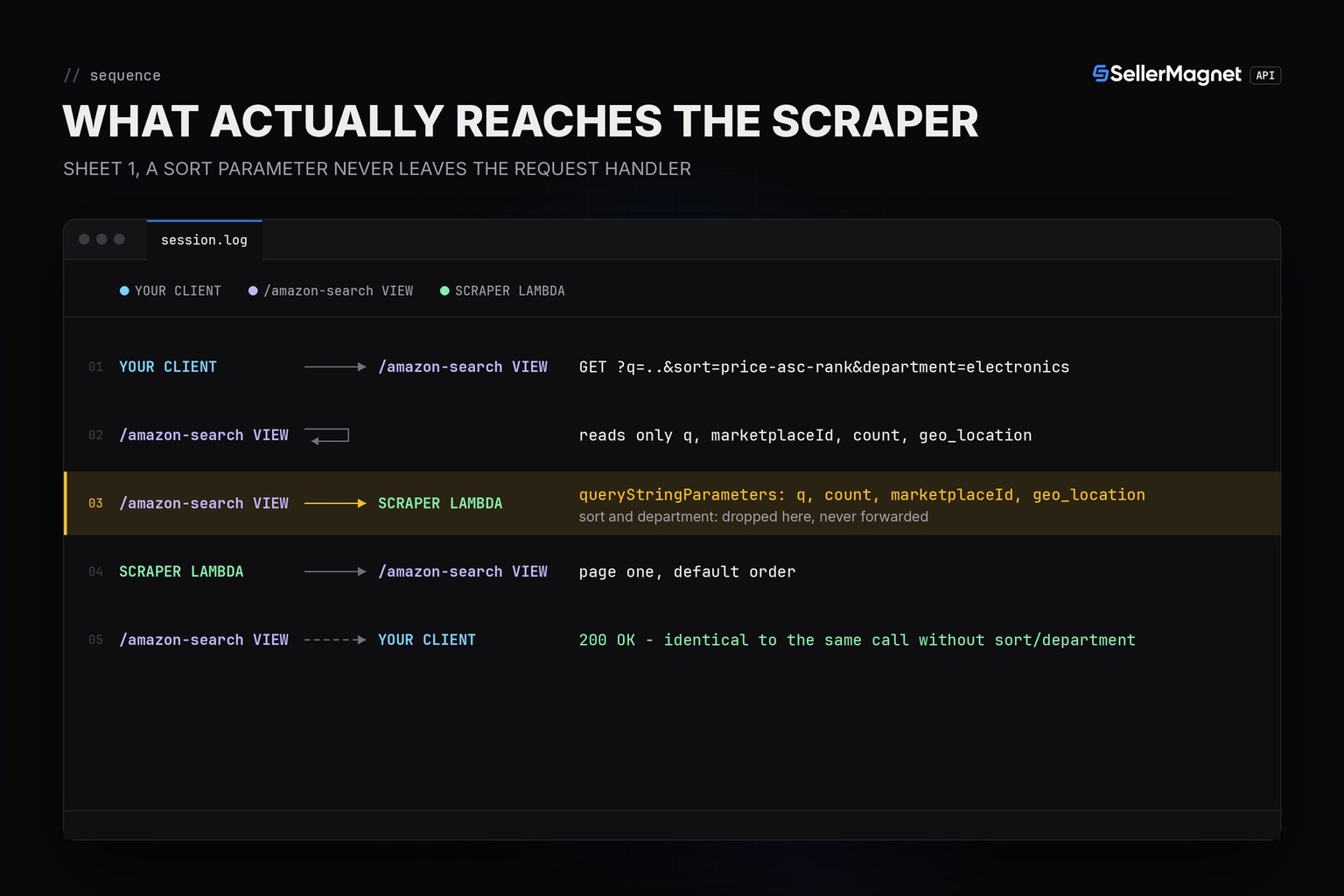
How do I actually sort or filter by department?
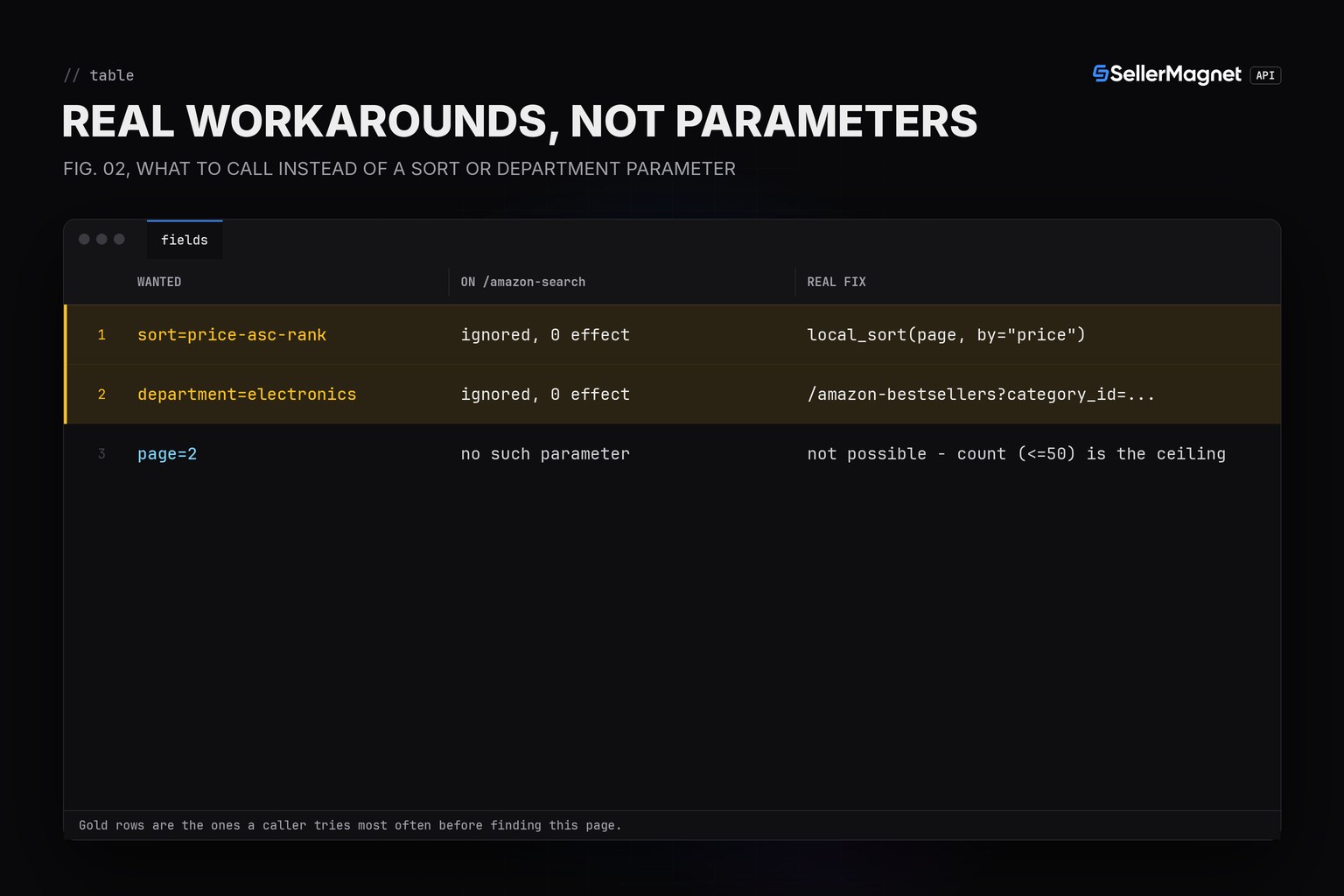
Two real workarounds, neither of which is a parameter on /amazon-search. For sorting, request the page (up to 50 results) and sort it yourself: price and rating both come back in the response, so a client-side sort costs nothing beyond the one call you were already making. For a department filter, use /amazon-bestsellers instead: it takes a category_id that is matched against the marketplace's own category tree, which is a genuine, code-enforced filter - just on a different, separately-billed endpoint, not on search.
| Need | Not a parameter on /amazon-search | Real workaround | Extra cost |
|---|---|---|---|
| Sort by price/rating | sort | Sort the returned page client-side | 0 - same call |
| Filter by department/category | department / category | /amazon-bestsellers with category_id | 1 credit, separate call |
| Page 2+ | page | Does not exist - count (max 50) is the ceiling on one page | n/a |
Don't trust "no error" as proof a parameter worked
A 200 response with &sort= or &department= attached looks exactly like success. The only way to catch the mistake is to check the parameter name yourself before sending the request - reject_unsupported() in the code above does exactly that, instead of letting a client quietly rely on a sort that never happened.
Frequently Asked Questions
Does /amazon-search support a sort parameter, like price-asc-rank?
No. The Flask view that handles /amazon-search reads exactly q, marketplaceId, count and geo_location and forwards only those four to the scraper. A sort parameter is not read, not forwarded, and not rejected - the response is identical with or without it.
Why didn't I get a 400 error when I added &sort= or &department= to my request?
Because nothing in the request handler looks at those names, so there is nothing to reject. Only a real input problem, like count above 50, produces a billed 400. An unsupported param is simply never read, which looks identical to success.
Can I get page 2 of Amazon search results from this API?
No. count (1 to 50, default 30) controls how many results come back from the one page the scraper reads; there is no second page to request. Fifty is the ceiling for one keyword on one call.
How do I sort Amazon search results by price with this API?
Sort the page you already paid for on your own side. The response gives you price, rating and position for up to 50 results; sorting that list client-side costs nothing extra and is the only sort this endpoint supports.
How do I filter Amazon search results by department or category?
/amazon-search cannot do this at all. /amazon-bestsellers can: it takes a category_id matched against the marketplace's own category tree. It is a separate, separately-billed endpoint, not a parameter you can add to a search call.
Bottom line: /amazon-search's sort, page and department are not real parameters - they are ignored, not rejected, so a 200 response proves nothing about whether they did anything. Sort the page yourself for a sort, and call /amazon-bestsellers with a category_id for a department filter. See the Amazon search results API post for the full field reference, and the Amazon categories page for category_id values.


