
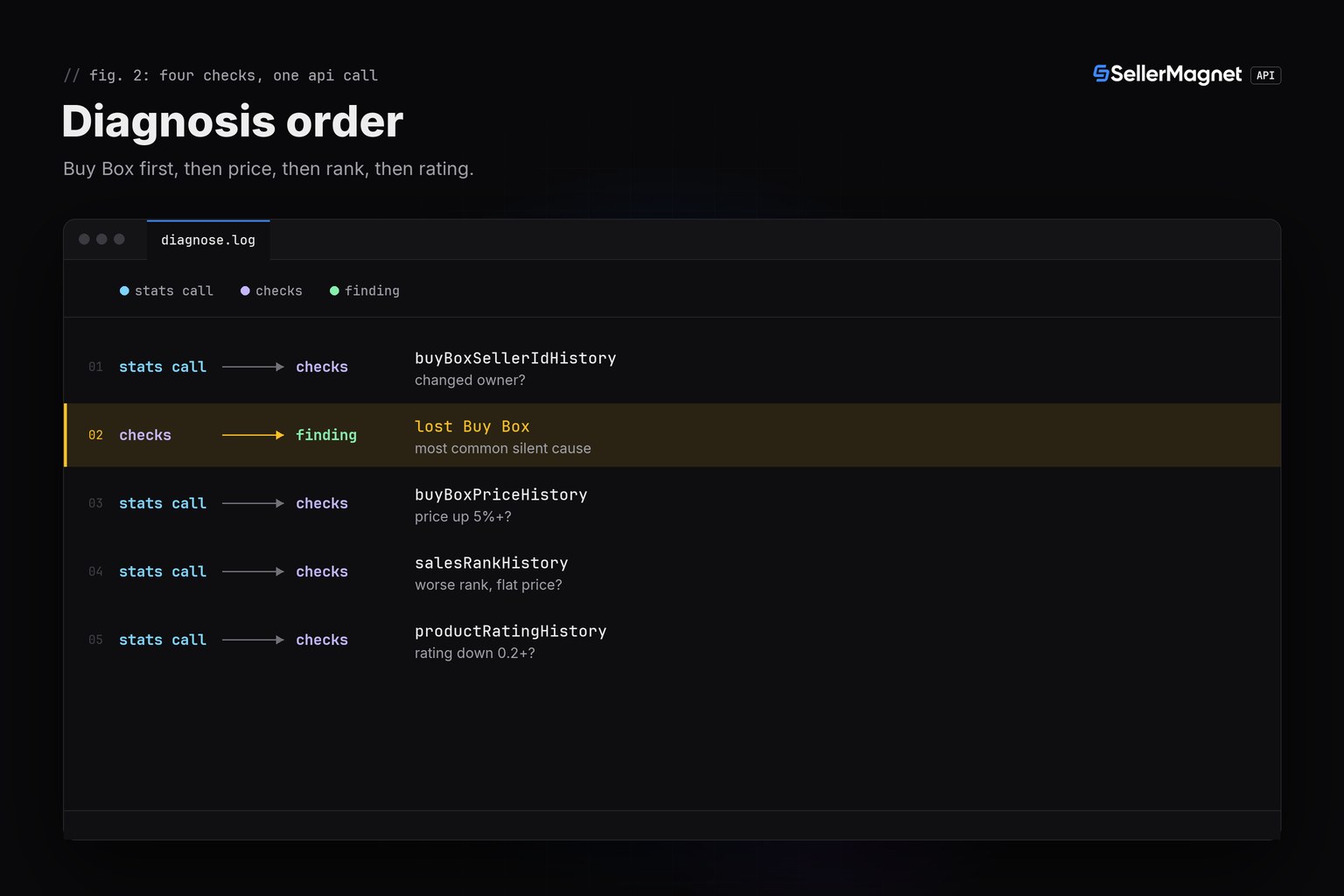
To diagnose why Amazon sales dropped, pull the product's history from /amazon-product-statistics and check four causes in order: did another seller take the Buy Box, did the landed price rise, did the sales rank worsen with price unchanged, or did the rating fall. One call returns all four series for the full tracked period, so the check runs in a single request instead of four separate guesses.
Key Takeaways
- One /amazon-product-statistics call returns Buy Box, price, rank and rating history together.
- Check Buy Box ownership first: losing it to a competitor is the single most common silent cause.
- A rank jump with a flat price points to fewer real sales, often ad spend or ranking loss, not pricing.
- salesRankHistory uses -1 for 'no rank recorded', not zero: drop those points before comparing.
- If all four series are flat, the cause is outside this data: check PPC spend, inventory and account health.
What are the most common causes of a sales drop?
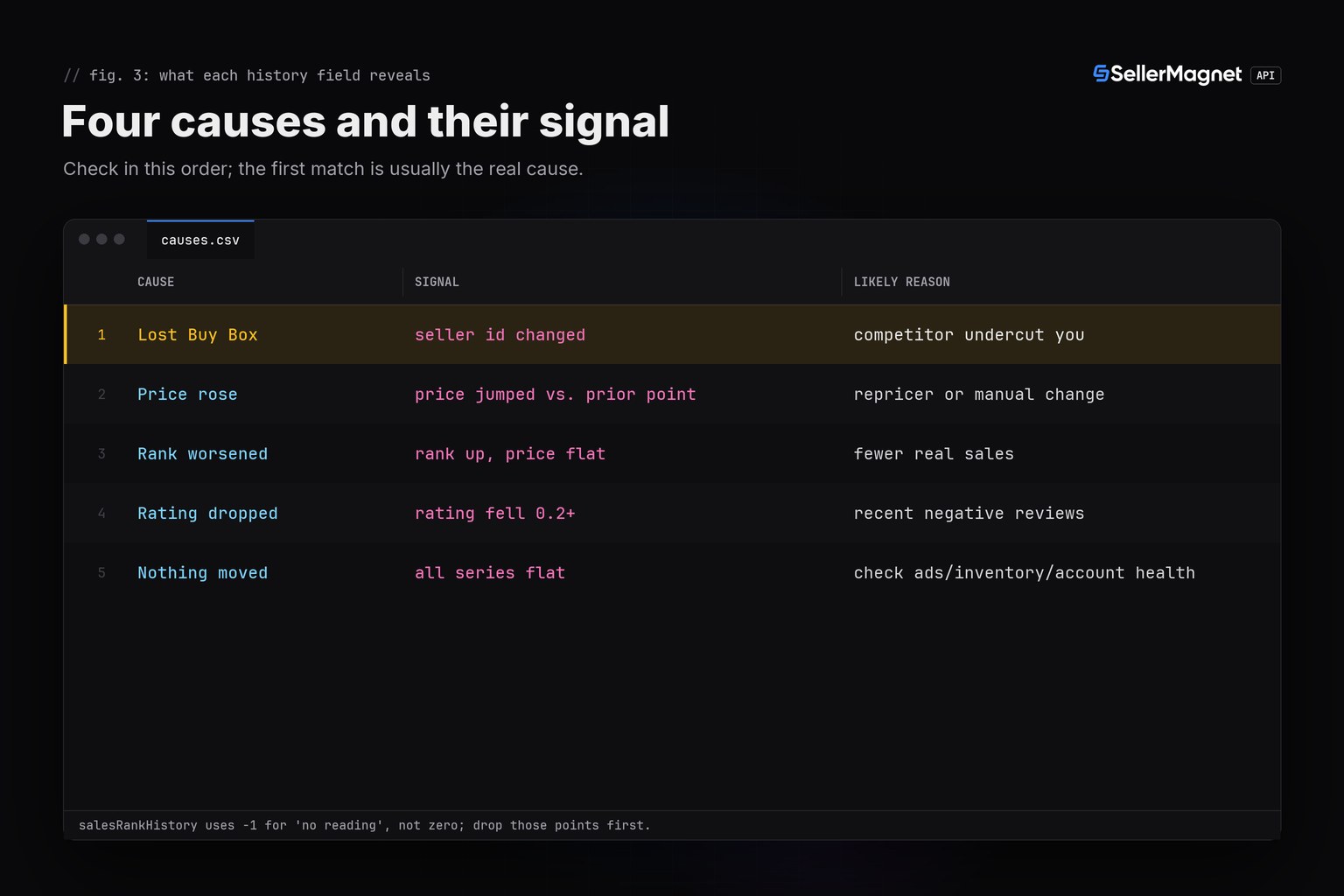
Most drops trace back to one of four visible changes: the Buy Box moved to a competitor, the price rose (yours or a repricer's), the sales rank worsened even though price held (fewer actual purchases), or the rating fell after a run of negative reviews. Checking in that order catches the loudest cause first, since losing the Buy Box alone can zero out sales for a listing that previously converted well.
| Cause | Signal in the data | Likely reason |
|---|---|---|
| Lost the Buy Box | buyBoxSellerIdHistory last entry changed owner | a competitor undercut price or improved availability |
| Price rose | buyBoxPriceHistory jumped versus the prior point | a manual or automated repricer change |
| Rank worsened sharply | salesRankHistory climbed with price flat | fewer actual sales, often ad spend or ranking loss |
| Rating dropped | productRatingHistory fell 0.2+ stars | recent negative reviews hurting conversion |
| Nothing in history moved | all four series flat | check PPC spend, inventory and account health directly |
How do I check Buy Box and price history programmatically?
/amazon-product-statistics returns buyBoxSellerIdHistory, buyBoxPriceHistory, salesRankHistory and productRatingHistory as parallel timestamped series inside data.stats. None of them are cleaned: a rank of -1 means no reading was recorded at that time, not a rank of negative one, and price series simply have gaps rather than zeros when no offer existed. Compare the two most recent points of each series rather than averages, since a repricer change is a step, not a trend.
diagnose.py - check the four causes in order
"""Diagnose a sales drop from the product's own history, not guesswork.

Pulls /amazon-product-statistics (price, Buy Box holder and sales-rank history)
and checks the four most common causes in order: lost the Buy Box, a price rise,
a rating/review drop, or a rank spike (less visible) with no price change at all.
"""
import os

import requests

BASE = "https://sellermagnet-api.com/api"
SESSION = requests.Session()
SESSION.headers["X-Api-Key"] = os.environ["SELLERMAGNET_API_KEY"]


def diagnose(asin: str, marketplace_id: str, my_seller_id: str) -> list:
    resp = SESSION.get(f"{BASE}/amazon-product-statistics",
                        params={"asin": asin, "marketplaceId": marketplace_id}, timeout=120)
    body = resp.json()
    if resp.status_code != 200 or not body.get("success"):
        raise RuntimeError(f"{asin}: {resp.status_code} {body.get('message')}")
    stats = body["data"]["stats"]

    findings = []
    bb_history = stats.get("buyBoxSellerIdHistory") or []
    if len(bb_history) >= 2:
        before, now = bb_history[-2][1], bb_history[-1][1]
        if before == my_seller_id and now != my_seller_id:
            findings.append(f"lost the Buy Box to seller {now!r}")
        elif now == "-1":
            findings.append("nobody currently qualifies for the Buy Box")

    price_history = stats.get("buyBoxPriceHistory") or []
    if len(price_history) >= 2:
        before_price, now_price = price_history[-2][1], price_history[-1][1]
        if now_price > before_price * 1.05:
            findings.append(f"landed price rose {before_price/100:.2f} -> {now_price/100:.2f}")

    rank_history = stats.get("salesRankHistory") or []
    clean_ranks = [r for _, r in rank_history if r != -1]
    if len(clean_ranks) >= 2 and clean_ranks[-1] > clean_ranks[-2] * 1.5:
        findings.append(f"sales rank worsened {clean_ranks[-2]} -> {clean_ranks[-1]} (fewer sales, same price)")

    rating_history = stats.get("productRatingHistory") or []
    if len(rating_history) >= 2 and rating_history[-1][1] < rating_history[-2][1] - 0.2:
        findings.append(f"rating dropped {rating_history[-2][1]} -> {rating_history[-1][1]}")

    return findings or ["no cause visible in price/Buy Box/rank/rating history; check PPC spend and inventory next"]


if __name__ == "__main__":
    for finding in diagnose("B0CLTBHXWQ", "APJ6JRA9NG5V4", my_seller_id="A11IL2PNWYJU7H"):
        print("-", finding)
Output for a listing that lost the Buy Box and more
- lost the Buy Box to seller 'A999OTHER'
- landed price rose 418.00 -> 449.97
- sales rank worsened 1200 -> 5400 (fewer sales, same price)
- rating dropped 4.6 -> 4.3
The stats fields this check reads (trimmed)
{
  "success": true,
  "data": {
    "stats": {
      "buyBoxSellerIdHistory": [["2026-09-01 00:00:00", "A11IL2PNWYJU7H"], ["2026-10-13 00:00:00", "A999OTHER"]],
      "buyBoxPriceHistory": [["2026-09-01", 41800], ["2026-10-13", 44997]],
      "salesRankHistory": [["2026-09-01 00:00:00", 1200], ["2026-10-13 00:00:00", 5400]],
      "productRatingHistory": [["2026-09-01 00:00:00", 4.6], ["2026-10-13 00:00:00", 4.3]]
    }
  }
}
Confirm before you act
A single flat point in salesRankHistory can be a missing reading, not a real plateau. Compare the two most recent CLEAN points (skip any -1) rather than reacting to one noisy entry.
What if the history shows nothing unusual?
A flat Buy Box, price, rank and rating history rules out the four causes this endpoint can see, which means the drop sits outside product data entirely: advertising spend paused or exhausted, a stock-out the history has not caught yet, a suppressed listing from an account-health issue, or a seasonal dip shared across the whole category. Those need the advertising console, inventory dashboard and account health page directly, not an API call.
Frequently Asked Questions
Why did my Amazon sales suddenly drop?
The four most common visible causes are losing the Buy Box to a competitor, a price increase, a sales-rank jump with flat price (fewer real sales), or a rating drop from recent reviews. /amazon-product-statistics returns the history to check all four in one call.
How do I check if I lost the Buy Box?
Compare the last two entries of buyBoxSellerIdHistory from /amazon-product-statistics. If the seller ID changed and the earlier one was yours, you lost it; "-1" means nobody currently qualifies.
What does -1 mean in salesRankHistory?
No rank was recorded at that timestamp, not a literal negative rank. Drop those points before comparing rank changes, or a gap in data looks like a rank crash.
What if none of the history shows a change?
A flat Buy Box, price, rank and rating series point outside this data: check PPC spend, inventory levels and account health, which the statistics endpoint does not cover.
How often should I check for a drop?
Daily is enough for most catalogs; checking every few hours mainly adds credit cost without catching problems meaningfully earlier, since the underlying page itself only updates periodically.
Bottom line: before assuming the worst, pull one /amazon-product-statistics call and check Buy Box, price, rank and rating in that order. For the full field list and history shape, see the product data without SP-API guide, and budget the check with the pricing guide.


