
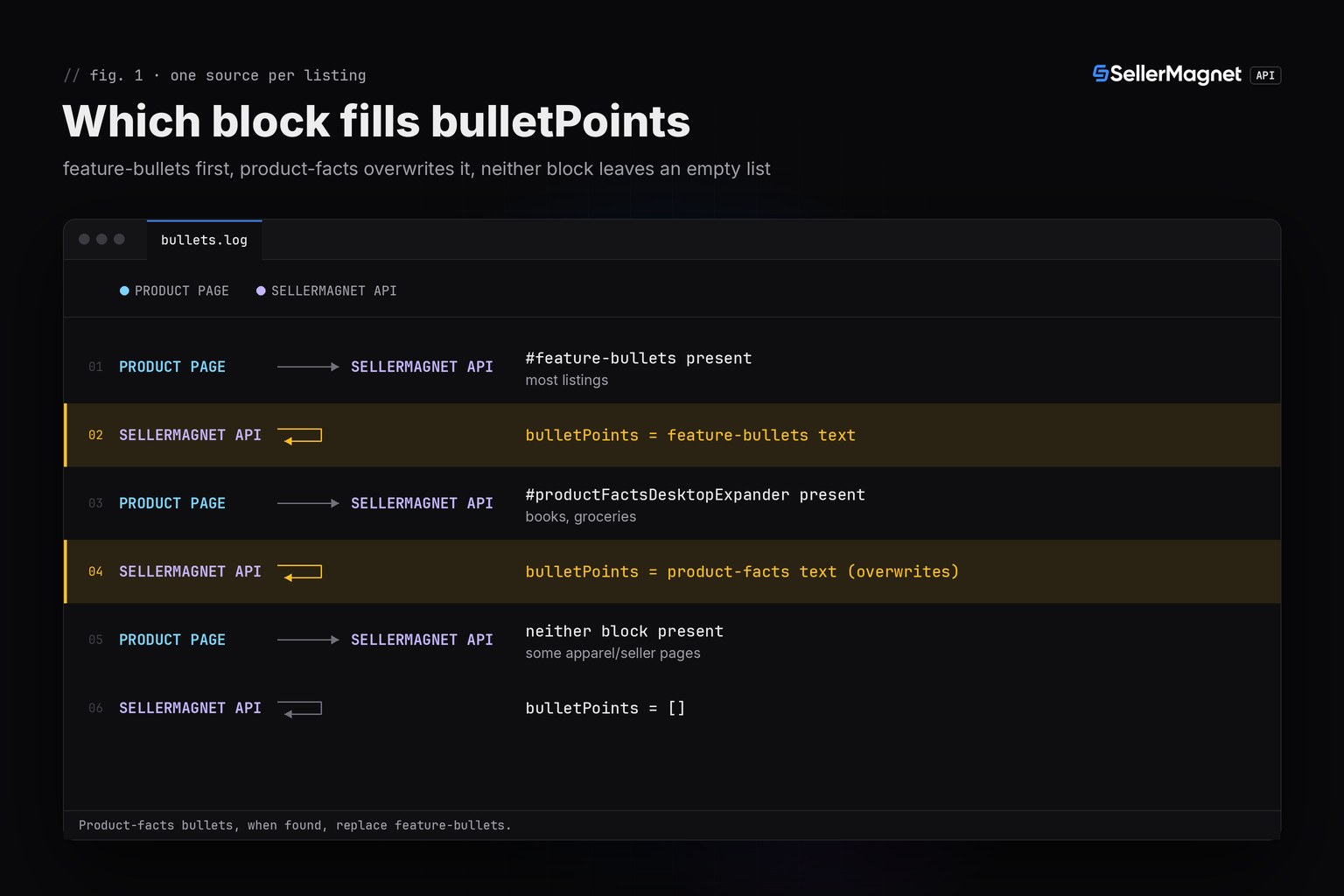
/amazon-product-lookup returns the feature bullets of a listing in productInfo.bulletPoints, a list of strings in page order. Most listings build it from the feature-bullets block; books, groceries and a few other categories show a product-facts table instead, and when that table is present it REPLACES the feature bullets rather than adding to them. A listing with neither block returns an empty list, which is not a lookup error. bulletPoints is also not the same field as additionalDetails, a separate key-value table read from elsewhere on the page.
Key Takeaways
bulletPointsis a list of strings: either the feature-bullets text, or the product-facts items when that table exists on the page - never both combined.- An empty
bulletPointslist means the page has neither block; it does not mean the lookup failed. additionalDetailsis a different field (brand, model, dimensions, ...), built from a different part of the page; a full bullet count does not imply a full additionalDetails table or vice versa.descriptionmixes A+ content text and the plain product description, so it is not a clean length signal for the listing.- A lookup costs 1 credit per ASIN; dedupe your ASIN list and validate the format before calling, since
/amazon-product-lookupbills a malformed ASIN like any other request.
What is in the bulletPoints field?
Each string is one bullet, already stripped of surrounding whitespace, in the order Amazon shows them. The API reads the page's feature-bullets block (#feature-bullets) first; if the page instead carries a product-facts table (#productFactsDesktopExpander, the layout Amazon uses on many book and grocery pages), that table's items overwrite whatever the feature-bullets block produced. The two never merge: a listing gets one source or the other, never a combination.
| Item | Value |
|---|---|
| Field | bulletPoints |
| Type | list of strings |
| Source | the feature-bullets block, or the product-facts table on pages that use one instead |
| Order | page order, top to bottom |
| Empty list | the page has neither block (common on some apparel and grocery listings) |
| Not the same as | additionalDetails (a separate key-value table: brand, model, dimensions, ...) |
Why is bulletPoints sometimes an empty list?
Because the page has neither a feature-bullets block nor a product-facts table - not because the lookup failed. This happens on some apparel, grocery and marketplace-seller listings whose page layout skips both blocks. Treat an empty list as a real listing property to report, the same way you would report a listing with few images or no video, and not as a reason to retry the call.
Does bulletPoints include the product-facts table on book and grocery pages?
Yes, but as a replacement, not an addition. When a product-facts table is present, its items (for example "Publisher", "Language" or "Print length" rows on a book page) become the entire bulletPoints list; any feature-bullets text the page might also have had is dropped for that response. A field-count check that expects five marketing bullets will read a book's three publisher-facts lines as "short" bullets, not as a different field - which is the exact gap the listing audit script should take into account when comparing bullet counts across categories.
productInfo.bulletPoints on a book page (product-facts table, illustrative data)
{
  "bulletPoints": [
    "Publisher : Example Press (1 January 2026)",
    "Language : English",
    "Print length : 320 pages"
  ]
}
How is bulletPoints different from additionalDetails?
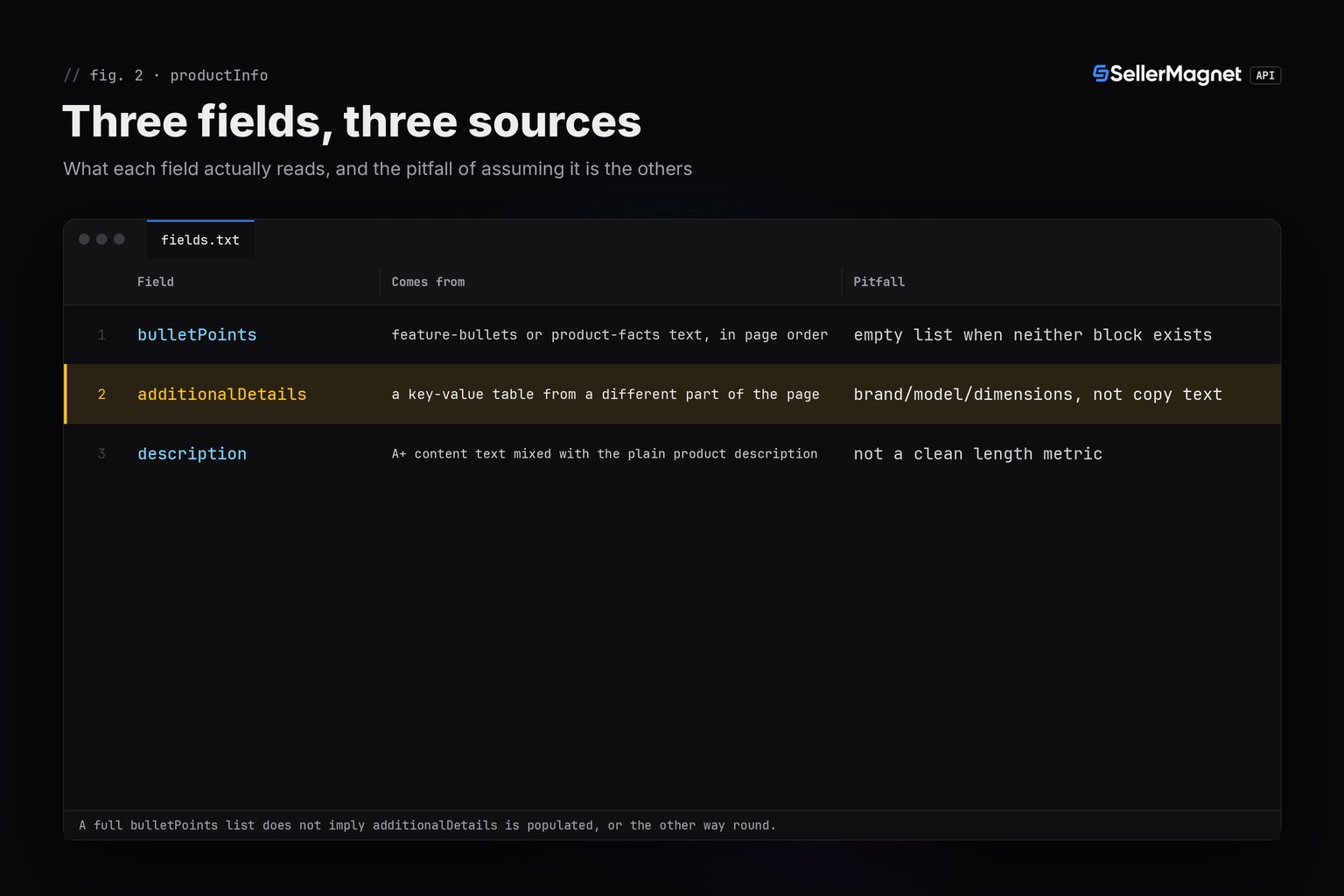
bulletPoints is marketing copy: short phrases meant to be read, in page order, as a plain list of strings. additionalDetails is a separate key-value table (brand, model number, item weight, dimensions, and similar fields), extracted from the listing's product-information block, which sits elsewhere on the page. A listing can have a full set of bullets and an empty additionalDetails table, or the other way round; neither field predicts the other, and code that conflates them will silently read the wrong data.
| Field | Comes from | Pitfall |
|---|---|---|
| bulletPoints | feature-bullets or product-facts text, in page order | empty list when neither block exists |
| additionalDetails | a key-value table from a different part of the page | brand/model/dimensions, not copy text |
| description | A+ content text mixed with the plain product description | not a clean length metric |
How do I export bullet points for a batch of ASINs in Python?
The script below looks up a list of ASINs, writes the bullet count and text to a CSV row per product, and flags listings with zero bullets so you can review them instead of assuming the call failed. It skips anything that is not a 10-character ASIN and drops a duplicate before paying for either, because /amazon-product-lookup bills a malformed or repeated ASIN like any other request. It uses sellermagnet.py (ApiError, new_session) and retry.py (get_with_retry) from the Python quickstart.
bullets_export.py - export bullet points for a batch of ASINs to CSV
"""Amazon bullet points (feature bullets) export: list them for a batch of ASINs and flag the field-reference
traps - products with no bullets at all, and listings where the "product facts" table replaces them outright.

bulletPoints is NOT additionalDetails: bulletPoints holds the feature-bullets text (or the product-facts items
on a book/grocery-style page, which REPLACE the feature bullets entirely, never add to them); additionalDetails
is a separate key-value table (brand, weight, dimensions, ...) built from a different block of the page.
Helpers: sellermagnet.py and retry.py from https://sellermagnet-api.com/blog/amazon-product-api-python
"""
import csv
import re

import requests

from retry import get_with_retry
from sellermagnet import ApiError, new_session

MARKETPLACE = "ATVPDKIKX0DER"   # amazon.com
ASINS = ["B0CL61F39H", "B0FACTBOOK", "B0NOBULLT1", "B0IEONLY01", "not-an-asin", "b0cl61f39h"]
OUT_FILE = "bullets.csv"
MAX_FAILED = 3                  # 502/503 are billed on every attempt: stop after 3 calls that keep failing


def export_row(product: dict) -> dict:
    """One row from productInfo: the bullets, their count, and whether a product-facts table replaced them."""
    bullets = product.get("bulletPoints") or []
    facts_block = bool(product.get("additionalDetails"))   # a separate table; its presence does not predict bullets
    return {
        "asin": product.get("asin"),
        "bullets": len(bullets),
        "text": " | ".join(bullets),
        "note": "no feature bullets and no product-facts replacement" if not bullets else "",
        "has_additional_details": facts_block,
    }


def main():
    session = new_session()
    rows, failed, seen = [], 0, set()
    with open(OUT_FILE, "w", newline="", encoding="utf-8") as fh:
        writer = csv.DictWriter(fh, fieldnames=["asin", "bullets", "text", "note", "has_additional_details"])
        writer.writeheader()
        for raw in ASINS:
            asin = raw.strip().upper()
            if not re.fullmatch(r"[A-Z0-9]{10}", asin):
                print(f"{raw}: skipped, not an ASIN (lookup would bill it)")
                continue
            if asin in seen:
                print(f"{asin}: skipped, already exported (lookup would bill it again)")
                continue
            seen.add(asin)
            if failed >= MAX_FAILED:
                print(f"stopped after {MAX_FAILED} failed calls")
                break
            try:
                product = get_with_retry(session, "amazon-product-lookup", asin=asin,
                                         marketplaceId=MARKETPLACE)["productInfo"]
            except ApiError as err:
                if err.status in (401, 403):
                    print(f"stopped: {err}")           # key or credits: every further call fails too
                    break
                label = "not found (billed 404)" if err.status == 404 else f"error {err}"
                print(f"{asin}: {label}")
                failed += err.status >= 500
                continue
            except (requests.ConnectionError, requests.Timeout) as err:
                print(f"{asin}: error {type(err).__name__}")
                failed += 1
                continue
            row = export_row(product)
            rows.append(row)
            writer.writerow(row)
            print(f"{row['asin']}: {row['bullets']} bullet(s)" + (f" - {row['note']}" if row["note"] else ""))
    print(f"\nexported {len(rows)} of {len(seen)} looked-up ASIN(s) to {OUT_FILE}")
    no_bullets = sum(1 for r in rows if r["bullets"] == 0)
    if no_bullets:
        print(f"{no_bullets} listing(s) had no bulletPoints at all (not a lookup error)")


if __name__ == "__main__":
    main()
Output (illustrative data: a normal listing, a book-style page, an empty list and a billed 404)
B0CL61F39H: 5 bullet(s)
B0FACTBOOK: 3 bullet(s)
B0NOBULLT1: 0 bullet(s) - no feature bullets and no product-facts replacement
B0IEONLY01: not found (billed 404)
not-an-asin: skipped, not an ASIN (lookup would bill it)
B0CL61F39H: skipped, already exported (lookup would bill it again)

exported 3 of 4 looked-up ASIN(s) to bullets.csv
1 listing(s) had no bulletPoints at all (not a lookup error)- 0 bullet(s) with the note "no feature bullets and no product-facts replacement" is a real page property, not an error: do not retry the call because of it.
- B0FACTBOOK's 3 bullets are product-facts rows (Publisher, Language, Print length), not marketing bullets: the field does not say which source produced the text.
- has_additional_details is read from a different field; the example listing has one, the book-style and empty-bullet listings in this run do not.
- skipped, already exported: the script normalises case before deduping, so the same ASIN in two cases is billed once.
What does a bullet points lookup cost?
1 credit per /amazon-product-lookup call, whether the listing has five bullets, three product-facts rows or none. A malformed ASIN is billed the same way, since the endpoint does not validate the ASIN format before fetching; filter obviously bad values client-side first. For comparing bullet and image counts against competitors, see the listing audit script; to catch a later change to the bullets themselves, see the listing change monitor.
Frequently Asked Questions
What is the bulletPoints field in the Amazon Product API?
A list of strings: the listing's feature bullets in page order, or the product-facts table's items when the page uses one instead of feature bullets.
Why is bulletPoints an empty list for some products?
The page has neither a feature-bullets block nor a product-facts table. It is a real listing property, not a failed lookup; no retry is needed.
Does bulletPoints combine feature bullets and the product-facts table?
No. When a product-facts table exists it replaces the feature bullets entirely; the two sources never appear together in one response.
Is bulletPoints the same as additionalDetails?
No. additionalDetails is a separate key-value table (brand, model, dimensions) read from a different part of the page; a full bulletPoints list says nothing about it.
Does checking bulletPoints cost extra credits?
No. It is part of the standard /amazon-product-lookup response, 1 credit per ASIN, the same call used for title, price and every other listing field.
Bottom line: read bulletPoints as either feature-bullets text or a product-facts replacement, never both, treat an empty list as a real page state, and keep it separate from additionalDetails in your code. A free account includes 150 credits to try it, and the product lookup endpoint page lists every other field in the response.


