
To build a live countdown of Amazon Lightning Deals, call the SellerMagnet /api/amazon-deals endpoint, keep only entries where isLightningDeal is true, parse dealEndTime as a UTC timestamp, drop deals with no end time or that already ended, and sort what is left by minutes remaining. One poll, one credit, and the countdown is just a subtraction - no scraping, no headless browser watching a page refresh.
Key Takeaways
- isLightningDeal is a plain boolean on every deal; filter on it before building the countdown.
- dealStartTime and dealEndTime are ISO 8601 in UTC with a trailing Z, or the string "N/A" when the page gives none.
- A deal with dealEndTime "N/A", or whose end time is already in the past, has no countdown to show - exclude it, don't show a negative number.
- dealId (falling back to asin when it is "N/A") is the key for deduplication; the same poll can repeat a deal.
- A deals poll is billed whether the list is full or empty; errors come back as 4xx/5xx, never as a fake empty list.
What marks a deal as a lightning deal in the API?
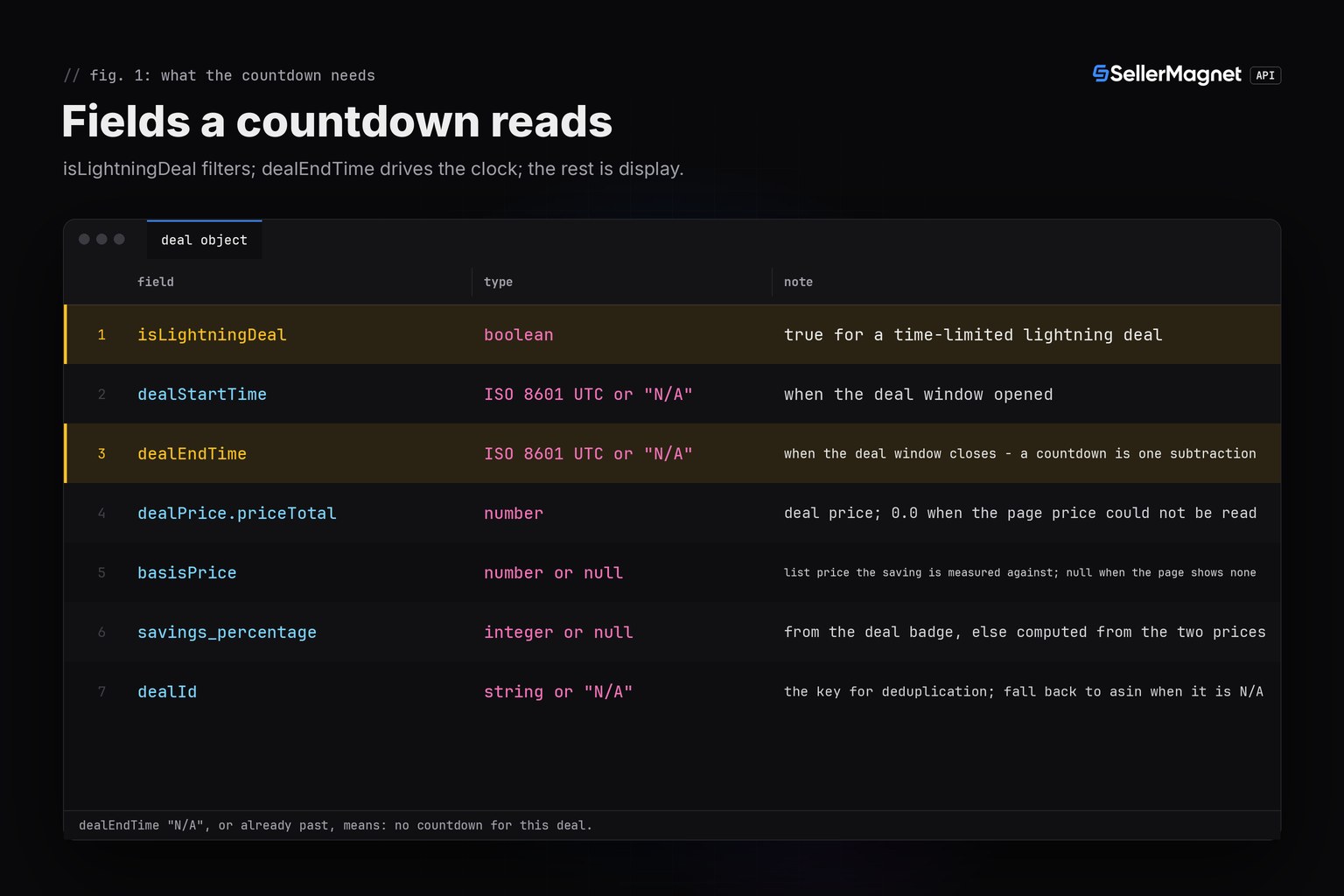
/api/amazon-deals returns every current deal for a marketplace (optionally filtered by category_id) as data.deals, lightning and non-lightning deals mixed together. isLightningDeal is the only field that tells them apart - there is no separate endpoint or parameter for lightning deals alone. dealStartTime and dealEndTime carry the deal's window as ISO 8601 timestamps in UTC, or the string "N/A" when the deals page did not show a time for that entry; a lightning deal without a readable end time is common enough that a countdown builder has to handle it, not assume it away.
One lightning deal from /api/amazon-deals on amazon.de (example values)
{
  "success": true,
  "data": {
    "deals": [
      {
        "dealId": "a1c93e7f",
        "asin": "B0CLTBHXWQ",
        "productTitle": "Anker 737 Power Bank, 24000mAh 140W",
        "dealLink": "https://www.amazon.de/dp/B0CLTBHXWQ",
        "dealPrice": {"priceTotal": 89.99, "priceCurrency": "EUR"},
        "basisPrice": 139.99,
        "savings_percentage": 36,
        "coupon_savings": null,
        "dealStartTime": "2026-10-26T17:47:00.000Z",
        "dealEndTime": "2026-10-26T18:59:00.000Z",
        "isLightningDeal": true,
        "image_url": "https://images-eu.ssl-images-amazon.com/images/I/717dw8J-hbL.jpg"
      }
    ]
  }
}| Field | Type | Meaning |
|---|---|---|
isLightningDeal | boolean | True for a time-limited lightning deal |
dealStartTime | ISO 8601 UTC or "N/A" | When the deal window opened |
dealEndTime | ISO 8601 UTC or "N/A" | When the deal window closes - a countdown is one subtraction |
dealPrice.priceTotal | number | Deal price; 0.0 when the page price could not be read |
basisPrice | number or null | List price the saving is measured against; null when the page shows none |
savings_percentage | integer or null | From the deal badge, else computed from the two prices |
dealId | string or "N/A" | The key for deduplication; fall back to asin when it is N/A |
How do I build the countdown list in Python?
Fetch the deals, keep only isLightningDeal entries with a dealEndTime that parses to a real UTC timestamp still in the future, deduplicate on dealId (falling back to asin when it is "N/A"), then sort by minutes remaining. The buckets below - ending soon, today, later - are just thresholds on that same number, so the same list can drive a dashboard, a Slack message or a cron alert. get_with_retry, new_session and ApiError come from the Python quickstart, which also covers the retry policy used here.
lightning_countdown.py - tested against the real sellermagnet.py/retry.py helpers
"""lightning_countdown.py - a live countdown list of Amazon Lightning Deals, one credit per poll."""
import datetime as dt

from retry import get_with_retry
from sellermagnet import new_session

# Buckets for the countdown list, in minutes of time remaining.
ENDING_SOON_MIN = 60
TODAY_MIN = 24 * 60


def _parse_utc(value: str | None) -> dt.datetime | None:
    if not value or value == "N/A":
        return None
    return dt.datetime.fromisoformat(value.replace("Z", "+00:00"))


def lightning_countdown(session, marketplace_id: str, category_id: str | None = None,
                         count: int = 50, now: dt.datetime | None = None) -> list[dict]:
    """Return active lightning deals sorted by time remaining, soonest first.

    A deal is included only when isLightningDeal is true, dealEndTime parses to a real
    timestamp (not "N/A"), and that end time is still in the future. Duplicate dealIds
    (the page can repeat a deal across pages of the same poll) are kept once.
    """
    assert 1 <= count <= 50, "count above 50 is a billed 400"
    now = now or dt.datetime.now(dt.timezone.utc)
    params = {"marketplaceId": marketplace_id, "count": count}
    if category_id:
        params["category_id"] = category_id
    data = get_with_retry(session, "amazon-deals", **params)

    rows, seen = [], set()
    for deal in data["deals"]:
        if not deal.get("isLightningDeal"):
            continue
        key = deal.get("dealId") if deal.get("dealId") not in (None, "N/A") else deal["asin"]
        if key in seen:
            continue
        end = _parse_utc(deal.get("dealEndTime"))
        if end is None or end <= now:
            continue                                  # no end time, or it already ended
        seen.add(key)
        remaining_min = int((end - now).total_seconds() // 60)
        bucket = ("ending soon" if remaining_min <= ENDING_SOON_MIN
                  else "today" if remaining_min <= TODAY_MIN else "later")
        rows.append({
            "asin": deal["asin"],
            "title": deal["productTitle"][:60],
            "price": deal["dealPrice"]["priceTotal"],
            "currency": deal["dealPrice"]["priceCurrency"],
            "savings_percentage": deal.get("savings_percentage"),
            "ends_at": deal["dealEndTime"],
            "remaining_min": remaining_min,
            "bucket": bucket,
        })
    rows.sort(key=lambda r: r["remaining_min"])
    return rows


if __name__ == "__main__":
    for row in lightning_countdown(new_session(), "A1PA6795UKMFR9", category_id="electronics"):
        print(f"{row['bucket']:>11} {row['remaining_min']:>5} min  {row['price']} {row['currency']}"
              f"  -{row['savings_percentage']}%  {row['title']}")
Real output of the script above (fixed fixture, illustrative deal data)
ending soon    17 min  89.99 EUR  -36%  Anker 737 Power Bank, 24000mAh 140W
      today   198 min  94.99 EUR  -27%  Philips Hue White and Color Starter Kit E27
      today  1035 min  119.0 EUR  -34%  SanDisk Extreme PRO 1TB microSDXC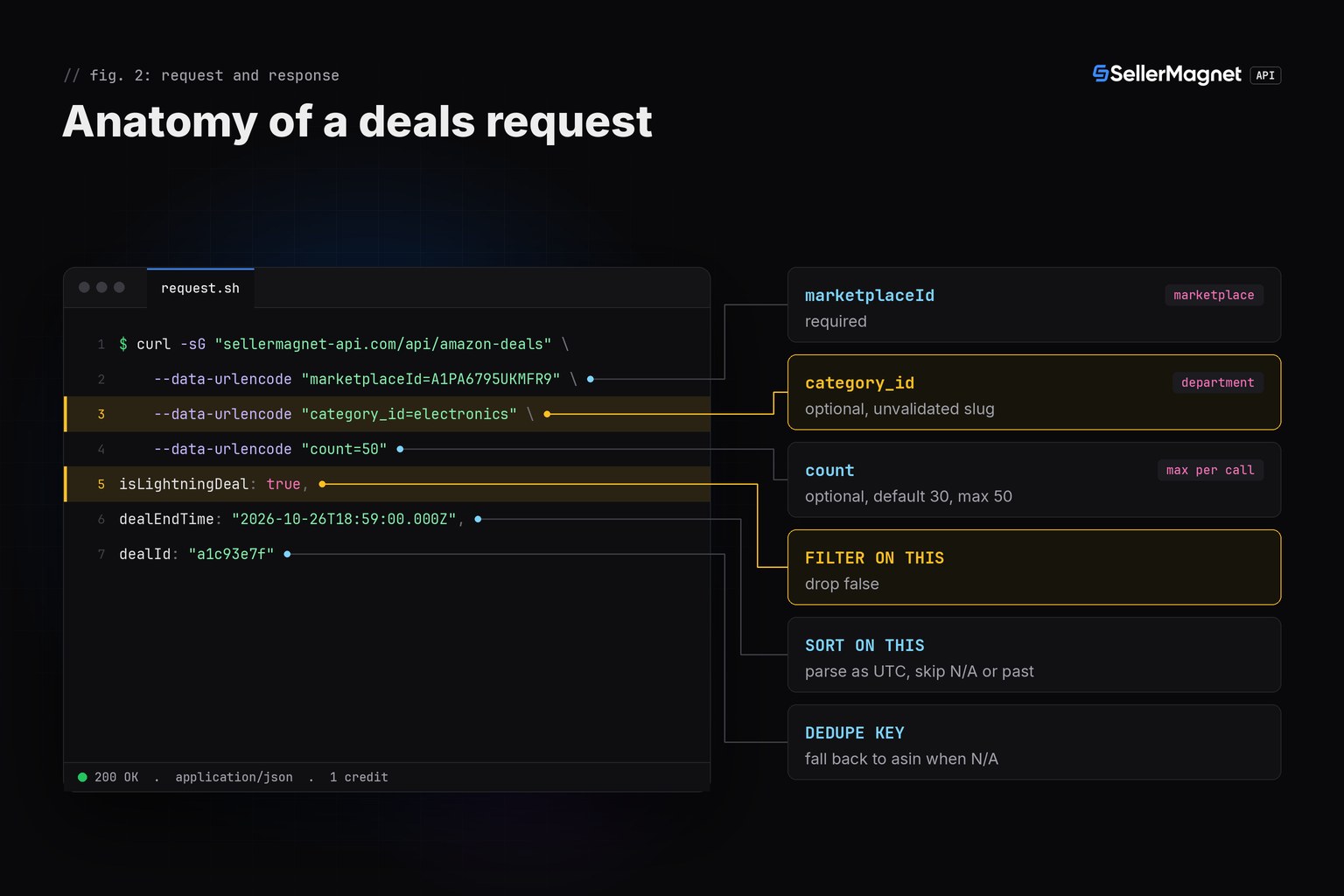
How often should I poll for a live countdown?
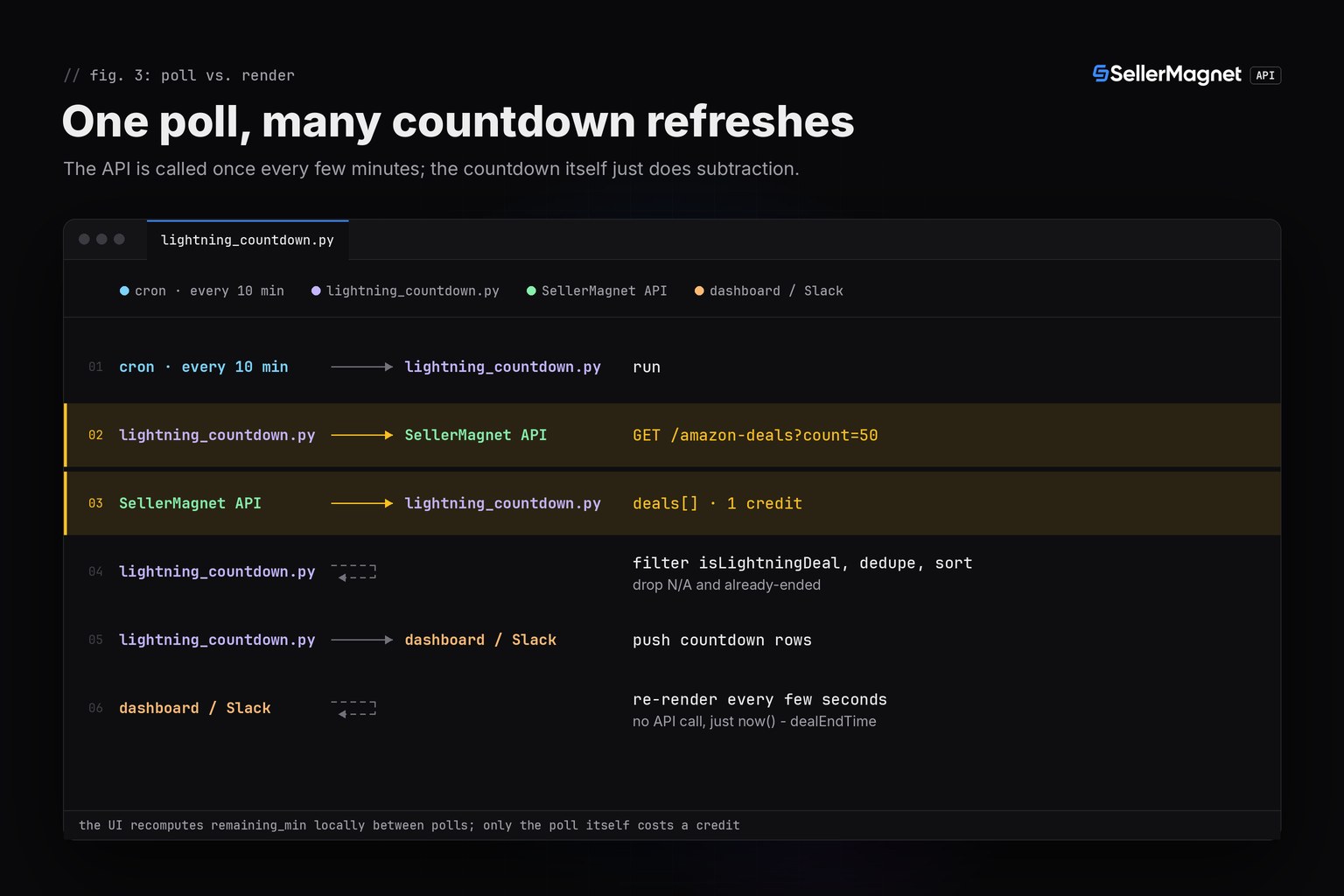
Lightning deals run for hours, not minutes, so a countdown does not need second-by-second polling - that only burns credits without changing what a viewer sees. Poll every 5 to 15 minutes, recompute remaining_min from the same stored dealEndTime values between polls (the countdown itself needs no API call), and only re-poll the endpoint to catch deals starting or ending. Each poll is one credit regardless of how many lightning deals it finds, including zero.
Never show a negative countdown
A lightning deal's dealEndTime can already be in the past by the time your poll reaches it - the page can lag the actual end. Drop any deal whose remaining time is zero or negative instead of displaying "-4 min"; the next poll either confirms it is gone or shows a new deal with the same ASIN under a different dealId. Deals with asin "N/A" occur too, so on the rare poll where both dealId and asin are "N/A" for more than one deal, the fallback key collapses them - acceptable for a countdown display, not for billing reconciliation.
Which errors should the countdown not retry?
A free-gate 400 (a missing or invalid marketplaceId) is an answer, not an outage - retrying it just buys the same rejection again. A count above 50 is a billed 400 from the endpoint itself, so validate it before sending, as the sample above does with a plain assert. A page that could not be read at all comes back as a retryable 5xx, never as a fake empty list: 500 is refunded and worth one retry; 502 and 503 are billed on every attempt and should back off, as covered in the error-handling guide.
| Status | Meaning | Charged | Client action |
|---|---|---|---|
| 400 free gate | missing or invalid marketplaceId | No | fix the call, nothing to retry |
| 400 endpoint | count above 50 | Yes | validate count (1-50) before sending |
| 500 | internal error, no Retry-After | Refunded | retry once |
| 502 / 503 | page could not be read at all | Yes | wait, retry with a cap |
What does an empty or all-expired deals list mean?
An empty deals array with success: true is real data - that marketplace or department has no current deals - and it is billed like any other answer; a page that could not be read at all comes back as a retryable 5xx instead. A non-empty list where every lightning deal has already ended or carries dealEndTime: "N/A" produces an empty countdown too: that is correct behaviour, not a bug in the filter. The full field set, including deals that are not lightning deals, is covered in the deals API overview; pair the countdown with the bestsellers endpoint to judge whether a lightning deal is actually on a product worth watching.
Frequently Asked Questions
Is there an API for Amazon Lightning Deals specifically?
Not a separate one. /api/amazon-deals returns all current deals for a marketplace, and isLightningDeal marks which ones are time-limited lightning deals; filter on that flag.
What does dealEndTime look like, and can it be missing?
An ISO 8601 UTC timestamp with a trailing Z, or the string "N/A" when the deals page shows no end time. Parse it as UTC and treat N/A as no countdown.
How do I know a lightning deal is about to end?
Subtract the current UTC time from dealEndTime. The sample script buckets the result into ending soon (<=60 min), today (<=24 h) and later.
Can a lightning deal appear twice in one poll?
Yes. Deduplicate on dealId (falling back to asin when dealId is N/A) before building the countdown, since the deals page can repeat an entry.
Does polling for the countdown cost extra credits?
One credit per call to /api/amazon-deals, regardless of how many lightning deals come back, including zero. Recompute the countdown between polls without calling the API again.
What happens if dealEndTime has already passed when I read it?
Drop that deal from the countdown instead of showing a negative time; the deal has likely ended or is about to disappear from the next poll.
Bottom line: isLightningDeal filters, dealEndTime sorts, and dealId deduplicates - three fields build the whole countdown, one credit per poll. The deals endpoint page shows the full response shape, and a free account includes 150 credits to try it.


