
To convert a UPC or EAN barcode to an ASIN, send it to the SellerMagnet /api/amazon-asin-converter endpoint with conversion_direction=ean-to-asin and the marketplace you sell in. The response carries the ASIN, every barcode Amazon has on file for that product, and its title. Check the barcode locally first: a malformed or unknown code still costs a credit, and a two-line check-digit test catches most typos for free.
Key Takeaways
- The converter turns an EAN, UPC or ISBN-13 barcode into an ASIN, and an ASIN into its barcodes.
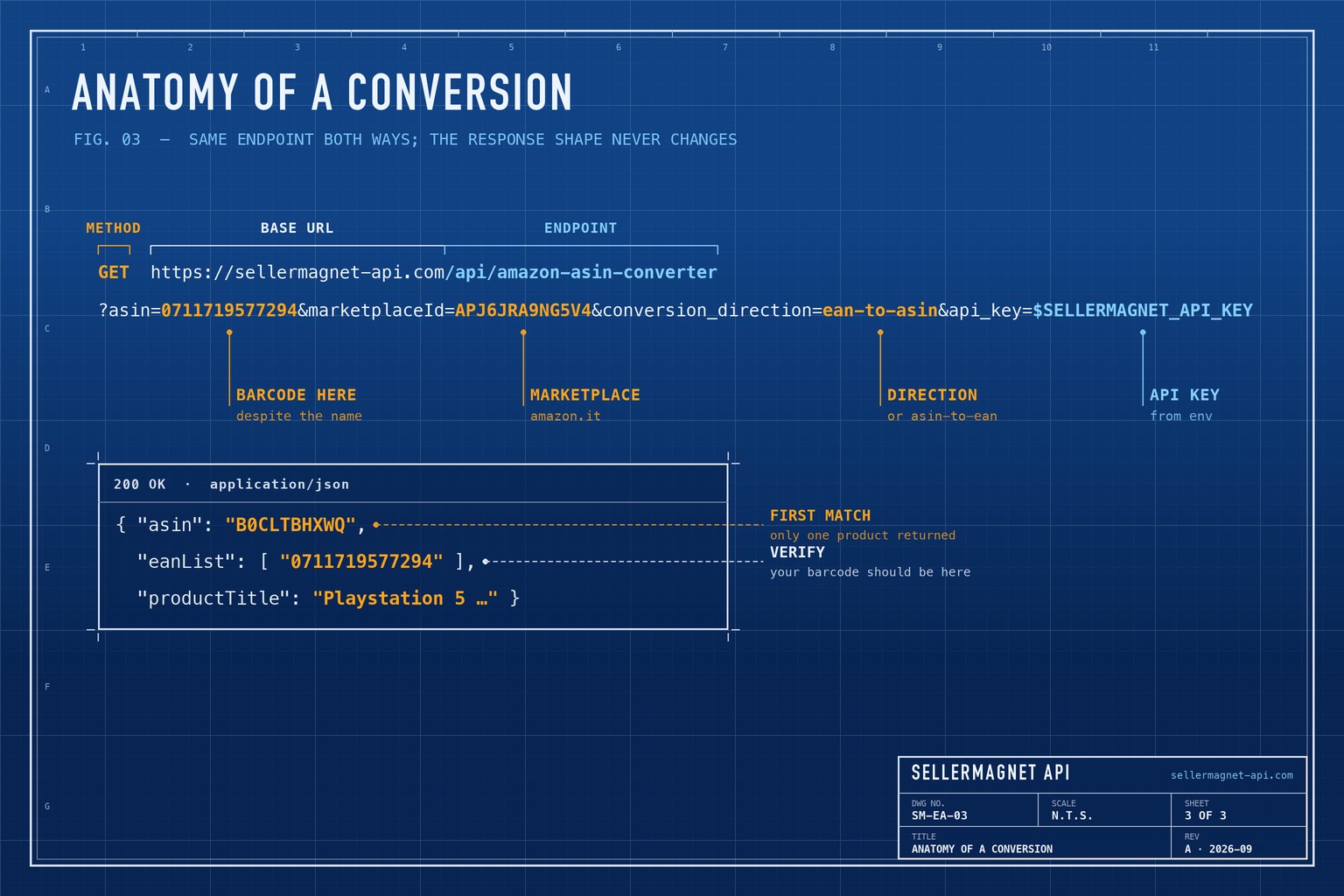
- Despite its name, the asin parameter carries the barcode when converting from EAN to ASIN.
- A 12-digit UPC-A is the same number as a 13-digit EAN with a leading zero.
- A malformed barcode (400) and an unknown one (404) are both billed, so validate the check digit locally.
- Only the first matching product is returned, so confirm the barcode appears in the result's eanList.
What is the difference between UPC, EAN and ASIN?
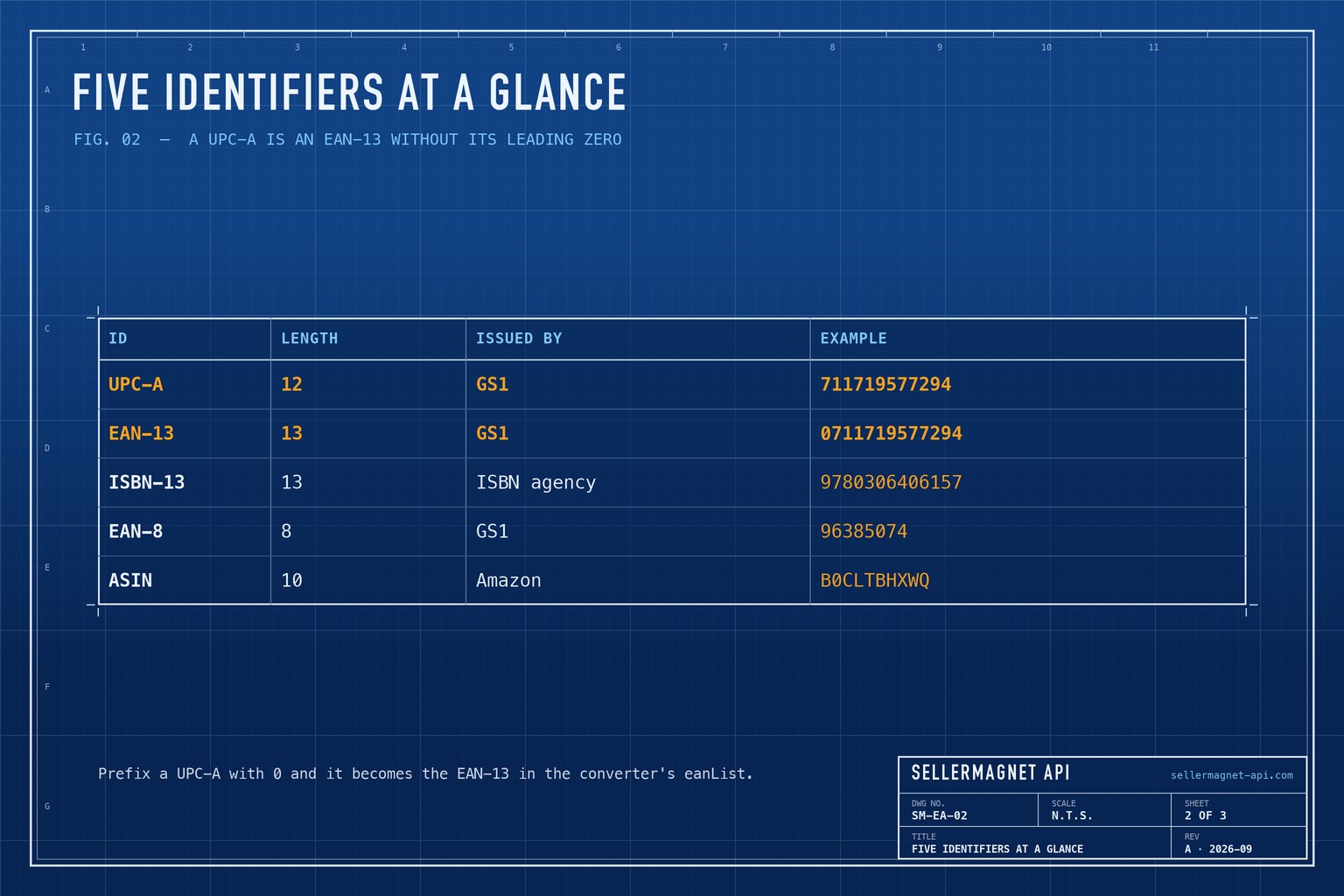
UPC and EAN are GS1 barcodes printed on the product; an ASIN is the 10-character identifier Amazon assigns to a listing. The barcode belongs to the manufacturer and is the same in every shop, while the ASIN exists only on Amazon. A 12-digit UPC-A and a 13-digit EAN are the same number system: prefixing a UPC with 0 gives its EAN-13 form, which is the form the converter's eanList uses. A Japanese JAN code is an EAN-13 too (prefix 45 or 49) and converts the same way.
| Identifier | Length | Issued by | Example |
|---|---|---|---|
| UPC-A | 12 digits | GS1 (mainly North America) | 711719577294 |
| EAN-13 | 13 digits | GS1 | 0711719577294 |
| ISBN-13 | 13 digits (978 or 979 prefix) | ISBN agencies | 9780306406157 |
| EAN-8 | 8 digits | GS1 (small packages) | 96385074 |
| ASIN | 10 characters | Amazon, per listing | B0CLTBHXWQ |
How do I convert an EAN or UPC to an ASIN?
Normalise the barcode to digits, pad a UPC-A to 13 digits, and test the check digit - the last digit, which GS1 computes from the others so that a single mistyped digit is caught. Only then call the converter. The barcode goes in the parameter named asin; the endpoint treats an all-digit value as a barcode. The converter covers amazon.com, .ca, .com.mx, .com.br, .co.uk (also used for Ireland), .de, .fr, .it, .es, .in and .co.jp; any other marketplaceId is looked up on amazon.com.
barcode_to_asin.py - validate locally, then convert
import os
import re

import requests


def normalise(barcode: str) -> str:
    digits = re.sub(r"\D", "", barcode)          # "711719-577294" -> "711719577294"
    return "0" + digits if len(digits) == 12 else digits  # UPC-A -> EAN-13


def check_digit_ok(code: str) -> bool:
    """GS1 mod-10 check for EAN-8 and EAN-13 (a UPC-A arrives padded to 13)."""
    if len(code) not in (8, 13):
        return False
    body, check = code[:-1], int(code[-1])
    total = sum(int(d) * (3 if i % 2 == 0 else 1) for i, d in enumerate(reversed(body)))
    return (10 - total % 10) % 10 == check


def barcode_to_asin(barcode: str, marketplace_id: str) -> dict:
    code = normalise(barcode)
    if not check_digit_ok(code):
        raise ValueError(f"{barcode!r} is not a valid barcode")  # caught for free
    resp = requests.get(
        "https://sellermagnet-api.com/api/amazon-asin-converter",
        params={"asin": code, "marketplaceId": marketplace_id,
                "conversion_direction": "ean-to-asin",
                "api_key": os.environ["SELLERMAGNET_API_KEY"]},
        timeout=120,
    )
    try:
        body = resp.json()
    except ValueError:  # e.g. an HTML error page from a proxy
        body = {}
    if resp.status_code != 200 or not body.get("success"):
        raise RuntimeError(f"{code}: {resp.status_code} {body.get('message')}")
    return body["data"]


print(barcode_to_asin("711719577294", "APJ6JRA9NG5V4"))
Converter response (example values)
{
  "success": true,
  "data": {
    "asin": "B0CLTBHXWQ",
    "eanList": ["0711719577294"],
    "productTitle": "Playstation 5 Console Edizione Digital Slim",
    "listedSince": "2023-12-30 01:00:00"
  }
}
How do I convert an ASIN to its EAN barcodes?
Use the same endpoint with conversion_direction=asin-to-ean and the ASIN in the asin parameter. The response has the same shape; read eanList, which can hold more than one barcode because a product can carry several. One catch: book ASINs are often ISBN-10s made only of digits, and an all-digit value is treated as a barcode, not an ASIN. As a quick command-line check:
ASIN to barcodes with curl and jq
curl -sG "https://sellermagnet-api.com/api/amazon-asin-converter" \
  --data-urlencode "asin=B0CLTBHXWQ" \
  --data-urlencode "marketplaceId=APJ6JRA9NG5V4" \
  --data-urlencode "conversion_direction=asin-to-ean" \
  --data-urlencode "api_key=$SELLERMAGNET_API_KEY" | jq -r '.data.eanList[]'
Why can one barcode match more than one ASIN?
The same barcode can appear on more than one Amazon listing - duplicates, bundles and relaunched products are common causes. The converter returns only the first product it finds, so treat the answer as a candidate: confirm that your barcode is in the returned eanList, and compare the productTitle with what you expected. For the live offers and Buy Box on the ASIN you settle on, use the product offers endpoint.
What does a failed conversion cost?
Every converter request that clears authentication, the parameter check and the concurrency limit is billed, whatever the outcome. A barcode the endpoint cannot parse returns HTTP 400 Invalid product ASIN/EAN, an unknown one returns HTTP 404 Product not found, and a conversion_direction other than the two valid values returns HTTP 400 - each after the credit is charged. A barcode usually comes back as not found for one of three reasons: the product is not sold on Amazon, it is listed on a different marketplace than the one you asked, or the barcode itself is wrong - only the last one is caught by the check digit. The error-handling guide covers the full list.
Free insurance
The check-digit test catches single-digit typos and most swapped digits before they reach the API. On a list of scanned or hand-typed barcodes, that is credits you do not spend on 400s.
How do I convert a list of barcodes to ASINs?
Read the barcodes from a CSV, drop invalid ones before they cost anything, deduplicate, and write one row per barcode. The loop reuses normalise, check_digit_ok and barcode_to_asin from above.
bulk_convert.py - barcodes.csv in, asins.csv out
import csv

seen, rows = set(), []
with open("barcodes.csv", newline="") as f:
    for record in csv.DictReader(f):  # a column named "barcode"
        code = normalise(record["barcode"])
        if code in seen:
            continue
        seen.add(code)
        if not check_digit_ok(code):
            rows.append({"barcode": code, "asin": "", "status": "invalid barcode"})
            continue
        try:
            data = barcode_to_asin(code, "APJ6JRA9NG5V4")
            ok = code in data.get("eanList", [])
            rows.append({"barcode": code, "asin": data["asin"],
                         "status": "ok" if ok else "check match"})
        except RuntimeError as err:
            rows.append({"barcode": code, "asin": "", "status": str(err)})

with open("asins.csv", "w", newline="") as f:
    writer = csv.DictWriter(f, fieldnames=["barcode", "asin", "status"])
    writer.writeheader()
    writer.writerows(rows)
For thousands of barcodes, run the conversion through the worker pool and resumable results file from the bulk ASIN lookup guide, swapping the lookup call for barcode_to_asin.
Frequently Asked Questions
How do I convert an EAN to an ASIN?
Call /api/amazon-asin-converter with the barcode in the asin parameter, conversion_direction=ean-to-asin and a marketplace ID. The ASIN is in data.asin.
Can I convert a UPC to an ASIN?
Yes. A 12-digit UPC-A is an EAN-13 without its leading zero; pad it to 13 digits and convert it like an EAN.
Does the converter work for ISBNs?
ISBN-13 numbers are EAN-13 barcodes with a 978 or 979 prefix, so they go through the same ean-to-asin conversion.
Why did I get only one ASIN for my barcode?
The converter returns the first matching product. Confirm your barcode is in the result's eanList before relying on the ASIN.
Does an invalid barcode cost a credit?
Yes. Malformed barcodes return a billed 400 and unknown ones a billed 404, so check the digit locally before sending.
Bottom line: normalise the barcode, check its digit, convert it against the right marketplace and confirm the match in eanList. The ASIN converter page shows the endpoint in the browser, and a free account includes 150 credits.


