
You can pull Amazon product data from the command line with two tools you probably already have: curl sends the request to the SellerMagnet API and jq cuts the JSON response down to the fields you need. One line returns a product's title, Buy Box price and bestseller rank; a second turns keyword search results into CSV. This guide covers both, plus loops over ASIN lists and error handling.
Key Takeaways
- Every SellerMagnet endpoint is a GET, so curl -G with --data-urlencode builds a correct request every time.
- jq selects fields by name, so a one-line filter replaces a parsing script.
- The @csv filter turns search results into spreadsheet-ready rows.
- Check the HTTP status with -w before trusting the body; errors return JSON with a message field.
- Retry only 429, 502 and 503 - and remember that 404, 502 and 503 are each billed.
How do I call the Amazon product API with curl?
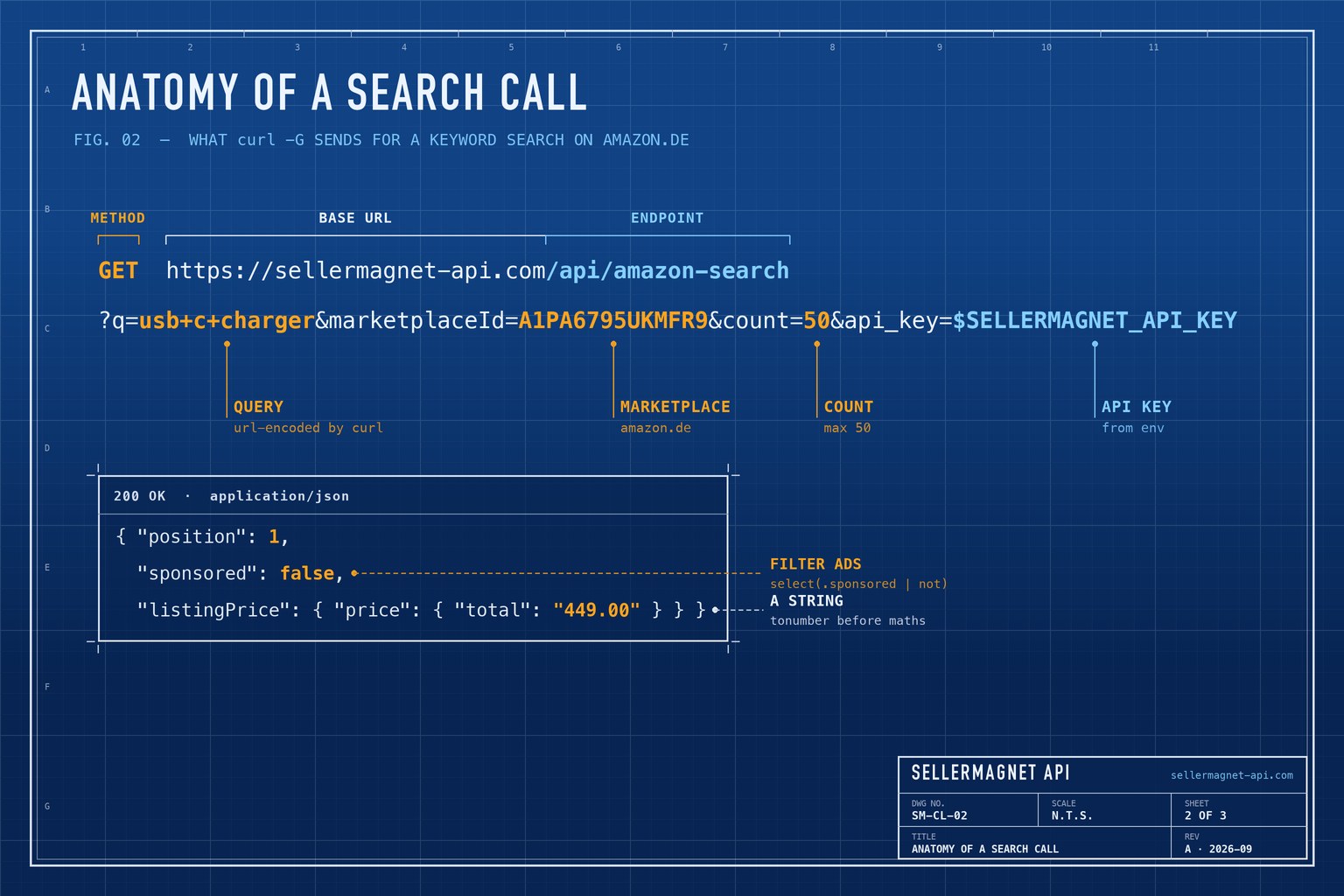
Keep the key in an environment variable and let curl encode the parameters. -G turns --data-urlencode pairs into a query string, so values with spaces or ampersands never break the URL. The request below asks amazon.com for one product; any of the 23 marketplace IDs in the marketplace ID list works in its place.
One product lookup
export SELLERMAGNET_API_KEY="your-key-here"

curl -sG "https://sellermagnet-api.com/api/amazon-product-lookup" \
  --data-urlencode "asin=B0CL61F39H" \
  --data-urlencode "marketplaceId=ATVPDKIKX0DER" \
  --data-urlencode "api_key=$SELLERMAGNET_API_KEY"
How do I extract fields with jq?
jq is a command-line JSON processor: a filter describes the shape you want and jq prints it. Piping the lookup into the filter below keeps five fields out of the full listing. A missing path simply gives null; the // operator swaps a missing or null value for a fallback, so a product without a Buy Box prints "no buy box". Install jq with brew install jq or apt install jq, and pipe any response into jq . for a first, pretty-printed look.
Keep only what you need
curl -sG "https://sellermagnet-api.com/api/amazon-product-lookup" \
  --data-urlencode "asin=B0CL61F39H" \
  --data-urlencode "marketplaceId=ATVPDKIKX0DER" \
  --data-urlencode "api_key=$SELLERMAGNET_API_KEY" |
jq '.data.productInfo | {
  asin,
  title,
  price: (.buyBoxInfo.price // "no buy box"),
  currency: (.buyBoxInfo.currencyCode // "-"),
  rank: .bestsellerRanks.main_category.rank
}'
Output (example values)
{
  "asin": "B0CL61F39H",
  "title": "PlayStation®5 console (slim)",
  "price": 444.99,
  "currency": "USD",
  "rank": 31
}
How do I turn search results into CSV?
/api/amazon-search returns up to 50 products from the first results page, each with its position, asin, productTitle and a sponsored flag. The filter below drops sponsored results and prints one CSV row per product; @csv quotes titles that contain commas. The price arrives as a string such as "449.00", so tonumber converts it before it lands in the file. The search endpoint page and the product lookup page list every field you can select.
Organic search results as CSV
curl -sG "https://sellermagnet-api.com/api/amazon-search" \
  --data-urlencode "q=usb c charger" \
  --data-urlencode "marketplaceId=A1PA6795UKMFR9" \
  --data-urlencode "count=50" \
  --data-urlencode "api_key=$SELLERMAGNET_API_KEY" |
jq -r '.data.searchResults[]
  | select(.sponsored | not)
  | [.position, .asin, (.listingPrice.price.total // "" | if . == "" then "" else tonumber end),
     .reviewRating, .reviewAmount, .productTitle]
  | @csv' > results.csv
Which jq filter answers which question?
| Question | Endpoint | jq filter |
|---|---|---|
| Buy Box price and currency | /amazon-product-lookup | .data.productInfo.buyBoxInfo | {price, currencyCode} |
| All image URLs | /amazon-product-lookup | .data.productInfo.images[] |
| Organic results only | /amazon-search | .data.searchResults[] | select(.sponsored | not) |
| Who holds the Buy Box now | /amazon-product-offers | .data.buyBox | {sellerName, totalPrice} |
| Top 10 bestsellers | /amazon-bestsellers | .data.bestsellers[:10][] | [.rank, .asin] | @tsv |
| Barcodes for an ASIN | /amazon-asin-converter | .data.eanList[] |
Save once, filter many times
Every request costs a credit, so while you work out a filter, save the response to a file and run jq against the file as often as you like. Unlike Amazon's Creators API, the successor of the retired Product Advertising API, no Associates account or sales history is involved: the whole call is one GET with the key in the query string.
One paid request, any number of filters
curl -sG "https://sellermagnet-api.com/api/amazon-product-lookup" \
  --data-urlencode "asin=B0CL61F39H" \
  --data-urlencode "marketplaceId=ATVPDKIKX0DER" \
  --data-urlencode "api_key=$SELLERMAGNET_API_KEY" -o product.json

jq '.data.productInfo.title' product.json
jq '.data.productInfo.images | length' product.json
jq -r '.data.productInfo.bulletPoints[]' product.json
How do I loop over a list of ASINs?
Read one ASIN per line and append one JSON line per product. Filtering the list for 10-character ASINs first matters: product lookup does not validate the format, so a malformed value is still sent and billed. For thousands of ASINs, the bulk ASIN lookup guide adds deduplication and resuming.
asins.txt in, products.jsonl out
tr -d '\r' < asins.txt | tr '[:lower:]' '[:upper:]' | grep -E '^[A-Z0-9]{10}$' | sort -u |
while read -r asin; do
  curl -sG "https://sellermagnet-api.com/api/amazon-product-lookup" \
    --data-urlencode "asin=$asin" \
    --data-urlencode "marketplaceId=ATVPDKIKX0DER" \
    --data-urlencode "api_key=$SELLERMAGNET_API_KEY" |
  jq -c --arg asin "$asin" '{asin: $asin, ok: .success, title: .data.productInfo.title?}'
done > products.jsonl
How do I handle errors in a shell script?
Write the body to a file with -o and print only the status with -w, then decide. A 429 from the per-key concurrency cap carries Retry-After: 2; a 503 carries 30 or 60 seconds. Anything else - an unknown key, a missing product, a count above 50 - fails the same way on every attempt, so stop instead of retrying. The one exception is a 401 whose message reads Temporary error validating API key. Please try again. Keep the attempt count low: every retried 502 or 503 is billed again. The error-handling guide lists which statuses are billed.
fetch.sh - retry network errors, 429, 502 and 503; stop on everything else
#!/usr/bin/env bash
set -euo pipefail
url="https://sellermagnet-api.com/api/amazon-product-lookup"
body=$(mktemp) headers=$(mktemp)
trap 'rm -f "$body" "$headers"' EXIT

for attempt in 1 2 3 4; do
  status=$(curl -sG "$url" -o "$body" -D "$headers" -w '%{http_code}' \
    --data-urlencode "asin=$1" --data-urlencode "marketplaceId=$2" \
    --data-urlencode "api_key=$SELLERMAGNET_API_KEY") || status=000  # network error
  case "$status" in
    200) jq '.data.productInfo.title' "$body"; exit 0 ;;
    000|429|502|503)
      wait=$(awk 'tolower($1)=="retry-after:" {print $2+0}' "$headers")
      sleep "${wait:-$((2 ** attempt))}" ;;
    *) { jq -r '.message // "request failed"' "$body" 2>/dev/null || echo "HTTP $status"; } >&2; exit 1 ;;
  esac
done
echo "gave up after 4 attempts" >&2; exit 1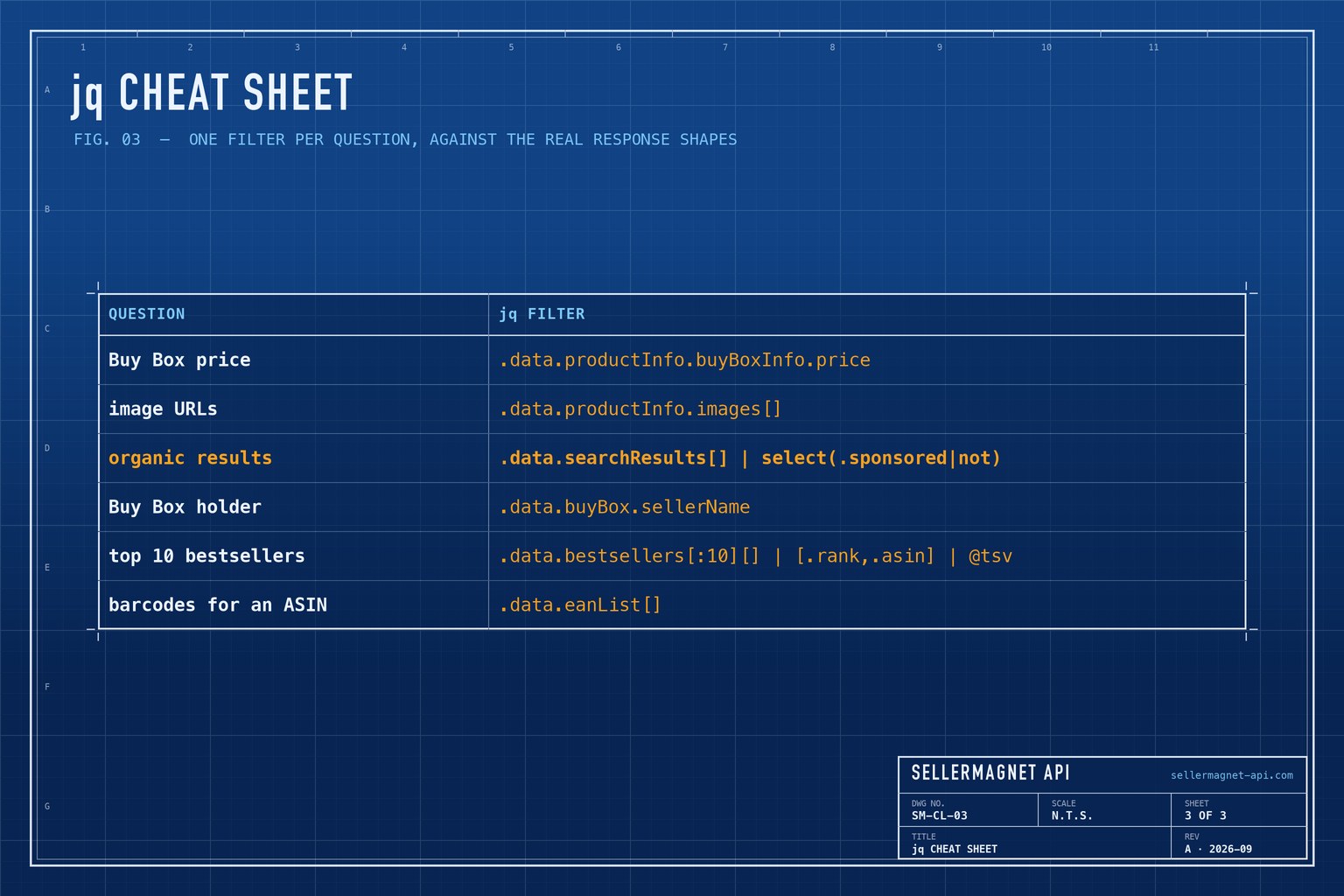
Frequently Asked Questions
How do I call the SellerMagnet API with curl?
Use curl -G with one --data-urlencode per parameter, including api_key, and read the key from an environment variable.
How do I get only the fields I need from the JSON?
Pipe the response into jq with a filter such as .data.productInfo | {asin, title}, which keeps just those fields.
Can jq export Amazon search results to CSV?
Yes. Build an array per result and end the filter with @csv, run with jq -r so the rows print unquoted.
Why is the search price a string?
The search endpoint returns listingPrice.price.total as text such as "449.00". Convert it with tonumber before doing arithmetic.
Which errors should a shell script retry?
Retry 429, 502 and 503, waiting at least the Retry-After value. Other statuses usually fail the same way again; the exception is a 401 whose message says the key check failed temporarily.
Bottom line: curl -G plus a one-line jq filter is a complete Amazon data client for ad-hoc questions, cron jobs and quick exports. Every endpoint and field is in the API documentation, and a free account includes 150 credits to try them.


